

Typical Practice of Managing IPsec VPN Gateway Using Terraform
Overview
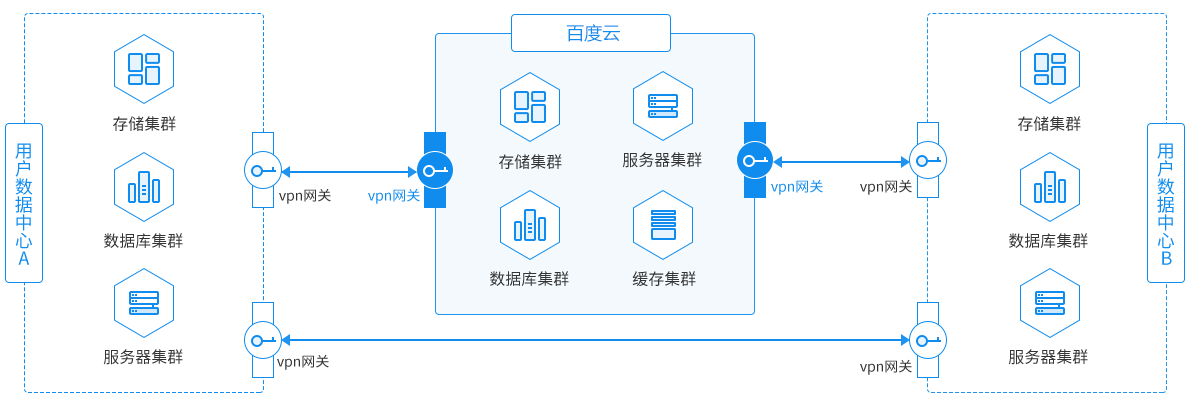
The IPsec VPN gateway connects the user IDC to a virtual private cloud through an encrypted public network tunnel.
Prerequisites
- You have already registered a Baidu AI Cloud account. If not, please complete the registration first.
- Ensure that the gateway devices in the user's data center support both the IKEv1 and IKEv2 protocols. Local gateway devices with these protocols can interconnect with the cloud-based VPN gateway.
- The gateway device in the user's data center must have a configured static Public IP.
- Ensure that the network segments between the user's data center and the VPC do not overlap.
- Understand the security group rules within the VPC and confirm that these rules allow the gateway devices in the user's data center to access cloud resources. For specific steps, please refer to "Querying Security Group Rules" and "Adding Security Group Rules."
Requirement scenarios
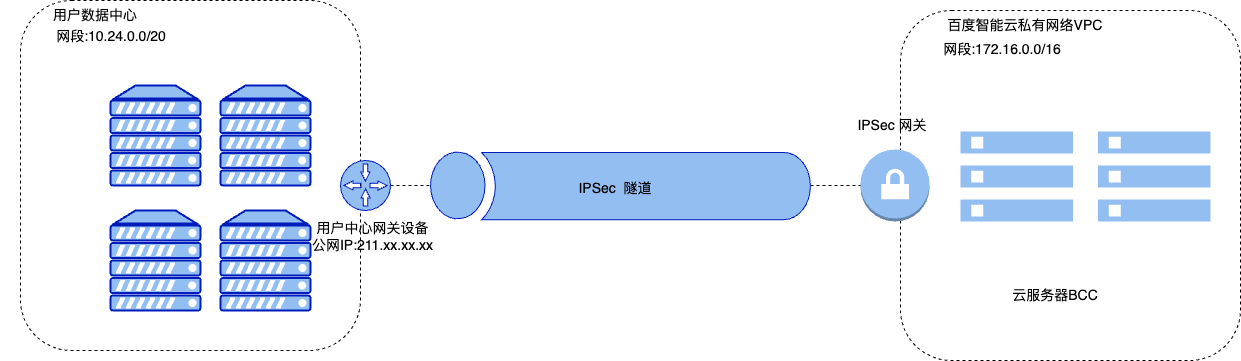
A company has created a VPC on Baidu AI Cloud with the network segment 172.16.0.0/16. The user's data center has a network segment of 10.24.0.0/20, with the gateway device at the data center using Public IP 211.XX.XX.XX. Due to business needs, the company requires interconnection between the user's data center and the cloud VPC. Users can establish a connection between the data center and the cloud VPC using an IPsec VPN Gateway and Tunnels, enabling smooth cloud-to-ground connectivity.
Solution overview
As illustrated below, users can connect their data centers to Baidu AI Cloud VPN through an IPSec VPN gateway.
Configuration steps
Environment preparation
Terraform: A tool for safely and efficiently building, changing and versioning infrastructure. It is driven by configuration files where you define various components, and Terraform completes the creation, modification and management of all components based on these files. Currently, Baidu AI Cloud has integrated with Terraform. You can use Terraform to create and manage various Baidu AI Cloud resources such as CFC, BOS, VPC and BCC. For details, please refer to Terraform BaiduCloud Provider.
Deployment process
- Sign in to the Terraform official website and download the installation package suitable for your operating system.
- Set up the Terraform Baidu Provider information. Refer to the sample code below to create a configuration file, and save it as version.tf in the current directory.
1    terraform {
2      required_providers {
3        baiducloud = {
4          source = "baidubce/baiducloud"
5 version = "1.15.6" # Version No.; you can check version update information on the official website
6        }
7      }
8 }- Run the command terraform init. Terraform will initialize the workspace based on the version.tf file in the current directory.
- Edit the Terraform configuration file by creating a new main.tf file. This file should specify metadata for the VPC, subnet, EIP, security group, VPN gateway, IPSec tunnel, and route table. Follow the configuration and steps outlined below:
For more parameter information, please refer to the official Baidu Provider Documentation
- Create VPC
1resource "baiducloud_vpc" "vpc" {
2  name = "terraform_vpc"
3  cidr = "172.16.0.0/16"
4}- Create a subnet corresponding to an availability zone. This example adopts North China-Beijing-Available Zone D
1resource "baiducloud_subnet" "subnet" {
2  name        = "terraform_subnet"
3  zone_name   = "cn-bj-d"
4  cidr        = "172.16.32.0/20"
5  vpc_id      = baiducloud_vpc.vpc.id
6  description = "terraform test subnet"
7}- Create EIP
1resource "baiducloud_eip" "eip" {
2# EIP_BP
3  bandwidth_in_mbps = 1
4  billing_method    = "ByBandwidth"
5  payment_timing    = "Postpaid"
6}- Create a security group
1resource "baiducloud_security_group" "sg" {
2  name        = "terraform-sg"
3  description = "security group created by terraform"
4  vpc_id      = baiducloud_vpc.vpc.id
5}- Create security group rules
1#This allows inbound ICMP protocol. This example only performs ping tests. Ports and protocols can be enabled based on actual demands.
2resource "baiducloud_security_group_rule" "sgr1_in" {
3  security_group_id = baiducloud_security_group.sg.id
4  remark            = "remark"
5  protocol          = "icmp"
6  port_range        = ""
7  direction         = "ingress"
8  source_ip         = "all"
9}
10# Enable egress ICMP protocol
11resource "baiducloud_security_group_rule" "sgr1_out" {
12  security_group_id = baiducloud_security_group.sg.id
13  remark            = "remark"
14  protocol          = "icmp"
15  port_range        = ""
16  direction         = "egress"
17  source_ip         = "all"
18}- Create VPN gateway
1resource "baiducloud_vpn_gateway" "vpn_gateway" {
2# Wait for the EIP creation to complete before creating the VPN gateway.
3  depends_on     = [baiducloud_eip.eip]
4  vpn_name       = "test_vpn_gateway"
5  vpc_id         = baiducloud_vpc.vpc.id
6  description    = "test desc"
7# Bill type: prepaid, postpaid
8  payment_timing = "Postpaid"
9# Bind EIP
10  eip            = baiducloud_eip.eip.eip
11}- Create IPSec tunnel
1resource "baiducloud_vpn_conn" "vpn_conn" {
2  vpn_id        = baiducloud_vpn_gateway.vpn_gateway.id
3# The shared key is a Unicode string for IPsec connection certification. Both ends must use the same pre-shared key
4  secret_key    = "ddd22@www"
5# Local IP: Subnet in Baidu AI Cloud VPC that needs to enter the VPN tunnel. This example fills in the IP address of the created subnet
6  local_subnets = [
7    baiducloud_subnet.subnet.cidr
8  ]
9# Peer gateway refers to the IPsec VPN service gateway in the user's data center, which must be used in conjunction with Baidu AI Cloud's VPN gateway.
10  remote_ip      = "211.xx.xx.xx"
11# The peer network segments requiring VPN tunnel connectivity
12  remote_subnets = [
13    "10.24.0.0/20"
14  ]
15  description   = "test VPN conn"
16  vpn_conn_name = "vpnconn"
17  ike_config    = {
18# Select the IKE protocol version. Currently, IKE V1 and IKE V2 are supported
19    ike_version   = "v1"
20# Select the IKE V1 negotiation mode.
21# Main mode: High-security negotiation process.
22# Aggressive mode: Fast negotiation with a high success rate.
23# After successful negotiation, both modes provide identical information transmission security.
24    ike_mode      = "main"
25# Select the encryption algorithm for phase 1 negotiation, supporting aes, aes192, aes256, and 3des
26    ike_enc_alg   = "aes"
27# Phase 1 negotiation certification algorithms supported: sha1, md5, sha2_256, sha2_384, and sha2_512
28    ike_auth_alg  = "sha1"
29# Select the Diffie-Hellman Key Exchange algorithm for phase 1 negotiation
30    ike_pfs       = "group2"
31# Set the lifecycle of the SA negotiated in phase 1. Default value: 28,800 seconds.
32    ike_life_time = 28800
33  }
34  ipsec_config = {
35# Select the encryption algorithm for phase 2 negotiation, supporting aes, aes192, aes256, and 3des
36    ipsec_enc_alg   = "aes"
37# Select the certification algorithm for phase 2 negotiation, supporting sha1, md5, sha2_256, sha2_384 and sha2_512
38    ipsec_auth_alg  = "sha1"
39# Select the Diffie-Hellman Key Exchange algorithm for phase 2 negotiation
40    ipsec_pfs       = "group2"
41# Set the lifecycle of the SA negotiated in phase 2 Default value is 28,800 seconds
42    ipsec_life_time = 28800
43  }
44}- Create route table
1resource "baiducloud_route_rule" "route_rule" {
2  route_table_id      = baiducloud_vpc.vpc.route_table_id
3# Source IP address In this example, it is the IP address of the subnet created by the user.
4  source_address      = baiducloud_subnet.subnet.cidr
5# Destination IP address In this example, it is the IP address of the user's data center
6  destination_address = "10.24.0.0/20"
7# Next hop Instance
8  next_hop_id         = baiducloud_vpn_gateway.vpn_gateway.id
9# Next Hop Type: In this example, it should be VPN.
10  next_hop_type       = "vpn"
11  description         = "created by terraform"
12}- Run the command terraform plan, and Terraform will generate a resource change plan based on the details in the current configuration file.
- Execute the command terraform apply and confirm with "yes" when prompted to automatically carry out the resource creation.
Query the VPN gateway list and IPSec Tunnel list
1data "baiducloud_vpn_gateways" "default" {
2# Enter the VPC ID here to query all gateway lists and details under the VPC
3  vpc_id = "vpc-xxxxxxx"
4}
5data "baiducloud_vpn_conns" "default" {
6# Enter the VPN ID here to query detailed information about the IPSec Tunnel associated with the VPN
7  vpn_id = "vpn-xxxxxxx"
8}
Resources can be filtered in results using a filter, example code:
1# Regular expressions can be used for filtering. The following code block filters resources whose names match the expression tf-test-VPN-* in the results.
2filter {
3   name = "name"
4   values = ["tf-test-VPN-*"]
5}
Resource Update
Update the VPN gateway and VPN tunnel configuration parameters in the main.tf file, then complete steps 5 and 6 of resource creation to finalize the resource update.
Resource deletion
The following command can be used to delete resources:
1    #By default, the command releases all resources in the current main.tf
2    terraform destroy
3 #You can destroy specific resources through the -target option, in the format: -target=<resource type>.<resource name>, for example:
4    terraform destroy -target baiducloud_vpn_gateway.test-vpn
Testing and verification
Upon completion of all configurations, users can create a Baidu Cloud Compute Instance within the subnet using Terraform as defined below to test network connectivity. Once security group rules are confirmed effective, use the ping Command to verify connectivity:
-$ ping 10.24.x.x
1# Baidu Cloud Compute Creation Example: Specific specification parameters can be flexibly configured as needed
2data "baiducloud_images" "images" {
3  image_type = "System"
4  name_regex = "8.4 aarch"
5  os_name    = "CentOS"
6}
7resource "baiducloud_instance" "server1" {
8# Availability zone This example creates a subnet in North China-Beijing-Zone D. The Availability Zone here should match the subnet
9  availability_zone = "cn-bj-d"
10# BCC specification
11  instance_spec     = "bcc.gr1.c1m4"
12# The image ID adopts CentOS 8.4 aarch image
13  image_id          = data.baiducloud_images.images.0.id
14# Payment type
15  billing           = {
16    payment_timing = "Postpaid"
17  }
18# Subnet ID subnet created via Terraform
19  subnet_id       = baiducloud_subnet.subnet.id
20# Security group security group created via Terraform
21  security_groups = [baiducloud_security_group.sg.id]
22}
At the same time, devices in the user data center should be able to connect to instances within the VPC.
Through the IPSec VPN, the user's data center has successfully connected to the cloud platform's internal resources, achieving seamless cloud-to-on-premises connectivity.
Related products
VPN gateway, Virtual Private Cloud (VPC), Baidu Cloud Compute (BCC), EIP