GRE VPN Gateway
Generic Routing Encapsulation (GRE) VPN gateway is a Layer 3 tunnel-based network connection product known for high bandwidth, low latency, enhanced security, and reliable performance. It is widely used for traditional network connections and IoT terminal applications, such as vehicle-mounted, handheld, and machine-end devices in 4G/5G connectivity scenarios.
Compared to IPsec VPN and SSL VPN, the GRE VPN gateway offers simpler deployment and configuration, making it ideal for scenarios requiring high throughput and high-concurrency traffic within private networks.
Service Architecture Diagram
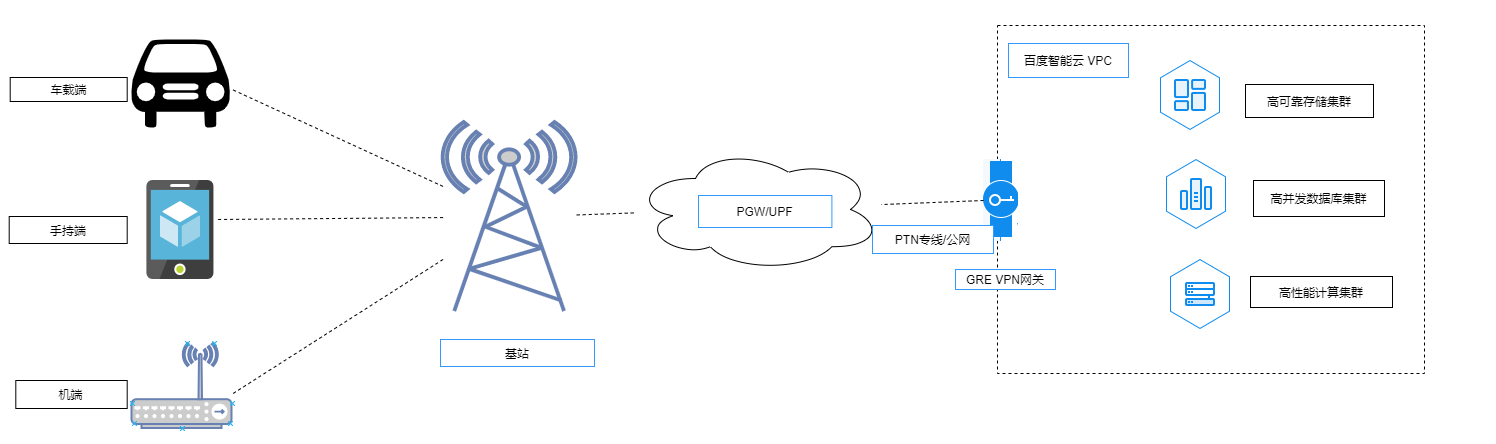
Description:
- Baidu AI Cloud's GRE VPN gateway is exclusively designed for accessing applications and services deployed in the VPC. It does not support direct Internet access.
- The GRE VPN gateway supports throughput capacities of 200 Mbps and 1000 Mbps. Higher-throughput gateway options will be available soon.
- When configuring the IPGRE VPN tunnel network, ensure proper address planning to avoid conflicts with existing local network segments.
- After creating a GRE VPN tunnel, modifications to local/peer interconnection addresses or the peer VPN gateway's public IP are not allowed. In case of errors, delete the existing tunnel and create a new one with the correct details.
- The GRE VPN gateway does not support NAT functionality.
Quota:
- A single GRE VPN gateway can establish up to five GRE VPN tunnels, and this limit cannot be adjusted.
Basic concept
| ConfigMap | Description |
|---|---|
| Throughput capacity | This is a required field: choose between 200 Mbps or 1000 Mbps. |
| Health check status | Statuses are classified as either normal or abnormal. |
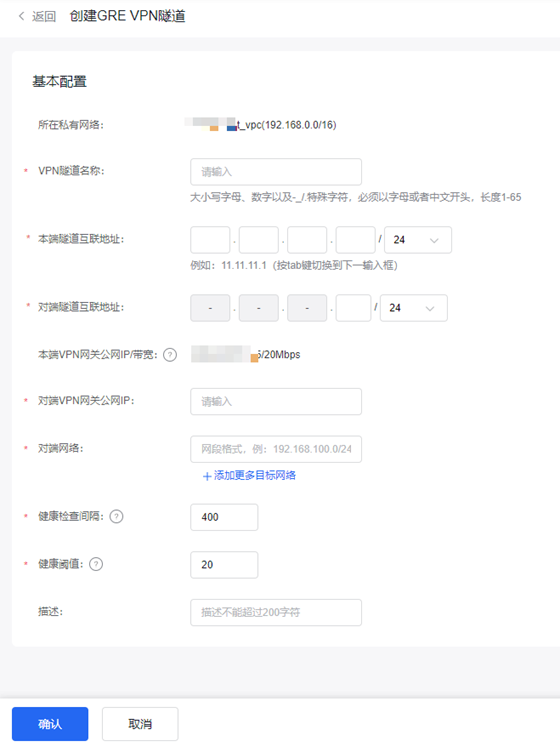
| Local tunnel interconnection address | This is a required field: the interconnection addresses must belong to the same network segment and must not be duplicated. |
| Peer tunnel interconnection address | This is a required field: the interconnection addresses must belong to the same network segment and must not be duplicated. |
| Public IP of local VPN gateway | This is a required field: users must purchase a Baidu AI Cloud EIP and bind it during the GRE VPN gateway creation process. |
| Public IP of peer VPN gateway | This is a required field: the client's public IP address is mandatory for creating a GRE VPN tunnel. |
| Peer Network | This is a required field: ensure the client's network specifies a private address range that does not overlap with the cloud VPC address range. |
| Health check interval | Required field, default is 400, the value is integer between [100 and 1000] , in milliseconds. |
| Health threshold | Default is 20, the value is integer between [3 and 50]. |
Operation process

GRE VPN gateway instances can be fully self-configured in the console. You need to complete the following steps to make the VPN connection effective:
Create GRE VPN gateway
In the virtual private cloud console, navigate through the left panel to Network Connection - VPN Gateway, go to the GRE VPN Gateway page, and click + Create GRE VPN Gateway.

Create GRE VPN tunnel
Click the collapse button next to the GRE VPN gateway instance ID to access and create a VPN Tunnel.
Configure the cloud route table
- In the navigation bar, select Route Table, click the Route Table name to access the details page, and then click Add Route.
- Enter the route table associated with the user-side network being accessed:
- Source network segment
- Enter the destination network segment
- Route type; select VPN gateway
- Next hop instance: Select a created and available VPN gateway
- Click OK to finalize the route table configuration.
Configure client GRE VPN
Taking a Huawei router as an example:
- interface gre_tunnelA
- tunnel mode ip
- tunnel vrf xxx
- tunnel source Ipv4 Local Tunnel Interconnection IP address
- tunnel destination Ipv4: Cloud Tunnel Interconnection IP address
- ip address API IP address 1 255.255.255.252
- ip route vrf xxx 0.0.0.0 0.0.0.0 gre_tunnelA #(Egress API or Baidu AI Cloud GRE VPN tunnel interconnection address)
Test availability
Testing with Linux system servers
Test parameters
| ConfigMap | Description |
|---|---|
| Local tunnel interconnection address | 11.11.11.3/24 |
| Peer tunnel interconnection address | 11.11.11.4/24 |
| Local network | 172.30.98.34/24 |
| Peer Network | 192.168.1.1/24 |