SSL VPN Gateway
The SSL VPN gateway (SSL: Secure Session Layer) is an encrypted network connection product that allows clients to access applications and services deployed in the Baidu AI Cloud VPC by loading certificates.
Compared to IPsec VPN, SSL VPN provides simpler configurations and wider applicability, such as enabling multiple client terminals to connect to a single SSL VPN server in the cloud. This makes it suitable for scenarios like business trips or mobile offices where multiple users need to access internal systems (ERP, OA, CRM) or cloud applications deployed on Baidu AI Cloud.
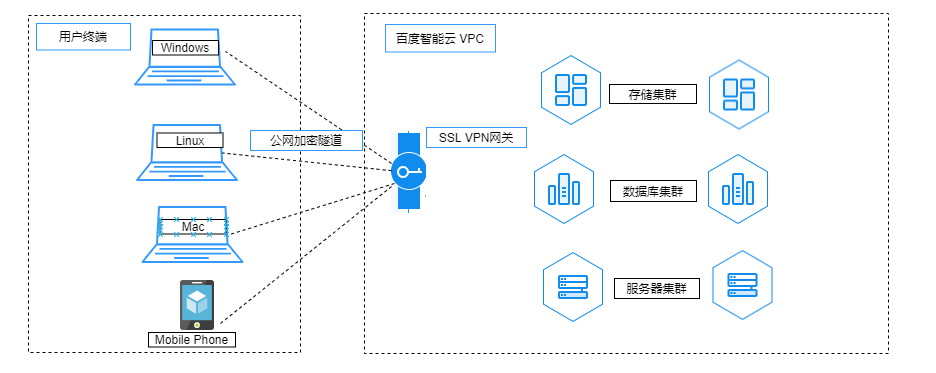
Description:
- Baidu AI Cloud SSL VPN gateway is designed only to provide access to applications and services deployed in the VPC and does not support Internet access.
- SSL VPN gateways are available in standard and enhanced types, supporting 5 to 1,000 SSL connections. Recommendation: For SSL connections exceeding 200, it's recommended to use the enhanced SSL VPN gateway.
- UDP Port 1194 cannot be blocked.
- The SSL VPN gateway does not support NAT. Proper network segment planning is required to avoid IP conflicts.
- The client network of an SSL VPN service doesn't allow segment additions. Recommendation: Configure the VPN client network with at least four times the number of IPs as SSL connections.
Quota:
- Only one SSL VPN service can be created per SSL VPN gateway.
- Up to 50 users can be created by one SSL VPN server user. To create more users, submit a Ticket for application.
Basic concept
| ConfigMap | Description |
|---|---|
| SSL VPN gateway specifications | Standard and enhanced types support maximum forwarding bandwidths of 200Mbps and 1,000Mbps, respectively |
| SSL connection count | 5-1,000 supported |
| SSL VPN service network | This refers to the VPC segment in the cloud, which supports user customization and enables adding multiple segments |
| SSL VPN client network | This refers to the segment assigned by the VPN server to the client for connecting to the server's virtual network interface card, rather than the original local segment of the client |
| User management | Administrators can create accounts through user management and assign them to users |
| Download certificate | Users must copy the certificate content and save it in certificate format to import into the terminal's configuration file |
| Client software download | Users can download clients for Android, Microsoft Windows, and Apple macOS based on terminal types from the console |
| DNS | Client DNS Address (optional) |
| Protocol | Protocol used for SSL connection |
| Ports | Port used for SSL connection |
| Encryption algorithm | Encryption algorithm for SSL connections, currently only supporting AES-256 |
Operation process

SSL VPN gateway instances can be fully self-configured in the console. You need to complete the following steps to make the VPN connection effective:
Create SSL VPN gateway
In the virtual private cloud console's left navigation bar, select "Network Connection - VPN Gateway," navigate to the SSL VPN Gateway page, and click "+ Create SSL VPN Gateway.\
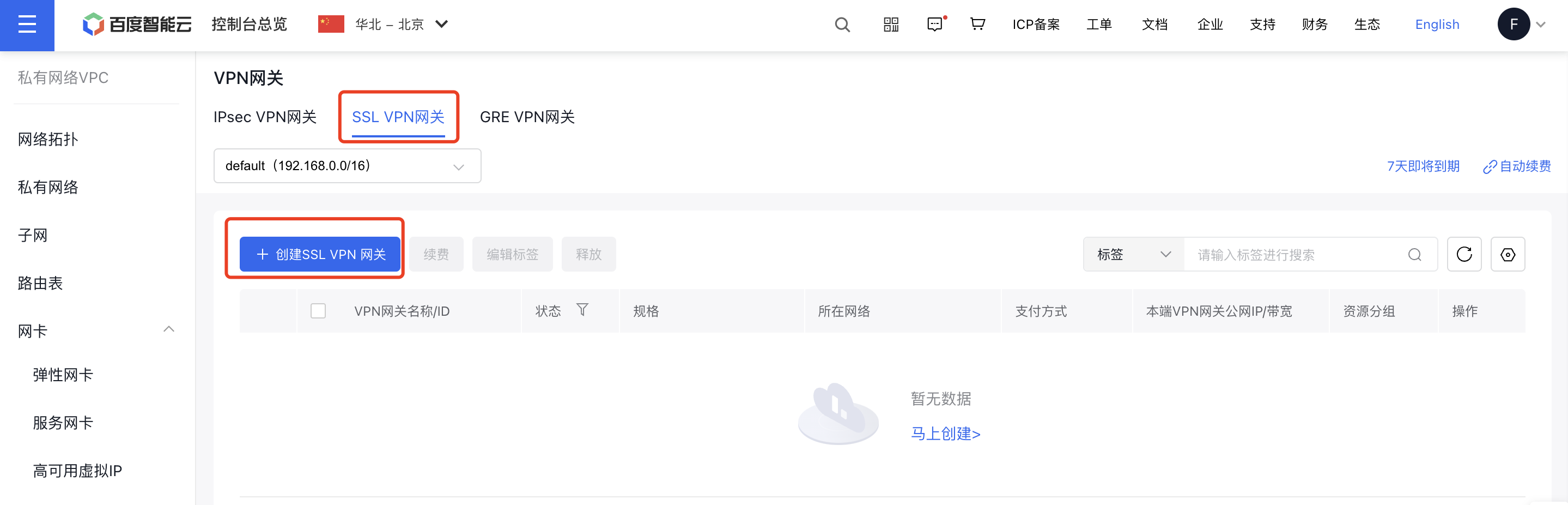
Create SSL VPN server
Click the expand button next to the SSL VPN gateway instance ID to access "+ Create SSL VPN Server.\
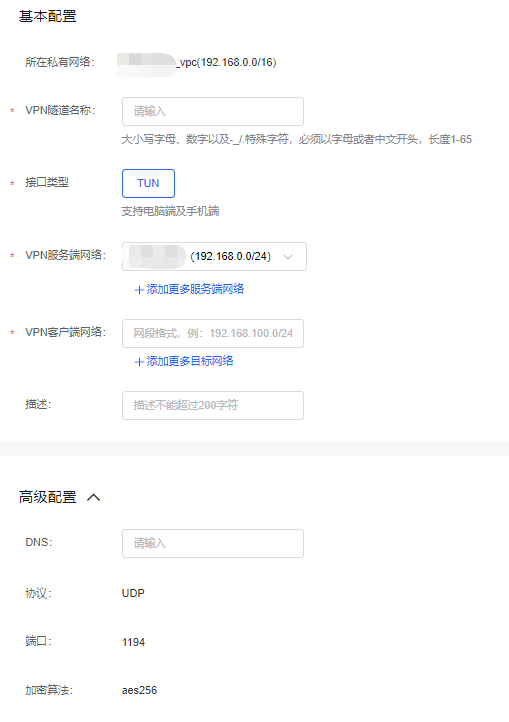
User management configuration
Click "SSL VPN Server - Operations - User Management" to navigate to the user management settings of the SSL VPN server. On this page, the administrator can create, edit, or delete usernames, passwords, and other client information for SSL VPN users.
1Download certificate
- Click SSL VPN server list page, where Certificate Download appears, and click Certificate Management and saves locally as xxx.ovpn.

- Import the OVPN file into the client's configuration, then enter the username and password provided by the server to establish a connection.
Client software download
Users can download clients for Android, Microsoft Windows, and Apple macOS based on system types.

Configure the cloud route table
- In the navigation bar, select Route Table, click the Route Table name to access the details page, and then click Add Route.
- Enter the route table associated with the on-premises network that will be accessed.
- Source network segment
- Enter the destination network segment
- Route type; select VPN gateway
- Next hop instance: Select a created and available VPN gateway
- Click OK to finalize the route table configuration.
Test availability
Test using a Windows system computer as the client
- Test parameters are as follows
| ConfigMap | Description |
|---|---|
| VPN service network | 192.168.1.0/24 |
| VPN client network | 172.16.200.0/24 |
| Baidu Cloud Compute IP in VPC | 192.168.1.4/24 |
| SSL VPN client IP | 172.16.200.2/24 |
- The user's computer generates a TAP interface, a virtual network interface card.

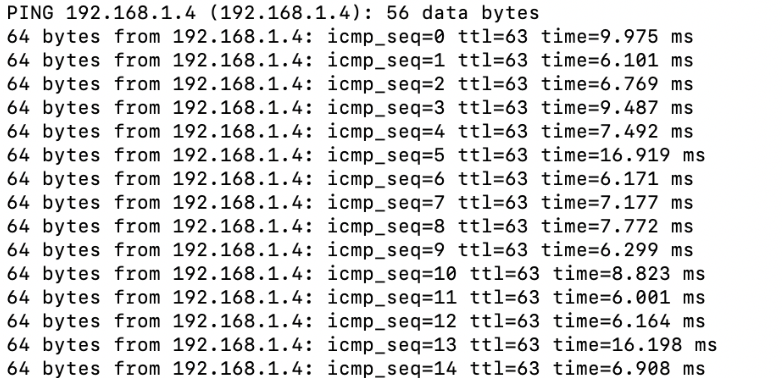
- Ping a cloud host IP in the VPC from the local computer: