Security group

VPC VPC

  • API Reference
    • ACL-Related Interfaces
      • Add ACL rule
      • Delete ACL rules
      • Query ACL rules
      • Query ACL
      • Update ACL rules
    • API function release records
    • API Overview
    • Appendix
    • Common Headers and Error Responses
    • Dedicated Gateway-Related Interfaces
      • Bind physical dedicated line
      • Create dedicated gateway
      • Create health check for dedicated gateway
      • Query dedicated gateway details
      • Query dedicated gateway list
      • Release dedicated gateway
      • Unbind physical dedicated line
      • Update dedicated gateway
    • Elastic Network Interface-Related Interfaces
      • Add intranet IP to elastic network interface in batches
      • Add Secondary IP Address of Elastic Network Interface
      • Create elastic network interface
      • Delete elastic network interface
      • Delete Intranet IP from elastic network interface in batches
      • Delete Secondary IP Address of Elastic Network Interface
      • Elastic network interface binds to EIP
      • Elastic Network Interface Mounts Cloud Product Instance
      • Elastic network interface unbinds from EIP
      • Elastic Network Interface Unmounts Cloud Product Instance
      • Query elastic network interface list
      • Query elastic network interface status
      • Query the specified elastic network interface
      • Update elastic network interface with enterprise security group
      • Update elastic network interface with regular security group
      • Update elastic network interface
    • Gateway Bandwidth Limiting Rule Related Interfaces
      • Create gateway bandwidth limiting rules
      • Delete Gateway Bandwidth Limiting Rule
      • Modify Gateway Bandwidth Limiting Rule
      • View Gateway Bandwidth Limiting Rule
    • General Description
    • High-Availability Virtual IP Address(HAVIP) Related Interfaces
      • Bind EIP to high-availability virtual IP address
      • Bind instance to high-availability virtual IP address
      • Create high-availability virtual IP address
      • Delete high-availability virtual IP address
      • Query high-availability virtual IP address list
      • Query the specified high-availability virtual IP address
      • Unbind EIP from high-availability virtual IP address
      • Unbind instance from high-availability virtual IP address
      • Update high-availability virtual IP address
    • Interface Overview
    • IPv6 Gateway-Related Interfaces
      • Add IPv6 egress-only policy
      • Bandwidth resizing for IPv6 gateway
      • Create IPv6 gateway bandwidth limiting policy
      • Create IPv6 gateway
      • Delete IPv6 gateway bandwidth limiting policy
      • Delete IPv6 Gateway
      • Delete the IPv6 egress-only policy
      • Query IPv6 gateway bandwidth limiting policy list
      • Query IPv6 gateway
      • Query the IPv6 egress-only policy list
      • Update IPv6 gateway bandwidth limiting policy
      • Update the IPv6 gateway release protection switch
    • NAT Gateway-Related Interfaces
      • Bind DNAT EIP to the NAT gateway
      • Bind SNAT EIP to the NAT gateway
      • Create DNAT rules in batches
      • Create DNAT rules
      • Create NAT gateway
      • Create SNAT rules in batches
      • Create SNAT rules
      • Delete DNAT rules
      • Delete SNAT rules
      • NAT Gateway Binds EIP
      • NAT gateway renewal
      • NAT Gateway Resize
      • NAT Gateway Unbinds EIP
      • Query DNAT rules
      • Query NAT gateway details
      • Query NAT gateway list
      • Query SNAT rules
      • Release NAT gateway
      • Unbind DNAT EIP from the NAT gateway
      • Unbind SNAT EIP from the NAT gateway
      • Update DNAT rules
      • Update NAT Delete Protection Switch
      • Update NAT gateway name
      • Update SNAT rules
    • Network Detection Related Interfaces
      • Create Network Probe
      • Delete network probe
      • Query network probe details
      • Query network probe list.
      • Update probe
    • Parameter Template-Related Interfaces
      • Add IP addresses to the IP address family
      • Add IP addresses to the IP address group
      • Create IP address family
      • Create IP address set
      • Delete IP address family
      • Delete IP address from IP address group
      • Delete IP address set
      • Query IP address family list
      • Query IP address group list
      • Query specified IP address family
      • Query specified IP address group
      • Remove IP address group from IP address family
      • Update IP address family
      • Update IP address set
    • Peering Connections-Related Interfaces
      • Application to process the peering connection
      • Bandwidth resizing for peering connections
      • Create peering connections
      • Disable DNS synchronization for the peering connections.
      • Enable DNS synchronization for the peering connections
      • List of peering connections to be queried.
      • Peering connection renewal
      • Release peering connections
      • Update the local API name and remarks for peering connections
      • Update the peering connection release protection switch
      • View details of peering connection
    • Route Table Related Interfaces
      • Create route rules
      • Delete route rules
      • Primary-standby switch
      • Query route table
      • Query routing rules
      • Update route rules
    • Security Group Related Interfaces
      • Enterprise security group
        • Authorize enterprise security group rules
        • Create enterprise security group
        • Delete enterprise security group rules
        • Delete enterprise security group
        • Query enterprise security group list
        • Update enterprise security group rules
      • Regular security group
        • Authorize regular security group rules
        • Create regular security group
        • Delete regular security group rules
        • Delete regular security group
        • Query regular security group list
        • Revoke regular security group rules
        • Update regular security group rules
        • View security group details
    • Service domain
    • Service Network Interface Card (SNIC)-Related Interfaces
      • Create service network interface card
      • Delete service network interface card
      • Query mountable public services
      • Query service network interface card details
      • Query service network interface card list
      • Update regular security group for service network interface card
      • Update service network interface card with enterprise security group
      • Update the service network interface card
    • Subnet-Related Interfaces
      • Create reserved network segment
      • Create subnet
      • Delete reserved network segment
      • Delete subnet
      • Query specified subnet
      • Query subnet list
      • Query the reserved network segment list
      • Update subnet
    • VPC-Related Interfaces
      • Create VPC
      • Delete VPC
      • Open VPC relay
      • Query IP Usage by Products in VPC
      • Query specified VPC
      • Query VPC intranet IP
      • Query VPC list
      • Shut down VPC relay
      • Update VPC
    • VPN-Related Interfaces
      • Bind EIP
      • Create SSL VPN server
      • Create SSL VPN users in batches
      • Create VPN tunnel
      • Create VPN
      • Delete SSL VPN server
      • Delete SSL VPN user
      • Delete VPN tunnel
      • Query SSL-VPN server
      • Query SSL-VPN user
      • Query VPN details
      • Query VPN List
      • Query VPN tunnels
      • Release VPN
      • Unbind EIP
      • Update SSL VPN server
      • Update SSL VPN user
      • Update VPN release protection switch
      • Update VPN tunnel
      • Update VPN
      • VPN gateway renewal
    • High-Availability Virtual IP Address (HAVIP) Related Interfaces
      • Bind EIP to high-availability virtual IP address
      • Bind instance to high-availability virtual IP address
      • Create high-availability virtual IP address
      • Delete high-availability virtual IP address
      • Query high-availability virtual IP address list
      • Query the specified high-availability virtual IP address
      • Unbind EIP from high-availability virtual IP address
      • Unbind instance from high-availability virtual IP address
      • Update high-availability virtual IP address
  • FAQs
    • Common Questions Overview
    • NAT FAQs
    • Route Table FAQs
    • Service Network Interface Card(SNIC) Common Questions
    • VPC FAQs
    • VPN FAQs
    • Service Network Interface Card (SNIC) Common Questions
  • Function Release Records
  • Operation guide
    • Access control
      • ACL
      • Parameter Template
      • Security group
    • Identity and access management
    • Monitor and Operations
      • NAT Gateway Instance Diagnosis
    • Network Connection
      • Dedicated gateway
      • IPv6 gateway
      • Layer 2 Gateway
      • NAT Gateway
        • Private Network NAT(Network Address Translation) Gateway
        • Public Network NAT(Network Address Translation) Gateway
        • Private Network NAT (Network Address Translation) Gateway
        • Public Network NAT (Network Address Translation) Gateway
      • Peering Connections
      • VPN Gateway
        • GRE VPN Gateway
        • IPsec VPN Gateway
        • SSL VPN Gateway
    • Network Diagnostics
      • Flow log
      • Gateway bandwidth limiting
      • Network probe
      • Path analysis
      • Port verification
      • Traffic monitor
    • Network interface card
      • Elastic network interface
      • High-availability virtual IP address (HAVIP)
      • Service network interface card
    • Network topology
    • Route table
    • Subnet
    • Tag Management
    • Using IPv6
    • VPC
  • Product Description
    • Application scenarios
    • Product advantages
    • Product features
    • Product Introduction
    • Related concepts
    • Usage restrictions
  • Product pricing
  • SDK
    • Go-SDK
      • ACL
      • Dedicated gateway
      • Elastic network interface
      • Exception handling
      • High-availability virtual IP address (HAVIP)
      • Initialization
      • Install the SDK Package
      • IPv6Gateway
      • NAT
      • Network probe
      • Overview
      • Peering Connections
      • Route
      • Security group
        • Enterprise security group
        • Regular security group
      • Service network interface card
      • Subnet
      • VPC
      • VPN
    • Java-SDK
      • ACL
      • Dedicated gateway
      • Elastic network interface
      • Enterprise security group
      • High-availability virtual IP address (HAVIP)
      • Install the SDK Package
      • IPv6 gateway
      • NAT
      • Network probe
      • Overview
      • Parameter Template
      • Peering Connections
      • Regular security group
      • Route
      • Service network interface card
      • Subnet
      • Version history
      • vpc
      • VPN
    • PHP-SDK
      • ACL
      • Install the SDK Package
      • NAT
      • Overview
      • Peering Connections
      • Route
      • Security group
      • Subnet
      • Version history
      • vpc
    • Python-SDK
      • ACL
      • Dedicated gateway
      • Elastic network interface
      • Enterprise security group
      • High-availability virtual IP address (HAVIP)
      • Install the SDK Package
      • IPv6Gateway
      • NAT
      • Network probe
      • Overview
      • Peering Connections
      • Route
      • Security group
      • Service network interface card
      • Subnet
      • Version history
      • VPC
      • VPN
  • Service Level Agreement (SLA)
    • IPv6 Gateway Service Level Agreement SLA
    • NAT(Network Address Translation) Gateway Service Level Agreement SLA
    • Peering Connections Service Level Agreement SLA
    • Service Network Interface Card(SNIC) Service Level Agreement SLA
    • VPN Gateway Service Level Agreement SLA
    • NAT (Network Address Translation) Gateway Service Level Agreement SLA
    • Service Network Interface Card (SNIC) Service Level Agreement SLA
  • Typical Practices
    • Configure Custom Service and Use Service Network Interface Card(SNIC) to Provide Service for Other VPCs
    • HAVIP Combined with Keepalived to Achieve Master-Backup Multi-Machine High Availability
    • Layer 2 Gateway Combined with Dedicated Line Access ET to Build Large Layer 2 Network Between IDC and Cloud VPC
    • Network Layer Security Description
    • Peering Connections Typical Practice
    • Security Group Configuration Practice (Advanced Level)
    • Security Group Configuration Practice (Beginner Level)
    • Typical Practice of Managing Elastic Network Interface Using Terraform
    • Typical Practice of Managing IPsec VPN Gateway Using Terraform
    • Using Keepalived in VPC to Achieve High-Availability Architecture
    • VPC Custom Route Table to Achieve Secure Traffic Mutual Access
    • Windows Using HAVIP to Configure Master-Backup Multi-Machine
    • Configure Custom Service and Use Service Network Interface Card (SNIC) to Provide Service for Other VPCs
  • VPC CLI
    • Configure BCE-CLI
    • Install BCE-CLI
    • Route Table Related Operations
    • Subnet Related Operations
    • Using VPC Service via CLI
    • Version Change Records
    • VPC Related Operations
All documents
menu
No results found, please re-enter

VPC VPC

  • API Reference
    • ACL-Related Interfaces
      • Add ACL rule
      • Delete ACL rules
      • Query ACL rules
      • Query ACL
      • Update ACL rules
    • API function release records
    • API Overview
    • Appendix
    • Common Headers and Error Responses
    • Dedicated Gateway-Related Interfaces
      • Bind physical dedicated line
      • Create dedicated gateway
      • Create health check for dedicated gateway
      • Query dedicated gateway details
      • Query dedicated gateway list
      • Release dedicated gateway
      • Unbind physical dedicated line
      • Update dedicated gateway
    • Elastic Network Interface-Related Interfaces
      • Add intranet IP to elastic network interface in batches
      • Add Secondary IP Address of Elastic Network Interface
      • Create elastic network interface
      • Delete elastic network interface
      • Delete Intranet IP from elastic network interface in batches
      • Delete Secondary IP Address of Elastic Network Interface
      • Elastic network interface binds to EIP
      • Elastic Network Interface Mounts Cloud Product Instance
      • Elastic network interface unbinds from EIP
      • Elastic Network Interface Unmounts Cloud Product Instance
      • Query elastic network interface list
      • Query elastic network interface status
      • Query the specified elastic network interface
      • Update elastic network interface with enterprise security group
      • Update elastic network interface with regular security group
      • Update elastic network interface
    • Gateway Bandwidth Limiting Rule Related Interfaces
      • Create gateway bandwidth limiting rules
      • Delete Gateway Bandwidth Limiting Rule
      • Modify Gateway Bandwidth Limiting Rule
      • View Gateway Bandwidth Limiting Rule
    • General Description
    • High-Availability Virtual IP Address(HAVIP) Related Interfaces
      • Bind EIP to high-availability virtual IP address
      • Bind instance to high-availability virtual IP address
      • Create high-availability virtual IP address
      • Delete high-availability virtual IP address
      • Query high-availability virtual IP address list
      • Query the specified high-availability virtual IP address
      • Unbind EIP from high-availability virtual IP address
      • Unbind instance from high-availability virtual IP address
      • Update high-availability virtual IP address
    • Interface Overview
    • IPv6 Gateway-Related Interfaces
      • Add IPv6 egress-only policy
      • Bandwidth resizing for IPv6 gateway
      • Create IPv6 gateway bandwidth limiting policy
      • Create IPv6 gateway
      • Delete IPv6 gateway bandwidth limiting policy
      • Delete IPv6 Gateway
      • Delete the IPv6 egress-only policy
      • Query IPv6 gateway bandwidth limiting policy list
      • Query IPv6 gateway
      • Query the IPv6 egress-only policy list
      • Update IPv6 gateway bandwidth limiting policy
      • Update the IPv6 gateway release protection switch
    • NAT Gateway-Related Interfaces
      • Bind DNAT EIP to the NAT gateway
      • Bind SNAT EIP to the NAT gateway
      • Create DNAT rules in batches
      • Create DNAT rules
      • Create NAT gateway
      • Create SNAT rules in batches
      • Create SNAT rules
      • Delete DNAT rules
      • Delete SNAT rules
      • NAT Gateway Binds EIP
      • NAT gateway renewal
      • NAT Gateway Resize
      • NAT Gateway Unbinds EIP
      • Query DNAT rules
      • Query NAT gateway details
      • Query NAT gateway list
      • Query SNAT rules
      • Release NAT gateway
      • Unbind DNAT EIP from the NAT gateway
      • Unbind SNAT EIP from the NAT gateway
      • Update DNAT rules
      • Update NAT Delete Protection Switch
      • Update NAT gateway name
      • Update SNAT rules
    • Network Detection Related Interfaces
      • Create Network Probe
      • Delete network probe
      • Query network probe details
      • Query network probe list.
      • Update probe
    • Parameter Template-Related Interfaces
      • Add IP addresses to the IP address family
      • Add IP addresses to the IP address group
      • Create IP address family
      • Create IP address set
      • Delete IP address family
      • Delete IP address from IP address group
      • Delete IP address set
      • Query IP address family list
      • Query IP address group list
      • Query specified IP address family
      • Query specified IP address group
      • Remove IP address group from IP address family
      • Update IP address family
      • Update IP address set
    • Peering Connections-Related Interfaces
      • Application to process the peering connection
      • Bandwidth resizing for peering connections
      • Create peering connections
      • Disable DNS synchronization for the peering connections.
      • Enable DNS synchronization for the peering connections
      • List of peering connections to be queried.
      • Peering connection renewal
      • Release peering connections
      • Update the local API name and remarks for peering connections
      • Update the peering connection release protection switch
      • View details of peering connection
    • Route Table Related Interfaces
      • Create route rules
      • Delete route rules
      • Primary-standby switch
      • Query route table
      • Query routing rules
      • Update route rules
    • Security Group Related Interfaces
      • Enterprise security group
        • Authorize enterprise security group rules
        • Create enterprise security group
        • Delete enterprise security group rules
        • Delete enterprise security group
        • Query enterprise security group list
        • Update enterprise security group rules
      • Regular security group
        • Authorize regular security group rules
        • Create regular security group
        • Delete regular security group rules
        • Delete regular security group
        • Query regular security group list
        • Revoke regular security group rules
        • Update regular security group rules
        • View security group details
    • Service domain
    • Service Network Interface Card (SNIC)-Related Interfaces
      • Create service network interface card
      • Delete service network interface card
      • Query mountable public services
      • Query service network interface card details
      • Query service network interface card list
      • Update regular security group for service network interface card
      • Update service network interface card with enterprise security group
      • Update the service network interface card
    • Subnet-Related Interfaces
      • Create reserved network segment
      • Create subnet
      • Delete reserved network segment
      • Delete subnet
      • Query specified subnet
      • Query subnet list
      • Query the reserved network segment list
      • Update subnet
    • VPC-Related Interfaces
      • Create VPC
      • Delete VPC
      • Open VPC relay
      • Query IP Usage by Products in VPC
      • Query specified VPC
      • Query VPC intranet IP
      • Query VPC list
      • Shut down VPC relay
      • Update VPC
    • VPN-Related Interfaces
      • Bind EIP
      • Create SSL VPN server
      • Create SSL VPN users in batches
      • Create VPN tunnel
      • Create VPN
      • Delete SSL VPN server
      • Delete SSL VPN user
      • Delete VPN tunnel
      • Query SSL-VPN server
      • Query SSL-VPN user
      • Query VPN details
      • Query VPN List
      • Query VPN tunnels
      • Release VPN
      • Unbind EIP
      • Update SSL VPN server
      • Update SSL VPN user
      • Update VPN release protection switch
      • Update VPN tunnel
      • Update VPN
      • VPN gateway renewal
    • High-Availability Virtual IP Address (HAVIP) Related Interfaces
      • Bind EIP to high-availability virtual IP address
      • Bind instance to high-availability virtual IP address
      • Create high-availability virtual IP address
      • Delete high-availability virtual IP address
      • Query high-availability virtual IP address list
      • Query the specified high-availability virtual IP address
      • Unbind EIP from high-availability virtual IP address
      • Unbind instance from high-availability virtual IP address
      • Update high-availability virtual IP address
  • FAQs
    • Common Questions Overview
    • NAT FAQs
    • Route Table FAQs
    • Service Network Interface Card(SNIC) Common Questions
    • VPC FAQs
    • VPN FAQs
    • Service Network Interface Card (SNIC) Common Questions
  • Function Release Records
  • Operation guide
    • Access control
      • ACL
      • Parameter Template
      • Security group
    • Identity and access management
    • Monitor and Operations
      • NAT Gateway Instance Diagnosis
    • Network Connection
      • Dedicated gateway
      • IPv6 gateway
      • Layer 2 Gateway
      • NAT Gateway
        • Private Network NAT(Network Address Translation) Gateway
        • Public Network NAT(Network Address Translation) Gateway
        • Private Network NAT (Network Address Translation) Gateway
        • Public Network NAT (Network Address Translation) Gateway
      • Peering Connections
      • VPN Gateway
        • GRE VPN Gateway
        • IPsec VPN Gateway
        • SSL VPN Gateway
    • Network Diagnostics
      • Flow log
      • Gateway bandwidth limiting
      • Network probe
      • Path analysis
      • Port verification
      • Traffic monitor
    • Network interface card
      • Elastic network interface
      • High-availability virtual IP address (HAVIP)
      • Service network interface card
    • Network topology
    • Route table
    • Subnet
    • Tag Management
    • Using IPv6
    • VPC
  • Product Description
    • Application scenarios
    • Product advantages
    • Product features
    • Product Introduction
    • Related concepts
    • Usage restrictions
  • Product pricing
  • SDK
    • Go-SDK
      • ACL
      • Dedicated gateway
      • Elastic network interface
      • Exception handling
      • High-availability virtual IP address (HAVIP)
      • Initialization
      • Install the SDK Package
      • IPv6Gateway
      • NAT
      • Network probe
      • Overview
      • Peering Connections
      • Route
      • Security group
        • Enterprise security group
        • Regular security group
      • Service network interface card
      • Subnet
      • VPC
      • VPN
    • Java-SDK
      • ACL
      • Dedicated gateway
      • Elastic network interface
      • Enterprise security group
      • High-availability virtual IP address (HAVIP)
      • Install the SDK Package
      • IPv6 gateway
      • NAT
      • Network probe
      • Overview
      • Parameter Template
      • Peering Connections
      • Regular security group
      • Route
      • Service network interface card
      • Subnet
      • Version history
      • vpc
      • VPN
    • PHP-SDK
      • ACL
      • Install the SDK Package
      • NAT
      • Overview
      • Peering Connections
      • Route
      • Security group
      • Subnet
      • Version history
      • vpc
    • Python-SDK
      • ACL
      • Dedicated gateway
      • Elastic network interface
      • Enterprise security group
      • High-availability virtual IP address (HAVIP)
      • Install the SDK Package
      • IPv6Gateway
      • NAT
      • Network probe
      • Overview
      • Peering Connections
      • Route
      • Security group
      • Service network interface card
      • Subnet
      • Version history
      • VPC
      • VPN
  • Service Level Agreement (SLA)
    • IPv6 Gateway Service Level Agreement SLA
    • NAT(Network Address Translation) Gateway Service Level Agreement SLA
    • Peering Connections Service Level Agreement SLA
    • Service Network Interface Card(SNIC) Service Level Agreement SLA
    • VPN Gateway Service Level Agreement SLA
    • NAT (Network Address Translation) Gateway Service Level Agreement SLA
    • Service Network Interface Card (SNIC) Service Level Agreement SLA
  • Typical Practices
    • Configure Custom Service and Use Service Network Interface Card(SNIC) to Provide Service for Other VPCs
    • HAVIP Combined with Keepalived to Achieve Master-Backup Multi-Machine High Availability
    • Layer 2 Gateway Combined with Dedicated Line Access ET to Build Large Layer 2 Network Between IDC and Cloud VPC
    • Network Layer Security Description
    • Peering Connections Typical Practice
    • Security Group Configuration Practice (Advanced Level)
    • Security Group Configuration Practice (Beginner Level)
    • Typical Practice of Managing Elastic Network Interface Using Terraform
    • Typical Practice of Managing IPsec VPN Gateway Using Terraform
    • Using Keepalived in VPC to Achieve High-Availability Architecture
    • VPC Custom Route Table to Achieve Secure Traffic Mutual Access
    • Windows Using HAVIP to Configure Master-Backup Multi-Machine
    • Configure Custom Service and Use Service Network Interface Card (SNIC) to Provide Service for Other VPCs
  • VPC CLI
    • Configure BCE-CLI
    • Install BCE-CLI
    • Route Table Related Operations
    • Subnet Related Operations
    • Using VPC Service via CLI
    • Version Change Records
    • VPC Related Operations
  • Document center
  • arrow
  • VPCVPC
  • arrow
  • Operation guide
  • arrow
  • Access control
  • arrow
  • Security group
Table of contents on this page
  • Security group overview
  • Create a security group
  • Edit security group
  • Export security group rules
  • Import security group rules
  • Copy security group
  • Delete a security group
  • Associate with security group
  • Instance association on the security group side
  • Associate security group from instance side
  • Disassociate security group
  • Disassociate instance from security group side
  • Disassociate security group from instance side

Security group

Updated at:2025-10-16

Security group overview

A security group acts as a network firewall within a VPC network for BCC instances, DCC dedicated instances, load balancer instances, and cloud database instances. It defines ingress and egress access rules based on IP and port, thereby enhancing the security of cloud server instances, load balancers, cloud database instances, and related resources.

Security groups are divided into regular security groups and enterprise security groups with the following functions:

Function Regular security group Enterprise security group
No rules specified for security group Ingress: Deny all access requests
Egress: Deny all access requests
Ingress: Deny all access requests
Egress: Deny all access requests
Default rules for new security groups Ingress: Deny all access requests
Egress: Allow all access requests
Ingress: Deny all access requests
Egress: Allow all access requests
Security group rule strategy Only support the Allow policies Support the Allow and Deny policies
Set rule priority Complete Allow List mechanism without priority Value range: 1-1000. The smaller the value, the higher the priority. If Allow and Deny rules share the same priority, Deny takes precedence. Rules are evaluated in order, from the highest to the lowest priority.
Select security group for source or target Support Not supported
Count of associated instances Unlimited Unlimited
Instance associating with multiple security groups All rules are matched one by one. If any rule allows, the request is allowed. All rules in the associated enterprise security groups are reordered by priority, and rules are matched by priority. If Allow and Deny policies have the same priority, Deny takes precedence.
Application scenarios For scenarios with low operation and maintenance costs For scenarios requiring more refined network control

Before Configuration, users should know:

  • Up to 100 security groups can be created in each default VPC;
  • Up to 20 security groups can be created in each regular VPC;
  • Each BCC instance can associate with up to 10 security groups. When associated with multiple groups, the effective rules for the instance will be the combined rules from all associated groups.
  • When the security group quota is exhausted, the button will be grayed out and cannot be clicked;
  • When creating a security group, users can configure detailed rules using the Ingress and Egress tabs under Port Settings.
  • Each regular security group allows a maximum of 100 rules per direction by default. To create additional rules, apply via the Quota Center.
  • Each enterprise security group allows a maximum of 150 ingress rules and 150 egress rules by default. To create additional rules, apply at the Quota Center.
  • Each VPC comes with a default security group that cannot be deleted. However, you can add, remove, or modify its rules. The "One-click Restoration to Initial Setting" button is available exclusively for the default security group.
  • To delete a security group, ensure it is first disassociated from all instances.
  • If a BCC instance has only one associated security group, that group cannot be disassociated.
  • An instance cannot be simultaneously associated with both regular security groups and enterprise security groups.

Create a security group

  1. Navigate to Product Services - Virtual Private Cloud (VPC), and choose Security Group from the left-hand menu.

image.png

  1. Click on Create Security Group to open the security group creation interface.
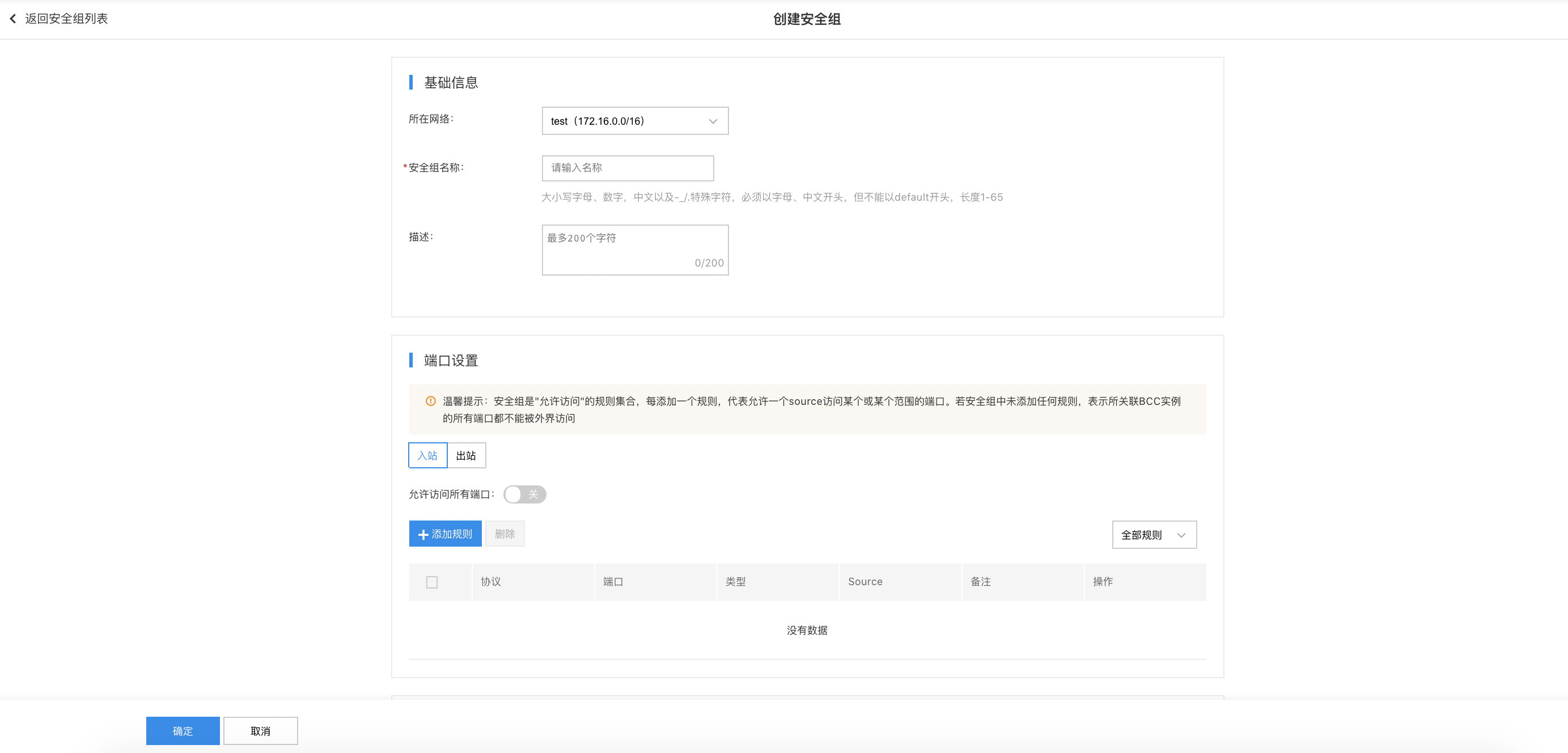
image.png

  1. Select the target network and provide the desired security group name and description.
  2. Select the port setting method. Ingress and egress access rule settings are divided into two separate tabs, with the following methods for rule setting:
  • When "Allow Access to All Ports" is turned OFF, click Add Rule to set up ingress and egress rules.

20059357afd47a93b769171b047ee0c3.png

  • If "Allow Access to All Ports" is OFF and no rules are defined, it will result in the BCC being unable to communicate with the external network. In this scenario, the BCC can only be accessed via remote VNC login. Therefore, use this option cautiously.
  • If "Allow Access to All Ports" is ON, all service ports of the BCC will be completely exposed to the network, potentially leading to security risks. Proceed with caution when enabling this option.

Description:

When adding a rule, if the source or target is a security group, it indicates that the source or destination IP refers to the internal IP of an instance linked to that security group, excluding other security group rules.

  1. Click OK to access the Security Group Details page and finalize the creation of the security group.

Edit security group

You can edit the names, descriptions, port settings, and associated instances of existing security groups.

Description:

To maintain system security, it is recommended not to alter the settings of the "Default security group." If additional permission mechanisms are needed, create a new security group and bind it to cloud service instances.

  1. Go to Product Services - Virtual Private Cloud (VPC) and select Security Group from the left-hand menu.
  2. Click on a security group name to access the Security Group Details page.
  3. For rules under the "Protocol" field that need changes, click Edit next to the corresponding action to modify them.
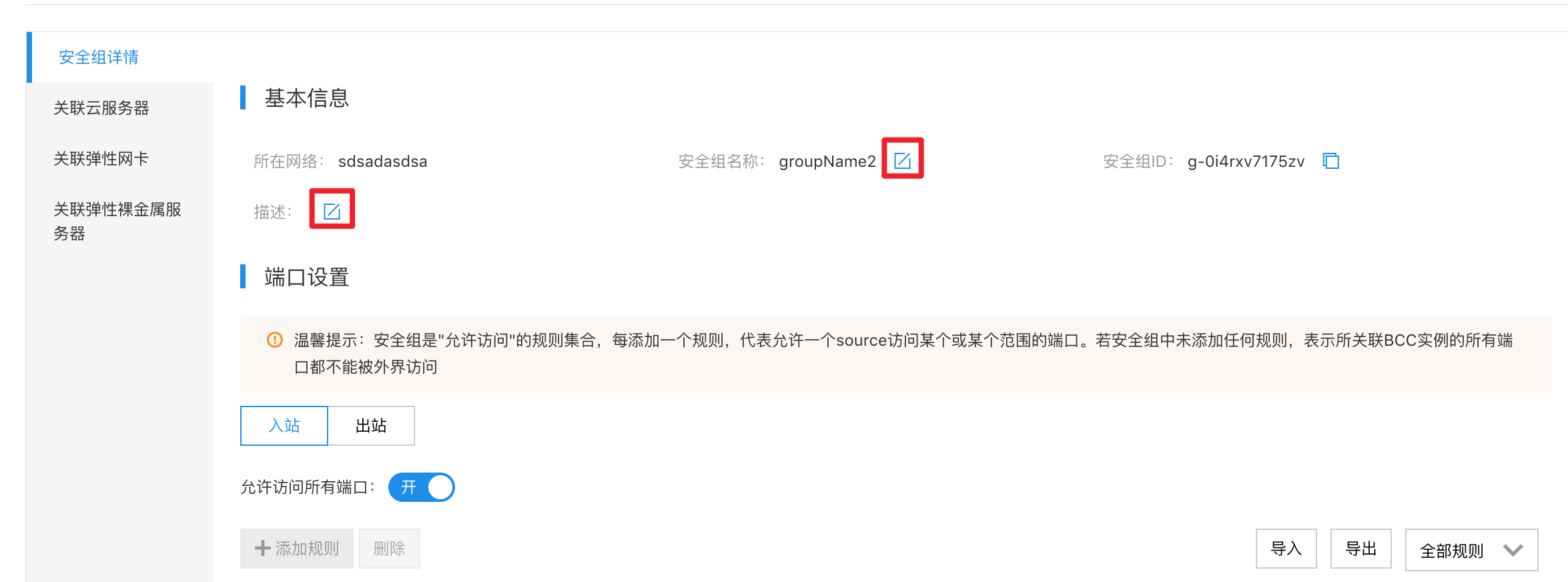
image.png

Export security group rules

You can export security group rules for local backup purposes.

  1. Go to Product Services - Virtual Private Cloud (VPC) and select Security Group from the left-hand menu.
  2. Click on a security group name to access the Security Group Details page.
  3. Click Export to download the rule file to your device.

chu.png

Import security group rules

You can import previously exported security group rule files into a new security group for quick setup and recovery.

  1. Go to Product Services - Virtual Private Cloud (VPC) and select Security Group from the left-hand menu.
  2. Click on a security group name to access the Security Group Details page.
  3. Click Import and choose a security group rule file in .csv format.
  4. Click OK to import the security group rules.

ru.png

Description:

To customize security group rules, start by exporting the current rules and editing them following the provided format.

Copy security group

Users can effortlessly create a security group with the same rules by using the Replicate Security Group feature.

  1. Navigate to Product Services - Virtual Private Cloud (VPC), then choose Security Group from the left navigation bar to access the Security Group List page.
  2. After selecting the desired security group to replicate, click the Copy button in the Actions column to open the Copy Security Group interface.
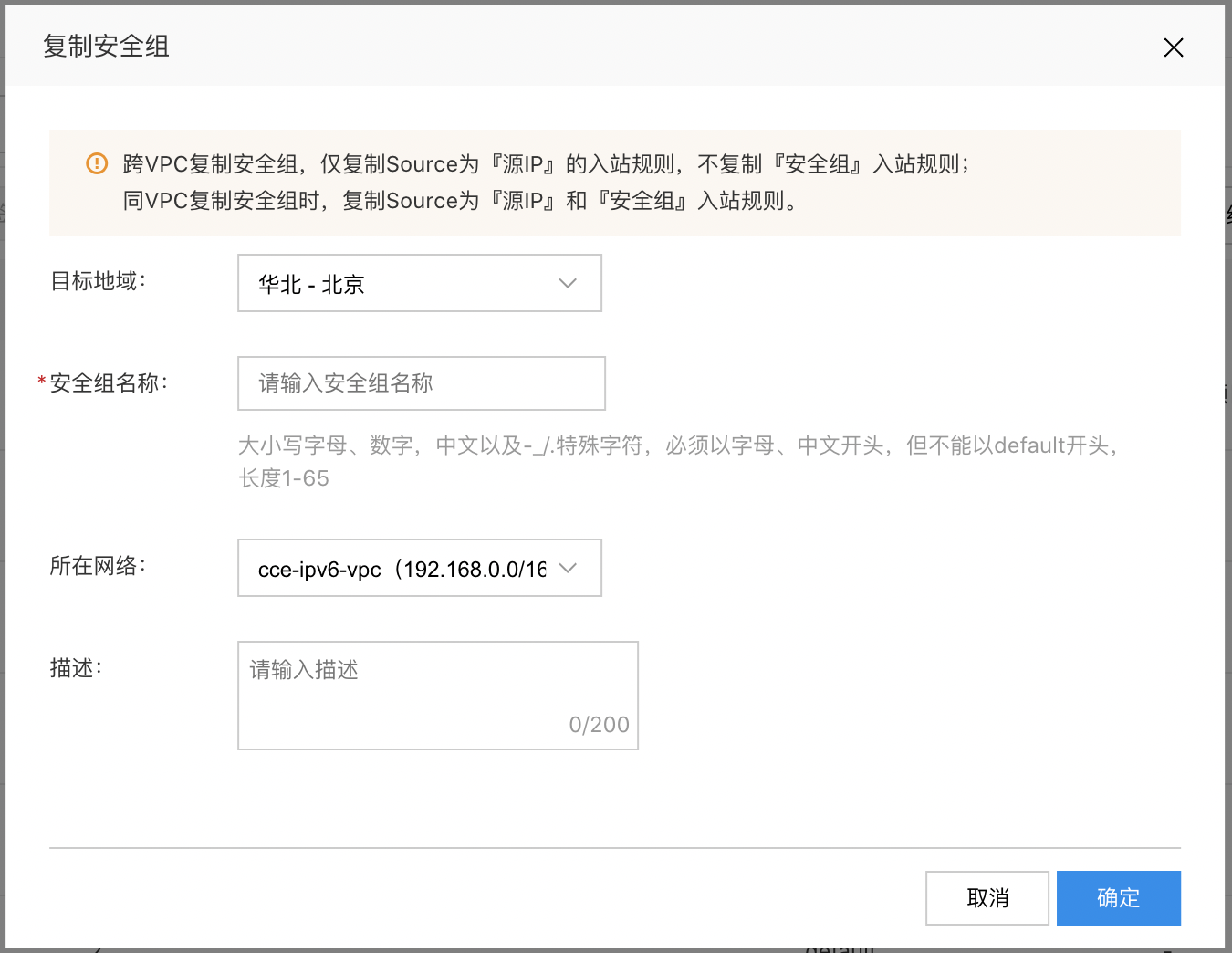
image.png

  1. Click OK to finalize the replication of the security group information.

Delete a security group

If a security group is no longer required, users can delete it. For unassociated custom security groups, direct deletion is allowed. For associated security groups, disassociation must occur before deletion.

  1. Navigate to Product Services - Virtual Private Cloud (VPC), then choose Security Group from the left navigation bar to access the Security Group List page.
  2. Select the security group to delete and click the Delete button.
  3. (Optional) To dis-associate from cloud server instances, refer to [Disassociate security group](#Disassociate security group).
  4. For unassociated security groups, simply click OK to remove the security group information immediately.

Description:

Users can also delete multiple security groups at once. In the Security Group List, select the target groups and click Delete.

Associate with security group

After creating a security group, associate and bind it to the relevant cloud server so that the security group rules can govern the cloud server’s network access control. Users can either associate an instance from the security group interface or associate a security group from the instance interface.

Description:

To modify the type of security group associated with an instance (e.g., switching from a standard security group to an enterprise security group), visit the Instance List page to manage security group associations.

Instance association on the security group side

  1. Go to Product Services - Virtual Private Cloud (VPC) and select Security Group from the left-hand menu.
  2. Click on a security group name to access the Security Group Details page.
  3. Click the Associate Cloud Server button located above the list of associated instances to proceed with the association.

image.png

Associate security group from instance side

Using BCC association as an example, detailed steps are available for guidance.

  1. Go to Product Services - Baidu Cloud Compute (BCC) to view the user’s list of created cloud servers.
  2. Select the instances you want to associate with the security group. When multiple instances are chosen, batch association will be performed.
  3. Click the Associate Security Group button to bring up the Associate Security Group dialog box.
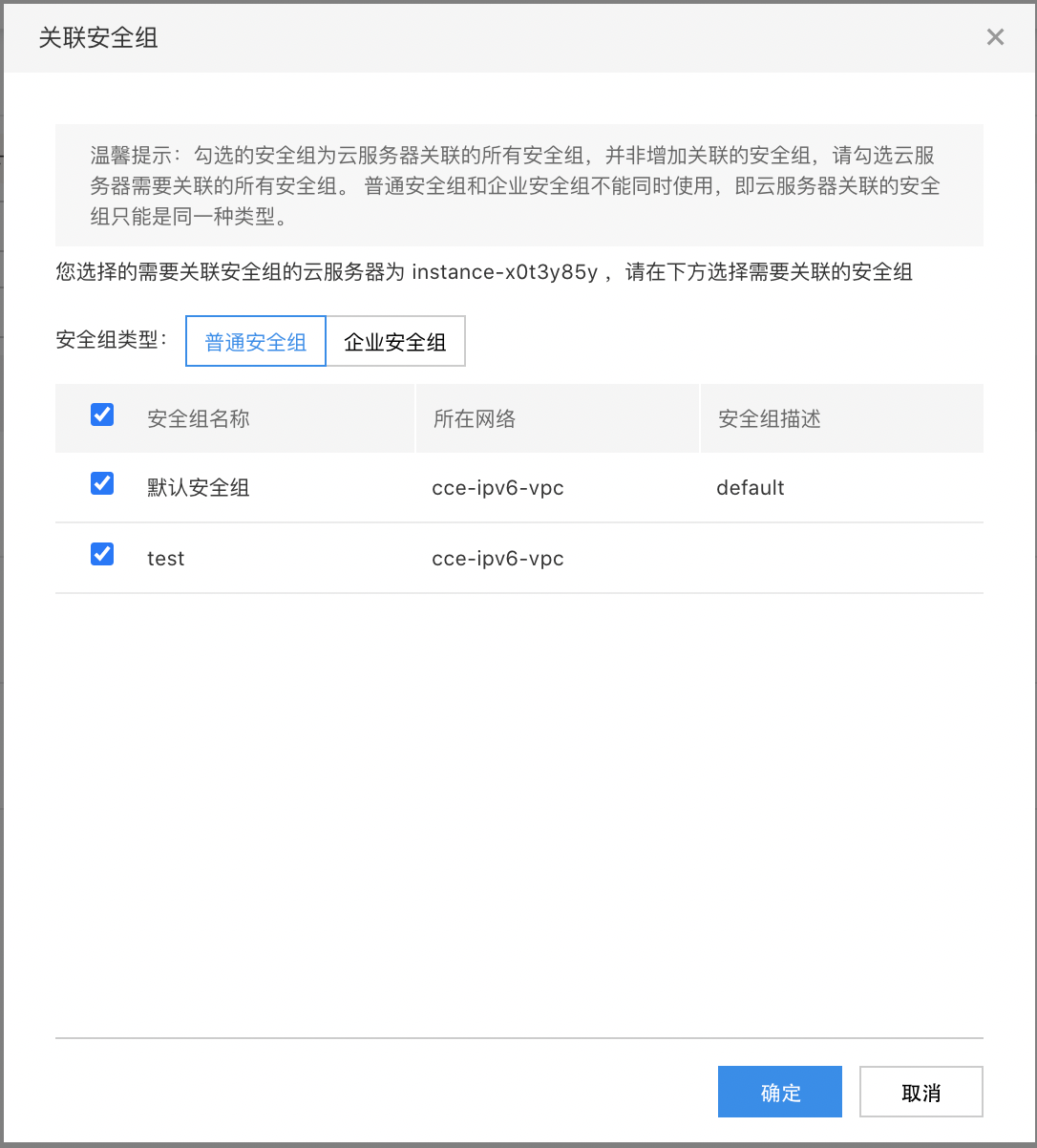
image.png

  1. Choose the name of the security group you wish to associate.
  2. Click OK to complete the association of the cloud server instance with the security group.

Disassociate security group

To switch a BCC instance to a different security group, the current security group association must be canceled since a BCC instance must always be linked to at least one security group. Users can disassociate the instance via the security group or the instance interface.

Disassociate instance from security group side

  1. Go to Product Services - Virtual Private Cloud (VPC) and select Security Group from the left-hand menu.
  2. Click on a security group name to access the Security Group Details page.
  3. In the operations column of the associated instances list, click Disassociate to unlink the security group.

image.png

Disassociate security group from instance side

  1. Choose Product Services - Baidu Cloud Compute (BCC) to navigate to the Instance List interface.
  2. Click on the corresponding link under Instance Name to open the Instance Details tab.
  3. Go to the Security Group tab and scroll down to the Associated Security Groups List section.
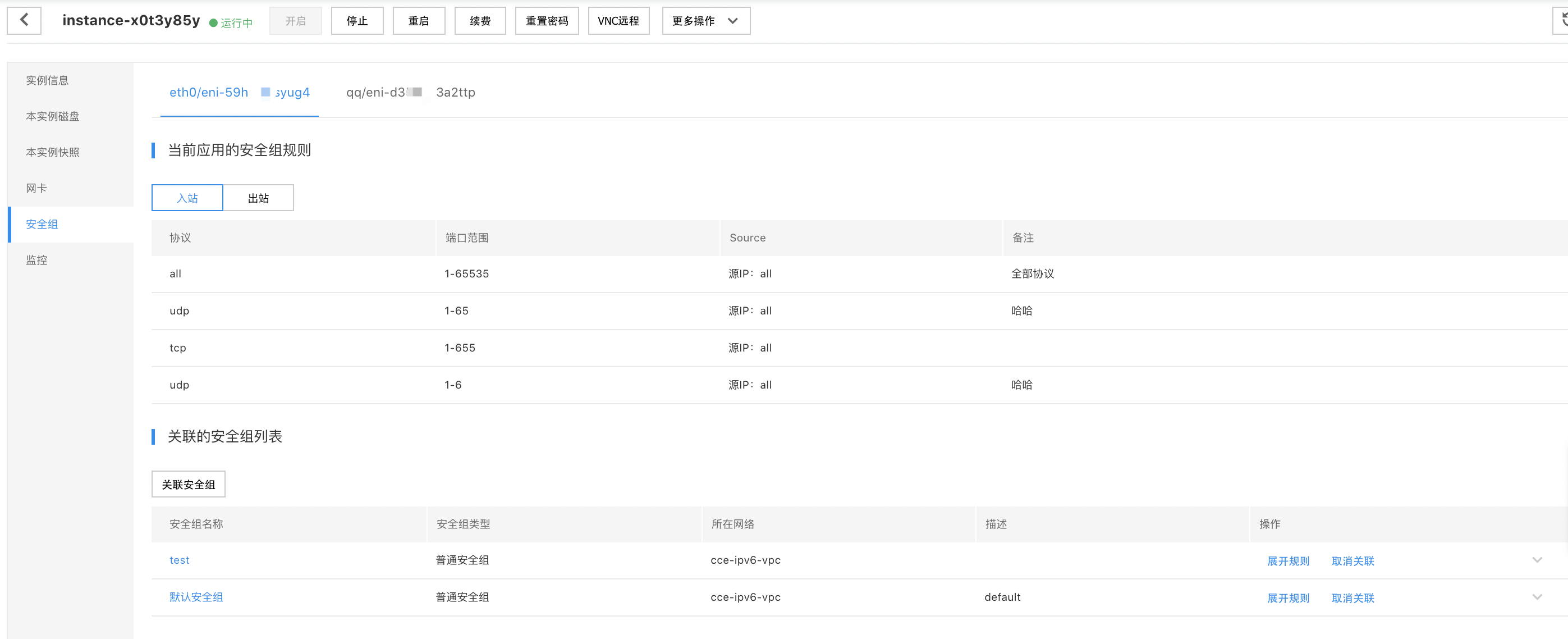
image.png

  1. Click Disassociate to unlink the instance from its associated security group.

Previous
Parameter Template
Next
Identity and access management