IPsec VPN Gateway

VPC VPC

  • API Reference
    • ACL-Related Interfaces
      • Add ACL rule
      • Delete ACL rules
      • Query ACL rules
      • Query ACL
      • Update ACL rules
    • API function release records
    • API Overview
    • Appendix
    • Common Headers and Error Responses
    • Dedicated Gateway-Related Interfaces
      • Bind physical dedicated line
      • Create dedicated gateway
      • Create health check for dedicated gateway
      • Query dedicated gateway details
      • Query dedicated gateway list
      • Release dedicated gateway
      • Unbind physical dedicated line
      • Update dedicated gateway
    • Elastic Network Interface-Related Interfaces
      • Add intranet IP to elastic network interface in batches
      • Add Secondary IP Address of Elastic Network Interface
      • Create elastic network interface
      • Delete elastic network interface
      • Delete Intranet IP from elastic network interface in batches
      • Delete Secondary IP Address of Elastic Network Interface
      • Elastic network interface binds to EIP
      • Elastic Network Interface Mounts Cloud Product Instance
      • Elastic network interface unbinds from EIP
      • Elastic Network Interface Unmounts Cloud Product Instance
      • Query elastic network interface list
      • Query elastic network interface status
      • Query the specified elastic network interface
      • Update elastic network interface with enterprise security group
      • Update elastic network interface with regular security group
      • Update elastic network interface
    • Gateway Bandwidth Limiting Rule Related Interfaces
      • Create gateway bandwidth limiting rules
      • Delete Gateway Bandwidth Limiting Rule
      • Modify Gateway Bandwidth Limiting Rule
      • View Gateway Bandwidth Limiting Rule
    • General Description
    • High-Availability Virtual IP Address(HAVIP) Related Interfaces
      • Bind EIP to high-availability virtual IP address
      • Bind instance to high-availability virtual IP address
      • Create high-availability virtual IP address
      • Delete high-availability virtual IP address
      • Query high-availability virtual IP address list
      • Query the specified high-availability virtual IP address
      • Unbind EIP from high-availability virtual IP address
      • Unbind instance from high-availability virtual IP address
      • Update high-availability virtual IP address
    • Interface Overview
    • IPv6 Gateway-Related Interfaces
      • Add IPv6 egress-only policy
      • Bandwidth resizing for IPv6 gateway
      • Create IPv6 gateway bandwidth limiting policy
      • Create IPv6 gateway
      • Delete IPv6 gateway bandwidth limiting policy
      • Delete IPv6 Gateway
      • Delete the IPv6 egress-only policy
      • Query IPv6 gateway bandwidth limiting policy list
      • Query IPv6 gateway
      • Query the IPv6 egress-only policy list
      • Update IPv6 gateway bandwidth limiting policy
      • Update the IPv6 gateway release protection switch
    • NAT Gateway-Related Interfaces
      • Bind DNAT EIP to the NAT gateway
      • Bind SNAT EIP to the NAT gateway
      • Create DNAT rules in batches
      • Create DNAT rules
      • Create NAT gateway
      • Create SNAT rules in batches
      • Create SNAT rules
      • Delete DNAT rules
      • Delete SNAT rules
      • NAT Gateway Binds EIP
      • NAT gateway renewal
      • NAT Gateway Resize
      • NAT Gateway Unbinds EIP
      • Query DNAT rules
      • Query NAT gateway details
      • Query NAT gateway list
      • Query SNAT rules
      • Release NAT gateway
      • Unbind DNAT EIP from the NAT gateway
      • Unbind SNAT EIP from the NAT gateway
      • Update DNAT rules
      • Update NAT Delete Protection Switch
      • Update NAT gateway name
      • Update SNAT rules
    • Network Detection Related Interfaces
      • Create Network Probe
      • Delete network probe
      • Query network probe details
      • Query network probe list.
      • Update probe
    • Parameter Template-Related Interfaces
      • Add IP addresses to the IP address family
      • Add IP addresses to the IP address group
      • Create IP address family
      • Create IP address set
      • Delete IP address family
      • Delete IP address from IP address group
      • Delete IP address set
      • Query IP address family list
      • Query IP address group list
      • Query specified IP address family
      • Query specified IP address group
      • Remove IP address group from IP address family
      • Update IP address family
      • Update IP address set
    • Peering Connections-Related Interfaces
      • Application to process the peering connection
      • Bandwidth resizing for peering connections
      • Create peering connections
      • Disable DNS synchronization for the peering connections.
      • Enable DNS synchronization for the peering connections
      • List of peering connections to be queried.
      • Peering connection renewal
      • Release peering connections
      • Update the local API name and remarks for peering connections
      • Update the peering connection release protection switch
      • View details of peering connection
    • Route Table Related Interfaces
      • Create route rules
      • Delete route rules
      • Primary-standby switch
      • Query route table
      • Query routing rules
      • Update route rules
    • Security Group Related Interfaces
      • Enterprise security group
        • Authorize enterprise security group rules
        • Create enterprise security group
        • Delete enterprise security group rules
        • Delete enterprise security group
        • Query enterprise security group list
        • Update enterprise security group rules
      • Regular security group
        • Authorize regular security group rules
        • Create regular security group
        • Delete regular security group rules
        • Delete regular security group
        • Query regular security group list
        • Revoke regular security group rules
        • Update regular security group rules
        • View security group details
    • Service domain
    • Service Network Interface Card (SNIC)-Related Interfaces
      • Create service network interface card
      • Delete service network interface card
      • Query mountable public services
      • Query service network interface card details
      • Query service network interface card list
      • Update regular security group for service network interface card
      • Update service network interface card with enterprise security group
      • Update the service network interface card
    • Subnet-Related Interfaces
      • Create reserved network segment
      • Create subnet
      • Delete reserved network segment
      • Delete subnet
      • Query specified subnet
      • Query subnet list
      • Query the reserved network segment list
      • Update subnet
    • VPC-Related Interfaces
      • Create VPC
      • Delete VPC
      • Open VPC relay
      • Query IP Usage by Products in VPC
      • Query specified VPC
      • Query VPC intranet IP
      • Query VPC list
      • Shut down VPC relay
      • Update VPC
    • VPN-Related Interfaces
      • Bind EIP
      • Create SSL VPN server
      • Create SSL VPN users in batches
      • Create VPN tunnel
      • Create VPN
      • Delete SSL VPN server
      • Delete SSL VPN user
      • Delete VPN tunnel
      • Query SSL-VPN server
      • Query SSL-VPN user
      • Query VPN details
      • Query VPN List
      • Query VPN tunnels
      • Release VPN
      • Unbind EIP
      • Update SSL VPN server
      • Update SSL VPN user
      • Update VPN release protection switch
      • Update VPN tunnel
      • Update VPN
      • VPN gateway renewal
    • High-Availability Virtual IP Address (HAVIP) Related Interfaces
      • Bind EIP to high-availability virtual IP address
      • Bind instance to high-availability virtual IP address
      • Create high-availability virtual IP address
      • Delete high-availability virtual IP address
      • Query high-availability virtual IP address list
      • Query the specified high-availability virtual IP address
      • Unbind EIP from high-availability virtual IP address
      • Unbind instance from high-availability virtual IP address
      • Update high-availability virtual IP address
  • FAQs
    • Common Questions Overview
    • NAT FAQs
    • Route Table FAQs
    • Service Network Interface Card(SNIC) Common Questions
    • VPC FAQs
    • VPN FAQs
    • Service Network Interface Card (SNIC) Common Questions
  • Function Release Records
  • Operation guide
    • Access control
      • ACL
      • Parameter Template
      • Security group
    • Identity and access management
    • Monitor and Operations
      • NAT Gateway Instance Diagnosis
    • Network Connection
      • Dedicated gateway
      • IPv6 gateway
      • Layer 2 Gateway
      • NAT Gateway
        • Private Network NAT(Network Address Translation) Gateway
        • Public Network NAT(Network Address Translation) Gateway
        • Private Network NAT (Network Address Translation) Gateway
        • Public Network NAT (Network Address Translation) Gateway
      • Peering Connections
      • VPN Gateway
        • GRE VPN Gateway
        • IPsec VPN Gateway
        • SSL VPN Gateway
    • Network Diagnostics
      • Flow log
      • Gateway bandwidth limiting
      • Network probe
      • Path analysis
      • Port verification
      • Traffic monitor
    • Network interface card
      • Elastic network interface
      • High-availability virtual IP address (HAVIP)
      • Service network interface card
    • Network topology
    • Route table
    • Subnet
    • Tag Management
    • Using IPv6
    • VPC
  • Product Description
    • Application scenarios
    • Product advantages
    • Product features
    • Product Introduction
    • Related concepts
    • Usage restrictions
  • Product pricing
  • SDK
    • Go-SDK
      • ACL
      • Dedicated gateway
      • Elastic network interface
      • Exception handling
      • High-availability virtual IP address (HAVIP)
      • Initialization
      • Install the SDK Package
      • IPv6Gateway
      • NAT
      • Network probe
      • Overview
      • Peering Connections
      • Route
      • Security group
        • Enterprise security group
        • Regular security group
      • Service network interface card
      • Subnet
      • VPC
      • VPN
    • Java-SDK
      • ACL
      • Dedicated gateway
      • Elastic network interface
      • Enterprise security group
      • High-availability virtual IP address (HAVIP)
      • Install the SDK Package
      • IPv6 gateway
      • NAT
      • Network probe
      • Overview
      • Parameter Template
      • Peering Connections
      • Regular security group
      • Route
      • Service network interface card
      • Subnet
      • Version history
      • vpc
      • VPN
    • PHP-SDK
      • ACL
      • Install the SDK Package
      • NAT
      • Overview
      • Peering Connections
      • Route
      • Security group
      • Subnet
      • Version history
      • vpc
    • Python-SDK
      • ACL
      • Dedicated gateway
      • Elastic network interface
      • Enterprise security group
      • High-availability virtual IP address (HAVIP)
      • Install the SDK Package
      • IPv6Gateway
      • NAT
      • Network probe
      • Overview
      • Peering Connections
      • Route
      • Security group
      • Service network interface card
      • Subnet
      • Version history
      • VPC
      • VPN
  • Service Level Agreement (SLA)
    • IPv6 Gateway Service Level Agreement SLA
    • NAT(Network Address Translation) Gateway Service Level Agreement SLA
    • Peering Connections Service Level Agreement SLA
    • Service Network Interface Card(SNIC) Service Level Agreement SLA
    • VPN Gateway Service Level Agreement SLA
    • NAT (Network Address Translation) Gateway Service Level Agreement SLA
    • Service Network Interface Card (SNIC) Service Level Agreement SLA
  • Typical Practices
    • Configure Custom Service and Use Service Network Interface Card(SNIC) to Provide Service for Other VPCs
    • HAVIP Combined with Keepalived to Achieve Master-Backup Multi-Machine High Availability
    • Layer 2 Gateway Combined with Dedicated Line Access ET to Build Large Layer 2 Network Between IDC and Cloud VPC
    • Network Layer Security Description
    • Peering Connections Typical Practice
    • Security Group Configuration Practice (Advanced Level)
    • Security Group Configuration Practice (Beginner Level)
    • Typical Practice of Managing Elastic Network Interface Using Terraform
    • Typical Practice of Managing IPsec VPN Gateway Using Terraform
    • Using Keepalived in VPC to Achieve High-Availability Architecture
    • VPC Custom Route Table to Achieve Secure Traffic Mutual Access
    • Windows Using HAVIP to Configure Master-Backup Multi-Machine
    • Configure Custom Service and Use Service Network Interface Card (SNIC) to Provide Service for Other VPCs
  • VPC CLI
    • Configure BCE-CLI
    • Install BCE-CLI
    • Route Table Related Operations
    • Subnet Related Operations
    • Using VPC Service via CLI
    • Version Change Records
    • VPC Related Operations
All documents
menu
No results found, please re-enter

VPC VPC

  • API Reference
    • ACL-Related Interfaces
      • Add ACL rule
      • Delete ACL rules
      • Query ACL rules
      • Query ACL
      • Update ACL rules
    • API function release records
    • API Overview
    • Appendix
    • Common Headers and Error Responses
    • Dedicated Gateway-Related Interfaces
      • Bind physical dedicated line
      • Create dedicated gateway
      • Create health check for dedicated gateway
      • Query dedicated gateway details
      • Query dedicated gateway list
      • Release dedicated gateway
      • Unbind physical dedicated line
      • Update dedicated gateway
    • Elastic Network Interface-Related Interfaces
      • Add intranet IP to elastic network interface in batches
      • Add Secondary IP Address of Elastic Network Interface
      • Create elastic network interface
      • Delete elastic network interface
      • Delete Intranet IP from elastic network interface in batches
      • Delete Secondary IP Address of Elastic Network Interface
      • Elastic network interface binds to EIP
      • Elastic Network Interface Mounts Cloud Product Instance
      • Elastic network interface unbinds from EIP
      • Elastic Network Interface Unmounts Cloud Product Instance
      • Query elastic network interface list
      • Query elastic network interface status
      • Query the specified elastic network interface
      • Update elastic network interface with enterprise security group
      • Update elastic network interface with regular security group
      • Update elastic network interface
    • Gateway Bandwidth Limiting Rule Related Interfaces
      • Create gateway bandwidth limiting rules
      • Delete Gateway Bandwidth Limiting Rule
      • Modify Gateway Bandwidth Limiting Rule
      • View Gateway Bandwidth Limiting Rule
    • General Description
    • High-Availability Virtual IP Address(HAVIP) Related Interfaces
      • Bind EIP to high-availability virtual IP address
      • Bind instance to high-availability virtual IP address
      • Create high-availability virtual IP address
      • Delete high-availability virtual IP address
      • Query high-availability virtual IP address list
      • Query the specified high-availability virtual IP address
      • Unbind EIP from high-availability virtual IP address
      • Unbind instance from high-availability virtual IP address
      • Update high-availability virtual IP address
    • Interface Overview
    • IPv6 Gateway-Related Interfaces
      • Add IPv6 egress-only policy
      • Bandwidth resizing for IPv6 gateway
      • Create IPv6 gateway bandwidth limiting policy
      • Create IPv6 gateway
      • Delete IPv6 gateway bandwidth limiting policy
      • Delete IPv6 Gateway
      • Delete the IPv6 egress-only policy
      • Query IPv6 gateway bandwidth limiting policy list
      • Query IPv6 gateway
      • Query the IPv6 egress-only policy list
      • Update IPv6 gateway bandwidth limiting policy
      • Update the IPv6 gateway release protection switch
    • NAT Gateway-Related Interfaces
      • Bind DNAT EIP to the NAT gateway
      • Bind SNAT EIP to the NAT gateway
      • Create DNAT rules in batches
      • Create DNAT rules
      • Create NAT gateway
      • Create SNAT rules in batches
      • Create SNAT rules
      • Delete DNAT rules
      • Delete SNAT rules
      • NAT Gateway Binds EIP
      • NAT gateway renewal
      • NAT Gateway Resize
      • NAT Gateway Unbinds EIP
      • Query DNAT rules
      • Query NAT gateway details
      • Query NAT gateway list
      • Query SNAT rules
      • Release NAT gateway
      • Unbind DNAT EIP from the NAT gateway
      • Unbind SNAT EIP from the NAT gateway
      • Update DNAT rules
      • Update NAT Delete Protection Switch
      • Update NAT gateway name
      • Update SNAT rules
    • Network Detection Related Interfaces
      • Create Network Probe
      • Delete network probe
      • Query network probe details
      • Query network probe list.
      • Update probe
    • Parameter Template-Related Interfaces
      • Add IP addresses to the IP address family
      • Add IP addresses to the IP address group
      • Create IP address family
      • Create IP address set
      • Delete IP address family
      • Delete IP address from IP address group
      • Delete IP address set
      • Query IP address family list
      • Query IP address group list
      • Query specified IP address family
      • Query specified IP address group
      • Remove IP address group from IP address family
      • Update IP address family
      • Update IP address set
    • Peering Connections-Related Interfaces
      • Application to process the peering connection
      • Bandwidth resizing for peering connections
      • Create peering connections
      • Disable DNS synchronization for the peering connections.
      • Enable DNS synchronization for the peering connections
      • List of peering connections to be queried.
      • Peering connection renewal
      • Release peering connections
      • Update the local API name and remarks for peering connections
      • Update the peering connection release protection switch
      • View details of peering connection
    • Route Table Related Interfaces
      • Create route rules
      • Delete route rules
      • Primary-standby switch
      • Query route table
      • Query routing rules
      • Update route rules
    • Security Group Related Interfaces
      • Enterprise security group
        • Authorize enterprise security group rules
        • Create enterprise security group
        • Delete enterprise security group rules
        • Delete enterprise security group
        • Query enterprise security group list
        • Update enterprise security group rules
      • Regular security group
        • Authorize regular security group rules
        • Create regular security group
        • Delete regular security group rules
        • Delete regular security group
        • Query regular security group list
        • Revoke regular security group rules
        • Update regular security group rules
        • View security group details
    • Service domain
    • Service Network Interface Card (SNIC)-Related Interfaces
      • Create service network interface card
      • Delete service network interface card
      • Query mountable public services
      • Query service network interface card details
      • Query service network interface card list
      • Update regular security group for service network interface card
      • Update service network interface card with enterprise security group
      • Update the service network interface card
    • Subnet-Related Interfaces
      • Create reserved network segment
      • Create subnet
      • Delete reserved network segment
      • Delete subnet
      • Query specified subnet
      • Query subnet list
      • Query the reserved network segment list
      • Update subnet
    • VPC-Related Interfaces
      • Create VPC
      • Delete VPC
      • Open VPC relay
      • Query IP Usage by Products in VPC
      • Query specified VPC
      • Query VPC intranet IP
      • Query VPC list
      • Shut down VPC relay
      • Update VPC
    • VPN-Related Interfaces
      • Bind EIP
      • Create SSL VPN server
      • Create SSL VPN users in batches
      • Create VPN tunnel
      • Create VPN
      • Delete SSL VPN server
      • Delete SSL VPN user
      • Delete VPN tunnel
      • Query SSL-VPN server
      • Query SSL-VPN user
      • Query VPN details
      • Query VPN List
      • Query VPN tunnels
      • Release VPN
      • Unbind EIP
      • Update SSL VPN server
      • Update SSL VPN user
      • Update VPN release protection switch
      • Update VPN tunnel
      • Update VPN
      • VPN gateway renewal
    • High-Availability Virtual IP Address (HAVIP) Related Interfaces
      • Bind EIP to high-availability virtual IP address
      • Bind instance to high-availability virtual IP address
      • Create high-availability virtual IP address
      • Delete high-availability virtual IP address
      • Query high-availability virtual IP address list
      • Query the specified high-availability virtual IP address
      • Unbind EIP from high-availability virtual IP address
      • Unbind instance from high-availability virtual IP address
      • Update high-availability virtual IP address
  • FAQs
    • Common Questions Overview
    • NAT FAQs
    • Route Table FAQs
    • Service Network Interface Card(SNIC) Common Questions
    • VPC FAQs
    • VPN FAQs
    • Service Network Interface Card (SNIC) Common Questions
  • Function Release Records
  • Operation guide
    • Access control
      • ACL
      • Parameter Template
      • Security group
    • Identity and access management
    • Monitor and Operations
      • NAT Gateway Instance Diagnosis
    • Network Connection
      • Dedicated gateway
      • IPv6 gateway
      • Layer 2 Gateway
      • NAT Gateway
        • Private Network NAT(Network Address Translation) Gateway
        • Public Network NAT(Network Address Translation) Gateway
        • Private Network NAT (Network Address Translation) Gateway
        • Public Network NAT (Network Address Translation) Gateway
      • Peering Connections
      • VPN Gateway
        • GRE VPN Gateway
        • IPsec VPN Gateway
        • SSL VPN Gateway
    • Network Diagnostics
      • Flow log
      • Gateway bandwidth limiting
      • Network probe
      • Path analysis
      • Port verification
      • Traffic monitor
    • Network interface card
      • Elastic network interface
      • High-availability virtual IP address (HAVIP)
      • Service network interface card
    • Network topology
    • Route table
    • Subnet
    • Tag Management
    • Using IPv6
    • VPC
  • Product Description
    • Application scenarios
    • Product advantages
    • Product features
    • Product Introduction
    • Related concepts
    • Usage restrictions
  • Product pricing
  • SDK
    • Go-SDK
      • ACL
      • Dedicated gateway
      • Elastic network interface
      • Exception handling
      • High-availability virtual IP address (HAVIP)
      • Initialization
      • Install the SDK Package
      • IPv6Gateway
      • NAT
      • Network probe
      • Overview
      • Peering Connections
      • Route
      • Security group
        • Enterprise security group
        • Regular security group
      • Service network interface card
      • Subnet
      • VPC
      • VPN
    • Java-SDK
      • ACL
      • Dedicated gateway
      • Elastic network interface
      • Enterprise security group
      • High-availability virtual IP address (HAVIP)
      • Install the SDK Package
      • IPv6 gateway
      • NAT
      • Network probe
      • Overview
      • Parameter Template
      • Peering Connections
      • Regular security group
      • Route
      • Service network interface card
      • Subnet
      • Version history
      • vpc
      • VPN
    • PHP-SDK
      • ACL
      • Install the SDK Package
      • NAT
      • Overview
      • Peering Connections
      • Route
      • Security group
      • Subnet
      • Version history
      • vpc
    • Python-SDK
      • ACL
      • Dedicated gateway
      • Elastic network interface
      • Enterprise security group
      • High-availability virtual IP address (HAVIP)
      • Install the SDK Package
      • IPv6Gateway
      • NAT
      • Network probe
      • Overview
      • Peering Connections
      • Route
      • Security group
      • Service network interface card
      • Subnet
      • Version history
      • VPC
      • VPN
  • Service Level Agreement (SLA)
    • IPv6 Gateway Service Level Agreement SLA
    • NAT(Network Address Translation) Gateway Service Level Agreement SLA
    • Peering Connections Service Level Agreement SLA
    • Service Network Interface Card(SNIC) Service Level Agreement SLA
    • VPN Gateway Service Level Agreement SLA
    • NAT (Network Address Translation) Gateway Service Level Agreement SLA
    • Service Network Interface Card (SNIC) Service Level Agreement SLA
  • Typical Practices
    • Configure Custom Service and Use Service Network Interface Card(SNIC) to Provide Service for Other VPCs
    • HAVIP Combined with Keepalived to Achieve Master-Backup Multi-Machine High Availability
    • Layer 2 Gateway Combined with Dedicated Line Access ET to Build Large Layer 2 Network Between IDC and Cloud VPC
    • Network Layer Security Description
    • Peering Connections Typical Practice
    • Security Group Configuration Practice (Advanced Level)
    • Security Group Configuration Practice (Beginner Level)
    • Typical Practice of Managing Elastic Network Interface Using Terraform
    • Typical Practice of Managing IPsec VPN Gateway Using Terraform
    • Using Keepalived in VPC to Achieve High-Availability Architecture
    • VPC Custom Route Table to Achieve Secure Traffic Mutual Access
    • Windows Using HAVIP to Configure Master-Backup Multi-Machine
    • Configure Custom Service and Use Service Network Interface Card (SNIC) to Provide Service for Other VPCs
  • VPC CLI
    • Configure BCE-CLI
    • Install BCE-CLI
    • Route Table Related Operations
    • Subnet Related Operations
    • Using VPC Service via CLI
    • Version Change Records
    • VPC Related Operations
  • Document center
  • arrow
  • VPCVPC
  • arrow
  • Operation guide
  • arrow
  • Network Connection
  • arrow
  • VPN Gateway
  • arrow
  • IPsec VPN Gateway
Table of contents on this page
  • Create IPsec VPN gateway
  • Create VPN tunnel
  • Create a client VPN gateway and parameters
  • VPN configuration route table
  • VPN network address translation (NAT) configuration
  • Cloud static NAT
  • IDC-side static NAT
  • IDC-side DNAT
  • Cloud DNAT
  • View monitor data
  • VPN gateway monitor
  • VPN tunnel monitor

IPsec VPN Gateway

Updated at:2025-10-16

The IPsec VPN gateway connects the user IDC to a virtual private cloud through an encrypted public network tunnel.

Operation process

image.png

IPsec VPN gateway instances can be fully self-configured in the console. Users need to complete the following steps to make the VPN connection effective:

Create IPsec VPN gateway

  1. In the left navigation bar of the virtual private cloud console, select Network Connection - VPN Gateway, navigate to the IPsec VPN Gateway Page, and click + Create IPsec VPN Gateway.

Description:

  • To create an IPsec VPN gateway in a non-default VPC, first create a subnet in that VPC. For details, refer to [Create subnet](VPC/Operation guide/Subnet.md#Create subnet).
  • Each VPC supports creating up to 3 IPsec VPN gateways. To create more gateways, submit a ticket for application.
  1. Fill in the following configuration information:
ConfigMap Description
Bill type Select bill type
Current region Supports regions such as North China-Beijing, North China-Baoding, South China-Guangzhou, East China-Shanghai, East China-Suzhou, Central China-Wuhan, Southwest China-Chengdu, and Hong Kong. Switch regions using the Region dropdown menu in the top-left corner.
Network Virtual private cloud (VPC) to which the VPN belongs
Subnet belonged Subnet located in the availability zone under the VPC associated with the VPN.
VPN gateway name Custom name for the VPN gateway.
VPN gateway specifications Users can choose the maximum forwarding capacity supported by the VPN gateway. Standard VPN gateways allow up to 200Mbps, while enhanced VPN gateways allow up to 1,000Mbps.
VPN description Description of the VPN gateway.
Gateway type Supports public and private networks. Public networks use the Internet to establish encrypted tunnels and require binding with Baidu AI Cloud EIP products. Private networks use an encrypted tunnel over a private connection via an express tunnel (ET). It is important to ensure network connectivity between the local VPN gateway and the peer VPN gateway's IP addresses, such as through the ET's dedicated channel.
VPN public network bandwidth (Optional, displayed only for public gateway types) The public EIP bound to the user.
Resource group Select resource group
Purchase period Select purchase period
Auto-renewal Select whether to enable auto-renewal
  1. After confirming the order and completing payment, the IPsec VPN gateway will be successfully created.

Create VPN tunnel

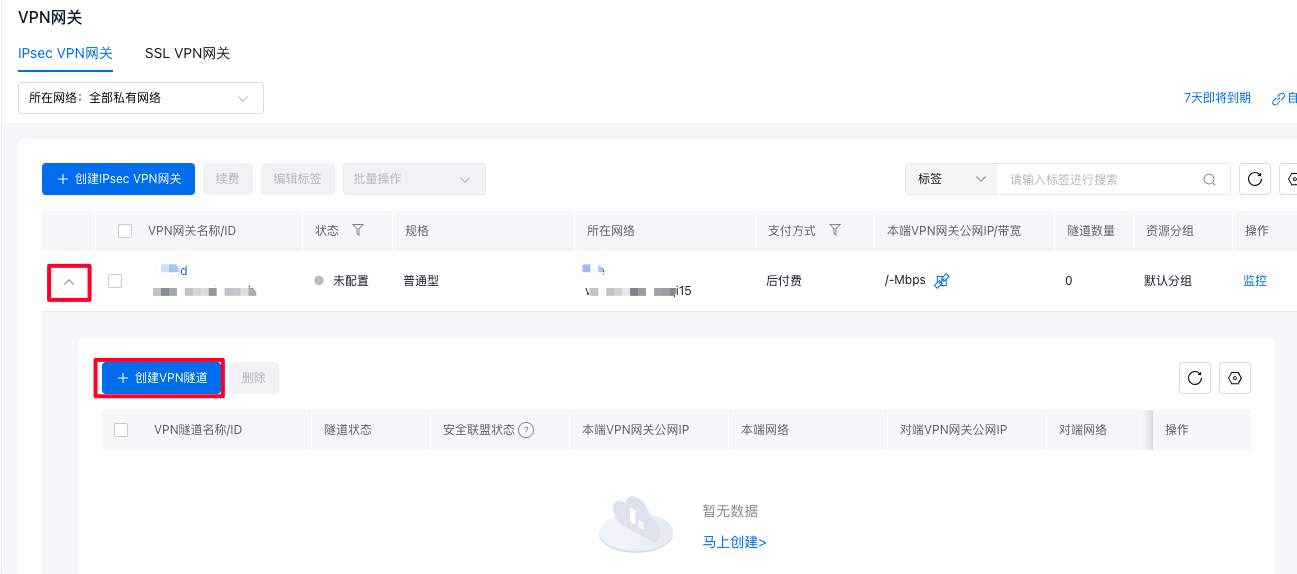
  1. On the IPsec VPN gateway list page, choose an IPsec VPN gateway and click the downward arrow in front of the gateway to view the VPN tunnel list.
    0b9207947b2704dfe921b7541.png

    Notes Each IPsec VPN gateway supports up to 10 IPsec VPN tunnels. To create more, submit a ticket for application.

  2. Click Create VPN Tunnel and enter the following configuration details:

Basic configuration

ConfigMap Description
Virtual private cloud The virtual private cloud (VPC) associated with the VPN.
VPN tunnel name Custom name for the VPN tunnel.
Shared key The shared key is a Unicode string used for IPsec connection authentication. Both ends must configure the same pre-shared key.
Communication mode Supports both destination-based routing mode and traffic selector mode. Destination-based routing mode forwards traffic based on the destination IP without needing to specify the local negotiated network segment. This mode is typically recommended when there are more than two network segments. The traffic selector mode negotiates based on the security association (SA), requiring the local and peer networks to be defined. It is commonly used when the number of network segments is relatively small. If destination-based routing mode is selected and both the local network segment and peer network segment are set to 0.0.0.0/0, you must manually add policy-based or destination-based routing rules in the VPN gateway after the IPsec connection is created.
Public IP of local VPN gateway (Optional, displayed only for public gateway type) The public IP/bandwidth of Local VPN gateway for encrypted public communication. If the VPN gateway is of the enhanced type, the purchase of public IP/bandwidth for the local end must comply with the detailed bandwidth purchase restrictions for EIP. For more information, please refer to .
Local Private IP (Optional, displayed only for private gateway type)
Local network (Optional, displayed only when the communication mode is traffic selector mode). This field specifies the subnet in Baidu AI Cloud VPC to be included in the VPN tunnel.
Public IP of peer VPN gateway (Optional, displayed only for public gateways) The peer gateway refers to the IPsec VPN service gateway in the IDC data center, which must work in conjunction with the Baidu AI Cloud VPN gateway.
IP of peer VPN gateway (Optional, displayed only for private gateway type) Ensure network connectivity between the local and peer VPN gateway IP addresses, for example, via a Dedicated Channel of Dedicated Line Access ET.
Peer Network The peer network segments that need connectivity through the VPN tunnel.
Description A description of the VPN tunnel.
Plain Text
1> **Note:** Each VPN gateway supports only one communication mode. For example, if the first tunnel uses destination-based routing mode for communication, all subsequent tunnels created in the same gateway must also use destination-based routing mode. Similarly, if the first tunnel uses traffic selector mode, all subsequent tunnels must adopt traffic selector mode.

Advanced configuration: IKE configuration

ConfigMap Description
Version Select the version of the IKE protocol. Currently, IKE V1 and IKE V2 are supported. IKE V2 is recommended for devices with high-security requirements and multiple network segments.
Negotiation Mode Select the IKE V1 negotiation mode.
- Main Mode: High-security negotiation process.
- Aggressive Mode: Fast negotiation with a high success rate.
Upon successful negotiation, both modes provide identical information transmission security.
Encryption algorithm Choose the encryption algorithm for phase 1 negotiation. Supported algorithms include aes, aes192, aes256, and 3des. 3des is less secure and not recommended.
Certification algorithm Select the authentication algorithm for phase 1 negotiation. Supported algorithms are sha1 (low security, not recommended), md5 (low security, not recommended), sha2_256, sha2_384, and sha2_512.
Local identifier Supports both IP addresses and Fully Qualified Domain Names (FQDN). The "Local Identifier" must match the "Remote Identifier" configured on the peer tunnel.
Remote identifier Supports both IP addresses and Fully Qualified Domain Names (FQDN). The "Remote Identifier" must match the "Local Identifier" configured on the peer tunnel.
DH grouping Supported algorithms include Group2, Group5, Group14, and Group24 (recommended). The "disabled" option indicates no Diffie-Hellman (DH) key exchange algorithm is used. Choose a DH key exchange algorithm for phase 1 negotiation.
SA lifecycle (seconds) Set the lifetime of the SA negotiated during phase 1. The default value is 28,800 seconds.

Advanced configuration: IPsec configuration

ConfigMap Description
Encryption algorithm Choose the encryption algorithm for phase 2 negotiation. Supported algorithms include aes, aes192, aes256, and 3des. 3des is less secure and not recommended.
Certification algorithm Select the authentication algorithm for phase 2 negotiation. Supported algorithms are sha1 (low security, not recommended), md5 (low security, not recommended), sha2_256, sha2_384, and sha2_512.
DH grouping Supported algorithms include Group2, Group5, Group14, and Group24 (recommended), while "disabled" indicates that no Diffie-Hellman key exchange algorithm is used. Choose a Diffie-Hellman key exchange algorithm for phase 2 negotiation.
SA lifecycle (seconds) Set the lifespan of the Security Association (SA) negotiated in phase 2. The default value is 28,800 seconds.

Create a client VPN gateway and parameters

The client gateway (or peer gateway) refers to the IPsec VPN service gateway located in the user's data center. It must be used alongside the IPsec VPN gateway provided by Baidu AI Cloud. For setup guidance, refer to the VPN tunnel's advanced settings.

Notes Enable NAT traversal on the local IDC's VPN gateway device.

At this stage, the VPN connection has been successfully established.

VPN configuration route table

After the VPN connection is successfully established, configure the route tables on both ends of the VPN tunnel to enable traffic exchange between the cloud environment and the user-side network. To configure the route table in Baidu AI Cloud, follow these steps:

  1. In the navigation bar, select Route Table, click the Route Table name to access the details page, and then click Add Route.
  2. Enter the route table associated with the on-premises network that will be accessed.
  • Source network segment
  • Enter the destination network segment
  • Route type; select VPN gateway
  • Select the created VPN gateway for the next-hop instance.
  1. Click "OK" to finalize the route table setup. When the Baidu Cloud Compute (BCC) instances within the subnet linked to this route table communicate with the user-side network, traffic will be routed through the VPN gateway.

VPN network address translation (NAT) configuration

Network Address Translation (NAT) resolves IP address conflicts commonly seen in hybrid cloud environments. The VPN gateway supports four conversion types: Cloud Static NAT, IDC Static NAT, IDC DNAT, and Cloud DNAT. These options address IP conflicts and meet security requirements by masking IP addresses.

In the diagram below, the term "local" refers to the cloud-based virtual private cloud (VPC), and "peer" represents the user's IDC-side network.

Notes Only IPsec VPN gateways support NAT function; neither SSL VPN gateways nor GRE VPN gateways support NAT.

Cloud static NAT

  • Cloud (local) IP conversion means mapping an IP address from the cloud's private network to a new IP address, allowing the cloud to communicate with the VPN peer using the newly assigned IP.
  • Cloud (local) IP conversion imposes no restrictions on the direction of network requests—either the VPC can initiate communication with the VPN peer, or the VPN peer can initiate communication with the VPC.
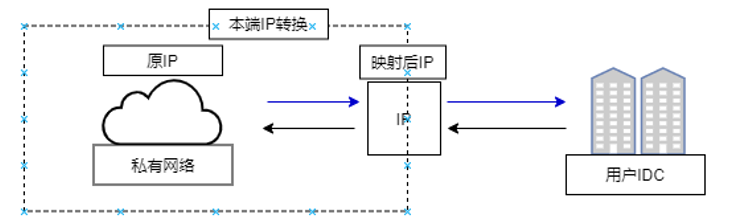
image.png

IDC-side static NAT

  • IDC-side static NAT involves mapping an IP address from the user's IDC network to a new IP address, enabling communication with the VPC using this newly assigned address.
  • IDC-side static NAT conversion doesn't restrict the direction of network requests, allowing both the virtual private cloud to initiate communication with the VPN peer and the VPN peer to initiate communication with the virtual private cloud.
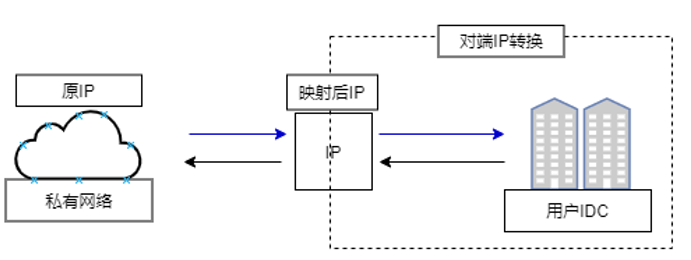
image.png

IDC-side DNAT

IDC-side DNAT, or local destination IP and port translation, allows the IDC network to actively connect to the VPC. It maps specific IP addresses and ports from the IDC subnet to new IP addresses and ports, enabling targeted communication with the VPC while ensuring IDC access is limited to the specified IP-port mappings.
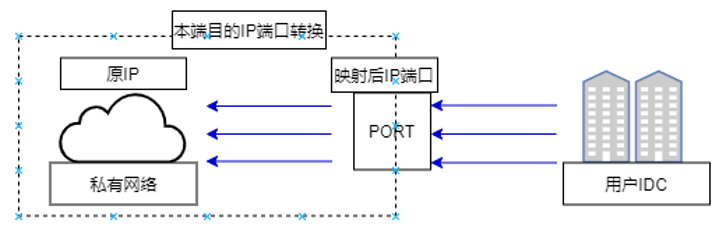
image.png

Cloud DNAT

Cloud DNAT translates specific IP addresses and ports from the IDC (peer) side to new IP-port mappings. The VPC can only communicate with the designated IDC IP addresses and ports through these mapped values.
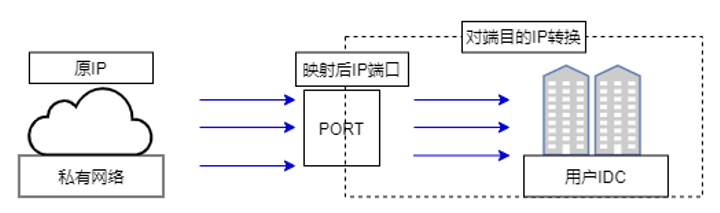
image.png

View monitor data

VPN gateway monitor

  1. Log in to the Management Console, navigate to Product Services - Virtual Private Cloud (VPC), then select Network Connection - VPN Gateway from the left navigation panel to view the VPN Gateway Instance List.
  2. Select Monitor after the instance, and a floating monitor window will appear on the right side of the page.
  3. Click View More to access the Monitor Of Instance Details page.
  4. Click Alarm Details on the Monitor page to enter the alarm policy configuration page, where you can manage the alarm strategy of VPN gateway. For detailed operation steps, please refer to BCM Alarm Management.

VPN tunnel monitor

  1. Sign in to the Management Console, select Product Service - Virtual Private Cloud (VPC), then select Network Connection - VPN Gateway from the left navigation bar to access the VPN Gateway Instance List.
  2. In the VPN gateway instance list, click the arrow beneath "Tunnel Count" to display the details of available VPN tunnels.
  3. Click "Monitor" next to a VPN tunnel to open the monitoring data window.
  4. Click Alarm Details in the list operation to enter the alarm policy configuration page, where you can manage the alarm strategy of VPN tunnel. For detailed operation steps, please refer to BCM Alarm Management.

Previous
GRE VPN Gateway
Next
SSL VPN Gateway