

Security Group Configuration Practice (Advanced Level)
Overview
Based on best practices for configuring security groups (Beginner's Guide), Baidu AI Cloud employs stateful firewalls and allow list settings to strengthen access management and control for cloud servers. This advanced guide explores batch operations for security groups and rule functionality, making large-scale cloud resource management more streamlined and efficient.
Requirement scenarios
Use Case 1: Apply security groups in bulk to multiple Baidu Cloud Compute instances
To improve security, users should configure fine-grained access controls for cloud services and implement tailored security policies for business systems. This is especially important in scenarios requiring batch operations across multiple Baidu Cloud Compute instances, enabling flexible and precise network access control.
Example case
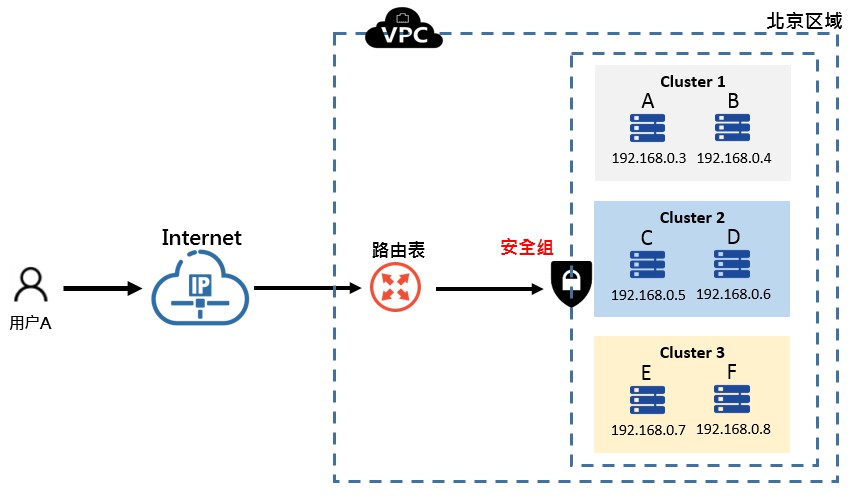
As illustrated in the diagram below, the hierarchical service architecture consists of three clusters of Baidu Cloud Compute servers, each with its own distinct security group policies. Cloud services within each cluster must configure their security groups simultaneously.
Operation step
Cluster 1: Baidu Cloud Computes A and B need to configure security group policies (Policy 1, Policy 2, Policy 3) simultaneously.
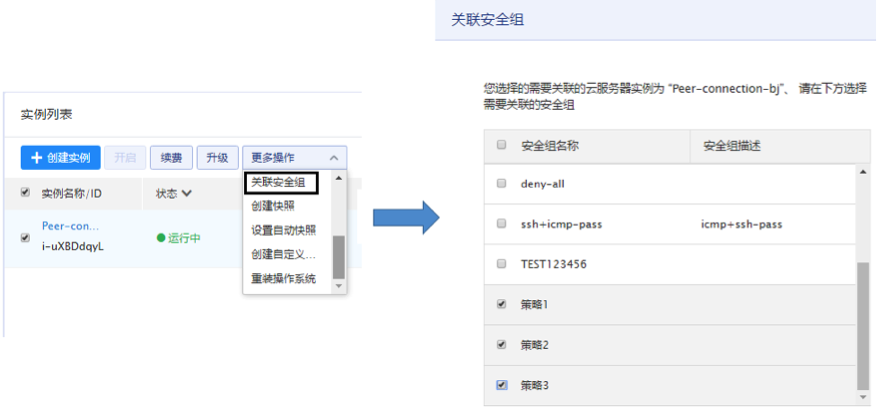
At this stage, the ability to apply multiple security groups in bulk to multiple Baidu Cloud Compute instances has been implemented.
Use Case 2: security group Referenced as a Rule
In Case 1, Cluster 1 has intranet connectivity, Cluster 2 has internal connectivity, and Cluster 3 has internal connectivity, while Clusters 1, 2, and 3 remain intranet-isolated (no mutual connectivity). In Case 2, the requirement is for Baidu Cloud Compute instances A, B, C, D, E, and F to achieve public network interconnectivity through their respective EIPs.
By configuring the internal IP addresses of each server across multiple security groups, intra-cluster communication and inter-cluster isolation are achieved. However, frequent addition or removal of servers from a cluster makes updating security group configurations highly complex and error-prone. Leveraging the rule reference functionality of the security group effectively addresses this challenge.
Operation steps
-
Create security group Cluster 1, apply it to Baidu Cloud Computes A and B, then modify Cluster 1's rules by closing all inbound and outbound policies and adding a rule that references security group Cluster 1 itself.
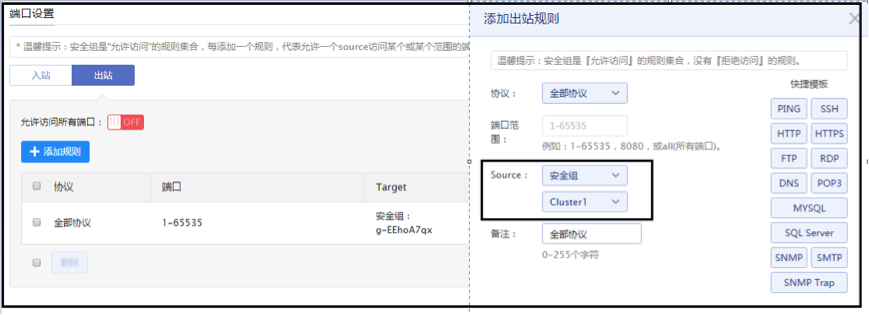
- Following the same procedure as Step 1, configure security group policies for Clusters 2 and 3, applying them to C/D and E/F, respectively, with egress policies referencing their respective security groups.
- These steps enable intranet communication within Clusters 1, 2, and 3 while maintaining intranet isolation between clusters and no public network connectivity.
-
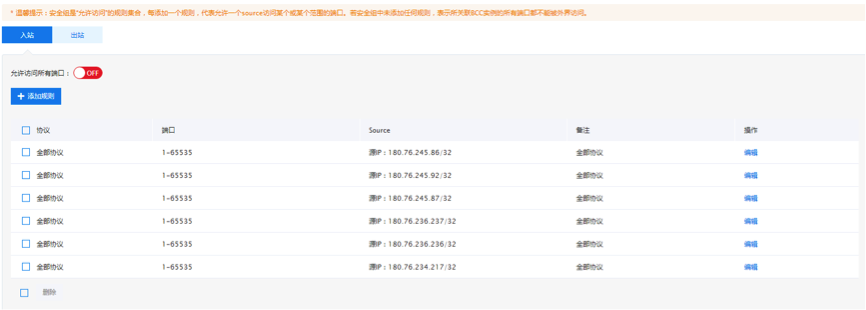
To enable public network interconnectivity, create a new security group named "Public network interconnect." After disabling all inbound and outbound policies, allow public IPs A, B, C, D, E, and F.
-
Apply the "Public network interconnect" security group to Baidu Cloud Computes A, B, C, D, E, and F.
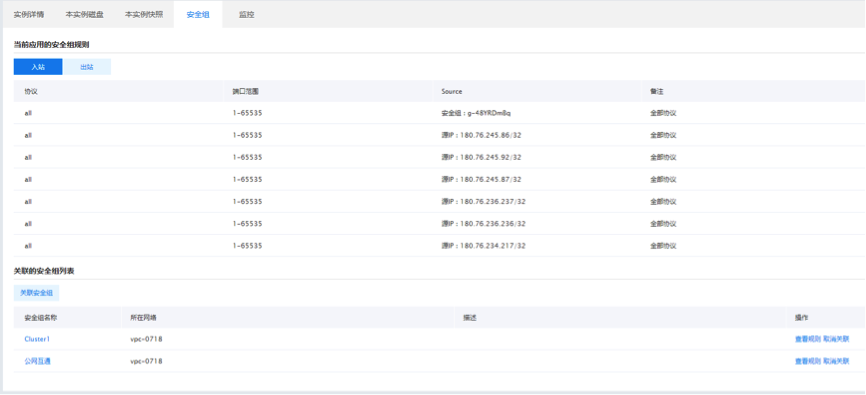
At this point, intranet connectivity within Clusters 1, 2, and 3 has been established, without internet access between clusters, but mutual access via the public network is enabled.
Related products
Cloud Server, Dedicated Server, Baidu Taihang·Elastic Baremetal Compute, Load Balancer, Virtual Private Cloud, Service Network Interface Card, Cloud Database RDS for MySQL Edition, Message Queue for RabbitMQ