Order Management

Finance Finance

  • API Reference
    • Access control
    • Balance Query Related Interfaces
      • Account Balance Query
    • Bill Related Interfaces
      • Appendix
      • Charge Item Bill
      • Python Request Example
      • Resource Month Bill
    • Error response
    • Feature Update Records
    • General Description
    • Interface Specifications
    • Introduction
  • Bill Management
    • Bill Details
    • Bill Subscription
    • Consumption Information Subscription Guide
    • Consumption Overview
    • How to View
    • Tag-Based Billing
  • Charge
    • Billing & Configuration Changes
      • Configuration Upgrade Or Shrinkage
      • Shift Charge
    • Charge type
    • On-Demand Billing
    • Pay-as-you-go
    • Subscription billing
  • Contract
    • Apply for Electronic Contract
    • Overview
  • Cost Management
    • Cost Allocation
    • Cost Splitting
  • Disclaimer
  • Enterprise Organization Financial Management
  • FAQs
    • Bill and Debt
    • Billing Issues
    • Common Questions Overview
    • Contract Issues
    • Coupon Issues
    • Dedicated Account Remittance Issues
    • Invoice Issues
    • Order Issues
    • Recharge Issues
    • Refund Issues
    • Renew Issues
    • Withdrawal Issues
  • Invoice
    • Apply for Baidu Intelligent Cloud Invoice
    • Return or Exchange Baidu Intelligent Cloud Invoice
  • Multi-Account Multi-User Financial Management
    • Enterprise Organization - Financial Management
    • Multi-User Access Control - Financial Permission
    • Unified Finance
  • Order Management
  • Overview
  • Partner Deposit Payment
  • Purchase Guide
    • Coupon
      • Activating Coupons
      • Coupon Overview
      • Using Coupons
      • Viewing Coupons
    • Income and Expense Details
    • Purchase
    • Recharge
      • Exclusive Account Wire Transfer
      • Recharge Operations
      • Viewing Balance
    • Refund and Compensation
      • Product Compensation Standards
      • Refund Application Process
      • Refund policy
      • Unsubscribe Overview
      • Unsubscribe Rule Description
    • Renew
      • Auto-renewal
      • Renew Overview
      • Unified Resource Expiration Time
    • Withdrawal
  • Resource Package Management
    • Resource Package Deduction Details
    • Resource Package Overview
  • SDK
    • Java-SDK
      • Bill
      • BillingClient
      • Exception handling
      • Install SDK
      • Overview
      • Version Update Description
All documents
menu
No results found, please re-enter

Finance Finance

  • API Reference
    • Access control
    • Balance Query Related Interfaces
      • Account Balance Query
    • Bill Related Interfaces
      • Appendix
      • Charge Item Bill
      • Python Request Example
      • Resource Month Bill
    • Error response
    • Feature Update Records
    • General Description
    • Interface Specifications
    • Introduction
  • Bill Management
    • Bill Details
    • Bill Subscription
    • Consumption Information Subscription Guide
    • Consumption Overview
    • How to View
    • Tag-Based Billing
  • Charge
    • Billing & Configuration Changes
      • Configuration Upgrade Or Shrinkage
      • Shift Charge
    • Charge type
    • On-Demand Billing
    • Pay-as-you-go
    • Subscription billing
  • Contract
    • Apply for Electronic Contract
    • Overview
  • Cost Management
    • Cost Allocation
    • Cost Splitting
  • Disclaimer
  • Enterprise Organization Financial Management
  • FAQs
    • Bill and Debt
    • Billing Issues
    • Common Questions Overview
    • Contract Issues
    • Coupon Issues
    • Dedicated Account Remittance Issues
    • Invoice Issues
    • Order Issues
    • Recharge Issues
    • Refund Issues
    • Renew Issues
    • Withdrawal Issues
  • Invoice
    • Apply for Baidu Intelligent Cloud Invoice
    • Return or Exchange Baidu Intelligent Cloud Invoice
  • Multi-Account Multi-User Financial Management
    • Enterprise Organization - Financial Management
    • Multi-User Access Control - Financial Permission
    • Unified Finance
  • Order Management
  • Overview
  • Partner Deposit Payment
  • Purchase Guide
    • Coupon
      • Activating Coupons
      • Coupon Overview
      • Using Coupons
      • Viewing Coupons
    • Income and Expense Details
    • Purchase
    • Recharge
      • Exclusive Account Wire Transfer
      • Recharge Operations
      • Viewing Balance
    • Refund and Compensation
      • Product Compensation Standards
      • Refund Application Process
      • Refund policy
      • Unsubscribe Overview
      • Unsubscribe Rule Description
    • Renew
      • Auto-renewal
      • Renew Overview
      • Unified Resource Expiration Time
    • Withdrawal
  • Resource Package Management
    • Resource Package Deduction Details
    • Resource Package Overview
  • SDK
    • Java-SDK
      • Bill
      • BillingClient
      • Exception handling
      • Install SDK
      • Overview
      • Version Update Description
  • Document center
  • arrow
  • FinanceFinance
  • arrow
  • Order Management

Order Management

Updated at:2025-10-27

When viewing orders, you can either overview all order information or view order information under specific conditions by selecting the payment method, product name, and order time range.

  1. Sign in to the Management Console - Finance Center.
  2. Click Order Management in the left navigation bar to enter the order management page.
  3. Filter orders by the following options:
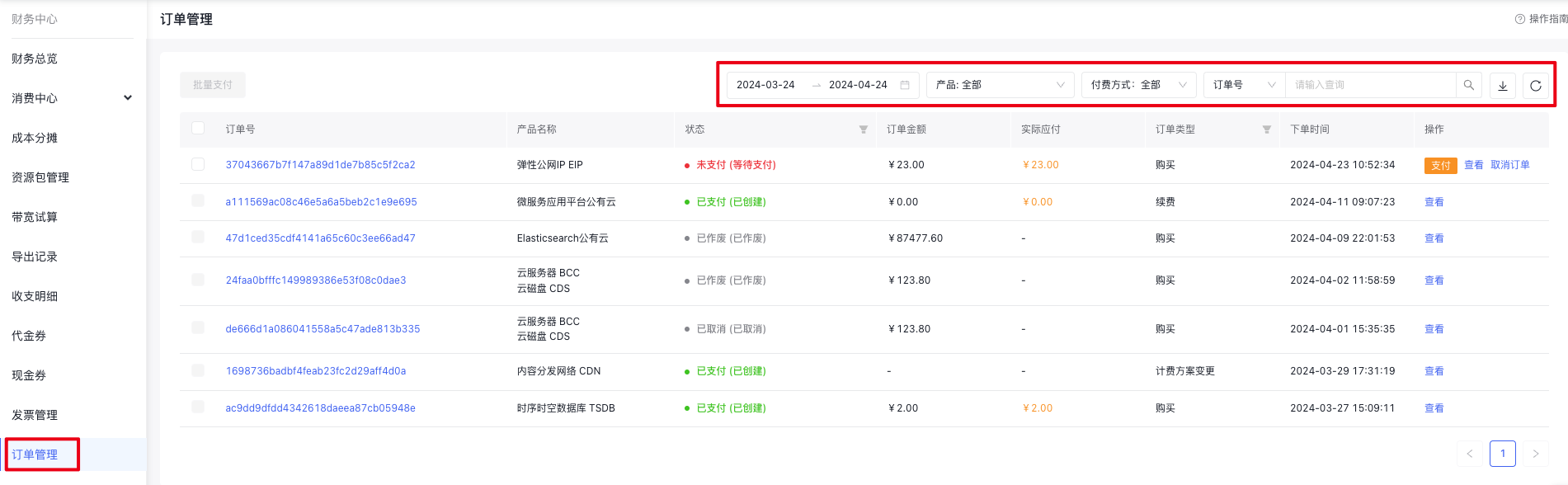
    image.png

Filter options Description
Order time Select the start date and end date. Displays records of the last 7 days by default.
Product name You can select a product to view its corresponding orders, or directly enter the product name you wish to view in the search box of the dropdown menu. If no action is taken, the system will display orders for all products by default.
Bill type
  • “All”: View orders for all payment methods;
  • “Prepay”: View orders where payment precedes service usage
  • “Postpay”: View orders where service is used first and paid later
Precise search
  • “Order ID”: Support users entering order ID for precise search of corresponding orders;
  • “Instance ID”: Allow users to input resource IDs to query all orders associated with the resource’s entire lifecycle
  1. The order records page displays the following details:
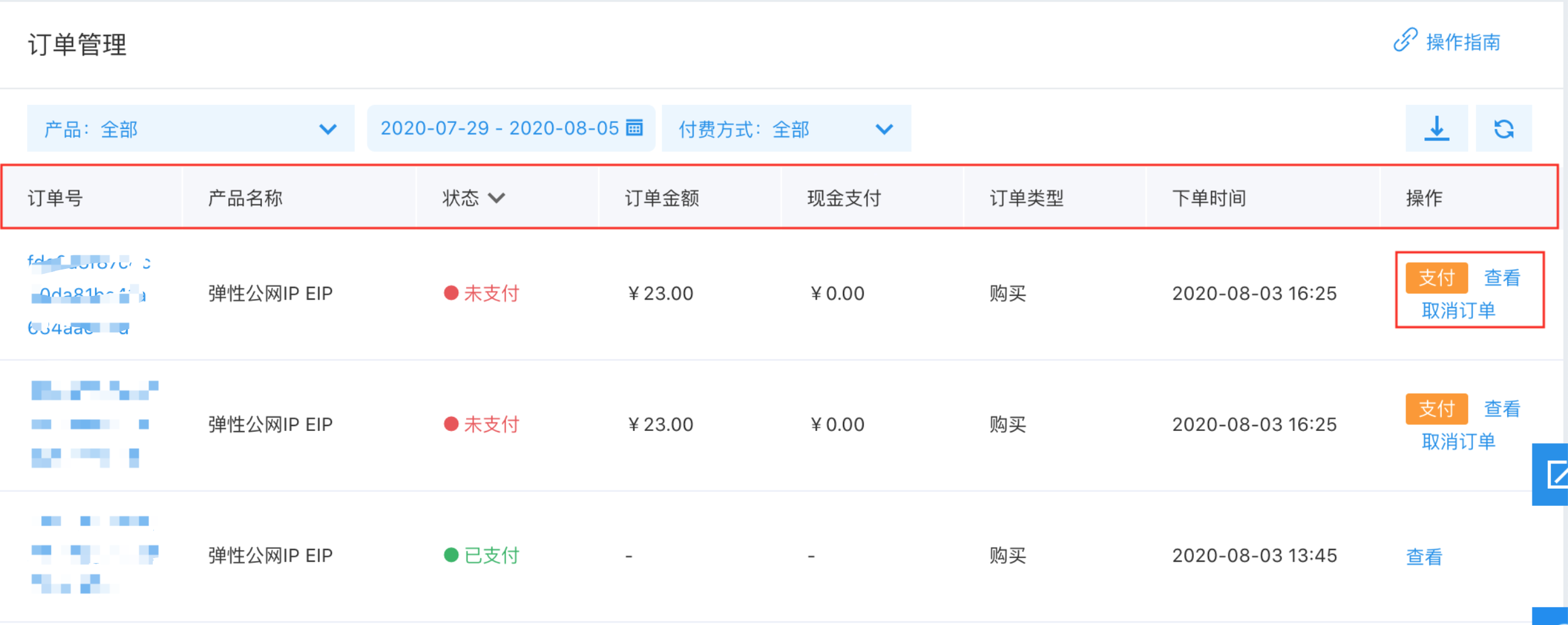
image.png

List display items Description
Order ID The unique identification number of an order, which facilitates locating all orders. Click to view the configuration information of the order.
Product name Display the product corresponding to the order.
Status
  • “Unpaid”: Indicate that the viewed order has not been paid yet;
  • “Paid”: Indicate that the viewed order has been paid successfully;
  • “Cancelled”: Indicate that the viewed order has been cancelled;
  • “Voided”: Indicate that the viewed order has been voided.
Order amount Display the amount of money to be paid for the order.
Cash payment Display the amount of money that has been paid for the order.
Order type
  • “Purchase”: Indicate an order generated by purchasing a service;
  • "Renewal": Indicate an order generated by renewing a service;
  • “Upgrade”: Indicate an order generated by upgrading a service;
  • “Downgrade”: Indicate an order generated by downgrading a service;
  • “Configuration change”: Indicate an order generated by actions such as elastic scaling of pay-as-you-go services or switching of billing methods;
  • “Compensation duration”: Indicate the service failure compensation promised by Baidu AI Cloud.
Order time Display the specific time when the order was placed, accurate to the minute.
Operation
  • “View": Allow viewing the configuration information of the order
  • “Pay”: Allow proceeding to pay for an unpaid order
  • “Cancel order”: Allow canceling the current unpaid order by yourself
  1. Click the order ID or the View option corresponding to the order, and the order details page will be displayed as shown in the figure below:
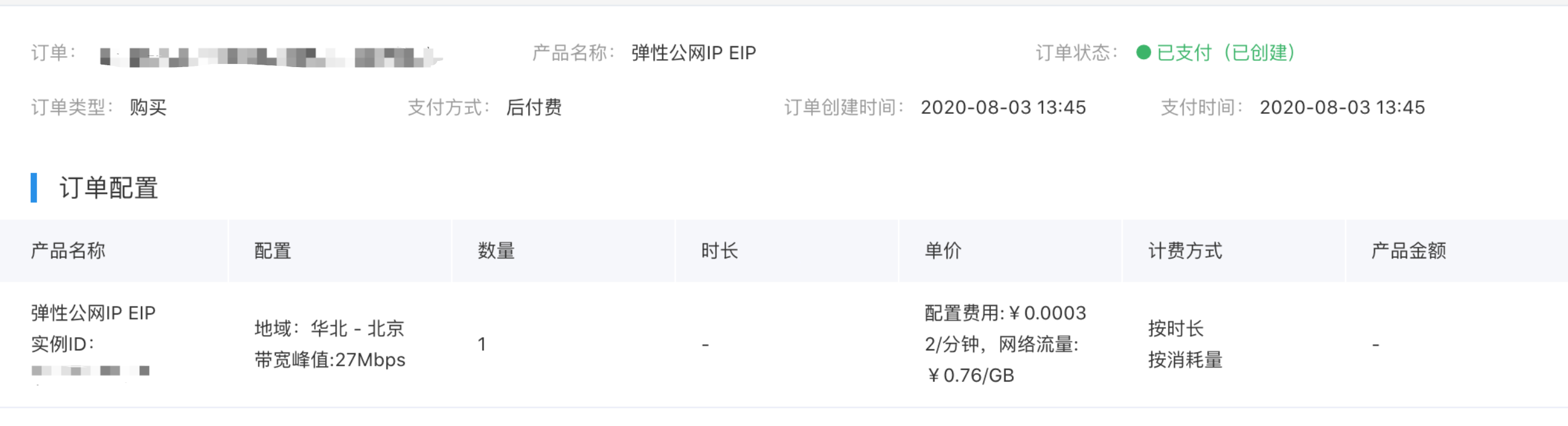
image.png

The details of the display items on the order configuration information page are as follows:

List display items Description
Product name Display the product for which the order was generated.
Configuration Display the detailed configuration of the order.
Count Display the number of purchased instances.
Duration Display the service duration of the product in the order, accurate to the minute.
Unit price Display the unit price of the product per unit time. The unit time for pay-as-you-go billing is 1 minute. The unit time for subscription billing is one month or one year.
Charge type
  • “Subscription”: Indicate that the billing method is annual or monthly subscription (prepaid);
  • “Pay-as-you-go” (or “by quantity”, etc.): Indicate that the billing method is pay-as-you-go (postpaid).
Product amount Display the amount of money to be paid for this order without applying discounts, which is consistent with the “Order Amount” in the order list.
  1. To download the order, please click the download button:
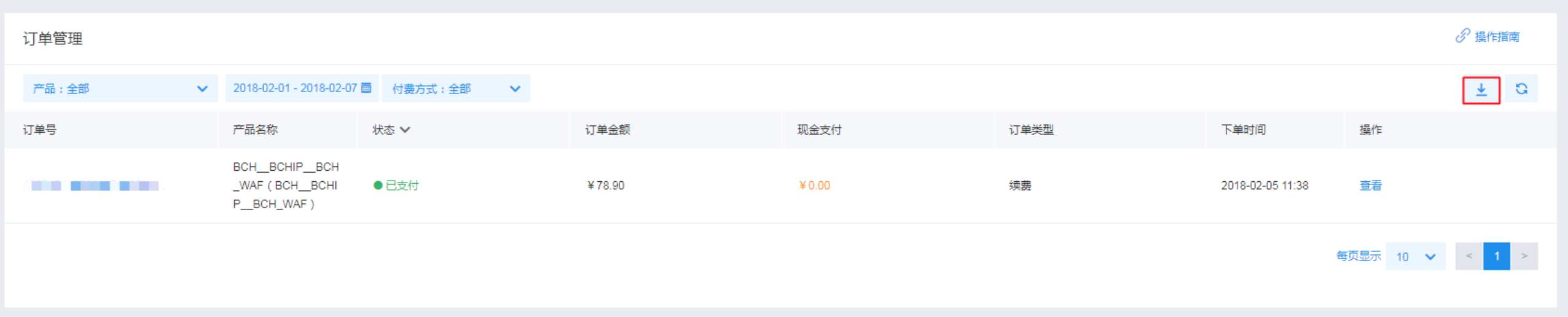
image.png

Previous
Multi-Account Multi-User Financial Management
Next
Overview