Exclusive Account Wire Transfer

Finance Finance

  • API Reference
    • Access control
    • Balance Query Related Interfaces
      • Account Balance Query
    • Bill Related Interfaces
      • Appendix
      • Charge Item Bill
      • Python Request Example
      • Resource Month Bill
    • Error response
    • Feature Update Records
    • General Description
    • Interface Specifications
    • Introduction
  • Bill Management
    • Bill Details
    • Bill Subscription
    • Consumption Information Subscription Guide
    • Consumption Overview
    • How to View
    • Tag-Based Billing
  • Charge
    • Billing & Configuration Changes
      • Configuration Upgrade Or Shrinkage
      • Shift Charge
    • Charge type
    • On-Demand Billing
    • Pay-as-you-go
    • Subscription billing
  • Contract
    • Apply for Electronic Contract
    • Overview
  • Cost Management
    • Cost Allocation
    • Cost Splitting
  • Disclaimer
  • Enterprise Organization Financial Management
  • FAQs
    • Bill and Debt
    • Billing Issues
    • Common Questions Overview
    • Contract Issues
    • Coupon Issues
    • Dedicated Account Remittance Issues
    • Invoice Issues
    • Order Issues
    • Recharge Issues
    • Refund Issues
    • Renew Issues
    • Withdrawal Issues
  • Invoice
    • Apply for Baidu Intelligent Cloud Invoice
    • Return or Exchange Baidu Intelligent Cloud Invoice
  • Multi-Account Multi-User Financial Management
    • Enterprise Organization - Financial Management
    • Multi-User Access Control - Financial Permission
    • Unified Finance
  • Order Management
  • Overview
  • Partner Deposit Payment
  • Purchase Guide
    • Coupon
      • Activating Coupons
      • Coupon Overview
      • Using Coupons
      • Viewing Coupons
    • Income and Expense Details
    • Purchase
    • Recharge
      • Exclusive Account Wire Transfer
      • Recharge Operations
      • Viewing Balance
    • Refund and Compensation
      • Product Compensation Standards
      • Refund Application Process
      • Refund policy
      • Unsubscribe Overview
      • Unsubscribe Rule Description
    • Renew
      • Auto-renewal
      • Renew Overview
      • Unified Resource Expiration Time
    • Withdrawal
  • Resource Package Management
    • Resource Package Deduction Details
    • Resource Package Overview
  • SDK
    • Java-SDK
      • Bill
      • BillingClient
      • Exception handling
      • Install SDK
      • Overview
      • Version Update Description
All documents
menu
No results found, please re-enter

Finance Finance

  • API Reference
    • Access control
    • Balance Query Related Interfaces
      • Account Balance Query
    • Bill Related Interfaces
      • Appendix
      • Charge Item Bill
      • Python Request Example
      • Resource Month Bill
    • Error response
    • Feature Update Records
    • General Description
    • Interface Specifications
    • Introduction
  • Bill Management
    • Bill Details
    • Bill Subscription
    • Consumption Information Subscription Guide
    • Consumption Overview
    • How to View
    • Tag-Based Billing
  • Charge
    • Billing & Configuration Changes
      • Configuration Upgrade Or Shrinkage
      • Shift Charge
    • Charge type
    • On-Demand Billing
    • Pay-as-you-go
    • Subscription billing
  • Contract
    • Apply for Electronic Contract
    • Overview
  • Cost Management
    • Cost Allocation
    • Cost Splitting
  • Disclaimer
  • Enterprise Organization Financial Management
  • FAQs
    • Bill and Debt
    • Billing Issues
    • Common Questions Overview
    • Contract Issues
    • Coupon Issues
    • Dedicated Account Remittance Issues
    • Invoice Issues
    • Order Issues
    • Recharge Issues
    • Refund Issues
    • Renew Issues
    • Withdrawal Issues
  • Invoice
    • Apply for Baidu Intelligent Cloud Invoice
    • Return or Exchange Baidu Intelligent Cloud Invoice
  • Multi-Account Multi-User Financial Management
    • Enterprise Organization - Financial Management
    • Multi-User Access Control - Financial Permission
    • Unified Finance
  • Order Management
  • Overview
  • Partner Deposit Payment
  • Purchase Guide
    • Coupon
      • Activating Coupons
      • Coupon Overview
      • Using Coupons
      • Viewing Coupons
    • Income and Expense Details
    • Purchase
    • Recharge
      • Exclusive Account Wire Transfer
      • Recharge Operations
      • Viewing Balance
    • Refund and Compensation
      • Product Compensation Standards
      • Refund Application Process
      • Refund policy
      • Unsubscribe Overview
      • Unsubscribe Rule Description
    • Renew
      • Auto-renewal
      • Renew Overview
      • Unified Resource Expiration Time
    • Withdrawal
  • Resource Package Management
    • Resource Package Deduction Details
    • Resource Package Overview
  • SDK
    • Java-SDK
      • Bill
      • BillingClient
      • Exception handling
      • Install SDK
      • Overview
      • Version Update Description
  • Document center
  • arrow
  • FinanceFinance
  • arrow
  • Purchase Guide
  • arrow
  • Recharge
  • arrow
  • Exclusive Account Wire Transfer
Table of contents on this page
  • Exclusive remittance account
  • Remittance verification rules
  • Remittance verification steps
  • View remittance records
  • Filter remittance records
  • Verify remittance information
  • Export remittance records
  • View the account name of remitter

Exclusive Account Wire Transfer

Updated at:2025-10-27

Exclusive remittance account

To meet the demand for corporate-to-public business remittance of Baidu AI Cloud corporate users, we provide An Offline Remittance Channel - the Exclusive Remittance Account (hereinafter referred to as the Exclusive Account). Users who have completed corporate real-name certification can recharge their Baidu AI Cloud account balance via offline remittance to their exclusive account, enabling automatic fund addition and fast arrival.

Each Baidu AI Cloud corporate real-name account is entitled to an independent exclusive account. If you do not currently have an exclusive account, you can go to generate your Exclusive Remittance Account.

If you already have an exclusive account, you can click Remittance Voucher Download on the page to download the electronic voucher for remittance to the exclusive account.

  • If you applied for the exclusive remittance account before July 7, 2021, the date on the electronic voucher will be defaulted to June 30, 2021;
  • If you applied for the exclusive remittance account on or after July 7, 2021, the date on the electronic voucher will be the date you applied for the account.

Remittance verification rules

To avoid fund disputes and ensure the validity and compliance of remittances, please confirm the remittance account before making a remittance, and try to ensure that the account name of remitter is consistent with the certification name of your Baidu AI Cloud account.

  • If the remittance is from yourself (i.e., the account name of remitter matches the certification name of your Baidu AI Cloud account), the transferred funds will be directly recharged to your Baidu AI Cloud account.
  • If the remittance comes from a third party (third-party payment scenario) and the account name of remitter is inconsistent with the certification name of your Baidu AI Cloud account, you need to supplement the remittance information as follows:

    • If the account name of remitter used for the remittance matches one of the "Active" account names of remitter in the list of account names of remitter, the remittance will be directly recharged to your Baidu AI Cloud account after arriving at Baidu physical bank account.
    • If the account name of remitter used for the remittance does not match all "Active" account names of remitter in the list of account names of remitter, Baidu AI Cloud will send you an SMS notification after the remittance arrives at Baidu physical bank account. You need to find the corresponding remittance record on the Exclusive Account Remittance page, then enter the Actual Account Name of Remitter and Accurate Remittance Amount to complete the recharge.

You have only one chance to enter the remittance information. If the remittance information comparison is successful, the remittance recharge is successful;

If the remittance information comparison fails, the remittance will directly enter the manual review process. Please Contact Us offline to provide Third-Party Payment Certificate with Official Seals of Both Parties.


Remittance verification steps


View remittance records

  1. Sign in to the Baidu AI Cloud Management Console, open Financial Center > Transaction Details, and select the Exclusive Account Remittance tab.
  2. On the Exclusive Account Remittance page, view all remittance records via your exclusive account, including records of remittances made by yourself and others.
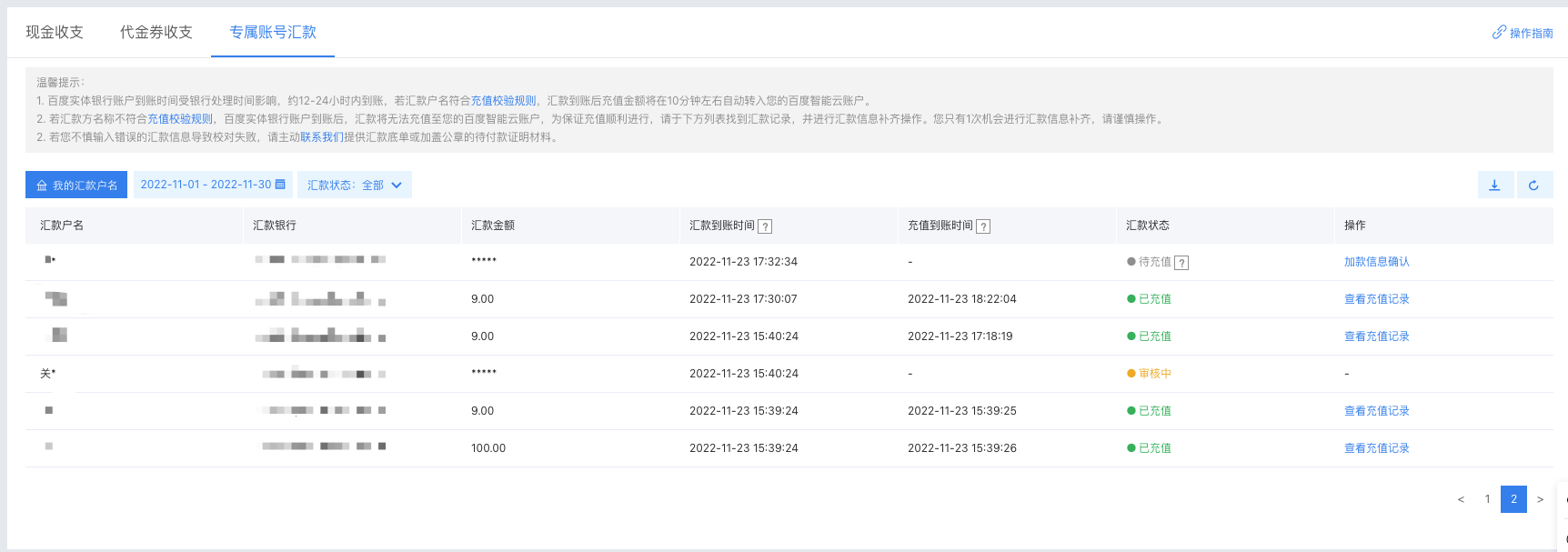
image.png


Filter remittance records

You can set the following options to view the eligible remittance records of exclusive accounts.

image.png


Filter criteria

Filter criteria Description
Time Range Filter remittance records by selecting a time range. The time filter is based on the Remittance Arrival Time
Remittance status Filter remittance records by selecting Remittance Status based on the current status of the remittance record

Description of list fields

Field Description
Account name of remitter The account name of remitter recorded by the bank when the remittance is made
Remitting bank The bank name used by the remitter for remittance
Remittance amount The amount of funds remitted by the remitter
Remittance arrival time It refers to the time when the remitted funds arrive at Baidu physical bank account (affected by bank processing time)
Recharge arrival time It refers to the time when the remitted funds are successfully recharged to your Baidu AI Cloud account balance
Remittance status Current status of the remittance:
  • Recharged: Records in this status indicate that the payment has been successfully recharged to your Baidu AI Cloud balance, and your Baidu AI Cloud balance will be successfully increased
  • To be recharged: If the account name of remitter of this payment remittance fails to pass the verification of the Baidu system, it will not be able to directly recharge to your Baidu AI Cloud account after entering the Baidu physical bank. At this time, this payment will be set to the "to be recharged" status, and you can enter remittance information for the records in this status
  • To be reviewed: The record in this status indicates that the account name of remitter or remittance amount you entered does not match the bank information. At this time, it will enter the manual review process and you are required to submit supporting documents (such as a third-party payment certificate with official seals of both parties)
  • Under review: Records in this status indicate that the payment has entered the manual review process after you submitted the required documents
  • Refunded: Records in this status indicate that the remittance has been refunded after you submitted a ticket, and the funds will be returned via the original payment channel
  • Transferred: Records in this status indicate that the remittance has been manually transferred to another target account at your request
Operation
  • View recharge records: For records in the "Recharged" status, you can click directly to view the recharge records
  • Confirmation of recharge information: You can supplement the remittance details (including the account name of remitter and remittance amount) for remittance records in the "To be Recharged" status here

Verify remittance information

  • After clicking Confirm Recharge Information, enter the actual account name of remitter and remittance amount of the current remittance record in the system pop-up window. Once verified by the system, the remittance will be successfully recharged to your Baidu AI Cloud account balance.
  • When you successfully associate an account name of remitter with a remittance record, this account name of remitter will be added to your list of account names of remitter and marked as "Active" status. Unless you delete this account name of remitter, it can be directly used as a recharge voucher for remittances to your exclusive account. All remittances from this account name of remitter will be directly recharged to your Baidu AI Cloud account balance.

For fund security reasons, the name of the payer corresponding to remittance records with an amount less than or equal to RMB 10 will not be included in the list of account names of remitter. Therefore, for remittances with an amount less than or equal to RMB 10, you need to manually enter the information
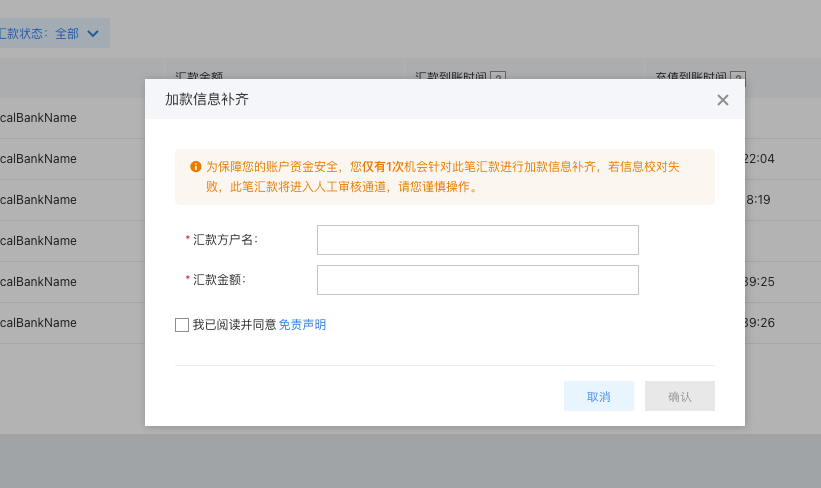
image.png


Export remittance records

You can click the Download button to export "Recharged" records within the selected time range.

image.png


If you cannot find a remittance record or discover an incorrect remittance record in your account, please contact us promptly via the phone call 400-920-8999 or Submit a Ticket.

View the account name of remitter

You can click Exclusive Account Remittance -> My Account Name of Remitter to view the third-party account name of remitter you are currently using or have used before. Your certification name will not be included in this list.
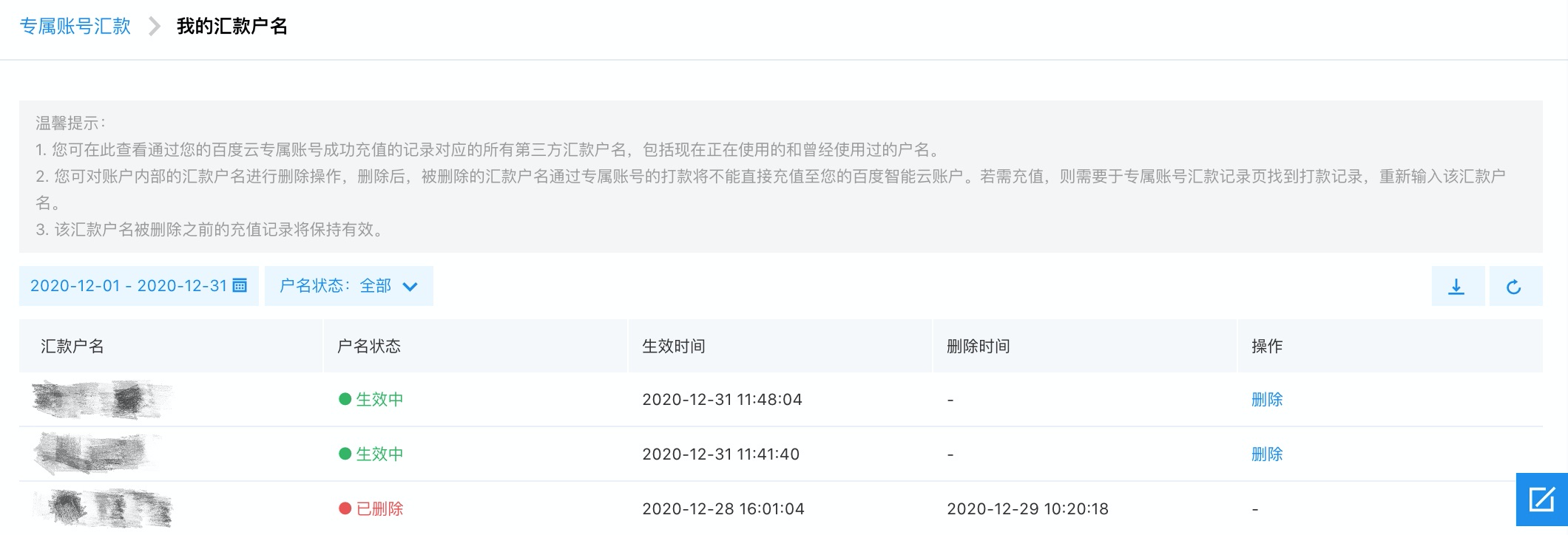
image.png


Filter criteria

You can set the following options to view eligible account name of remitter:

  • Time range: You can filter remittance records by selecting a time range, and the time filtering is based on the effective rime.
  • Account name status: There are two types of account name statuses: "Active" and "Deleted".
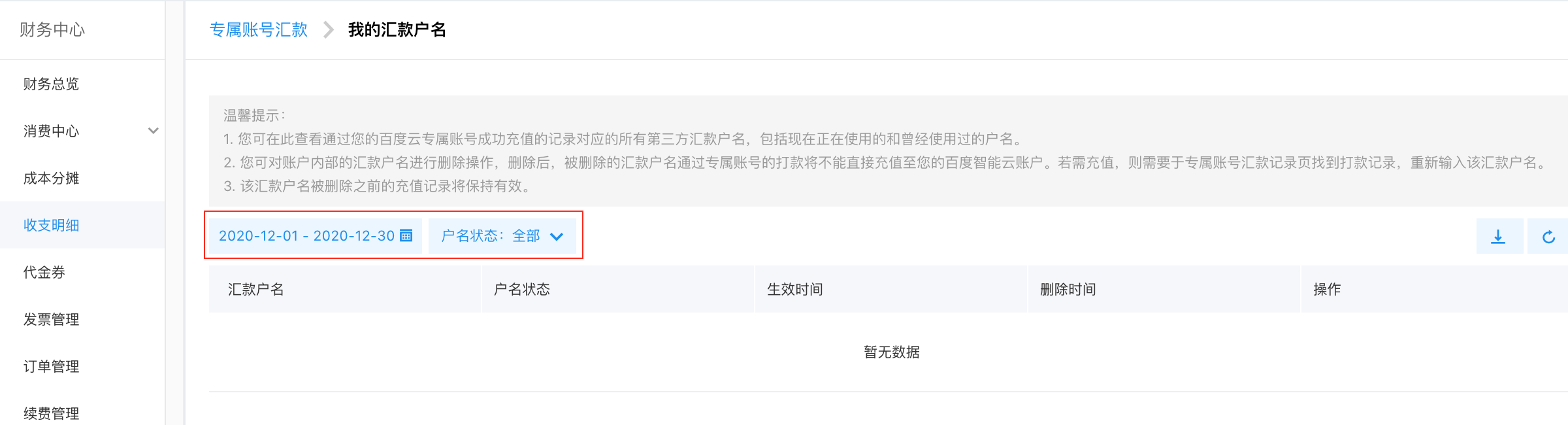
image.png


Description of list fields

Field Description
Account name of remitter The third-party account name of remitter corresponding to "Recharged" remittance records typically do not include your certification name
Account name status
  • Active: After you manually enter the account name of remitter for a remittance record and the recharge is successful, the account name of remitter corresponding to that record will be directly added to the My Account Name of Remitter list and marked as "Active"; Remittances from an active account name of remitter can be directly recharged to your Baidu AI Cloud account
  • Deleted: This account name of remitter has been deleted by you. Until it is reactivated next time, remittances from this account name of remitter cannot be directly recharged to your Baidu AI Cloud account
Effective time The time when the payment record corresponding to this account name of remitter is successfully recharged
Deletion time The time when this account name of remitter is manually deleted
Operation
  • You can delete the account name of remitter in the "Active" status. After deletion, remittances from this account name of remitter cannot be directly recharged to your Baidu AI Cloud account balance
  • If you later need a deleted account name of remitter to continue serving as a recharge voucher for remittances to your exclusive account, you only need to find the remittance record on the Exclusive Account Remittance page and enter the account name of remitter after using the account name of remitter for remittance

Export the account name of remitter

You can click the Export button to export all account names of remitter that meet the filter criteria and their corresponding change records.
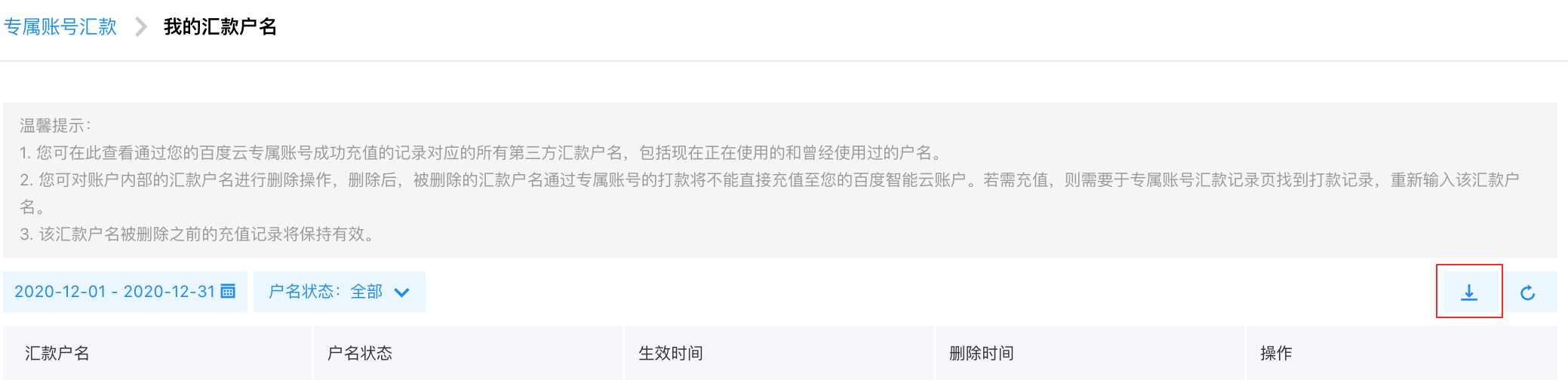
image.png


For any questions, please first refer to the Exclusive Account Remittance FAQs. If the issue remains unresolved, you can contact us via phone call 400-920-8999 or by Submit a Ticket.

Previous
Purchase
Next
Recharge Operations