

Viewing Balance
Updated at:2025-10-27
There are two ways to view your current account balance:
-
You can check your current account balance on the homepage of the Baidu AI Cloud Management Console.

- On the homepage of the Baidu AI Cloud Management Console, click Finance in the navigation bar. Then you can view your account balance in the Account Overview -> Account Information section.
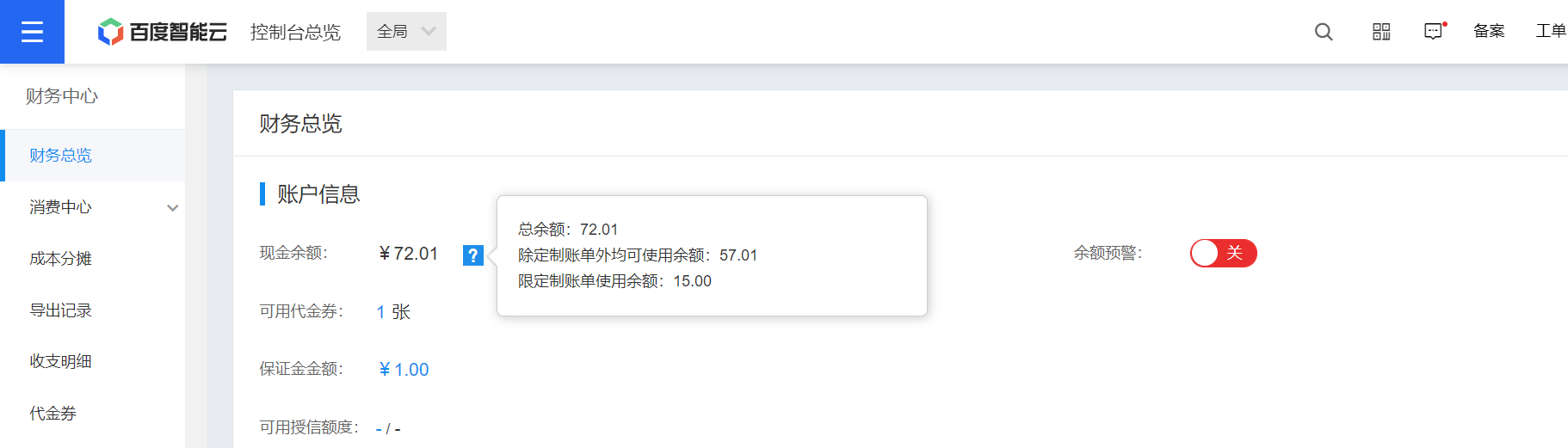
You can view the composition of your cash balance by clicking the question mark prompt next to the cash balance. The specific types of balances are explained as follows:
- Balance usable for all except customized bills: Indicates that this fund can be used to purchase all online products on Baidu AI Cloud.
- Balance restricted to xxxx bills: Indicates that this fund can only be used under the specified restriction, where “xxxx” represents a time period or a product. For example: “Balance restricted to 202111 bills” means the balance can be used for bills in November 2021; “Balance restricted to 202111 CDN bills” means the balance can be used for CDN bills in November 2021.
- Balance restricted to customized bills: Indicates that this fund can be used to pay for all non-online purchased products. For example: Fees for customized development services agreed with Baidu AI Cloud that cannot be transacted directly online.
- Balance restricted to designated customized bills: Indicates that this fund is designated to pay for the fee of a specific non-online purchased product and cannot be used for other bills.