Invoice Issues
How to apply for an invoice?
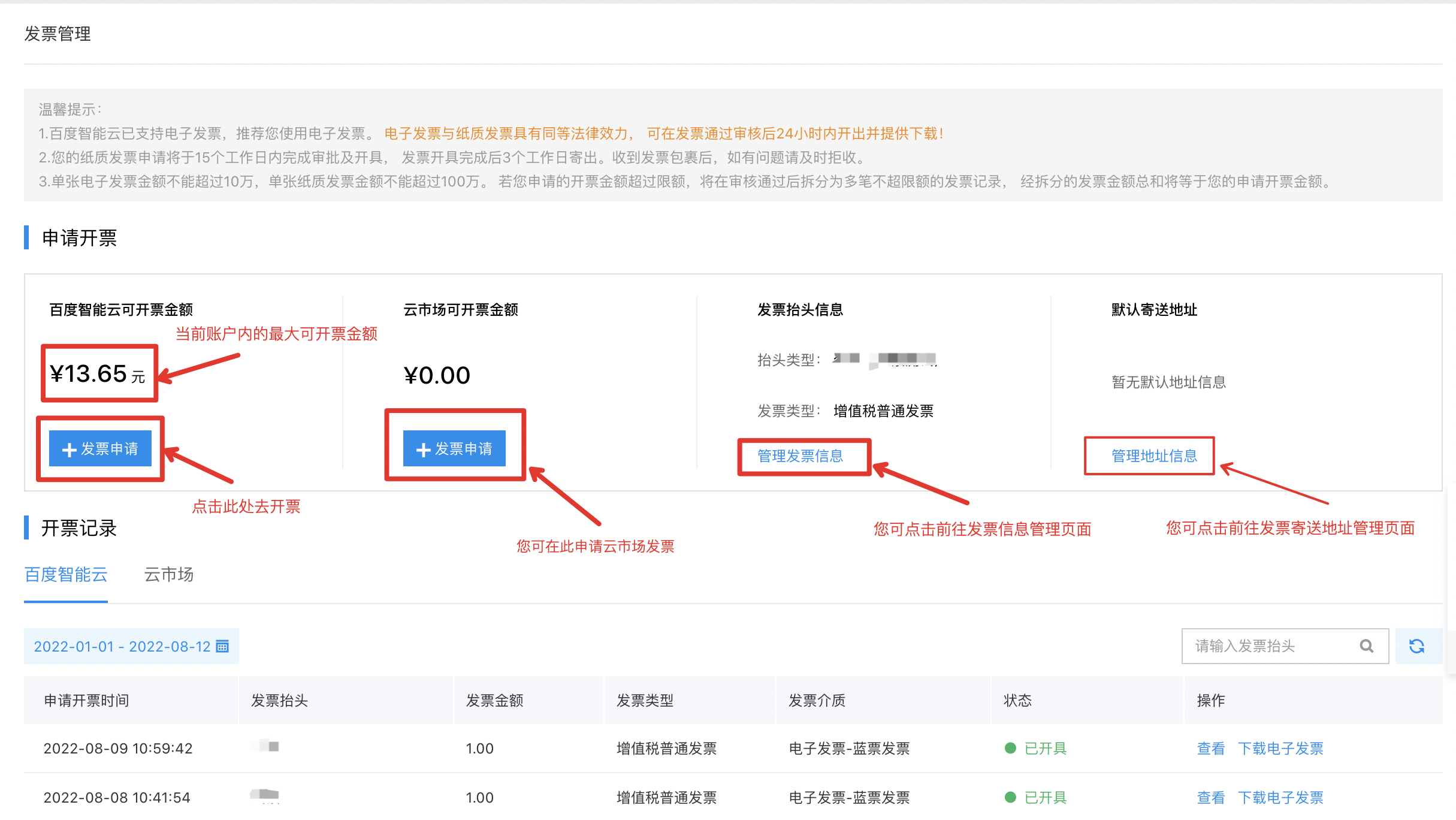
Baidu AI Cloud provides you with a self-service invoice application service. After completing certification, you can go to Console > Financial Overview > Invoice Management to apply for an invoice by yourself.
For detailed operations, you can refer to Applying for Baidu AI Cloud Invoice to view the specific invoice application process.
How to apply for an invoice directly after recharging via bank transfer?
Currently, invoice application based on the recharge amount is not supported; only consumption-based invoices are available. That is, the amount recharged into the balance can only be used to apply for an invoice based on the actual consumption amount after it has been spent.
- For prepaid consumption: You can apply for an invoice immediately after the order payment is completed and the order resources are successfully created.
- For postpaid consumption: You can apply for an invoice for the postpaid consumption bill on the day after the payment is completed.
Why is the available invoice amount in the account inconsistent with the recharge amount?
Invoice amount for consumption-based invoicing customers:
- For prepaid consumption in the account, a record of available invoice amount will be generated immediately;
- For postpaid consumption bills, a record of available invoice amount will be generated after 10:00 on the day following the payment.
Available invoice amount = Total prepaid cash consumption amount of the user + Total postpaid cash consumption amount up to the previous day (amounts from coupons, rebate funds, etc., cannot be invoiced) - Outstanding invoice amount. Consumption amount of cloud market products is not included in the user’s available invoice amount.
How to apply for an invoice for purchased cloud market products?
You can apply for an invoice online at Financial Center > Invoice Management 7 days after the order is delivered.
Cloud market products are sold by third-party service providers, so the invoice issuer will be the corresponding third-party service provider.
How do overseas or Hong Kong enterprises apply for invoices?
For overseas/Hong Kong enterprises, we can provide you with a proforma invoice. To obtain the proforma invoice template, please submit a ticket. After you confirm the template is correct, we will coordinate with the finance department to affix Baidu Netcom’s special invoice seal on the template and provide you with a scanned copy.
How to issue invoices for third-party paid orders?
If you are an agent: You can directly refer to Invoice Application Process to apply for invoices for third-party paid orders.
If you are a customer of an agent: Please contact the agent to obtain the invoice. Baidu AI Cloud will not provide invoices for the third-party paid orders in your account.
How to cancel an invoice application?
- If the invoice status is “Pending Approval”: Check if there is a Cancel Application option. If yes, you can withdraw the invoice application by yourself;
- If the invoice status is “Pending Approval” (without the Cancel Application option), “Approved”, “Issued”, or “Shipped”: To cancel the invoice application, please submit a ticket and we will verify and handle it for you.
How to void an invoice?
Voiding a paper invoice:
- If you applied for a paper ordinary invoice: Please send the original invoice along with a note explaining the reason for voiding to the following address: Fangzhou Building, Building 15, Zhongguancun Software Park Phase I, No. 8 Dongbeiwang West Road, Haidian District, Beijing, Baidu AI Cloud Finance Department, Tel.: 010-58003107 (Freight collect is not accepted). We will verify and handle it after receiving the original invoice;
- If you applied for a paper special invoice: Please send the original invoice and Invoice Rejection Certificate to the following address: Fangzhou Building, Building 15, Zhongguancun Software Park Phase I, No. 8 Dongbeiwang West Road, Haidian District, Beijing, Baidu AI Cloud Finance Department, Tel.: 010-58003107 (Freight collect is not accepted);
- For other special cases, please submit a ticket and we will verify and handle it as soon as possible.
To void a digital invoice, you can directly go to the Console > Finance > Invoice Management page, find the digital invoice you want to red-issue, and complete the self-service red-issuance directly For more instructions, please refer to the document: Returning and Exchanging Baidu AI Cloud Invoices.
Which type of invoice should I choose: Ordinary VAT invoice or special VAT invoice?
There are two types of invoices: “ordinary VAT invoice” and “special VAT invoice”. It is recommended that you confirm your company’s tax qualification with your company’s financial staff before selecting the invoice type.
Baidu AI Cloud provides an self-service application entry for special VAT invoices for enterprise-certified users. If you are an enterprise-certified user, you can freely switch between the invoice types (ordinary invoice/special invoice) when applying for an invoice.
- Ordinary VAT invoice: Applicable to small-scale taxpayers, individuals, and non-profit organizations such as government agencies and schools. It cannot be used to deduct input tax;
- Special VAT invoice: Applicable to enterprise users with general taxpayer qualification. It can be used to deduct input tax. To apply for a special VAT invoice, please complete enterprise certification first.
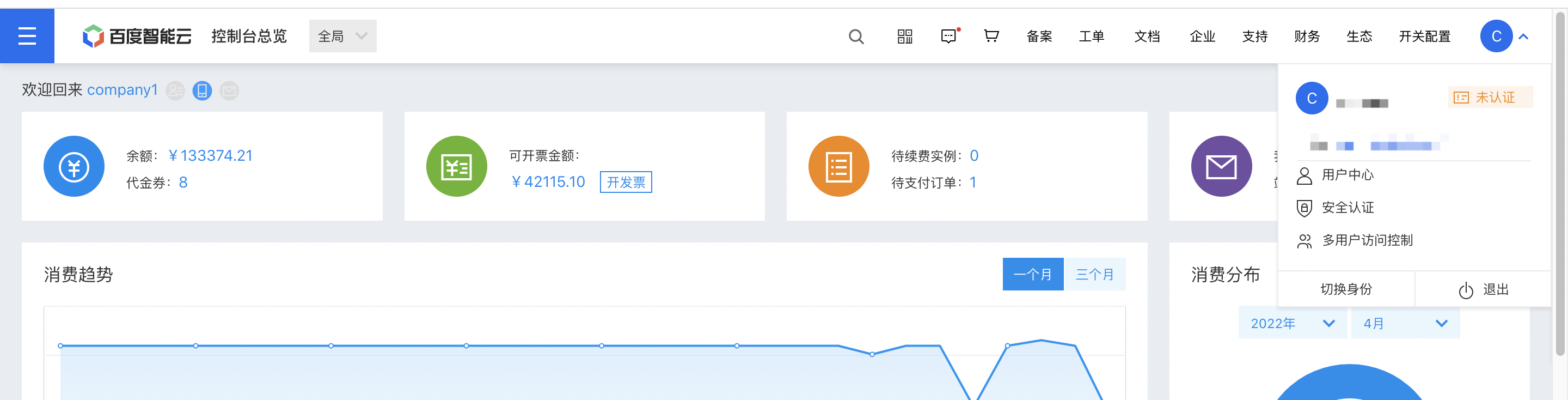
How to complete enterprise certification: Enter the Security Certification page from the console (as shown in the figure below), and then you can complete the enterprise certification
What is the maximum amount I can invoice?
How is the available invoice amount in the account calculated?
The available invoice amount in your account is entirely derived from your consumption amount on Baidu AI Cloud. After a successful cash transaction in the account, the system will automatically generate a record of available invoice amount. The calculation formula for the available invoice amount in the account is as follows:
- Available invoice amount = Total prepaid cash consumption amount of the user + Total postpaid cash consumption amount up to the previous day (amounts from coupons, rebate funds, etc., cannot be invoiced) - Outstanding invoice amount
Since the invoices for cloud market product consumption are provided by third-party service providers (not Baidu AI Cloud), the consumption amount of cloud market products is not included in the available invoice amount.
For prepaid orders: You can invoice immediately after the transaction is completed (order payment completed + order resources successfully created).
For postpaid consumption bills: A record of available invoice amount will be generated on the day after the payment is completed.
After a resource refund is processed for an order, an outstanding invoice record will be generated. Outstanding invoice records include records of refunded orders and orders with downgraded configurations.
Limits on the amount for a single e-invoice/paper invoice application
The minimum amount for a single invoice application is RMB 0.01. The maximum amount for a single e-invoice is RMB 99,999.99. The maximum amount for a single paper invoice is RMB 1,000,000. If the amount you apply for exceeds the maximum limit, the system will automatically split it into multiple invoices.
Baidu AI Cloud supports issuing both e-invoices and paper invoices; you can choose according to your needs. However, currently, special VAT invoices are only available in paper form.
What to do if there is an outstanding invoice obligation in the account?
Why is there an outstanding invoice in my account?
If you apply for an invoice for the consumption amount and then apply for a refund, an outstanding invoice issue will occur, and the account balance cannot be withdrawn.
How to resolve outstanding invoices?
- After voiding the issued invoice, the account balance can be withdrawn. For details, please refer to the document: Returning and Exchanging Baidu AI Cloud Invoices;
-
Continue consuming. When the positive available invoice amount generated by new consumption is sufficient to offset the outstanding invoice amount, there will no longer be a negative invoice amount at the account level.
The prerequisite for the outstanding invoice to be fully offset is that the tax classification codes corresponding to the consumed products (or billing items) are completely consistent
How long does it take to review an invoice applied for on the Baidu AI Cloud platform? How long does it take to receive the invoice?
- If the invoice title you applied for is consistent with your certification name, the invoice will be reviewed and approved within 10 minutes. In other cases, Baidu AI Cloud will complete the review within 3 working days.
- For e-invoices: Baidu will issue the invoice within 24 hours after the invoice is approved.
- For paper invoices: Baidu will complete the review and issue the invoice within 15 working days, and send it to you by express for free within 3 days after issuance.
Does the invoice date show the remittance date or the invoice issuance date?
The invoice date is based on the actual issuance date after your application; it cannot be set to the date of your application or the order purchase date.
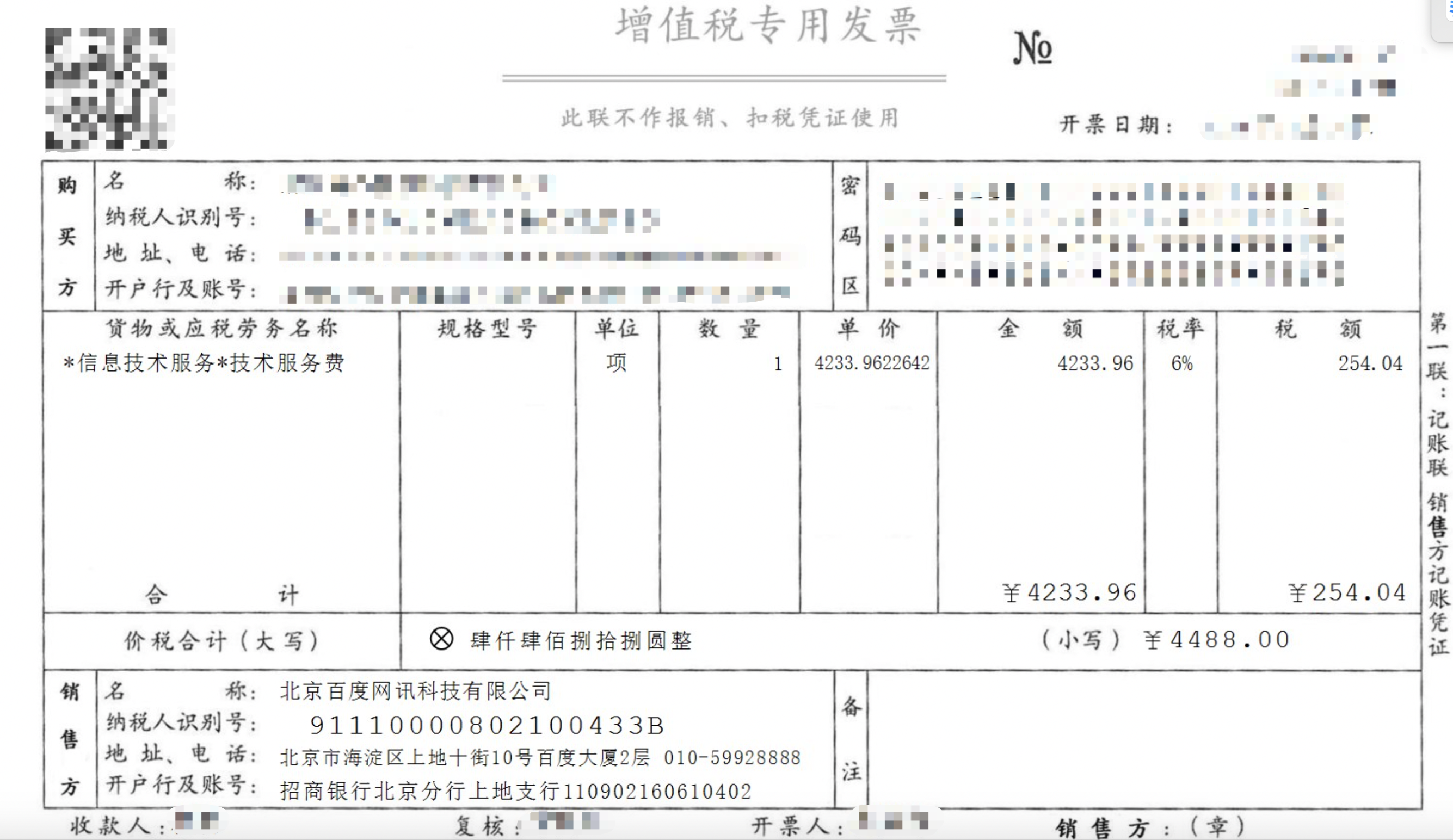
What is the seller information on Baidu AI Cloud invoices?
- Name: Beijing Baidu Netcom Science and Technology Co., Ltd.
- Taxpayer identification No.: 91110000802100433B
- Address & phone: 2nd Floor, Baidu Building, No. 10 Shangdi 10th Street, Haidian District, Beijing, Tel.: 59922888
- Bank name & account No.: China Merchants Bank, Beijing Branch, Shangdi Sub-branch, account No.: 110902160610402
How to modify the invoice delivery address?
- If you need to modify the invoice mailing address: Enter the Management Console > Financial Center > Invoice Management > Invoice Information Management, add a new mailing address in the Mailing Address section, and set it as the default mailing address.
- If you have already submitted the invoice application: You can submit a ticket to contact us, and provide the new invoice receiving address, contact person, and phone number.
Can I issue an invoice in the name of another enterprise?
For individual users: When applying for an individual ordinary invoice, you can select the “certification name of the account” as the invoice title. At the same time, we support individual users to apply for invoices with the title of another enterprise;
For enterprise and other organization users: The invoice title must be consistent with the certification subject name of the account. To modify the invoice title, please refer to the processes corresponding to the following scenarios:
- For industrial and commercial changes (i.e., only changing the subject name): Please initiate a change application through the console. For detailed operation instructions, see Company Name Change;
- For non-industrial and commercial changes (i.e., changing the subject): Please initiate a change application through the console. For detailed operation instructions, see Company Subject Change.
How to modify invoice information if there is a change?
If you need to modify the invoice information before the invoice is issued: You can enter Financial Center > Invoice Management > Invoice Information Management, fill in the new invoice information, and click Save Invoice Information. You can also modify it on the invoice information confirmation page when applying for the invoice.
If you need to modify the information of an issued but unused invoice: You can first void the invoice and then reapply for an invoice, and save your expected invoice information at that time. For the invoice voiding process, please refer to the above section How to Void an Invoice.
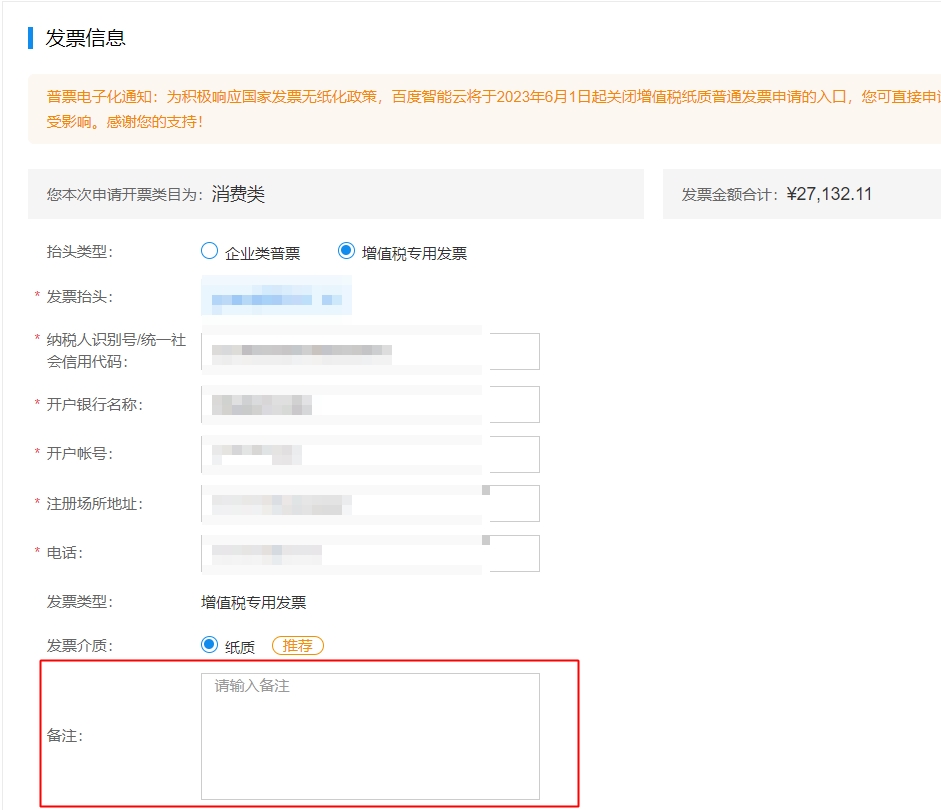
How to add a remark to an invoice?
You can add remarks on the Confirm Information and Address page during the invoice application process.
Is there a courier fee for receiving the applied invoice?
Currently, no courier fee is charged for paper invoices after they are issued and shipped; delivery is free of charge. After the invoice is shipped, the tracking number will be updated to your Financial Center > Invoice Management list.
E-invoices will be successfully issued within 5 minutes after your invoice is approved. You can go to the Console - Invoice Management list to download them by yourself.
Can individuals issue invoices in the name of an enterprise?
Yes. Individual users can go to the Invoice Information Management page to save the enterprise invoice information template and then apply for the invoice.
Why is the Request Invoice button grayed out on my page?
If you find that the Request Invoice button is grayed out and unclickable on the invoice application page, it means you cannot initiate an invoice application. This may be due to the following issues:
- You have not filled in the invoice application amount or selected the order/bill for which you want to apply for an invoice (i.e., no invoice amount is selected). In this case, you only need to select the relevant items or fill in the amount
- There is an outstanding invoice in your account, and the sum of the invoice application amount you filled in or the available invoice amount of the selected order/bill for invoicing is insufficient to offset the outstanding invoice amount in your account. (Why is there an outstanding invoice? )
What to do if an invoice is lost?
If you accidentally lose an invoice (special VAT invoice/ordinary VAT invoice), you can submit a ticket to contact us. Please prepare a scanned copy of Baidu Netcom Invoice Loss Certificate Template.docx](https://ticket.bce.baidu.com/?_=1639118498790#/ticket/create~productId=64&questionId=398&channel=2) in advance. After the materials are verified, we will provide you with a scanned copy or a copy of the invoice stub with the invoice seal affixed (see the example below).
Scanned copy or copy of the invoice stub