Return or Exchange Baidu Intelligent Cloud Invoice

Finance Finance

  • API Reference
    • Access control
    • Balance Query Related Interfaces
      • Account Balance Query
    • Bill Related Interfaces
      • Appendix
      • Charge Item Bill
      • Python Request Example
      • Resource Month Bill
    • Error response
    • Feature Update Records
    • General Description
    • Interface Specifications
    • Introduction
  • Bill Management
    • Bill Details
    • Bill Subscription
    • Consumption Information Subscription Guide
    • Consumption Overview
    • How to View
    • Tag-Based Billing
  • Charge
    • Billing & Configuration Changes
      • Configuration Upgrade Or Shrinkage
      • Shift Charge
    • Charge type
    • On-Demand Billing
    • Pay-as-you-go
    • Subscription billing
  • Contract
    • Apply for Electronic Contract
    • Overview
  • Cost Management
    • Cost Allocation
    • Cost Splitting
  • Disclaimer
  • Enterprise Organization Financial Management
  • FAQs
    • Bill and Debt
    • Billing Issues
    • Common Questions Overview
    • Contract Issues
    • Coupon Issues
    • Dedicated Account Remittance Issues
    • Invoice Issues
    • Order Issues
    • Recharge Issues
    • Refund Issues
    • Renew Issues
    • Withdrawal Issues
  • Invoice
    • Apply for Baidu Intelligent Cloud Invoice
    • Return or Exchange Baidu Intelligent Cloud Invoice
  • Multi-Account Multi-User Financial Management
    • Enterprise Organization - Financial Management
    • Multi-User Access Control - Financial Permission
    • Unified Finance
  • Order Management
  • Overview
  • Partner Deposit Payment
  • Purchase Guide
    • Coupon
      • Activating Coupons
      • Coupon Overview
      • Using Coupons
      • Viewing Coupons
    • Income and Expense Details
    • Purchase
    • Recharge
      • Exclusive Account Wire Transfer
      • Recharge Operations
      • Viewing Balance
    • Refund and Compensation
      • Product Compensation Standards
      • Refund Application Process
      • Refund policy
      • Unsubscribe Overview
      • Unsubscribe Rule Description
    • Renew
      • Auto-renewal
      • Renew Overview
      • Unified Resource Expiration Time
    • Withdrawal
  • Resource Package Management
    • Resource Package Deduction Details
    • Resource Package Overview
  • SDK
    • Java-SDK
      • Bill
      • BillingClient
      • Exception handling
      • Install SDK
      • Overview
      • Version Update Description
All documents
menu
No results found, please re-enter

Finance Finance

  • API Reference
    • Access control
    • Balance Query Related Interfaces
      • Account Balance Query
    • Bill Related Interfaces
      • Appendix
      • Charge Item Bill
      • Python Request Example
      • Resource Month Bill
    • Error response
    • Feature Update Records
    • General Description
    • Interface Specifications
    • Introduction
  • Bill Management
    • Bill Details
    • Bill Subscription
    • Consumption Information Subscription Guide
    • Consumption Overview
    • How to View
    • Tag-Based Billing
  • Charge
    • Billing & Configuration Changes
      • Configuration Upgrade Or Shrinkage
      • Shift Charge
    • Charge type
    • On-Demand Billing
    • Pay-as-you-go
    • Subscription billing
  • Contract
    • Apply for Electronic Contract
    • Overview
  • Cost Management
    • Cost Allocation
    • Cost Splitting
  • Disclaimer
  • Enterprise Organization Financial Management
  • FAQs
    • Bill and Debt
    • Billing Issues
    • Common Questions Overview
    • Contract Issues
    • Coupon Issues
    • Dedicated Account Remittance Issues
    • Invoice Issues
    • Order Issues
    • Recharge Issues
    • Refund Issues
    • Renew Issues
    • Withdrawal Issues
  • Invoice
    • Apply for Baidu Intelligent Cloud Invoice
    • Return or Exchange Baidu Intelligent Cloud Invoice
  • Multi-Account Multi-User Financial Management
    • Enterprise Organization - Financial Management
    • Multi-User Access Control - Financial Permission
    • Unified Finance
  • Order Management
  • Overview
  • Partner Deposit Payment
  • Purchase Guide
    • Coupon
      • Activating Coupons
      • Coupon Overview
      • Using Coupons
      • Viewing Coupons
    • Income and Expense Details
    • Purchase
    • Recharge
      • Exclusive Account Wire Transfer
      • Recharge Operations
      • Viewing Balance
    • Refund and Compensation
      • Product Compensation Standards
      • Refund Application Process
      • Refund policy
      • Unsubscribe Overview
      • Unsubscribe Rule Description
    • Renew
      • Auto-renewal
      • Renew Overview
      • Unified Resource Expiration Time
    • Withdrawal
  • Resource Package Management
    • Resource Package Deduction Details
    • Resource Package Overview
  • SDK
    • Java-SDK
      • Bill
      • BillingClient
      • Exception handling
      • Install SDK
      • Overview
      • Version Update Description
  • Document center
  • arrow
  • FinanceFinance
  • arrow
  • Invoice
  • arrow
  • Return or Exchange Baidu Intelligent Cloud Invoice
Table of contents on this page
  • Reasons for invoice return/exchange
  • Operation process
  • Electronic invoices
  • Paper invoices
  • Invoices not shipped
  • Invoices already shipped
  • Lost invoices

Return or Exchange Baidu Intelligent Cloud Invoice

Updated at:2025-10-27

Baidu AI Cloud provides you with invoice return and exchange services. If you find that the information of an issued invoice does not meet your expectations, you can follow the process below to return or exchange the invoice.

Reasons for invoice return/exchange

  • Incorrect invoice type (special VAT invoice / ordinary VAT invoice)
  • Incorrect invoice information
  • Incorrect invoice amount
  • Others

Operation process

Electronic invoices

If you need to return or exchange an electronic invoice, you can directly go to the Console - Finance - Invoice Management page, find the electronic invoice you want to issue a red invoice for, and process the red invoice by yourself. Each original blue invoice can only be matched with one red invoice.

After the red invoice is issued, the data of the orders/bills associated with the original invoice (which are eligible for invoicing) will be released, and you can reapply for an invoice after re-associating the orders/bills.
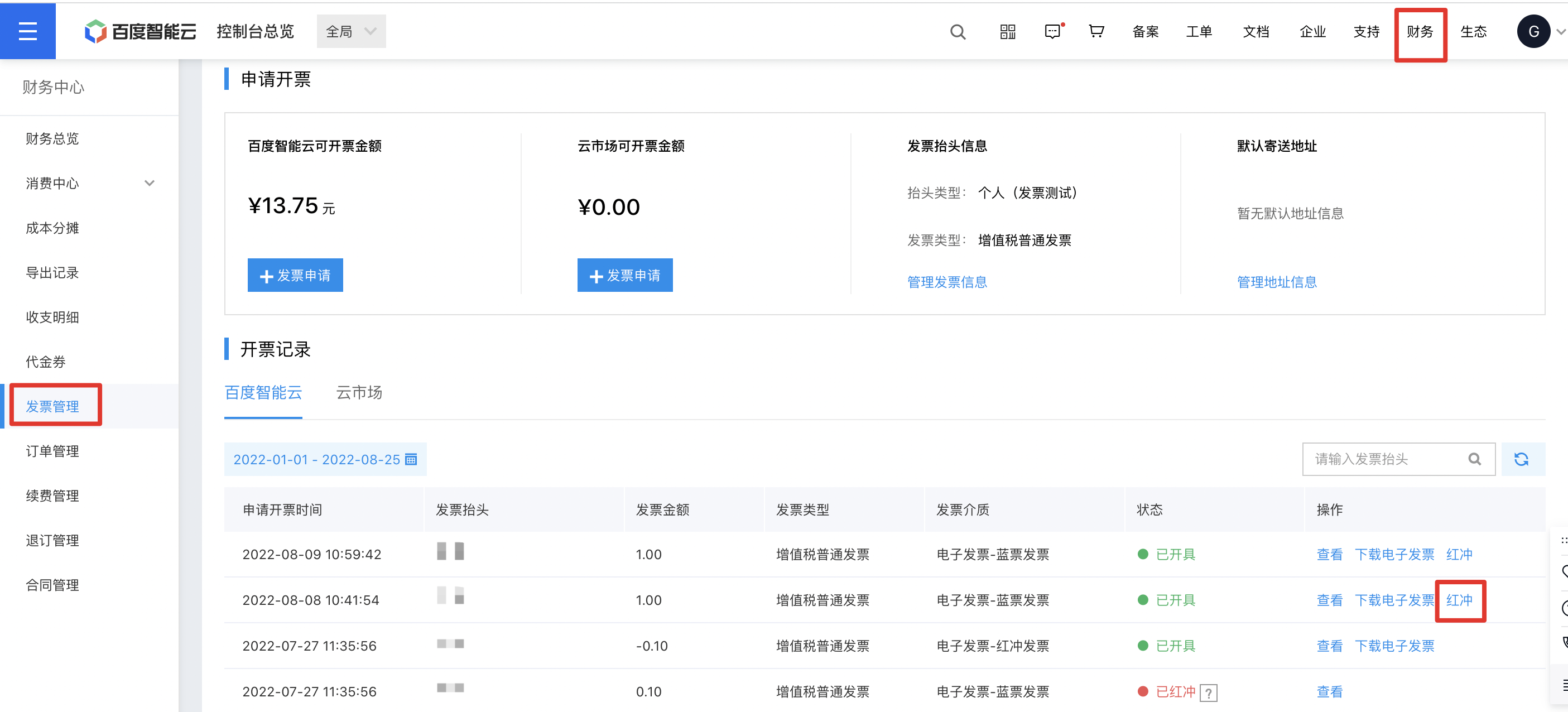
image.png

Paper invoices

The methods for returning and exchanging paper invoices vary depending on their process status, which are roughly divided into two categories: invoices that have been shipped and invoices that have not been shipped.

Invoices not shipped

You can view all your invoice application records in the console at Financial Center - Invoice Management - Invoice Records. If the target invoice application record is in any of the following statuses, you can terminate the invoice approval process by canceling the application directly or submitting a ticket.

  • Pending review: If the target invoice application record is in the “Pending Review” status, you can directly click Cancel Application in the console to terminate this invoice application;

    Notes:

    Records in “Pending Review” include those that have entered the review process but not yet been reviewed. If the Cancel Application button is not displayed for such records, you cannot terminate the process by yourself. In this case, you need to submit a ticket, and the operation is the same as the process for terminating invoice applications in the “Approved/Issued” status.

  • Approved/issued: If the target invoice application record is in the “Approved” or “Issued” status, you can submit a ticket to terminate this invoice application. When submitting the ticket, please provide your Account ID and a screenshot of the invoice application record. Thank you for your cooperation.
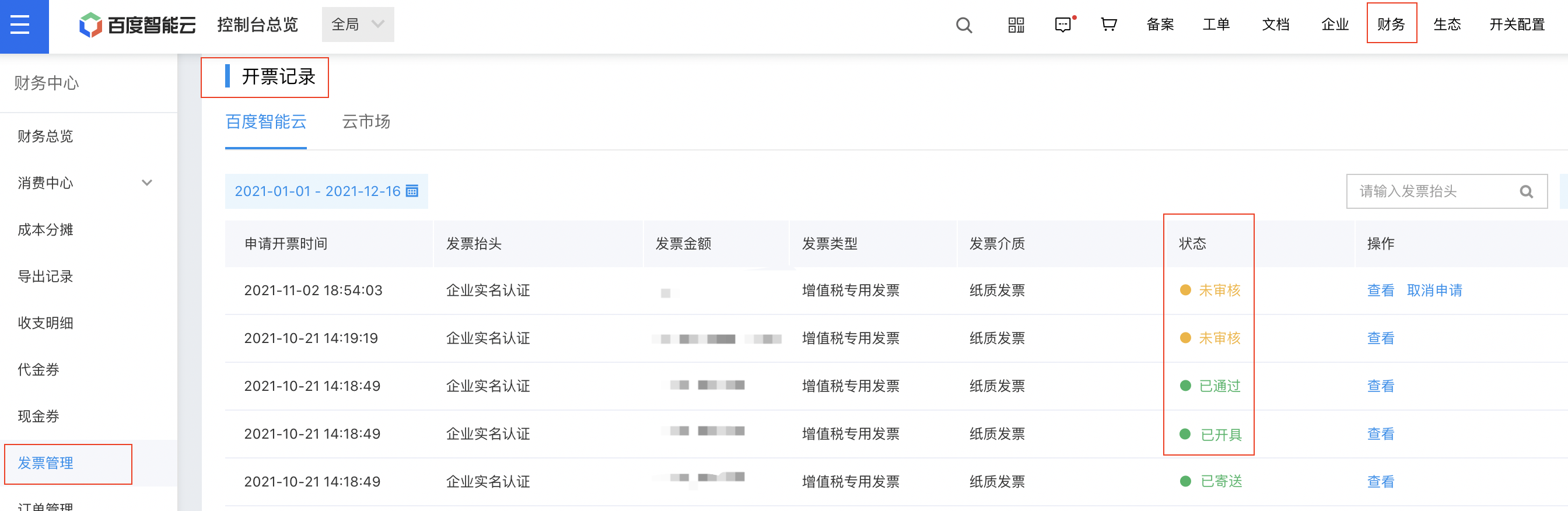
image.png


Invoices already shipped

If you need to return or exchange a paper invoice after receiving it, please prepare the required materials as instructed below and mail them to the address provided (collect-on-delivery is not supported for returning invoices temporarily). After we receive the returned invoice and other relevant materials, we will void the original invoice or issue a red invoice for it. You can reapply for an invoice in the console after receiving a SMS notification that the original invoice has been voided or a red invoice has been issued.

Mailing address information:

Address: Fangzhou Building, Building 15, Zhongguancun Software Park Phase I, No. 8 Dongbeiwang West Road, Haidian District, Beijing

Recipient: Baidu AI Cloud Finance Department

Tel.: 01058003107

Invoice types Usage status Required materials
Ordinary VAT invoice -- Original invoice + reason for invoice voiding (a note is sufficient)
Special VAT invoice Uncertified Original invoice + Baidu Netcom Invoice Rejection Certificate Template.docx
Special VAT invoice Certified Red invoice notice (with official seal affixed) + Baidu Netcom Invoice Rejection Certificate Template (for Certified Invoices).docx

Lost invoices

If you accidentally lose an invoice (special VAT invoice/ordinary VAT invoice), you can submit a ticket to contact us. Please prepare a scanned copy of Baidu Netcom Invoice Loss Certificate Template.docx](https://ticket.bce.baidu.com/?_=1639118498790#/ticket/create~productId=64&questionId=398&channel=2) in advance. After the materials are verified, we will provide you with a scanned copy or a copy of the invoice stub with the invoice seal affixed (see the example below).

Scanned copy or copy of the invoice stub
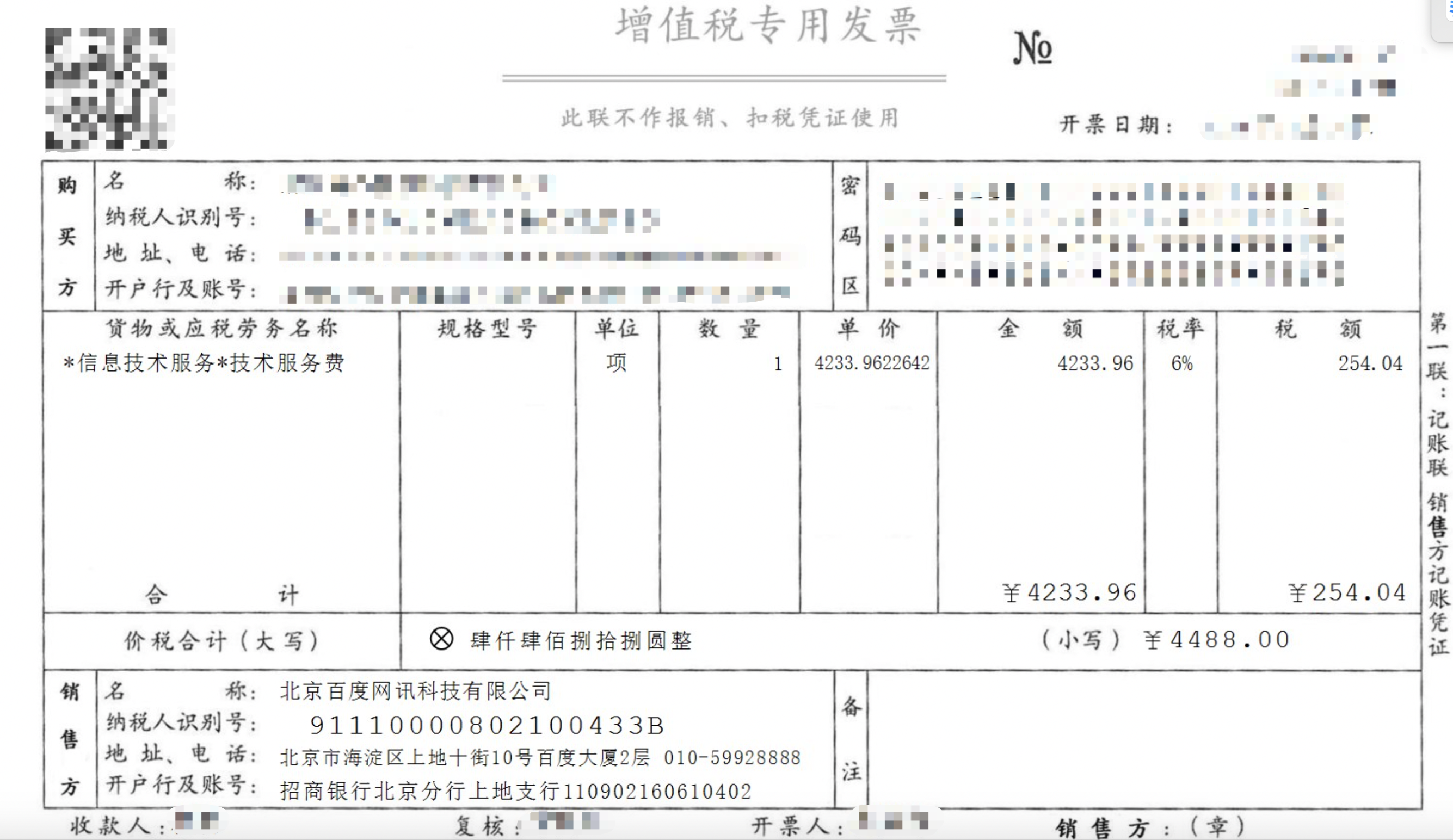
image.png


For more frequently asked questions about invoices, please refer to [Invoice FAQs](Finance/FAQs/Invoice Issues.md).

Previous
Apply for Baidu Intelligent Cloud Invoice
Next
Multi-Account Multi-User Financial Management