Contract Issues

Finance Finance

  • API Reference
    • Access control
    • Balance Query Related Interfaces
      • Account Balance Query
    • Bill Related Interfaces
      • Appendix
      • Charge Item Bill
      • Python Request Example
      • Resource Month Bill
    • Error response
    • Feature Update Records
    • General Description
    • Interface Specifications
    • Introduction
  • Bill Management
    • Bill Details
    • Bill Subscription
    • Consumption Information Subscription Guide
    • Consumption Overview
    • How to View
    • Tag-Based Billing
  • Charge
    • Billing & Configuration Changes
      • Configuration Upgrade Or Shrinkage
      • Shift Charge
    • Charge type
    • On-Demand Billing
    • Pay-as-you-go
    • Subscription billing
  • Contract
    • Apply for Electronic Contract
    • Overview
  • Cost Management
    • Cost Allocation
    • Cost Splitting
  • Disclaimer
  • Enterprise Organization Financial Management
  • FAQs
    • Bill and Debt
    • Billing Issues
    • Common Questions Overview
    • Contract Issues
    • Coupon Issues
    • Dedicated Account Remittance Issues
    • Invoice Issues
    • Order Issues
    • Recharge Issues
    • Refund Issues
    • Renew Issues
    • Withdrawal Issues
  • Invoice
    • Apply for Baidu Intelligent Cloud Invoice
    • Return or Exchange Baidu Intelligent Cloud Invoice
  • Multi-Account Multi-User Financial Management
    • Enterprise Organization - Financial Management
    • Multi-User Access Control - Financial Permission
    • Unified Finance
  • Order Management
  • Overview
  • Partner Deposit Payment
  • Purchase Guide
    • Coupon
      • Activating Coupons
      • Coupon Overview
      • Using Coupons
      • Viewing Coupons
    • Income and Expense Details
    • Purchase
    • Recharge
      • Exclusive Account Wire Transfer
      • Recharge Operations
      • Viewing Balance
    • Refund and Compensation
      • Product Compensation Standards
      • Refund Application Process
      • Refund policy
      • Unsubscribe Overview
      • Unsubscribe Rule Description
    • Renew
      • Auto-renewal
      • Renew Overview
      • Unified Resource Expiration Time
    • Withdrawal
  • Resource Package Management
    • Resource Package Deduction Details
    • Resource Package Overview
  • SDK
    • Java-SDK
      • Bill
      • BillingClient
      • Exception handling
      • Install SDK
      • Overview
      • Version Update Description
All documents
menu
No results found, please re-enter

Finance Finance

  • API Reference
    • Access control
    • Balance Query Related Interfaces
      • Account Balance Query
    • Bill Related Interfaces
      • Appendix
      • Charge Item Bill
      • Python Request Example
      • Resource Month Bill
    • Error response
    • Feature Update Records
    • General Description
    • Interface Specifications
    • Introduction
  • Bill Management
    • Bill Details
    • Bill Subscription
    • Consumption Information Subscription Guide
    • Consumption Overview
    • How to View
    • Tag-Based Billing
  • Charge
    • Billing & Configuration Changes
      • Configuration Upgrade Or Shrinkage
      • Shift Charge
    • Charge type
    • On-Demand Billing
    • Pay-as-you-go
    • Subscription billing
  • Contract
    • Apply for Electronic Contract
    • Overview
  • Cost Management
    • Cost Allocation
    • Cost Splitting
  • Disclaimer
  • Enterprise Organization Financial Management
  • FAQs
    • Bill and Debt
    • Billing Issues
    • Common Questions Overview
    • Contract Issues
    • Coupon Issues
    • Dedicated Account Remittance Issues
    • Invoice Issues
    • Order Issues
    • Recharge Issues
    • Refund Issues
    • Renew Issues
    • Withdrawal Issues
  • Invoice
    • Apply for Baidu Intelligent Cloud Invoice
    • Return or Exchange Baidu Intelligent Cloud Invoice
  • Multi-Account Multi-User Financial Management
    • Enterprise Organization - Financial Management
    • Multi-User Access Control - Financial Permission
    • Unified Finance
  • Order Management
  • Overview
  • Partner Deposit Payment
  • Purchase Guide
    • Coupon
      • Activating Coupons
      • Coupon Overview
      • Using Coupons
      • Viewing Coupons
    • Income and Expense Details
    • Purchase
    • Recharge
      • Exclusive Account Wire Transfer
      • Recharge Operations
      • Viewing Balance
    • Refund and Compensation
      • Product Compensation Standards
      • Refund Application Process
      • Refund policy
      • Unsubscribe Overview
      • Unsubscribe Rule Description
    • Renew
      • Auto-renewal
      • Renew Overview
      • Unified Resource Expiration Time
    • Withdrawal
  • Resource Package Management
    • Resource Package Deduction Details
    • Resource Package Overview
  • SDK
    • Java-SDK
      • Bill
      • BillingClient
      • Exception handling
      • Install SDK
      • Overview
      • Version Update Description
  • Document center
  • arrow
  • FinanceFinance
  • arrow
  • FAQs
  • arrow
  • Contract Issues
Table of contents on this page
  • Is a corresponding contract provided after purchasing smart cloud products?
  • Which products currently support the generation of electronic contracts?
  • What types of electronic contracts are currently supported?
  • What should I do if I need to add additional clauses to the electronic agreement?
  • Can electronic contracts only be stamped with an electronic seal? What if I want to use a physical seal?
  • Why can’t the purchased product order be found on the contract application page?
  • How to change Party A’s name in the contract?
  • How to void a contract?
  • Voiding a draft contract
  • Voiding an official contract
  • Can I reapply for a contract after voiding it?
  • What if the contract entity is inconsistent with the certification after the company changes its name and updates the certification?
  • Can the generated official contract be downloaded multiple times?
  • After downloading the official contract and affixing your company’s official seal (or special contract seal), do you need to send it back to Baidu AI Cloud?

Contract Issues

Updated at:2025-10-27

Is a corresponding contract provided after purchasing smart cloud products?

Yes. You can go to the Console - Contract Management Page to apply for an order agreement.
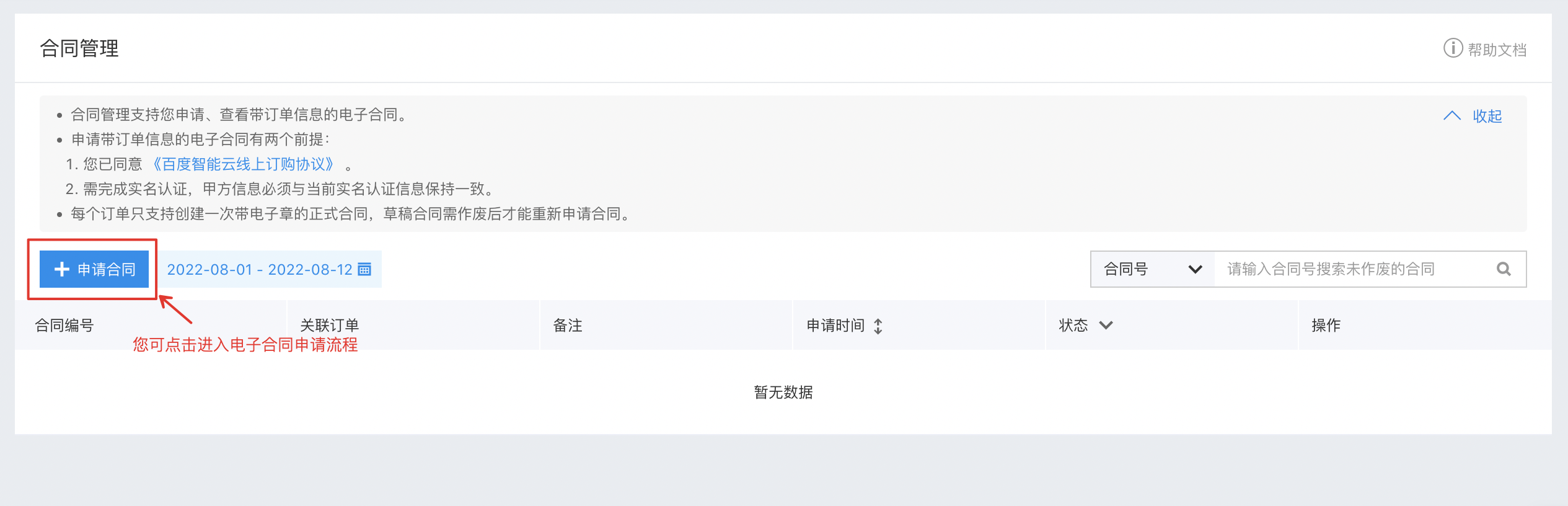
image.png

Which products currently support the generation of electronic contracts?

You can view the list of products for which electronic contracts can be generated in the product drop-down list under [Financial Center] → [Contract Management] in the Baidu AI Cloud Console.

Currently, except for cloud market-related products (MKT\MKT_BD\MKT_V\AI_MKT) and customized orders (CUSTOM), which do not support electronic contract generation, all other products are supported.

What types of electronic contracts are currently supported?

Baidu AI Cloud currently supports applying for electronic contracts for paid orders (referred to as “Order Contracts”) and for unpaid orders (referred to as “Payment Request Contracts”).

What should I do if I need to add additional clauses to the electronic agreement?

The online agreements provided by Baidu AI Cloud are standard model contracts, and self-service modification of clauses online is not supported.

If the current standard agreement cannot meet your needs, you can contact your account manager, and Baidu AI Cloud will provide assistance related to offline contract signing.

Can electronic contracts only be stamped with an electronic seal? What if I want to use a physical seal?

All online agreements of Baidu AI Cloud are currently stamped with an electronic contract seal, which has the same legal effect as a physical seal.

If your company’s legal department requires a physical seal on the contract, you can contact your account manager, and Baidu AI Cloud will provide relevant assistance.

Why can’t the purchased product order be found on the contract application page?

If you cannot find the purchased product order on the contract application page, please check whether the order has already been applied as a draft contract or converted into an official contract. Since each order can only be included in one contract, once an order is used to apply for a draft contract or an official contract, it will no longer appear on the contract application page.

If you need to reapply for a contract, you can first void the contract associated with this order, then reapply.

How to change Party A’s name in the contract?

In the online agreements provided by Baidu AI Cloud, Party A’s name will be consistent with your certification name on the Baidu AI Cloud official website at the time of application. During the contract application process, Baidu AI Cloud defaults that Party A’s name matches your certification name and does not allow modification.

If you need to change the Party A’s name in the contract, please first void the contract (including draft contracts and official contracts). After the contract is voided, the orders associated with the contract will be released. You can modify your certification name to the intended entity, then go to the Contract Management page again to apply for a contract for the target order.

How to void a contract?

Voiding a draft contract

Since a draft contract has not yet been stamped with Baidu AI Cloud’s special electronic contract seal, you can void it by yourself on the Console - Contract Management page.

Voiding an official contract

Since an official contract has already been stamped with Baidu AI Cloud’s special electronic contract seal, self-service voiding of official contracts on the console is not currently supported.

If an official contract really needs to be voided, please submit a ticket for processing.

Can I reapply for a contract after voiding it?

Yes.

After voiding a contract, the orders associated with the contract will be released, and you can re-associate the target order to reapply for a contract.

What if the contract entity is inconsistent with the certification after the company changes its name and updates the certification?

After successfully updating your certification on Baidu AI Cloud, you can void the historical contract. After the historical contract is voided, the orders associated with it will be released. You can then reapply for a contract for the order, and the contract entity (Party A’s name) will be your updated certification name.

Can the generated official contract be downloaded multiple times?

Yes. After the official contract is generated, you can download it multiple times from the Contract Management List.

After downloading the official contract and affixing your company’s official seal (or special contract seal), do you need to send it back to Baidu AI Cloud?

There is no need to send it back.

Previous
Common Questions Overview
Next
Coupon Issues