

Auto-renewal
Overview
If you have purchased a prepaid service, Baidu AI Cloud recommends enabling the auto-renewal service to save operation time and prevent inconvenience caused by service suspension due to renewal failure. Once auto-renewal is activated, Baidu AI Cloud will automatically process renewal payments at intervals of 7, 5, 3, 1, or 0 days before the instance expires. You will receive notifications via SMS and email about successful or failed renewals.
Please note the following details that may be relevant to your applications:
- Ensure that your account balance is sufficient to enable the automatic renewal service.
-
After activation, the system will automatically deduct fees 7/5/3/1/0 days before the instance expires. If the account balance is insufficient during automatic deduction, the deduction will be postponed to the next scheduled deduction time
Example: You purchased a one-month EIP service and activated auto-renewal at 10:00 on July 10, 2020. The service will expire at 10:00 on August 10, 2020. The system will automatically deduct the fee on August 3, 2020. If the balance is insufficient at the time of deduction, it will be extended to 3 days before the expiration date, and you will be notified via SMS that the renewal has failed, reminding you to recharge; if the deduction is successful, the auto-renewal service for this period will be completed.
- After expiration, the resources and services will automatically stop, and no automatic renewal will occur during the period from stoppage to resource retention. Users need to manually renew the service
-
If you have manually renewed the resource within an order period, automatic renewal will not be executed.
Example: You purchased a one-month BCC service and activated auto-renewal at 10:00 on June 10, 2020. If you manually renewed the resource on June 25, the scheduled automatic deduction originally set for July 3 will no longer be executed.
-
Within seven days after resource expiration, the service will be automatically disabled and retain the data while sending renewal notices to you.
- After renewal, the system will automatically resume the original service;
- If the expiration exceeds seven days, the CDS data resources will be cleared and cannot be recovered. You need to repurchase the service.
Enable auto-renewal
Activate upon purchase
- You can activate auto-renewal when purchasing prepaid products on Baidu AI Cloud
- Baidu AI Cloud provides flexible renewal periods for you. You can select "annual" or "monthly" as the renewal period and specify the number of cycles, to reduce inconvenience caused by potential service interruptions due to expired resources.
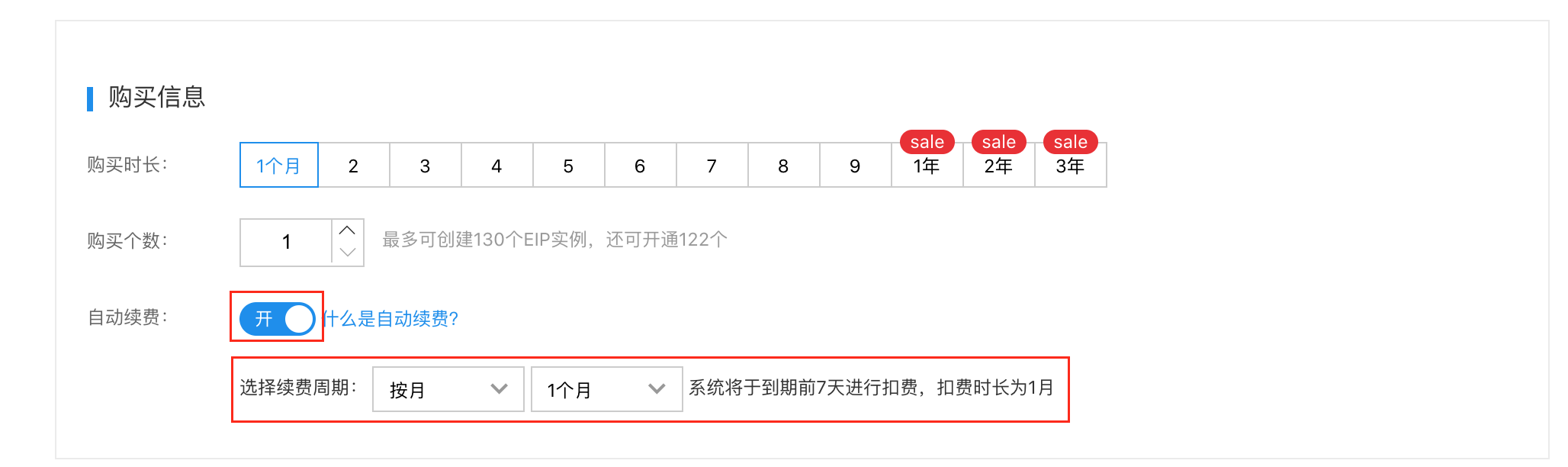
Activate after successful purchase
- Sign in to the Baidu AI Cloud management console.
- On the console homepage, click the Finance button in the upper right corner, then navigate to Financial Center -> Financial Overview page.
- In the Account Overview-> Instances to Be Renewed", click Renew to access the Renewal Management page:
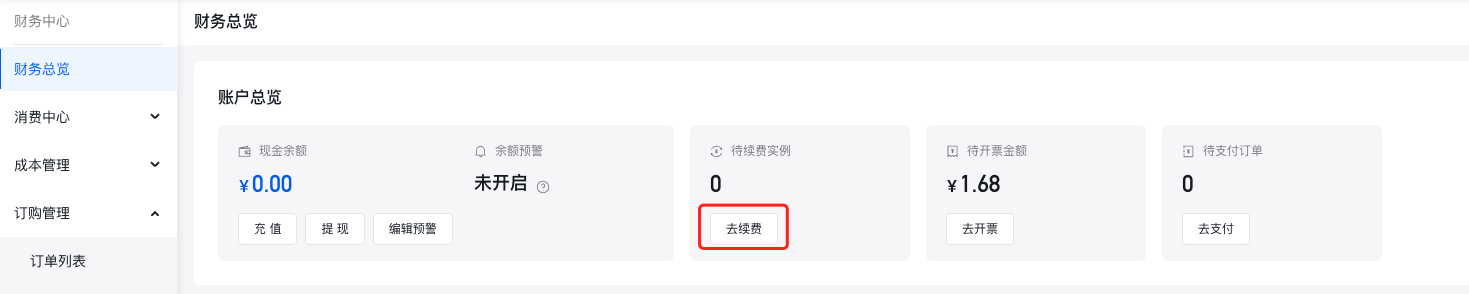 Alternatively, click Subscription Management -> Renewal Management in the left navigation bar to directly access the page.
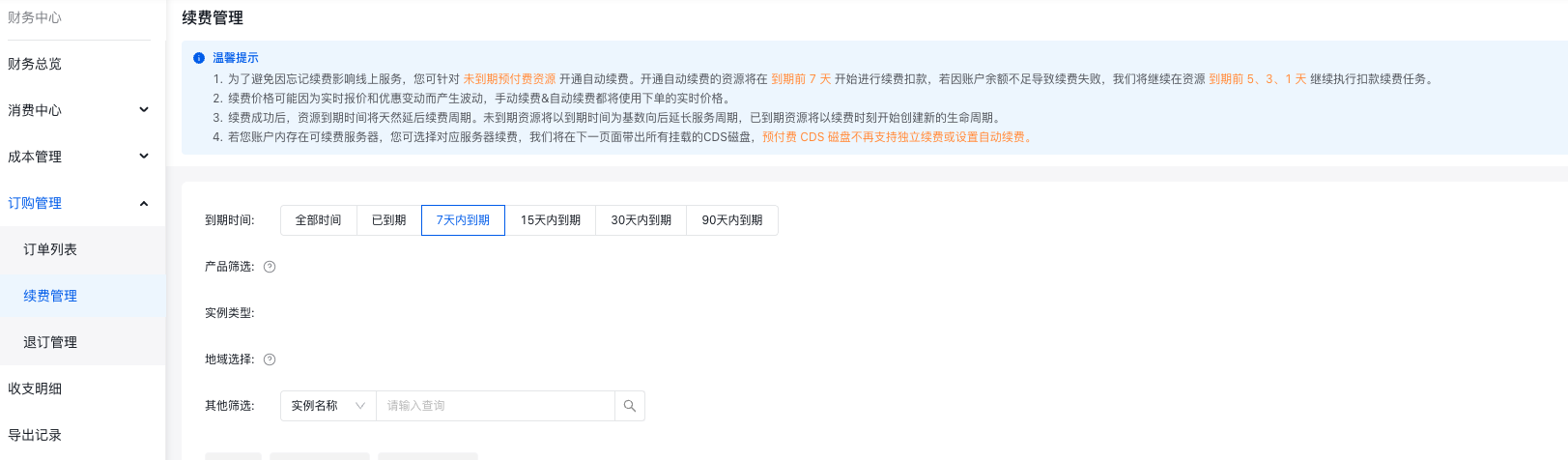
-
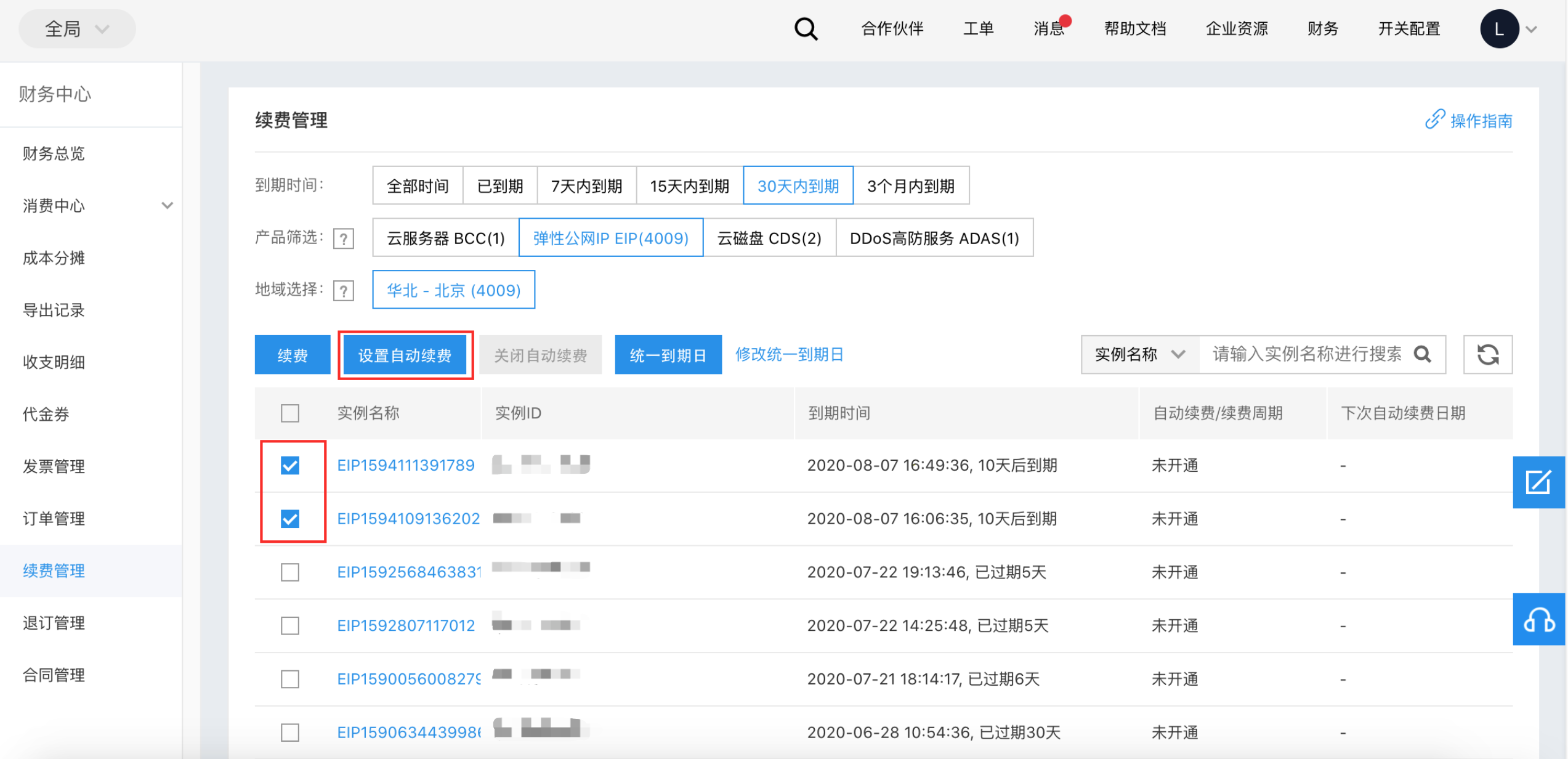
The system will automatically filter products and regions with renewable instances. You can perform cross-selection based on product, expiration time, and region. Then, check the instance (one or multiple) for which you want to enable auto-renewal based on the results filtered by the cross-selection, and click the Set Auto-Renewal button. Take EIP as an example;,see the figure below:
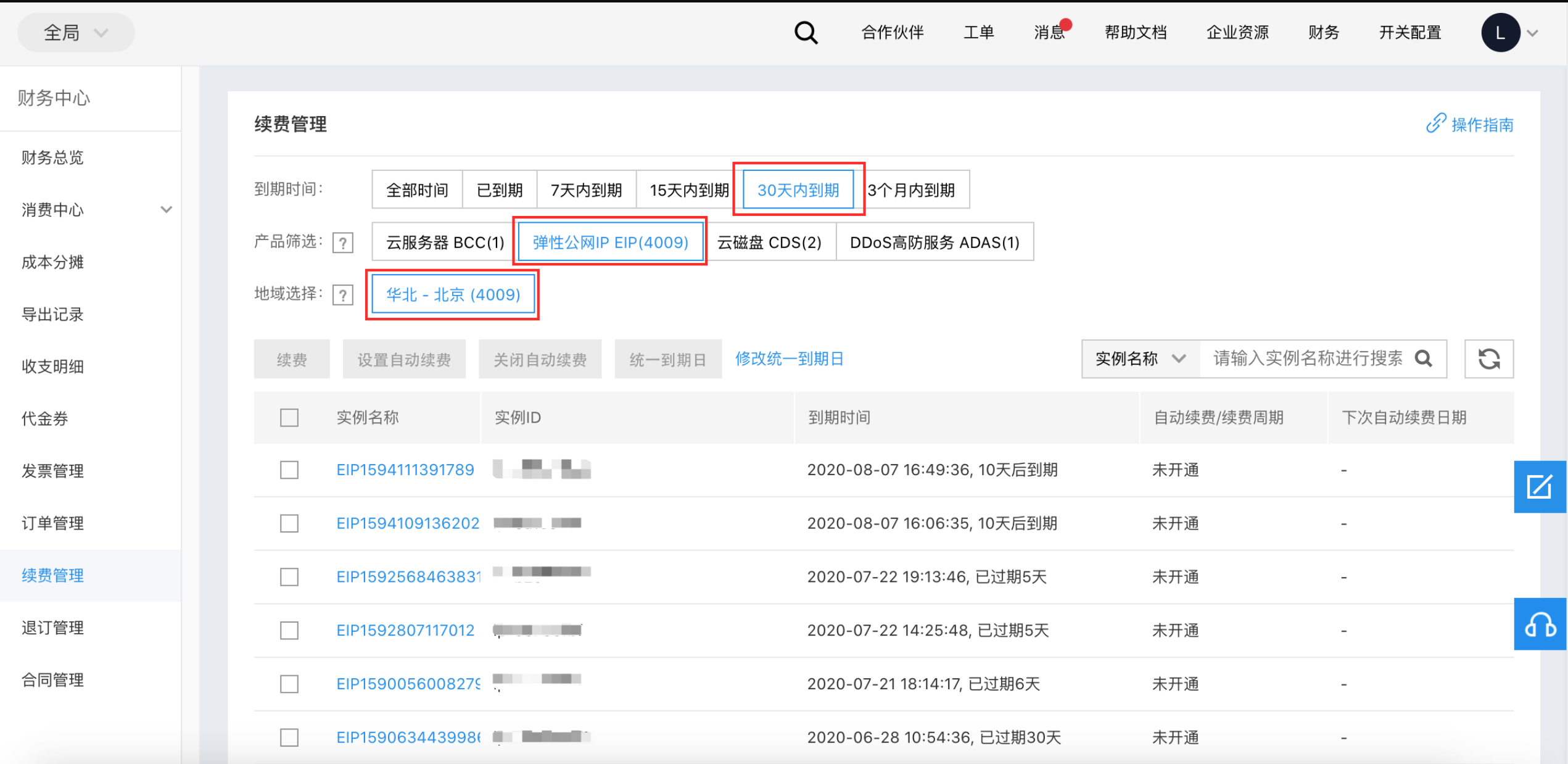
-
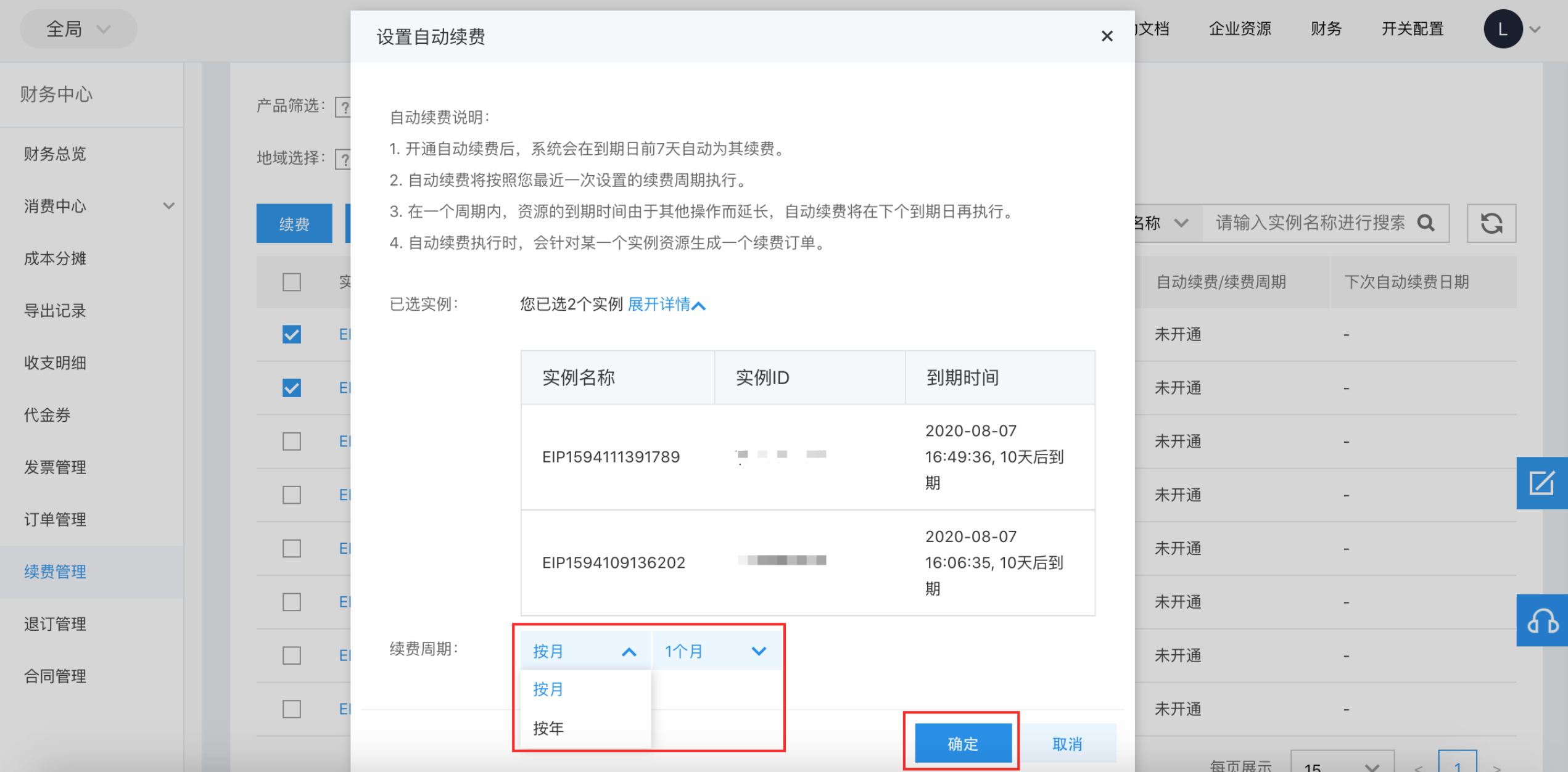
In the Activate Auto-Renewal pop-up box, select your preferred auto-renewal period (annual or monthly) and the number of renewal periods (N months or N years), and then click OK.
- After successful activation of auto-renewal, the system will send you SMS and email notifications regarding the resource renewal status.
Modify auto-renewal period
If you need to modify the auto-renewal period after activation, follow the same steps as the activation process.
Disable auto-renewal
-
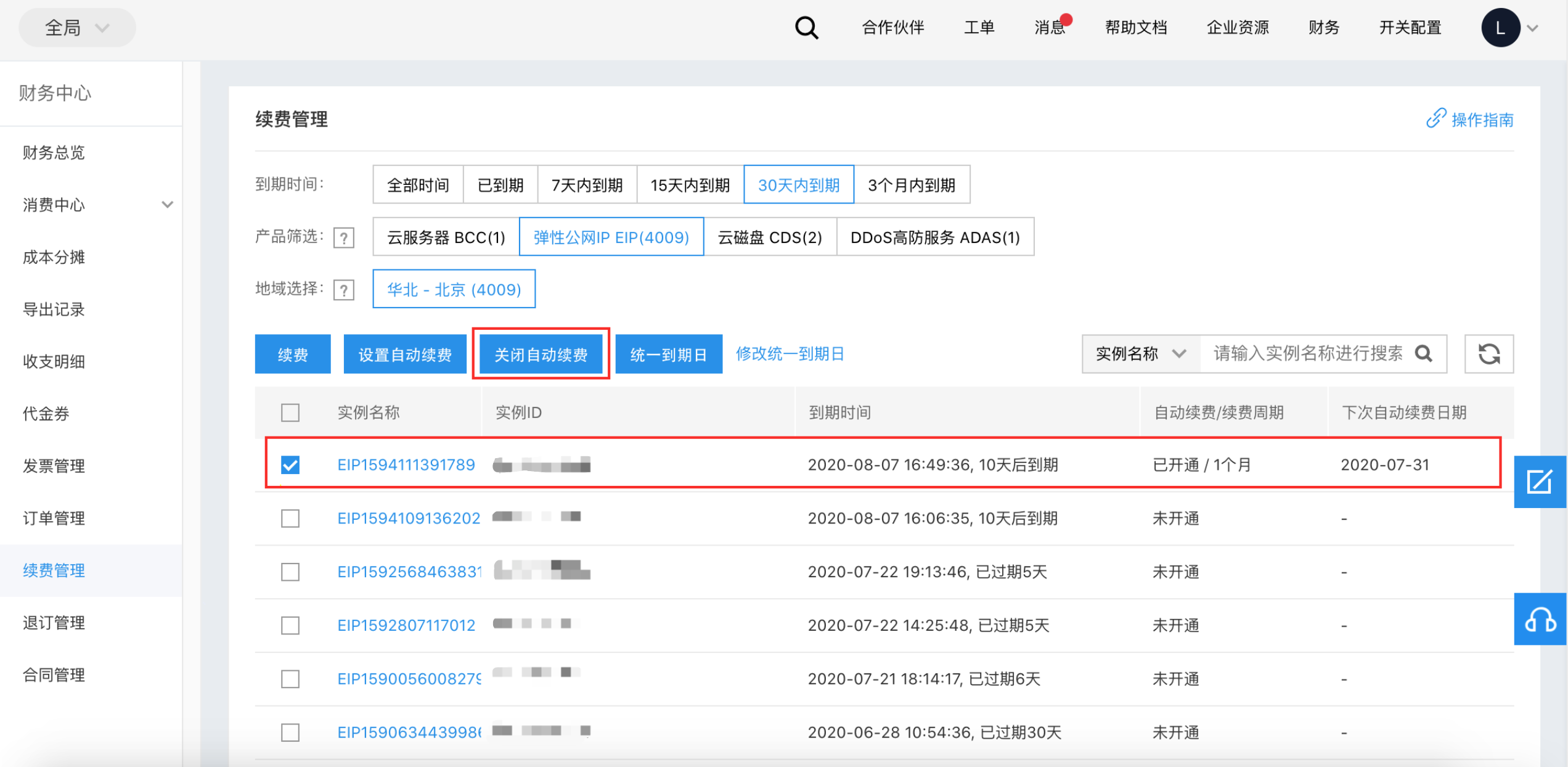
Check the automatically renewed instance that has been activated, and click the Deactivate Auto-Renewal button.
-
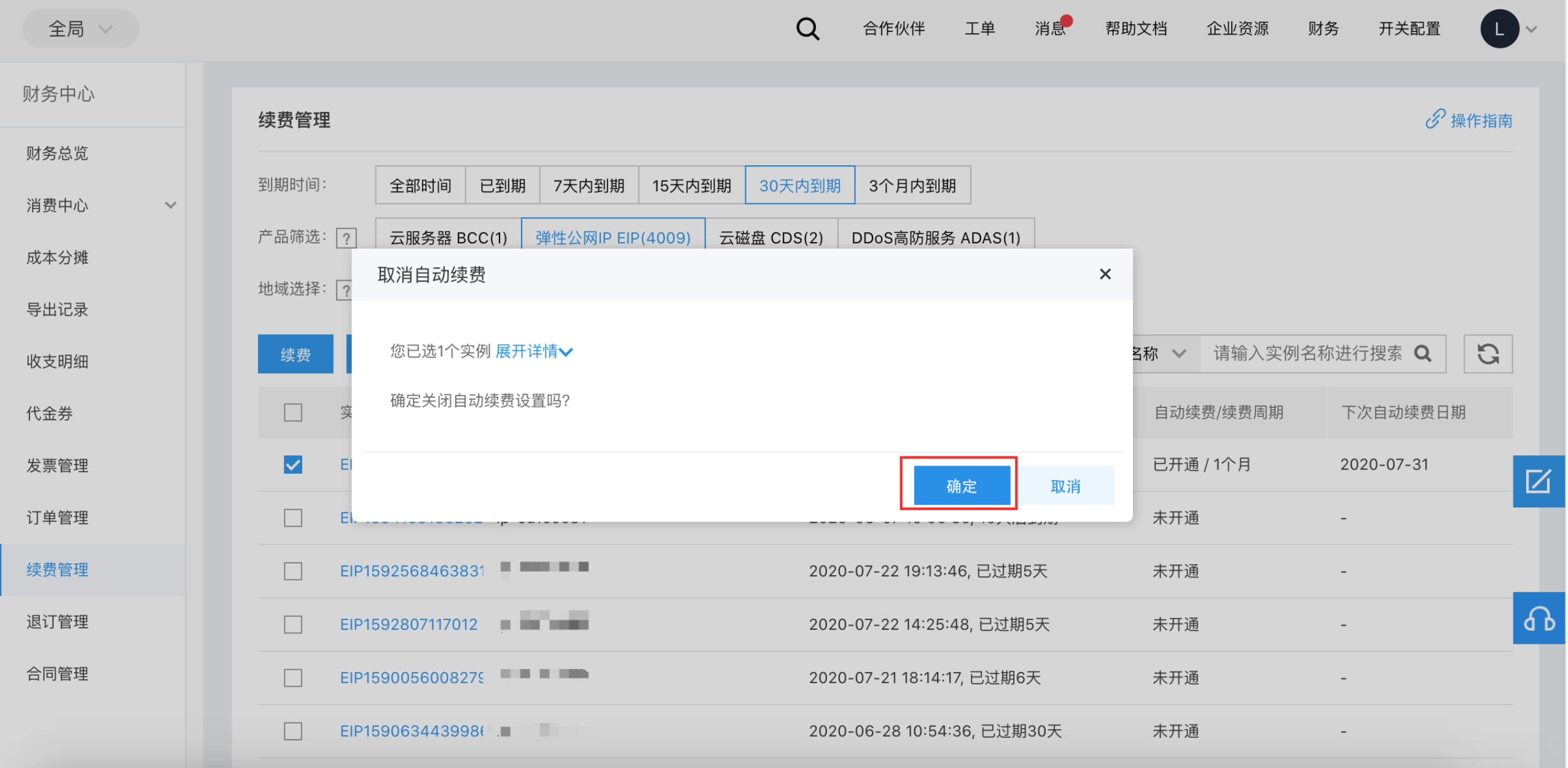
In the Deactivate Auto-Renewal pop-up window, click OK.
- After deactivating auto-renewal, please pay attention to the expiration period of your cloud resources to avoid inconvenience caused by service interruptions due to debts.
Products supporting auto-renewal
The following products purchased via prepaid methods support auto-renewal:
- Baidu App Engine (BAEPRO)
- Baidu Cloud Compute (BCC)
- Relational Database Service (RDS)
- Cloud Disk Server (CDS)
- Simple Cache Service (SCS) for Redis
- MapReduce BMR
- Anti-DDoS Attack Service (ADAS)
- Express Tunnel (ET)
- Time-series Database (TSDB)
- Elastic IP (EIP)
- EIPGROUP
- Data Warehouse (DORIS PALO)
- Dedicated Cloud Compute (DCC)
- Elasticsearch BES
- Elastic Baremetal Compute (BBC)
- VPN Gateway (VPN)
- Web Application Firewall (WAF)
- |NAT Gateway (NAT)|
- Baidu Storage Gateway (BSG)
- Peering Connections (PEERCONN)
- Host Security (HOSTEYE)
- Cloud Database GaiaDB-X (DRDS)
- Baidu ARM Cloud (ARMCM)
- Intelligent Traffic Manager (ITM)
- Document Database (DocDB) for MongoDB (MONGODB)
- Privacy Number Service (PNS)
- Baidu Edge Computing (BEC)
- Cloud Container Registry (CCR)
- Message Service for RabbitMQ (RABBITMQ)
- Voice Call (AI_SVS)
- Gaia Database (GaiaDB) - S GAIADB
- Cloud Smart Network (CSN)
- Traffic Burst Service Package (TBSP)
- Cloud Bastion Host (CAG)
- Smart Wide Area Network (SMART_WAN)
- Database Dedicated Cluster (DDC)
- Lightweight Server (LS)
- Load Balance Dedicated Cluster (LBDC)
- Cloud Database HBase (HBASE)
- Message Service for Kafka