

Withdrawal
Withdrawal amount
Withdrawable amount
The calculation formula for the withdrawable amount is as follows:
- If you currently have no active postpaid resources, or your postpaid resources have been released for more than 24 hours, the calculation formula is:
Withdrawable amount = min (Account balance - Unpaid bills of the billing cycle, Total investment - Total invoiced amount)
- If you currently have active postpaid resources, or your postpaid resources have been released for 24 hours or less, you are required to keep RMB 100 in your account. The calculation formula is:
Withdrawable amount = min (Account balance - Unpaid bills of the billing cycle, Total investment - Total invoiced amount) - 100
Non-withdrawable amount
The applied withdrawal amount cannot exceed the available withdrawal amount. The following reasons may affect the self-service withdrawal of your cash account balance:
- You have postpaid products, or the release of postpaid resources occurred within 24 hours (in such cases, you need to keep at least RMB 100 in the account).
- Part of your cash balance is already in the withdrawal process.
- Your account has unpaid invoices or outstanding debts.
- The single withdrawal amount exceeds the upper limit of RMB 30,000, or the number of withdrawals exceeds 3 times within one day.
- Your Baidu AI Cloud account has been activated for less than 24 hours. Please apply for withdrawal after the account has been activated for 24 hours.
Withdrawal types
Baidu AI Cloud provides two types of fund withdrawal methods for you: “Return to Original Payment Channel” and “Offline Withdrawal”.
| Withdrawal types | Applicable scenarios | Withdrawal instructions |
| Return to original payment channel | Funds from WeChat/Baidu Pay/Baidu Cashier transactions (`within 12 months of the transaction time) | For funds returned to the original third-party payment channel, we will return the funds to your original transaction account online, and no additional account information is required. |
| Funds from Alipay transactions (within 18 months of the transaction time) | ||
| Funds remitted via exclusive remittance accounts | For each transaction record of funds remitted through an exclusive account, you need to supplement additional bank payment information (excluding the payee name and payee account number) when applying for withdrawal for the first time | |
| Offline withdrawal | Overdue funds from third-party payment channels (funds that do not meet the transaction time requirement for “Return to Original Payment Channel”) | For offline returned funds, we will return the funds to your original transaction account via bank transfer based on the original transaction vouchers you provide |
| Funds remitted via offline wire transfer |
Withdrawal operation
Withdrawal entry
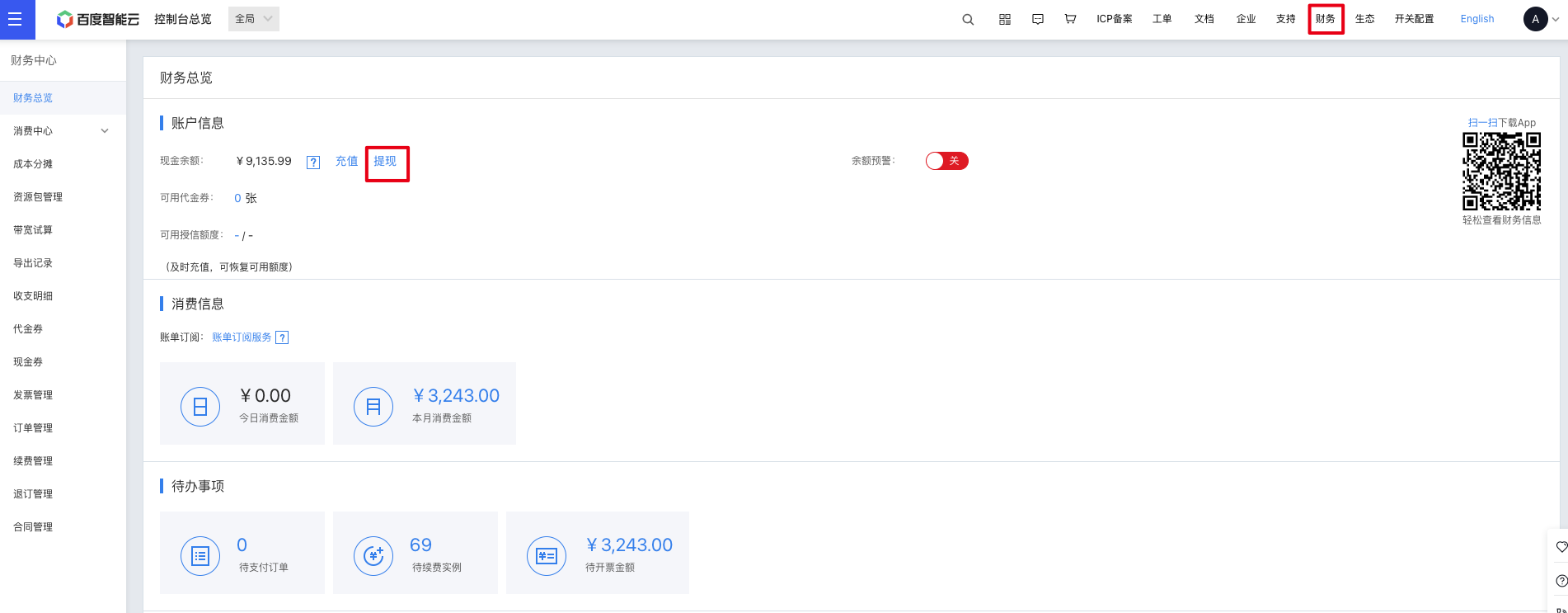
- You can go to the Baidu AI Cloud Console --> Financial Overview page, click Withdrawal to access the account balance withdrawal entry
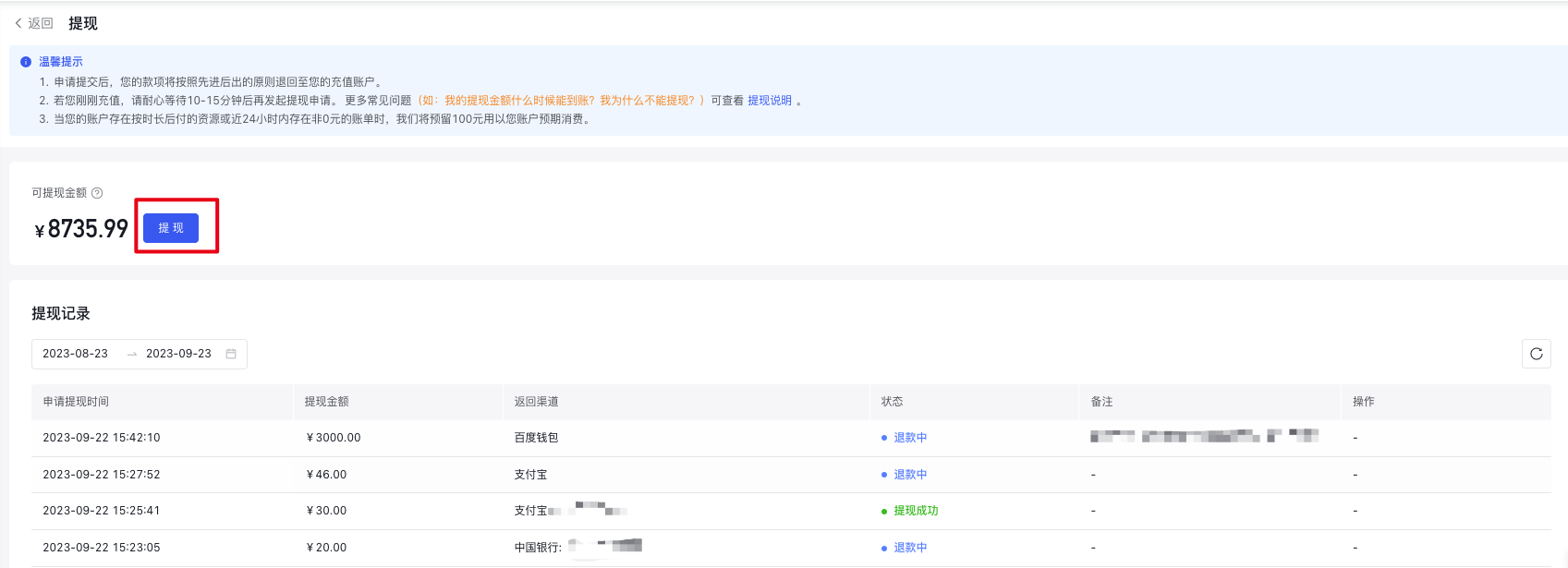
- Click the Withdrawal button to enter the withdrawal transaction record selection page
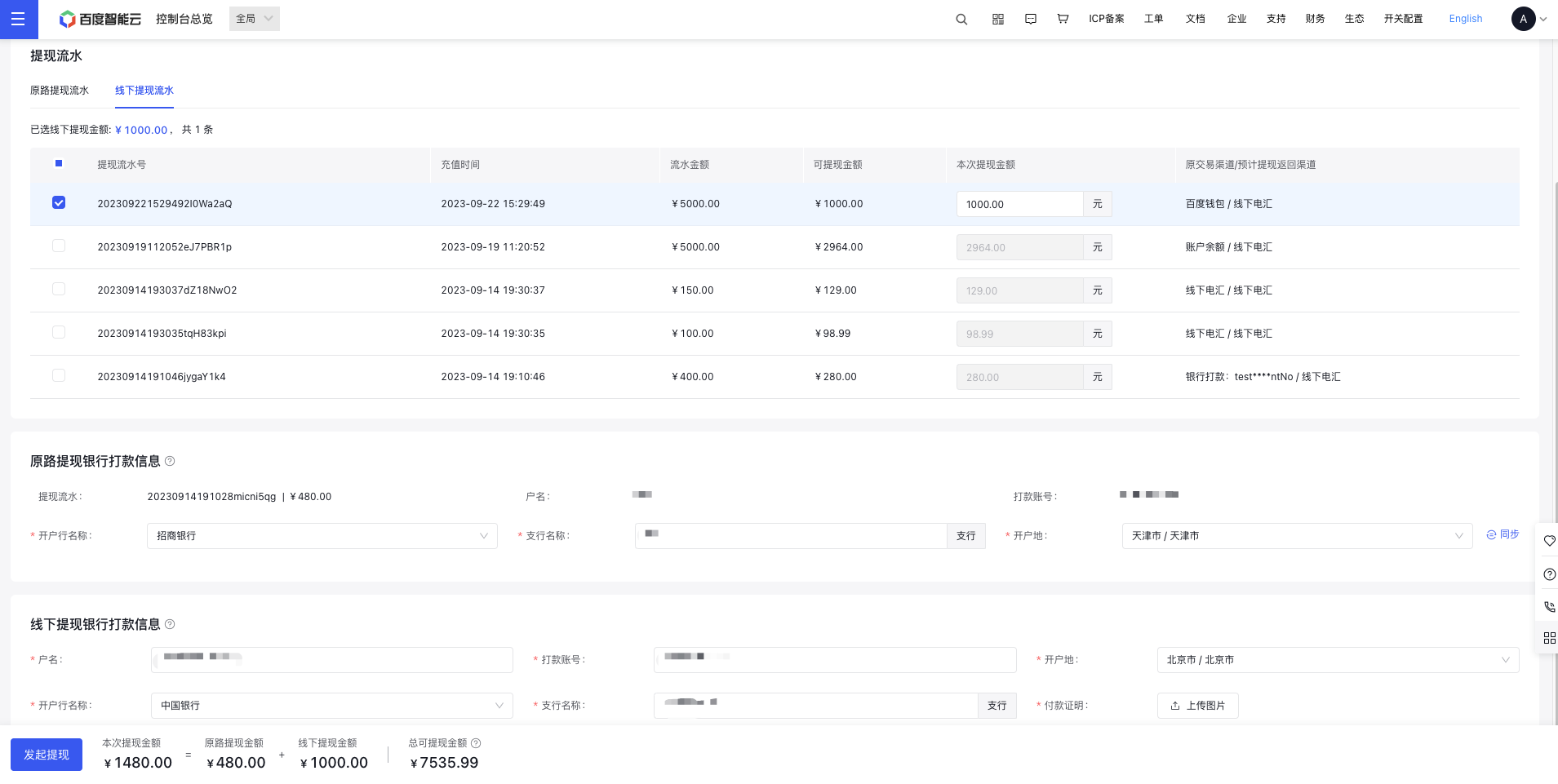
Select withdrawal transaction records
To ensure the security of funds in your account, you need to apply for withdrawal based on the original fund consumption transaction records. You can select the withdrawal transaction records according to the original transaction channel, and we will return the funds to the original transaction channel corresponding to the original fund transaction records you selected.
Original fund transaction records are divided into “Funds for Return to Original Channel” and “Funds for Offline Withdrawal” based on the rules (see “Withdrawal Types” above). You can switch between transaction record types by toggling the tabs in the table;
A single withdrawal application supports selecting multiple transaction records of multiple types to initiate a withdrawal. We will split the withdrawal records based on the transaction records you selected and the expected withdrawal amount.
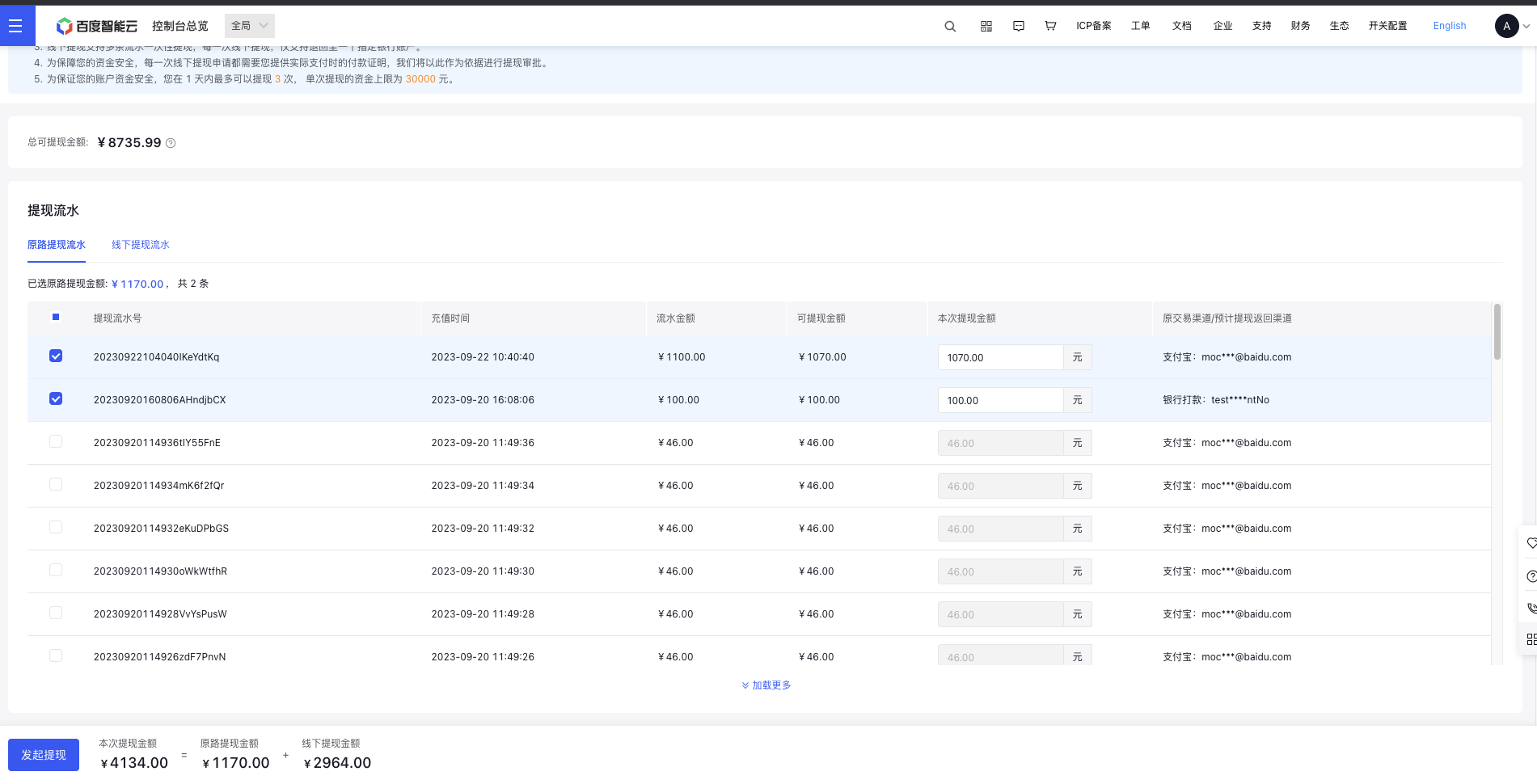
| Field | Description |
|---|---|
| Withdrawal transaction ID | A unique identifier for the withdrawal transaction record in the current account |
| Recharge time | The original transaction time of this record |
| Transaction amount | The original transaction amount of this record |
| Withdrawable amount | The current remaining withdrawable amount of this transaction record |
| Current withdrawal amount | The expected withdrawal amount for this time. This amount can be edited, and the maximum value cannot exceed the current withdrawable amount of the transaction record |
| Original transaction channel / expected withdrawal return channel | For “Return to Original Channel” records, the original transaction channel is the same as the expected return channel; for “Offline Withdrawal” records, the original transaction channel is different from the expected return channel |
| Select operation | Checkbox: You can select multiple transaction records to initiate a withdrawal at one time |
Supplement withdrawal return information
If the fund transaction records you selected only include third-party channel transaction funds eligible for “Return to Original Payment Channel”, you do not need to supplement additional information. We will directly return the funds to your original transaction account through online channels;
For overdue third-party payment records, funds from exclusive account remittances, and funds from bank transfers (non-exclusive account remittances), we will return the funds to the original transaction account via bank transfer. To ensure the security of your funds, you need to complete the payee information required for bank transfer.
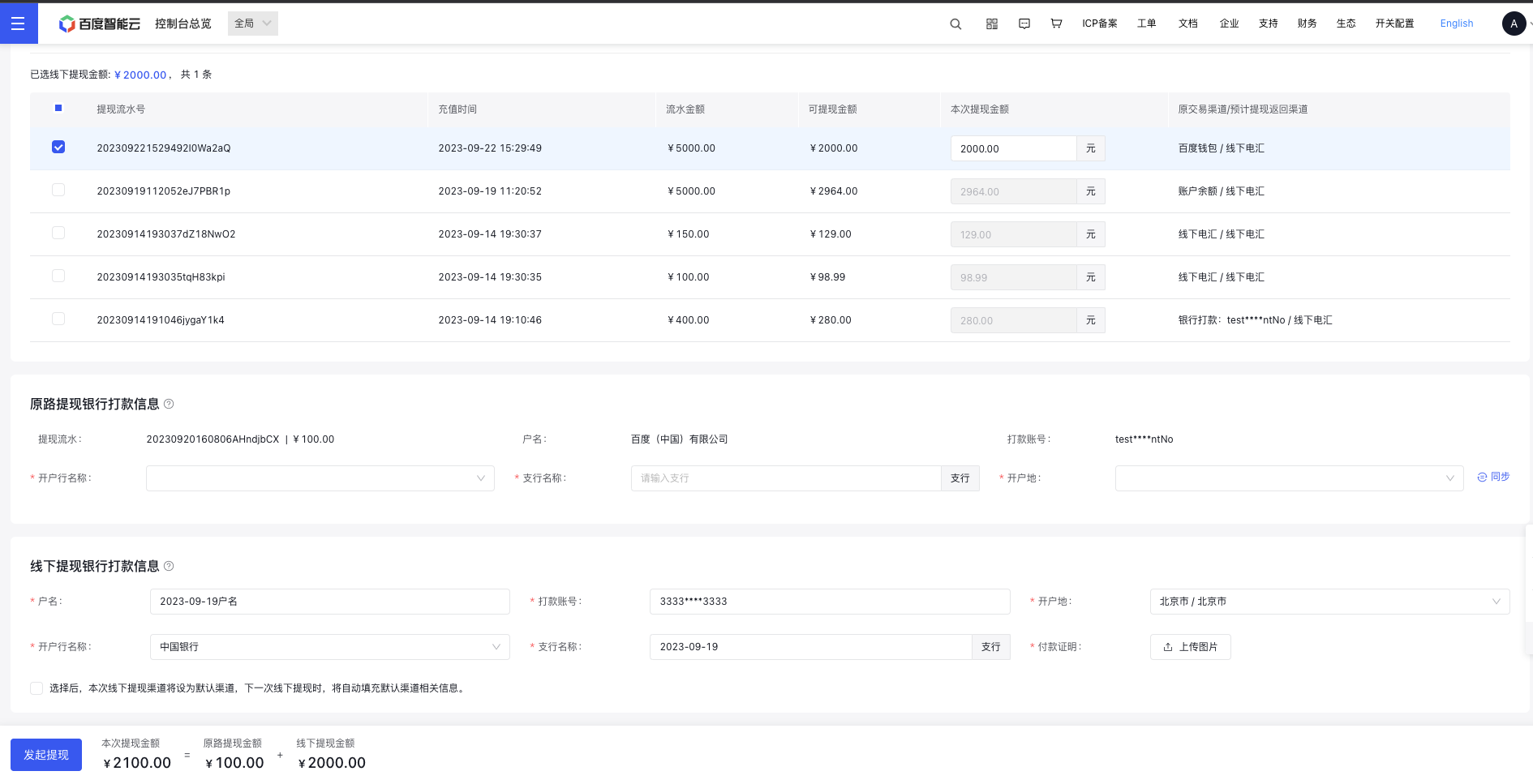
Exclusive remittance account
For transaction records of funds from exclusive remittance accounts, the payee name and payee account number will be automatically populated. When applying for withdrawal for the first time, you need to complete additional information of the receiving bank account, including “Bank Name”, “Sub-branch Name”, and “Account Opening Location”. If there is still a withdrawable balance in this transaction record after a successful withdrawal, the system will automatically populate the receiving information used for the previous successful transfer when you apply for withdrawal for this record again, and no manual supplementation is required
If the multiple exclusive remittance account transaction records you selected include those with the same payee name and payee account number, you can click the Synchronize button on the right after supplementing the information for one record. After clicking, the system will automatically synchronize the filled bank information to other withdrawal records with the same payee name and transfer account number in this “Return to Original Payment Channel” withdrawal application.

Offline withdrawal
For offline withdrawal transaction records, you need to provide the receiving account (original transaction account) information and original transaction vouchers for each offline withdrawal application. We will review based on the original transaction vouchers you provide, and return the funds to your original transaction account after the review is approved;
Currently, for each offline withdrawal application, even if multiple transaction records are involved, the funds can only be returned to one receiving account;
You can set a receiving account as the default return channel for offline withdrawals. For subsequent withdrawals, the system will automatically populate this information, and no secondary manual entry is required. However, you need to upload the original transaction vouchers for each withdrawal application

Initiate withdrawal
After completing the selection of withdrawal transaction records and filling in the receiving information, click Initiate Withdrawal at the bottom of the page. After a successful initiation, we will split the withdrawal records based on the transaction records you selected and the expected withdrawal amount, and redirect you to the Withdrawal Records page
Subsequent operations
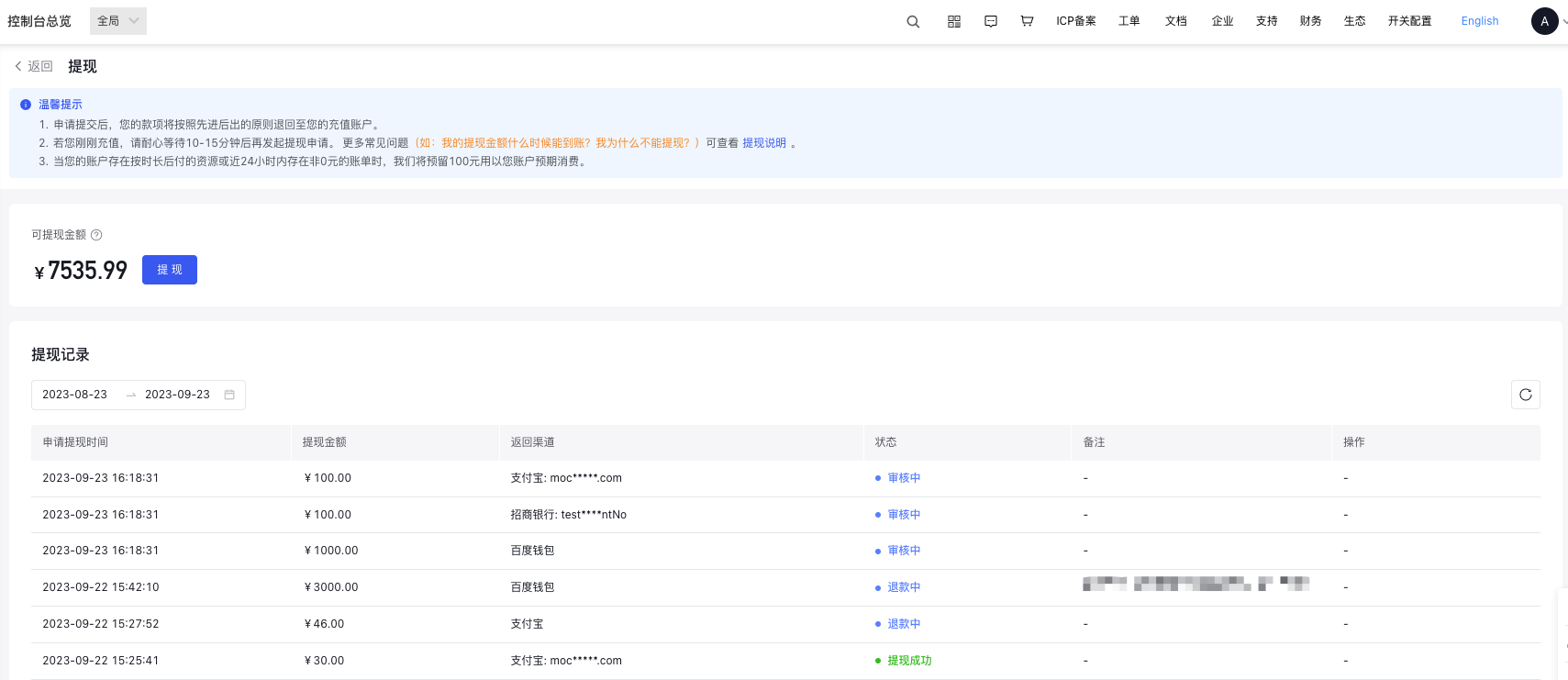
After submitting the withdrawal application, you can view the processing progress of the withdrawal application in the Withdrawal Records list on the Financial Overview > Withdrawal page.
Withdrawal arrival time
| Remittance method | Payment channel | Withdrawal arrival time | Description |
|---|---|---|---|
| Online remittance | Third-party payment | 1-2 working days | Normally not affected by other factors |
| Offline remittance | UnionPay B2B | 2-3 working days | Offline remittance involves offline bank operations. Fund transfers will be delayed during the financial settlement period (3 working days at the end of the month + 5 working days at the beginning of the month) |
Notes:
Due to the validity period restrictions of third-party channel returns, your withdrawal operation may fail due to timeout. In such cases, we will return the funds to you via offline remittance. Please supplement and submit the corresponding materials according to the prompts in the withdrawal records.
Baidu AI Cloud will manually review your materials as soon as possible. Please wait patiently. If you have any questions, you can submit a ticket for specific consultation.
For more frequently asked questions about withdrawal, please refer to Withdrawal FAQs.