Consumption Overview

Finance Finance

  • API Reference
    • Access control
    • Balance Query Related Interfaces
      • Account Balance Query
    • Bill Related Interfaces
      • Appendix
      • Charge Item Bill
      • Python Request Example
      • Resource Month Bill
    • Error response
    • Feature Update Records
    • General Description
    • Interface Specifications
    • Introduction
  • Bill Management
    • Bill Details
    • Bill Subscription
    • Consumption Information Subscription Guide
    • Consumption Overview
    • How to View
    • Tag-Based Billing
  • Charge
    • Billing & Configuration Changes
      • Configuration Upgrade Or Shrinkage
      • Shift Charge
    • Charge type
    • On-Demand Billing
    • Pay-as-you-go
    • Subscription billing
  • Contract
    • Apply for Electronic Contract
    • Overview
  • Cost Management
    • Cost Allocation
    • Cost Splitting
  • Disclaimer
  • Enterprise Organization Financial Management
  • FAQs
    • Bill and Debt
    • Billing Issues
    • Common Questions Overview
    • Contract Issues
    • Coupon Issues
    • Dedicated Account Remittance Issues
    • Invoice Issues
    • Order Issues
    • Recharge Issues
    • Refund Issues
    • Renew Issues
    • Withdrawal Issues
  • Invoice
    • Apply for Baidu Intelligent Cloud Invoice
    • Return or Exchange Baidu Intelligent Cloud Invoice
  • Multi-Account Multi-User Financial Management
    • Enterprise Organization - Financial Management
    • Multi-User Access Control - Financial Permission
    • Unified Finance
  • Order Management
  • Overview
  • Partner Deposit Payment
  • Purchase Guide
    • Coupon
      • Activating Coupons
      • Coupon Overview
      • Using Coupons
      • Viewing Coupons
    • Income and Expense Details
    • Purchase
    • Recharge
      • Exclusive Account Wire Transfer
      • Recharge Operations
      • Viewing Balance
    • Refund and Compensation
      • Product Compensation Standards
      • Refund Application Process
      • Refund policy
      • Unsubscribe Overview
      • Unsubscribe Rule Description
    • Renew
      • Auto-renewal
      • Renew Overview
      • Unified Resource Expiration Time
    • Withdrawal
  • Resource Package Management
    • Resource Package Deduction Details
    • Resource Package Overview
  • SDK
    • Java-SDK
      • Bill
      • BillingClient
      • Exception handling
      • Install SDK
      • Overview
      • Version Update Description
All documents
menu
No results found, please re-enter

Finance Finance

  • API Reference
    • Access control
    • Balance Query Related Interfaces
      • Account Balance Query
    • Bill Related Interfaces
      • Appendix
      • Charge Item Bill
      • Python Request Example
      • Resource Month Bill
    • Error response
    • Feature Update Records
    • General Description
    • Interface Specifications
    • Introduction
  • Bill Management
    • Bill Details
    • Bill Subscription
    • Consumption Information Subscription Guide
    • Consumption Overview
    • How to View
    • Tag-Based Billing
  • Charge
    • Billing & Configuration Changes
      • Configuration Upgrade Or Shrinkage
      • Shift Charge
    • Charge type
    • On-Demand Billing
    • Pay-as-you-go
    • Subscription billing
  • Contract
    • Apply for Electronic Contract
    • Overview
  • Cost Management
    • Cost Allocation
    • Cost Splitting
  • Disclaimer
  • Enterprise Organization Financial Management
  • FAQs
    • Bill and Debt
    • Billing Issues
    • Common Questions Overview
    • Contract Issues
    • Coupon Issues
    • Dedicated Account Remittance Issues
    • Invoice Issues
    • Order Issues
    • Recharge Issues
    • Refund Issues
    • Renew Issues
    • Withdrawal Issues
  • Invoice
    • Apply for Baidu Intelligent Cloud Invoice
    • Return or Exchange Baidu Intelligent Cloud Invoice
  • Multi-Account Multi-User Financial Management
    • Enterprise Organization - Financial Management
    • Multi-User Access Control - Financial Permission
    • Unified Finance
  • Order Management
  • Overview
  • Partner Deposit Payment
  • Purchase Guide
    • Coupon
      • Activating Coupons
      • Coupon Overview
      • Using Coupons
      • Viewing Coupons
    • Income and Expense Details
    • Purchase
    • Recharge
      • Exclusive Account Wire Transfer
      • Recharge Operations
      • Viewing Balance
    • Refund and Compensation
      • Product Compensation Standards
      • Refund Application Process
      • Refund policy
      • Unsubscribe Overview
      • Unsubscribe Rule Description
    • Renew
      • Auto-renewal
      • Renew Overview
      • Unified Resource Expiration Time
    • Withdrawal
  • Resource Package Management
    • Resource Package Deduction Details
    • Resource Package Overview
  • SDK
    • Java-SDK
      • Bill
      • BillingClient
      • Exception handling
      • Install SDK
      • Overview
      • Version Update Description
  • Document center
  • arrow
  • FinanceFinance
  • arrow
  • Bill Management
  • arrow
  • Consumption Overview
Table of contents on this page
  • Consumption Statistics
  • Resource month bill
  • Field description
  • Historical consumption trend
  • Reconciliation example

Consumption Overview

Updated at:2025-10-27

Consumption Statistics

  1. You can view or download the required consumption bills in the Consumption Statistics module of the Consumption Center - Consumption Overview page, and filter bills by bill type and consumption date:
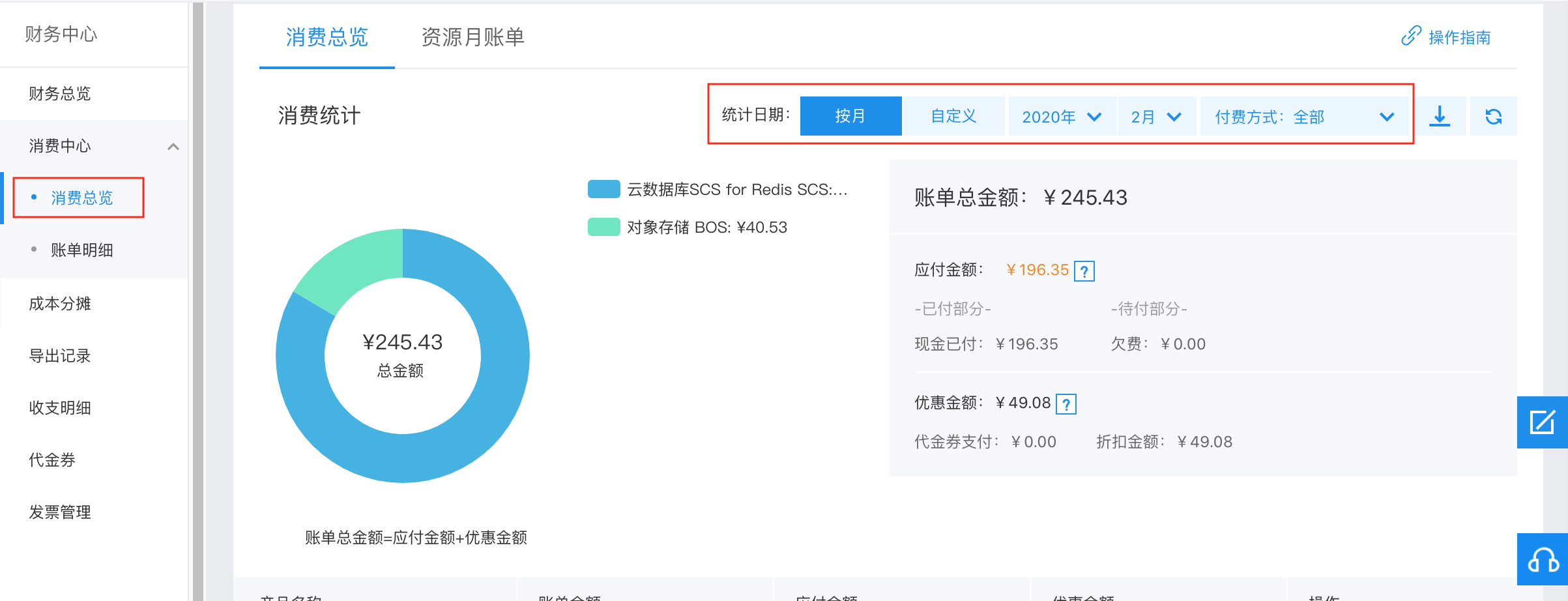
image.png

  • Bill type: It includes three options, including prepay consumption bills, postpay consumption bills, or all consumption bills, all consumption bills will be selected by default;
  • Statistic date: Customize the time range for viewing consumption bills. You can select Monthly Bill or Custom Bill to set the start and end dates.
  1. The left side of the consumption statistics shows a pie chart of consumption amount proportions of products, allowing you to understand the expenditure distribution of your purchased resources. The right side shows expenditure details:
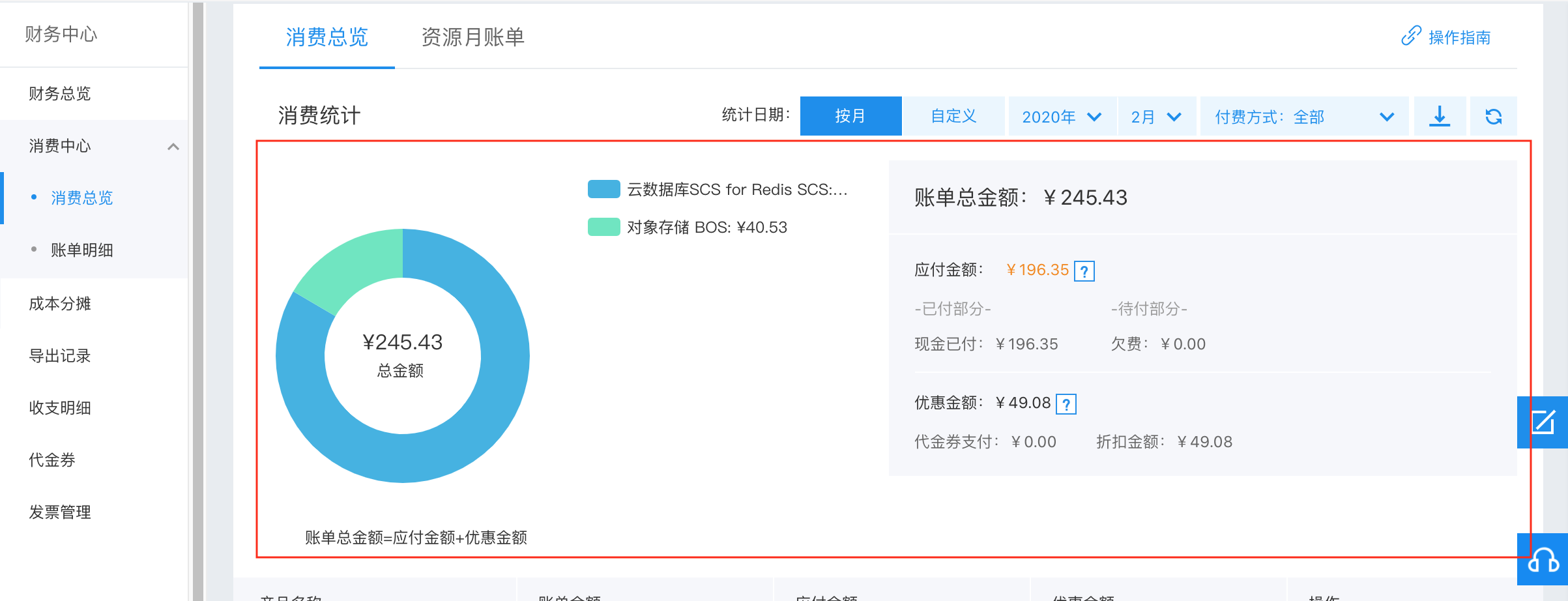
image.png

  • Total bill amount: Display the sum of all bills within the selected period;
  • Need-pay amount: Display the actual amount to be paid to Baidu AI cloud after deducting discounts during the selected period, including paid amounts (e.g., cash payment) and unpaid amounts (e.g., debt)
  • Nopaid amount: Display nopaid amounts granted by Baidu AI cloud during the selected period, that is, no payment is required.
  1. The lower section of the consumption statistics displays consumption details:
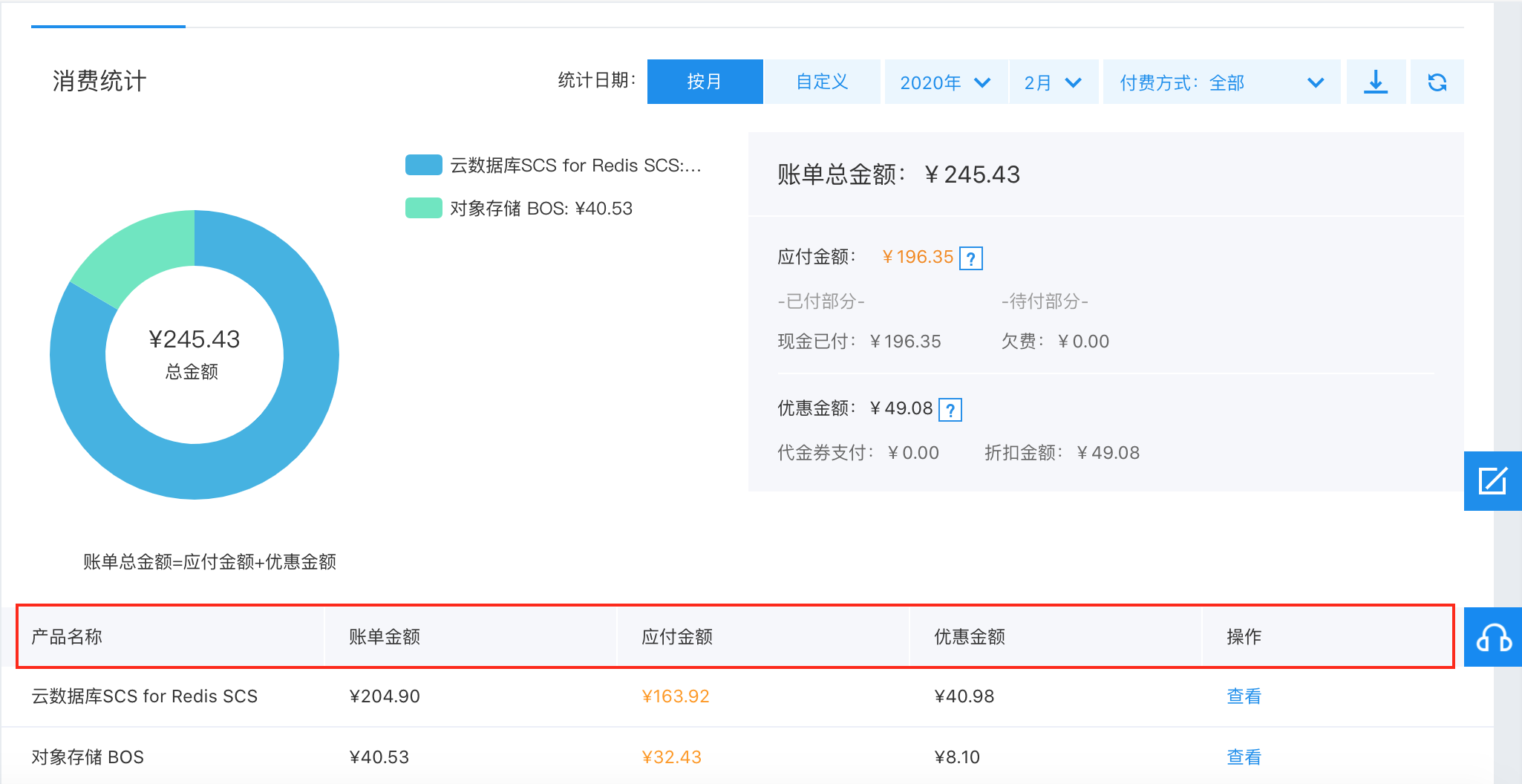
image.png

  • Product name: Display the product billed;
  • Bill amount: Display the total amount of all bills generated by the product during the selected time period;
  • Need-pay amount: Display the amount to be paid for the product during the selected time period;
  • Nopaid amount: Display nopaid amounts granted by Baidu AI cloud for the product during the selected period, that is, no payment is required;
  • Action: Click View to access the hour bill for this product during the selected time period.
  1. To download bills, click the Download button, select the payment method and time period in the popup dialog, then click Download to obtain the specified bill.
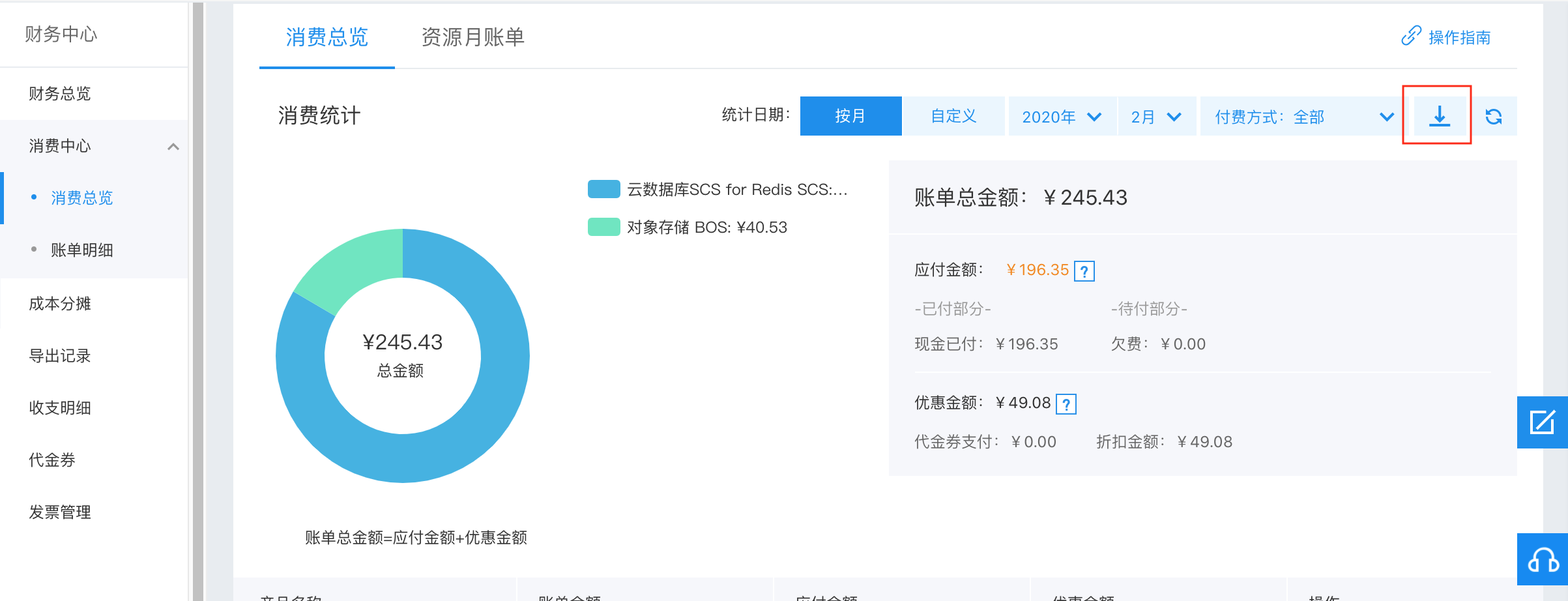
image.png

Resource month bill

You can view monthly granularity consumption summary of resources in Consumption Overview -> Resource Month Bill. The resource month bill is used to verify each resource's configuration, usage, unit price, fees and other information on a monthly basis. Billing time is the 1st of the following month, and bill details can be expanded by swiping left.
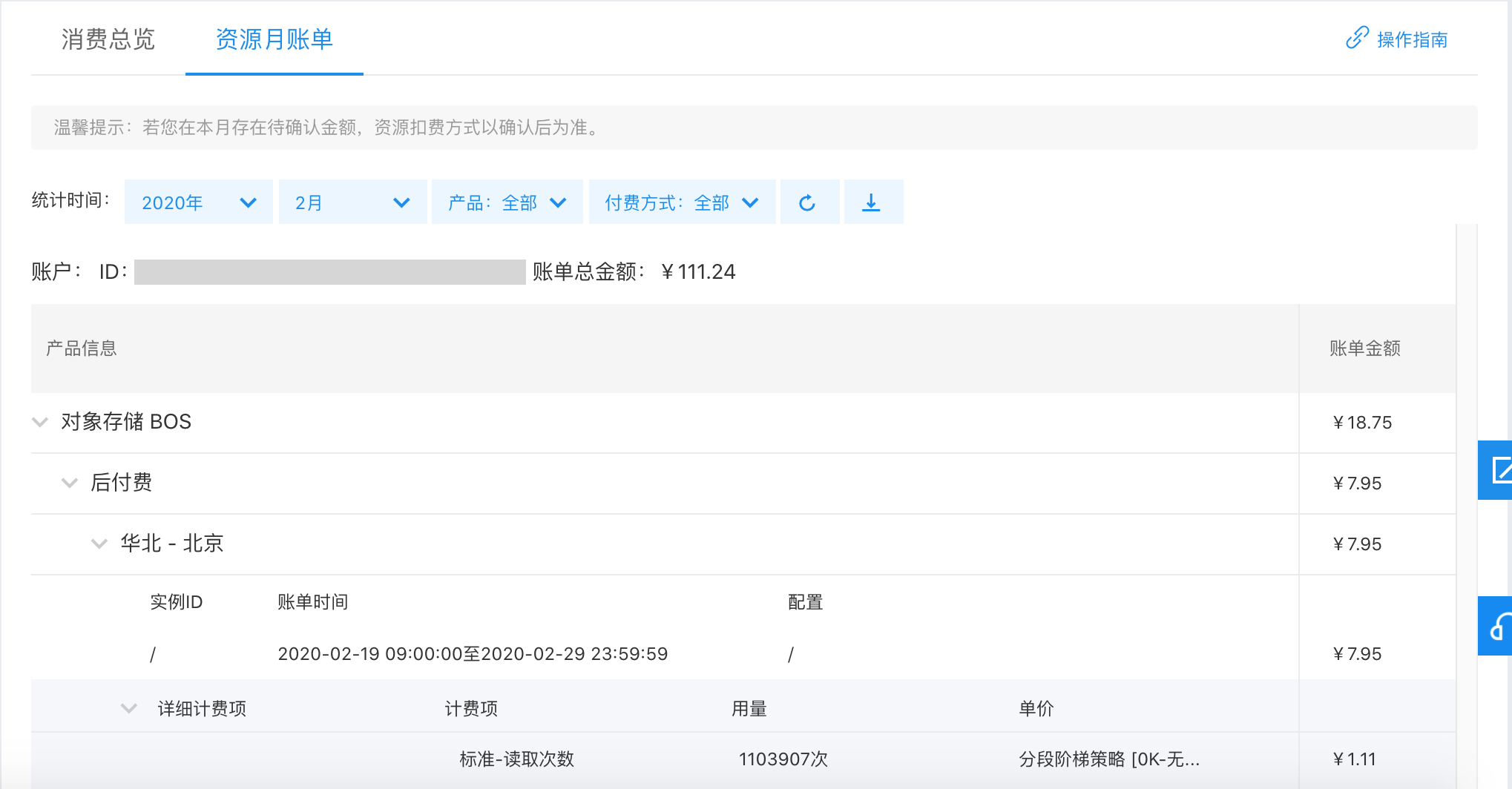
image.png

Field description

Resource month bill display items Description
Product name Product English name (Chinese name), e.g.: BCC (Baidu Cloud Compute)
Bill type Prepay or postpay
Region Chinese name of regions corresponding to instances or services under the product, e.g., North China-Beijing
Instance ID Instance ID for instance-level products, or package product ID. Display "-" if no instance ID exists
Order type Order types corresponding to this prepay payment, e.g., purchase, upgrade, postpay to prepay, etc.
Bill time Prepay bill time refers to time when the payment is completed, postpay bill time refers to the bill period corresponding to the usage
Configuration Pricing configuration information for this instance, e.g., CPU: 1C, memory: 1G
Service duration Corresponding service duration in prepay bills, e.g., 1 month, 27 days, 12 months, etc.
Charge item Postpay charge items, e.g., runtime, cold storage-storage space, etc.
Usage quantity Usage corresponding to the charge item during the bill time
Unit price Unit price corresponding to this instance/service
Bill amount Bill amount corresponding to the instance/service you purchased
Detailed bill amount It includes specific deduction details, containing fields such as cash, coupon, debt, discounts, etc.

Historical consumption trend

In the Consumption Center -> Consumption Overview window, you can view your historical consumption trends within a selected time period under the historical consumption trends module. The total consumption trends and product-specific consumption trends across different time granularities during the selected time period can be filtered by products, time periods, and time granularities:

  • Select the comparison data: You can select the total amount or product(s) you wish to view by clicking the Select the Comparison Data. The system will automatically display corresponding consumption trends, defaulting to a line chart of the total amount;
  • Time filter: You can select a time range by selecting a start and end time, and then the system will display your consumption during the selected time period. If no time period is specified, the system defaults to the six months from the query date;
  • Daily summary/monthly summary: You can select Daily Summary or Monthly Summary to filter the time granularity of the trend line chart below. The system defaults to Monthly Summary if no change is made;
  • You can change the start time by dragging the timeline below the coordinate axis.

For specific operations, refer to the video below:

Reconciliation example

It is recommended to verify based on consumption overview and resource month bill.

  • By summary information: Filter by corresponding month. Total bill amount for both is identical.
  • Verify by product: Filter by the corresponding month and product, ensuring the amounts are consistent.
  • Verify by bill type: Filter by corresponding month and bill type, ensuring the amounts are consistent.

Previous
Consumption Information Subscription Guide
Next
How to View