mount Cloud Disk Server

CDS

  • API Reference
    • Disk Related Interfaces
  • Dedicated Cluster Operation Guide
    • Charge
    • Create a dedicated cluster
    • Create Cloud Disk Server in Dedicated Cluster
    • Expand Dedicated Cluster
    • View Dedicated Cluster Information
    • What Is a Dedicated Cluster
  • Disk Operation Guide
    • Basic Operations
      • Create cloud disks
      • Disk encryption
        • Encrypt Data Disk and Snapshot
        • Encrypt System Disk and Image
        • Encryption Overview
      • Format cloud disks
        • Format Disk Partition on Linux System
        • Format Disk Partition on Windows System
        • Overview
      • Monitor alarm
      • mount Cloud Disk Server
      • Recycle bin
      • Release cloud disks
      • Tag Management
      • Unmount Cloud Disk Server
    • Billing management
      • Renew cloud disks
      • Shift Charge
    • Elastic Operations
      • Burst performance capability
      • Change cloud disk type
      • Performance preconfiguration
        • Use Performance Pre-Configuration
        • What Is Performance Pre-Configuration
      • Resize cloud disks
        • Expansion Overview
        • Extend Disk Partition on Linux Data Disk
        • Extend Disk Partition on Linux System Disk
        • Extend Disk Partition on Windows Data Disk
        • Extend Disk Partition on Windows System Disk
  • FAQs
    • Billing Problems
    • Common Questions Overview
    • Configuration-related questions
    • Fault-related questions
    • Performance-related questions
    • Security Problems
  • Peripheral Tools
    • CDSCMD Tool
      • Configure CDS CMD Tool
      • Install CDS CMD Tool
      • Operate Disk Using CDS CMD Tool
      • Overview
      • Tool Version History
  • Product Description
    • Application scenarios
    • Disk Status
    • Disk types
    • Product advantages
    • Product features
    • Product functions
    • Product Introduction
    • Type and Region
  • Product pricing
    • Disk charge type
      • Pay as you go
      • Subscription billing
    • Disk Expiration and Debt Reminder
    • Snapshot Charge Type
    • Universal Storage Capacity Package GSCP
  • Product Updates
    • Function Release Records
    • Product Announcement
      • Adjustments to prepay Disk renew, shift charge, and Unsubscribe Operations
  • Service Level Agreement (SLA)
    • Baidu Intelligent Cloud Block Storage Trusted Cloud
    • CDS Service Level Agreement (SLA V2_0)
  • Snapshot Operation Guide
    • Disk Snapshot
      • Automatic snapshot
      • Create a custom image
      • Create CDS disk from snapshot
      • Cross-region replication
      • Delete a snapshot
      • Manual Snapshot
      • Snapshot Rollback
      • Tag Management
    • Instance snapshots
      • Instance snapshots
    • Introduction to snapshot
      • Instructions for use
      • Snapshot chain
  • Typical Practices
    • Block Device Persistent Naming
All documents
menu
No results found, please re-enter

CDS

  • API Reference
    • Disk Related Interfaces
  • Dedicated Cluster Operation Guide
    • Charge
    • Create a dedicated cluster
    • Create Cloud Disk Server in Dedicated Cluster
    • Expand Dedicated Cluster
    • View Dedicated Cluster Information
    • What Is a Dedicated Cluster
  • Disk Operation Guide
    • Basic Operations
      • Create cloud disks
      • Disk encryption
        • Encrypt Data Disk and Snapshot
        • Encrypt System Disk and Image
        • Encryption Overview
      • Format cloud disks
        • Format Disk Partition on Linux System
        • Format Disk Partition on Windows System
        • Overview
      • Monitor alarm
      • mount Cloud Disk Server
      • Recycle bin
      • Release cloud disks
      • Tag Management
      • Unmount Cloud Disk Server
    • Billing management
      • Renew cloud disks
      • Shift Charge
    • Elastic Operations
      • Burst performance capability
      • Change cloud disk type
      • Performance preconfiguration
        • Use Performance Pre-Configuration
        • What Is Performance Pre-Configuration
      • Resize cloud disks
        • Expansion Overview
        • Extend Disk Partition on Linux Data Disk
        • Extend Disk Partition on Linux System Disk
        • Extend Disk Partition on Windows Data Disk
        • Extend Disk Partition on Windows System Disk
  • FAQs
    • Billing Problems
    • Common Questions Overview
    • Configuration-related questions
    • Fault-related questions
    • Performance-related questions
    • Security Problems
  • Peripheral Tools
    • CDSCMD Tool
      • Configure CDS CMD Tool
      • Install CDS CMD Tool
      • Operate Disk Using CDS CMD Tool
      • Overview
      • Tool Version History
  • Product Description
    • Application scenarios
    • Disk Status
    • Disk types
    • Product advantages
    • Product features
    • Product functions
    • Product Introduction
    • Type and Region
  • Product pricing
    • Disk charge type
      • Pay as you go
      • Subscription billing
    • Disk Expiration and Debt Reminder
    • Snapshot Charge Type
    • Universal Storage Capacity Package GSCP
  • Product Updates
    • Function Release Records
    • Product Announcement
      • Adjustments to prepay Disk renew, shift charge, and Unsubscribe Operations
  • Service Level Agreement (SLA)
    • Baidu Intelligent Cloud Block Storage Trusted Cloud
    • CDS Service Level Agreement (SLA V2_0)
  • Snapshot Operation Guide
    • Disk Snapshot
      • Automatic snapshot
      • Create a custom image
      • Create CDS disk from snapshot
      • Cross-region replication
      • Delete a snapshot
      • Manual Snapshot
      • Snapshot Rollback
      • Tag Management
    • Instance snapshots
      • Instance snapshots
    • Introduction to snapshot
      • Instructions for use
      • Snapshot chain
  • Typical Practices
    • Block Device Persistent Naming
  • Document center
  • arrow
  • CDS
  • arrow
  • Disk Operation Guide
  • arrow
  • Basic Operations
  • arrow
  • mount Cloud Disk Server
Table of contents on this page
  • Overview
  • Operation steps

mount Cloud Disk Server

Updated at:2025-11-03

Overview

Postpaid cloud disk servers that have been created can be attached to BCC instances using this process.

Operation steps

1. Sign in to the Baidu AI Cloud official website

Sign in to Baidu AI Cloud official website.

  • If you have not registered an account, you must first [register an account](UserGuide/Register an account.md#Register a Baidu Account).
  • If you have registered an account, you can directly sign in.

2. Enter the Disk List page

In the left navigation menu of the console, go to Baidu Cloud Compute > Baidu Cloud Compute (BCC) to enter the BCC console. Then click Disks on the left menu to access the disk list page, or directly select Cloud Disk Server (CDS) from the left navigation to open the disk list page.
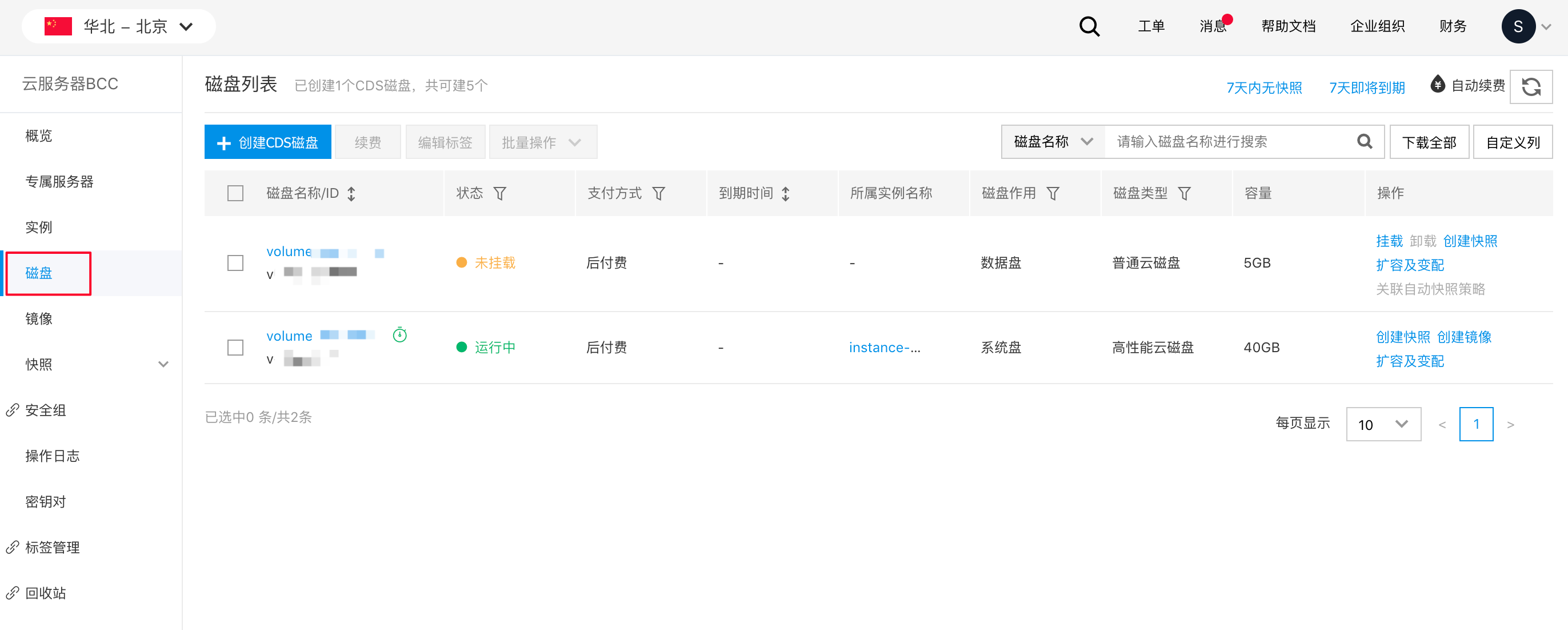
image.png

3. Select disk for mounting

From the disk list, click the Mount button in the operation bar of the target disk to start the mounting process.
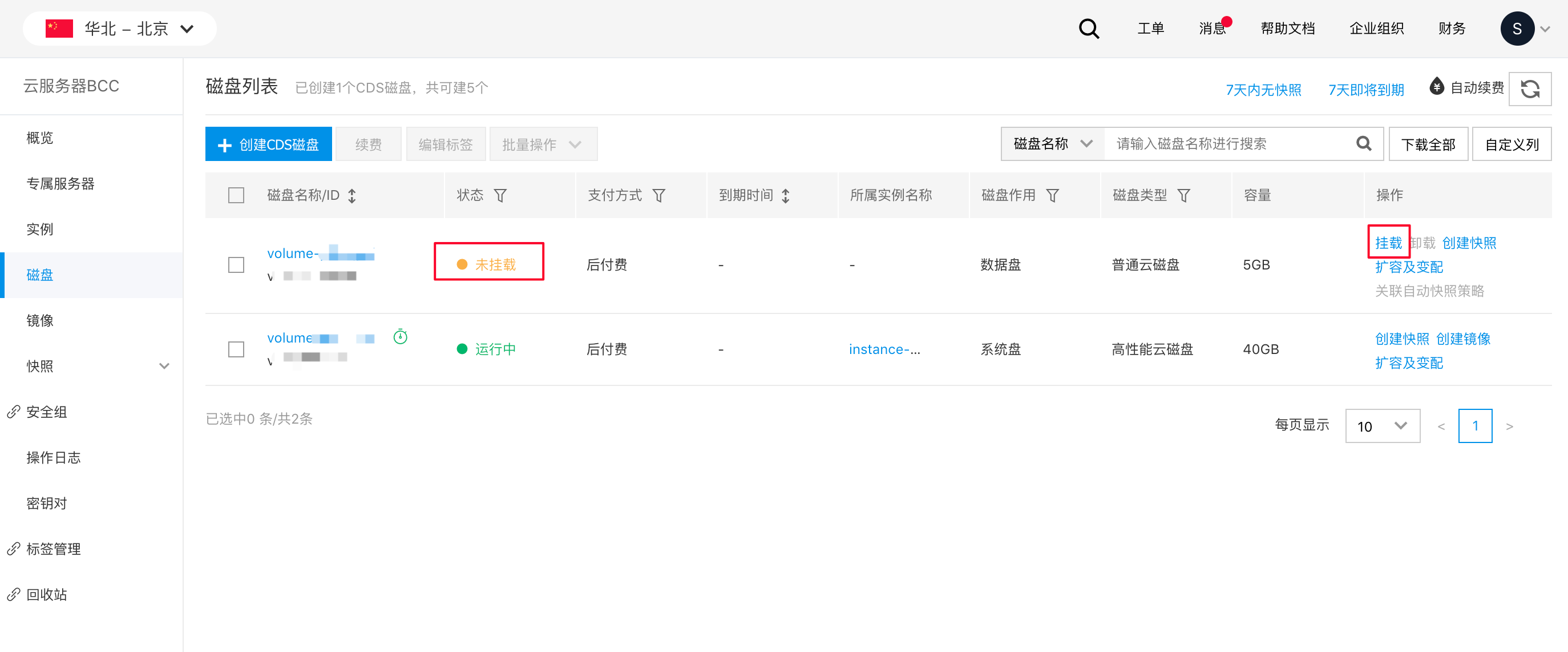
image.png

You can also click the disk name to enter its details page and click Mount button. image.png
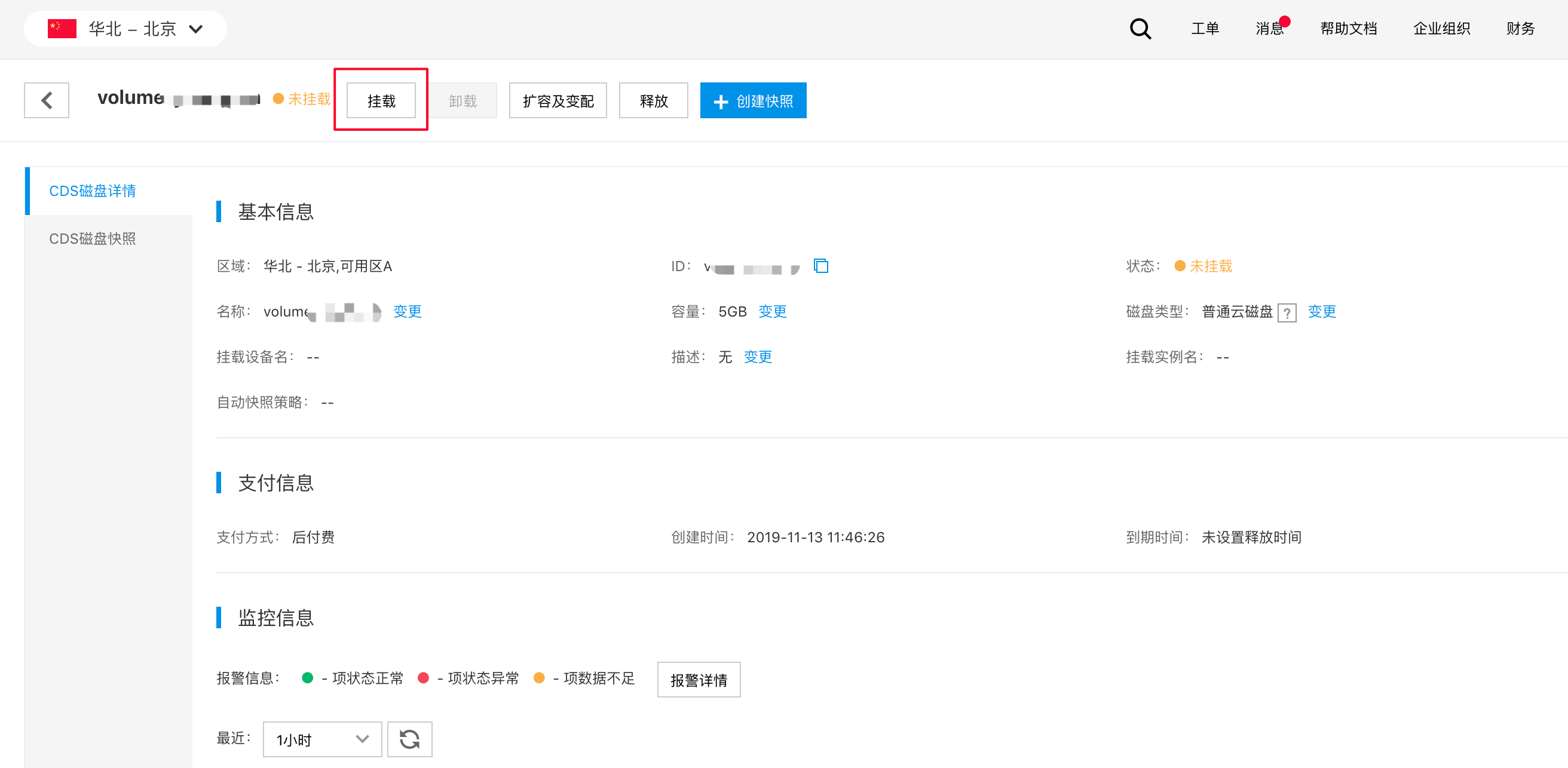
In the pop-up window, select the instance to mount and click OK.

Description:

  • Target disks and instances must be in the same region and availability zone. If they are in different availability zones, the instance will not appear as an option during the mounting process.
  • Subscribed disks can only be attached to subscribed BCC instances, and the disk expiration date must be later than that of the BCC instance. If the disk does not meet these conditions, mounting may fail. In such cases, you should renew the disk before attempting to mount it.
  • If no BCC instance exists in the availability zone of cloud disk server (CDS), create one via BCC console before mounting;
  • After mounting/unmounting operations, CDS cloud disks often experience drive letter drift. You can query the disk’s drive letter using the command: grep . /sys/block/vd*/serial. The drive letter obtained via this command is not affected by disk mounting/unmounting operations and remains permanent.

4. Format the disk

After mounting, the Status in the disk list will change to Mounted. Before use, you need to performCloud Disk Server (CDS) Formatting . You may use the disk only after formatting.

5. Completion

Once the above operations are completed, the disk is mounted on the target instance and ready for use.

Previous
Monitor alarm
Next
Recycle bin