

Change cloud disk type
Overview
You can flexibly change the disk type of the CDS cloud disk according to your own business needs. CDS cloud disk supports multiple change methods:
- You can upgrade or downgrade the type of a purchased post-paid CDS cloud disk, as well as upgrade or downgrade the type of a pre-paid CDS cloud disk.
- It supports converting not only data disk types but also system disk types.
- If you're looking to expand the capacity of a purchased cloud disk, you can initiate the capacity expansion simultaneously while changing the disk type.
Application scenarios
If the CDS cloud disk is mounted to a BCC cloud server instance, you can change both data disk and system disk types. However, if it's mounted to a dedicated server DCC, only data disk type changes are allowed, and system disk type changes are temporarily unsupported. For specific scenarios regarding disk type changes, refer to the table below:
| Mounted instance type | Disk charge type | Disk region | Disk function | Disk type upgrade | Disk type downgrade |
|---|---|---|---|---|---|
| Baidu Cloud Compute (BCC) | Postpay | All regions | Data disk | Support | Support |
| Baidu Cloud Compute (BCC) | Postpay | All regions | System disk | Support | Support |
| Baidu Cloud Compute (BCC) | Prepay | All regions | Data disk | Support | Support |
| Baidu Cloud Compute (BCC) | Prepay | All regions | System disk | Support | Support |
| Dedicated server DCC | Postpay | All regions | Data disk | Support | Support |
| Dedicated server DCC | Prepay | All regions | Data disk | Support | Support |
Description:
- Disk type upgrade refers to changing the type of a CDS cloud disk from the current type to a disk type with a higher price;
- Disk type downgrade refers to changing the type of a CDS cloud disk from the current type to a disk type with a lower price;
- Disk type change is only applicable to CDS cloud disks and does not support type change for local disks;
- Currently, Baidu AI Cloud provides 6 types of CDS cloud disks, whose prices from low to high are: previous-generation cloud disk, general-purpose HDD, high-throughput HDD, high-performance cloud disk, general-purpose SSD, and enhanced SSD. For the differences between each disk type and specific performance indicators, please refer to Disk Types. The pricing of different CDS cloud disks varies, and two billing methods are supported: Subscription Pricing and Pay-as-you-go Billing. Please check them respectively;
- High-throughput HDDs and previous-generation cloud disks are no longer available for purchase. If you already own a high-throughput HDD or previous-generation cloud disk, please switch them to other disk types using the online disk type change feature. For example, previous-generation cloud disks can be converted to general-purpose HDDs at the same price, and high-throughput HDDs can be changed to high-performance cloud disks at the same price.
Usage restrictions
- You can initiate a disk type change operation only when the disk is in the “Running” or “Mounted” state. Initiating the operation in other states will not be permitted.
- Disk type change operations may take several hours from start to completion. It is advised to perform the operation during off-peak business hours.
- After starting the disk type change operation, the disk will progress through two states sequentially: “Configuration Changing & Expanding” and “Configuration Changing & Optimizing”. The “Configuration Changing & Expanding” phase lasts a few seconds or minutes, while “Configuration Changing & Optimizing” can take several minutes to hours. Despite the prolonged duration of “Configuration Changing & Optimizing,” it won't affect data read and write operations.
- For the sake of data security, some operations will be restricted during the type conversion process. For specific limitations, please consult the guidelines under Operation Guide > Configuration Changing & Expanding and Operation Guide > Configuration Changing & Optimizing located at the bottom of this document.
- For your data security, the system sets a window protection period for the disk type change operation. This window protection period starts when the configuration change operation is initiated and ends 12 hours later. If you initiate a disk type change operation and the change operation is completed within 12 hours, if you want to initiate the operation again, you need to wait until the window protection period ends. If the disk type change operation you initiated fails due to accidental external factors within 12 hours, you can initiate a new configuration change operation immediately, and the new operation is not restricted by the window protection period. If your disk encounters an abnormal situation, resulting in the disk type change taking more than 12 hours, please submit a ticket for handling.
Operation guide
Sign in to the console to modify the instance type of the CDS cloud disk.
1. Sign in to the Baidu AI Cloud official website
Sign in to Baidu AI Cloud official website.
- If you have not registered an account, you must first [register an account](UserGuide/Register an account.md#Register a Baidu Account).
- If you have registered an account, you can directly sign in.
2. Access the CDS console
In the left-hand navigation bar, go to Product Services > Cloud Disk Server (CDS) to access the Disk List page. Alternatively, navigate to Product Services > Baidu Cloud Compute (BCC) > Instance List > Disks of This Instance to open the Disks of This Instance List page.
3. Enter the disk configuration change page
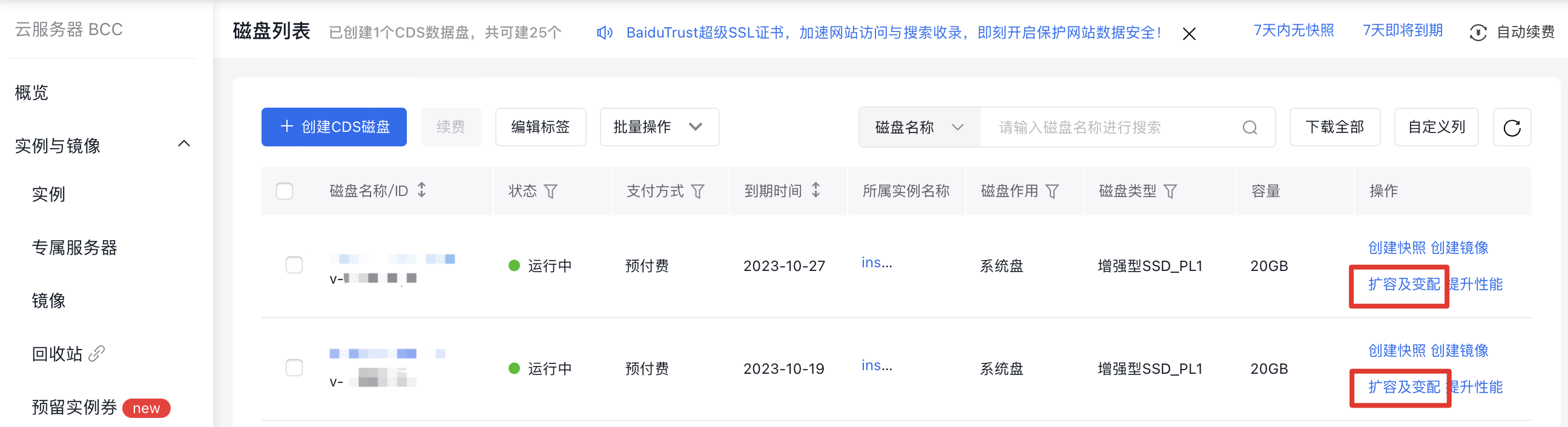
On the Disk List page, select the CDS disk you wish to modify, then click Expand Capacity & Change Configuration in the operation bar on the right to access the Disk Configuration Change page.
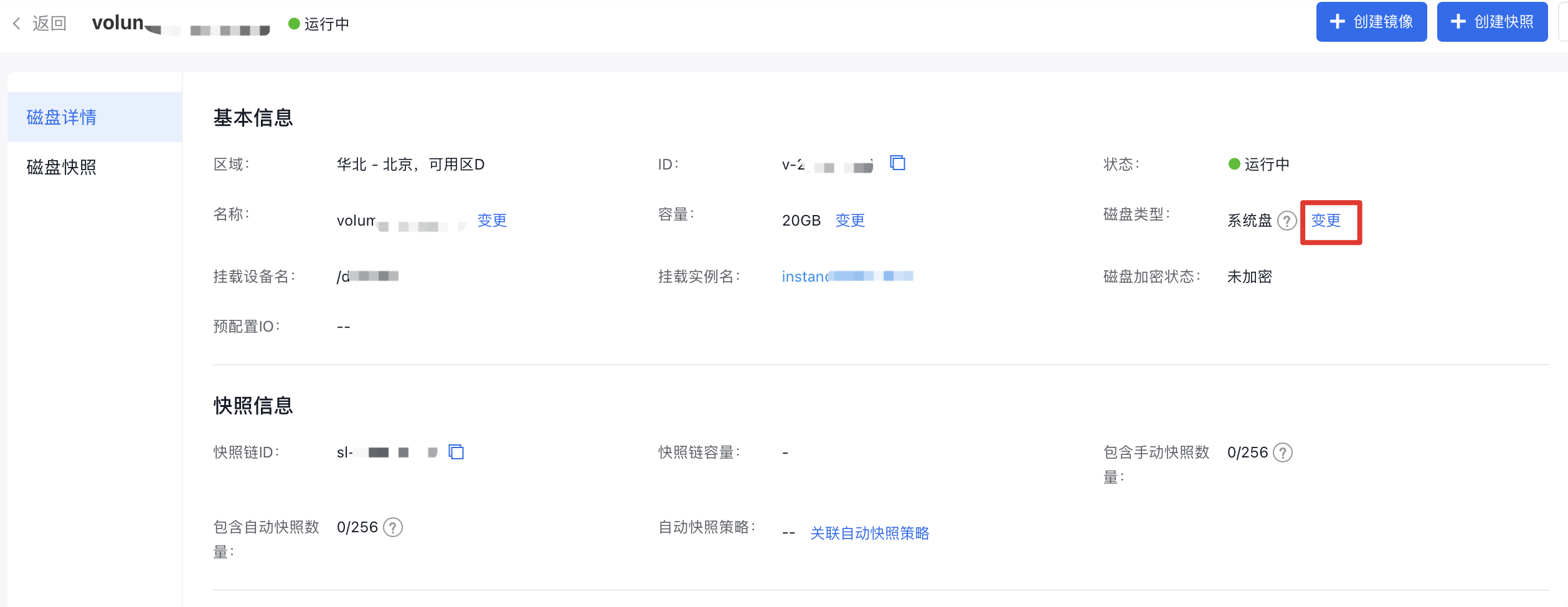
You can also click the disk name on the Disk List page to enter the Disk Details page, then click the Change entry after the disk type to enter the Disk Configuration Change page.
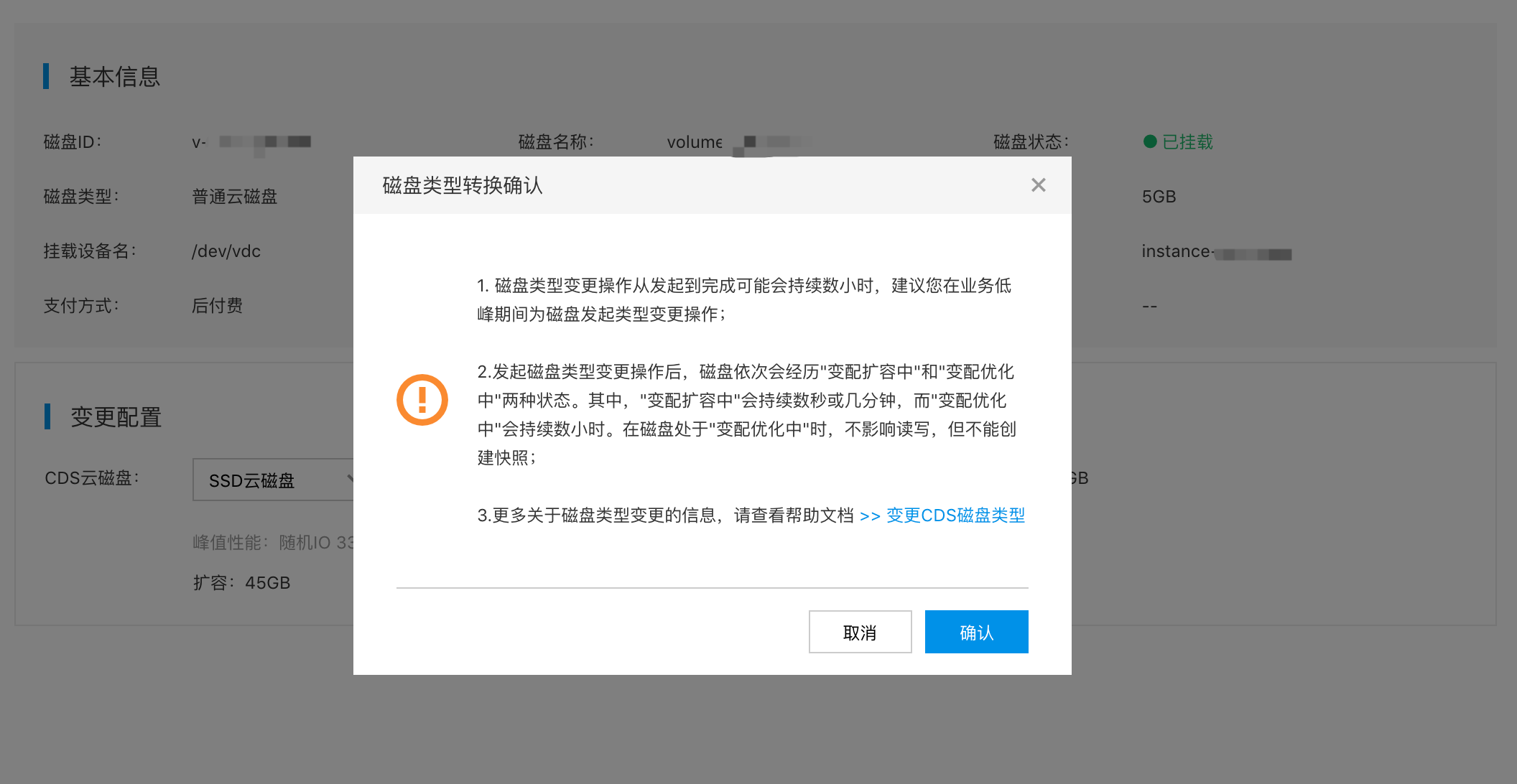
After entering the Disk Type Configuration Change page, you can select the target change type of the disk. At this time, if you want to expand the disk capacity at the same time, you can complete it synchronously on this page. For the operation method of disk capacity expansion, please refer to Expanding CDS Disk Capacity. You can check the price of the disk after the change on the right side of the page. After confirming that it is correct, click Next Step, then confirm and complete the order and payment.
After completing the above steps, the disk will shift through two statuses: "Configuration Changing & Expanding" and "Configuration Changing & Optimizing", completing the configuration change you initiated. The "Configuration Changing & Expanding" stage typically lasts a few seconds to minutes, depending on the network and server load. The "Configuration Changing & Optimizing" stage may last anywhere from a few minutes to several hours, influenced by the data volume on your disk, but it will not exceed 12 hours.
Description:
- When the disk for which you change the configuration uses the pre-paid billing method, the disk will start to be billed according to the new disk type immediately after the configuration change operation is initiated;
- When the disk for which you change the configuration uses the post-paid billing method, the disk will start to be billed according to the new disk type after the type conversion is completed. During the configuration change states (i.e., “Configuration Changing & Expanding” and “Configuration Changing & Optimizing”), the disk will be billed according to the original disk type;
- When converting the disk type to an SSD cloud disk, the minimum capacity required is 50 GB.
4. Configuration changing & expanding
During the "Configuration Changing & Expanding" stage, the system is performing the configuration change for your disk. This process generally takes a few seconds to minutes and is influenced by the server's current network and load.
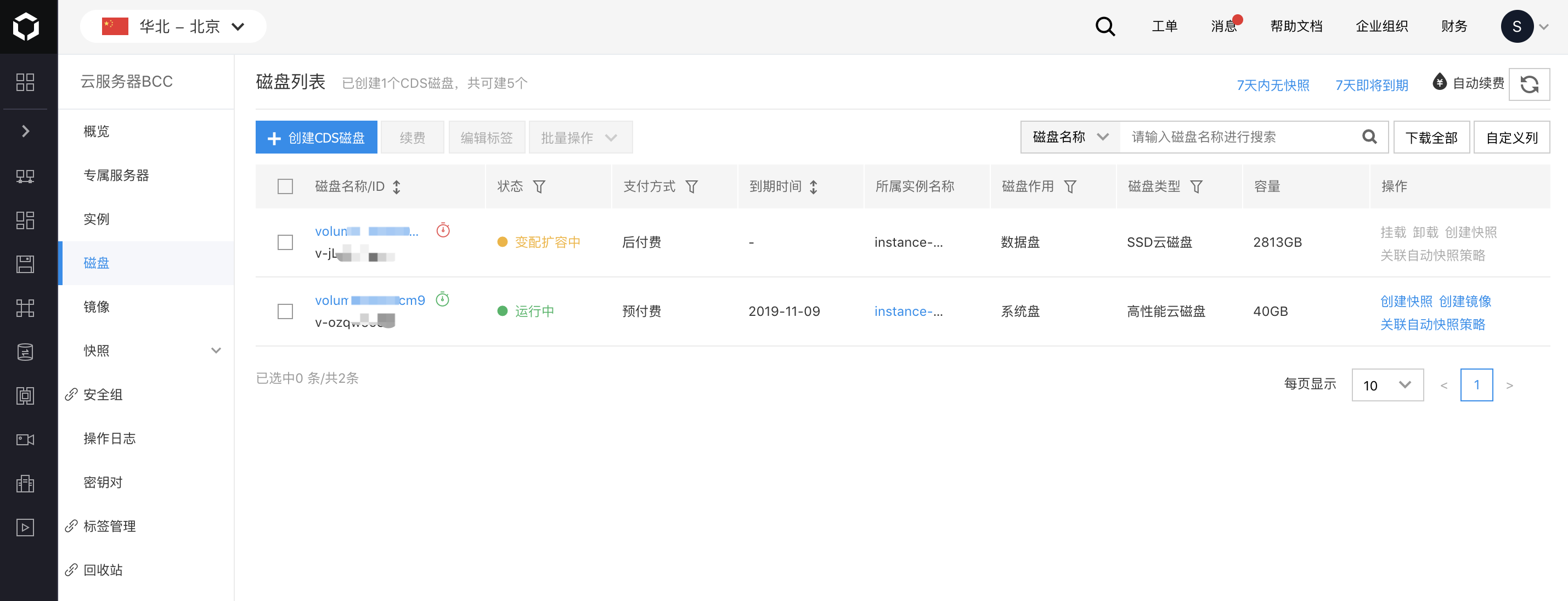
While the disk is in the "Configuration Changing & Expanding" stage, some operations will be restricted for data security. If you need to perform these operations, it is advised to postpone initiating the disk type change. The list of restricted operations is as follows:
- Mounting and unmounting operations are not allowed for data disks in the “Configuration Changing & Expanding” state;
- Manual or automatic snapshots are not allowed for data disks or system disks in the “Configuration Changing & Expanding” state;
- Rollback snapshots are not allowed for data disks or system disks in the “Configuration Changing & Expanding” state;
- Re-performing configuration change and capacity expansion operations are not allowed for data disks or system disks in the “Configuration Changing & Expanding” state;
5. Configuration changing & optimizing
Once the "Configuration Changing & Expanding" stage concludes, the disk transitions to the "Configuration Changing & Optimizing" phase. During this phase, the system migrates data on your disk. Completion time ranges from a few minutes to several hours, depending on the disk's data volume and type.
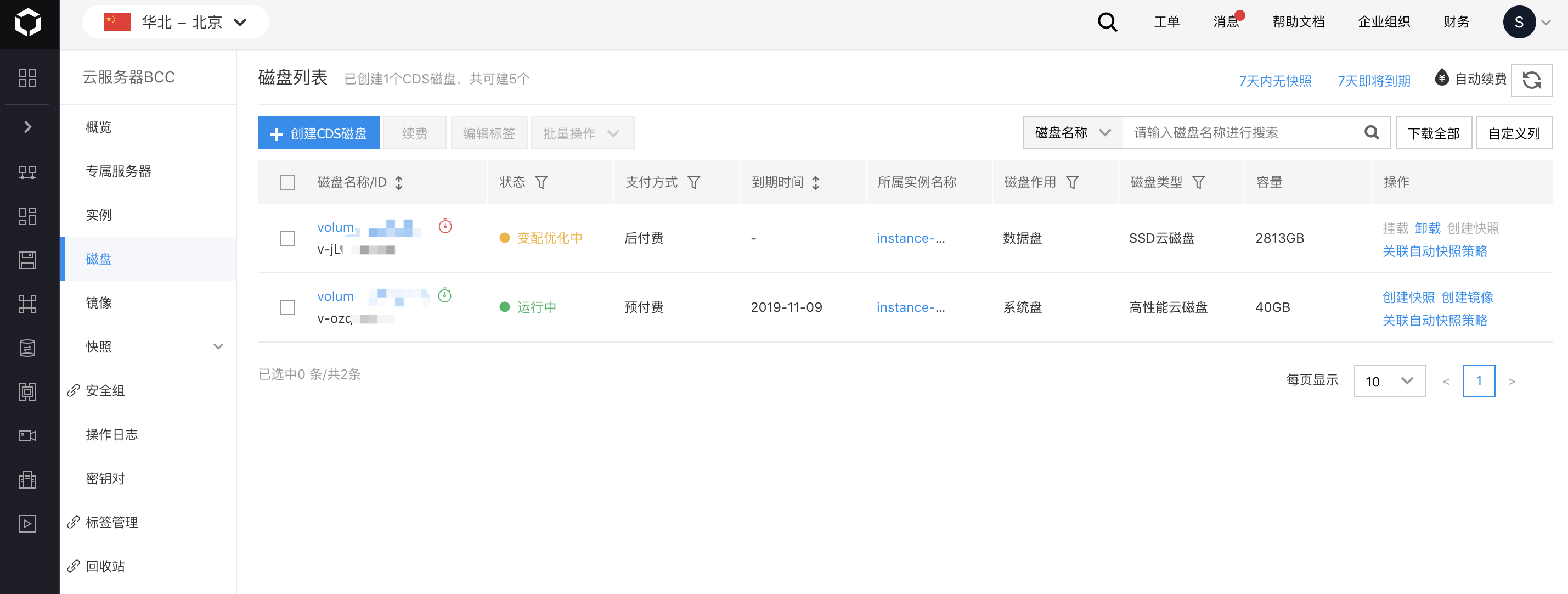
At this time, the read and write operations of your disk will not be affected, but there are still some usage restrictions:
- Manual or automatic snapshots are not allowed for data disks or system disks in the “Configuration Changing & Optimizing” state;
- Rollback snapshots are not allowed for data disks or system disks in the “Configuration Changing & Expanding” state;
- Creating images for system disks in the “Configuration Changing & Optimizing” state is not allowed;
- Expansion is not allowed for data disks or system disks in the “Configuration Changing & Optimizing” state;
- Releasing data disks in the “Configuration Changing & Optimizing” state is not allowed;
- Releasing or scheduling the release of instances in the “Configuration Changing & Optimizing” state is not allowed;
- Reinstalling the system for instances in the “Configuration Changing & Optimizing” state is not allowed;
Note:
- If you initiate a type change for a pre-paid CDS cloud disk within 7 days after its creation (or the pre-paid BCC instance to which the disk is mounted is within 7 days after its creation), and you want to release the CDS cloud disk or BCC instance when the change operation has been initiated but not completed, you need to wait until the change is completed before initiating the release operation. If you want to release it immediately, please submit a ticket for handling.
Charge
- When changing the type of a subscription disk, you will need to either pay or receive a refund for the price difference between the old and new disk types based on the remaining subscription period.
- For pay-as-you-go disks, billing will immediately reflect the updated disk type upon completion of the type change.