

Automatic snapshot
Overview
For certain critical applications where disk data is both highly important and frequently changing, developers need to regularly create disk snapshots to ensure data security. To address such scenarios, Baidu AI Cloud provides an automatic snapshot feature. You just need to predefine the disks and time periods for snapshot creation, and the system will handle the snapshots automatically.
Description:
- Each CDS disk can create up to 512 snapshots, including 256 manual snapshots and 256 automatic snapshots. After the number of automatic snapshots reaches the limit, the system will automatically delete the oldest automatic snapshot when creating a new one. For details, refer to [Snapshot Overview](CDS/Snapshot Operation Guide/Introduction to snapshot/Instructions for use.md); -A single disk can be bound to up to 10 Automatic Snapshot Policies; -The time required to create a Snapshot depends on the size of the disk data, typically ranging from seconds to minutes.
Operation guide
Create automatic snapshot policy
1. Sign in to the Baidu AI Cloud
Sign in to Baidu AI Cloud official website.
- If you have not registered, you must first [register an account](UserGuide/Register an account.md#Register a Baidu Account).
- If you have already registered, directly Sign in.
2. Log in to BCC Console
Navigate to Product Service > Baidu Cloud Compute (BCC) in the left menu of the console to access the BCC Instance List. Click "Snapshot" in the left menu and choose "Automatic Snapshot Policy" to enter the automatic snapshot configuration page.
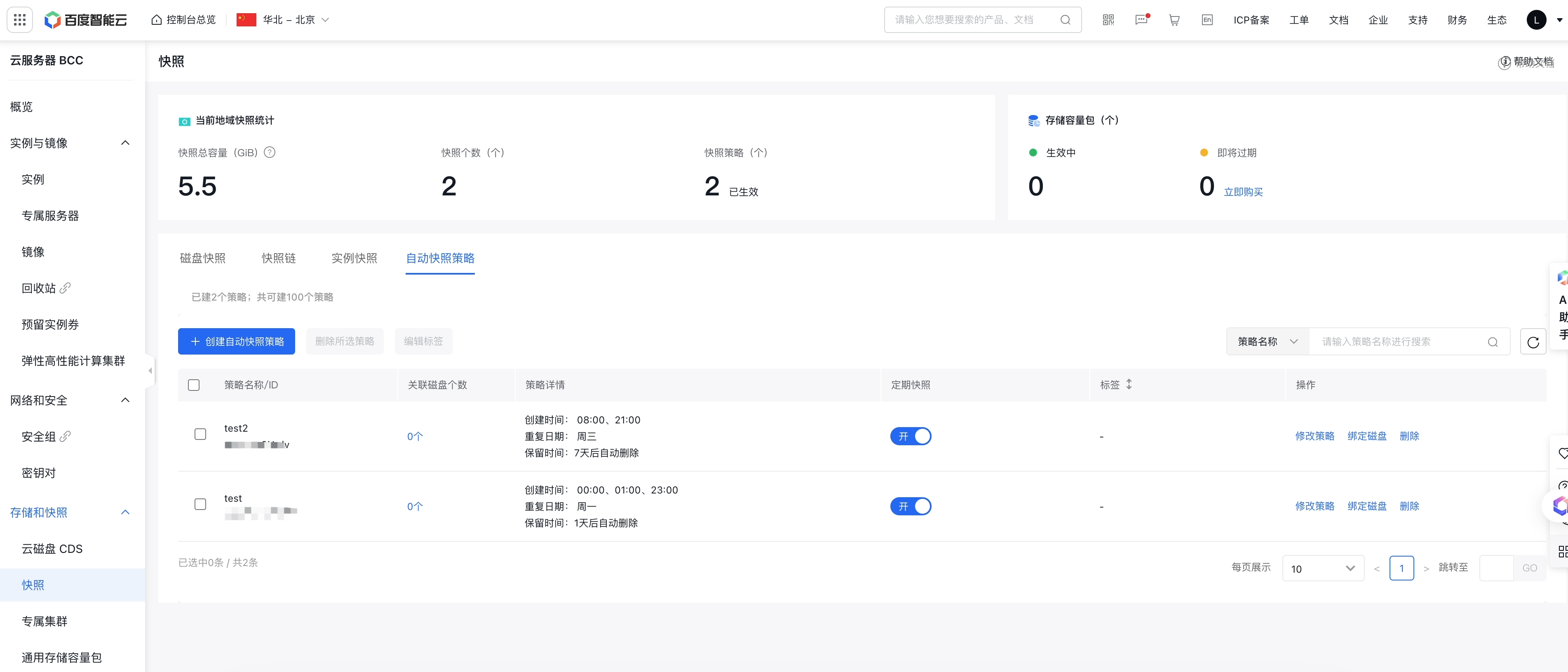
3. Create automatic snapshot policy
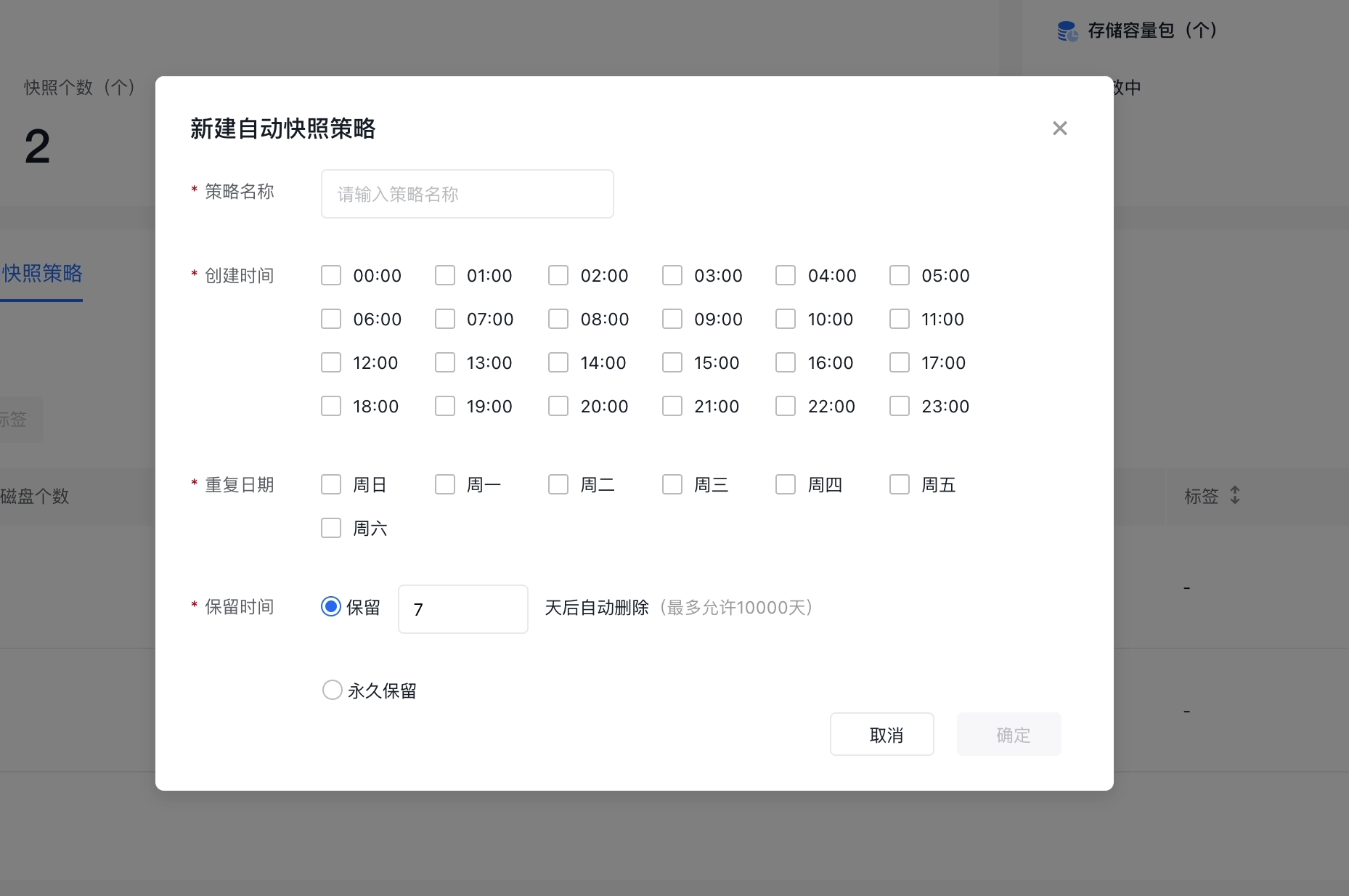
In the "Create Automatic Snapshot Policy" popup window, specify a policy name and select the snapshot creation time and recurrence dates. You can also set the snapshot retention period, after which snapshots will be automatically deleted. After completing the configuration, click "Confirm" to create the policy.
As shown in the example below, the specified policy is effective from Monday to Friday each week, automatically creating snapshots at 00:00, 12:00, and 18:00 daily during these five days. Additionally, the snapshot retention period is set to 7 days.
After successfully creating a policy, you can view all existing snapshot policies in the Automatic Snapshot Policy list and perform actions such as modifying, binding/unbinding disks, enabling/disabling, or deleting these policies.
Description:
- The snapshot policy and the Cloud Disk Server (CDS) to be bound must be in the same region;
- A single user can create up to 100 Snapshot Policies within the same Region.
Modify automatic snapshot policy
You can modify existing Automatic Snapshot Policies from the Automatic Snapshot Policy list.
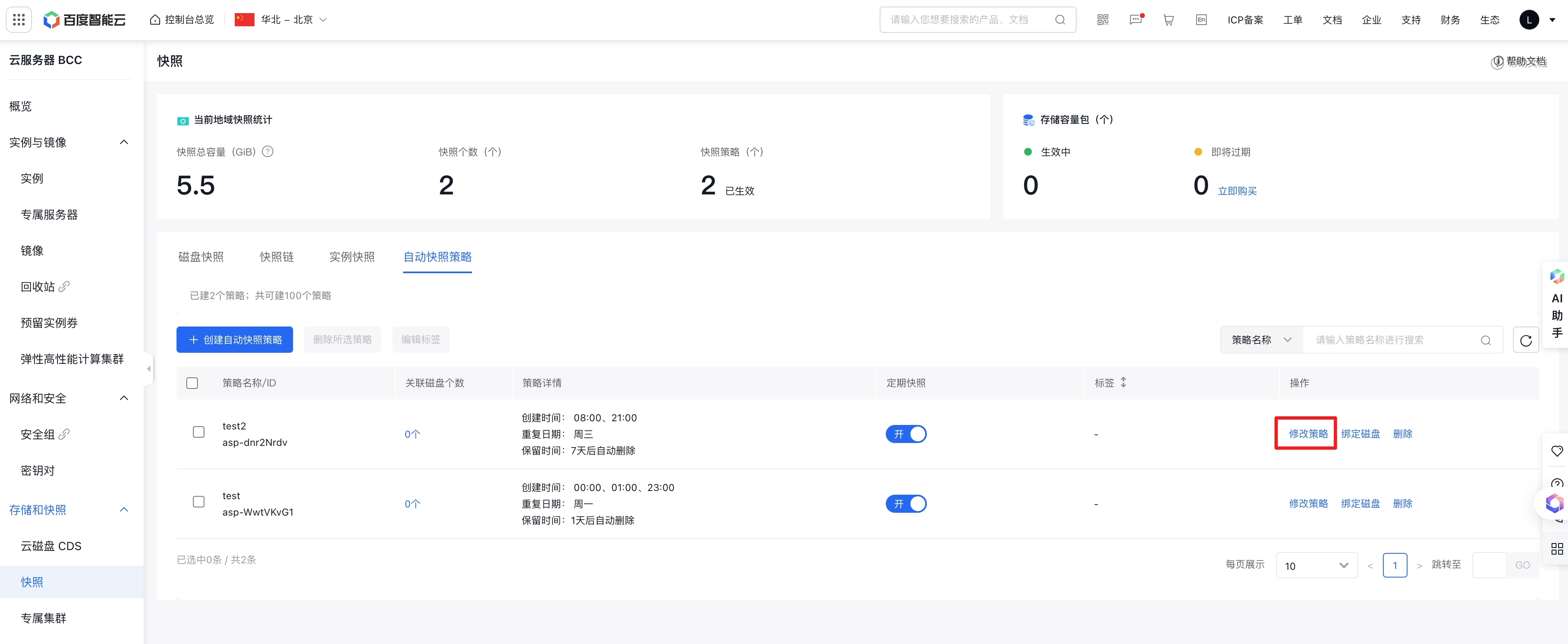
By clicking "Modify Policy," you can update the Automatic Snapshot Policy's name, creation time, and recurrence date. Additionally, you can adjust snapshot retention periods or set them for permanent retention.
Description:
- After editing an Automatic Snapshot Policy, the updated policy will replace the original one. Once modified, the disks associated with the policy will execute automatic snapshots based on the revised policy.
- Only automatic snapshots created after the policy modification will adhere to the updated "retention period." Snapshots created before the modification will retain their original "retention period." For example, if this Automatic Snapshot Policy was previously bound to a CDS Cloud Disk Server with a "Retention Period" of 60 days and the "Retention Period" is later changed to 30 days, snapshots created before the change will still be retained for 60 days. To delete existing snapshots, go to the "Snapshot List" for manual deletion.
Automatic Snapshot Policy bound to disks
Snapshot policies take effect only after being bound to disks. You can use one of the following two methods to bind disks to an Automatic Snapshot Policy.
Method 1: Bind disk via Automatic Snapshot Policy
You can bind the selected policy to existing disks by using the "Bind Disk" button in the action column of the policy on the Snapshot-Automatic Snapshot Policy list. This method is ideal for batch disk binding.
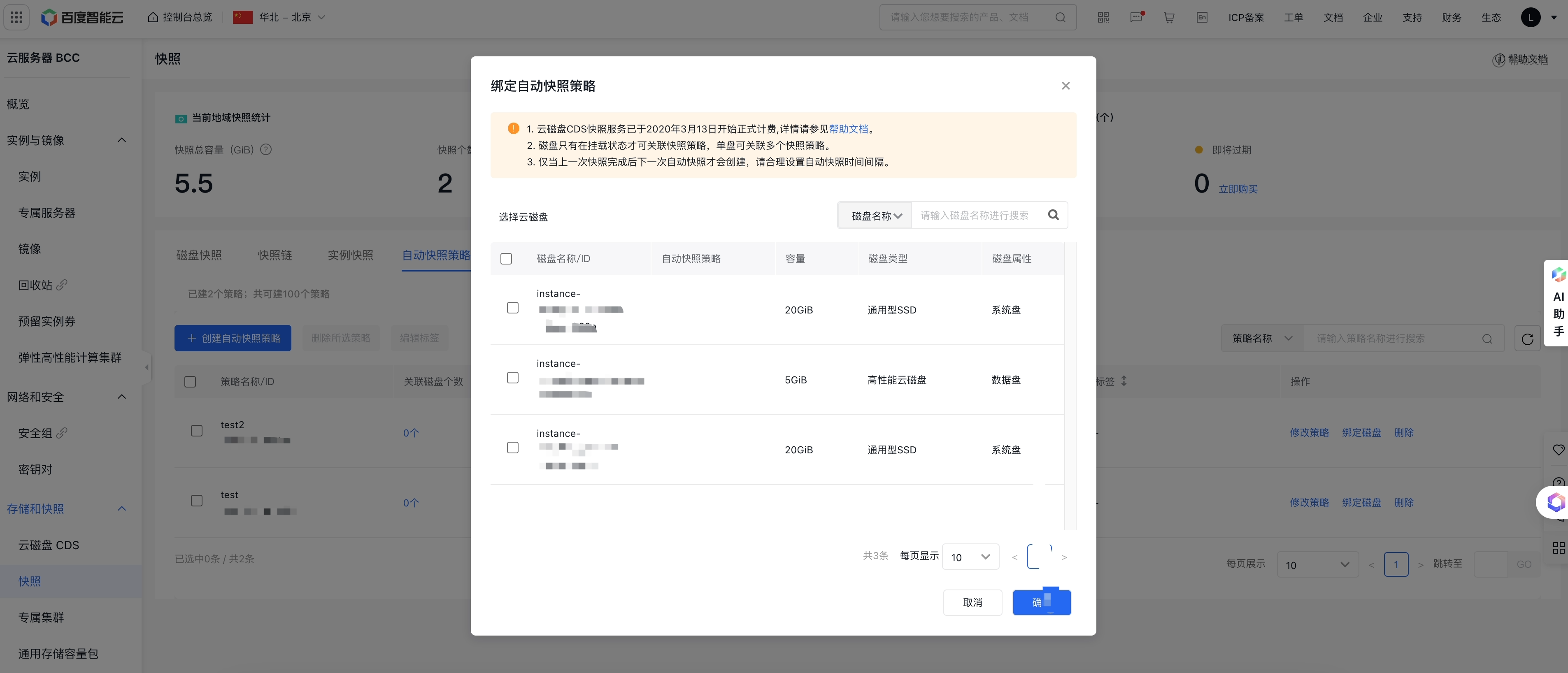
Description:
- Snapshot policies can be bound to mounted CDS Cloud Disk Servers on Baidu AI Cloud Compute BCC and Dedicated Compute DCC, but not to Local Disks. To bind a System Disk, its status must be "Running";
Method 2: Associate disks with Automatic Snapshot Policies
In the disk list, click the "+" button under "Associate Automatic Snapshot Policy" to select a policy for binding. This method is suitable for batch binding disks to multiple Automatic Snapshot Policies.
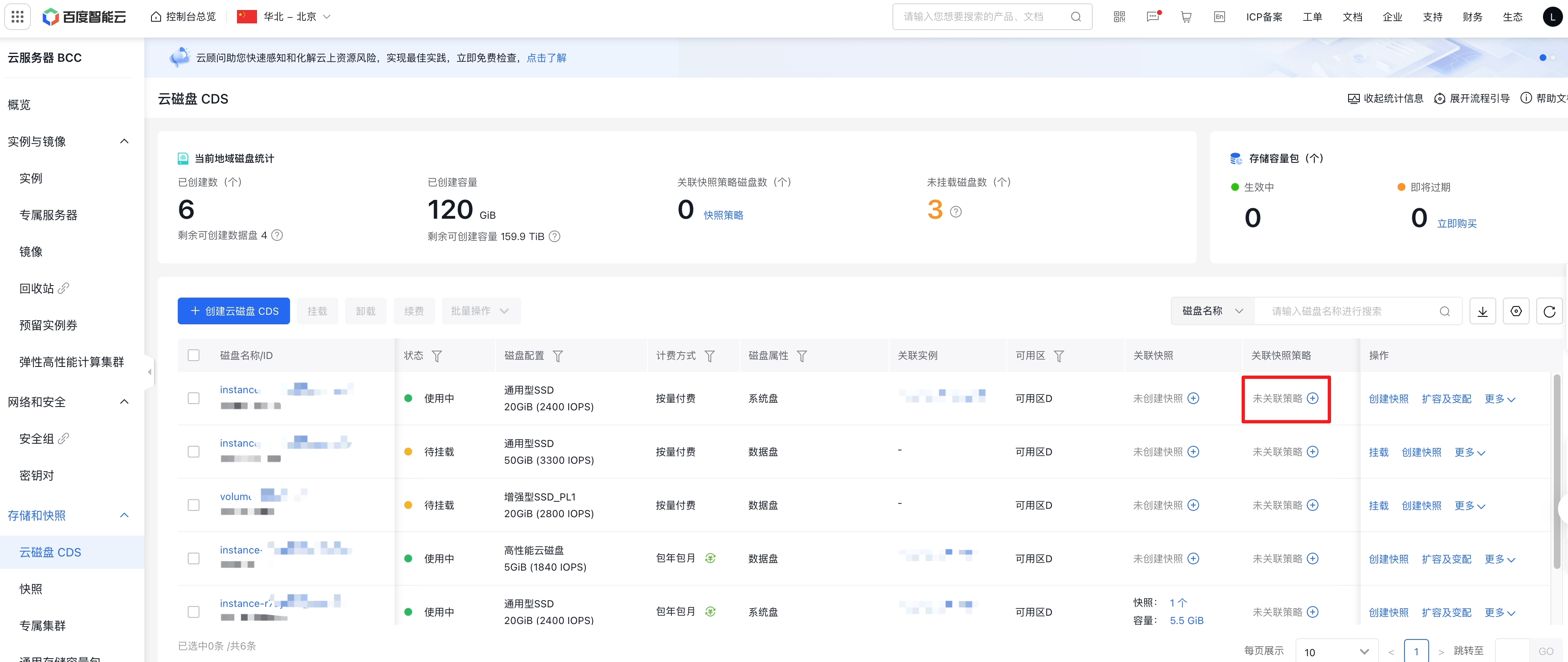
Description:
- Only "mounted" data disks and "Running" system disks can be associated with snapshot policies and take effect;
- A single disk can be bound to a maximum of 10 Automatic Snapshot Policies;
- The original Automatic Snapshot settings for Baidu AI Cloud Compute BCC and Dedicated Compute DCC will be smoothly transitioned to the new Snapshot Policy feature. None of the original configurations will be lost, as the system will automatically migrate all existing settings to the new Snapshot Policy.