Expand Dedicated Cluster

CDS

  • API Reference
    • Disk Related Interfaces
  • Dedicated Cluster Operation Guide
    • Charge
    • Create a dedicated cluster
    • Create Cloud Disk Server in Dedicated Cluster
    • Expand Dedicated Cluster
    • View Dedicated Cluster Information
    • What Is a Dedicated Cluster
  • Disk Operation Guide
    • Basic Operations
      • Create cloud disks
      • Disk encryption
        • Encrypt Data Disk and Snapshot
        • Encrypt System Disk and Image
        • Encryption Overview
      • Format cloud disks
        • Format Disk Partition on Linux System
        • Format Disk Partition on Windows System
        • Overview
      • Monitor alarm
      • mount Cloud Disk Server
      • Recycle bin
      • Release cloud disks
      • Tag Management
      • Unmount Cloud Disk Server
    • Billing management
      • Renew cloud disks
      • Shift Charge
    • Elastic Operations
      • Burst performance capability
      • Change cloud disk type
      • Performance preconfiguration
        • Use Performance Pre-Configuration
        • What Is Performance Pre-Configuration
      • Resize cloud disks
        • Expansion Overview
        • Extend Disk Partition on Linux Data Disk
        • Extend Disk Partition on Linux System Disk
        • Extend Disk Partition on Windows Data Disk
        • Extend Disk Partition on Windows System Disk
  • FAQs
    • Billing Problems
    • Common Questions Overview
    • Configuration-related questions
    • Fault-related questions
    • Performance-related questions
    • Security Problems
  • Peripheral Tools
    • CDSCMD Tool
      • Configure CDS CMD Tool
      • Install CDS CMD Tool
      • Operate Disk Using CDS CMD Tool
      • Overview
      • Tool Version History
  • Product Description
    • Application scenarios
    • Disk Status
    • Disk types
    • Product advantages
    • Product features
    • Product functions
    • Product Introduction
    • Type and Region
  • Product pricing
    • Disk charge type
      • Pay as you go
      • Subscription billing
    • Disk Expiration and Debt Reminder
    • Snapshot Charge Type
    • Universal Storage Capacity Package GSCP
  • Product Updates
    • Function Release Records
    • Product Announcement
      • Adjustments to prepay Disk renew, shift charge, and Unsubscribe Operations
  • Service Level Agreement (SLA)
    • Baidu Intelligent Cloud Block Storage Trusted Cloud
    • CDS Service Level Agreement (SLA V2_0)
  • Snapshot Operation Guide
    • Disk Snapshot
      • Automatic snapshot
      • Create a custom image
      • Create CDS disk from snapshot
      • Cross-region replication
      • Delete a snapshot
      • Manual Snapshot
      • Snapshot Rollback
      • Tag Management
    • Instance snapshots
      • Instance snapshots
    • Introduction to snapshot
      • Instructions for use
      • Snapshot chain
  • Typical Practices
    • Block Device Persistent Naming
All documents
menu
No results found, please re-enter

CDS

  • API Reference
    • Disk Related Interfaces
  • Dedicated Cluster Operation Guide
    • Charge
    • Create a dedicated cluster
    • Create Cloud Disk Server in Dedicated Cluster
    • Expand Dedicated Cluster
    • View Dedicated Cluster Information
    • What Is a Dedicated Cluster
  • Disk Operation Guide
    • Basic Operations
      • Create cloud disks
      • Disk encryption
        • Encrypt Data Disk and Snapshot
        • Encrypt System Disk and Image
        • Encryption Overview
      • Format cloud disks
        • Format Disk Partition on Linux System
        • Format Disk Partition on Windows System
        • Overview
      • Monitor alarm
      • mount Cloud Disk Server
      • Recycle bin
      • Release cloud disks
      • Tag Management
      • Unmount Cloud Disk Server
    • Billing management
      • Renew cloud disks
      • Shift Charge
    • Elastic Operations
      • Burst performance capability
      • Change cloud disk type
      • Performance preconfiguration
        • Use Performance Pre-Configuration
        • What Is Performance Pre-Configuration
      • Resize cloud disks
        • Expansion Overview
        • Extend Disk Partition on Linux Data Disk
        • Extend Disk Partition on Linux System Disk
        • Extend Disk Partition on Windows Data Disk
        • Extend Disk Partition on Windows System Disk
  • FAQs
    • Billing Problems
    • Common Questions Overview
    • Configuration-related questions
    • Fault-related questions
    • Performance-related questions
    • Security Problems
  • Peripheral Tools
    • CDSCMD Tool
      • Configure CDS CMD Tool
      • Install CDS CMD Tool
      • Operate Disk Using CDS CMD Tool
      • Overview
      • Tool Version History
  • Product Description
    • Application scenarios
    • Disk Status
    • Disk types
    • Product advantages
    • Product features
    • Product functions
    • Product Introduction
    • Type and Region
  • Product pricing
    • Disk charge type
      • Pay as you go
      • Subscription billing
    • Disk Expiration and Debt Reminder
    • Snapshot Charge Type
    • Universal Storage Capacity Package GSCP
  • Product Updates
    • Function Release Records
    • Product Announcement
      • Adjustments to prepay Disk renew, shift charge, and Unsubscribe Operations
  • Service Level Agreement (SLA)
    • Baidu Intelligent Cloud Block Storage Trusted Cloud
    • CDS Service Level Agreement (SLA V2_0)
  • Snapshot Operation Guide
    • Disk Snapshot
      • Automatic snapshot
      • Create a custom image
      • Create CDS disk from snapshot
      • Cross-region replication
      • Delete a snapshot
      • Manual Snapshot
      • Snapshot Rollback
      • Tag Management
    • Instance snapshots
      • Instance snapshots
    • Introduction to snapshot
      • Instructions for use
      • Snapshot chain
  • Typical Practices
    • Block Device Persistent Naming
  • Document center
  • arrow
  • CDS
  • arrow
  • Dedicated Cluster Operation Guide
  • arrow
  • Expand Dedicated Cluster
Table of contents on this page
  • Overview
  • Note
  • Operation steps
  • FAQs

Expand Dedicated Cluster

Updated at:2025-11-03

Overview

If the available capacity of a purchased dedicated cluster is nearing its limit, you can initiate a cluster expansion.

Note

  • The expansion step size for dedicated clusters is 10240 GiB (10 TiB), with a maximum cluster capacity of 1039360 GB (1015 TiB)
  • Dedicated clusters do not support no-reason refunds within 7 days of purchase. Unsubscribe can only be initiated after 6 months of purchase
  • The time required to complete expansion depends on the scale of the change. Under normal conditions, delivery is typically finalized within 21 business days from order placement. Please monitor the system notifications for updates.

Operation steps

Follow these steps to complete the dedicated cluster expansion on the console:

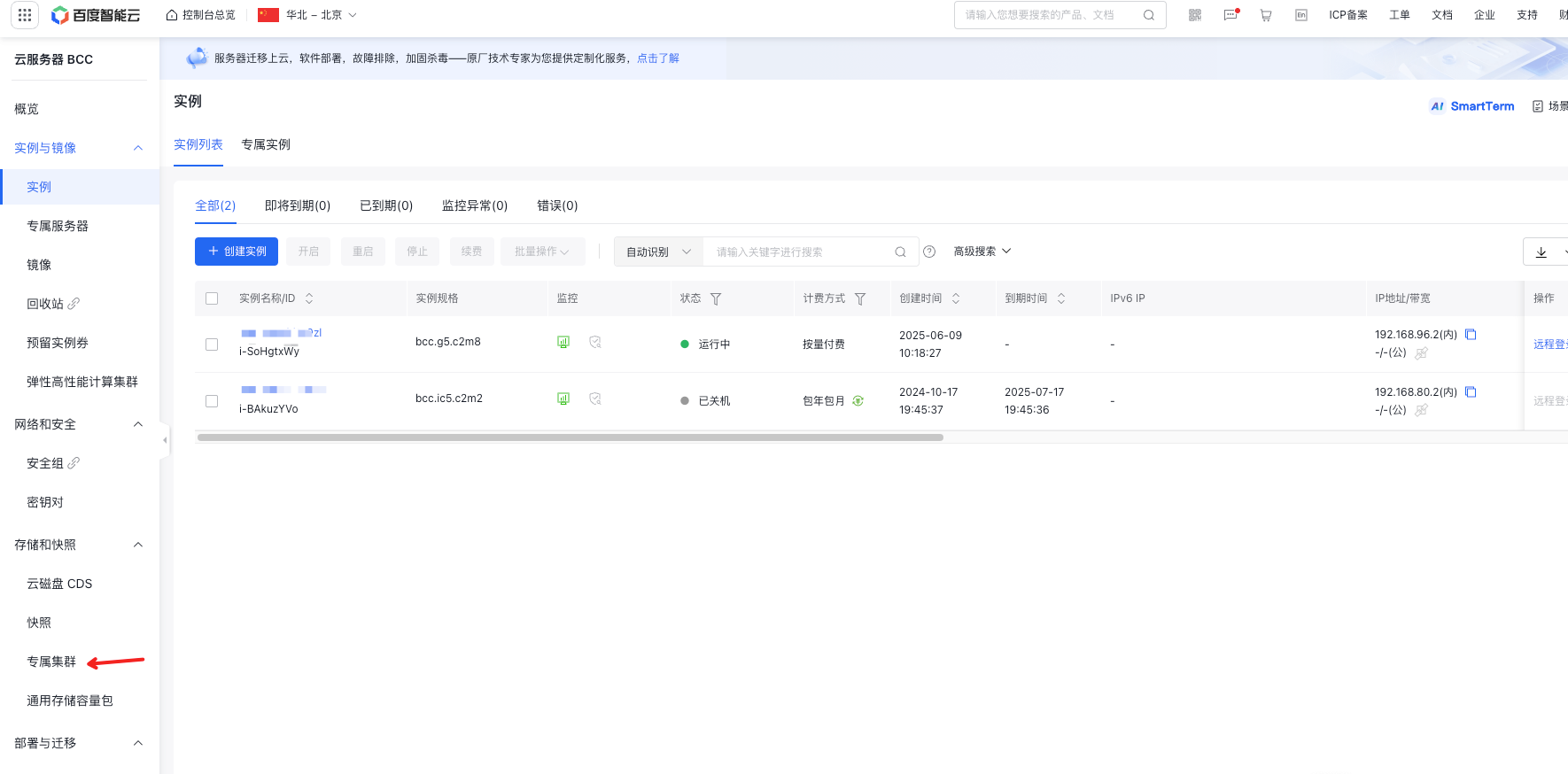
  1. Sign in to the Baidu Cloud Compute (BCC) console, select Storage & Snapshots > Dedicated Clusters in the left navigation bar to access the dedicated cluster list page. image.png
  2. Locate the target cluster in the list and click the "Expand" button in the operation bar.
  3. On the expansion page, either drag the capacity slider or enter the desired target capacity in the input field provided.
  4. After confirming the expansion capacity and associated cost, click "OK" to finalize the order payment.
  5. After placing the order, wait for the expansion cluster to be delivered. Please keep an eye on system notification messages.

FAQs

Does the expansion operation affect the current cluster usage?

Expansion operations will not impact existing disks. You can continue using the dedicated cluster normally during the expansion process.

Previous
Create Cloud Disk Server in Dedicated Cluster
Next
View Dedicated Cluster Information