Instance monitor

BCM

  • Function Release Records
  • Product Announcement
    • Site Monitor Billing Announcement
  • Product Description
    • Product Introduction
    • Core concepts
    • Product advantages
    • Product features
  • Product pricing
    • Product pricing
    • Site Monitor Pricing
  • Quick Start
  • Operation guide
    • Enter Cloud Monitor
    • Dashboard
      • Overview
      • Management Dashboard Charts
      • Management Dashboard
    • Alarm Service
      • Overview
      • Alarm strategy
      • Alarm history
      • Alarm Template
      • Alarm Notification Template
      • Alarm callback
    • Cloud product monitor
      • Instance monitor
      • Instance Group
      • View Metrics
    • Site Monitor
      • Timed Detection (Formerly Site Monitor)
        • Overview
        • Manage Timed Probe Tasks
        • Purchase Guide
        • View timed probe tasks
      • IP advanced fault diagnosis
        • Manage IP Advanced Fault Diagnosis Tasks
        • View IP Advanced Fault Diagnosis Tasks
      • Instant probe
        • Overview
        • Manage instant probe tasks
    • Event Monitor
    • Event Bus
      • Event Delivery History
      • Overview
      • Event summary
      • Event Set
      • Event Rules
        • Event Rules
        • Event content conversion
        • Event pattern
  • API Reference
    • Overview
    • Service domain
    • Error response
    • Query Monitoring Data for Partial Dimensions
    • Dashboard API
    • Common Request and Response Headers
    • Alarm Management API
    • Alarm Management Interface V2
    • Alarm history
    • Push Data API
    • Event Bus Push
    • Application Monitor
    • Dimension Value TopN and Monitoring Data Query Interface
    • Batch Query Monitoring Data Interface V2
    • Dimension Value TopN Query Interface
    • Instance Group Interface
    • Site Monitor
    • Query Latest Metric Data for Partial Dimensions
    • General Description
    • Query Data API
    • Event Monitor
    • Instant Probe
    • Event Alarm History
    • Notification Template
  • Java-SDK
    • Overview
    • Initialization
    • Install the SDK Package
    • BcmClient
    • Query Monitoring Data for Partial Dimensions
    • Dimension Value TopN and Monitoring Data Query Interface
    • Batch Query Monitoring Data Interface V2
    • Dimension Value TopN Query Interface
    • Query Latest Metric Data for Partial Dimensions
    • Query Data API
    • Alarm Strategy-related APIs
    • Batch Query Data Interface
    • Alarm History-related APIs
  • Python-SDK
    • Overview
    • Initialization
    • Install SDK
    • BcmClient
    • Query Monitoring Data for Partial Dimensions
    • Batch Query Monitoring Data Interface V2
    • Dimension Value TopN Query Interface
    • Query Latest Metric Data for Partial Dimensions
    • Query Data API
    • Alarm Strategy List API
    • Batch Data Query Interface
  • Go-SDK
    • Overview
    • Initialization
    • Install the SDK Package
    • BcmClient
    • Query Monitoring Data for Partial Dimensions
    • Dimension Value TopN and Monitoring Data Query Interface
    • Batch Query Monitoring Data Interface V2
    • Dimension Value TopN Query Interface
    • Query Latest Metric Data for Partial Dimensions
    • Query Data API
    • Alarm Strategy-related APIs
    • Alarm History-related APIs
    • Batch Data Query Interface
  • BCM-Agent
    • Functions
    • Monitoring Trend Chart
    • BCM-Agent-Frequently Asked Questions
    • Appendix
  • FAQs
    • Common Questions Overview
    • Fault-related questions
    • Configuration-related questions
    • Performance-related questions
  • Cloud Product Monitor List
    • Cloud Product Metric List (Legacy Version Hidden)
    • Cloud Product Monitor Object Type List
    • Cloud Product Event List
    • Cloud Product Metric List
      • Database
        • Cloud Database TableStorage
        • Cloud Database DocDB for MongoDB
        • Data transmission service (DTS)
        • Cloud native database GaiaDB
        • Vector Database (VectorDB)
        • Dedicated Database Cluster (DDC)
        • Cloud Database Redis
        • Cloud database RDS
        • Cloud Database HBase
      • Enterprise Application
        • Message Service for RabbitMQ
      • Network
        • Service Network Interface Card (SNIC)
        • Peering Connections
        • IPv6 gateway
        • NAT Gateway
        • Load Balancer Dedicated Cluster LBDC
        • Baidu Load Balance (BLB)
        • Network probe NP
        • Dedicated channel
        • Elastic IP EIP
        • Elastic Network Interface Card (ENIC)
        • Cloud Smart Network (CSN)
        • Dedicated gateway
        • Virtual Private Network (VPN) Gateway
        • Layer 2 Gateway LTGW
        • Physical dedicated line
      • Intelligent Big Data
        • MapReduce BMR
        • Message service for Kafka-dedicated
        • Message Service for RocketMQ
        • Baidu Stream Computing (BSC)
        • Baidu Elasticsearch
        • Log Service BLS
        • Data warehouse DORIS
      • Cloud native
        • Cloud Function Computing
        • Baidu container instance (BCI)
      • Compute
        • Baidu Cloud Compute (BCC)
        • Elastic Baremetal Compute BBC
      • Storage and CDN
        • Parallel Filesystem Service (PFS)
        • Cloud File System (CFS)
        • Content delivery network (CDN)
        • Baidu object storage (BOS)
        • Cloud Disk Server (CDS)
        • Baidu edge computing (BEC)
      • Website service
        • Baidu Cloud Virtual Host (BCH)
      • Large Model Platform
        • Qianfan Large Model Platform ModelBuilder
  • Typical Practices
    • Scenarios for Batch Creation of Alarm Strategies
    • Usage Scenarios for Different Notification Channels
  • Service Level Agreement (SLA)
    • Site Monitor Service Level Agreement SLA
  • BCM-Tool
    • Uninstallation Method
    • Installation method
    • BCM-Tool-Frequently Asked Questions
    • Functions
    • Multi-Region Service
    • Application method
All documents
menu
No results found, please re-enter

BCM

  • Function Release Records
  • Product Announcement
    • Site Monitor Billing Announcement
  • Product Description
    • Product Introduction
    • Core concepts
    • Product advantages
    • Product features
  • Product pricing
    • Product pricing
    • Site Monitor Pricing
  • Quick Start
  • Operation guide
    • Enter Cloud Monitor
    • Dashboard
      • Overview
      • Management Dashboard Charts
      • Management Dashboard
    • Alarm Service
      • Overview
      • Alarm strategy
      • Alarm history
      • Alarm Template
      • Alarm Notification Template
      • Alarm callback
    • Cloud product monitor
      • Instance monitor
      • Instance Group
      • View Metrics
    • Site Monitor
      • Timed Detection (Formerly Site Monitor)
        • Overview
        • Manage Timed Probe Tasks
        • Purchase Guide
        • View timed probe tasks
      • IP advanced fault diagnosis
        • Manage IP Advanced Fault Diagnosis Tasks
        • View IP Advanced Fault Diagnosis Tasks
      • Instant probe
        • Overview
        • Manage instant probe tasks
    • Event Monitor
    • Event Bus
      • Event Delivery History
      • Overview
      • Event summary
      • Event Set
      • Event Rules
        • Event Rules
        • Event content conversion
        • Event pattern
  • API Reference
    • Overview
    • Service domain
    • Error response
    • Query Monitoring Data for Partial Dimensions
    • Dashboard API
    • Common Request and Response Headers
    • Alarm Management API
    • Alarm Management Interface V2
    • Alarm history
    • Push Data API
    • Event Bus Push
    • Application Monitor
    • Dimension Value TopN and Monitoring Data Query Interface
    • Batch Query Monitoring Data Interface V2
    • Dimension Value TopN Query Interface
    • Instance Group Interface
    • Site Monitor
    • Query Latest Metric Data for Partial Dimensions
    • General Description
    • Query Data API
    • Event Monitor
    • Instant Probe
    • Event Alarm History
    • Notification Template
  • Java-SDK
    • Overview
    • Initialization
    • Install the SDK Package
    • BcmClient
    • Query Monitoring Data for Partial Dimensions
    • Dimension Value TopN and Monitoring Data Query Interface
    • Batch Query Monitoring Data Interface V2
    • Dimension Value TopN Query Interface
    • Query Latest Metric Data for Partial Dimensions
    • Query Data API
    • Alarm Strategy-related APIs
    • Batch Query Data Interface
    • Alarm History-related APIs
  • Python-SDK
    • Overview
    • Initialization
    • Install SDK
    • BcmClient
    • Query Monitoring Data for Partial Dimensions
    • Batch Query Monitoring Data Interface V2
    • Dimension Value TopN Query Interface
    • Query Latest Metric Data for Partial Dimensions
    • Query Data API
    • Alarm Strategy List API
    • Batch Data Query Interface
  • Go-SDK
    • Overview
    • Initialization
    • Install the SDK Package
    • BcmClient
    • Query Monitoring Data for Partial Dimensions
    • Dimension Value TopN and Monitoring Data Query Interface
    • Batch Query Monitoring Data Interface V2
    • Dimension Value TopN Query Interface
    • Query Latest Metric Data for Partial Dimensions
    • Query Data API
    • Alarm Strategy-related APIs
    • Alarm History-related APIs
    • Batch Data Query Interface
  • BCM-Agent
    • Functions
    • Monitoring Trend Chart
    • BCM-Agent-Frequently Asked Questions
    • Appendix
  • FAQs
    • Common Questions Overview
    • Fault-related questions
    • Configuration-related questions
    • Performance-related questions
  • Cloud Product Monitor List
    • Cloud Product Metric List (Legacy Version Hidden)
    • Cloud Product Monitor Object Type List
    • Cloud Product Event List
    • Cloud Product Metric List
      • Database
        • Cloud Database TableStorage
        • Cloud Database DocDB for MongoDB
        • Data transmission service (DTS)
        • Cloud native database GaiaDB
        • Vector Database (VectorDB)
        • Dedicated Database Cluster (DDC)
        • Cloud Database Redis
        • Cloud database RDS
        • Cloud Database HBase
      • Enterprise Application
        • Message Service for RabbitMQ
      • Network
        • Service Network Interface Card (SNIC)
        • Peering Connections
        • IPv6 gateway
        • NAT Gateway
        • Load Balancer Dedicated Cluster LBDC
        • Baidu Load Balance (BLB)
        • Network probe NP
        • Dedicated channel
        • Elastic IP EIP
        • Elastic Network Interface Card (ENIC)
        • Cloud Smart Network (CSN)
        • Dedicated gateway
        • Virtual Private Network (VPN) Gateway
        • Layer 2 Gateway LTGW
        • Physical dedicated line
      • Intelligent Big Data
        • MapReduce BMR
        • Message service for Kafka-dedicated
        • Message Service for RocketMQ
        • Baidu Stream Computing (BSC)
        • Baidu Elasticsearch
        • Log Service BLS
        • Data warehouse DORIS
      • Cloud native
        • Cloud Function Computing
        • Baidu container instance (BCI)
      • Compute
        • Baidu Cloud Compute (BCC)
        • Elastic Baremetal Compute BBC
      • Storage and CDN
        • Parallel Filesystem Service (PFS)
        • Cloud File System (CFS)
        • Content delivery network (CDN)
        • Baidu object storage (BOS)
        • Cloud Disk Server (CDS)
        • Baidu edge computing (BEC)
      • Website service
        • Baidu Cloud Virtual Host (BCH)
      • Large Model Platform
        • Qianfan Large Model Platform ModelBuilder
  • Typical Practices
    • Scenarios for Batch Creation of Alarm Strategies
    • Usage Scenarios for Different Notification Channels
  • Service Level Agreement (SLA)
    • Site Monitor Service Level Agreement SLA
  • BCM-Tool
    • Uninstallation Method
    • Installation method
    • BCM-Tool-Frequently Asked Questions
    • Functions
    • Multi-Region Service
    • Application method
  • Document center
  • arrow
  • BCM
  • arrow
  • Operation guide
  • arrow
  • Cloud product monitor
  • arrow
  • Instance monitor
Table of contents on this page
  • Function overview
  • View monitor data
  • Add the alarm strategy
  • View Alarm Strategy
  • View alarm history

Instance monitor

Updated at:2025-11-03

Function overview

Cloud Product Monitor serves as a unified platform to display monitoring information for various cloud products. Users can view their cloud resources and corresponding monitoring and alert data on this platform.

View monitor data

  1. Log in to Baidu AI Cloud, select Baidu Cloud Monitor (BCM), navigate to Cloud Product Monitor, then Instance Monitor in the left navigation bar, and click the desired cloud product name to open its Instance List page. To view Baidu Cloud Compute (BCC) monitoring data, click Baidu Cloud Compute (BCC) to access the Instance List page.
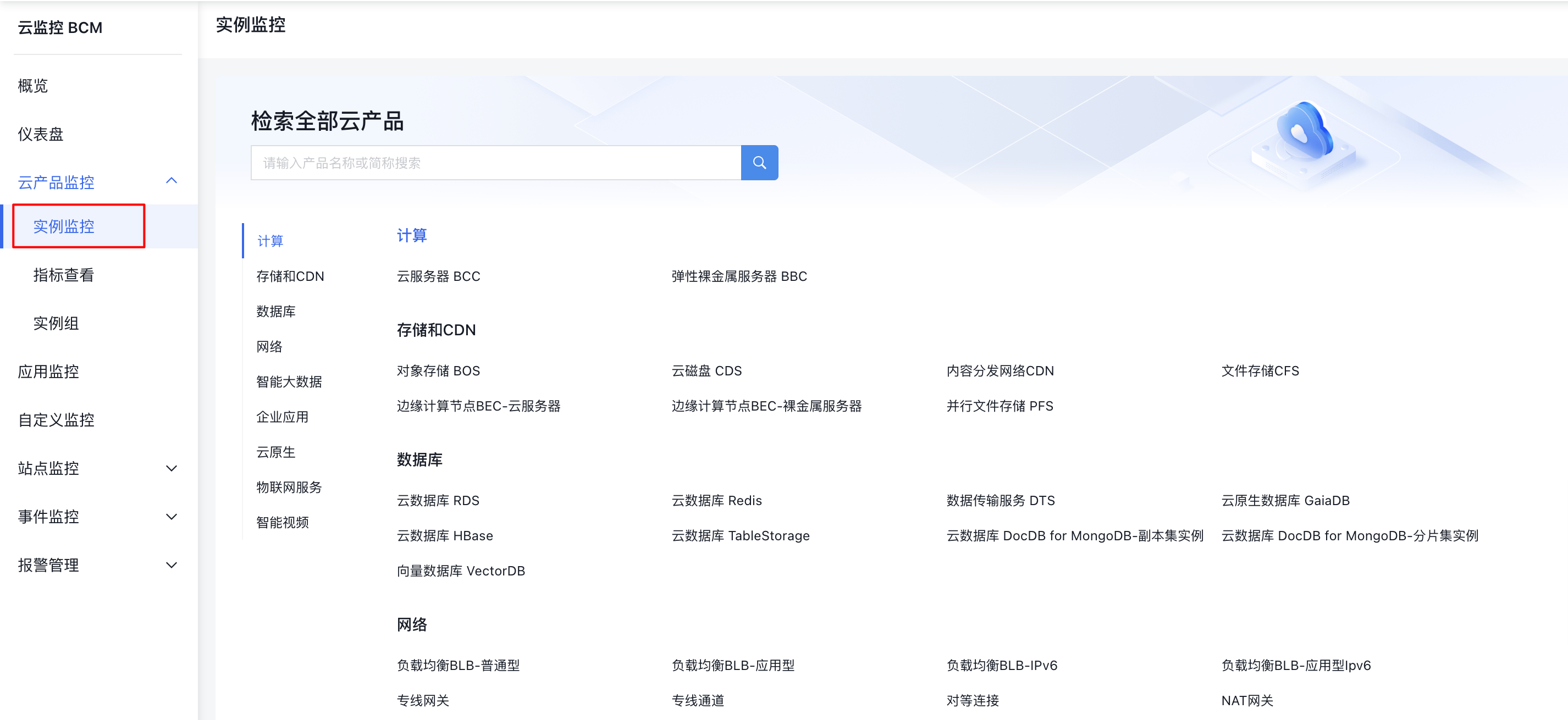
image.png

  1. On the Cloud Server Instance List page, click any Instance Name to open the Instance Monitor Details page.
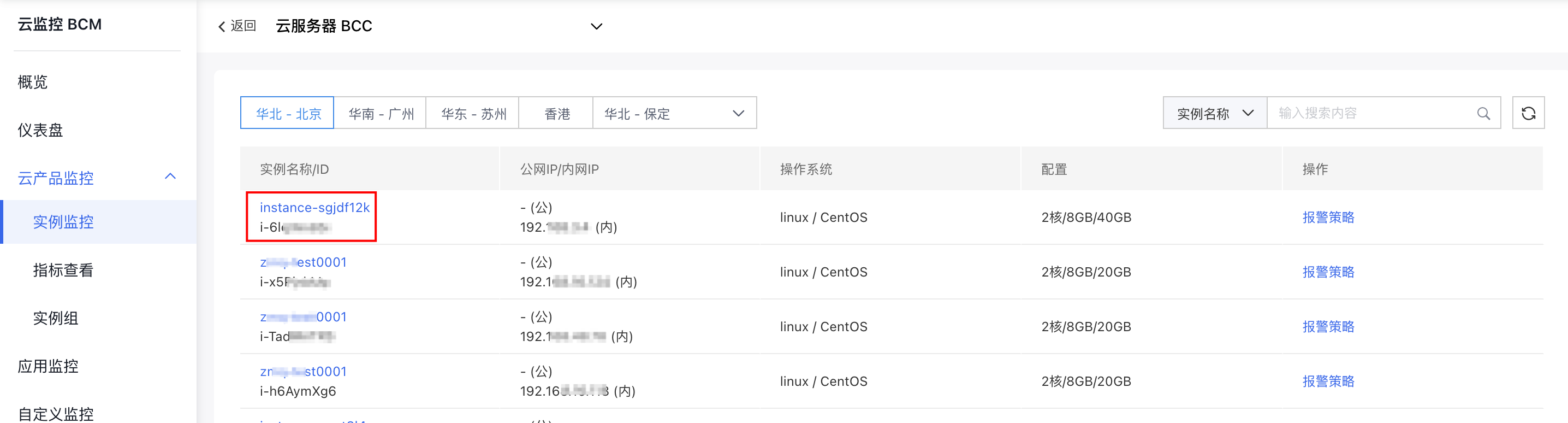
image.png

  1. On the Monitor Details page, click the Monitor Information tab to view the instance's monitoring data.
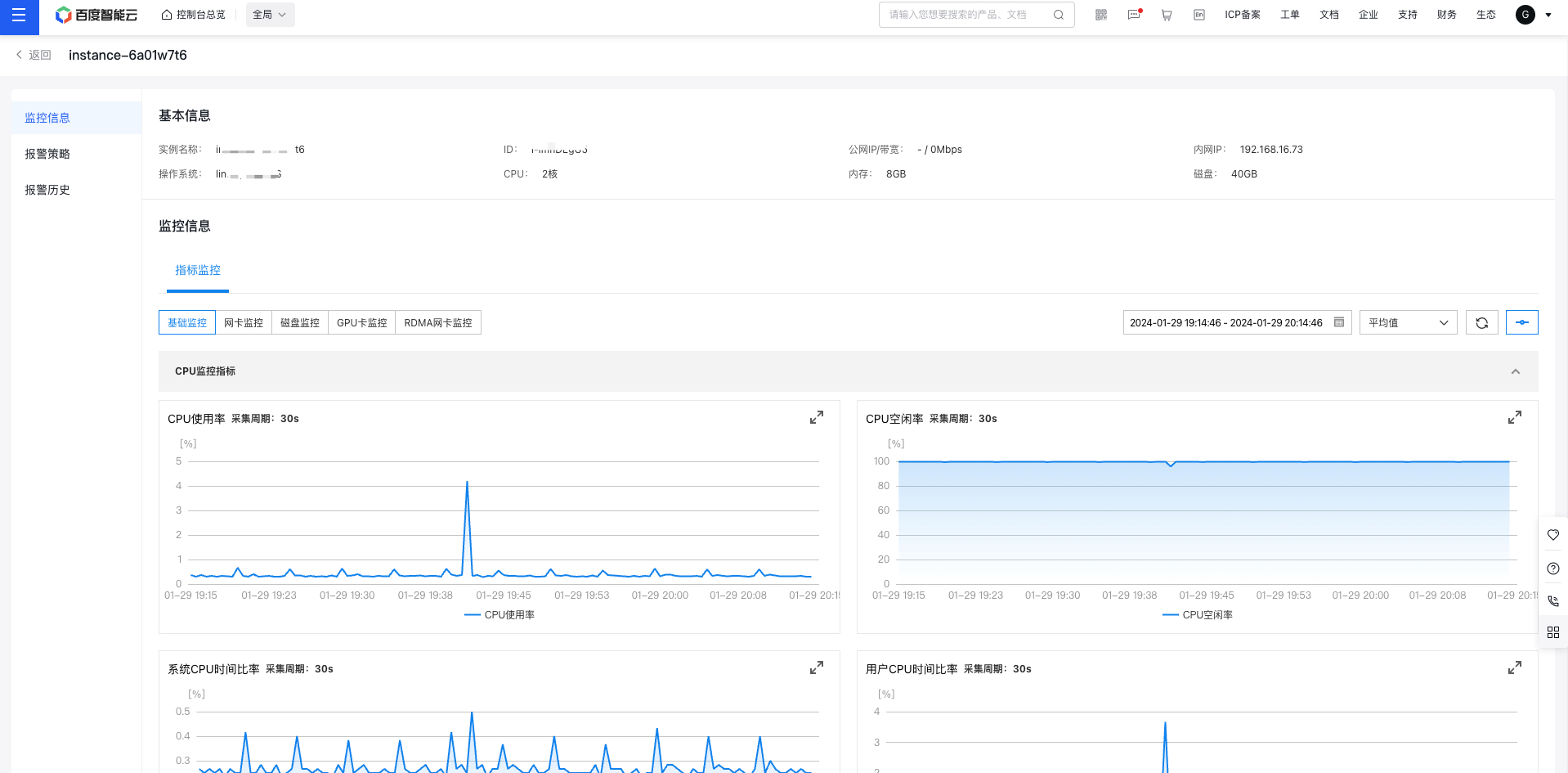
image.png

Add the alarm strategy

There are three methods to add alarm strategies:

Method 1:

  1. Click Cloud Product Monitor in the left navigation bar, then select the desired cloud product name to access its Instance List page. To check Baidu Cloud Compute (BCC) monitoring data, click Baidu Cloud Compute Monitor to open the Baidu Cloud Compute List page. Click the Add Alarm Strategy button in the Operation column to open the Add Alarm Strategy form.
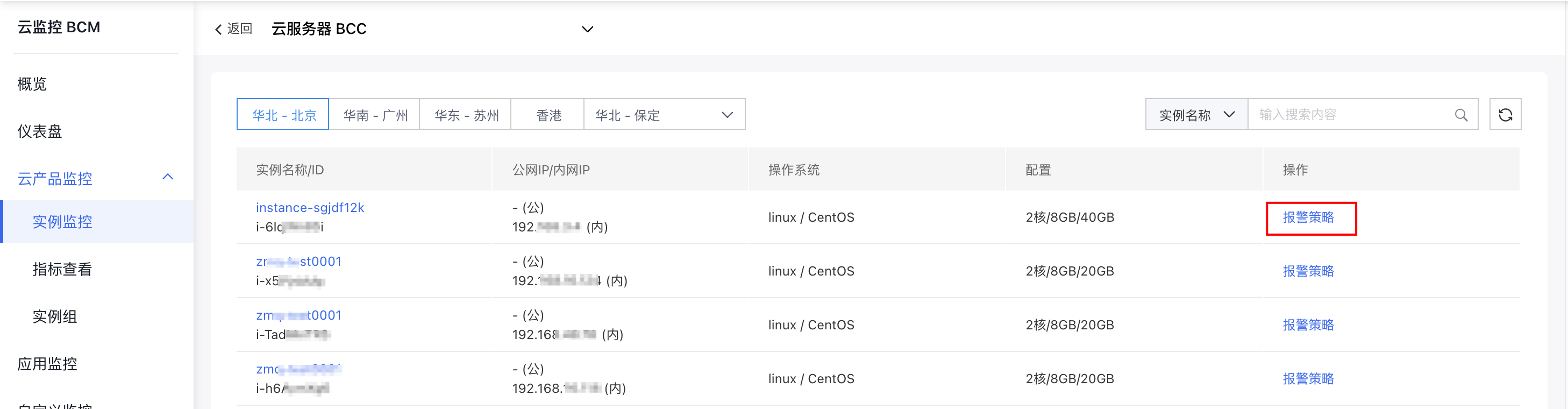
image.png

  1. Fill in the form, configure the Alarm Strategy parameters, and click the Complete button to successfully add the Alarm Strategy.
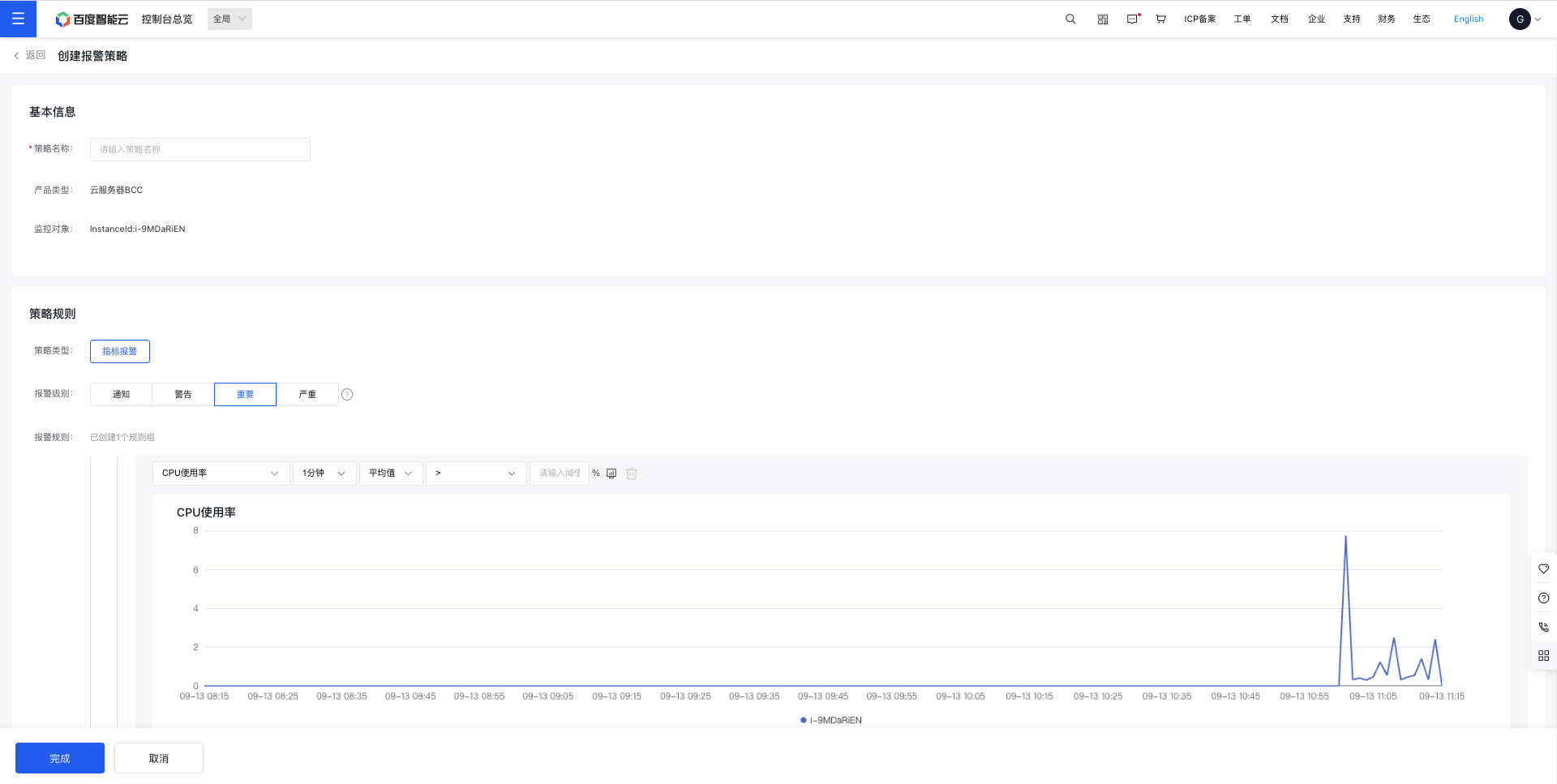
image.png

For the threshold, place refer to the Monitor Trend Chart below. For how to set up alarm notifications, please refer to Alarm Notification Template.

Method 2:

  1. Click Cloud Product Monitor in the left navigation menu, then choose the desired cloud product name to open its Instance List page. To view Baidu Cloud Compute (BCC) monitoring data, click Baidu Cloud Compute Monitor to access the Baidu Cloud Compute List page. From the Cloud Server List page, click any Instance Name to open the Instance Monitor Details page.

image.png

  1. On the Monitor Details page, click the Alarm Strategy tab and then the Add Strategy button to open the Add Alarm Strategy Form page.
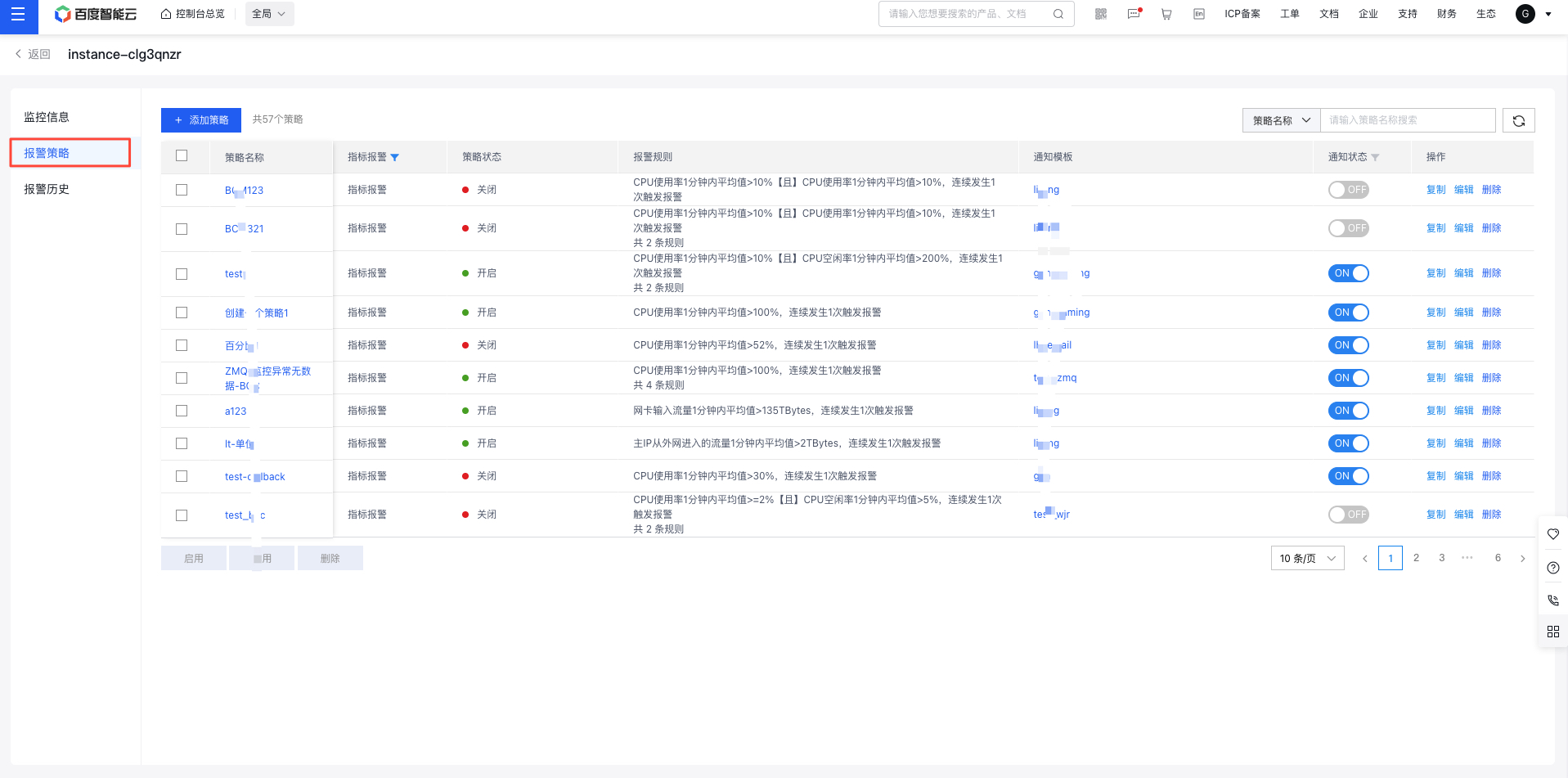
image.png

  1. Fill in the form, configure the Alarm Strategy parameters, and click the Complete button to successfully add the Alarm Strategy.

image.png

For the threshold, place refer to the Monitor Trend Chart below. For how to set up alarm notifications, please refer to Alarm Notification Template.

• Method 3:

  1. In the left navigation menu, click Alarm Management, then Alarm Strategy to access the Alarm Strategy page.
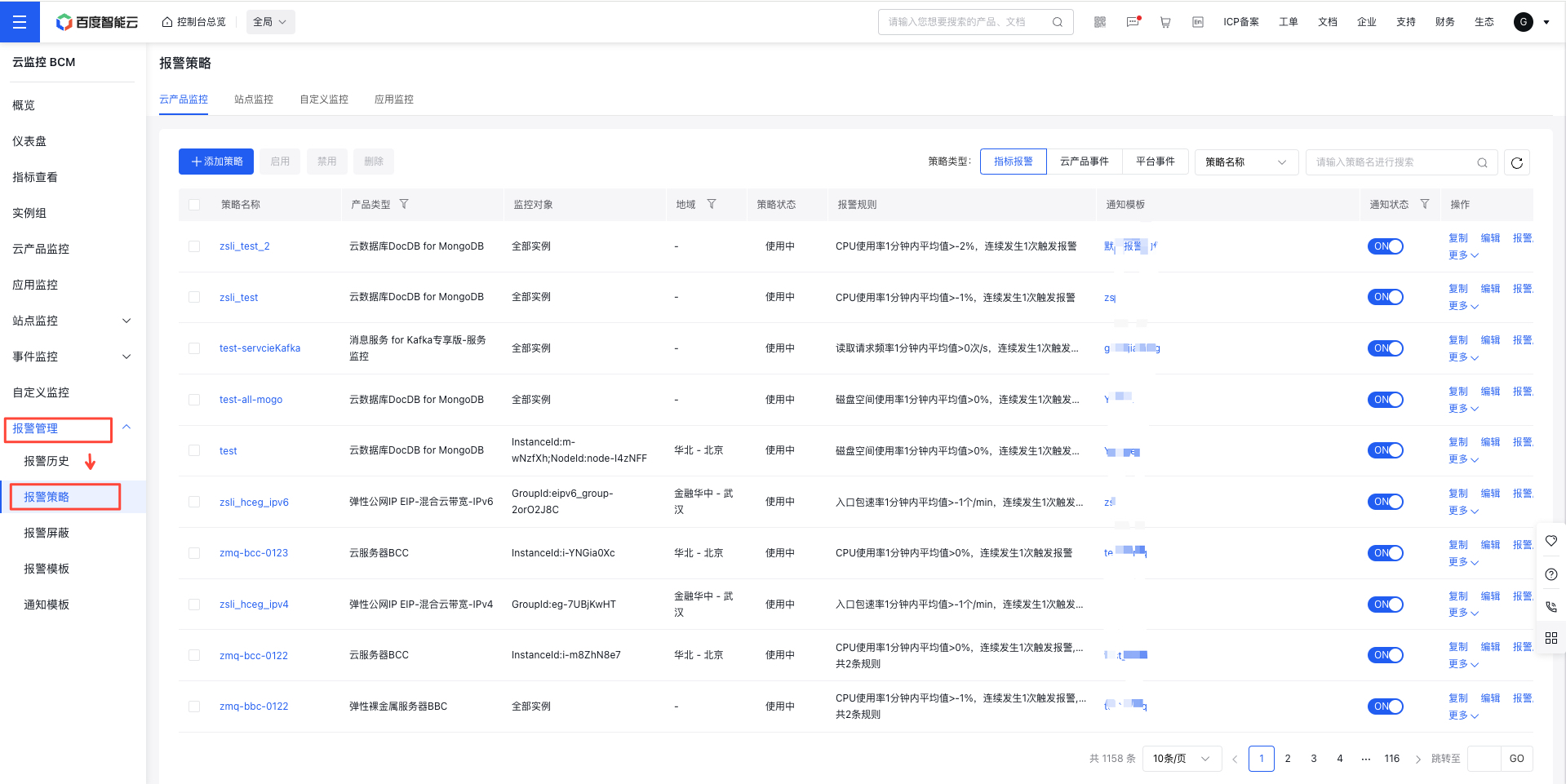
image.png

  1. On the Alarm Strategy page, click the Alarm Strategy and then the Add Strategy button to open the Alarm Strategy Form page.
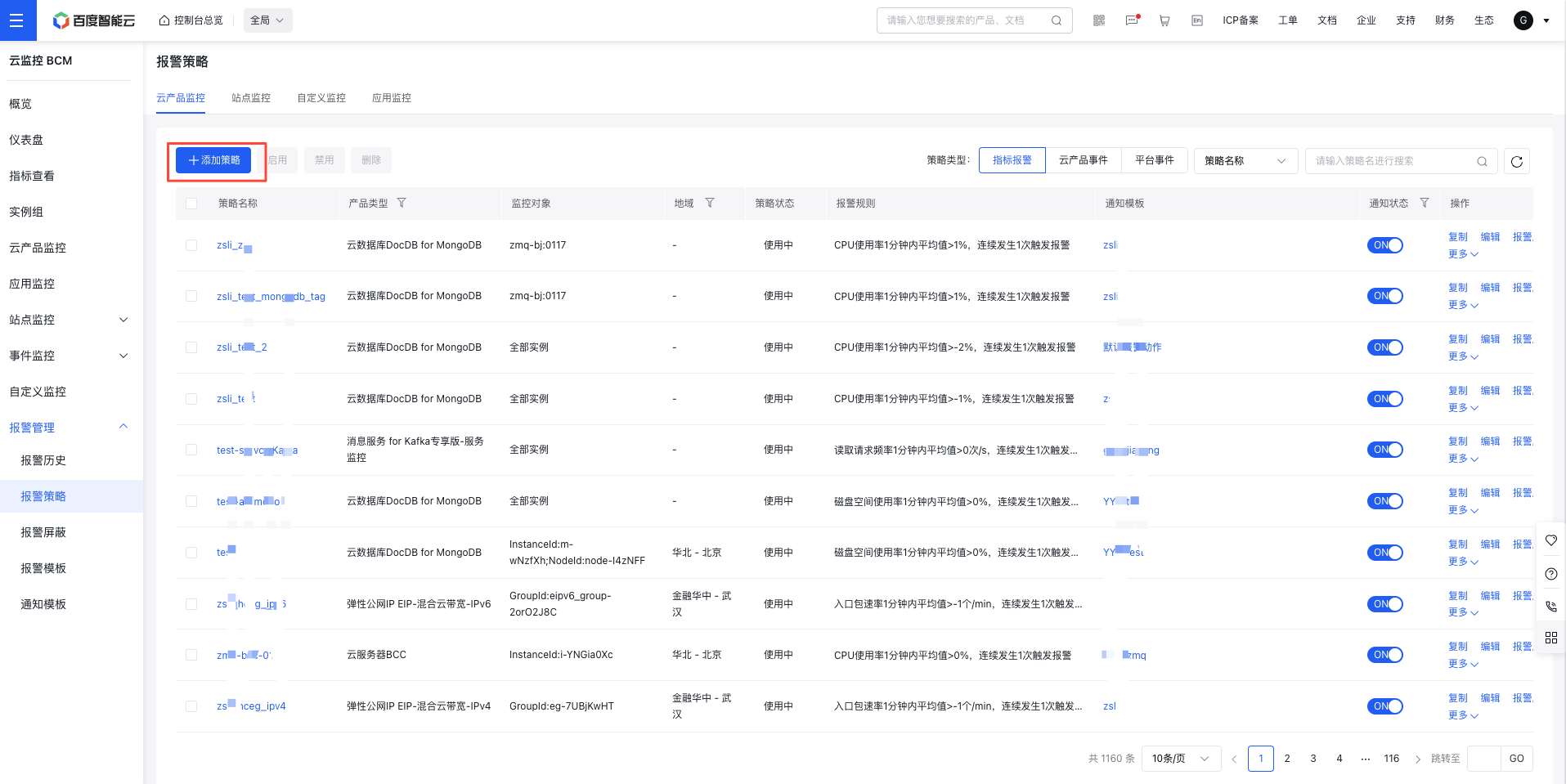
image.png

  1. Fill in the form, configure the Alarm Strategy parameters, and click the Complete button to successfully add the Alarm Strategy.
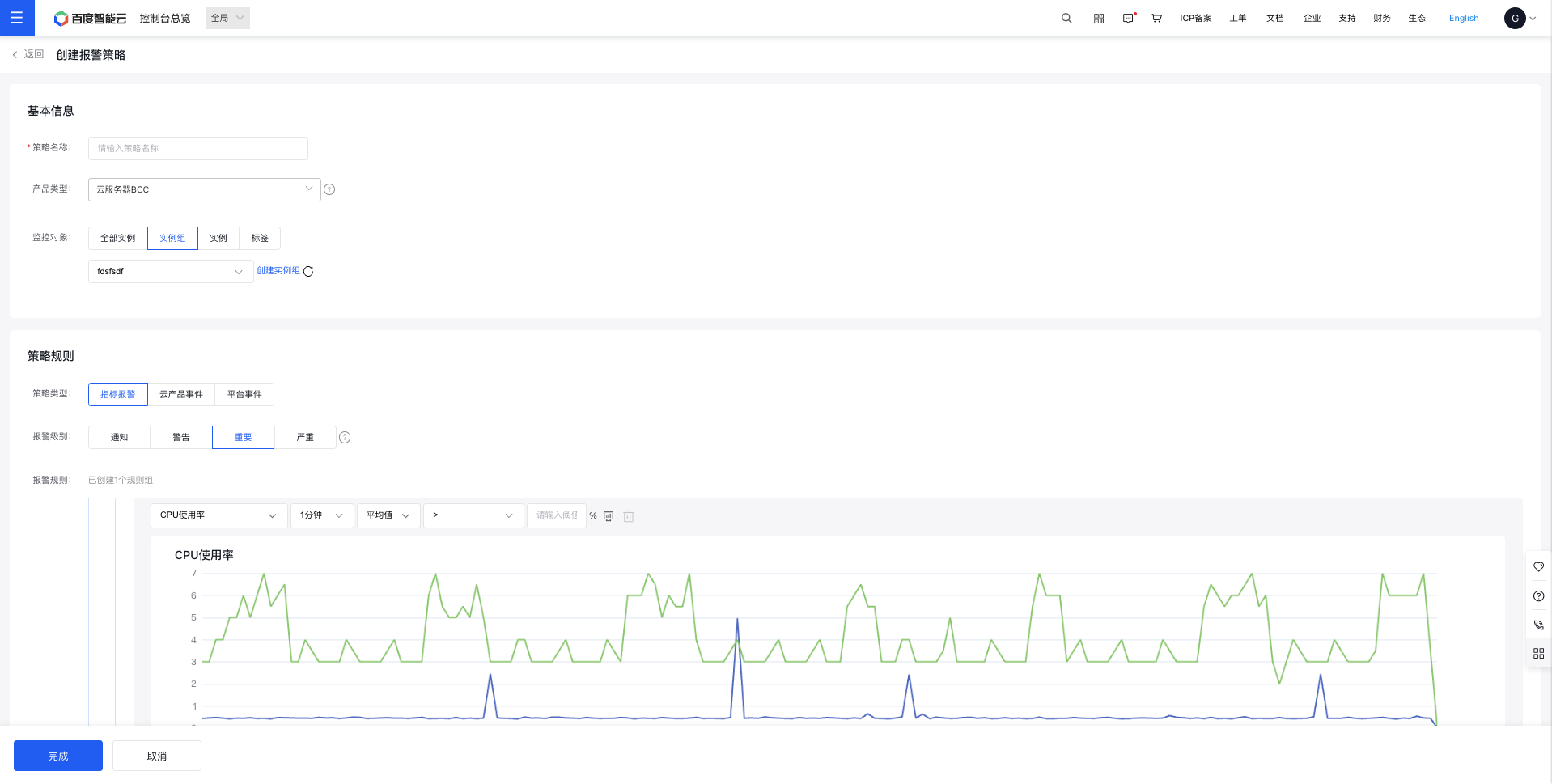
image.png

For the threshold, place refer to the Monitor Trend Chart below. For how to set up alarm notifications, please refer to Alarm Notification Template.

View Alarm Strategy

There are three methods to view alarm strategies:

Method 1:

  1. Click Cloud Product Monitor in the left navigation menu, then select the desired cloud product name to open its Instance List page. For Baidu Cloud Compute (BCC) monitoring data, click Baidu Cloud Compute Monitor to access the Baidu Cloud Compute List page. From the Cloud Server List page, click any Instance Name to open the Instance Monitor Details page.

image.png

  1. On the Monitor Details page, click the Alarm Strategy tab and then the name of an Alarm Strategy to open its Details page.
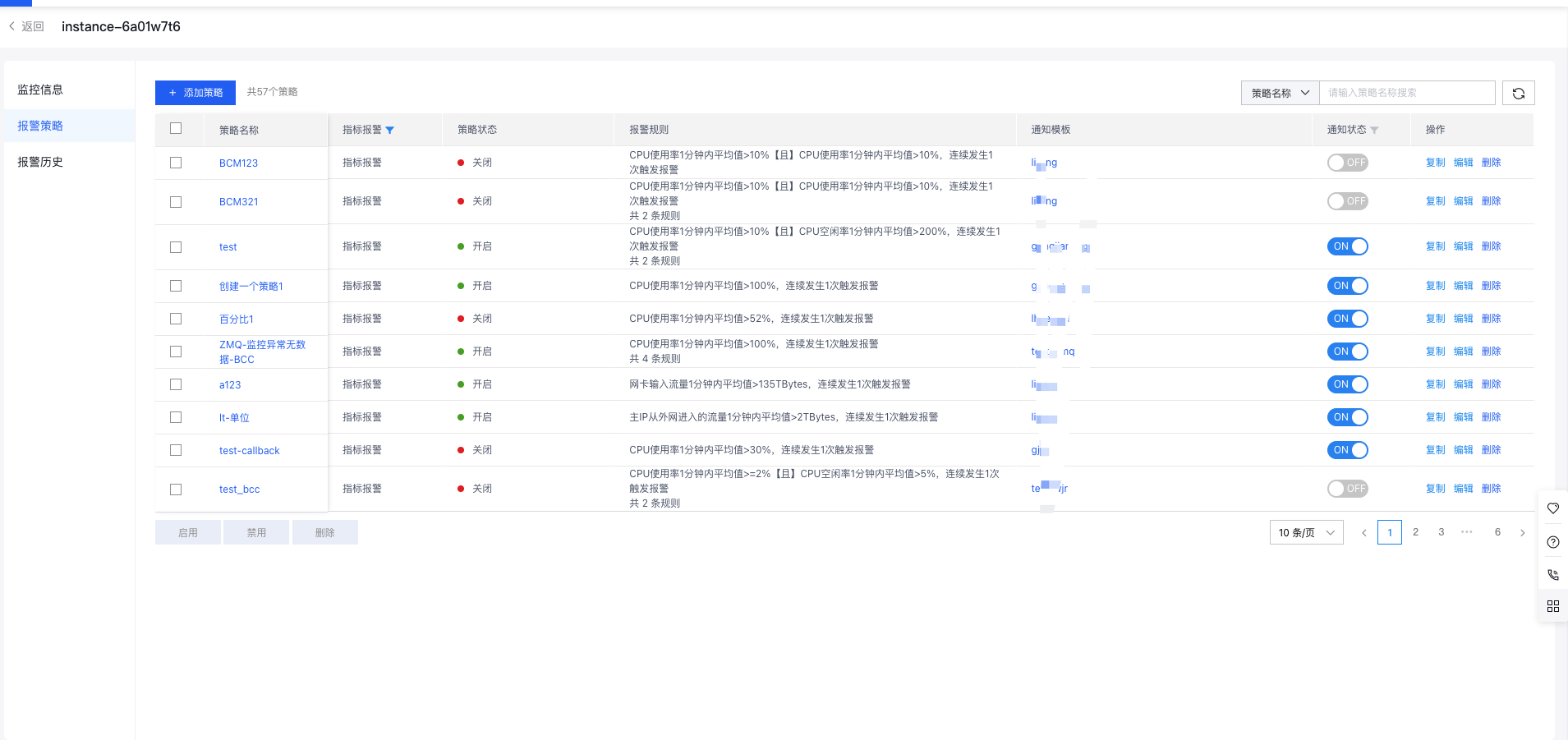
image.png

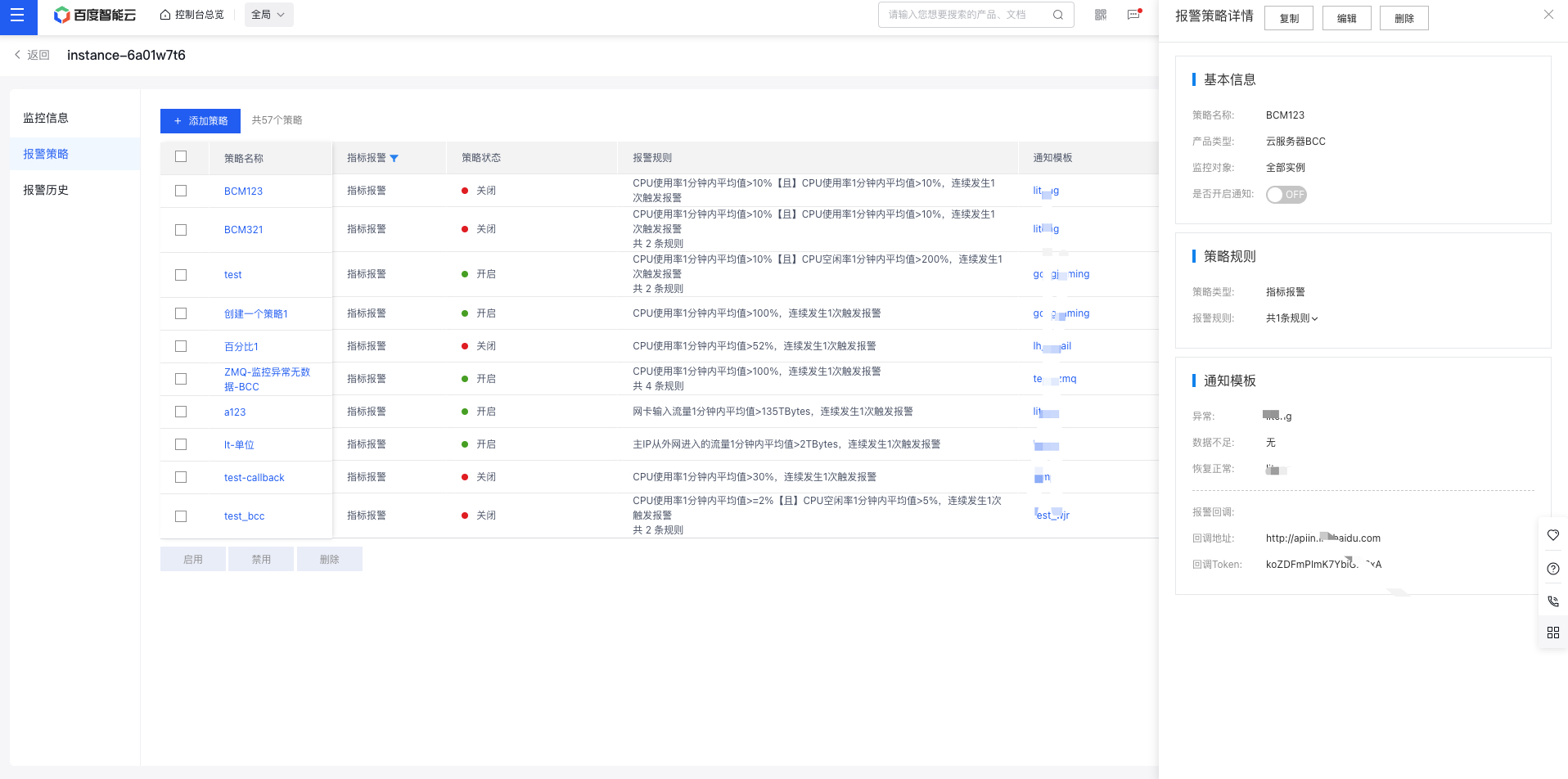
On this page, you can quickly filter the alarm strategies for the instance that meet the criteria using Alarm Status and Notification Status.
3. On the Alarm Strategy Details page, you can view the detailed information of the alarm strategies.

Plain Text
1 ![image.png](https://bce.bdstatic.com/doc/bce-doc/BCM/image_f1885ac.png)

Method 2:

  1. In the left navigation menu, click Alarm Management, then Alarm Strategy to access the Alarm Strategy page.

image.png

  1. On the Alarm Strategy page, quickly find the desired alarm strategy by searching for its name.
  2. Click on the alarm strategy name to open the Alarm Strategy Details page.
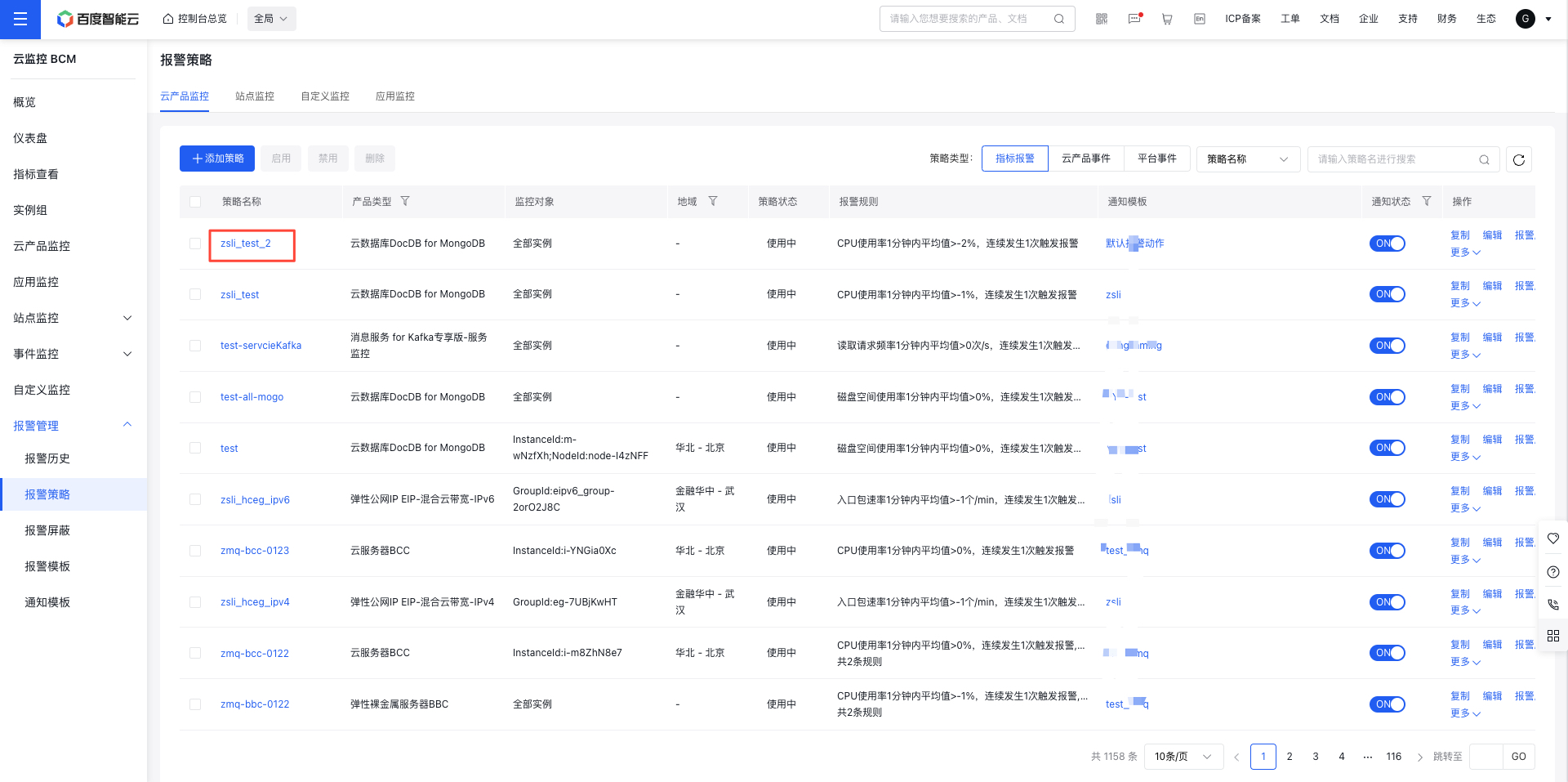
image.png

  1. On the Alarm Strategy Details page, you can review comprehensive details about the alarm strategies.
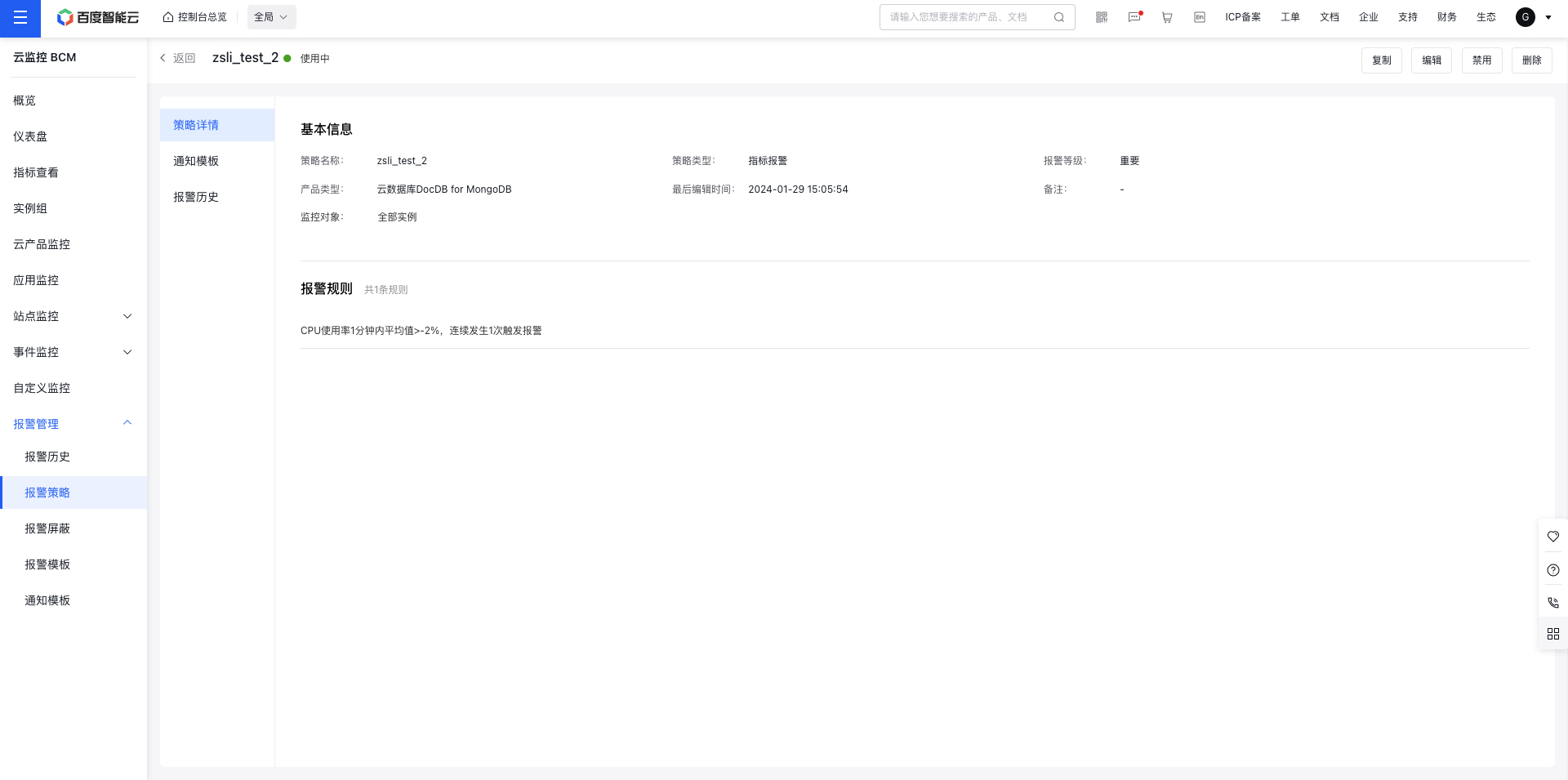
image.png

Notes
This section only describes how to view alarm strategies. For "Modify", "Delete", and "Mute" operations, refer to [Manage Alarms](BCM/Operation guide/Alarm Service/Manage Alarms.md).

View alarm history

There are three methods to view alarm history:

Method 1:

  1. Click Cloud Product Monitor in the left navigation menu, then select the desired cloud product name to open its Instance List page. For Baidu Cloud Compute (BCC) monitoring data, click Baidu Cloud Compute Monitor to access the Baidu Cloud Compute List page. From the Cloud Server List page, click any Instance Name to open the Instance Monitor Details page.

image.png

  1. On the Monitor Details page, navigate to the Alarm History tab to access the Alarm History List page for the instance. Here, you can view key information such as the strategy name, event type, and alarm level.
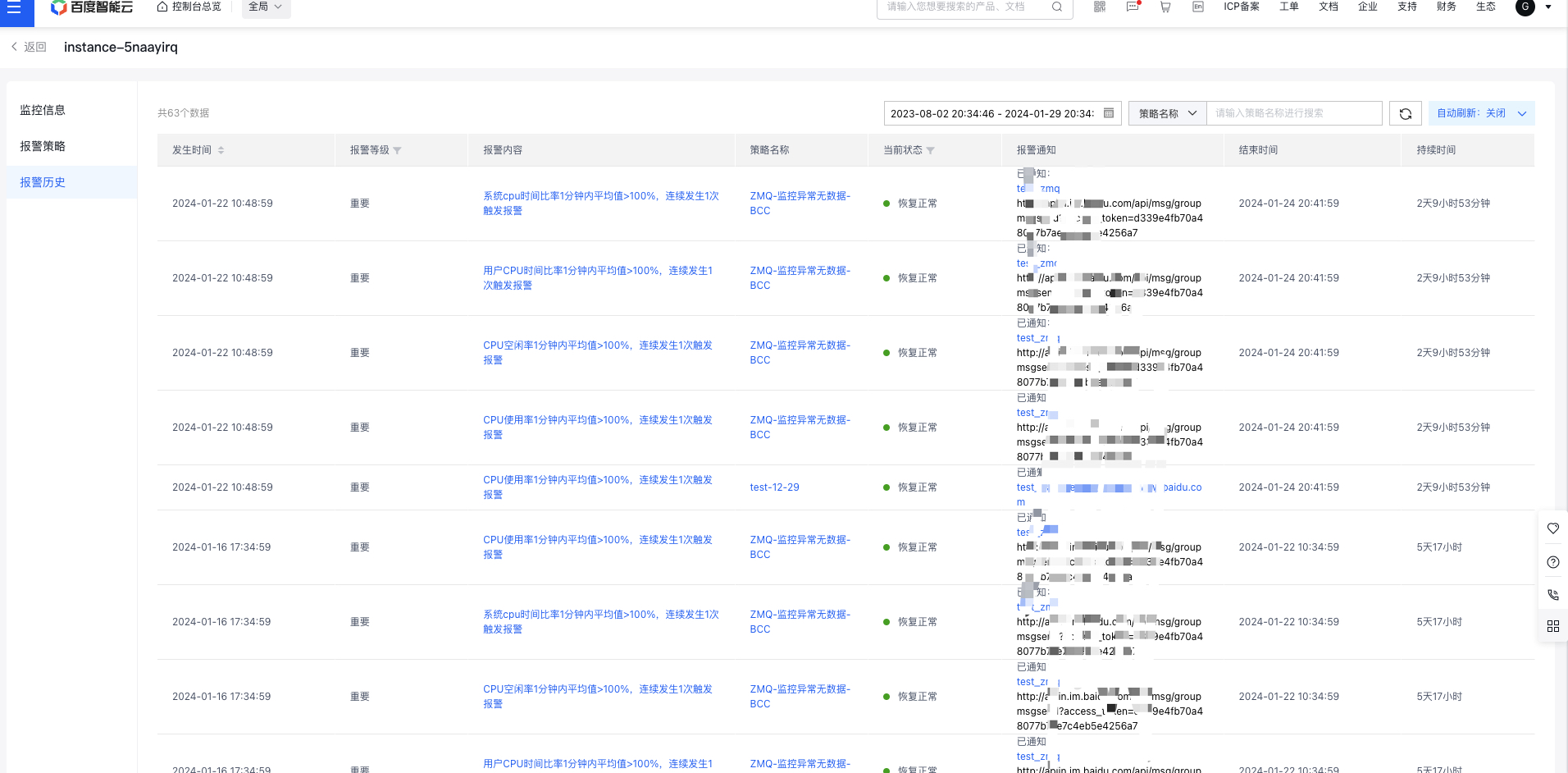
image.png

On the Alarm Strategy List page, you can easily filter alarm events for the BCC instance that match specific criteria using the Event Type and Time Range buttons.

Method 2:

  1. Go to Alarm Management and select Alarm History from the left navigation bar to open the Alarm History and Cloud Product Monitor page. On the Alarm History List page, you can view detailed information about each alarm event, including time of occurrence, level, monitoring object, and region.
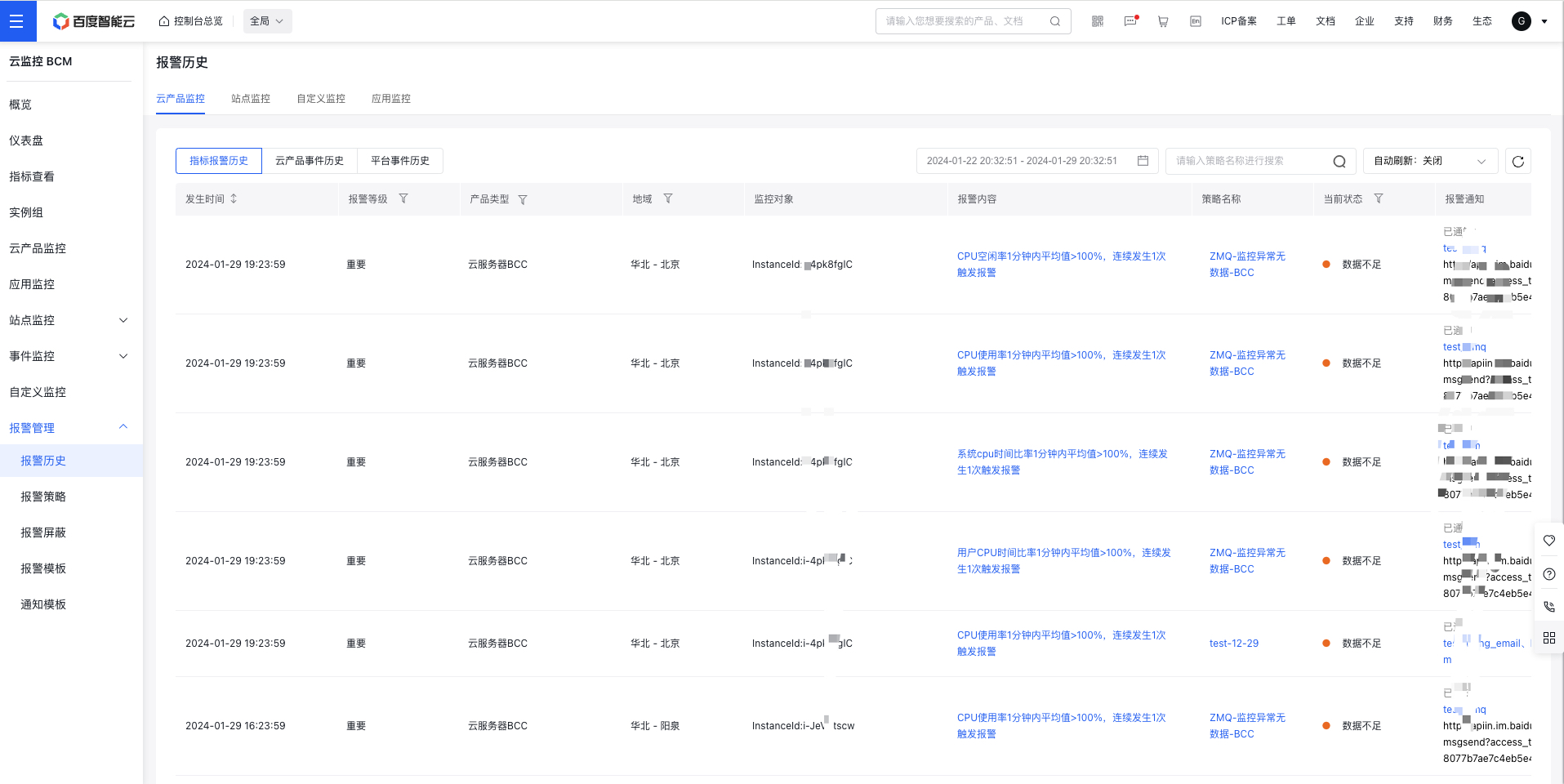
image.png

Previous
Alarm Service
Next
Instance Group