View IP Advanced Fault Diagnosis Tasks

BCM

  • Function Release Records
  • Product Announcement
    • Site Monitor Billing Announcement
  • Product Description
    • Product Introduction
    • Core concepts
    • Product advantages
    • Product features
  • Product pricing
    • Product pricing
    • Site Monitor Pricing
  • Quick Start
  • Operation guide
    • Enter Cloud Monitor
    • Dashboard
      • Overview
      • Management Dashboard Charts
      • Management Dashboard
    • Alarm Service
      • Overview
      • Alarm strategy
      • Alarm history
      • Alarm Template
      • Alarm Notification Template
      • Alarm callback
    • Cloud product monitor
      • Instance monitor
      • Instance Group
      • View Metrics
    • Site Monitor
      • Timed Detection (Formerly Site Monitor)
        • Overview
        • Manage Timed Probe Tasks
        • Purchase Guide
        • View timed probe tasks
      • IP advanced fault diagnosis
        • Manage IP Advanced Fault Diagnosis Tasks
        • View IP Advanced Fault Diagnosis Tasks
      • Instant probe
        • Overview
        • Manage instant probe tasks
    • Event Monitor
    • Event Bus
      • Event Delivery History
      • Overview
      • Event summary
      • Event Set
      • Event Rules
        • Event Rules
        • Event content conversion
        • Event pattern
  • API Reference
    • Overview
    • Service domain
    • Error response
    • Query Monitoring Data for Partial Dimensions
    • Dashboard API
    • Common Request and Response Headers
    • Alarm Management API
    • Alarm Management Interface V2
    • Alarm history
    • Push Data API
    • Event Bus Push
    • Application Monitor
    • Dimension Value TopN and Monitoring Data Query Interface
    • Batch Query Monitoring Data Interface V2
    • Dimension Value TopN Query Interface
    • Instance Group Interface
    • Site Monitor
    • Query Latest Metric Data for Partial Dimensions
    • General Description
    • Query Data API
    • Event Monitor
    • Instant Probe
    • Event Alarm History
    • Notification Template
  • Java-SDK
    • Overview
    • Initialization
    • Install the SDK Package
    • BcmClient
    • Query Monitoring Data for Partial Dimensions
    • Dimension Value TopN and Monitoring Data Query Interface
    • Batch Query Monitoring Data Interface V2
    • Dimension Value TopN Query Interface
    • Query Latest Metric Data for Partial Dimensions
    • Query Data API
    • Alarm Strategy-related APIs
    • Batch Query Data Interface
    • Alarm History-related APIs
  • Python-SDK
    • Overview
    • Initialization
    • Install SDK
    • BcmClient
    • Query Monitoring Data for Partial Dimensions
    • Batch Query Monitoring Data Interface V2
    • Dimension Value TopN Query Interface
    • Query Latest Metric Data for Partial Dimensions
    • Query Data API
    • Alarm Strategy List API
    • Batch Data Query Interface
  • Go-SDK
    • Overview
    • Initialization
    • Install the SDK Package
    • BcmClient
    • Query Monitoring Data for Partial Dimensions
    • Dimension Value TopN and Monitoring Data Query Interface
    • Batch Query Monitoring Data Interface V2
    • Dimension Value TopN Query Interface
    • Query Latest Metric Data for Partial Dimensions
    • Query Data API
    • Alarm Strategy-related APIs
    • Alarm History-related APIs
    • Batch Data Query Interface
  • BCM-Agent
    • Functions
    • Monitoring Trend Chart
    • BCM-Agent-Frequently Asked Questions
    • Appendix
  • FAQs
    • Common Questions Overview
    • Fault-related questions
    • Configuration-related questions
    • Performance-related questions
  • Cloud Product Monitor List
    • Cloud Product Metric List (Legacy Version Hidden)
    • Cloud Product Monitor Object Type List
    • Cloud Product Event List
    • Cloud Product Metric List
      • Database
        • Cloud Database TableStorage
        • Cloud Database DocDB for MongoDB
        • Data transmission service (DTS)
        • Cloud native database GaiaDB
        • Vector Database (VectorDB)
        • Dedicated Database Cluster (DDC)
        • Cloud Database Redis
        • Cloud database RDS
        • Cloud Database HBase
      • Enterprise Application
        • Message Service for RabbitMQ
      • Network
        • Service Network Interface Card (SNIC)
        • Peering Connections
        • IPv6 gateway
        • NAT Gateway
        • Load Balancer Dedicated Cluster LBDC
        • Baidu Load Balance (BLB)
        • Network probe NP
        • Dedicated channel
        • Elastic IP EIP
        • Elastic Network Interface Card (ENIC)
        • Cloud Smart Network (CSN)
        • Dedicated gateway
        • Virtual Private Network (VPN) Gateway
        • Layer 2 Gateway LTGW
        • Physical dedicated line
      • Intelligent Big Data
        • MapReduce BMR
        • Message service for Kafka-dedicated
        • Message Service for RocketMQ
        • Baidu Stream Computing (BSC)
        • Baidu Elasticsearch
        • Log Service BLS
        • Data warehouse DORIS
      • Cloud native
        • Cloud Function Computing
        • Baidu container instance (BCI)
      • Compute
        • Baidu Cloud Compute (BCC)
        • Elastic Baremetal Compute BBC
      • Storage and CDN
        • Parallel Filesystem Service (PFS)
        • Cloud File System (CFS)
        • Content delivery network (CDN)
        • Baidu object storage (BOS)
        • Cloud Disk Server (CDS)
        • Baidu edge computing (BEC)
      • Website service
        • Baidu Cloud Virtual Host (BCH)
      • Large Model Platform
        • Qianfan Large Model Platform ModelBuilder
  • Typical Practices
    • Scenarios for Batch Creation of Alarm Strategies
    • Usage Scenarios for Different Notification Channels
  • Service Level Agreement (SLA)
    • Site Monitor Service Level Agreement SLA
  • BCM-Tool
    • Uninstallation Method
    • Installation method
    • BCM-Tool-Frequently Asked Questions
    • Functions
    • Multi-Region Service
    • Application method
All documents
menu
No results found, please re-enter

BCM

  • Function Release Records
  • Product Announcement
    • Site Monitor Billing Announcement
  • Product Description
    • Product Introduction
    • Core concepts
    • Product advantages
    • Product features
  • Product pricing
    • Product pricing
    • Site Monitor Pricing
  • Quick Start
  • Operation guide
    • Enter Cloud Monitor
    • Dashboard
      • Overview
      • Management Dashboard Charts
      • Management Dashboard
    • Alarm Service
      • Overview
      • Alarm strategy
      • Alarm history
      • Alarm Template
      • Alarm Notification Template
      • Alarm callback
    • Cloud product monitor
      • Instance monitor
      • Instance Group
      • View Metrics
    • Site Monitor
      • Timed Detection (Formerly Site Monitor)
        • Overview
        • Manage Timed Probe Tasks
        • Purchase Guide
        • View timed probe tasks
      • IP advanced fault diagnosis
        • Manage IP Advanced Fault Diagnosis Tasks
        • View IP Advanced Fault Diagnosis Tasks
      • Instant probe
        • Overview
        • Manage instant probe tasks
    • Event Monitor
    • Event Bus
      • Event Delivery History
      • Overview
      • Event summary
      • Event Set
      • Event Rules
        • Event Rules
        • Event content conversion
        • Event pattern
  • API Reference
    • Overview
    • Service domain
    • Error response
    • Query Monitoring Data for Partial Dimensions
    • Dashboard API
    • Common Request and Response Headers
    • Alarm Management API
    • Alarm Management Interface V2
    • Alarm history
    • Push Data API
    • Event Bus Push
    • Application Monitor
    • Dimension Value TopN and Monitoring Data Query Interface
    • Batch Query Monitoring Data Interface V2
    • Dimension Value TopN Query Interface
    • Instance Group Interface
    • Site Monitor
    • Query Latest Metric Data for Partial Dimensions
    • General Description
    • Query Data API
    • Event Monitor
    • Instant Probe
    • Event Alarm History
    • Notification Template
  • Java-SDK
    • Overview
    • Initialization
    • Install the SDK Package
    • BcmClient
    • Query Monitoring Data for Partial Dimensions
    • Dimension Value TopN and Monitoring Data Query Interface
    • Batch Query Monitoring Data Interface V2
    • Dimension Value TopN Query Interface
    • Query Latest Metric Data for Partial Dimensions
    • Query Data API
    • Alarm Strategy-related APIs
    • Batch Query Data Interface
    • Alarm History-related APIs
  • Python-SDK
    • Overview
    • Initialization
    • Install SDK
    • BcmClient
    • Query Monitoring Data for Partial Dimensions
    • Batch Query Monitoring Data Interface V2
    • Dimension Value TopN Query Interface
    • Query Latest Metric Data for Partial Dimensions
    • Query Data API
    • Alarm Strategy List API
    • Batch Data Query Interface
  • Go-SDK
    • Overview
    • Initialization
    • Install the SDK Package
    • BcmClient
    • Query Monitoring Data for Partial Dimensions
    • Dimension Value TopN and Monitoring Data Query Interface
    • Batch Query Monitoring Data Interface V2
    • Dimension Value TopN Query Interface
    • Query Latest Metric Data for Partial Dimensions
    • Query Data API
    • Alarm Strategy-related APIs
    • Alarm History-related APIs
    • Batch Data Query Interface
  • BCM-Agent
    • Functions
    • Monitoring Trend Chart
    • BCM-Agent-Frequently Asked Questions
    • Appendix
  • FAQs
    • Common Questions Overview
    • Fault-related questions
    • Configuration-related questions
    • Performance-related questions
  • Cloud Product Monitor List
    • Cloud Product Metric List (Legacy Version Hidden)
    • Cloud Product Monitor Object Type List
    • Cloud Product Event List
    • Cloud Product Metric List
      • Database
        • Cloud Database TableStorage
        • Cloud Database DocDB for MongoDB
        • Data transmission service (DTS)
        • Cloud native database GaiaDB
        • Vector Database (VectorDB)
        • Dedicated Database Cluster (DDC)
        • Cloud Database Redis
        • Cloud database RDS
        • Cloud Database HBase
      • Enterprise Application
        • Message Service for RabbitMQ
      • Network
        • Service Network Interface Card (SNIC)
        • Peering Connections
        • IPv6 gateway
        • NAT Gateway
        • Load Balancer Dedicated Cluster LBDC
        • Baidu Load Balance (BLB)
        • Network probe NP
        • Dedicated channel
        • Elastic IP EIP
        • Elastic Network Interface Card (ENIC)
        • Cloud Smart Network (CSN)
        • Dedicated gateway
        • Virtual Private Network (VPN) Gateway
        • Layer 2 Gateway LTGW
        • Physical dedicated line
      • Intelligent Big Data
        • MapReduce BMR
        • Message service for Kafka-dedicated
        • Message Service for RocketMQ
        • Baidu Stream Computing (BSC)
        • Baidu Elasticsearch
        • Log Service BLS
        • Data warehouse DORIS
      • Cloud native
        • Cloud Function Computing
        • Baidu container instance (BCI)
      • Compute
        • Baidu Cloud Compute (BCC)
        • Elastic Baremetal Compute BBC
      • Storage and CDN
        • Parallel Filesystem Service (PFS)
        • Cloud File System (CFS)
        • Content delivery network (CDN)
        • Baidu object storage (BOS)
        • Cloud Disk Server (CDS)
        • Baidu edge computing (BEC)
      • Website service
        • Baidu Cloud Virtual Host (BCH)
      • Large Model Platform
        • Qianfan Large Model Platform ModelBuilder
  • Typical Practices
    • Scenarios for Batch Creation of Alarm Strategies
    • Usage Scenarios for Different Notification Channels
  • Service Level Agreement (SLA)
    • Site Monitor Service Level Agreement SLA
  • BCM-Tool
    • Uninstallation Method
    • Installation method
    • BCM-Tool-Frequently Asked Questions
    • Functions
    • Multi-Region Service
    • Application method
  • Document center
  • arrow
  • BCM
  • arrow
  • Operation guide
  • arrow
  • Site Monitor
  • arrow
  • IP advanced fault diagnosis
  • arrow
  • View IP Advanced Fault Diagnosis Tasks
Table of contents on this page
  • Prerequisites
  • Task details
  • Alarm strategy
  • Add the alarm strategy
  • View Alarm Strategy
  • Management alarm strategy
  • Alarm history

View IP Advanced Fault Diagnosis Tasks

Updated at:2025-11-03

Prerequisites

Ensure that you have created an IP advanced fault diagnosis task.

Task details

  1. In the left navigation panel, select Site Monitor, then click the IP Advanced Fault Diagnosis tab to open the Task List page.
  2. Click on a task name to navigate to the Task Details page.
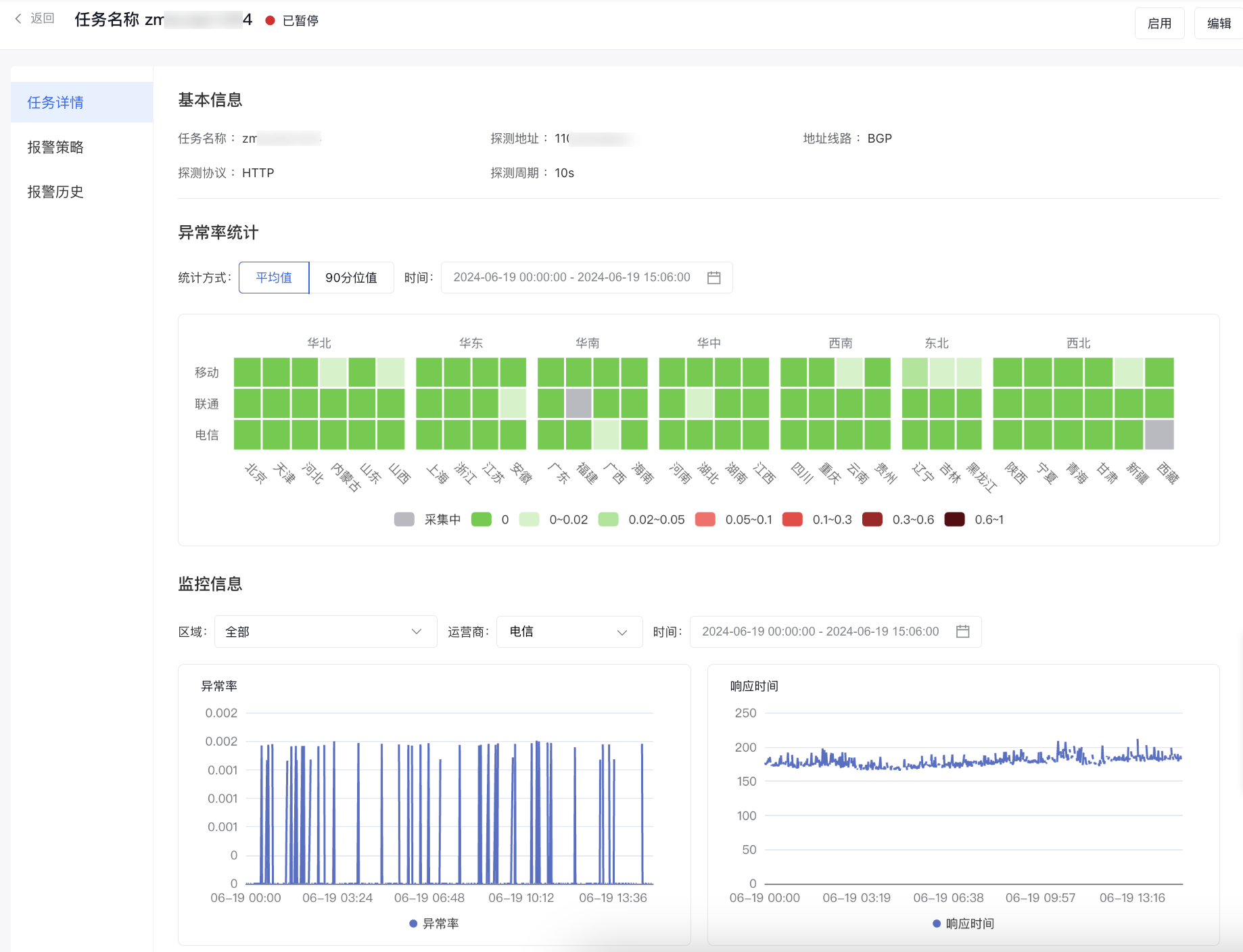
image.png

Metric description

Protocol type Metric name Metric definition
HTTP/TCP Exception rate Exception probe count/total probe count * 100%
HTTP/TCP Response time The time taken from sending a request to receiving a response at a probe node.
PING Packet Loss Rate The proportion of lost packets compared to the total transmitted packets. Packet loss is usually caused by physical line failures, device malfunctions, network congestion, routing errors, and similar issues.
PING RTT The time taken for a data packet to travel from the local machine to the server and back with the server's response

Alarm strategy

Add the alarm strategy

  1. In the left navigation bar, click on the Site Monitor and then the IP Advanced Fault Diagnosis tab to open the Task List page.
  2. Click the Alarm Strategy button in the operation column to open the Alarm Strategy List page for the specific task.
  3. Click the Add Strategy button to navigate to the page for creating an alarm strategy for this IP advanced fault diagnosis task. Complete the form to finalize the alarm strategy creation.
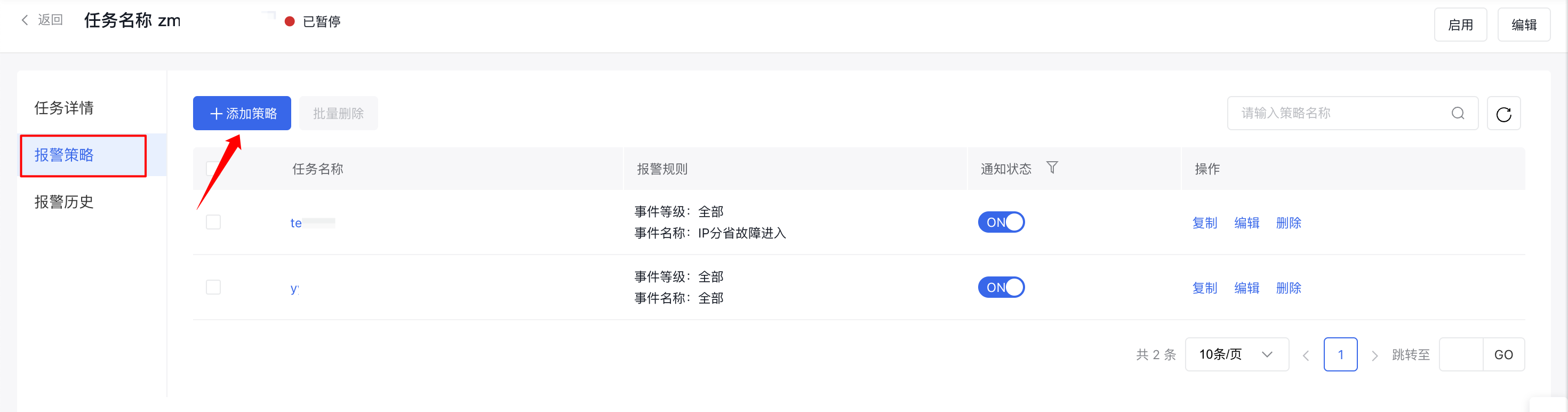
image.png

View Alarm Strategy

  1. In the left navigation bar, click on the Site Monitor and then the IP Advanced Fault Diagnosis tab to open the Task List page.
  2. Click the Alarm Strategy button in the operation column to open the Alarm Strategy List page for the specific task.
  3. Click the name of an alarm strategy to open the Alarm Strategy Details pop-up window.
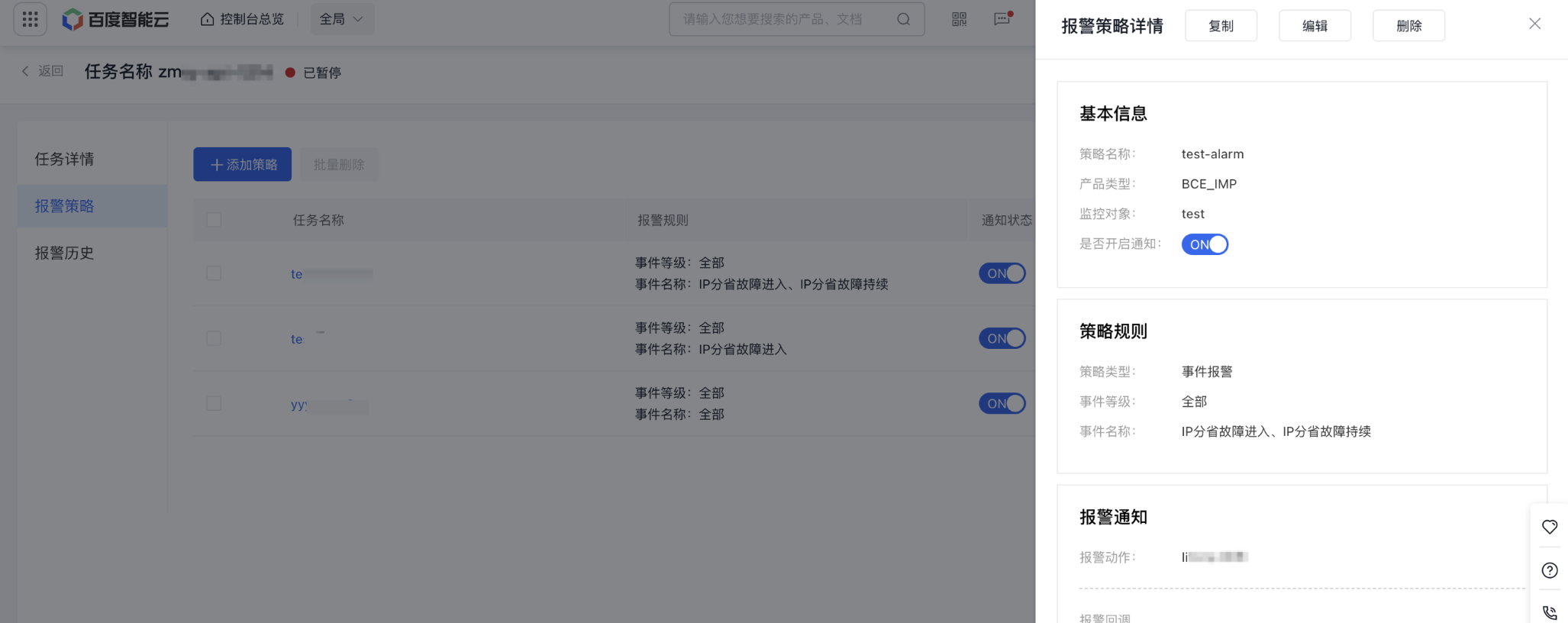
image.png

Management alarm strategy

  1. In the left navigation bar, click on the Site Monitor and then the IP Advanced Fault Diagnosis tab to open the Task List page.
  2. Click the Alarm Strategy button in the operation column to open the Alarm Strategy List page for the specific task.
  3. Click the Copy, Edit, or Delete button in the operation column to duplicate, modify, or remove an alarm strategy. You can also select multiple strategies for batch deletion.
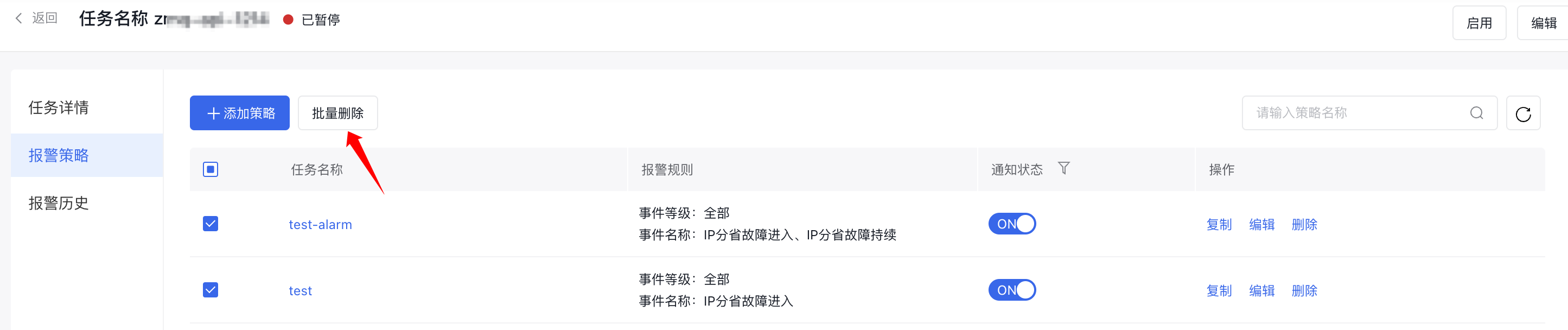
image.png

Alternatively, click the strategy name, then choose Copy, Edit, or Delete within the Alarm Strategy Details window to modify or delete a specific strategy.
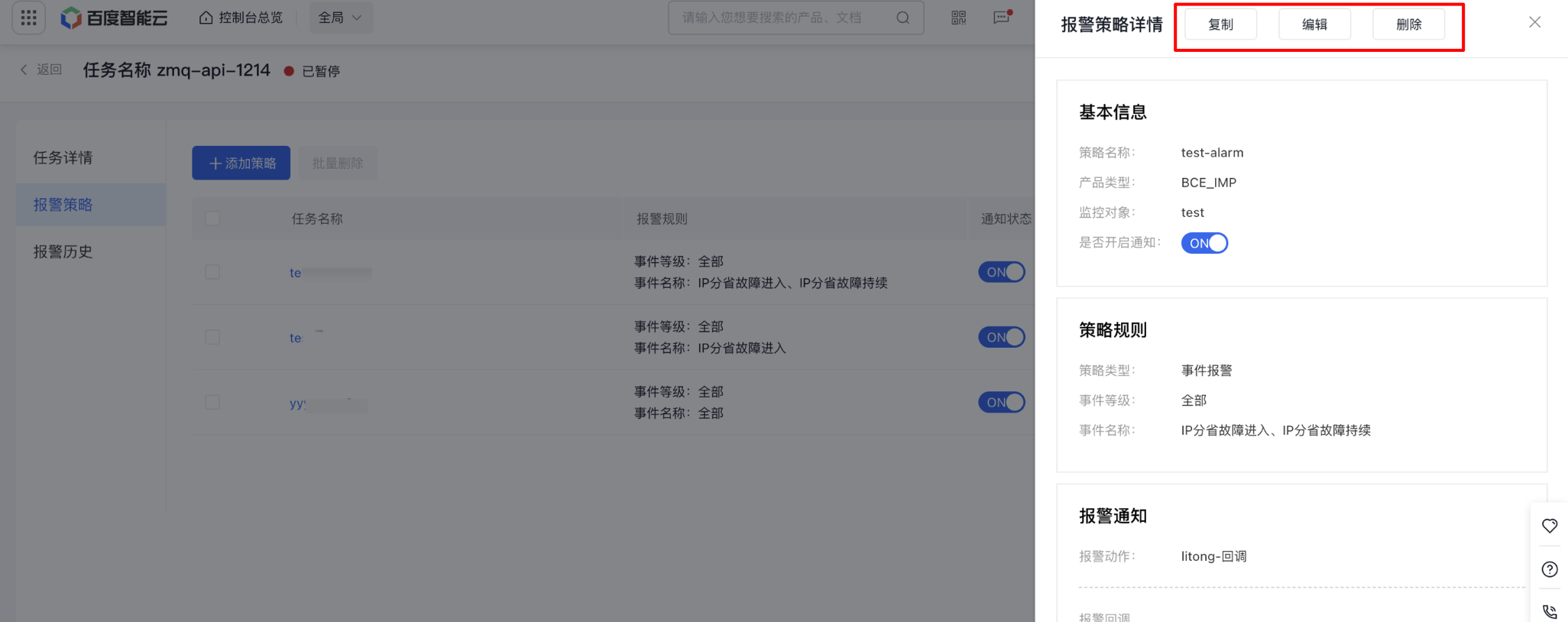
image.png

Alarm history

  1. In the left navigation bar, click on the Site Monitor and then the IP Advanced Fault Diagnosis tab to open the Task List page.
  2. Click the Alarm Strategy button in the operation column to open the Alarm Strategy List page for the specific task.
  3. Click the left-side Alarm History tab to open the Alarm History Information page.
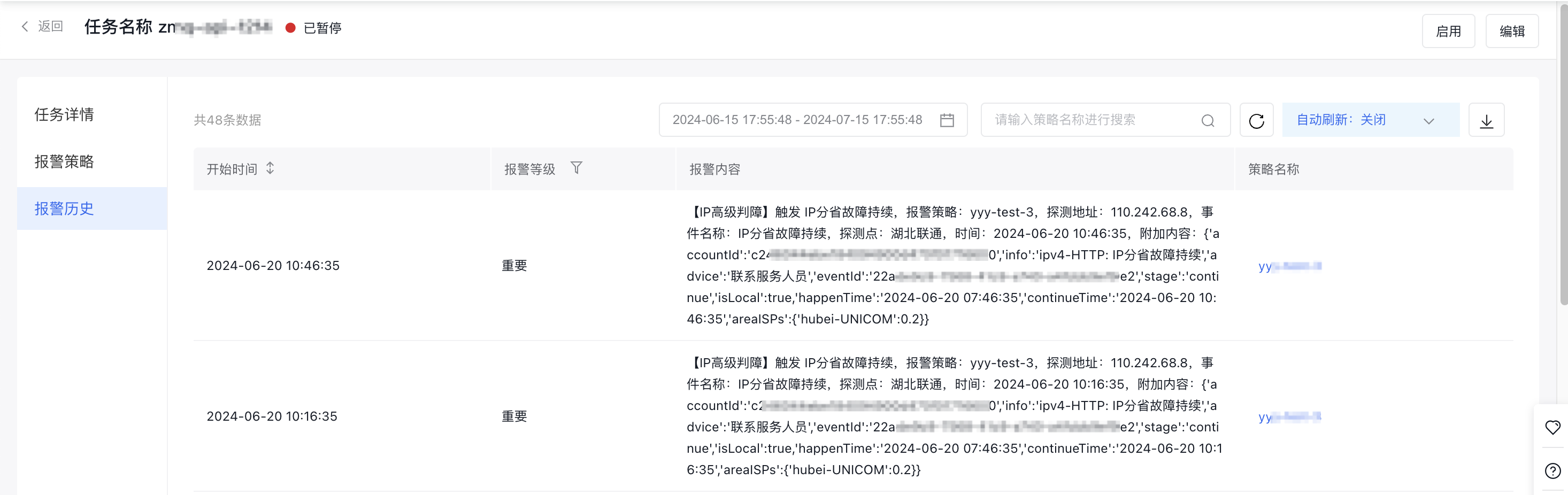
image.png

Previous
Manage IP Advanced Fault Diagnosis Tasks
Next
Instant probe