Manage Timed Probe Tasks

BCM

  • Function Release Records
  • Product Announcement
    • Site Monitor Billing Announcement
  • Product Description
    • Product Introduction
    • Core concepts
    • Product advantages
    • Product features
  • Product pricing
    • Product pricing
    • Site Monitor Pricing
  • Quick Start
  • Operation guide
    • Enter Cloud Monitor
    • Dashboard
      • Overview
      • Management Dashboard Charts
      • Management Dashboard
    • Alarm Service
      • Overview
      • Alarm strategy
      • Alarm history
      • Alarm Template
      • Alarm Notification Template
      • Alarm callback
    • Cloud product monitor
      • Instance monitor
      • Instance Group
      • View Metrics
    • Site Monitor
      • Timed Detection (Formerly Site Monitor)
        • Overview
        • Manage Timed Probe Tasks
        • Purchase Guide
        • View timed probe tasks
      • IP advanced fault diagnosis
        • Manage IP Advanced Fault Diagnosis Tasks
        • View IP Advanced Fault Diagnosis Tasks
      • Instant probe
        • Overview
        • Manage instant probe tasks
    • Event Monitor
    • Event Bus
      • Event Delivery History
      • Overview
      • Event summary
      • Event Set
      • Event Rules
        • Event Rules
        • Event content conversion
        • Event pattern
  • API Reference
    • Overview
    • Service domain
    • Error response
    • Query Monitoring Data for Partial Dimensions
    • Dashboard API
    • Common Request and Response Headers
    • Alarm Management API
    • Alarm Management Interface V2
    • Alarm history
    • Push Data API
    • Event Bus Push
    • Application Monitor
    • Dimension Value TopN and Monitoring Data Query Interface
    • Batch Query Monitoring Data Interface V2
    • Dimension Value TopN Query Interface
    • Instance Group Interface
    • Site Monitor
    • Query Latest Metric Data for Partial Dimensions
    • General Description
    • Query Data API
    • Event Monitor
    • Instant Probe
    • Event Alarm History
    • Notification Template
  • Java-SDK
    • Overview
    • Initialization
    • Install the SDK Package
    • BcmClient
    • Query Monitoring Data for Partial Dimensions
    • Dimension Value TopN and Monitoring Data Query Interface
    • Batch Query Monitoring Data Interface V2
    • Dimension Value TopN Query Interface
    • Query Latest Metric Data for Partial Dimensions
    • Query Data API
    • Alarm Strategy-related APIs
    • Batch Query Data Interface
    • Alarm History-related APIs
  • Python-SDK
    • Overview
    • Initialization
    • Install SDK
    • BcmClient
    • Query Monitoring Data for Partial Dimensions
    • Batch Query Monitoring Data Interface V2
    • Dimension Value TopN Query Interface
    • Query Latest Metric Data for Partial Dimensions
    • Query Data API
    • Alarm Strategy List API
    • Batch Data Query Interface
  • Go-SDK
    • Overview
    • Initialization
    • Install the SDK Package
    • BcmClient
    • Query Monitoring Data for Partial Dimensions
    • Dimension Value TopN and Monitoring Data Query Interface
    • Batch Query Monitoring Data Interface V2
    • Dimension Value TopN Query Interface
    • Query Latest Metric Data for Partial Dimensions
    • Query Data API
    • Alarm Strategy-related APIs
    • Alarm History-related APIs
    • Batch Data Query Interface
  • BCM-Agent
    • Functions
    • Monitoring Trend Chart
    • BCM-Agent-Frequently Asked Questions
    • Appendix
  • FAQs
    • Common Questions Overview
    • Fault-related questions
    • Configuration-related questions
    • Performance-related questions
  • Cloud Product Monitor List
    • Cloud Product Metric List (Legacy Version Hidden)
    • Cloud Product Monitor Object Type List
    • Cloud Product Event List
    • Cloud Product Metric List
      • Database
        • Cloud Database TableStorage
        • Cloud Database DocDB for MongoDB
        • Data transmission service (DTS)
        • Cloud native database GaiaDB
        • Vector Database (VectorDB)
        • Dedicated Database Cluster (DDC)
        • Cloud Database Redis
        • Cloud database RDS
        • Cloud Database HBase
      • Enterprise Application
        • Message Service for RabbitMQ
      • Network
        • Service Network Interface Card (SNIC)
        • Peering Connections
        • IPv6 gateway
        • NAT Gateway
        • Load Balancer Dedicated Cluster LBDC
        • Baidu Load Balance (BLB)
        • Network probe NP
        • Dedicated channel
        • Elastic IP EIP
        • Elastic Network Interface Card (ENIC)
        • Cloud Smart Network (CSN)
        • Dedicated gateway
        • Virtual Private Network (VPN) Gateway
        • Layer 2 Gateway LTGW
        • Physical dedicated line
      • Intelligent Big Data
        • MapReduce BMR
        • Message service for Kafka-dedicated
        • Message Service for RocketMQ
        • Baidu Stream Computing (BSC)
        • Baidu Elasticsearch
        • Log Service BLS
        • Data warehouse DORIS
      • Cloud native
        • Cloud Function Computing
        • Baidu container instance (BCI)
      • Compute
        • Baidu Cloud Compute (BCC)
        • Elastic Baremetal Compute BBC
      • Storage and CDN
        • Parallel Filesystem Service (PFS)
        • Cloud File System (CFS)
        • Content delivery network (CDN)
        • Baidu object storage (BOS)
        • Cloud Disk Server (CDS)
        • Baidu edge computing (BEC)
      • Website service
        • Baidu Cloud Virtual Host (BCH)
      • Large Model Platform
        • Qianfan Large Model Platform ModelBuilder
  • Typical Practices
    • Scenarios for Batch Creation of Alarm Strategies
    • Usage Scenarios for Different Notification Channels
  • Service Level Agreement (SLA)
    • Site Monitor Service Level Agreement SLA
  • BCM-Tool
    • Uninstallation Method
    • Installation method
    • BCM-Tool-Frequently Asked Questions
    • Functions
    • Multi-Region Service
    • Application method
All documents
menu
No results found, please re-enter

BCM

  • Function Release Records
  • Product Announcement
    • Site Monitor Billing Announcement
  • Product Description
    • Product Introduction
    • Core concepts
    • Product advantages
    • Product features
  • Product pricing
    • Product pricing
    • Site Monitor Pricing
  • Quick Start
  • Operation guide
    • Enter Cloud Monitor
    • Dashboard
      • Overview
      • Management Dashboard Charts
      • Management Dashboard
    • Alarm Service
      • Overview
      • Alarm strategy
      • Alarm history
      • Alarm Template
      • Alarm Notification Template
      • Alarm callback
    • Cloud product monitor
      • Instance monitor
      • Instance Group
      • View Metrics
    • Site Monitor
      • Timed Detection (Formerly Site Monitor)
        • Overview
        • Manage Timed Probe Tasks
        • Purchase Guide
        • View timed probe tasks
      • IP advanced fault diagnosis
        • Manage IP Advanced Fault Diagnosis Tasks
        • View IP Advanced Fault Diagnosis Tasks
      • Instant probe
        • Overview
        • Manage instant probe tasks
    • Event Monitor
    • Event Bus
      • Event Delivery History
      • Overview
      • Event summary
      • Event Set
      • Event Rules
        • Event Rules
        • Event content conversion
        • Event pattern
  • API Reference
    • Overview
    • Service domain
    • Error response
    • Query Monitoring Data for Partial Dimensions
    • Dashboard API
    • Common Request and Response Headers
    • Alarm Management API
    • Alarm Management Interface V2
    • Alarm history
    • Push Data API
    • Event Bus Push
    • Application Monitor
    • Dimension Value TopN and Monitoring Data Query Interface
    • Batch Query Monitoring Data Interface V2
    • Dimension Value TopN Query Interface
    • Instance Group Interface
    • Site Monitor
    • Query Latest Metric Data for Partial Dimensions
    • General Description
    • Query Data API
    • Event Monitor
    • Instant Probe
    • Event Alarm History
    • Notification Template
  • Java-SDK
    • Overview
    • Initialization
    • Install the SDK Package
    • BcmClient
    • Query Monitoring Data for Partial Dimensions
    • Dimension Value TopN and Monitoring Data Query Interface
    • Batch Query Monitoring Data Interface V2
    • Dimension Value TopN Query Interface
    • Query Latest Metric Data for Partial Dimensions
    • Query Data API
    • Alarm Strategy-related APIs
    • Batch Query Data Interface
    • Alarm History-related APIs
  • Python-SDK
    • Overview
    • Initialization
    • Install SDK
    • BcmClient
    • Query Monitoring Data for Partial Dimensions
    • Batch Query Monitoring Data Interface V2
    • Dimension Value TopN Query Interface
    • Query Latest Metric Data for Partial Dimensions
    • Query Data API
    • Alarm Strategy List API
    • Batch Data Query Interface
  • Go-SDK
    • Overview
    • Initialization
    • Install the SDK Package
    • BcmClient
    • Query Monitoring Data for Partial Dimensions
    • Dimension Value TopN and Monitoring Data Query Interface
    • Batch Query Monitoring Data Interface V2
    • Dimension Value TopN Query Interface
    • Query Latest Metric Data for Partial Dimensions
    • Query Data API
    • Alarm Strategy-related APIs
    • Alarm History-related APIs
    • Batch Data Query Interface
  • BCM-Agent
    • Functions
    • Monitoring Trend Chart
    • BCM-Agent-Frequently Asked Questions
    • Appendix
  • FAQs
    • Common Questions Overview
    • Fault-related questions
    • Configuration-related questions
    • Performance-related questions
  • Cloud Product Monitor List
    • Cloud Product Metric List (Legacy Version Hidden)
    • Cloud Product Monitor Object Type List
    • Cloud Product Event List
    • Cloud Product Metric List
      • Database
        • Cloud Database TableStorage
        • Cloud Database DocDB for MongoDB
        • Data transmission service (DTS)
        • Cloud native database GaiaDB
        • Vector Database (VectorDB)
        • Dedicated Database Cluster (DDC)
        • Cloud Database Redis
        • Cloud database RDS
        • Cloud Database HBase
      • Enterprise Application
        • Message Service for RabbitMQ
      • Network
        • Service Network Interface Card (SNIC)
        • Peering Connections
        • IPv6 gateway
        • NAT Gateway
        • Load Balancer Dedicated Cluster LBDC
        • Baidu Load Balance (BLB)
        • Network probe NP
        • Dedicated channel
        • Elastic IP EIP
        • Elastic Network Interface Card (ENIC)
        • Cloud Smart Network (CSN)
        • Dedicated gateway
        • Virtual Private Network (VPN) Gateway
        • Layer 2 Gateway LTGW
        • Physical dedicated line
      • Intelligent Big Data
        • MapReduce BMR
        • Message service for Kafka-dedicated
        • Message Service for RocketMQ
        • Baidu Stream Computing (BSC)
        • Baidu Elasticsearch
        • Log Service BLS
        • Data warehouse DORIS
      • Cloud native
        • Cloud Function Computing
        • Baidu container instance (BCI)
      • Compute
        • Baidu Cloud Compute (BCC)
        • Elastic Baremetal Compute BBC
      • Storage and CDN
        • Parallel Filesystem Service (PFS)
        • Cloud File System (CFS)
        • Content delivery network (CDN)
        • Baidu object storage (BOS)
        • Cloud Disk Server (CDS)
        • Baidu edge computing (BEC)
      • Website service
        • Baidu Cloud Virtual Host (BCH)
      • Large Model Platform
        • Qianfan Large Model Platform ModelBuilder
  • Typical Practices
    • Scenarios for Batch Creation of Alarm Strategies
    • Usage Scenarios for Different Notification Channels
  • Service Level Agreement (SLA)
    • Site Monitor Service Level Agreement SLA
  • BCM-Tool
    • Uninstallation Method
    • Installation method
    • BCM-Tool-Frequently Asked Questions
    • Functions
    • Multi-Region Service
    • Application method
  • Document center
  • arrow
  • BCM
  • arrow
  • Operation guide
  • arrow
  • Site Monitor
  • arrow
  • Timed Detection (Formerly Site Monitor)
  • arrow
  • Manage Timed Probe Tasks
Table of contents on this page
  • Create timed probe task
  • Edit/delete site monitor task

Manage Timed Probe Tasks

Updated at:2025-11-03

Create timed probe task

  1. Click the Site Monitor and Timed Probe tab in the left navigation bar to open the Site Task List page.
  2. Click the Add Monitor Task button to access the Create Monitor Task page.
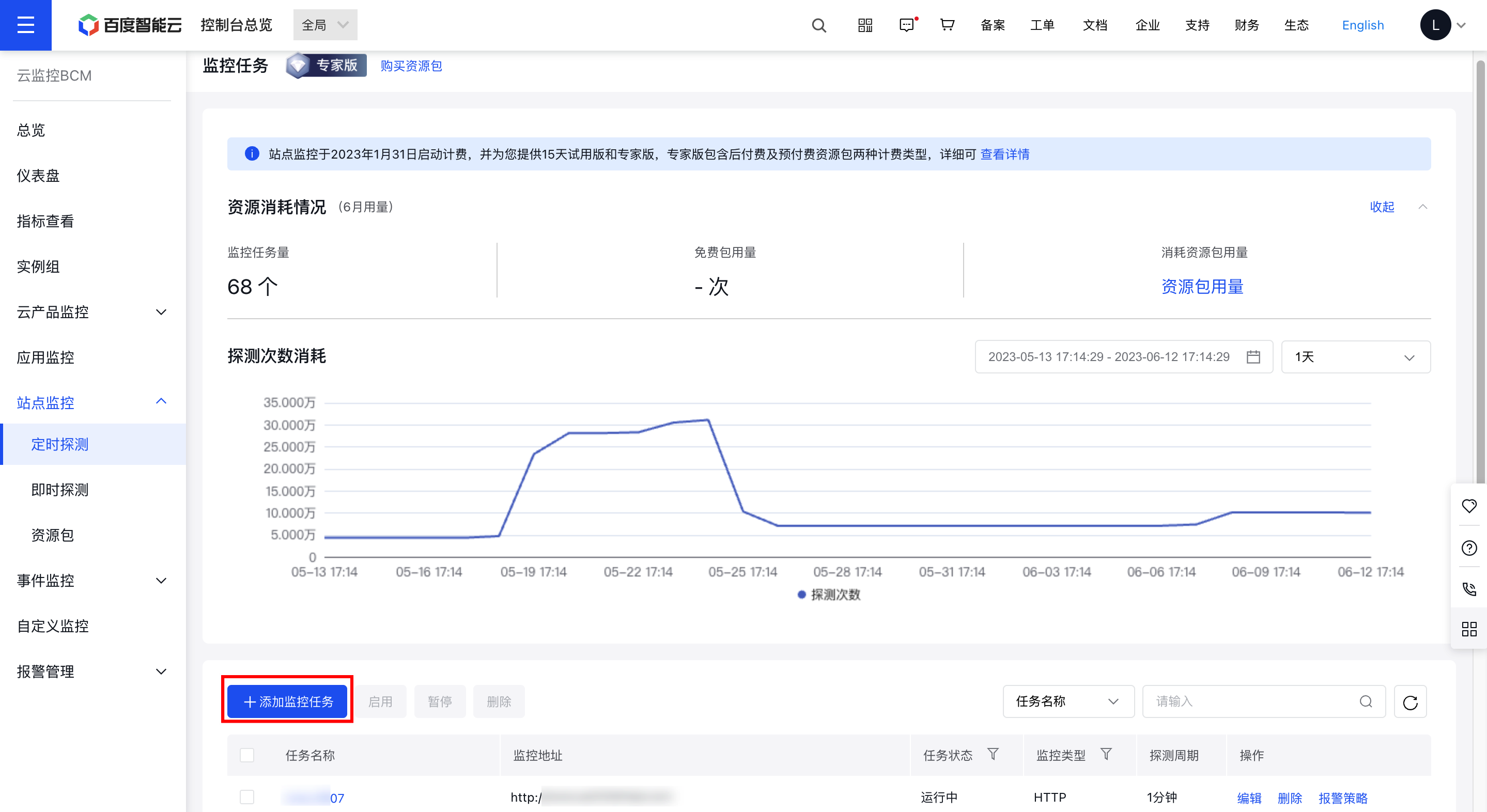
image.png

  1. Fill out the form. The seven supported probe types are HTTP, HTTPS, PING, TCP, UDP, FTP, and DNS.
  • HTTP/HTTPS

a. Choose "HTTP" or "HTTPS" as the probe protocol.

b. Follow on-screen instructions to fill out the form. The request methods available for "HTTP" or "HTTPS" are GET and POST.

HTTP/HTTPS form configuration:

ConfigMap Description
Task name Required. Enter a unique custom task name for this account.
Probe protocol Mandatory. Select the DNS type.
Probe address Mandatory. Provide the URL of the monitor object. It can be a domain name or an IP address for probing.
Request method Both GET and POST methods are supported.
  • Submission content: body content of HTTP POST request, sent in the format of JSONObject, such as {'test':'testValue'}
  • Advanced configuration Disabled by default. Once enabled, the corresponding content will be displayed.
  • Host: The HOST field in the request header, such as a domain name or an IP address.
  • User-Agent: The User-Agent field in the HTTP request header.
  • Cookie: The Cookie field in the HTTP request header.
  • HTTP code matching: Specify particular HTTP codes, such as 501.
  • Response content matching: Specify the content to match in order to confirm response accuracy.
  • HTTP authentication username: Enter the corresponding username required for HTTP authentication.
  • HTTP authentication password: Enter the corresponding password required for HTTP authentication.
  • Probe node
  • Required. Supports probe nodes for both IPv4 and IPv6 network types. Displays IPv4 probe nodes by default.
  • When entering an IP address for probing, ensure the probe address type matches the network type. For a probe address in IPv4 format, choose the network type as IPv4. The same applies to IPv6.
  • Detection Period Required. Specify the interval between two probes. Supports intervals of 1, 2, 5, 10, 15, or 30 minutes, or 1, 2, or 3 hours.
    Timeout setting
  • Allows customization of the maximum duration for a single probe before marking it as failed.
  • The timeout duration cannot exceed the probe interval.
  • If left empty, the probe interval is used as the default timeout duration.
    • Ping

    a. Select "Ping" as the probe protocol.

    b. Fill out the form according to the on-screen instructions.

    Ping form configuration:

    ConfigMap Description
    Task name Required. Enter a unique custom task name for this account.
    Probe protocol Mandatory. Select the DNS type.
    Probe address Mandatory. Provide the URL of the monitor object. It can be a domain name or an IP address for probing.
    Ping packet count Set the number of packets for a single probe task. Range: 1–40 packets.
    Ping packet loss rate
  • Define the criteria for determining probe success or failure.
  • Range: Integer between 0 and 100, represented as a percentage.
  • If the Ping packet loss rate exceeds this value, the current probe is deemed failed.
  • Probe node
  • Required. Supports probe nodes for both IPv4 and IPv6 network types. Displays IPv4 probe nodes by default.
  • When entering an IP address for probing, ensure the probe address type matches the network type. For a probe address in IPv4 format, choose the network type as IPv4. The same applies to IPv6.
  • Detection Period Required. Specify the interval between two probes. Supports intervals of 1, 2, 5, 10, 15, or 30 minutes, or 1, 2, or 3 hours.
    Timeout setting
  • Allows customization of the maximum duration for a single probe before marking it as failed.
  • The timeout duration cannot exceed the probe interval.
  • If left empty, the probe interval is used as the default timeout duration.
    • TCP

    a. Select "TCP" as the probe protocol.

    b. Fill out the form according to the on-screen instructions.

    TCP form configuration:

    ConfigMap Description
    Task name Required. Enter a unique custom task name for this account.
    Probe protocol Mandatory. Select the DNS type.
    Probe address Mandatory. Provide the URL of the monitor object. It can be a domain name or an IP address for probing.
    Port No.
  • Please enter the probe's port number.
  • Valid range: An integer between 0 and 65,535.
  • Advanced configuration Disabled by default. Once enabled, the following content will be displayed:
  • Format for request content: Two formats are supported - "hexadecimal string" and "ASCII string".
  • Request content: Please input the test request content.
  • Format for matching response content: Two formats are supported - "hexadecimal string" and "ASCII string".
  • Response content matching: Specify the expected response pattern. You may provide matching content to verify if the response is correct. If left blank, matching verification will not be conducted.
  • Probe node
  • Required. Supports probe nodes for both IPv4 and IPv6 network types. Displays IPv4 probe nodes by default.
  • When entering an IP address for probing, ensure the probe address type matches the network type. For a probe address in IPv4 format, choose the network type as IPv4. The same applies to IPv6.
  • Detection Period Required. Specify the interval between two probes. Supports intervals of 1, 2, 5, 10, 15, or 30 minutes, or 1, 2, or 3 hours.
    Timeout setting
  • Allows customization of the maximum duration for a single probe before marking it as failed.
  • The timeout duration cannot exceed the probe interval.
  • Timeout duration under TCP protocol cannot exceed 10s
    • UDP

    a. Choose "UDP" as the protocol for the probe.

    b. Fill out the form according to the on-screen instructions.

    UDP form configuration:

    ConfigMap Description
    Task name Required. Enter a unique custom task name for this account.
    Probe protocol Mandatory. Select the DNS type.
    Probe address Mandatory. Provide the URL of the monitor object. It can be a domain name or an IP address for probing.
    Port No.
  • Please enter the probe's port number.
  • Valid range: An integer between 0 and 65,535.
  • Request content format Two formats are supported: "hexadecimal string" and "ASCII string".
    Request content Input the test request content.
    Response content matching format Two formats are supported: "hexadecimal string" and "ASCII string".
    Response content matching Specify the expected response pattern. Matching content can be entered to validate if the response is accurate. If left blank, no verification will be performed.
    Probe node
  • Required. Supports probe nodes for both IPv4 and IPv6 network types. Displays IPv4 probe nodes by default.
  • When entering an IP address for probing, ensure the probe address type matches the network type. For a probe address in IPv4 format, choose the network type as IPv4. The same applies to IPv6.
  • Detection Period Required. Specify the interval between two probes. Supports intervals of 1, 2, 5, 10, 15, or 30 minutes, or 1, 2, or 3 hours.
    Timeout setting
  • Allows customization of the maximum duration for a single probe before marking it as failed.
  • The timeout duration cannot exceed the probe interval.
  • If left empty, the probe interval is used as the default timeout duration.
    • FTP

    a. Choose "FTP" as the protocol for the probe.

    b. Fill out the form according to the on-screen instructions.

    FTP form configuration:

    ConfigMap Description
    Task name Required. Enter a unique custom task name for this account.
    Probe protocol Mandatory. Select the DNS type.
    Probe address Mandatory. Provide the URL of the monitor object. It can be a domain name or an IP address for probing.
    Port No.
  • This is required. Enter the probe's port number; the default is 20.
  • Valid range: An integer between 0 and 65,535.
  • Whether to log in anonymously
  • Supports anonymous login by default, as well as login with identity verification.
  • For identity verification, input the username and password. The backend will perform probing at the configured frequency. Providing incorrect credentials or frequent probing may lead to service blocking.
  • Probe node
  • Required. Supports probe nodes for both IPv4 and IPv6 network types. Displays IPv4 probe nodes by default.
  • When entering an IP address for probing, ensure the probe address type matches the network type. For a probe address in IPv4 format, choose the network type as IPv4. The same applies to IPv6.
  • Detection Period Required. Specify the interval between two probes. Supports intervals of 1, 2, 5, 10, 15, or 30 minutes, or 1, 2, or 3 hours.
    Timeout setting
  • Allows customization of the maximum duration for a single probe before marking it as failed.
  • The timeout duration cannot exceed the probe interval.
  • If left empty, the probe interval is used as the default timeout duration.
    • DNS

    a. Choose "DNS" as the protocol for the probe.

    b. Fill out the form according to the on-screen instructions.

    DNS form configuration:

    ConfigMap Description
    Task name Required. Enter a unique custom task name for this account.
    Probe protocol Mandatory. Select the DNS type.
    Probe address Mandatory. Provide the URL of the monitor object. It can be a domain name or an IP address for probing.
    Query method Mandatory. Available options are "recursion" and "iteration," with "recursion" as the default.
  • Recursion: The DNS query client only interacts with the LocalDNS, which queries root domain servers, top-level domain name servers, and authoritative domain servers.
  • Iteration: The DNS query client queries hierarchical DNS servers independently until the final result is obtained.
  • DNS server Not required. You can configure specific DNS servers to resolve the entered domain name. If not specified, the local DNS server of the probe node will be used by default.
    DNS allow list No required. During resolution of domain name (such as www.baidu.com), if the resolved IP address or CNAME is not in the DNS hijacking allow list, user access will fail or a non-Baidu target IP will be returned; if the resolved IP or CNAME is in the DNS allow list, it will be considered that no DNS hijacking has occurred.
    Specific rules and examples are as follows:
  • Domain name: Matching rules. These rules support IP addresses, IP wildcards, and CNAMEs. Multiple rules can be entered, separated by vertical bars (|). Example: www.baidu.com:112.80.248.76 | 112.80.248.75 means that all IPs under the www.baidu.com domain, except 112.80.248.76 and 112.80.248.75, are considered hijacked.
  • IP format (IP hijacking)
    Specify IP address; ipv4,eg. 192.168.1.1; ipv6, eg. 2400:A480:aa:400:a1:b2:c3:d4
    wildcard Matching, eg.192.168.1.* indicates 192.168.1.1~254 all IP address
    Wildcard matching, eg. 2400:A480:aa:400:a1:b2:c3:* indicates 2400:A480:aa:400:a1:b2:C3:0~FFFF
  • CNAME format (CNAME hijacking)
    Specify domain name address, e.g., www.baidu.com
    Wildcard matching, e.g. *baidu.com
  • Probe node
  • Required. Supports probe nodes for both IPv4 and IPv6 network types. Displays IPv4 probe nodes by default.
  • When entering an IP address for probing, ensure the probe address type matches the network type. For a probe address in IPv4 format, choose the network type as IPv4. The same applies to IPv6.
  • Detection Period Required. Specify the interval between two probes. Supports intervals of 1, 2, 5, 10, 15, or 30 minutes, or 1, 2, or 3 hours.
    Timeout setting
  • Allows customization of the maximum duration for a single probe before marking it as failed.
  • The timeout duration cannot exceed the probe interval.
  • If left empty, the probe interval is used as the default timeout duration.
  • Edit/delete site monitor task

    1. Click on the "Site Monitor" and "Timed Probe" tabs in the left navigation bar to access the Site Monitor Task List page.
    2. Click the "Edit" or "Delete" button in the Operation column to modify or remove a site task.
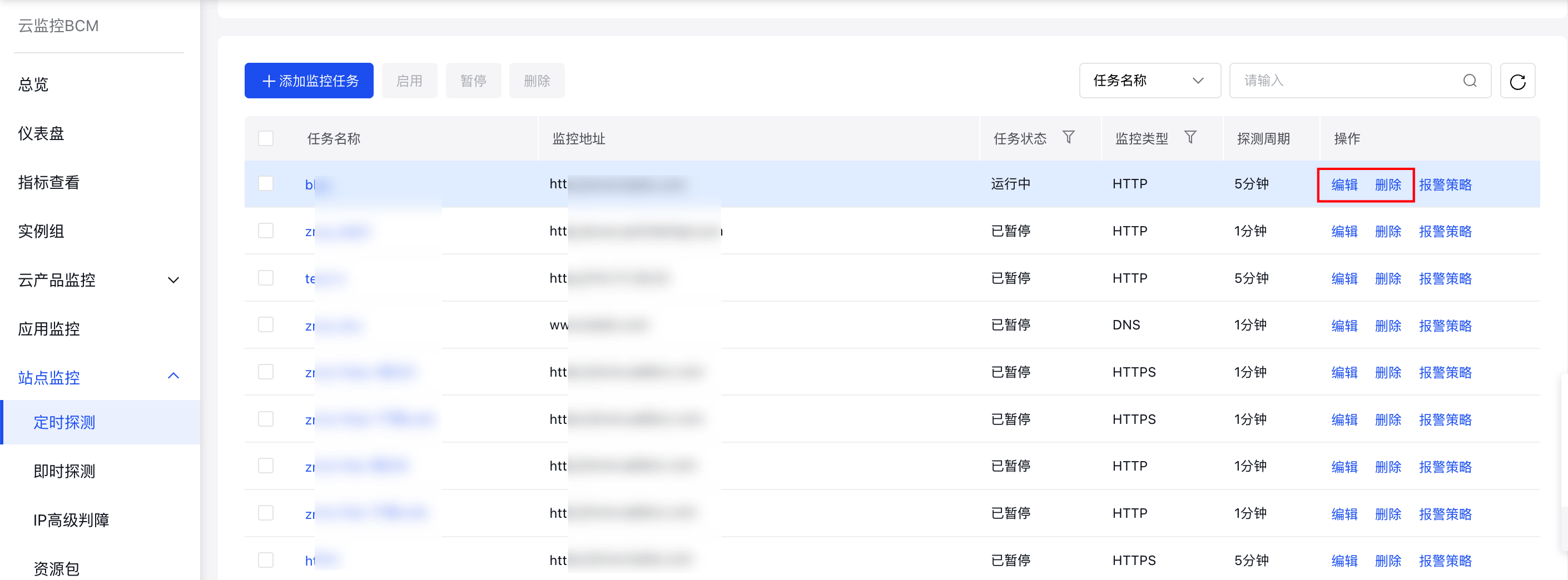
    image.png

    Previous
    Overview
    Next
    Purchase Guide