

Shift Charge
Overview
During the use of EIP, if the selected charge type no longer meets the service requirements, users can easily switch it. The EIP charge types, including prepay (subscription), postpay (by bandwidth), and postpay (by traffic), are interchangeable.
- When converting from Postpay (by bandwidth or usage) to Prepay (subscription), the change takes effect immediately.
- Conversions between Postpay (by bandwidth) and Postpay (by traffic) will take effect at the start of the next full hour.
- Switching from prepay (as subscribed) to postpay (pay-by-bandwidth or pay-by-traffic) will automatically update the EIP subscription service upon expiration.
- The maximum limit for shifting to traffic-based billing is 200Mbps, and the maximum limit for shifting to bandwidth-based billing (prepay or postpay) is also 200Mbps.
- EIP instances currently undergoing a charge type change cannot be selected for another "shift charge" operation.
Postpaid-to-prepaid API
To convert an on-demand EIP instance to subscription (i.e., from postpay to prepay), follow the following steps:
- Log in to the console and go to Product Service - EIP.
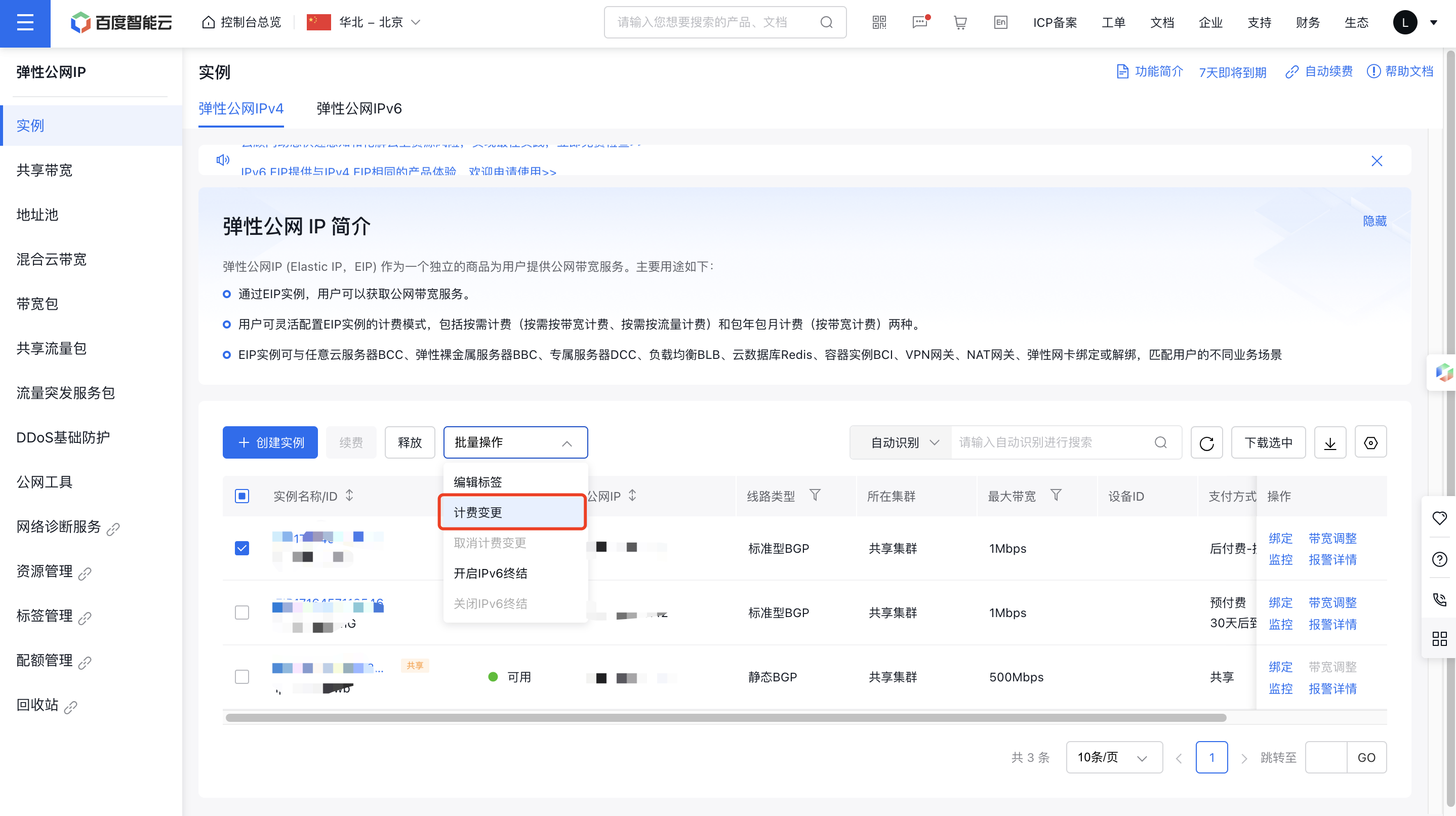
- Select a postpaid EIP instance and choose Shift Charge under Batch Operations.
- Choose the Prepay option, specify public network bandwidth, set the purchase duration, and decide whether to enable auto-renewal.
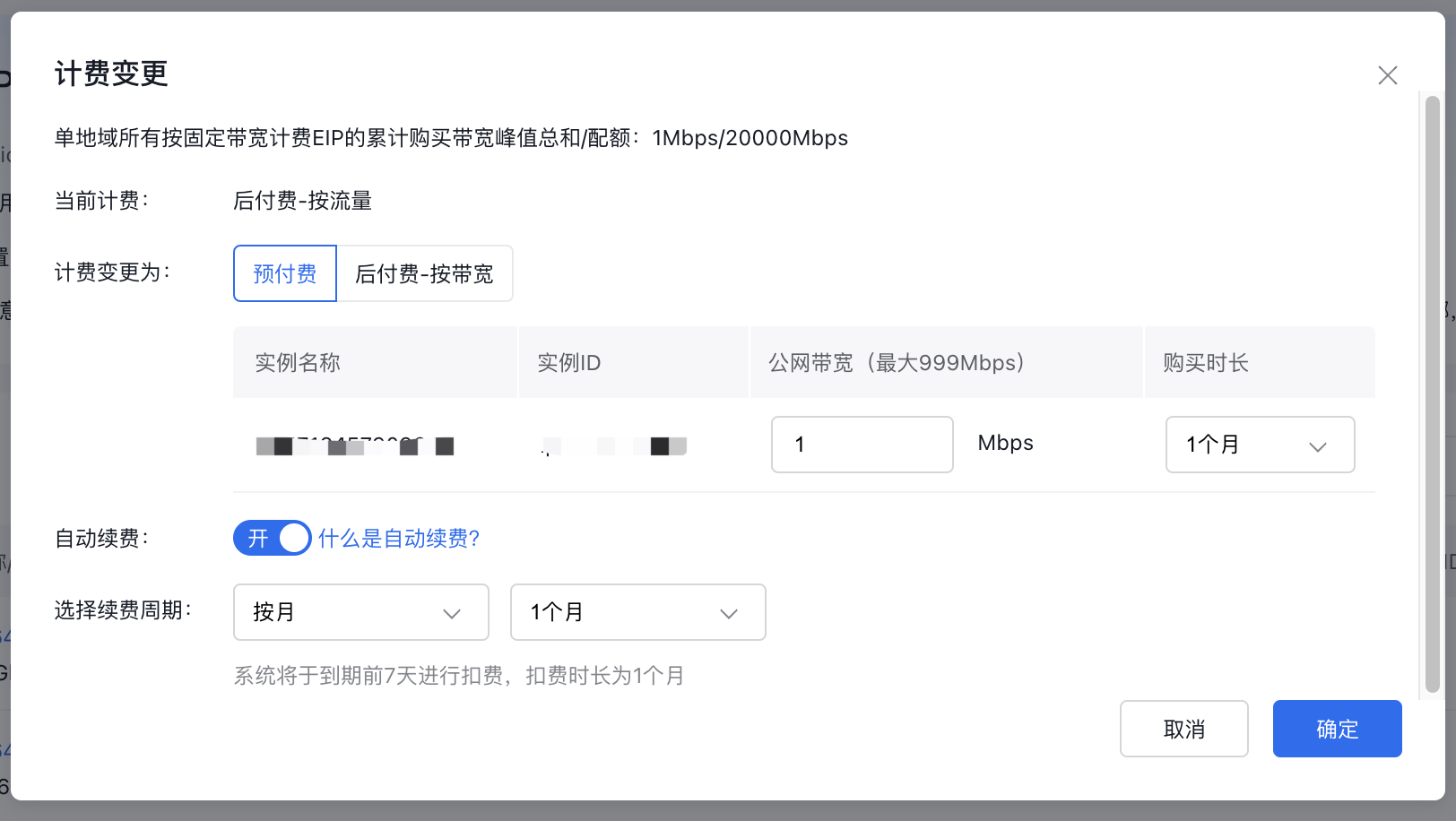
- Click OK to move on to the payment process.
- Follow the payment steps to complete the transaction, and the new charge type will take effect immediately.
Prepay to postpay
If it is required for your services to be switched from subscription-based EIP instance purchases to pay-as-you-go, i.e., transitioning from prepay to postpay, please refer to the following shift charge instructions:
- This feature is exclusively for prepaid EIP instances that have not yet expired, allowing them to switch to postpay.
- The change will take effect upon expiration of the current subscription.
- This feature is only available for EIP instances without auto-renewal enabled. To change the charge type, auto-renewal must first be disabled.
- To ensure uninterrupted service, it is necessary to pre-recharge your account for the postpay method.
Operation step
- Log in to the console and go to Product Service - EIP.
- Select a prepaid EIP instance and choose Shift Charge under Batch Operations.
- Pick the new charge type and bandwidth for the shift charge, then click OK.
- Verify the purchase details, complete the payment as guided, and the shift charge will be successful.
Convert between bandwidth-based and traffic-based billing
During the use of EIP service, if the postpaid services is better suited to another billing mode (traffic-based/bandwidth-based), users can refer to the following instructions to perform a shift charge:
- The change will take effect starting from the next full hour.
- This feature is only available for EIP instances without auto-renewal enabled. To change the charge type, auto-renewal must first be disabled.
Operation step
- Log in to the console and go to Product Service - EIP.
- Select an EIP instance billed on a postpay-by-traffic or bandwidth basis and choose Shift Charge under More Operations.
- Pick the new charge type and bandwidth for the shift charge, then click OK.
- Verify the purchase details, complete the payment as guided, and the shift charge will be successful.