Identity and access management

EIP

  • API Reference
    • API function release records
    • API Service Domain Name
    • API Specifications
    • Appendix 1
    • Bandwidth Package Related Interfaces
      • Adjust the bandwidth of the bandwidth package
      • Create bandwidth package
      • Query bandwidth package details
      • Query bandwidth package list information of users
      • Release bandwidth package
      • Update the automatic release time of the bandwidth package
      • Update the name of the bandwidth package
    • DDoS Basic Protection Related Interfaces
      • Modify DDoS basic protection threshold
      • Query DDoS Basic Protection Attack Records
      • Query DDoS basic protection list
    • EIP Related Interfaces
      • Apply for EIP
      • Bind EIP
      • Disable EIP direct
      • EIP bandwidth scaling
      • EIP renewal has been enabled
      • Enable EIP direct
      • Query EIP list in bucket trash
      • Query EIP list
      • Release EIP
      • Release EIPs in the bucket trash
      • Renew EIP
      • Restore EIPs in the bucket trash
      • Selective release of EIP
      • Unbind EIP
      • Unsubscribe prepaid EIP
      • Update EIP Release Protection Switch
    • Error code
    • General Description
    • Inquiry Related
      • Bandwidth package price inquiry
      • EIP Inquiry
      • EIPGROUP Inquiry
      • Shared Traffic Package Inquiry
    • Interface Overview
    • Overview
    • Prerequisites for use
    • Shared Bandwidth Related Interfaces
      • Bandwidth scaling up for EIPGROUP
      • Create EIPGROUP
      • EIPGROUP IP count upgrade
      • EIPGROUP release
      • EIPGROUP renewal
      • EIPGROUP update
      • Migrate EIP from EIPGROUP
      • Migrate EIP into EIPGROUP
      • Query EIPGROUP details
      • Query the EIPGROUP list
      • Unsubscribe prepaid EIPGROUP
    • Shared Traffic Package Related Interfaces
      • Create a shared traffic package
      • Query shared traffic package details
      • Query shared traffic package list
    • TBSP Related Interfaces
      • Add Protection IP Allow List
      • Add Protocol Blocking
      • Add Region Blocking
      • Bind Protection Object
      • Close Protection IP Cleaning
      • Create TBSP
      • Delete Protection IP Allow List
      • Delete Protection Object
      • Delete Protocol Blocking
      • Delete Region Blocking
      • Modify Protection IP Cleaning Threshold
      • Modify Protection IP Protection Level
      • Open Protection IP Cleaning
      • Query Protection IP Allow List
      • Query Protection IP Cleaning Threshold List
      • Query Protocol Blocking List
      • Query Region Blocking List
      • Query TBSP Details
      • Query TBSP List
      • TBSP Capacity dilatation
      • TBSP renew
  • FAQs
    • Billing class
    • Configuration
    • Consultation
    • Security class
  • Function Release Records
  • Operation guide
    • Address pool
    • Bandwidth package
      • Bandwidth scale-up package
      • Cross-border acceleration package
    • Certification
    • DDoS standard protection
    • EIP Instance
      • Create instance
      • EIP Direct Connect
      • IPv6 Termination
      • Manage Alarms
      • Operation Instance
      • Shift Charge
      • View monitoring
    • EIP Self-Service Diagnostics
      • EIP Instance Diagnosis
    • EIPGROUP
      • Bind cloud resources
      • Manage Shared Bandwidth
      • Purchase Shared Bandwidth
      • View monitoring
    • High Defense EIP
    • Identity and access management
    • Recycle bin
    • Shared traffic package
      • Purchase Shared Traffic Package
      • View Shared Traffic Package
    • Tag Management
    • Traffic Burst Service Package
      • Instance management
      • Monitor alarm
      • Protection Configuration
    • Unblocking Center
  • Product Description
    • Application scenarios
    • Product advantages
    • Product Introduction
    • Usage restrictions
  • Product pricing
    • Bandwidth Package Billing
    • EIP Instance Billing
    • EIPGROUP Billing
    • Shared Traffic Package Billing
    • TBSP Billing
  • SDK
    • GO-SDK
      • DDoS Instance
      • EIP Instance
      • EipBp Instance
      • EIPGROUP Instance
      • EipTp Instance
      • Exception handling
      • Initialization
      • Install the SDK Package
      • Overview
    • Java-SDK
      • EIP Instance
      • EipBP Instance
      • EIPGROUP Instance
      • EipTp Instance
      • Exception handling
      • Initialization
      • Install the SDK Package
      • Overview
      • Version history
    • PHP-SDK
      • EIP Instance
      • EipBP Instance
      • EIPGROUP Instance
      • Exception handling
      • Initialization
      • Install the SDK Package
      • Overview
      • Version history
    • Python-SDK
      • EIP Instance
      • EipBP Instance
      • EIPGROUP Instance
      • EipTp Instance
      • Exception handling
      • Initialization
      • Install the SDK Package
      • Overview
      • Version history
  • Service Level Agreement (SLA)
    • EIP Service Level Agreement SLA
    • TBSP Service Level Agreement SLA
  • Typical Practices
    • Bring Your Own Overseas Public IP Address to the Cloud
    • IPv6 Public Network Access
    • Save Public Network Costs
    • TCP Port 25 Restriction Description
All documents
menu
No results found, please re-enter

EIP

  • API Reference
    • API function release records
    • API Service Domain Name
    • API Specifications
    • Appendix 1
    • Bandwidth Package Related Interfaces
      • Adjust the bandwidth of the bandwidth package
      • Create bandwidth package
      • Query bandwidth package details
      • Query bandwidth package list information of users
      • Release bandwidth package
      • Update the automatic release time of the bandwidth package
      • Update the name of the bandwidth package
    • DDoS Basic Protection Related Interfaces
      • Modify DDoS basic protection threshold
      • Query DDoS Basic Protection Attack Records
      • Query DDoS basic protection list
    • EIP Related Interfaces
      • Apply for EIP
      • Bind EIP
      • Disable EIP direct
      • EIP bandwidth scaling
      • EIP renewal has been enabled
      • Enable EIP direct
      • Query EIP list in bucket trash
      • Query EIP list
      • Release EIP
      • Release EIPs in the bucket trash
      • Renew EIP
      • Restore EIPs in the bucket trash
      • Selective release of EIP
      • Unbind EIP
      • Unsubscribe prepaid EIP
      • Update EIP Release Protection Switch
    • Error code
    • General Description
    • Inquiry Related
      • Bandwidth package price inquiry
      • EIP Inquiry
      • EIPGROUP Inquiry
      • Shared Traffic Package Inquiry
    • Interface Overview
    • Overview
    • Prerequisites for use
    • Shared Bandwidth Related Interfaces
      • Bandwidth scaling up for EIPGROUP
      • Create EIPGROUP
      • EIPGROUP IP count upgrade
      • EIPGROUP release
      • EIPGROUP renewal
      • EIPGROUP update
      • Migrate EIP from EIPGROUP
      • Migrate EIP into EIPGROUP
      • Query EIPGROUP details
      • Query the EIPGROUP list
      • Unsubscribe prepaid EIPGROUP
    • Shared Traffic Package Related Interfaces
      • Create a shared traffic package
      • Query shared traffic package details
      • Query shared traffic package list
    • TBSP Related Interfaces
      • Add Protection IP Allow List
      • Add Protocol Blocking
      • Add Region Blocking
      • Bind Protection Object
      • Close Protection IP Cleaning
      • Create TBSP
      • Delete Protection IP Allow List
      • Delete Protection Object
      • Delete Protocol Blocking
      • Delete Region Blocking
      • Modify Protection IP Cleaning Threshold
      • Modify Protection IP Protection Level
      • Open Protection IP Cleaning
      • Query Protection IP Allow List
      • Query Protection IP Cleaning Threshold List
      • Query Protocol Blocking List
      • Query Region Blocking List
      • Query TBSP Details
      • Query TBSP List
      • TBSP Capacity dilatation
      • TBSP renew
  • FAQs
    • Billing class
    • Configuration
    • Consultation
    • Security class
  • Function Release Records
  • Operation guide
    • Address pool
    • Bandwidth package
      • Bandwidth scale-up package
      • Cross-border acceleration package
    • Certification
    • DDoS standard protection
    • EIP Instance
      • Create instance
      • EIP Direct Connect
      • IPv6 Termination
      • Manage Alarms
      • Operation Instance
      • Shift Charge
      • View monitoring
    • EIP Self-Service Diagnostics
      • EIP Instance Diagnosis
    • EIPGROUP
      • Bind cloud resources
      • Manage Shared Bandwidth
      • Purchase Shared Bandwidth
      • View monitoring
    • High Defense EIP
    • Identity and access management
    • Recycle bin
    • Shared traffic package
      • Purchase Shared Traffic Package
      • View Shared Traffic Package
    • Tag Management
    • Traffic Burst Service Package
      • Instance management
      • Monitor alarm
      • Protection Configuration
    • Unblocking Center
  • Product Description
    • Application scenarios
    • Product advantages
    • Product Introduction
    • Usage restrictions
  • Product pricing
    • Bandwidth Package Billing
    • EIP Instance Billing
    • EIPGROUP Billing
    • Shared Traffic Package Billing
    • TBSP Billing
  • SDK
    • GO-SDK
      • DDoS Instance
      • EIP Instance
      • EipBp Instance
      • EIPGROUP Instance
      • EipTp Instance
      • Exception handling
      • Initialization
      • Install the SDK Package
      • Overview
    • Java-SDK
      • EIP Instance
      • EipBP Instance
      • EIPGROUP Instance
      • EipTp Instance
      • Exception handling
      • Initialization
      • Install the SDK Package
      • Overview
      • Version history
    • PHP-SDK
      • EIP Instance
      • EipBP Instance
      • EIPGROUP Instance
      • Exception handling
      • Initialization
      • Install the SDK Package
      • Overview
      • Version history
    • Python-SDK
      • EIP Instance
      • EipBP Instance
      • EIPGROUP Instance
      • EipTp Instance
      • Exception handling
      • Initialization
      • Install the SDK Package
      • Overview
      • Version history
  • Service Level Agreement (SLA)
    • EIP Service Level Agreement SLA
    • TBSP Service Level Agreement SLA
  • Typical Practices
    • Bring Your Own Overseas Public IP Address to the Cloud
    • IPv6 Public Network Access
    • Save Public Network Costs
    • TCP Port 25 Restriction Description
  • Document center
  • arrow
  • EIP
  • arrow
  • Operation guide
  • arrow
  • Identity and access management
Table of contents on this page
  • Introduction
  • Create User
  • Configuration Policy
  • User Authorization
  • Sign in as IAM User

Identity and access management

Updated at:2025-10-16

Introduction

Identity and Access Management helps users manage resource access permissions within cloud accounts. It caters to various enterprise roles by granting different staff levels access to specific product permissions. For enterprises requiring multi-user collaboration for resource operations, using Identity and Access Management is recommended.

It is applicable to the following usage scenarios:

  • Medium and large enterprise customers: Authorization management for multiple employees in the enterprise;
  • Technology-oriented vendor or SAAS platform provider: Resource and permission management for proxy clients;
  • Small and medium-sized developers or small enterprises: Add project members or collaborators for resource management.

Create User

  1. After logging into the root account, select Identity and Access Management from the console to access the user management page.
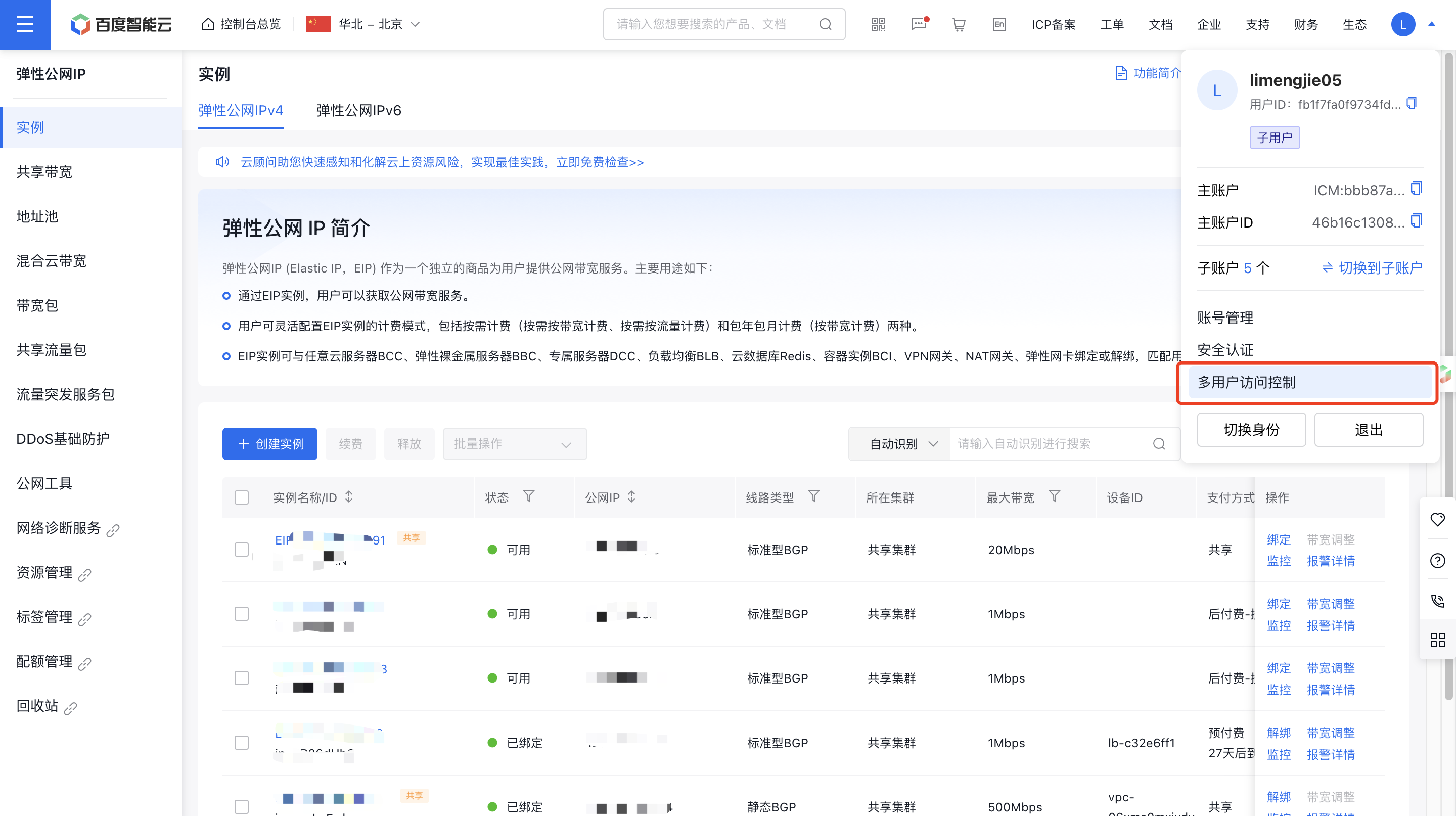
image.png

  1. Click on User Management in the left navigation bar, then click New User on the IAM User Management List page.
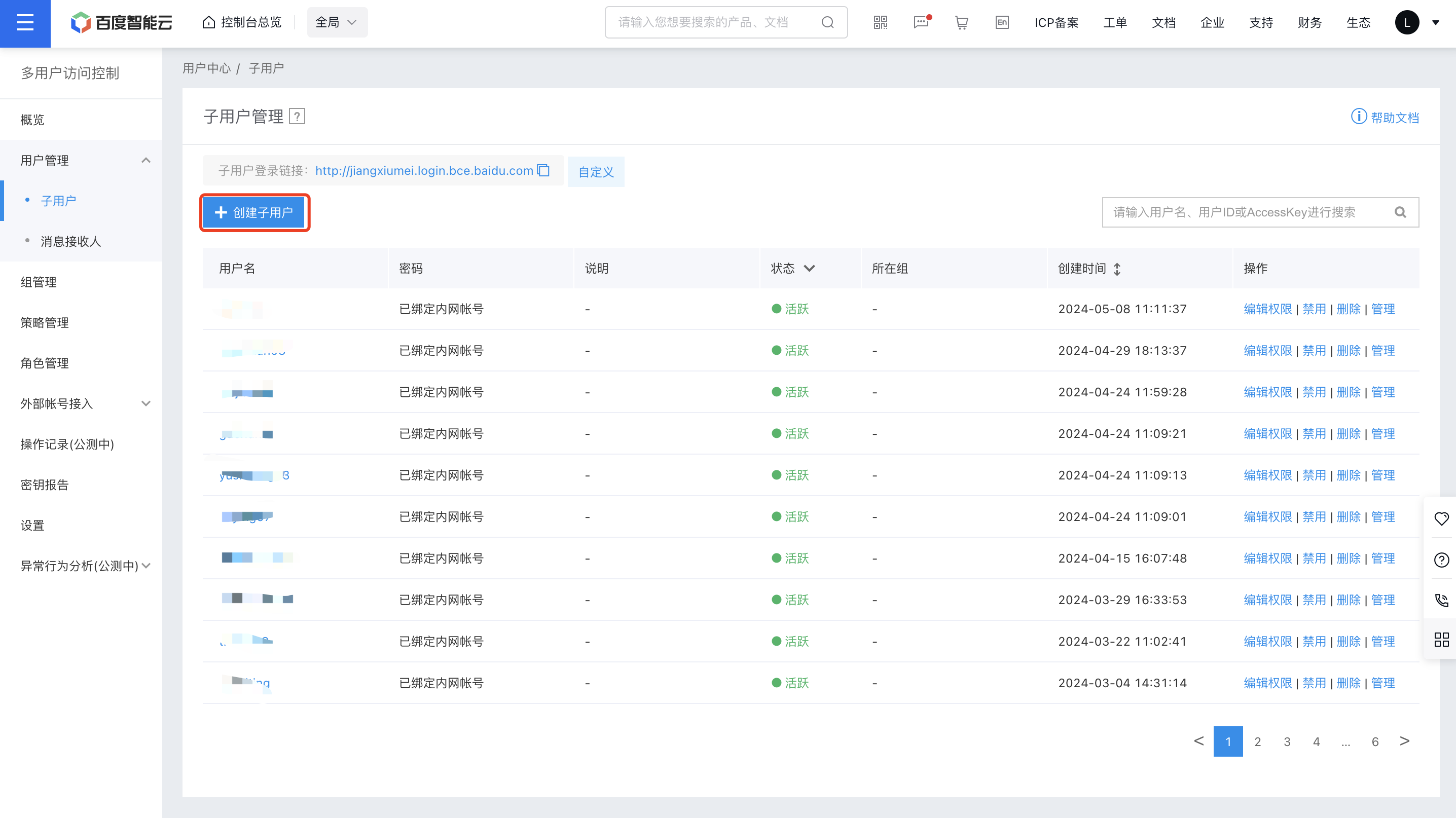
image.png

  1. In the New User dialog box that appears, enter the username, confirm the details, and return to the IAM User Management List to view the newly created IAM user.
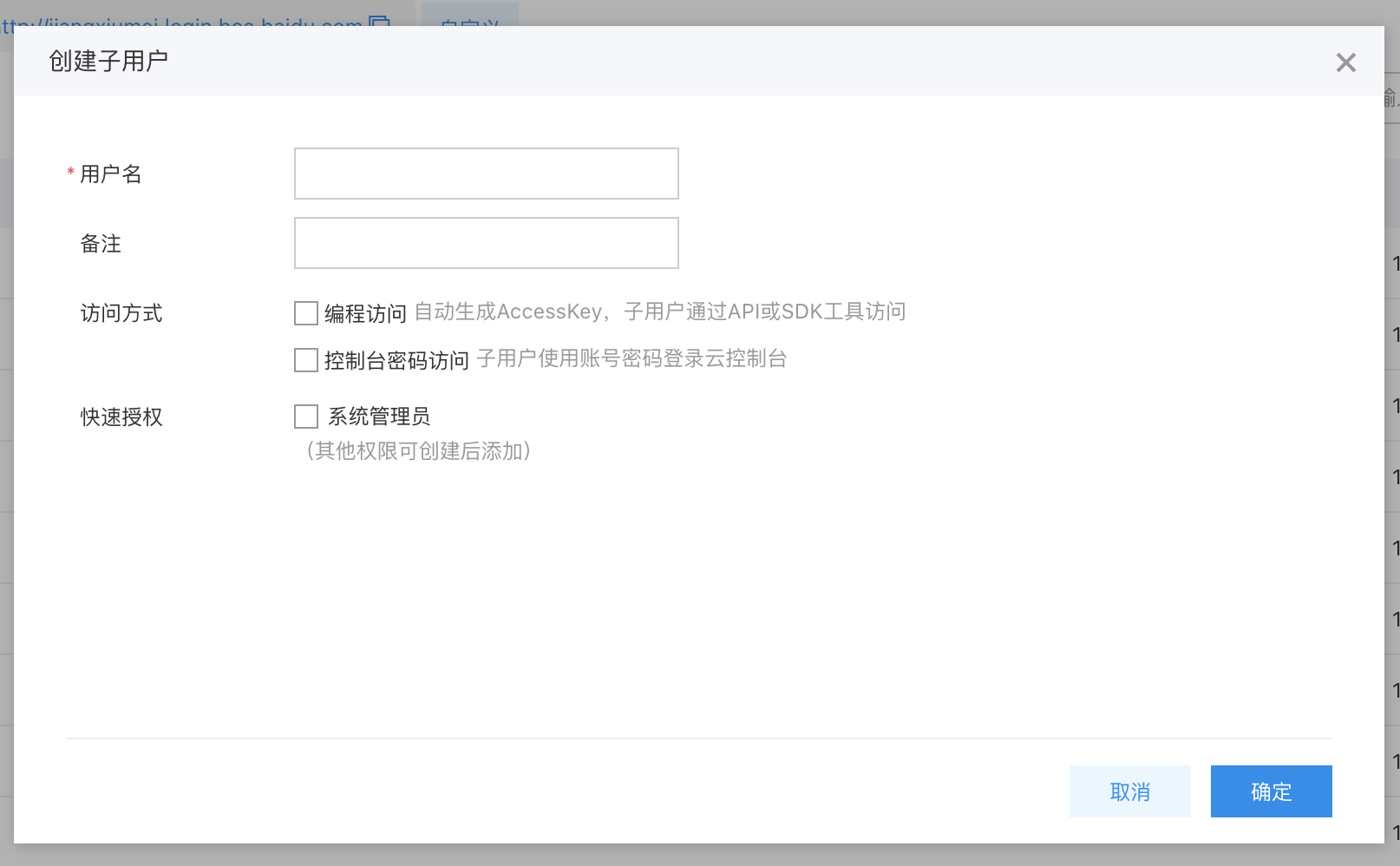
image.png

Configuration Policy

EIP provides both system and custom policies for product-level and instance-level permission control.

  • System policy: A pre-defined set of permissions provided by the Baidu AI Cloud system for resource management. These can be directly assigned to IAM users, but users cannot modify them.
  • Custom policy: A user-created, more granular set of permissions for resource management, allowing specific permissions to be configured for single instances. This provides flexibility to address the unique permission management needs of different users.

Description:

  • An EIP consists of various sub-products, with permissions classified into three categories: Read-only, Operation and Maintenance, and Management.
  • For each product, O&M permissions encompass all read-only permissions. Administration permissions, in turn, include both read-only and O&M permissions. The table below highlights only areas where upper-level permissions deviate from lower-level permissions.
  • Custom policies apply to specific individual instances and only take effect for those instances. As a result, they do not include permissions for instance creation.

Permission scope

The correspondence between the names of system policy and third-level permissions for each product is as follows:

Products Read-only permission Operation and maintenance permission Management permission
EIP EipReadOnlyAccessPolicy EipOperateAccessPolicy EIPFullControlPolicy
EIP_BP EIP_BPReadOnlyAccessPolicy EIP_BPOperateAccessPolicy EIP_BPFullControlPolicy
EIPGROUP EipGroupReadOnlyAccessPolicy EipGroupOperateAccessPolicy EIPGROUPFullControlPolicy
TBSP TBSPReadAccessPolicy TBSPOperateAccessPolicy TBSPFullControlAccessPolicy

The permission scope of policies for each product is detailed as follows:

Products Read-only operation Operation and maintenance operations Management operations
Elastic public IP (EIP) Query EIP list, view instance details Query EIP list, bind, unbind, modify EIP name, monitor, alarm Query EIP list, bind/unbind, modify EIP name, monitor, alarm, create EIP, release EIP, renew, adjust bandwidth, perform shift charge, cancel shift charge
EIPGROUP Query instance list and view instance details Query instance list, view instance details, modify EIPGROUP name, monitor, and alarm Query instance list, view instance details, modify EIPGROUP name and description, monitor, alarm, create EIPGROUP, release EIPGROUP, adjust bandwidth, upgrade IP count, perform shift charge, cancel shift charge
Bandwidth package (EIP_BP) Query instance list and view instance details Query instance list, view instance details and modify bandwidth package name Query instance list, view instance details, modify bandwidth package name and description, create bandwidth package, release bandwidth package, bandwidth adjustment
Traffic Burst Service Package (TBSP) Query instance list and view instance details Query instance list, view instance details, modify service package name and description, add protected IPs Query instance list, view instance details, modify service package name and description, add protected IPs, scale up capacity and release service package

User Authorization

In the IAM User Management List under User Management, select Edit Permission in the Operations column for the relevant IAM user, then authorize with either a System Policy or a Custom Policy.
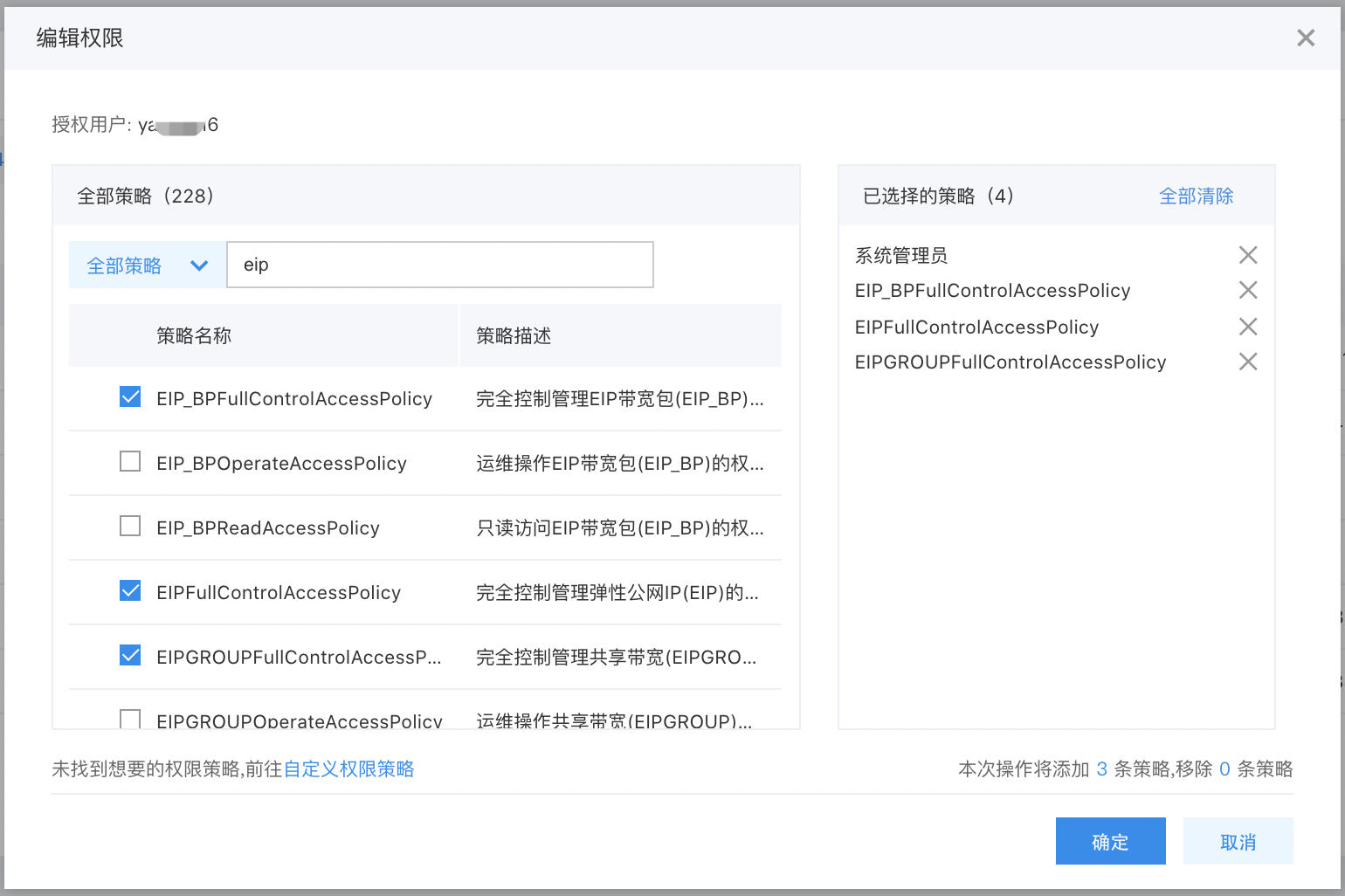
Note: To change an IAM user's permissions without modifying existing policy rules, you must delete the current policy and assign a new one since existing policy permissions cannot be unchecked or edited directly.

Sign in as IAM User

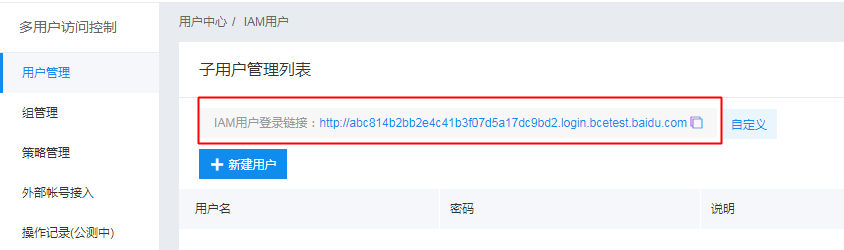
After the root account authorizes the IAM user, it can share the login link with the IAM user. The IAM user can then access the root account's management console via this link and operate or view the root account's resources based on the granted policies.
For other detailed operations, refer to Identity and Access Management.

Previous
High Defense EIP
Next
Recycle bin