Address pool

EIP

  • API Reference
    • API function release records
    • API Service Domain Name
    • API Specifications
    • Appendix 1
    • Bandwidth Package Related Interfaces
      • Adjust the bandwidth of the bandwidth package
      • Create bandwidth package
      • Query bandwidth package details
      • Query bandwidth package list information of users
      • Release bandwidth package
      • Update the automatic release time of the bandwidth package
      • Update the name of the bandwidth package
    • DDoS Basic Protection Related Interfaces
      • Modify DDoS basic protection threshold
      • Query DDoS Basic Protection Attack Records
      • Query DDoS basic protection list
    • EIP Related Interfaces
      • Apply for EIP
      • Bind EIP
      • Disable EIP direct
      • EIP bandwidth scaling
      • EIP renewal has been enabled
      • Enable EIP direct
      • Query EIP list in bucket trash
      • Query EIP list
      • Release EIP
      • Release EIPs in the bucket trash
      • Renew EIP
      • Restore EIPs in the bucket trash
      • Selective release of EIP
      • Unbind EIP
      • Unsubscribe prepaid EIP
      • Update EIP Release Protection Switch
    • Error code
    • General Description
    • Inquiry Related
      • Bandwidth package price inquiry
      • EIP Inquiry
      • EIPGROUP Inquiry
      • Shared Traffic Package Inquiry
    • Interface Overview
    • Overview
    • Prerequisites for use
    • Shared Bandwidth Related Interfaces
      • Bandwidth scaling up for EIPGROUP
      • Create EIPGROUP
      • EIPGROUP IP count upgrade
      • EIPGROUP release
      • EIPGROUP renewal
      • EIPGROUP update
      • Migrate EIP from EIPGROUP
      • Migrate EIP into EIPGROUP
      • Query EIPGROUP details
      • Query the EIPGROUP list
      • Unsubscribe prepaid EIPGROUP
    • Shared Traffic Package Related Interfaces
      • Create a shared traffic package
      • Query shared traffic package details
      • Query shared traffic package list
    • TBSP Related Interfaces
      • Add Protection IP Allow List
      • Add Protocol Blocking
      • Add Region Blocking
      • Bind Protection Object
      • Close Protection IP Cleaning
      • Create TBSP
      • Delete Protection IP Allow List
      • Delete Protection Object
      • Delete Protocol Blocking
      • Delete Region Blocking
      • Modify Protection IP Cleaning Threshold
      • Modify Protection IP Protection Level
      • Open Protection IP Cleaning
      • Query Protection IP Allow List
      • Query Protection IP Cleaning Threshold List
      • Query Protocol Blocking List
      • Query Region Blocking List
      • Query TBSP Details
      • Query TBSP List
      • TBSP Capacity dilatation
      • TBSP renew
  • FAQs
    • Billing class
    • Configuration
    • Consultation
    • Security class
  • Function Release Records
  • Operation guide
    • Address pool
    • Bandwidth package
      • Bandwidth scale-up package
      • Cross-border acceleration package
    • Certification
    • DDoS standard protection
    • EIP Instance
      • Create instance
      • EIP Direct Connect
      • IPv6 Termination
      • Manage Alarms
      • Operation Instance
      • Shift Charge
      • View monitoring
    • EIP Self-Service Diagnostics
      • EIP Instance Diagnosis
    • EIPGROUP
      • Bind cloud resources
      • Manage Shared Bandwidth
      • Purchase Shared Bandwidth
      • View monitoring
    • High Defense EIP
    • Identity and access management
    • Recycle bin
    • Shared traffic package
      • Purchase Shared Traffic Package
      • View Shared Traffic Package
    • Tag Management
    • Traffic Burst Service Package
      • Instance management
      • Monitor alarm
      • Protection Configuration
    • Unblocking Center
  • Product Description
    • Application scenarios
    • Product advantages
    • Product Introduction
    • Usage restrictions
  • Product pricing
    • Bandwidth Package Billing
    • EIP Instance Billing
    • EIPGROUP Billing
    • Shared Traffic Package Billing
    • TBSP Billing
  • SDK
    • GO-SDK
      • DDoS Instance
      • EIP Instance
      • EipBp Instance
      • EIPGROUP Instance
      • EipTp Instance
      • Exception handling
      • Initialization
      • Install the SDK Package
      • Overview
    • Java-SDK
      • EIP Instance
      • EipBP Instance
      • EIPGROUP Instance
      • EipTp Instance
      • Exception handling
      • Initialization
      • Install the SDK Package
      • Overview
      • Version history
    • PHP-SDK
      • EIP Instance
      • EipBP Instance
      • EIPGROUP Instance
      • Exception handling
      • Initialization
      • Install the SDK Package
      • Overview
      • Version history
    • Python-SDK
      • EIP Instance
      • EipBP Instance
      • EIPGROUP Instance
      • EipTp Instance
      • Exception handling
      • Initialization
      • Install the SDK Package
      • Overview
      • Version history
  • Service Level Agreement (SLA)
    • EIP Service Level Agreement SLA
    • TBSP Service Level Agreement SLA
  • Typical Practices
    • Bring Your Own Overseas Public IP Address to the Cloud
    • IPv6 Public Network Access
    • Save Public Network Costs
    • TCP Port 25 Restriction Description
All documents
menu
No results found, please re-enter

EIP

  • API Reference
    • API function release records
    • API Service Domain Name
    • API Specifications
    • Appendix 1
    • Bandwidth Package Related Interfaces
      • Adjust the bandwidth of the bandwidth package
      • Create bandwidth package
      • Query bandwidth package details
      • Query bandwidth package list information of users
      • Release bandwidth package
      • Update the automatic release time of the bandwidth package
      • Update the name of the bandwidth package
    • DDoS Basic Protection Related Interfaces
      • Modify DDoS basic protection threshold
      • Query DDoS Basic Protection Attack Records
      • Query DDoS basic protection list
    • EIP Related Interfaces
      • Apply for EIP
      • Bind EIP
      • Disable EIP direct
      • EIP bandwidth scaling
      • EIP renewal has been enabled
      • Enable EIP direct
      • Query EIP list in bucket trash
      • Query EIP list
      • Release EIP
      • Release EIPs in the bucket trash
      • Renew EIP
      • Restore EIPs in the bucket trash
      • Selective release of EIP
      • Unbind EIP
      • Unsubscribe prepaid EIP
      • Update EIP Release Protection Switch
    • Error code
    • General Description
    • Inquiry Related
      • Bandwidth package price inquiry
      • EIP Inquiry
      • EIPGROUP Inquiry
      • Shared Traffic Package Inquiry
    • Interface Overview
    • Overview
    • Prerequisites for use
    • Shared Bandwidth Related Interfaces
      • Bandwidth scaling up for EIPGROUP
      • Create EIPGROUP
      • EIPGROUP IP count upgrade
      • EIPGROUP release
      • EIPGROUP renewal
      • EIPGROUP update
      • Migrate EIP from EIPGROUP
      • Migrate EIP into EIPGROUP
      • Query EIPGROUP details
      • Query the EIPGROUP list
      • Unsubscribe prepaid EIPGROUP
    • Shared Traffic Package Related Interfaces
      • Create a shared traffic package
      • Query shared traffic package details
      • Query shared traffic package list
    • TBSP Related Interfaces
      • Add Protection IP Allow List
      • Add Protocol Blocking
      • Add Region Blocking
      • Bind Protection Object
      • Close Protection IP Cleaning
      • Create TBSP
      • Delete Protection IP Allow List
      • Delete Protection Object
      • Delete Protocol Blocking
      • Delete Region Blocking
      • Modify Protection IP Cleaning Threshold
      • Modify Protection IP Protection Level
      • Open Protection IP Cleaning
      • Query Protection IP Allow List
      • Query Protection IP Cleaning Threshold List
      • Query Protocol Blocking List
      • Query Region Blocking List
      • Query TBSP Details
      • Query TBSP List
      • TBSP Capacity dilatation
      • TBSP renew
  • FAQs
    • Billing class
    • Configuration
    • Consultation
    • Security class
  • Function Release Records
  • Operation guide
    • Address pool
    • Bandwidth package
      • Bandwidth scale-up package
      • Cross-border acceleration package
    • Certification
    • DDoS standard protection
    • EIP Instance
      • Create instance
      • EIP Direct Connect
      • IPv6 Termination
      • Manage Alarms
      • Operation Instance
      • Shift Charge
      • View monitoring
    • EIP Self-Service Diagnostics
      • EIP Instance Diagnosis
    • EIPGROUP
      • Bind cloud resources
      • Manage Shared Bandwidth
      • Purchase Shared Bandwidth
      • View monitoring
    • High Defense EIP
    • Identity and access management
    • Recycle bin
    • Shared traffic package
      • Purchase Shared Traffic Package
      • View Shared Traffic Package
    • Tag Management
    • Traffic Burst Service Package
      • Instance management
      • Monitor alarm
      • Protection Configuration
    • Unblocking Center
  • Product Description
    • Application scenarios
    • Product advantages
    • Product Introduction
    • Usage restrictions
  • Product pricing
    • Bandwidth Package Billing
    • EIP Instance Billing
    • EIPGROUP Billing
    • Shared Traffic Package Billing
    • TBSP Billing
  • SDK
    • GO-SDK
      • DDoS Instance
      • EIP Instance
      • EipBp Instance
      • EIPGROUP Instance
      • EipTp Instance
      • Exception handling
      • Initialization
      • Install the SDK Package
      • Overview
    • Java-SDK
      • EIP Instance
      • EipBP Instance
      • EIPGROUP Instance
      • EipTp Instance
      • Exception handling
      • Initialization
      • Install the SDK Package
      • Overview
      • Version history
    • PHP-SDK
      • EIP Instance
      • EipBP Instance
      • EIPGROUP Instance
      • Exception handling
      • Initialization
      • Install the SDK Package
      • Overview
      • Version history
    • Python-SDK
      • EIP Instance
      • EipBP Instance
      • EIPGROUP Instance
      • EipTp Instance
      • Exception handling
      • Initialization
      • Install the SDK Package
      • Overview
      • Version history
  • Service Level Agreement (SLA)
    • EIP Service Level Agreement SLA
    • TBSP Service Level Agreement SLA
  • Typical Practices
    • Bring Your Own Overseas Public IP Address to the Cloud
    • IPv6 Public Network Access
    • Save Public Network Costs
    • TCP Port 25 Restriction Description
  • Document center
  • arrow
  • EIP
  • arrow
  • Operation guide
  • arrow
  • Address pool
Table of contents on this page
  • Overview
  • Application scenarios
  • Usage restrictions
  • Operation steps
  • Create address pool
  • Use address pool

Address pool

Updated at:2025-10-16

Overview

Address pools can allocate IP addresses from specific network segments to EIPs and EIPGROUPs. Users can first create an address pool and add the desired network segments to it. When creating an EIP, users can select the pre-created address pool, ensuring the IP address for the EIP instance is assigned from the network segment of that address pool.

Application scenarios

  • Utilize consecutive IP addresses.
  • Designate a public IP address.
  • Expand the IP quota beyond the default configuration.

Usage restrictions

  • The IP segments of a dedicated address pool are obtained by submitting a ticket application, and Baidu AI Cloud will allocate them.
  • Each dedicated address pool can only include a single IP address segment.
  • If an EIP or EIPGROUP instance is still valid but the address pool expires, the existing IP remains operational but cannot be reassigned from the dedicated address pool.
  • If an EIP or EIPGROUP instance expires, both the address pool and the EIP/EIPGROUP will become unavailable.

Operation steps

Create address pool

Follow these steps to create address pool on the console:

  1. Sign in to the Management Console and select Product Services - Network - EIP.
  2. Select Address Pool from the navigation bar to access the list page.
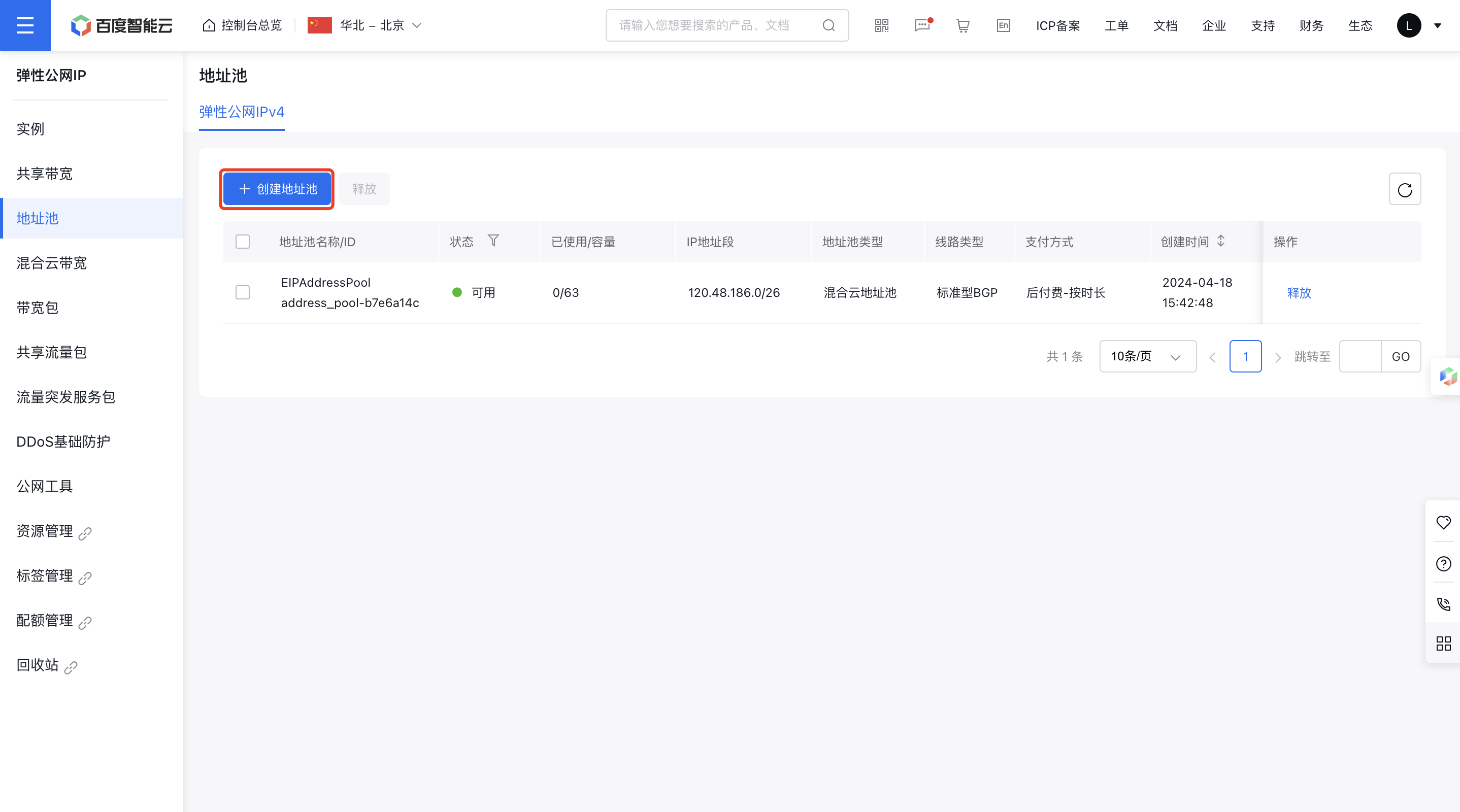
image.png

  1. Click on Create Address Pool to open the creation page and provide the required configuration details.
ConfigMap Description
Bill type Defaulted as postpay
Current region Select the region where the address pool needs to be created
Name User-defined address pool name
Address pool type Select address pool type, defaulted as dedicated pool
Internet connection type Select the address pool type, which can be either standard BGP or enhanced BGP
IP address segment Select the IP address segment to be added
  1. After creation, the address pool will be visible in the address pool list.

Use address pool

After creating an IP pool, select it on the EIP and EIPGROUP Creation pages. Follow these steps to use the pool via console:

  1. Sign in to the Cloud Management Console and select Product Services - Network - EIP.
  2. Select Instance from the navigation bar to open the instance page.
  3. Click Create Instance to access the creation page, and choose Dedicated Address Pool to use the previously created pool. The dropdown list will display the names (IDs) of available pools; pools with outstanding debt will not be shown.
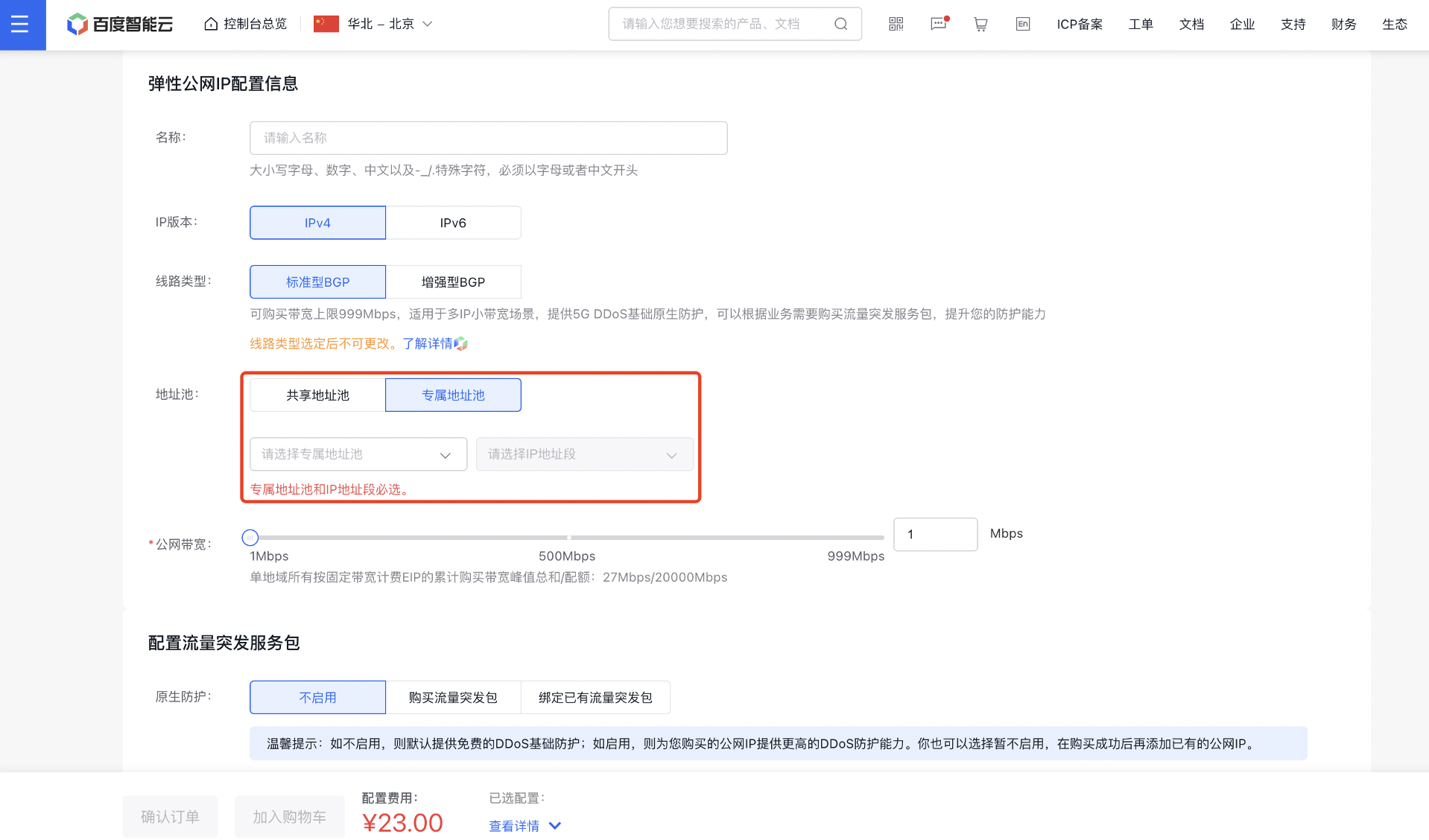
image.png

Previous
Function Release Records
Next
Bandwidth package