Bandwidth scale-up package

EIP

  • API Reference
    • API function release records
    • API Service Domain Name
    • API Specifications
    • Appendix 1
    • Bandwidth Package Related Interfaces
      • Adjust the bandwidth of the bandwidth package
      • Create bandwidth package
      • Query bandwidth package details
      • Query bandwidth package list information of users
      • Release bandwidth package
      • Update the automatic release time of the bandwidth package
      • Update the name of the bandwidth package
    • DDoS Basic Protection Related Interfaces
      • Modify DDoS basic protection threshold
      • Query DDoS Basic Protection Attack Records
      • Query DDoS basic protection list
    • EIP Related Interfaces
      • Apply for EIP
      • Bind EIP
      • Disable EIP direct
      • EIP bandwidth scaling
      • EIP renewal has been enabled
      • Enable EIP direct
      • Query EIP list in bucket trash
      • Query EIP list
      • Release EIP
      • Release EIPs in the bucket trash
      • Renew EIP
      • Restore EIPs in the bucket trash
      • Selective release of EIP
      • Unbind EIP
      • Unsubscribe prepaid EIP
      • Update EIP Release Protection Switch
    • Error code
    • General Description
    • Inquiry Related
      • Bandwidth package price inquiry
      • EIP Inquiry
      • EIPGROUP Inquiry
      • Shared Traffic Package Inquiry
    • Interface Overview
    • Overview
    • Prerequisites for use
    • Shared Bandwidth Related Interfaces
      • Bandwidth scaling up for EIPGROUP
      • Create EIPGROUP
      • EIPGROUP IP count upgrade
      • EIPGROUP release
      • EIPGROUP renewal
      • EIPGROUP update
      • Migrate EIP from EIPGROUP
      • Migrate EIP into EIPGROUP
      • Query EIPGROUP details
      • Query the EIPGROUP list
      • Unsubscribe prepaid EIPGROUP
    • Shared Traffic Package Related Interfaces
      • Create a shared traffic package
      • Query shared traffic package details
      • Query shared traffic package list
    • TBSP Related Interfaces
      • Add Protection IP Allow List
      • Add Protocol Blocking
      • Add Region Blocking
      • Bind Protection Object
      • Close Protection IP Cleaning
      • Create TBSP
      • Delete Protection IP Allow List
      • Delete Protection Object
      • Delete Protocol Blocking
      • Delete Region Blocking
      • Modify Protection IP Cleaning Threshold
      • Modify Protection IP Protection Level
      • Open Protection IP Cleaning
      • Query Protection IP Allow List
      • Query Protection IP Cleaning Threshold List
      • Query Protocol Blocking List
      • Query Region Blocking List
      • Query TBSP Details
      • Query TBSP List
      • TBSP Capacity dilatation
      • TBSP renew
  • FAQs
    • Billing class
    • Configuration
    • Consultation
    • Security class
  • Function Release Records
  • Operation guide
    • Address pool
    • Bandwidth package
      • Bandwidth scale-up package
      • Cross-border acceleration package
    • Certification
    • DDoS standard protection
    • EIP Instance
      • Create instance
      • EIP Direct Connect
      • IPv6 Termination
      • Manage Alarms
      • Operation Instance
      • Shift Charge
      • View monitoring
    • EIP Self-Service Diagnostics
      • EIP Instance Diagnosis
    • EIPGROUP
      • Bind cloud resources
      • Manage Shared Bandwidth
      • Purchase Shared Bandwidth
      • View monitoring
    • High Defense EIP
    • Identity and access management
    • Recycle bin
    • Shared traffic package
      • Purchase Shared Traffic Package
      • View Shared Traffic Package
    • Tag Management
    • Traffic Burst Service Package
      • Instance management
      • Monitor alarm
      • Protection Configuration
    • Unblocking Center
  • Product Description
    • Application scenarios
    • Product advantages
    • Product Introduction
    • Usage restrictions
  • Product pricing
    • Bandwidth Package Billing
    • EIP Instance Billing
    • EIPGROUP Billing
    • Shared Traffic Package Billing
    • TBSP Billing
  • SDK
    • GO-SDK
      • DDoS Instance
      • EIP Instance
      • EipBp Instance
      • EIPGROUP Instance
      • EipTp Instance
      • Exception handling
      • Initialization
      • Install the SDK Package
      • Overview
    • Java-SDK
      • EIP Instance
      • EipBP Instance
      • EIPGROUP Instance
      • EipTp Instance
      • Exception handling
      • Initialization
      • Install the SDK Package
      • Overview
      • Version history
    • PHP-SDK
      • EIP Instance
      • EipBP Instance
      • EIPGROUP Instance
      • Exception handling
      • Initialization
      • Install the SDK Package
      • Overview
      • Version history
    • Python-SDK
      • EIP Instance
      • EipBP Instance
      • EIPGROUP Instance
      • EipTp Instance
      • Exception handling
      • Initialization
      • Install the SDK Package
      • Overview
      • Version history
  • Service Level Agreement (SLA)
    • EIP Service Level Agreement SLA
    • TBSP Service Level Agreement SLA
  • Typical Practices
    • Bring Your Own Overseas Public IP Address to the Cloud
    • IPv6 Public Network Access
    • Save Public Network Costs
    • TCP Port 25 Restriction Description
All documents
menu
No results found, please re-enter

EIP

  • API Reference
    • API function release records
    • API Service Domain Name
    • API Specifications
    • Appendix 1
    • Bandwidth Package Related Interfaces
      • Adjust the bandwidth of the bandwidth package
      • Create bandwidth package
      • Query bandwidth package details
      • Query bandwidth package list information of users
      • Release bandwidth package
      • Update the automatic release time of the bandwidth package
      • Update the name of the bandwidth package
    • DDoS Basic Protection Related Interfaces
      • Modify DDoS basic protection threshold
      • Query DDoS Basic Protection Attack Records
      • Query DDoS basic protection list
    • EIP Related Interfaces
      • Apply for EIP
      • Bind EIP
      • Disable EIP direct
      • EIP bandwidth scaling
      • EIP renewal has been enabled
      • Enable EIP direct
      • Query EIP list in bucket trash
      • Query EIP list
      • Release EIP
      • Release EIPs in the bucket trash
      • Renew EIP
      • Restore EIPs in the bucket trash
      • Selective release of EIP
      • Unbind EIP
      • Unsubscribe prepaid EIP
      • Update EIP Release Protection Switch
    • Error code
    • General Description
    • Inquiry Related
      • Bandwidth package price inquiry
      • EIP Inquiry
      • EIPGROUP Inquiry
      • Shared Traffic Package Inquiry
    • Interface Overview
    • Overview
    • Prerequisites for use
    • Shared Bandwidth Related Interfaces
      • Bandwidth scaling up for EIPGROUP
      • Create EIPGROUP
      • EIPGROUP IP count upgrade
      • EIPGROUP release
      • EIPGROUP renewal
      • EIPGROUP update
      • Migrate EIP from EIPGROUP
      • Migrate EIP into EIPGROUP
      • Query EIPGROUP details
      • Query the EIPGROUP list
      • Unsubscribe prepaid EIPGROUP
    • Shared Traffic Package Related Interfaces
      • Create a shared traffic package
      • Query shared traffic package details
      • Query shared traffic package list
    • TBSP Related Interfaces
      • Add Protection IP Allow List
      • Add Protocol Blocking
      • Add Region Blocking
      • Bind Protection Object
      • Close Protection IP Cleaning
      • Create TBSP
      • Delete Protection IP Allow List
      • Delete Protection Object
      • Delete Protocol Blocking
      • Delete Region Blocking
      • Modify Protection IP Cleaning Threshold
      • Modify Protection IP Protection Level
      • Open Protection IP Cleaning
      • Query Protection IP Allow List
      • Query Protection IP Cleaning Threshold List
      • Query Protocol Blocking List
      • Query Region Blocking List
      • Query TBSP Details
      • Query TBSP List
      • TBSP Capacity dilatation
      • TBSP renew
  • FAQs
    • Billing class
    • Configuration
    • Consultation
    • Security class
  • Function Release Records
  • Operation guide
    • Address pool
    • Bandwidth package
      • Bandwidth scale-up package
      • Cross-border acceleration package
    • Certification
    • DDoS standard protection
    • EIP Instance
      • Create instance
      • EIP Direct Connect
      • IPv6 Termination
      • Manage Alarms
      • Operation Instance
      • Shift Charge
      • View monitoring
    • EIP Self-Service Diagnostics
      • EIP Instance Diagnosis
    • EIPGROUP
      • Bind cloud resources
      • Manage Shared Bandwidth
      • Purchase Shared Bandwidth
      • View monitoring
    • High Defense EIP
    • Identity and access management
    • Recycle bin
    • Shared traffic package
      • Purchase Shared Traffic Package
      • View Shared Traffic Package
    • Tag Management
    • Traffic Burst Service Package
      • Instance management
      • Monitor alarm
      • Protection Configuration
    • Unblocking Center
  • Product Description
    • Application scenarios
    • Product advantages
    • Product Introduction
    • Usage restrictions
  • Product pricing
    • Bandwidth Package Billing
    • EIP Instance Billing
    • EIPGROUP Billing
    • Shared Traffic Package Billing
    • TBSP Billing
  • SDK
    • GO-SDK
      • DDoS Instance
      • EIP Instance
      • EipBp Instance
      • EIPGROUP Instance
      • EipTp Instance
      • Exception handling
      • Initialization
      • Install the SDK Package
      • Overview
    • Java-SDK
      • EIP Instance
      • EipBP Instance
      • EIPGROUP Instance
      • EipTp Instance
      • Exception handling
      • Initialization
      • Install the SDK Package
      • Overview
      • Version history
    • PHP-SDK
      • EIP Instance
      • EipBP Instance
      • EIPGROUP Instance
      • Exception handling
      • Initialization
      • Install the SDK Package
      • Overview
      • Version history
    • Python-SDK
      • EIP Instance
      • EipBP Instance
      • EIPGROUP Instance
      • EipTp Instance
      • Exception handling
      • Initialization
      • Install the SDK Package
      • Overview
      • Version history
  • Service Level Agreement (SLA)
    • EIP Service Level Agreement SLA
    • TBSP Service Level Agreement SLA
  • Typical Practices
    • Bring Your Own Overseas Public IP Address to the Cloud
    • IPv6 Public Network Access
    • Save Public Network Costs
    • TCP Port 25 Restriction Description
  • Document center
  • arrow
  • EIP
  • arrow
  • Operation guide
  • arrow
  • Bandwidth package
  • arrow
  • Bandwidth scale-up package
Table of contents on this page
  • Purchase bandwidth scale-up package
  • Scale up with bandwidth scale-up package
  • Release bandwidth scale-up package
  • Manual release
  • Scheduled release

Bandwidth scale-up package

Updated at:2025-10-16

The bandwidth scale-up package can be applied to prepaid EIP instances or EIPGROUPs, offering temporary prepaid bandwidth scaling. It supports immediate bandwidth adjustments. Upon deletion, the linked EIP reverts to its original bandwidth. This package enhances the flexibility of EIP bandwidth configuration.

Description: The current bandwidth scale-up package supports both IPv4 and IPv6 IP versions.

Purchase bandwidth scale-up package

Operation step

  1. Log in to the management console and go to Product Service - EIP.
  2. From the navigation bar, choose "Bandwidth Package IPv4 Scaling Up" and click "Create Bandwidth Upgrade Package."
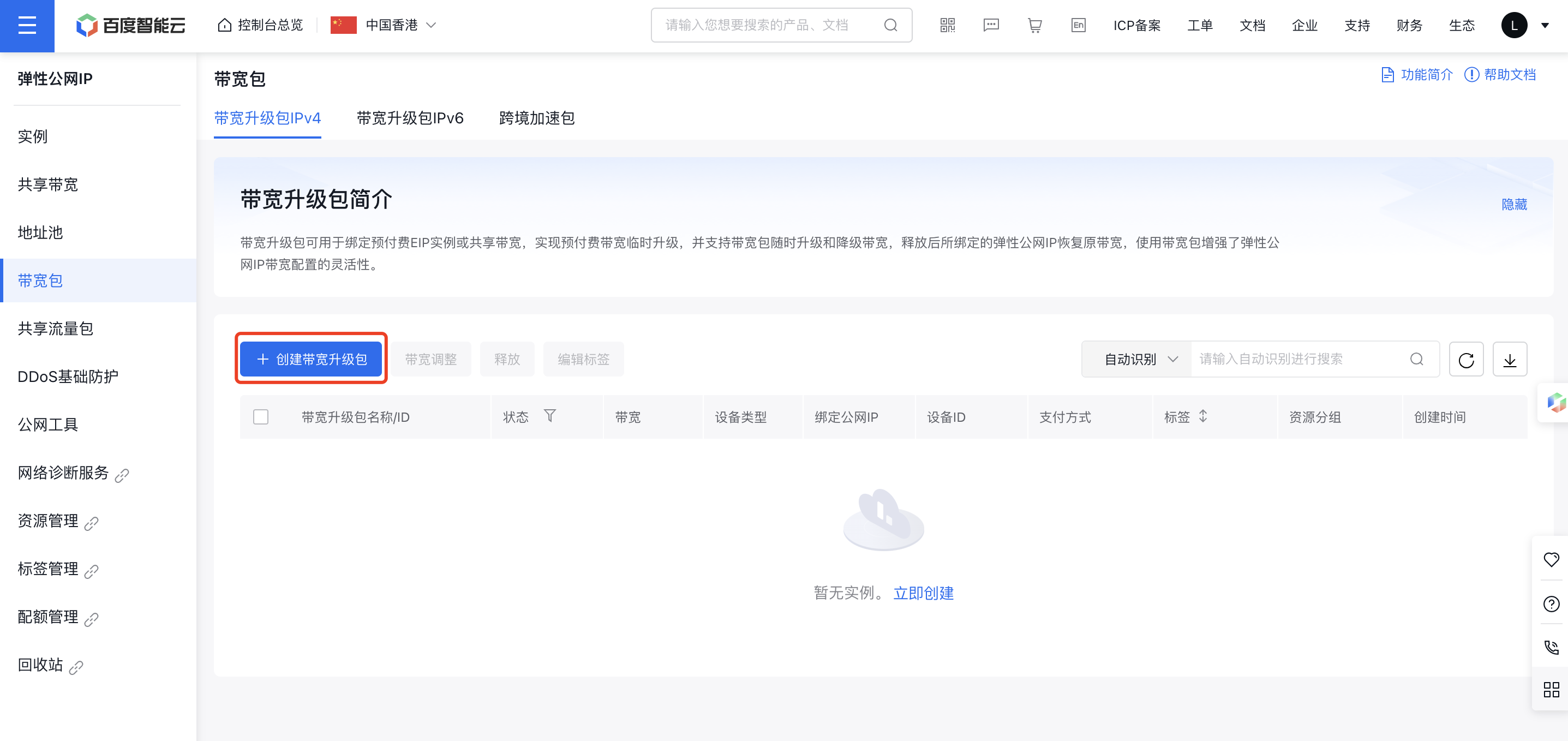
image.png

  1. Provide the configuration details for the bandwidth scale-up package.
Configuration Description
Billing and Region Select bill type and region
IP version Either IPv4 or IPv6 can be selected
Name Instance name of custom bandwidth upgrade package
Internet connection type Select the Internet Connection Type, which cannot be changed once created
Public network bandwidth Select the bandwidth upper limit for the scaled up package; the sum of the scaled up package bandwidth and the bound prepaid instance bandwidth must not exceed 500Mbps
Binding EIP instance Only prepaid instances are supported for binding, with options for EIP instance or EIPGROUP
Automatic release Select whether to enable auto-release
Resource group Resource group enables categorization of cloud resources by different dimensions
  1. Step by step, complete the payment process to create the bandwidth scale-up package.
  2. After purchase, check the bandwidth scale-up package list and click on the package name to view its details.

Description:

  • The "Maximum Bandwidth" column in the EIP instance will show the combined bandwidth. Click to open the Bandwidth Scale-up Package Details page.
  • When binding multiple prepaid instances, each instance requires a separate bandwidth upgrade package.

Scale up with bandwidth scale-up package

Guide

  1. Log in to the management console and go to Product Service - EIP.
  2. Select "Bandwidth Package" from the navigation bar, choose the package to be adjusted, and click "Bandwidth Adjustment."
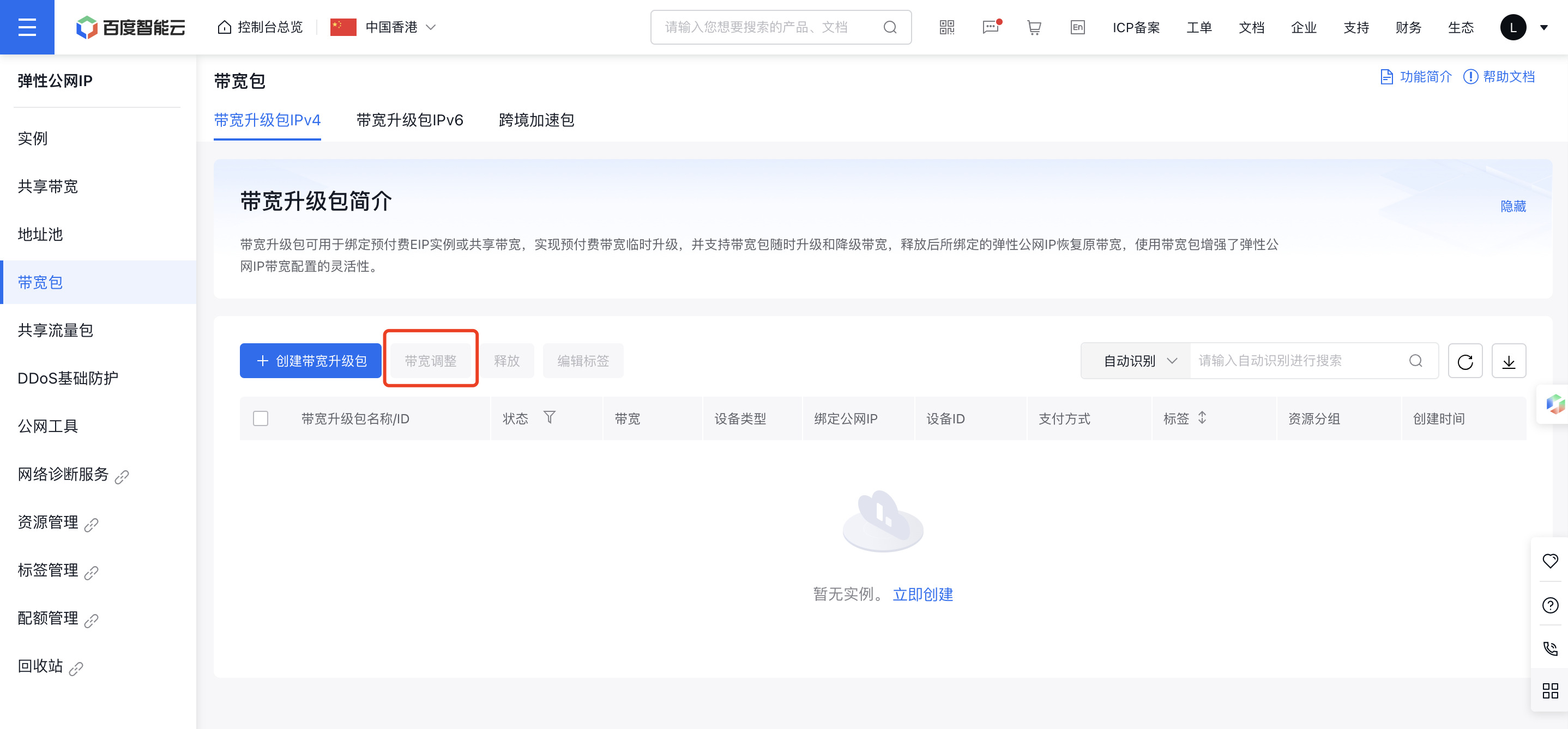
image.png

  1. Adjust the bandwidth values, complete the payment, and finalize the adjustment.
  2. Return to the bandwidth upgrade list to view the updated bandwidth values.

Release bandwidth scale-up package

Application scenario

  • The bandwidth package can be manually released anytime.
  • There are two methods for release, i.e., manual release and scheduled release.
  • If the prepaid EIP instance linked to the bandwidth package expires, the system will automatically release the bandwidth package.

Manual release

Guide

  1. Log in to the management console and go to Product Service - EIP.
  2. In the navigation bar, choose Bandwidth Package, select the bandwidth package you want to release, and click Release.
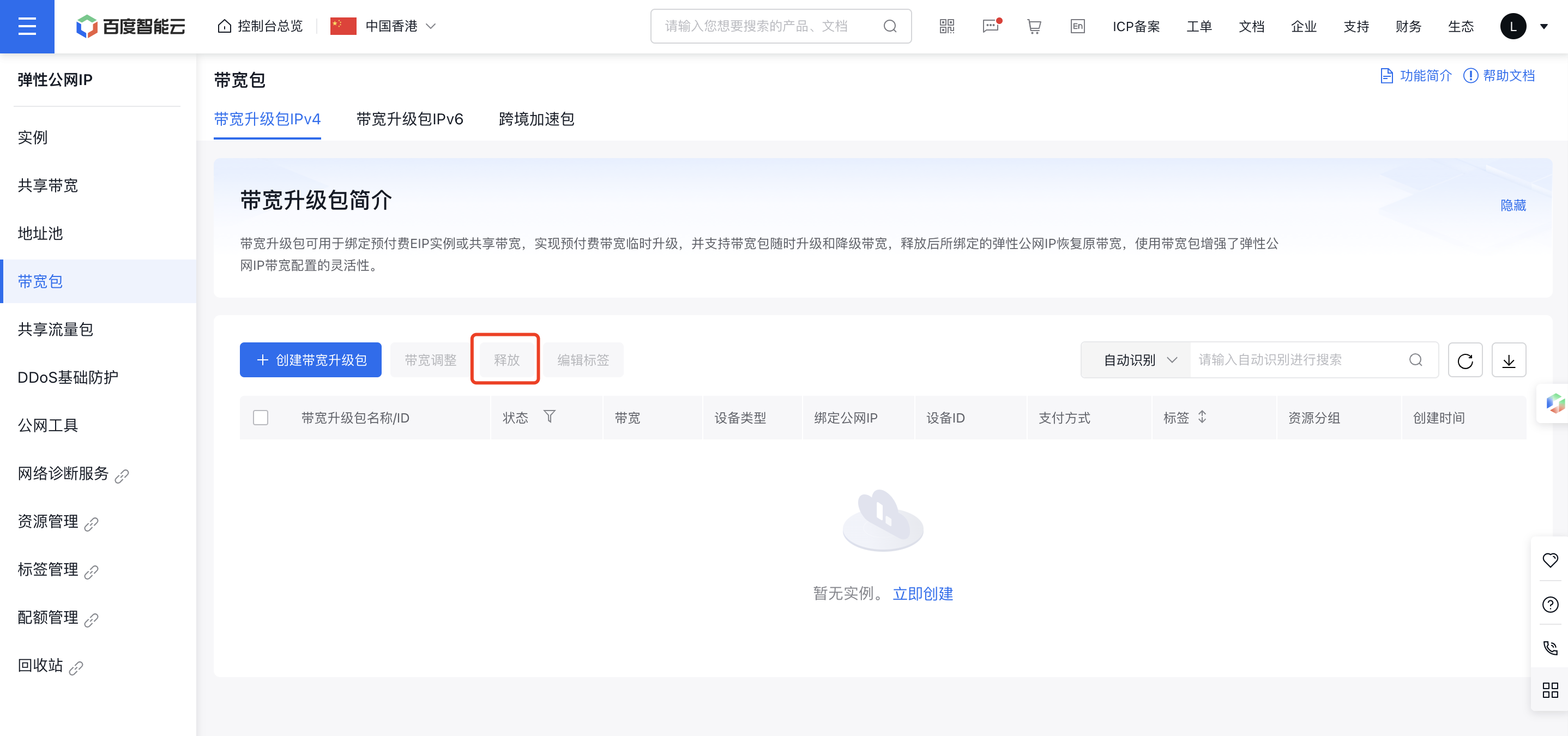
image.png

  1. In the Security Verification dialog box, click Send Verification Code to receive the code via SMS, then enter it to finalize the bandwidth release.
  2. Go back to the bandwidth package list; the selected packages will now be released.

Scheduled release

Guide

  1. Navigate to Product Service - Network - EIP - Bandwidth Package to access your list of user-created bandwidth scale-up packages.
  2. Click on the Bandwidth Scale-up Package Name to open the details page, then select Configuration under the operational status section.
  3. The Auto-release Settings pop-up will appear. Choose Set Auto-release and specify the desired release date and time as required.
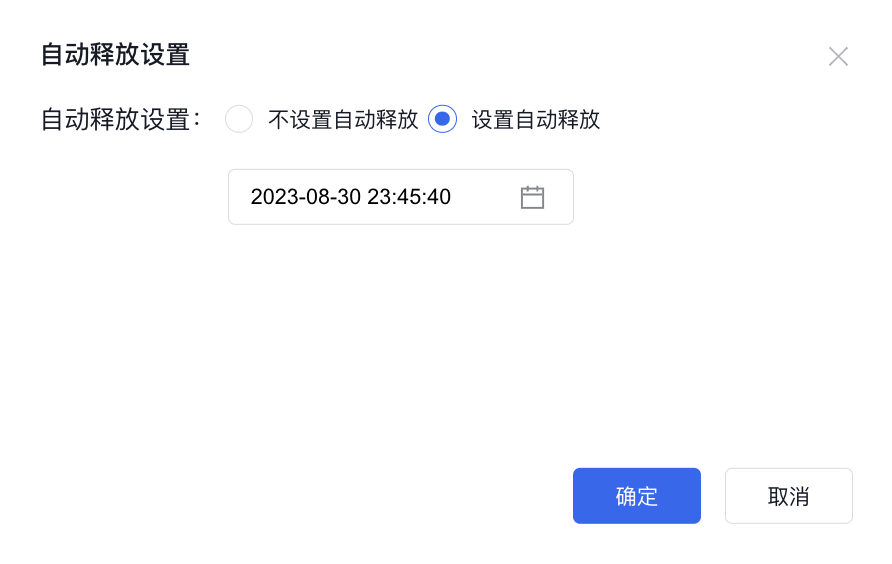
image-20230830231555874

  1. Click OK to confirm your auto-release time settings.
  2. Once successfully configured, review the Bandwidth Scale-up Package Details page to see the scheduled release time.

Previous
Address pool
Next
Cross-border acceleration package