

Cross-border acceleration package
Updated at:2025-10-16
It can be associated with EIP instances or EIPGROUP of any billing type for temporary cross-border bandwidth expansion. It supports on-demand bandwidth adjustments. Upon release, the associated EIP instance or EIPGROUP reverts to its original bandwidth, ensuring greater configuration flexibility. Cross-border connections are directly linked to the Chinese Mainland via high-quality carrier networks, avoiding international carrier exits and providing lower latency.
Cross-border bandwidth limiting rules in Hong Kong region:
Before September 17, 2022
- If the purchased EIP instances or EIPGROUP have bandwidth peaks of 2Mbps or higher, Baidu AI Cloud provides free cross-border bandwidth of 2Mbps.
- If the purchased EIP instance or EIPGROUP has a bandwidth peak of 1Mbps, Baidu AI Cloud allocates free cross-border bandwidth equal to the purchased bandwidth peak.
After September 17, 2022
- If the purchased EIP instances or EIPGROUP have bandwidth peaks above 10Mbps, Baidu AI Cloud provides free cross-border bandwidth of 2Mbps.
- If the purchased EIP instances or EIPGROUP have bandwidth peaks of 10Mbps or lower, Baidu AI Cloud allocates free cross-border bandwidth of 1Mbps.
Notes:
- Cross-border connections can only link to the Chinese Mainland through premium carrier networks. If the free cross-border bandwidth is insufficient for user needs, additional cross-border acceleration packages can be purchased to improve bandwidth.
- When cross-border bandwidth limits are exceeded, traffic will not be routed via international carriers to return to the Chinese Mainland. Overseas users accessing services in the Hong Kong/Singapore regions are not subject to cross-border bandwidth limits.
- When binding a cross-border acceleration package to an EIP instance or EIPGROUP, the total of the cross-border acceleration package bandwidth and the default free cross-border bandwidth must not exceed the public network bandwidth of the EIP instance or EIPGROUP.
Purchase cross-border acceleration package
Operation step
- Log in to the management console and go to Product Service - EIP.
- From the left navigation bar, select Bandwidth Package to access the Cross-border Acceleration Package List page.
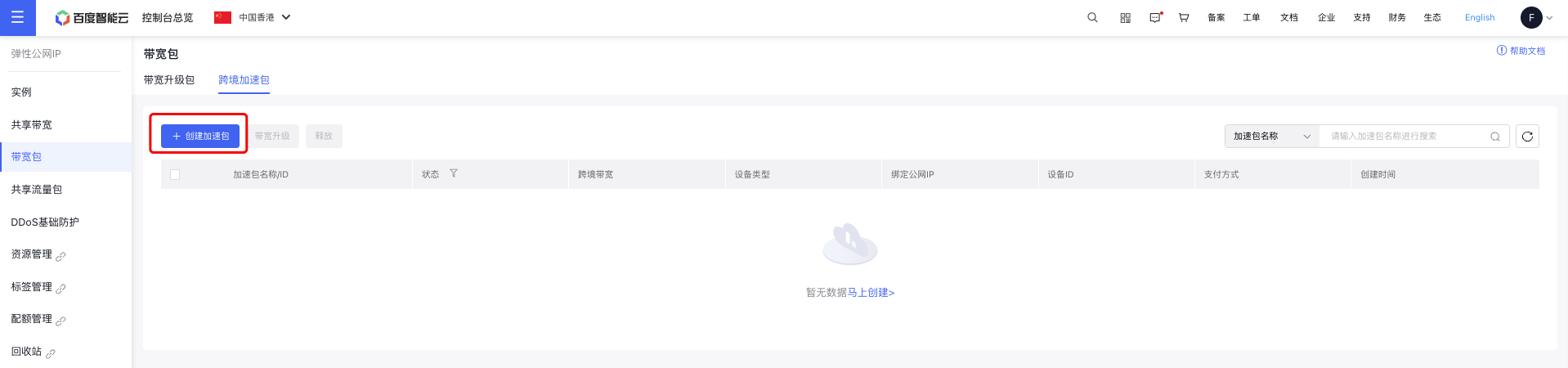
- Go to the Cross-border Acceleration Package tab and click Create Acceleration Package.
- Fill in the configuration information for the bandwidth package.
| Configuration | Description |
|---|---|
| Billing and Region | Select bill type and region |
| Name | Name of custom acceleration package instance |
| Cross-border bandwidth | Choose the cross-border bandwidth limit for the acceleration package. Ensure that the total cross-border bandwidth, including the bandwidth before binding the instance, does not exceed the public network bandwidth of the instance. |
| Bind instance | Select an EIP instance or EIPGROUP |
| Automatic release | Select whether to enable auto-release |
- Complete the payment step-by-step to finalize the creation of the cross-border acceleration package.
- After a successful purchase, view the cross-border acceleration package list and click the package name to access its details page.
Description:
- The Cross-border Bandwidth column in the EIP instance will show the combined bandwidth. Click to open the Cross-border Acceleration Package Details page.
- If multiple instances are selected for binding, each instance will be associated with one cross-border acceleration package.
Upgrade cross-border acceleration package
Guide
- Log in to the management console and go to Product Service - EIP.
- From the left navigation bar, select Bandwidth Package to access the Bandwidth Package List page.
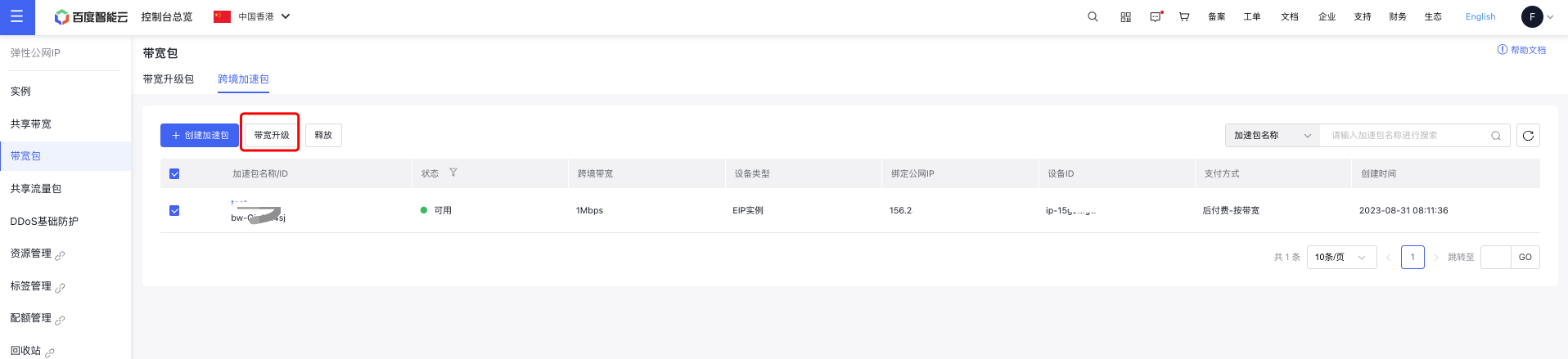
- Navigate to the Cross-border Acceleration Package tab, select the package to be scaled, and click Bandwidth Scaling Up.
- Adjust the bandwidth values, complete the payment, and finalize the adjustment.
- Return to the Cross-border Acceleration Package List to see the updated bandwidth values.
Release cross-border acceleration package
Application scenario
- The cross-border acceleration package can be released manually at any time.
- There are two methods for release, i.e., manual release and scheduled release.
- If instances bound to cross-border acceleration expire, the system will automatically release the acceleration package.
Manual release
Guide
- Log in to the management console and go to Product Service - EIP.
- From the left navigation bar, select Bandwidth Package to access the Bandwidth Package List page.
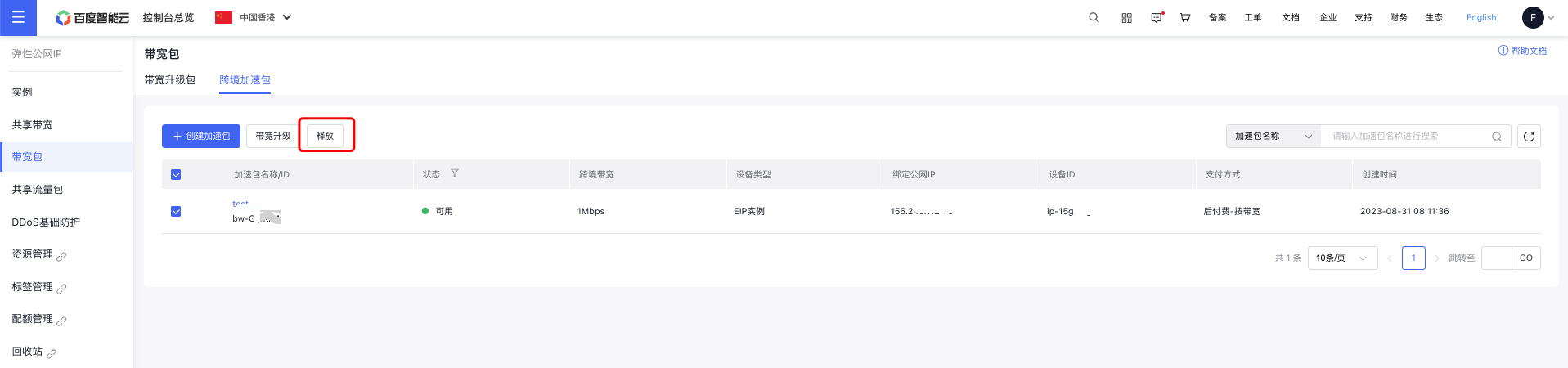
- Go to the Cross-border Acceleration Package tab, select the package to be released, and click Release.
- In the Security Verification dialog box, click Send Verification Code to receive the code via SMS, then enter it to finalize the bandwidth release.
- Once you return to the cross-border acceleration package list, the selected packages will have been released.
Scheduled release
Guide
- Log in to the management console and go to Product Service - EIP.
- From the left navigation bar, select Bandwidth Package to access the Bandwidth Package List page.
- Navigate to the Cross-border Acceleration Package tab to view the list of created packages.
- Click the name of the Acceleration Package to access the Cross-border Acceleration Package Details page, then click Settings under Operational Status Information.
- The Auto-release Settings pop-up will appear. Choose Set Auto-release and specify the desired release date and time as required.
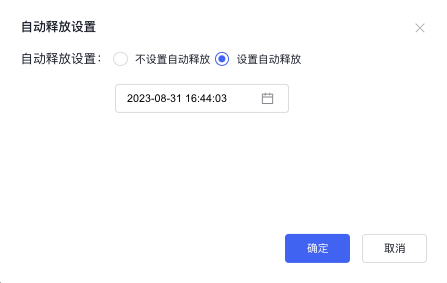
- Click OK to confirm your auto-release time settings.
- After successfully configuring, check the details page of the Cross-border Acceleration Package, where the scheduled time will be displayed.