Operation Instance

EIP

  • API Reference
    • API function release records
    • API Service Domain Name
    • API Specifications
    • Appendix 1
    • Bandwidth Package Related Interfaces
      • Adjust the bandwidth of the bandwidth package
      • Create bandwidth package
      • Query bandwidth package details
      • Query bandwidth package list information of users
      • Release bandwidth package
      • Update the automatic release time of the bandwidth package
      • Update the name of the bandwidth package
    • DDoS Basic Protection Related Interfaces
      • Modify DDoS basic protection threshold
      • Query DDoS Basic Protection Attack Records
      • Query DDoS basic protection list
    • EIP Related Interfaces
      • Apply for EIP
      • Bind EIP
      • Disable EIP direct
      • EIP bandwidth scaling
      • EIP renewal has been enabled
      • Enable EIP direct
      • Query EIP list in bucket trash
      • Query EIP list
      • Release EIP
      • Release EIPs in the bucket trash
      • Renew EIP
      • Restore EIPs in the bucket trash
      • Selective release of EIP
      • Unbind EIP
      • Unsubscribe prepaid EIP
      • Update EIP Release Protection Switch
    • Error code
    • General Description
    • Inquiry Related
      • Bandwidth package price inquiry
      • EIP Inquiry
      • EIPGROUP Inquiry
      • Shared Traffic Package Inquiry
    • Interface Overview
    • Overview
    • Prerequisites for use
    • Shared Bandwidth Related Interfaces
      • Bandwidth scaling up for EIPGROUP
      • Create EIPGROUP
      • EIPGROUP IP count upgrade
      • EIPGROUP release
      • EIPGROUP renewal
      • EIPGROUP update
      • Migrate EIP from EIPGROUP
      • Migrate EIP into EIPGROUP
      • Query EIPGROUP details
      • Query the EIPGROUP list
      • Unsubscribe prepaid EIPGROUP
    • Shared Traffic Package Related Interfaces
      • Create a shared traffic package
      • Query shared traffic package details
      • Query shared traffic package list
    • TBSP Related Interfaces
      • Add Protection IP Allow List
      • Add Protocol Blocking
      • Add Region Blocking
      • Bind Protection Object
      • Close Protection IP Cleaning
      • Create TBSP
      • Delete Protection IP Allow List
      • Delete Protection Object
      • Delete Protocol Blocking
      • Delete Region Blocking
      • Modify Protection IP Cleaning Threshold
      • Modify Protection IP Protection Level
      • Open Protection IP Cleaning
      • Query Protection IP Allow List
      • Query Protection IP Cleaning Threshold List
      • Query Protocol Blocking List
      • Query Region Blocking List
      • Query TBSP Details
      • Query TBSP List
      • TBSP Capacity dilatation
      • TBSP renew
  • FAQs
    • Billing class
    • Configuration
    • Consultation
    • Security class
  • Function Release Records
  • Operation guide
    • Address pool
    • Bandwidth package
      • Bandwidth scale-up package
      • Cross-border acceleration package
    • Certification
    • DDoS standard protection
    • EIP Instance
      • Create instance
      • EIP Direct Connect
      • IPv6 Termination
      • Manage Alarms
      • Operation Instance
      • Shift Charge
      • View monitoring
    • EIP Self-Service Diagnostics
      • EIP Instance Diagnosis
    • EIPGROUP
      • Bind cloud resources
      • Manage Shared Bandwidth
      • Purchase Shared Bandwidth
      • View monitoring
    • High Defense EIP
    • Identity and access management
    • Recycle bin
    • Shared traffic package
      • Purchase Shared Traffic Package
      • View Shared Traffic Package
    • Tag Management
    • Traffic Burst Service Package
      • Instance management
      • Monitor alarm
      • Protection Configuration
    • Unblocking Center
  • Product Description
    • Application scenarios
    • Product advantages
    • Product Introduction
    • Usage restrictions
  • Product pricing
    • Bandwidth Package Billing
    • EIP Instance Billing
    • EIPGROUP Billing
    • Shared Traffic Package Billing
    • TBSP Billing
  • SDK
    • GO-SDK
      • DDoS Instance
      • EIP Instance
      • EipBp Instance
      • EIPGROUP Instance
      • EipTp Instance
      • Exception handling
      • Initialization
      • Install the SDK Package
      • Overview
    • Java-SDK
      • EIP Instance
      • EipBP Instance
      • EIPGROUP Instance
      • EipTp Instance
      • Exception handling
      • Initialization
      • Install the SDK Package
      • Overview
      • Version history
    • PHP-SDK
      • EIP Instance
      • EipBP Instance
      • EIPGROUP Instance
      • Exception handling
      • Initialization
      • Install the SDK Package
      • Overview
      • Version history
    • Python-SDK
      • EIP Instance
      • EipBP Instance
      • EIPGROUP Instance
      • EipTp Instance
      • Exception handling
      • Initialization
      • Install the SDK Package
      • Overview
      • Version history
  • Service Level Agreement (SLA)
    • EIP Service Level Agreement SLA
    • TBSP Service Level Agreement SLA
  • Typical Practices
    • Bring Your Own Overseas Public IP Address to the Cloud
    • IPv6 Public Network Access
    • Save Public Network Costs
    • TCP Port 25 Restriction Description
All documents
menu
No results found, please re-enter

EIP

  • API Reference
    • API function release records
    • API Service Domain Name
    • API Specifications
    • Appendix 1
    • Bandwidth Package Related Interfaces
      • Adjust the bandwidth of the bandwidth package
      • Create bandwidth package
      • Query bandwidth package details
      • Query bandwidth package list information of users
      • Release bandwidth package
      • Update the automatic release time of the bandwidth package
      • Update the name of the bandwidth package
    • DDoS Basic Protection Related Interfaces
      • Modify DDoS basic protection threshold
      • Query DDoS Basic Protection Attack Records
      • Query DDoS basic protection list
    • EIP Related Interfaces
      • Apply for EIP
      • Bind EIP
      • Disable EIP direct
      • EIP bandwidth scaling
      • EIP renewal has been enabled
      • Enable EIP direct
      • Query EIP list in bucket trash
      • Query EIP list
      • Release EIP
      • Release EIPs in the bucket trash
      • Renew EIP
      • Restore EIPs in the bucket trash
      • Selective release of EIP
      • Unbind EIP
      • Unsubscribe prepaid EIP
      • Update EIP Release Protection Switch
    • Error code
    • General Description
    • Inquiry Related
      • Bandwidth package price inquiry
      • EIP Inquiry
      • EIPGROUP Inquiry
      • Shared Traffic Package Inquiry
    • Interface Overview
    • Overview
    • Prerequisites for use
    • Shared Bandwidth Related Interfaces
      • Bandwidth scaling up for EIPGROUP
      • Create EIPGROUP
      • EIPGROUP IP count upgrade
      • EIPGROUP release
      • EIPGROUP renewal
      • EIPGROUP update
      • Migrate EIP from EIPGROUP
      • Migrate EIP into EIPGROUP
      • Query EIPGROUP details
      • Query the EIPGROUP list
      • Unsubscribe prepaid EIPGROUP
    • Shared Traffic Package Related Interfaces
      • Create a shared traffic package
      • Query shared traffic package details
      • Query shared traffic package list
    • TBSP Related Interfaces
      • Add Protection IP Allow List
      • Add Protocol Blocking
      • Add Region Blocking
      • Bind Protection Object
      • Close Protection IP Cleaning
      • Create TBSP
      • Delete Protection IP Allow List
      • Delete Protection Object
      • Delete Protocol Blocking
      • Delete Region Blocking
      • Modify Protection IP Cleaning Threshold
      • Modify Protection IP Protection Level
      • Open Protection IP Cleaning
      • Query Protection IP Allow List
      • Query Protection IP Cleaning Threshold List
      • Query Protocol Blocking List
      • Query Region Blocking List
      • Query TBSP Details
      • Query TBSP List
      • TBSP Capacity dilatation
      • TBSP renew
  • FAQs
    • Billing class
    • Configuration
    • Consultation
    • Security class
  • Function Release Records
  • Operation guide
    • Address pool
    • Bandwidth package
      • Bandwidth scale-up package
      • Cross-border acceleration package
    • Certification
    • DDoS standard protection
    • EIP Instance
      • Create instance
      • EIP Direct Connect
      • IPv6 Termination
      • Manage Alarms
      • Operation Instance
      • Shift Charge
      • View monitoring
    • EIP Self-Service Diagnostics
      • EIP Instance Diagnosis
    • EIPGROUP
      • Bind cloud resources
      • Manage Shared Bandwidth
      • Purchase Shared Bandwidth
      • View monitoring
    • High Defense EIP
    • Identity and access management
    • Recycle bin
    • Shared traffic package
      • Purchase Shared Traffic Package
      • View Shared Traffic Package
    • Tag Management
    • Traffic Burst Service Package
      • Instance management
      • Monitor alarm
      • Protection Configuration
    • Unblocking Center
  • Product Description
    • Application scenarios
    • Product advantages
    • Product Introduction
    • Usage restrictions
  • Product pricing
    • Bandwidth Package Billing
    • EIP Instance Billing
    • EIPGROUP Billing
    • Shared Traffic Package Billing
    • TBSP Billing
  • SDK
    • GO-SDK
      • DDoS Instance
      • EIP Instance
      • EipBp Instance
      • EIPGROUP Instance
      • EipTp Instance
      • Exception handling
      • Initialization
      • Install the SDK Package
      • Overview
    • Java-SDK
      • EIP Instance
      • EipBP Instance
      • EIPGROUP Instance
      • EipTp Instance
      • Exception handling
      • Initialization
      • Install the SDK Package
      • Overview
      • Version history
    • PHP-SDK
      • EIP Instance
      • EipBP Instance
      • EIPGROUP Instance
      • Exception handling
      • Initialization
      • Install the SDK Package
      • Overview
      • Version history
    • Python-SDK
      • EIP Instance
      • EipBP Instance
      • EIPGROUP Instance
      • EipTp Instance
      • Exception handling
      • Initialization
      • Install the SDK Package
      • Overview
      • Version history
  • Service Level Agreement (SLA)
    • EIP Service Level Agreement SLA
    • TBSP Service Level Agreement SLA
  • Typical Practices
    • Bring Your Own Overseas Public IP Address to the Cloud
    • IPv6 Public Network Access
    • Save Public Network Costs
    • TCP Port 25 Restriction Description
  • Document center
  • arrow
  • EIP
  • arrow
  • Operation guide
  • arrow
  • EIP Instance
  • arrow
  • Operation Instance
Table of contents on this page
  • Bind cloud resources
  • Bandwidth adjustment
  • Renew EIP instance
  • Delete EIP instance

Operation Instance

Updated at:2025-10-16

For each EIP instance, users can perform operations like binding to cloud resources, adjusting bandwidth, renewing, and releasing via the console according to their needs.

Bind cloud resources

Background information

Users can bind or unbind EIP instances with BCC, BLB, NAT, and VPN instances within the same region to flexibly meet service change demands. Binding and unbinding operations can be performed in the EIP instance list or in the instance lists of related services such as Baidu Cloud Compute, load balancer, NAT, VPN, etc. This section only explains operations within the EIP instance list.

Operation step

  1. Click the Management Console link to access the EIP Instance List interface.
  2. Click Bind in the operation column. A popup for binding instances will appear. Select the instance you want to bind from the menu and click OK.
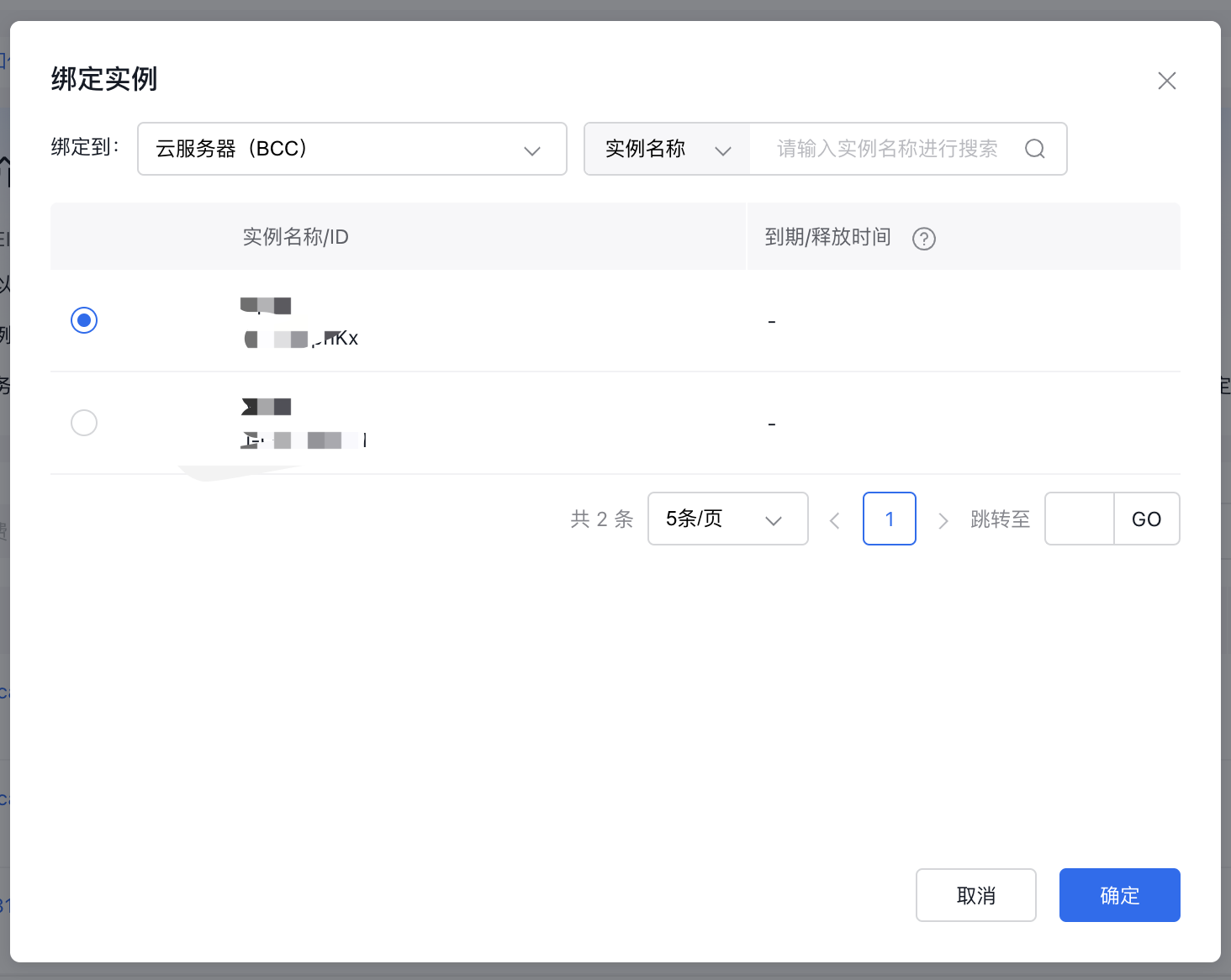
image.png

  1. The system will execute the binding operation between the EIP instance and cloud resources in the backend. Once the EIP status shows as bound, the binding is successful.

Description:

  • Instances within the same VPC (e.g., Baidu Cloud Compute servers, load balancers) cannot simultaneously use an elastic public IPv6 and an IPv6 gateway. If an IPv6 gateway is created, cloud resources in this VPC cannot associate with an EIP IPv6.
  • After an EIP instance is bound to cloud resources, the Bind button in the EIP instance list changes to Unbind. By clicking Unbind, the connection between the EIP instance and the cloud resource is removed.

Bandwidth adjustment

Application scenario

To adjust the bandwidth of an EIP instance, users can perform a bandwidth adjustment operation. This section uses a "pay-by-traffic" EIP instance as an example to demonstrate the bandwidth adjustment process. The same procedure applies to other charge types for bandwidth upgrades.

Operation step

  1. Click the Management Console link to access the Instance List interface.
  2. Click Bandwidth Adjustment under the Operations column.
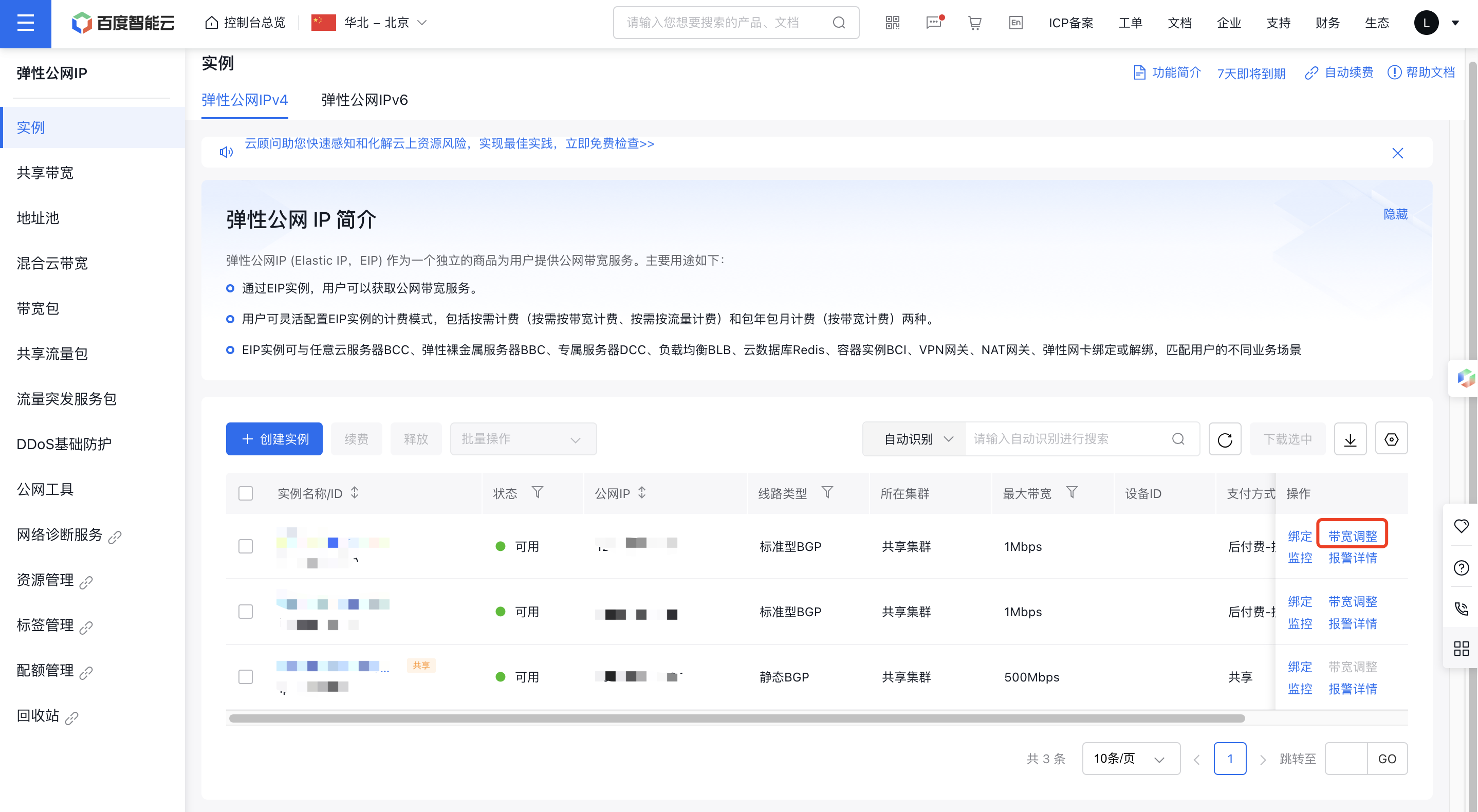
image.png

  1. Change the bandwidth value and click Confirm Order.
  2. After reviewing the order details, click Confirm Order again to complete the bandwidth modification.
  3. Go to the Instance List page to view the results of the bandwidth scaling for the EIP instance.

Renew EIP instance

Application scenario

For an EIP instance with the "Subscription" billing type, once it expires, the service will automatically suspend. Within seven days of expiration, it will be disabled but retain its data while renewal notices are sent to the user. Upon renewal, the system automatically restores the service. If the expiration exceeds seven days, the EIP resources are permanently cleared and cannot be recovered, requiring repurchase.

Baidu AI Cloud provides two renewal options: automatic renewal and manual renewal.

Note: For EIP instances billed as "Pay-by-Bandwidth" or "Pay-As-You-Go," renewal operations are unavailable.

Auto-renewal

For users of prepaid services, it is recommended to enable the Automatic Renewal Service to save your operation time and avoid service interruption due to forgotten renewal upon expiration. Automatic renewal function periodically renews your cloud resources, automatically deducting fees 7 days before instance expiration. Users will be reminded by SMS and email whether the renewal is successful or not.

Note:

  • Ensure sufficient account balance to enable the automatic renewal service.
  • If the automatic renewal fails due to insufficient balance 7 days before expiration, the system will retry the deduction 3 days before expiration. A successful deduction completes the automatic renewal; if it fails, another attempt will be made 1 day before expiration.
  • After expiration, the service stops automatically, and no automatic renewal will occur between service suspension and resource deletion. You must renew the service manually.
  • If you manually renew a resource during a period, automatic renewal will not take place.

Manual renew

In the prepayment mode, EIP instances shut down automatically upon expiration. The system will retain these instances by default for seven days without charges, during which you can manually renew them.

Operation step

  • Auto-renewal: For steps to set up automatic renewal, please refer to Automatic Renewal Operation.
  • Manual renewal: Perform the following operations to manually renew an EIP:
  1. Click the Management Console link to access the Instance List interface.
  2. Select the EIP instance to renew and click Renew.
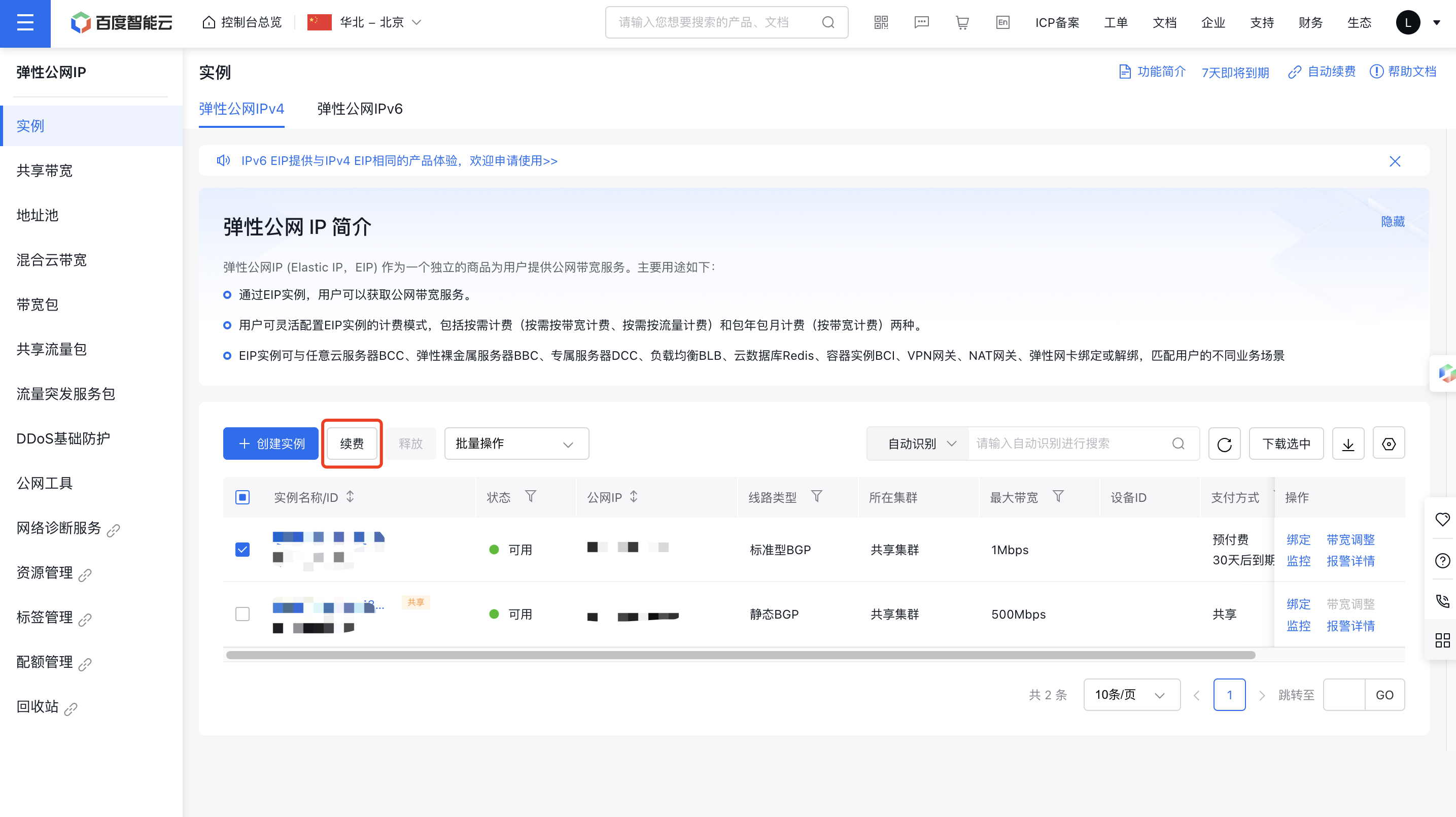
image.png

  1. Adjust the renewal period and click Next.
  2. Ensure the order details are correct and click Next to proceed to payment.

Note: If you have Baidu AI Cloud coupons, you can use them to offset costs. If the coupon value is insufficient, the remaining balance can be paid via bank card.

  1. Choose a payment method and click Confirm Payment to complete the transaction.
  2. Once payment is successful, the system automatically extends the EIP instance's lease period.

Note: EIP supports batch renewal. Select multiple postpay instances eligible for batch renewal in the instance list, then click the Renew button.

Delete EIP instance

Application scenario

Users can release unused EIP instances to reduce leasing expenses.

Note: The system does not allow releasing EIP instances under the following conditions:

  • Subscription-based EIP instances cannot be released.
  • EIP instances bound to BCC or BLB instances are not eligible for release.

Operation step

  1. Click the Management Console link to access the Instance List interface.
  2. Choose the EIP instance you wish to release and click the Release button.
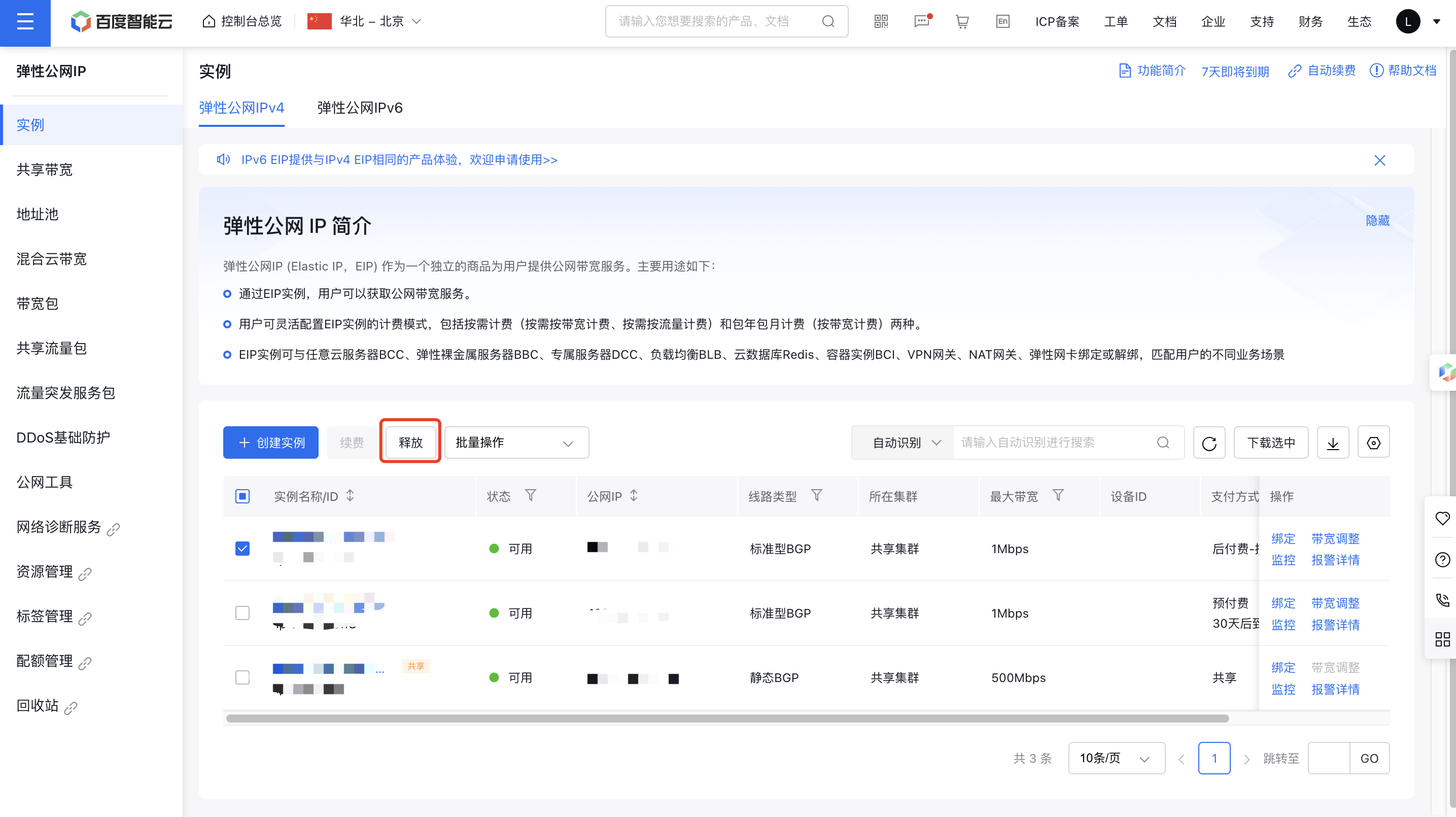
image.png

  1. Enter the SMS verification code to proceed.
  2. Check the instance list. The selected EIP instances have been successfully released.

Previous
Manage Alarms
Next
Shift Charge