EIP Direct Connect

EIP

  • API Reference
    • API function release records
    • API Service Domain Name
    • API Specifications
    • Appendix 1
    • Bandwidth Package Related Interfaces
      • Adjust the bandwidth of the bandwidth package
      • Create bandwidth package
      • Query bandwidth package details
      • Query bandwidth package list information of users
      • Release bandwidth package
      • Update the automatic release time of the bandwidth package
      • Update the name of the bandwidth package
    • DDoS Basic Protection Related Interfaces
      • Modify DDoS basic protection threshold
      • Query DDoS Basic Protection Attack Records
      • Query DDoS basic protection list
    • EIP Related Interfaces
      • Apply for EIP
      • Bind EIP
      • Disable EIP direct
      • EIP bandwidth scaling
      • EIP renewal has been enabled
      • Enable EIP direct
      • Query EIP list in bucket trash
      • Query EIP list
      • Release EIP
      • Release EIPs in the bucket trash
      • Renew EIP
      • Restore EIPs in the bucket trash
      • Selective release of EIP
      • Unbind EIP
      • Unsubscribe prepaid EIP
      • Update EIP Release Protection Switch
    • Error code
    • General Description
    • Inquiry Related
      • Bandwidth package price inquiry
      • EIP Inquiry
      • EIPGROUP Inquiry
      • Shared Traffic Package Inquiry
    • Interface Overview
    • Overview
    • Prerequisites for use
    • Shared Bandwidth Related Interfaces
      • Bandwidth scaling up for EIPGROUP
      • Create EIPGROUP
      • EIPGROUP IP count upgrade
      • EIPGROUP release
      • EIPGROUP renewal
      • EIPGROUP update
      • Migrate EIP from EIPGROUP
      • Migrate EIP into EIPGROUP
      • Query EIPGROUP details
      • Query the EIPGROUP list
      • Unsubscribe prepaid EIPGROUP
    • Shared Traffic Package Related Interfaces
      • Create a shared traffic package
      • Query shared traffic package details
      • Query shared traffic package list
    • TBSP Related Interfaces
      • Add Protection IP Allow List
      • Add Protocol Blocking
      • Add Region Blocking
      • Bind Protection Object
      • Close Protection IP Cleaning
      • Create TBSP
      • Delete Protection IP Allow List
      • Delete Protection Object
      • Delete Protocol Blocking
      • Delete Region Blocking
      • Modify Protection IP Cleaning Threshold
      • Modify Protection IP Protection Level
      • Open Protection IP Cleaning
      • Query Protection IP Allow List
      • Query Protection IP Cleaning Threshold List
      • Query Protocol Blocking List
      • Query Region Blocking List
      • Query TBSP Details
      • Query TBSP List
      • TBSP Capacity dilatation
      • TBSP renew
  • FAQs
    • Billing class
    • Configuration
    • Consultation
    • Security class
  • Function Release Records
  • Operation guide
    • Address pool
    • Bandwidth package
      • Bandwidth scale-up package
      • Cross-border acceleration package
    • Certification
    • DDoS standard protection
    • EIP Instance
      • Create instance
      • EIP Direct Connect
      • IPv6 Termination
      • Manage Alarms
      • Operation Instance
      • Shift Charge
      • View monitoring
    • EIP Self-Service Diagnostics
      • EIP Instance Diagnosis
    • EIPGROUP
      • Bind cloud resources
      • Manage Shared Bandwidth
      • Purchase Shared Bandwidth
      • View monitoring
    • High Defense EIP
    • Identity and access management
    • Recycle bin
    • Shared traffic package
      • Purchase Shared Traffic Package
      • View Shared Traffic Package
    • Tag Management
    • Traffic Burst Service Package
      • Instance management
      • Monitor alarm
      • Protection Configuration
    • Unblocking Center
  • Product Description
    • Application scenarios
    • Product advantages
    • Product Introduction
    • Usage restrictions
  • Product pricing
    • Bandwidth Package Billing
    • EIP Instance Billing
    • EIPGROUP Billing
    • Shared Traffic Package Billing
    • TBSP Billing
  • SDK
    • GO-SDK
      • DDoS Instance
      • EIP Instance
      • EipBp Instance
      • EIPGROUP Instance
      • EipTp Instance
      • Exception handling
      • Initialization
      • Install the SDK Package
      • Overview
    • Java-SDK
      • EIP Instance
      • EipBP Instance
      • EIPGROUP Instance
      • EipTp Instance
      • Exception handling
      • Initialization
      • Install the SDK Package
      • Overview
      • Version history
    • PHP-SDK
      • EIP Instance
      • EipBP Instance
      • EIPGROUP Instance
      • Exception handling
      • Initialization
      • Install the SDK Package
      • Overview
      • Version history
    • Python-SDK
      • EIP Instance
      • EipBP Instance
      • EIPGROUP Instance
      • EipTp Instance
      • Exception handling
      • Initialization
      • Install the SDK Package
      • Overview
      • Version history
  • Service Level Agreement (SLA)
    • EIP Service Level Agreement SLA
    • TBSP Service Level Agreement SLA
  • Typical Practices
    • Bring Your Own Overseas Public IP Address to the Cloud
    • IPv6 Public Network Access
    • Save Public Network Costs
    • TCP Port 25 Restriction Description
All documents
menu
No results found, please re-enter

EIP

  • API Reference
    • API function release records
    • API Service Domain Name
    • API Specifications
    • Appendix 1
    • Bandwidth Package Related Interfaces
      • Adjust the bandwidth of the bandwidth package
      • Create bandwidth package
      • Query bandwidth package details
      • Query bandwidth package list information of users
      • Release bandwidth package
      • Update the automatic release time of the bandwidth package
      • Update the name of the bandwidth package
    • DDoS Basic Protection Related Interfaces
      • Modify DDoS basic protection threshold
      • Query DDoS Basic Protection Attack Records
      • Query DDoS basic protection list
    • EIP Related Interfaces
      • Apply for EIP
      • Bind EIP
      • Disable EIP direct
      • EIP bandwidth scaling
      • EIP renewal has been enabled
      • Enable EIP direct
      • Query EIP list in bucket trash
      • Query EIP list
      • Release EIP
      • Release EIPs in the bucket trash
      • Renew EIP
      • Restore EIPs in the bucket trash
      • Selective release of EIP
      • Unbind EIP
      • Unsubscribe prepaid EIP
      • Update EIP Release Protection Switch
    • Error code
    • General Description
    • Inquiry Related
      • Bandwidth package price inquiry
      • EIP Inquiry
      • EIPGROUP Inquiry
      • Shared Traffic Package Inquiry
    • Interface Overview
    • Overview
    • Prerequisites for use
    • Shared Bandwidth Related Interfaces
      • Bandwidth scaling up for EIPGROUP
      • Create EIPGROUP
      • EIPGROUP IP count upgrade
      • EIPGROUP release
      • EIPGROUP renewal
      • EIPGROUP update
      • Migrate EIP from EIPGROUP
      • Migrate EIP into EIPGROUP
      • Query EIPGROUP details
      • Query the EIPGROUP list
      • Unsubscribe prepaid EIPGROUP
    • Shared Traffic Package Related Interfaces
      • Create a shared traffic package
      • Query shared traffic package details
      • Query shared traffic package list
    • TBSP Related Interfaces
      • Add Protection IP Allow List
      • Add Protocol Blocking
      • Add Region Blocking
      • Bind Protection Object
      • Close Protection IP Cleaning
      • Create TBSP
      • Delete Protection IP Allow List
      • Delete Protection Object
      • Delete Protocol Blocking
      • Delete Region Blocking
      • Modify Protection IP Cleaning Threshold
      • Modify Protection IP Protection Level
      • Open Protection IP Cleaning
      • Query Protection IP Allow List
      • Query Protection IP Cleaning Threshold List
      • Query Protocol Blocking List
      • Query Region Blocking List
      • Query TBSP Details
      • Query TBSP List
      • TBSP Capacity dilatation
      • TBSP renew
  • FAQs
    • Billing class
    • Configuration
    • Consultation
    • Security class
  • Function Release Records
  • Operation guide
    • Address pool
    • Bandwidth package
      • Bandwidth scale-up package
      • Cross-border acceleration package
    • Certification
    • DDoS standard protection
    • EIP Instance
      • Create instance
      • EIP Direct Connect
      • IPv6 Termination
      • Manage Alarms
      • Operation Instance
      • Shift Charge
      • View monitoring
    • EIP Self-Service Diagnostics
      • EIP Instance Diagnosis
    • EIPGROUP
      • Bind cloud resources
      • Manage Shared Bandwidth
      • Purchase Shared Bandwidth
      • View monitoring
    • High Defense EIP
    • Identity and access management
    • Recycle bin
    • Shared traffic package
      • Purchase Shared Traffic Package
      • View Shared Traffic Package
    • Tag Management
    • Traffic Burst Service Package
      • Instance management
      • Monitor alarm
      • Protection Configuration
    • Unblocking Center
  • Product Description
    • Application scenarios
    • Product advantages
    • Product Introduction
    • Usage restrictions
  • Product pricing
    • Bandwidth Package Billing
    • EIP Instance Billing
    • EIPGROUP Billing
    • Shared Traffic Package Billing
    • TBSP Billing
  • SDK
    • GO-SDK
      • DDoS Instance
      • EIP Instance
      • EipBp Instance
      • EIPGROUP Instance
      • EipTp Instance
      • Exception handling
      • Initialization
      • Install the SDK Package
      • Overview
    • Java-SDK
      • EIP Instance
      • EipBP Instance
      • EIPGROUP Instance
      • EipTp Instance
      • Exception handling
      • Initialization
      • Install the SDK Package
      • Overview
      • Version history
    • PHP-SDK
      • EIP Instance
      • EipBP Instance
      • EIPGROUP Instance
      • Exception handling
      • Initialization
      • Install the SDK Package
      • Overview
      • Version history
    • Python-SDK
      • EIP Instance
      • EipBP Instance
      • EIPGROUP Instance
      • EipTp Instance
      • Exception handling
      • Initialization
      • Install the SDK Package
      • Overview
      • Version history
  • Service Level Agreement (SLA)
    • EIP Service Level Agreement SLA
    • TBSP Service Level Agreement SLA
  • Typical Practices
    • Bring Your Own Overseas Public IP Address to the Cloud
    • IPv6 Public Network Access
    • Save Public Network Costs
    • TCP Port 25 Restriction Description
  • Document center
  • arrow
  • EIP
  • arrow
  • Operation guide
  • arrow
  • EIP Instance
  • arrow
  • EIP Direct Connect
Table of contents on this page
  • Application scenarios
  • Operation steps
  • Step I: Obtain the EIP direct configuration script
  • Step II: Configure EIP direct
  • Step III: Execute EIP direct configuration script

EIP Direct Connect

Updated at:2025-10-16

This document describes the method of Baidu AI Cloud for configuring EIP direct for BCC CentOS instances (including an instructional video). Users may refer to the key steps in the video to use AI Cloud products or resolve issues independently. Click here to watch the video Configuring EIP Direct for BCC CentOS Instances.

Description:

If the interface elements or operation methods shown in the video guidance are updated, please rely on the AI Cloud console interface for the most accurate information. The video aims to demonstrate the functional operation process, and minor interface changes will not affect the overall functionality or presentation.

EIP direct is primarily used in scenarios where virtual machines need to access public IPs, such as redirecting internal and external traffic to specific IP addresses. This document provides guidance on enabling EIP direct on Linux and configuring it.

Description:

  • EIP direct is not supported for Windows Baidu Cloud Compute instances.
  • Activating EIP direct may cause a brief network interruption. Users must first download the EIP direct script onto Baidu Cloud Compute and confirm that the service can handle temporary interruptions.
  • The EIP direct configuration script performs only basic setup. For additional service needs, ensure routing is configured accordingly.

Application scenarios

When connecting to the Internet via EIP, users can choose between NAT mode or EIP direct mode, with NAT mode being the default option.

  • In NAT mode, the EIP is not visible locally and must be manually added to the configuration every time.
  • Once EIP direct is activated, the EIP becomes locally visible, eliminating the need for manual entry during every configuration, thereby reducing development efforts.

Operation steps

Step I: Obtain the EIP direct configuration script

Since enabling EIP direct will cause network interruptions, first download the EIP direct script to Baidu Cloud Compute via one of the following methods:

Method I: Upload EIP direct script

  1. Download the EIP direct configuration script from the following path:

CentOS:bcc_elastic_net_centos.sh

Ubuntu:bcc_elastic_net_ubuntu.sh

Debian:bcc_elastic_net_debian.sh

  1. After downloading the Linux script locally, upload it to the Baidu Cloud Compute instance that requires EIP direct.

Method II: Use the command directly

Sign in to the server requiring EIP direct and execute the following command:

Where, bcc_elastic_net_xx.sh is the script corresponding to the target machine's distribution, e.g., centos uses bcc_elastic_net_centos.sh

Plain Text
1    wget http://mirrors.baidubce.com/baidu/elastic-net-tools/bcc_elastic_net_xx.sh
2 Or curl -O http://mirrors.baidubce.com/baidu/elastic-net-tools/bcc_elastic_net_xx.sh

Step II: Configure EIP direct

  1. Log in to the console, open the left navigation bar, select "Elastic Public IP (EIP)," and go to the EIP interface.
  2. Select the EIP requiring direct access, go to the EIP Instance Details page, and toggle the EIP Direct switch.

Description:

  • Users must bind the EIP to a cloud host or an elastic network interface before enabling EIP direct.
  • EIP direct is disabled by default. Once enabled, users must configure EIP direct within the Baidu Cloud Compute server to make the EIP locally accessible.
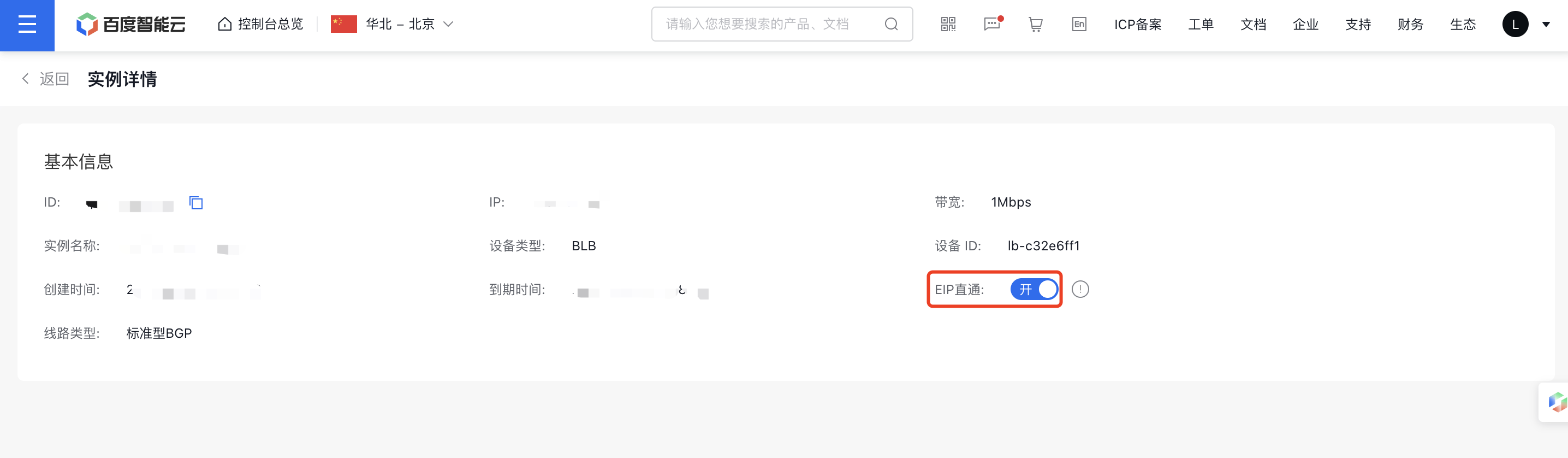
image.png

Step III: Execute EIP direct configuration script

After configuring EIP direct for the primary network interface card, log in to Baidu Cloud Compute and execute the EIP direct script.

  1. Log in to the Baidu Cloud Compute server where EIP direct needs to be enabled.
  2. Grant executable permission to the configuration script.

    chmod +x bcc_elastic_net_xx.sh

  3. Execute configuration script

Where xx.xx.xx.xx represents the EIP address (optional). If omitted, simply run ./bcc_elastic_net_xx.sh install.

Plain Text
1   ./bcc_elastic_net_xx.sh install xx.xx.xx.xx
  1. Run the command ip addr to check the configured EIP address.

Instructions for use of configuration script

The current configuration script supports three parameters. Refer to the table below for usage:

Parameter name Application method Parameter description Note
install install [eip] Configure [EIP] as the source address for the default route If [EIP] is empty, it defaults to the first EIP address with direct service enabled
uninstall uninstall Restore the initial configuration of the default route
help help Display help information

Description:

  • Baidu AI Cloud currently also supports elastic network interface (EIP) direct. For operation related to the elastic network interface, please refer to Configure Elastic Network Interface.

Previous
Create instance
Next
IPv6 Termination