

Add Cross-Account Network Instance
Operation scenarios
When multiple network instances (e.g., Virtual Private Cloud (VPC), dedicated channel, edge network) under different accounts require private network connections, they can be integrated into the same cloud enterprise network instance.
Prerequisites
● Ensure that your Baidu AI Cloud real-name authentication is complete.
● Make sure that the total of your available balance and vouchers exceeds RMB 100; otherwise, the purchase cannot be completed.
● To add a cross-account network instance, you can only proceed with the addition after the other party grants authorization. For more detailed introduction and configuration references on cross-account authorization, please refer to Cross-Account Authorization Management.
Operation instructions
● Each network instance can only be added to one Cloud Smart Network (CSN) instance. Please plan accordingly.
● Multiple BGP-type dedicated channels created on the same dedicated line router cannot be loaded into the same CSN simultaneously. If you need to use it, you can load the “Primary Dedicated Channel” into a CSN instance through the Dedicated Channel Association feature.
Operation steps
- Sign in to the Cloud Smart Network Console.
- Access the designated CSN instance.
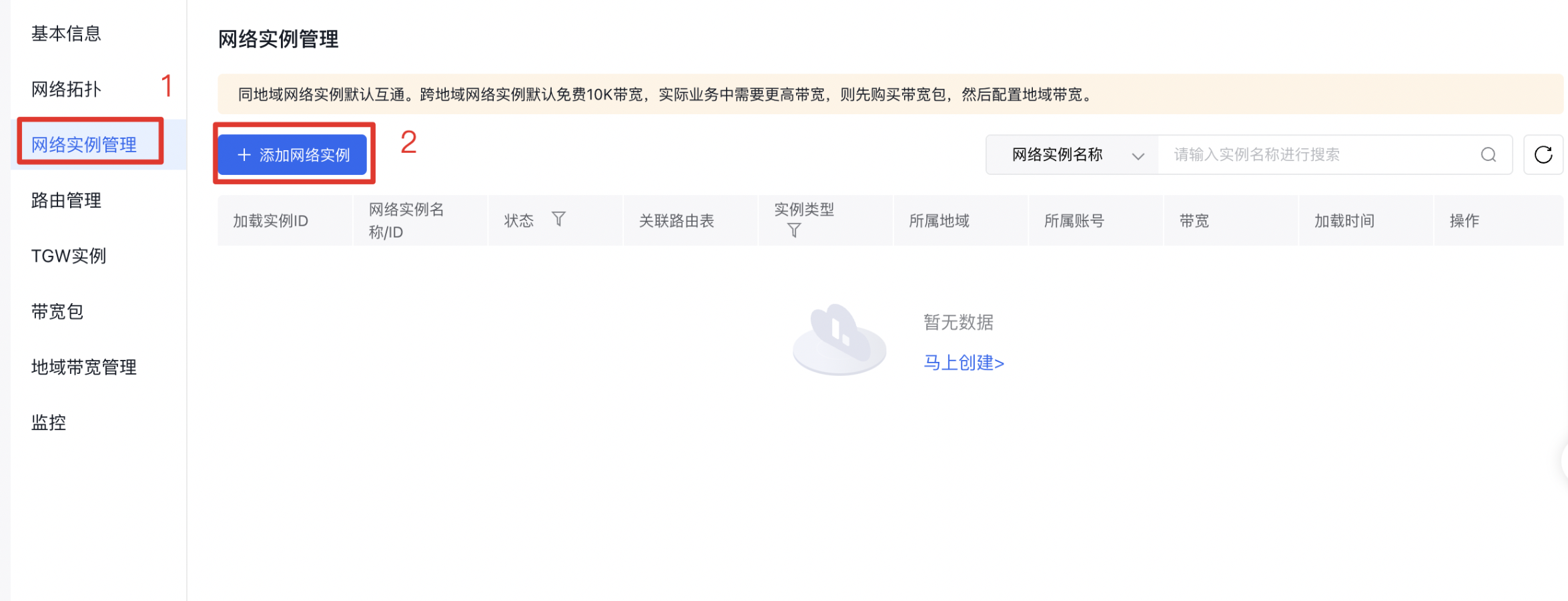
- In the left navigation panel, click on Network Instance Management to navigate to the network instance management page for the CSN instance.
- Click Add Network Instance to open a new pop-up window.
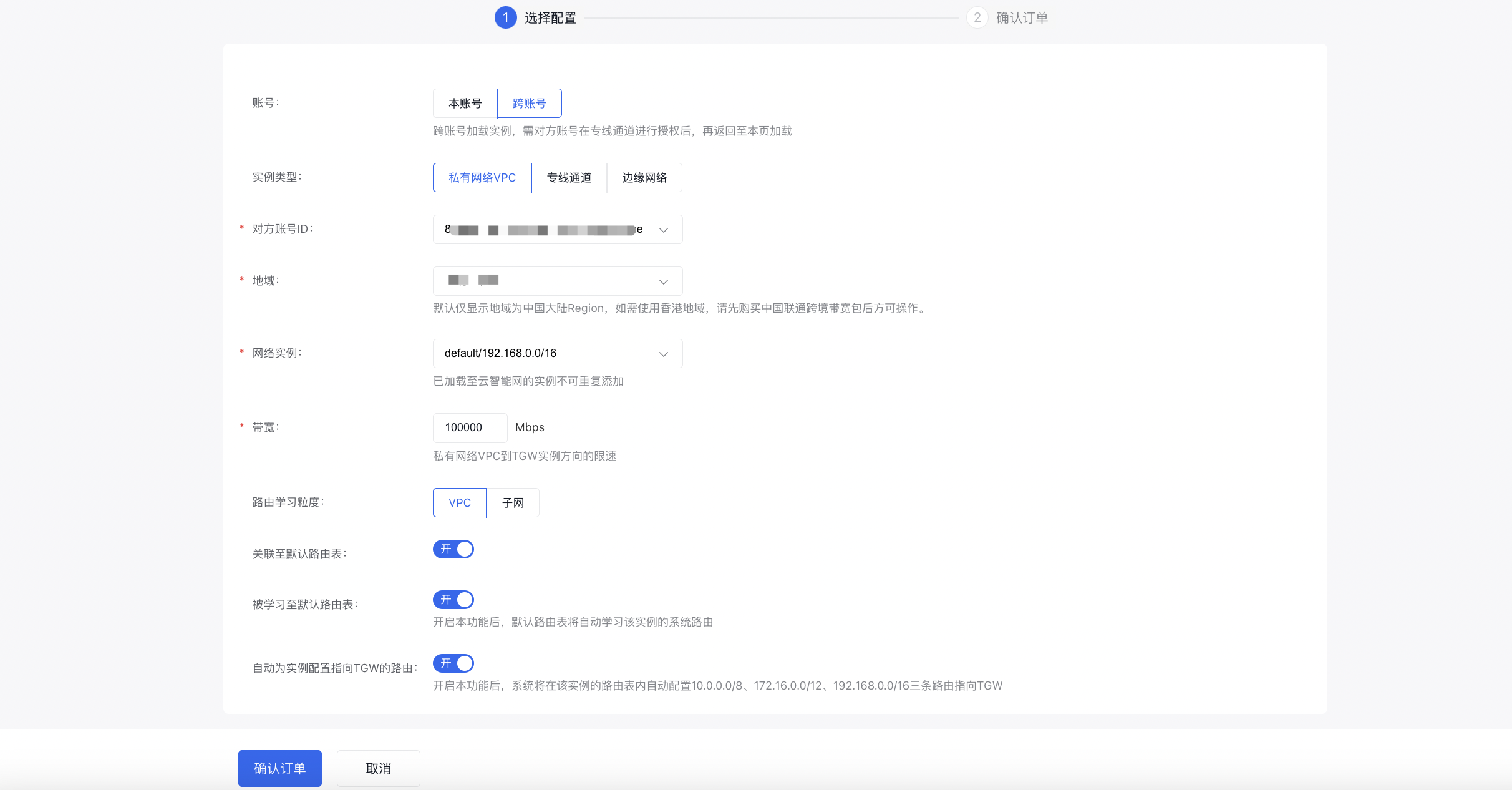
- Fill in the following configuration information:
| ConfigMap | Description |
|---|---|
| Account | This is used to select whether the resource bound to this network instance belongs to your own account or another account. Select Cross-Account here. |
| Instance type | Select the type of network instance to add: Virtual Private Cloud (VPC): The network instance is bound to a VPC. In subsequent configurations, you need to select the region, VPC ID, and bandwidth. Dedicated channel: The network instance is bound to an ET dedicated channel. In subsequent configurations, you need to select the region, dedicated channel ID, and bandwidth. Edge network: The network instance is bound to an edge network VPC. In subsequent configurations, you need to select the region, edge VPC, and bandwidth. |
| Other party’s account ID | Choose the account ID of the owner of the authorized network instance. |
| Region | Select the region for the authorized network instance. |
| Network instance | Select the name and ID of the authorized network instance. |
| Bandwidth | Virtual Private Cloud (VPC): Bandwidth limitation from the VPC to the TGW instance. Dedicated channel: Bandwidth limitation from the TGW instance to the dedicated channel. Edge network: Bandwidth limitation from the VPC to the TGW instance. |
| Route learning granularity (supported for VPC and edge network types) | Define the granularity at which the Cloud Smart Network learns routes from the network instance. You can choose between VPC or Subnet. |
| Associate with default route table | Decide whether to associate this network instance with the default CSN route table. This is enabled by default: VPC network instances allow disabling this option, but dedicated channel network instances do not. |
| Learned by default route table | Choose whether the default route table should learn routes from this network instance. This is enabled by default: When enabled, the default route table will automatically learn the system routes of this instance. |
| Automatically configure routes pointing to TGW for the instance (supported for VPC and edge network types) | Once this feature is turned on, the system will automatically add three routes (10.0.0.0/8, 172.16.0.0/12, 192.168.0.0/16) to the instance's route table, pointing to the TGW, which is enabled by default. |
| Learn dedicated line routes (supported for dedicated channel type) | Only available when the instance type is dedicated channel; disabled by default. By default, CSN automatically advertises non-dedicated line routes in the route table associated with this instance to the CPE side. After enabling this feature, CSN will also advertise dedicated line routes to the CPE side. |
- Enter the following configuration details, then click Confirm Order to finalize the setup.