Tag Management

CSN

  • API Reference
    • API function release records
    • Appendix
    • Bandwidth Package Related
      • Bandwidth package price inquiry
      • Bandwidth upgrade-downgrade for the bandwidth package
      • Bind a bandwidth package to a Cloud Smart Network
      • Create bandwidth package
      • Delete bandwidth package
      • Query bandwidth package list
      • Query the specified bandwidth package details
      • Unbind a bandwidth package from a Cloud Smart Network
      • Update bandwidth package
    • Cloud Smart Network Related
      • Create a Cloud Smart Network
      • Delete a Cloud Smart Network
      • Network instances loaded by the Cloud Smart Network
      • Network instances unloaded by the Cloud Smart Network
      • Query Cloud Smart Network details
      • Query Cloud Smart Network instance list
      • Query the list of Cloud Smart Network
      • Update a Cloud Smart Network
    • Common Headers and Error Responses
    • General Description
    • Ingress Management Related Interfaces
      • Add a routing entry
      • Create affiliation
      • Create learning relationship
      • Delete a learning relationship
      • Delete a routing entry
      • Delete an association relationship
      • Query association relationships
      • Query learning relationships
      • Query route table list
      • Query routing entries
    • Interface Overview
    • Region Bandwidth Related Interfaces
      • Create cross-region bandwidth
      • Delete cross-region bandwidth
      • Query cross-region bandwidth
      • Query the cross-region bandwidth of the specified Cloud Smart Network
      • Update cross-region bandwidth
    • Service domain
    • TGW Related Interfaces
      • Query routing entries of a TGW
      • Query TGW list
      • Update TGW information
  • FAQs
    • Consultation
  • Function Release Records
  • Operation guide
    • Cross-Account Authorization Management
      • Cancel Authorized Network Instance
      • Create Authorized Network Instance
      • Delete Authorized Network Instance
      • View Authorized Network Instance
    • Cross-Region Bandwidth Package Management
    • CSN Instance
      • Create CSN Instance
      • Delete CSN Instance
      • Modify CSN Instance
    • Identity and access management
    • Monitor and Operations
      • CSN Instance Diagnosis
    • Network instance
      • Add Cross-Account Network Instance
      • Add Local Account Network Instance
      • Adjust Network Instance Bandwidth
      • Uninstall Network Instance
    • Region Bandwidth Management
      • Adjust Region Bandwidth
      • Create cross-region bandwidth
      • Delete cross-region bandwidth
    • Route management
      • Association Relationship
        • Create affiliation
        • Delete affiliation
      • Custom route tables
        • Create custom route table
        • Delete custom route table
        • View Custom Route Table
      • Learning Relationship
        • Add Custom Route Entry
        • Create learning relationship
        • Delete Custom Route Entry
        • Delete learning relationship
        • Publish and Revoke Network Instance Route
        • View Route Entry
    • Tag Management
  • Product Description
    • Application scenarios
    • Introduction
    • Usage restrictions
  • Product pricing
  • SDK
    • GO-SDK
      • Bandwidth package
      • CSN Instance
      • Exception handling
      • Initialization
      • Install
      • Overview
      • Region Bandwidth
      • Route management
      • TGW
    • Java-SDK
      • CSN
      • Exception handling
      • Initialization
      • Install the SDK Package
      • Overview
      • Version history
    • Python-SDK
      • Bandwidth package
      • CSN Instance
      • Initialization
      • Region Bandwidth
      • Route management
      • TGW
  • Service Level Agreement (SLA)
    • Cloud Smart Network Service Level Agreement SLA
  • Typical Practices
    • CSN supports VPC custom route tables for secure traffic access
    • Multi-IDC Disaster Recovery via Cloud Smart Network
    • Multi-IDC Interconnection via Cloud Smart Network
    • Private Network VPC Interconnection with Edge Network
All documents
menu
No results found, please re-enter

CSN

  • API Reference
    • API function release records
    • Appendix
    • Bandwidth Package Related
      • Bandwidth package price inquiry
      • Bandwidth upgrade-downgrade for the bandwidth package
      • Bind a bandwidth package to a Cloud Smart Network
      • Create bandwidth package
      • Delete bandwidth package
      • Query bandwidth package list
      • Query the specified bandwidth package details
      • Unbind a bandwidth package from a Cloud Smart Network
      • Update bandwidth package
    • Cloud Smart Network Related
      • Create a Cloud Smart Network
      • Delete a Cloud Smart Network
      • Network instances loaded by the Cloud Smart Network
      • Network instances unloaded by the Cloud Smart Network
      • Query Cloud Smart Network details
      • Query Cloud Smart Network instance list
      • Query the list of Cloud Smart Network
      • Update a Cloud Smart Network
    • Common Headers and Error Responses
    • General Description
    • Ingress Management Related Interfaces
      • Add a routing entry
      • Create affiliation
      • Create learning relationship
      • Delete a learning relationship
      • Delete a routing entry
      • Delete an association relationship
      • Query association relationships
      • Query learning relationships
      • Query route table list
      • Query routing entries
    • Interface Overview
    • Region Bandwidth Related Interfaces
      • Create cross-region bandwidth
      • Delete cross-region bandwidth
      • Query cross-region bandwidth
      • Query the cross-region bandwidth of the specified Cloud Smart Network
      • Update cross-region bandwidth
    • Service domain
    • TGW Related Interfaces
      • Query routing entries of a TGW
      • Query TGW list
      • Update TGW information
  • FAQs
    • Consultation
  • Function Release Records
  • Operation guide
    • Cross-Account Authorization Management
      • Cancel Authorized Network Instance
      • Create Authorized Network Instance
      • Delete Authorized Network Instance
      • View Authorized Network Instance
    • Cross-Region Bandwidth Package Management
    • CSN Instance
      • Create CSN Instance
      • Delete CSN Instance
      • Modify CSN Instance
    • Identity and access management
    • Monitor and Operations
      • CSN Instance Diagnosis
    • Network instance
      • Add Cross-Account Network Instance
      • Add Local Account Network Instance
      • Adjust Network Instance Bandwidth
      • Uninstall Network Instance
    • Region Bandwidth Management
      • Adjust Region Bandwidth
      • Create cross-region bandwidth
      • Delete cross-region bandwidth
    • Route management
      • Association Relationship
        • Create affiliation
        • Delete affiliation
      • Custom route tables
        • Create custom route table
        • Delete custom route table
        • View Custom Route Table
      • Learning Relationship
        • Add Custom Route Entry
        • Create learning relationship
        • Delete Custom Route Entry
        • Delete learning relationship
        • Publish and Revoke Network Instance Route
        • View Route Entry
    • Tag Management
  • Product Description
    • Application scenarios
    • Introduction
    • Usage restrictions
  • Product pricing
  • SDK
    • GO-SDK
      • Bandwidth package
      • CSN Instance
      • Exception handling
      • Initialization
      • Install
      • Overview
      • Region Bandwidth
      • Route management
      • TGW
    • Java-SDK
      • CSN
      • Exception handling
      • Initialization
      • Install the SDK Package
      • Overview
      • Version history
    • Python-SDK
      • Bandwidth package
      • CSN Instance
      • Initialization
      • Region Bandwidth
      • Route management
      • TGW
  • Service Level Agreement (SLA)
    • Cloud Smart Network Service Level Agreement SLA
  • Typical Practices
    • CSN supports VPC custom route tables for secure traffic access
    • Multi-IDC Disaster Recovery via Cloud Smart Network
    • Multi-IDC Interconnection via Cloud Smart Network
    • Private Network VPC Interconnection with Edge Network
  • Document center
  • arrow
  • CSN
  • arrow
  • Operation guide
  • arrow
  • Tag Management
Table of contents on this page
  • Overview
  • Add tag
  • Tag sorting and search
  • Resource bill

Tag Management

Updated at:2025-11-11

Overview

Baidu AI Cloud offers the "Tag Management" feature, enabling fast categorization and resource identification through tagging. Tag Management is supported for CSN instances and CSN bandwidth packages. This section uses CSN instances as an example for explanation.

Before using tags, you need to know:

  • Tag: Each tag includes a key and a value. The combination of the key and value must be unique.
  • Single and batch: Supports tagging individual resources or applying tags to multiple cloud resources in batch.
  • Sorting and searching: Supports locating and sorting resources using tags (keys and values).
  • Cross-product tagging: Tags can be shared across different product lines.

Restriction

Each user is allowed to create up to 200 tags.

Add tag

Users managing multiple CSN instances can categorize, identify, and manage these instances more effectively by adding tags based on their project and usage scenarios.

Operation step:

  1. Log in to the Management Console and navigate to Product Services > Networking > Cloud Smart Network (CSN).
  2. Click "Instance" in the left navigation panel to open the Instance List page.
  3. Select one or more instances, then click "Edit Tags" in the operation bar to proceed.
  4. In the pop-up dialog box, enter a unique custom label key and an optional label value. The "Key" must be unique, but the value can remain empty.
  5. Click OK to complete the tag creation.

Notes When creating instance tags in batch, you cannot view the single instance tag that has been added.

Tag sorting and search

Tag Sorting

Users can sort tags for cloud resources in the console by simply clicking the Tag column header.

Tag Search

Search for tags by combining filter criteria to accurately find CSN instance results. You can filter by tag key and tag value:

Delete Tag

If you no longer need certain tags, you can delete them.

  1. Go to Tag Management from the left navigation bar, select a tag name on the Tag List page, and click Delete in the operation bar.
  2. In the pop-up dialog, click OK to delete the tag. Once it’s deleted, the tag cannot be recovered, and the system will automatically unbind it from the associated resources.

Resource bill

The resource bill function records the lifecycle and consumption data of each resource, allowing users to view resource and product consumption data by resource dimension.

Operation step:

  1. Log in to the Management Console and navigate to Product Services > Networking > Cloud Smart Network (CSN).
  2. Click Tag Management from the left navigation bar to access the Tag List page.
  3. Select a tag and click View Bill in the operation bar.
  4. Go to the Resource Bill page and select the desired month to view the bill. Current tagged resources' consumption data will be displayed. You can also search tags by combining filter criteria, view consumption details for other tags using their tag key and value, and download the related information.

    Note: You can also retrieve information by instance ID to view the instance’s consumption details.

  5. Click View Details to view the instance ID, product name, and bill amount. There may be both prepay and postpay instances, so the postpaid bill and the prepaid bill will be displayed in separate tabs by clicking View Instance Details.
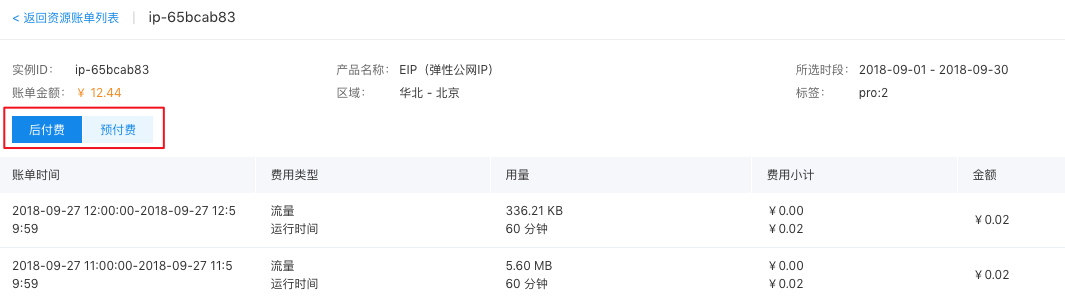
    Notes Because prepay incurs one-time deduction of fees, the consumption information will only be displayed in the month of creation, while the postpay involves continuous deduction of fees, and the consumption information be displayed from the month of creation to the usage period.

Previous
Route management
Next
Product Description