

Multi-IDC Disaster Recovery via Cloud Smart Network
The Cloud Smart Network (CSN) facilitates global routing and allows users to manage CSN routing by modifying BGP route parameters, thereby supporting disaster recovery between multiple IDCs.
Scenario examples
A customer has IDC-SH and VPC-SH in the East China - Shanghai region, IDC-GZ and VPC-GZ in the South China - Guangzhou region, and VPC-SZ in the East China - Suzhou region. Both IDC-SH and IDC-GZ deploy the same service, Service-A, but IDC-SH has higher service quality. Under normal conditions, it is expected that traffic from cloud VPC accessing Service-A will preferentially access IDC-SH. When IDC-SH fails, the traffic can automatically switch to access Service-A in IDC-GZ.
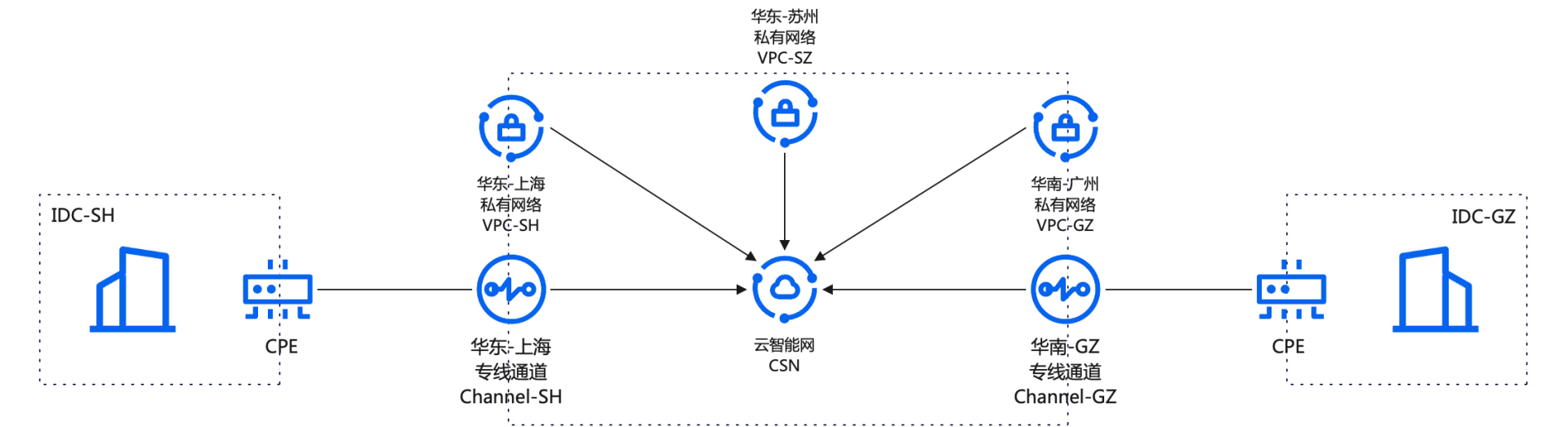
Resource planning
Network instance
| Network instance name | Network instance type | Region | Publishing network segment | BGP route As-Path |
|---|---|---|---|---|
| VPC-SZ | Virtual private cloud | East China-Suzhou | 192.168.0.0/24 | - |
| VPC-GZ | Virtual private cloud | South China-Guangzhou | 192.168.1.0/24 | - |
| VPC-SH | Virtual private cloud | East China-Shanghai | 192.168.2.0/24 | - |
| Channel-SH | Dedicated channel | East China-Shanghai | 10.0.1.0/24 10.0.2.0/24 10.0.3.0/24 |
11111 |
| Channel-GZ | Dedicated channel | South China-Guangzhou | 10.0.1.0/24 10.0.2.0/24 10.0.3.0/24 |
22222,33333 |
Baidu Cloud Compute
| Baidu Cloud Compute name | Belonging to network instance | Baidu Cloud Compute (IP) |
|---|---|---|
| VM-SZ | VPC-SZ | 192.168.0.2 |
| VM-GZ | VPC-GZ | 192.168.1.2 |
| VM-SH | VPC-SH | 192.168.2.2 |
IDC service
| Service name | Belonging to IDC | Endpoint |
|---|---|---|
| Service-A | IDC-SH | 10.0.1.2 |
| Service-A | IDC-GZ | 10.0.1.2 |
Configuration steps
Step I: Create a CSN instance
- Sign in to the Cloud Smart Network Console.
- Create a CSN instance. For specific operations, refer to CSN Instance Operations.
Step II: Load network instances
Load the dedicated channels Channel-SH and Channel-GZ into CSN. For specific operations, refer to Network Instance Operations. After all instances are loaded, the network instances in CSN are as follows:

Since the As-Path of the route published by the dedicated channel Channel-SH is shorter, CSN will select the route published by Channel-SH as the optimal route. The routes learned by the default route table are as follows:

Step III: Purchase a bandwidth package and configure cross-region bandwidth
In this scenario, since VPC traffic to IDCs requires cross-region communication, you need to purchase a bandwidth package and configure cross-region bandwidth. If there's no need for cross-region communication, the bandwidth package is unnecessary.
- Purchase a bandwidth package. For specific operations, refer to Bandwidth Package Operations. For the bill type and price of the bandwidth package, refer to Product Pricing. After creation, the bandwidth package list in CSN is as follows:

- Configure cross-region bandwidth. For specific operations, refer to Cross-Region Bandwidth Operations. After the creation is completed, the cross-region bandwidth list is as follows:

Step IV: Test connectivity and traffic path
Sign in to Baidu Cloud Computes VM-SZ (192.168.0.2), VM-GZ (192.168.1.2) and VM-SH (192.168.2.2) respectively. For login methods, refer to Overview of Login Methods.
- Run the traceroute command with the destination IP 10.0.1.2. Use the trace path to verify that traffic is reaching Service-A (10.0.1.2) in IDC-SH via the dedicated link Channel-SH, rather than Service-A (10.0.1.2) in IDC-GZ.
Step V: Disaster recovery test
- Manually shut down the BGP Peer of the dedicated channel Channel-SH to simulate a network failure in IDC-SH. The BGP route published by Channel-SH is withdrawn; at this point, the route published by dedicated channel Channel-GZ becomes the optimal route. After route convergence is completed, the routes in the CSN default route table are as follows:

Repeat Step IV to verify that traffic from cloud VPCs to 10.0.1.2 has switched to the dedicated link Channel-GZ and is reaching Service-A (10.0.1.2) in IDC-GZ.