View Custom Route Table
Updated at:2025-11-11
Operation scenarios
Once the configuration of the custom route table is completed, you can check the configuration details in the console to confirm that the routing entries have been correctly applied and are functioning as intended.
Operation steps
- Sign in to the Cloud Smart Network Console.
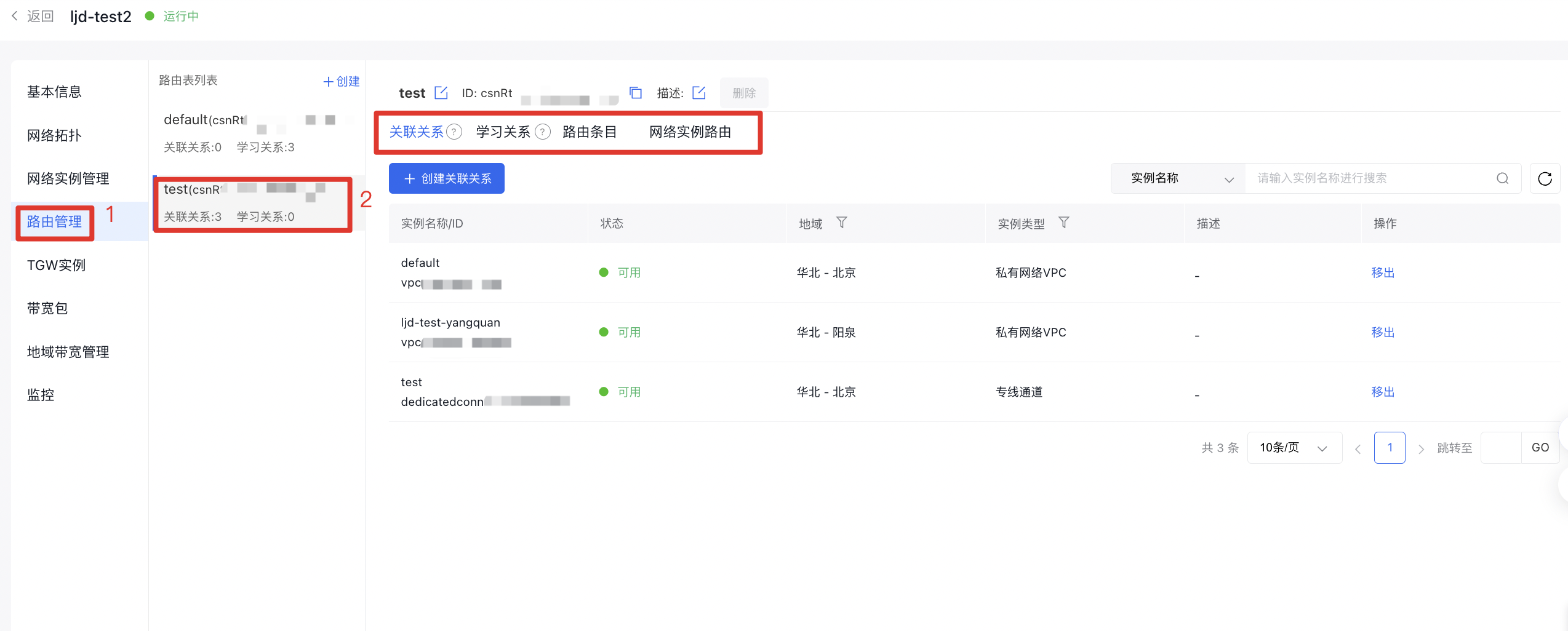
- On the Cloud Smart Network Instance page, locate the target CSN instance, click its ID, and navigate to the Route Management tab in the details page.
- On the Route Table List tab, click the route table ID to open the route table details page, where you can view the related information for that route table.
- In the Association Relationships tab, view the information of network instances bound to this route table.
- In the Learning Relationships tab, view the information of network instances learned by this route table.
- In the Routing Entries tab, view the routing entry information of this route table.
- In the Network Instance Routes tab, view the routing entries of added network instances - there is no need to switch to the VPC console to query routing information.