

View Authorized Network Instance
Updated at:2025-11-11
Operation scenarios
You can view the network instance details authorized to your current account, helping you easily track resource usage and association relationships.
Operation steps
- Sign in to the Cloud Smart Network Console.
- In the left navigation bar, go to Cross-Account Authorization Management -> Authorized Network Instances to access the Authorized Network Instances page. Here, you can view the instances authorized by other accounts.
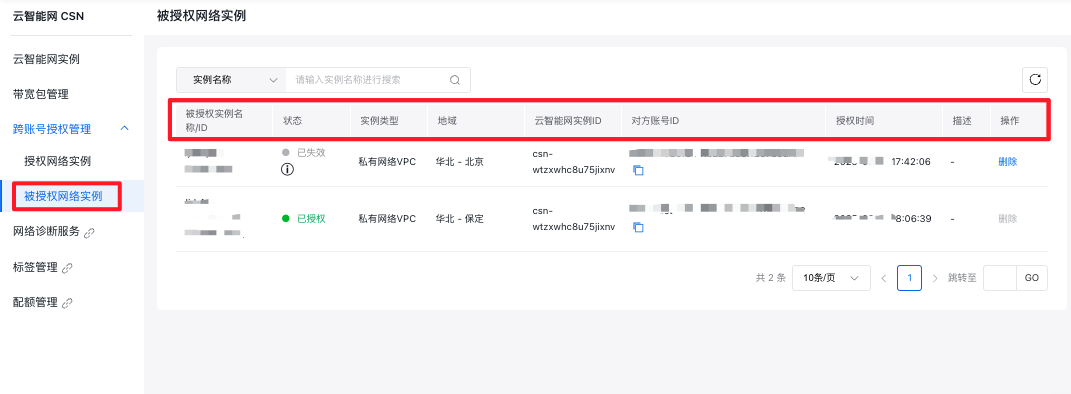
| Items in list | Description |
|---|---|
| Name/ID of authorized instance | Name and ID of the authorized instance |
| Status | Status includes Expired and Authorized. When the other account revokes the authorization, the status will change to Expired |
| Instance type | Type of the authorized instance: The type is either Virtual Private Cloud (VPC) or Edge Network |
| Region | Region of the authorized network instance |
| Cloud Smart Network instance ID | ID of the target Cloud Smart Network instance for authorization |
| Other party’s account ID | Account ID of the authorizing party |
| Authorization time | The time when the authorizing party initiated the authorization operation |
| Description | The description filled in by the authorizing party when initiating the authorization operation |
| Operation | You can Delete this authorization record. However, the deletion operation can only be performed after the other account has revoked the authorization. |