

CSN Instance Diagnosis
Updated at:2025-11-11
Cloud Smart Network integrates Network Diagnostic Services (NDS), allowing you to diagnose CSN instances and receive repair suggestions based on identified issues. This feature enables independent troubleshooting of network problems in CSN instances.
Usage restrictions
Only CSN instances are supported for diagnostics.
CSN instance diagnosis items
The table below details the diagnosis items supported for CSN instances.
| Classification of diagnostic items | Diagnostic item | Description |
| Route diagnosis | Network instance route conflict check | Verify route conflicts between network instances. |
| VPC route check | Ensure TGW routes are configured in the route table of the VPC network instance. | |
| Route check for dedicated channel to cloud | Check if the dedicated line channel has acquired routes from the CSN route table. | |
| Route check for dedicated channel from cloud | Verify if the dedicated channel has obtained routes from the peer end. | |
| Configuration diagnosis | Cross-region speed limit configuration check | Confirm if speed-limited bandwidth is set up for cross-region connections between different regions. |
| Route learning check | Ensure a learning relationship has been established between the network instance and the CSN route table. | |
| Associated forwarding check | Confirm an association relationship exists between the network instance and the CSN route table. | |
| Cost diagnosis | Bandwidth package cost status check | Verify if the bandwidth package instance linked to CSN is in arrears or will expire within the coming 7 days. |
| Capacity overrun diagnosis | Cross-region bandwidth utilization check | Check if the bandwidth utilization of cross-region connections exceeded 80% in the last 15 minutes. |
| Network instance bandwidth utilization check | Verify if the bandwidth utilization of network instances reached 80% in the last 15 minutes. | |
| Dedicated line ECMP route quantity check | Ensure the number of dedicated line ECMP routes has not exceeded 80% of the maximum limit (maximum: 512). |
Initiate diagnosis
- Sign in to the Cloud Smart Network Console.
- Go to the CSN instance page, find the target CSN instance, and click the button in the Diagnosis column of the respective instance.
- Select Initiate Instance Diagnosis from the Diagnosis column.
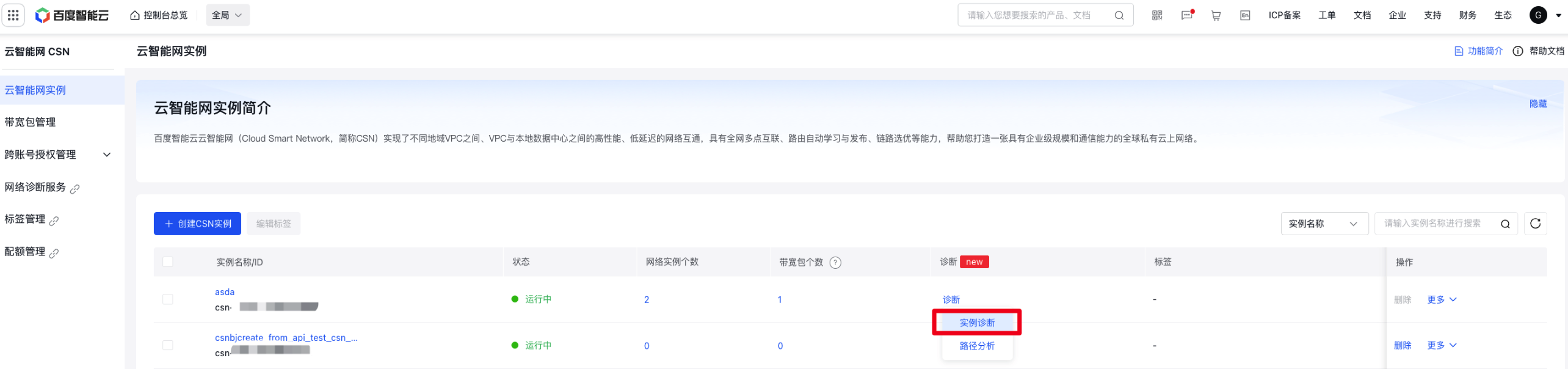
- On the Instance Health Diagnosis panel, review the diagnosis details.
Related documents
For more information about network intelligent service instance diagnosis, please refer to Instance Diagnosis.