

Private Network VPC Interconnection with Edge Network
By default, the virtual private cloud and edge network are isolated and unable to communicate. The Cloud Smart Network (CSN) enables connectivity between virtual private clouds and edge networks, supporting inter-cloud, cloud-edge, and border-edge connections. This document explains how to connect VPCs located in different regions with various edge networks of Baidu Edge Computing through Cloud Smart Network (CSN).
Scenario examples
A customer with VPC-BJ in North China - Beijing, VPC-GZ in South China - Guangzhou, an edge network BEC-VPC-XA in Northwest China - Xi'an Third Front, and an edge network BEC-VPC-CZ in East China - Changzhou Third Front aims to integrate all these VPCs and edge networks across different regions.
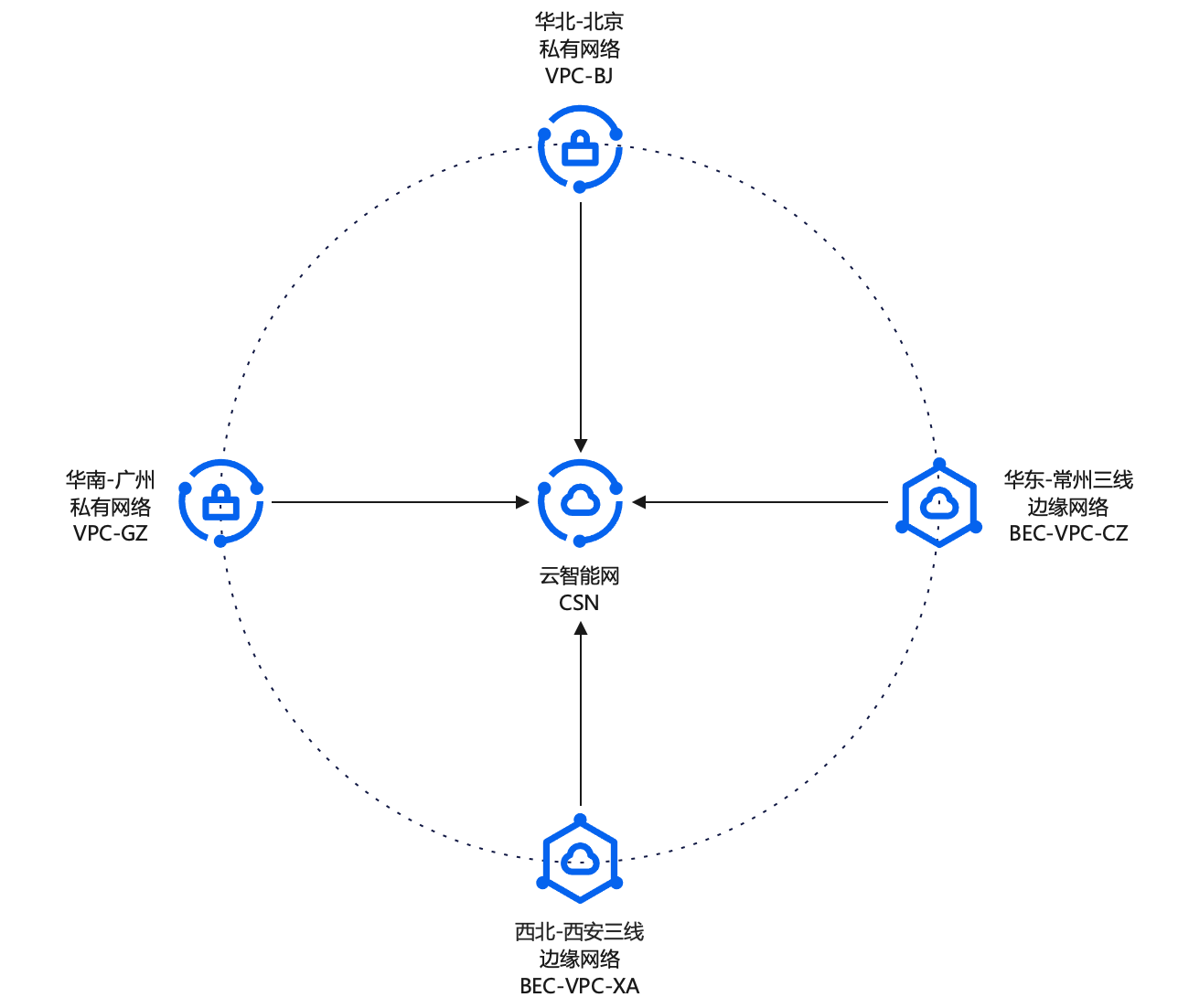
Resource planning
Network instance
| Network instance name | Network instance type | Region | Network segment |
|---|---|---|---|
| VPC-BJ | Virtual private cloud | North China-Beijing | 192.168.0.0/24 |
| VPC-GZ | Virtual private cloud | South China-Guangzhou | 192.168.1.0/24 |
| BEC-VPC-XA | Edge network | Northwest - Xi'an Third Front | 172.16.0.0/24 |
| BEC-VPC-CZ | Edge network | East China - Changzhou Third Front | 172.16.1.0/24 |
Baidu Cloud Compute
| Baidu Cloud Compute name | Belonging to network instance | Baidu Cloud Compute (IP) |
|---|---|---|
| VM-BJ | VPC-BJ | 192.168.0.2 |
| VM-GZ | VPC-GZ | 192.168.1.2 |
| BEC-VM-XA | BEC-VPC-XA | 172.16.0.4 |
| BEC-VM-CZ | BEC-VPC-CZ | 172.16.1.4 |
Configuration steps
Step I: Create a CSN instance
- Sign in to the Cloud Smart Network Console.
Click the "Create CSN Instance" button, then provide information such as a name, description, and tags in the pop-up form to complete the CSN instance creation.

Step II: Load network instances
On the "CSN List" page, click the newly created CSN instance to open the CSN configuration interface.
Click "Network Instance Management" in the left-hand menu to access the network instance management interface.
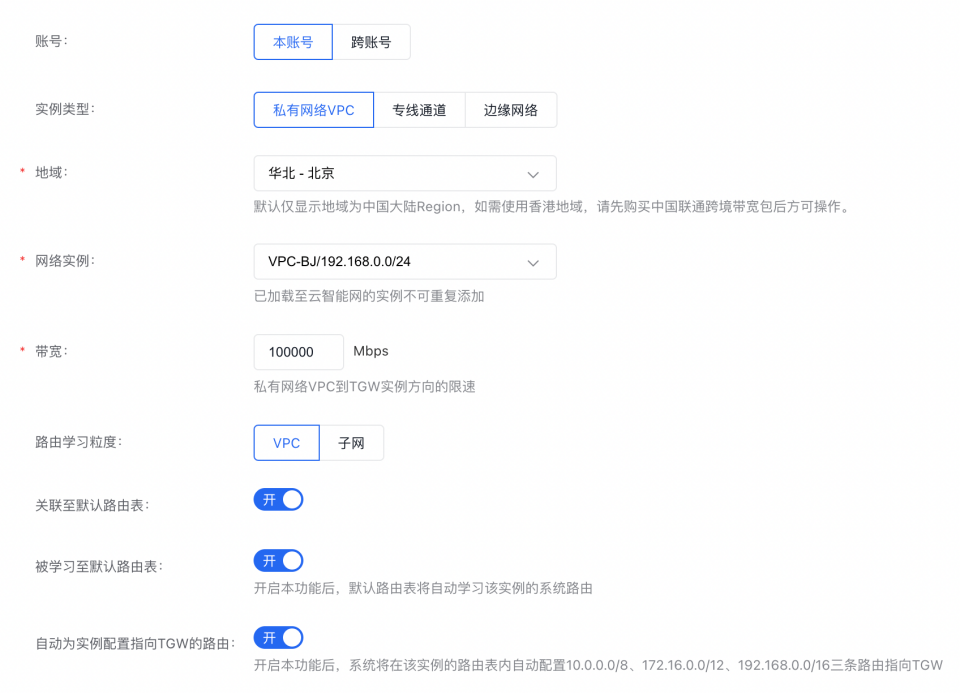
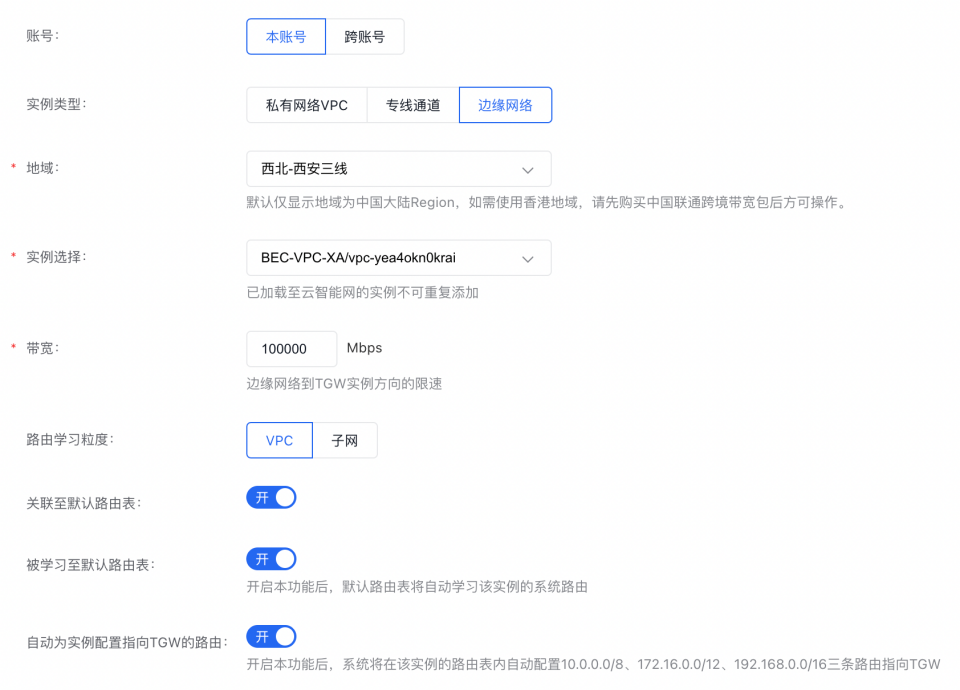
Click the "Add Network Instance" button, then select and load network instances on the network instance addition page. Following the given configuration guidance, add both VPCs and BEC-VPCs into the CSN.
Virtual Private Cloud
Edge Network
After all instances are loaded, the network instances in CSN are as follows:

Step III: Purchase a bandwidth package
Click "Bandwidth Packages" in the CSN configuration interface's left-hand menu to access the bandwidth package management section for the CSN.
- Click the Add Bandwidth Package button, select the interconnection type, bill type, bandwidth and other information on the bandwidth package addition interface, and create the bandwidth package. Create three types of bandwidth packages: "Inter-Cloud Connection", "Cloud-Edge Connection" and "Border-Edge Connection". For the bill type and price of bandwidth packages, refer to CSN Price Details.
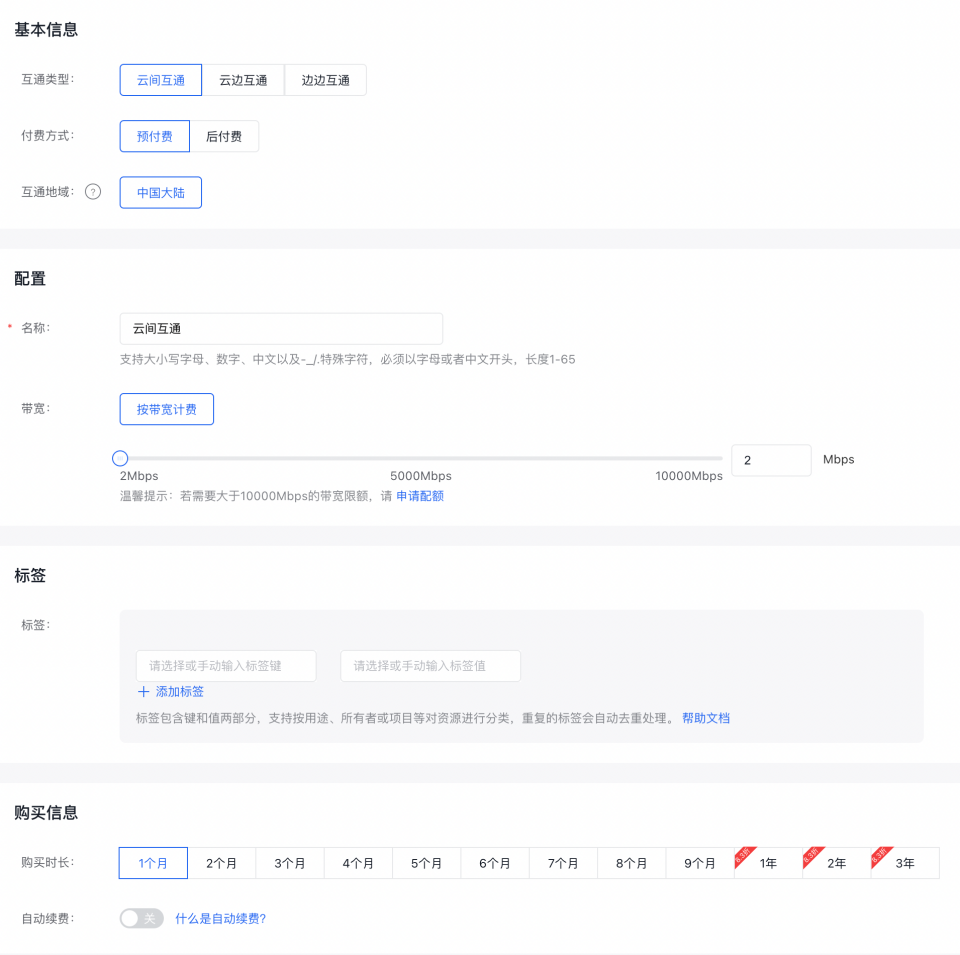
After creation, the bandwidth package list in CSN is as follows:

Step IV: Configure cross-region bandwidth
Click "Cross-Region Bandwidth Management" in the CSN configuration interface's left-hand menu to open the cross-region bandwidth management section.
Click the "Create Cross-Region Bandwidth" button, select the connection type and regions in the pop-up form, choose the bandwidth package, and allocate the bandwidth values to complete the cross-region bandwidth configuration.
Allocate cross-region bandwidth between the central cloud and Baidu Edge Computing according to the connection type:
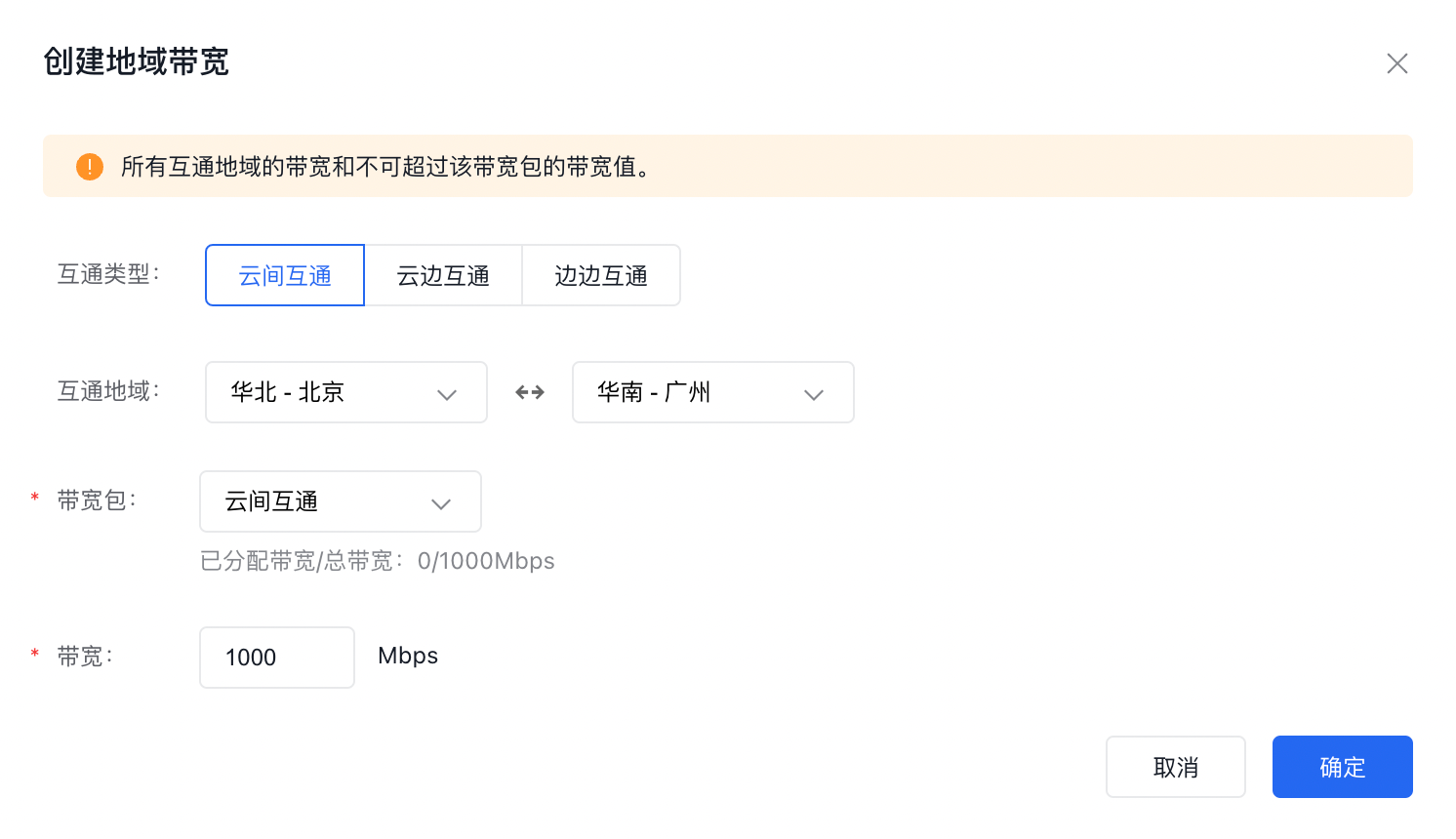
After the cross-region bandwidth is created, the CSN cross-region bandwidth list is as follows:

Step V: Test connectivity
- Sign in to Baidu Cloud Compute VM-BJ (192.168.0.2). For login methods, refer to Overview of Login Methods.
- Run the ping command to test connectivity with Baidu Cloud Compute VM-GZ (192.168.1.2). If the ping succeeds, it confirms that the VPC-BJ and VPC-GZ networks are successfully connected.
- Run the ping command to test connectivity with Baidu Cloud Compute BEC-VM-XA (172.16.0.4) and BEC-VM-CZ (172.16.1.4). A successful ping confirms that the VPC-BJ network is connected to both the BEC-VPC-XA and BEC-VPC-CZ networks.
- Sign in to Baidu Cloud Compute VM-GZ. For login methods, refer to Overview of Login Methods.
- Run the ping command to test connectivity with Baidu Cloud Compute BEC-VM-XA (172.16.0.4) and BEC-VM-CZ (172.16.1.4). A successful ping confirms that the VPC-GZ network is connected to both the BEC-VPC-XA and BEC-VPC-CZ networks.
- Sign in to Baidu Cloud Compute BEC-VM-XA (172.16.0.4). For login methods, refer to Overview of Login Methods.
- Run the ping command to test connectivity with Baidu Cloud Compute BEC-VM-CZ (172.16.1.4). A successful ping confirms that the BEC-VM-XA and BEC-VPC-CZ networks are successfully interconnected.