

Multi-IDC Interconnection via Cloud Smart Network
The Cloud Smart Network (CSN) enables users to connect multiple IDCs through the cloud, facilitating active-standby mode or load balancing between on-cloud and off-cloud chains.
Scenario examples
For example, a customer has an IDC in Shanghai (IDC-SH) and another in Guangzhou (IDC-GZ) and plans to connect them via the Cloud Smart Network (CSN).

Resource planning
Network instance
| Network instance name | Network instance type | Region | Publishing network segment |
|---|---|---|---|
| Channel-SH | Dedicated channel | East China-Shanghai | 10.0.11.0/24 10.0.12.0/24 10.0.13.0/24 |
| Channel-GZ | Dedicated channel | South China-Guangzhou | 10.0.21.0/24 10.0.22.0/24 10.0.23.0/24 |
PC
| PC name | Belonging to IDC | IP |
|---|---|---|
| PC-SH | IDC-SH | 10.0.11.2 |
| PC-GZ | IDC-GZ | 10.0.21.2 |
Configuration steps
Step I: Create a CSN instance
- Sign in to the Cloud Smart Network Console.
- Create a CSN instance. For specific operations, refer to CSN Instance Operations.
Step II: Load network instances
Load the dedicated channels Channel-SH and Channel-GZ into CSN. For specific operations, refer to Network Instance Operations. When loading, you need to enable the "Learn Dedicated Routes" switch. After enabling this switch, CSN will publish the dedicated routes learned in the route table to this dedicated channel. After all instances are loaded, the network instances in CSN are as follows:

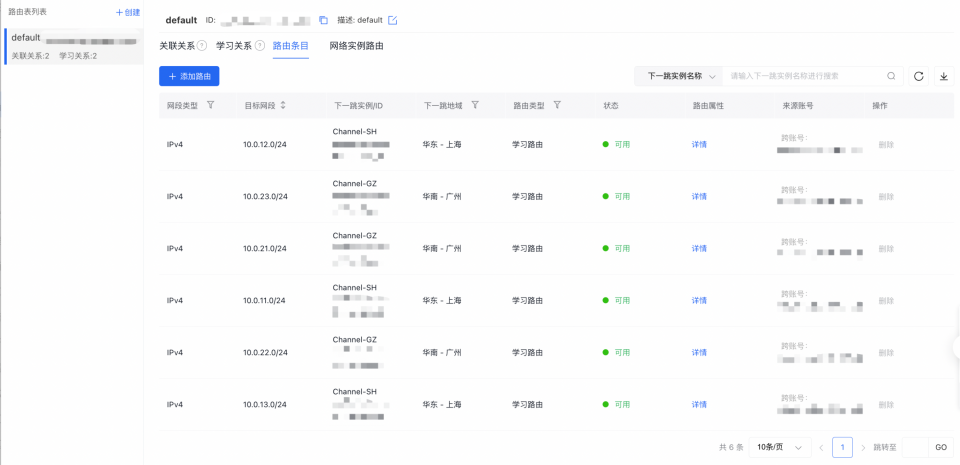
The CSN default route table learns the dedicated routes of the two dedicated channels, and the routes in the route table are as follows:
Step III: Purchase a bandwidth package and configure cross-region bandwidth
Since the interconnection between IDCs described here involves cross-region communication, a bandwidth package must be purchased alongside configuring cross-region bandwidth. For IDCs located within the same region, no bandwidth package is required.
- Purchase a bandwidth package. For specific operations, refer to Bandwidth Package Operations. For the bill type and price of the bandwidth package, refer to Product Pricing. After creation, the bandwidth package list in CSN is as follows:

- Configure cross-region bandwidth. For detailed steps, refer to the Cross-Region Bandwidth Operations documentation. Once completed, the cross-region bandwidth configurations are as follows:

Step IV: Test connectivity
- Log in to PC-SH under IDC-SH.
- Run the ping command to check connectivity with PC-GZ in IDC-GZ. A successful ping confirms the IDC-SH and IDC-GZ networks are connected.
Log in to PC-GZ in IDC-GZ.
- Run the ping command to check connectivity with PC-SH in IDC-SH. A successful ping confirms the IDC-GZ and IDC-SH networks are connected.