

Interconnecting IDCs and VPCs Across Different Regions via Dedicated Lines
Overview
Using dedicated physical lines, users can establish private network communication between their local data center (IDC) and Baidu AI Cloud's Virtual Private Cloud (VPC), enabling the creation of a hybrid cloud. This setup extends local IT infrastructures seamlessly onto Baidu AI Cloud, utilizing its vast compute, storage, network, and CDN resources to address business fluctuations and boost application stability.
Requirement scenarios
Building hybrid cloud solutions for enterprise users
The existing network infrastructure of enterprise users cannot meet the demands for flexible service expansion and redundancy/disaster recovery. The Express Tunnel (ET) product allows for the rapid creation of a hybrid cloud networking environment. Enterprises can deploy scalable services on Baidu AI Cloud while seamlessly integrating their current IDC operations through Express Tunnel (ET), eliminating migration risks while enhancing security and reducing costs.
Solution overview
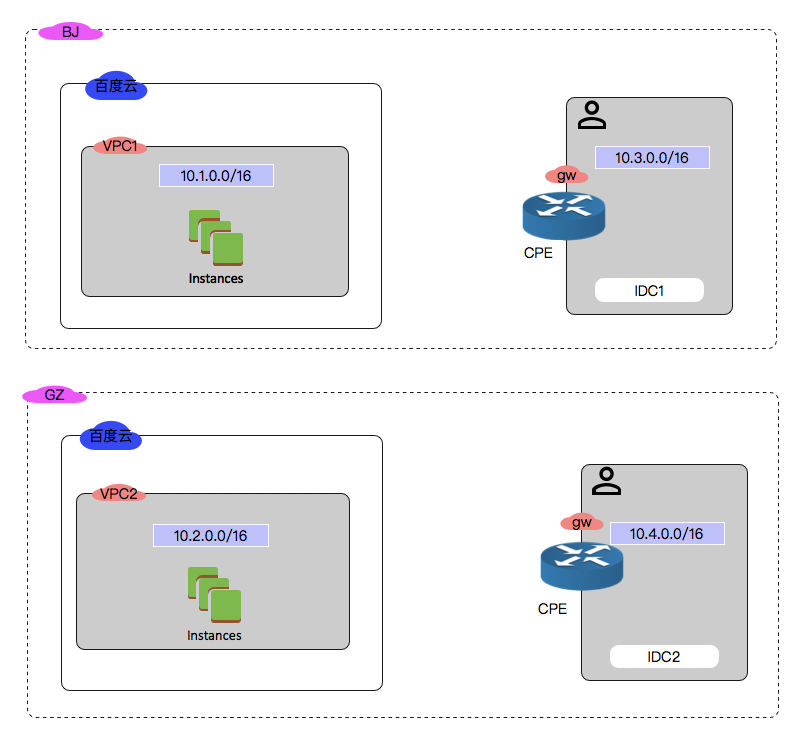
The network architecture for this case is as follows:
- The user operates independent IDCs in both Beijing and Guangzhou.
- The user has deployed cloud services in the Beijing and Guangzhou regions.
- Ensure that the VPC network segments and data center network segments in each region do not overlap.
The IP address ranges of each VPC and data center are listed in the table below.
| Network | IP address segment |
|---|---|
| Beijing VPC1 | 10.1.0.0/16 |
| Guangzhou VPC2 | 10.2.0.0/16 |
| Beijing IDC1 | 10.3.0.0/16 |
| Guangzhou IDC2 | 10.4.0.0/16 |
Configuration steps
Beijing IDC is connected to Beijing Baidu AI Cloud access point via Express Tunnel
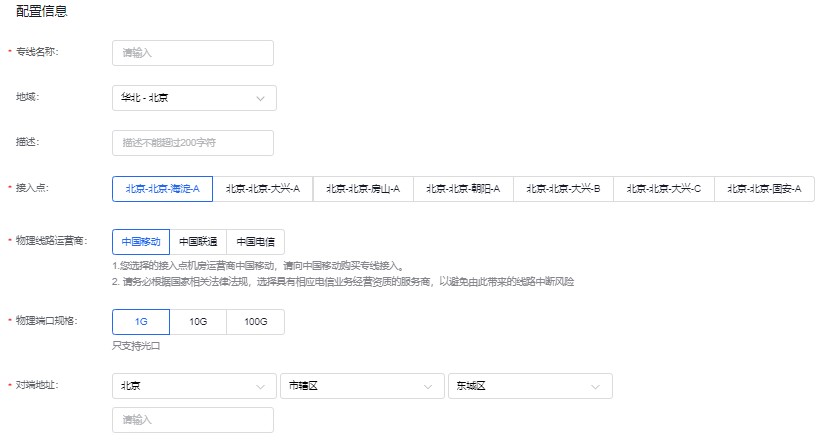
- Log in to the Baidu AI Cloud Console, go to Products & Services - Express Tunnel (ET) to reach the Physical Dedicated Line List page. Click on "Apply for a physical dedicated line" to access the Application page and submit your request. After review and approval by Baidu AI Cloud network engineers, the status of the physical dedicated line will update to "available."
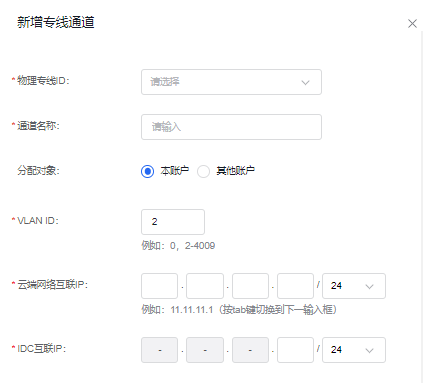
- Apply for a dedicated channel on the Physical Dedicated Line Instance Details page. Allocation target: The user ID associated with this dedicated channel. If the user is an Express Tunnel partner, enter the authorized user ID. Route parameter: 10.3.0.0/16. Once reviewed and approved by Baidu AI Cloud network engineers, and if no parameter conflicts are found, the dedicated channel status will update to "available."
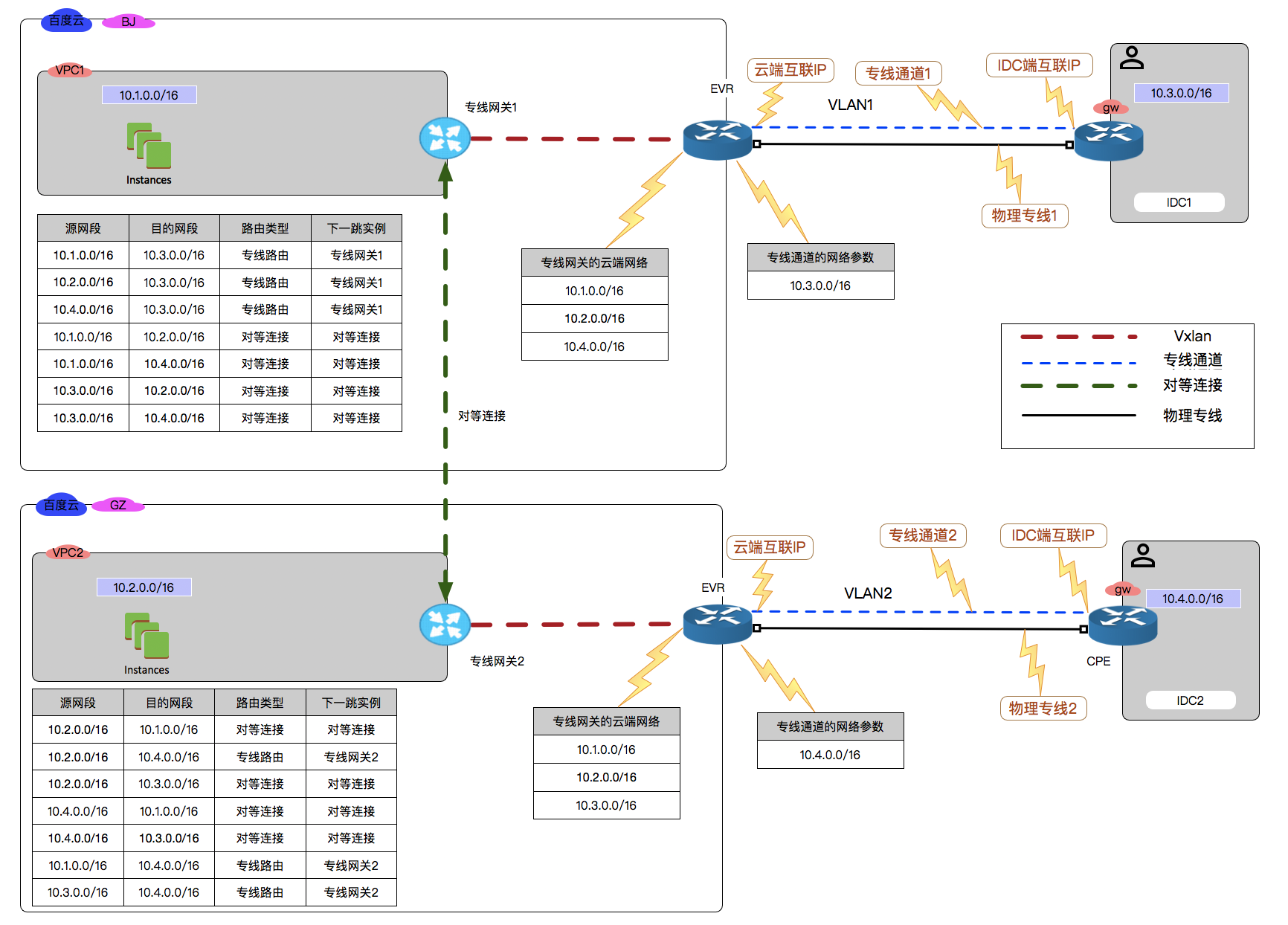
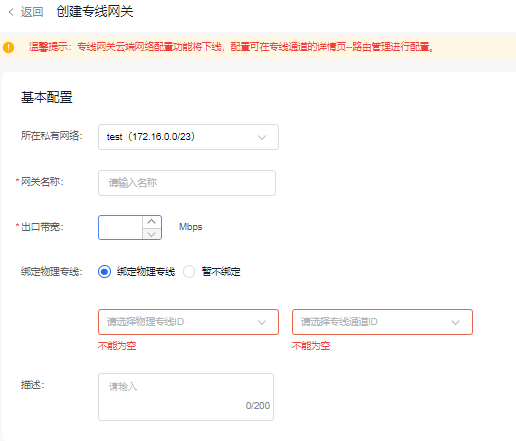
3. Create dedicated gateway and bind channels. Establish a dedicated gateway in Beijing VPC. Cloud network parameters translated to EVR represent the ingress from EVR to BVRouter into the VPC, therefore, Beijing VPC must be included here.
- Set up routing on the user's IDC1 side, configuring the gateway for IDC1.
| Destination network segment | Next hop |
|---|---|
| 10.1.0.0/16 | Cloud-side interconnection IP |
- Set up routing on the Baidu AI Cloud VPC1 side.
| Source network segment | Destination segment | Route type | Next-hop instance |
|---|---|---|---|
| 10.1.0.0/16 | 10.3.0.0/16 | Dedicated gateway | Dedicated gateway instance 1 |
- Perform a mutual PING test to verify connectivity between the virtual machine in the VPC and the IP in IDC1.
Guangzhou IDC is connected to Guangzhou Baidu AI Cloud access point via dedicated line
Configuration is same as [ Beijing IDC connecting to Beijing Baidu AI Cloud access point via Express Tunnel](ET/Typical Practices/Interconnecting IDCs and VPCs Across Different Regions via Dedicated Lines.md#Beijing IDC is connected to Beijing Baidu AI Cloud access point via Express Tunnel)
Establish peering connections between Beijing VPC1 and Guangzhou VPC2
Refer to the peering connection Operation Guide
Configure routing to achieve interconnection between IDC and VPC
- Set up routing on User IDC1.
| Destination network segment | Next hop |
|---|---|
| 10.1.0.0/16 | Cloud-side interconnection IP |
| 10.2.0.0/16 | Cloud-side interconnection IP |
| 10.4.0.0/16 | Cloud-side interconnection IP |
- Set up routing on User IDC2.
| Destination network segment | Next hop |
|---|---|
| 10.1.0.0/16 | Cloud-side interconnection IP |
| 10.2.0.0/16 | Cloud-side interconnection IP |
| 10.3.0.0/16 | Cloud-side interconnection IP |
- In Beijing VPC1, add routes for the dedicated line and peering connections to establish the cloud network.
Add VPC route
| Source network segment | Destination segment | Route type | Next-hop instance |
|---|---|---|---|
| 10.2.0.0/16 | 10.4.0.0/16 | Dedicated gateway | Dedicated Gateway 2 |
| 10.1.0.0/16 | 10.4.0.0/16 | Dedicated gateway | Dedicated Gateway 2 |
| 10.3.0.0/16 | 10.4.0.0/16 | Dedicated gateway | Dedicated Gateway 2 |
| 10.2.0.0/16 | 10.1.0.0/16 | Peering connections | Peering connections |
| 10.2.0.0/16 | 10.3.0.0/16 | Peering connections | Peering connections |
| 10.4.0.0/16 | 10.1.0.0/16 | Peering connections | Peering connections |
| 10.4.0.0/16 | 10.3.0.0/16 | Peering connections | Peering connections |
Add VPC route
| Cloud network |
|---|
| 10.1.0.0/16 |
| 10.2.0.0/16 |
| 10.4.0.0/16 |
- In Guangzhou VPC2, add routes for the dedicated line and peering connections to establish the cloud network.
Add VPC route
| Source network segment | Destination segment | Route type | Next-hop instance |
|---|---|---|---|
| 10.1.0.0/16 | 10.3.0.0/16 | Dedicated gateway | Dedicated Gateway 2 |
| 10.2.0.0/16 | 10.3.0.0/16 | Dedicated gateway | Dedicated Gateway 2 |
| 10.4.0.0/16 | 10.3.0.0/16 | Dedicated gateway | Dedicated Gateway 2 |
| 10.1.0.0/16 | 10.2.0.0/16 | Peering connections | Peering connections |
| 10.1.0.0/16 | 10.4.0.0/16 | Peering connections | Peering connections |
| 10.3.0.0/16 | 10.2.0.0/16 | Peering connections | Peering connections |
| 10.3.0.0/16 | 10.4.0.0/16 | Peering connections | Peering connections |
Add VPC route
| Cloud network |
|---|
| 10.1.0.0/16 |
| 10.2.0.0/16 |
| 10.3.0.0/16 |
- Conduct mutual PING tests to verify connectivity between Beijing VPC1, Guangzhou VPC2, Beijing IDC1, and Guangzhou IDC2.