

Add dedicated channel
Updated at:2025-11-11
Operation scenarios
After creating a physical dedicated line, you also need to create a dedicated channel and a dedicated gateway. Note: This article only describes the configuration steps for creating a regular dedicated channel. For steps to create a cross-account dedicated channel, refer to Add Cross-Account Dedicated Channel.
Prerequisites
- The user’s account must complete enterprise verification before purchasing Express Tunnel-related resources.
- The total of your account balance (i.e., cash balance) and available vouchers for purchasing dedicated channels must be no less than RMB 100. You can recharge your account in advance; for specific operations, refer to Recharge Instructions.
Operation steps
- Sign in to the Dedicated Channel Console.
- Click the "Add Dedicated Channel" button.
-
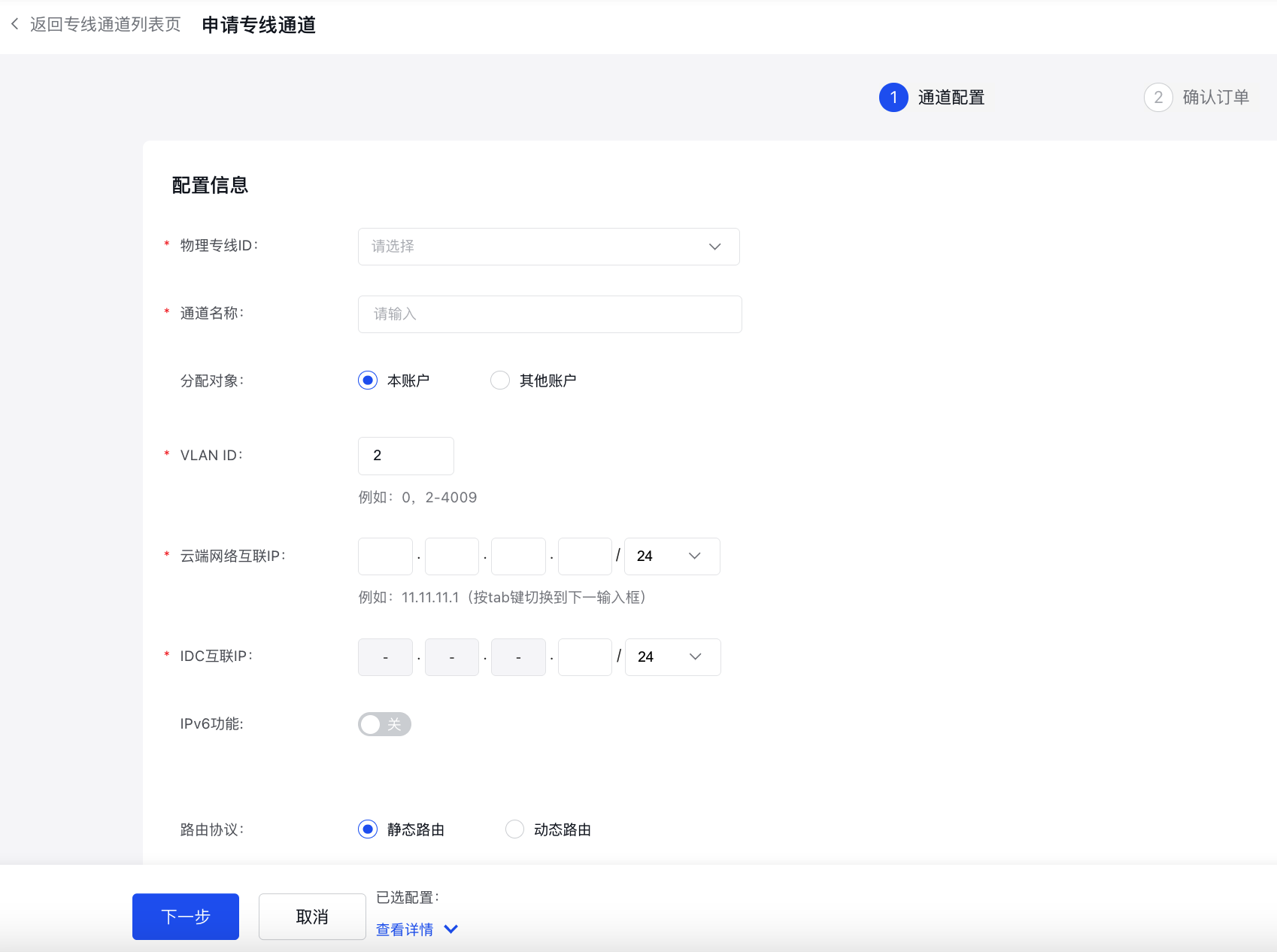
Use the table below as a guide to configure the dedicated channel.
Channel configuration
| Parameters | Description | Example |
| Configuration information | ||
|---|---|---|
| Physical dedicated line ID | Dropdown selection required: Choose the physical dedicated line ID that has already been created and is in an available status. Note: The physical dedicated line ID must belong to this account. | dcphy-xxxxxxxxxxxx |
| Channel name | Enter the name of the dedicated channel. Naming format: 1–65 characters, allowing uppercase/lowercase letters, numbers, Chinese characters, and special characters (-, _, /). The name must begin with a letter or a Chinese character. | test456 |
| Allocation object | This field is required. Options are "current account" (default) or "other accounts.\ | Current account |
| VLAN ID | The system default is set to 2, with an input range of 0, 2–4009. Note: VLAN 0 operates in Layer 3 mode, allowing only one dedicated channel per physical dedicated line. VLANs 2–4009 support trunk mode, which allows multiple dedicated channels under a single physical dedicated line. | 2 |
| Description | Optional, with a character length of 0-200. | For testing purposes |
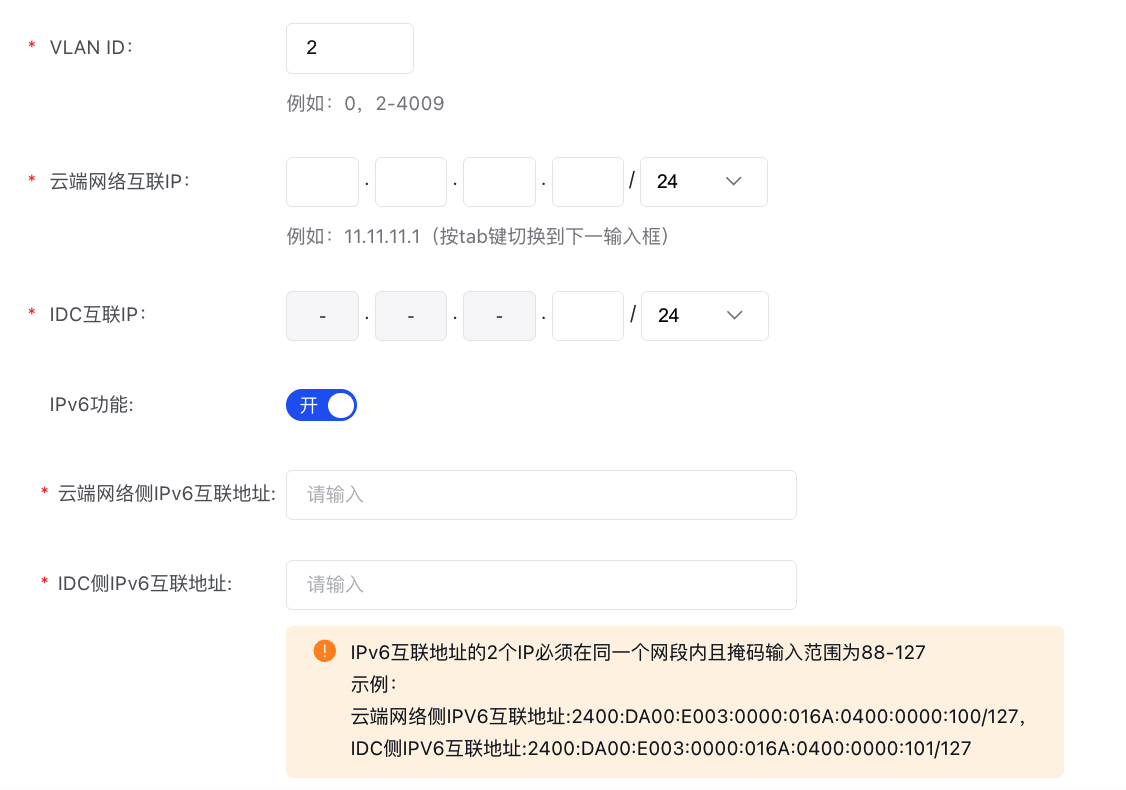
Interconnection IP
| Parameters | Description | Example |
| Cloud network interconnection IP | Enter the IPv4 interconnection IP address.
| The following network segments are prohibited: 0.0.0.0/24, 127.0.0.0/24, 255.255.255.0/24, 224.0.0.0–239.255.255.255, 240.0.0.0–255.255.255.254.|
| IDC interconnection IP | Enter the IPv4 interconnection IP address.
| The following network segments are prohibited: 0.0.0.0/24, 127.0.0.0/24, 255.255.255.0/24, 224.0.0.0–239.255.255.255, 240.0.0.0–255.255.255.254. |
| IPv6 function | Currently an allow list feature is available; submit a ticket to use the function | Enable |
| Cloud network IPv6 interconnection address | IPv6 functionality is disabled by default and cannot be configured. It can be set up after activation.
| Example: IPv6 interconnection address on cloud network side: 2400:DA00:E003:0000:016A:0400:0000:100/127, IPv6 interconnection address on IDC side: 2400:DA00:E003:0000:016A:0400:0000:101/127 |
| Cloud network IPv6 interconnection address | 2400:DA00:E003:0000:016A:0400:0000:101/127 |
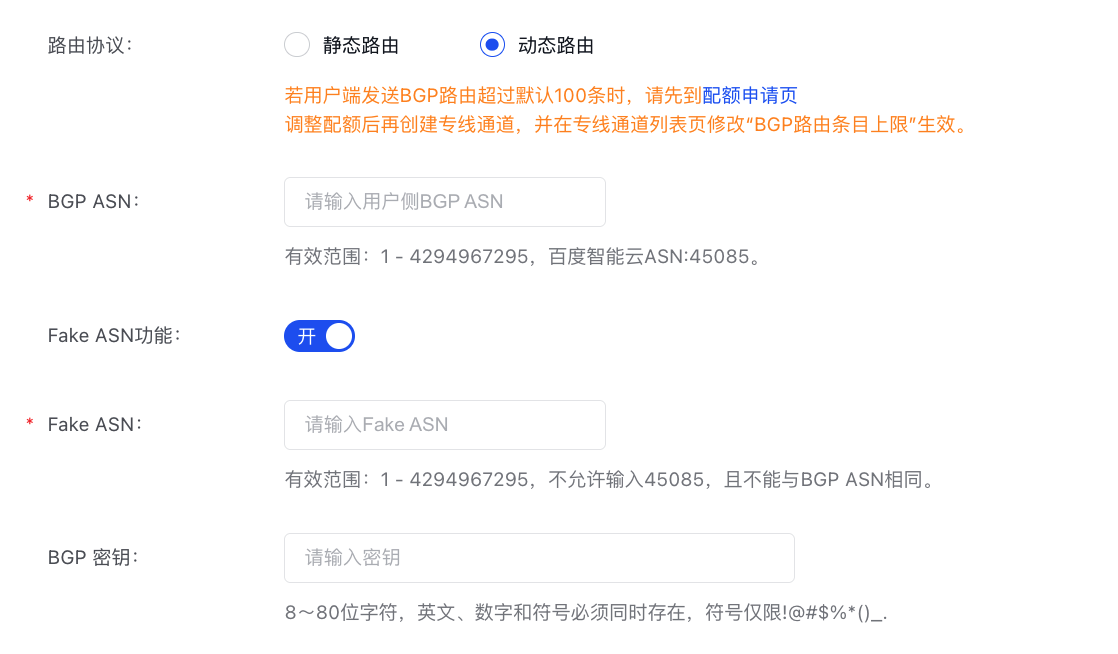
Routing information
| Parameters | Description | Example |
| Routing protocol | Supports both static routing (default) and dynamic routing, with dynamic routing based on the BGP protocol. | Dynamic routing |
| BGP ASN | Baidu AI Cloud’s BGP ASN is 45085. In the Baidu AI Cloud console, users need to input the BGP ASN of their IDC side, which must fall within the range 1 - 4294967295. | 65530 |
| Fake ASN function | Defaults to off and can be enabled manually. | Enable |
| Fake ASN | Valid range: 1 - 4294967295. The value 45085 is prohibited and must differ from the BGP ASN.
| Usage scenario: Client-side upgrades, ASN modifications. However, due to ASN changes, configurations on both PEER ends need to be updated, causing network interruptions during this process. If the local end is unwilling/unable to modify the ASN or does not want to expose its real AS, a FAKE ASN must be used (e.g., ASN100 is replaced with ASN200 locally, while the peer uses ASN300. In this case, FAKE ASN 200 can be configured on the local end).|
| BGP key | This parameter is displayed only when the routing type is set to "dynamic routing." Input the password for the BGP neighbor.
| The BGP key is sensitive information. Please store it securely to prevent loss or leakage.
Tag
| Parameters | Description | Example |
| Tag | A Tag consists of a tag key (key) and a tag value (value), which can be used to categorize and search for physical dedicated lines. *Click +Add Icon to add multiple tags; multiple tags can be added in a single operation. *The tag key (key) for multiple tags on the same dedicated channel cannot be duplicated, and each tag key (key) can only have one tag value (value). *Tag keys (key) and tag values (value) are case-sensitive. For example, Key=tag and Key=Tag are considered different Tag Keys. For more details, refer to Tag Management | key:test |
- Click Submit Order to complete the creation.
Subsequent operations
| Document link | Operation instructions |
| Static route configuration for dedicated channels | If the routing mode of the dedicated channel is "Static Route", you need to configure route entries for both cloud and on-premises directions on the route management interface of the dedicated channel, and also configure route entries in the VPC route table with the next hop set as the dedicated gateway. |
| Dynamic routing BGP configuration for dedicated channels | If the routing mode of the dedicated channel is "Dynamic Routing", you need to configure cloud direction route entries on the route management interface of the dedicated channel, and configure route entries in the VPC route table with the next hop set as the dedicated gateway. |
| Configure user-side routing and test connectivity | Configure routes on the switch of the on-premises IDC according to the actual line routing type and perform connectivity tests. |