Dedicated Channel IPv6 Feature Configuration

ET

  • API Reference
    • API function release records
    • Appendix
    • Common Request Headers and Response Headers
    • Dedicated Line Related Interfaces
      • Add dedicated channel routing parameters
      • Add dedicated channel user object
      • Apply for physical dedicated line
      • Associate dedicated channel
      • Create dedicated channel
      • Create routing rules of Dedicated channel
      • Delete dedicated channel
      • Delete routing rules of dedicated channel
      • Disable dedicated channel IPv6 function
      • Disassociate dedicated channel
      • Enable IPv6 function for the dedicated channel
      • Modify the dedicated channel routing rules
      • Query dedicated channel
      • Query dedicated line details
      • Query dedicated line list
      • Query the routing rules of the dedicated channel
      • Remove dedicated channel route parameters
      • Remove dedicated channel user object
      • Resubmit the dedicated channel
      • Update dedicated channel
      • Update physical dedicated line
    • Error code
    • General Description
    • Interface Overview
    • Overview
    • Service domain
  • FAQs
    • General Problems
  • Function Release Records
  • Getting Started Guide
    • Getting Started Guide
    • On-Premises IDC and Cloud VPC Interconnection
      • Add dedicated channel
      • Add network instance
      • Apply for physical dedicated line
      • Configure user-side routing and test connectivity
      • Create dedicated gateway
  • Operation guide
    • Dedicated channel
      • Add cross-account dedicated channel
      • Add dedicated channel
      • Dedicated Channel Cross-Account Authorization for Cloud Smart Network
      • Dedicated Channel IPv6 Feature Configuration
      • Delete dedicated channel
      • Dynamic routing BGP configuration for dedicated channels
      • Static route configuration for dedicated channels
    • Dedicated gateway
      • Create dedicated gateway
      • Dedicated Gateway
    • Identity and access management
    • Monitor and Operations
      • Alarm Strategy Description
      • Dedicated Channel Instance Diagnosis
      • Fault Drill
    • Physical dedicated line
      • Apply for physical dedicated line
      • Express Tunnel process
      • Manage Physical Dedicated Line
      • Operation preparation
  • Product billing
    • Billing Item Description
    • Charge
    • Expiration description
    • Overdue description
  • Product Description
    • Application scenarios
    • Dedicated Line Access Point Address
    • Product advantages
    • Usage restrictions
    • What Is Dedicated Line Access
  • SDK
    • GO SDK
      • Dedicated line
      • Exception handling
      • Initialization
      • Install the SDK Package
      • Overview
      • Version history
    • Java-SDK
      • Dedicated line
      • Exception handling
      • Initialization
      • Install the SDK Package
      • Overview
      • Version history
    • Python SDK
      • Dedicated line
      • Function Release Records
      • Initialization
      • Install the SDK Package
      • Overview
  • Service Level Agreement (SLA)
    • Service Level Agreement (SLA)
  • Typical Practices
    • Connecting On-Premises IDC to Cloud VPC via Multi-Line ECMP (Dynamic Routing)
    • Connecting On-Premises IDC to Cloud VPC via Multi-Line ECMP (Static Routing)
    • Connecting On-Premises IDC to Cloud VPC via Primary and Backup Dedicated Lines (Dynamic Routing)
    • Connecting On-Premises IDC to Cloud VPC via Primary and Backup Dedicated Lines (Static Routing)
    • Interconnecting IDCs and VPCs Across Different Regions via Dedicated Lines
All documents
menu
No results found, please re-enter

ET

  • API Reference
    • API function release records
    • Appendix
    • Common Request Headers and Response Headers
    • Dedicated Line Related Interfaces
      • Add dedicated channel routing parameters
      • Add dedicated channel user object
      • Apply for physical dedicated line
      • Associate dedicated channel
      • Create dedicated channel
      • Create routing rules of Dedicated channel
      • Delete dedicated channel
      • Delete routing rules of dedicated channel
      • Disable dedicated channel IPv6 function
      • Disassociate dedicated channel
      • Enable IPv6 function for the dedicated channel
      • Modify the dedicated channel routing rules
      • Query dedicated channel
      • Query dedicated line details
      • Query dedicated line list
      • Query the routing rules of the dedicated channel
      • Remove dedicated channel route parameters
      • Remove dedicated channel user object
      • Resubmit the dedicated channel
      • Update dedicated channel
      • Update physical dedicated line
    • Error code
    • General Description
    • Interface Overview
    • Overview
    • Service domain
  • FAQs
    • General Problems
  • Function Release Records
  • Getting Started Guide
    • Getting Started Guide
    • On-Premises IDC and Cloud VPC Interconnection
      • Add dedicated channel
      • Add network instance
      • Apply for physical dedicated line
      • Configure user-side routing and test connectivity
      • Create dedicated gateway
  • Operation guide
    • Dedicated channel
      • Add cross-account dedicated channel
      • Add dedicated channel
      • Dedicated Channel Cross-Account Authorization for Cloud Smart Network
      • Dedicated Channel IPv6 Feature Configuration
      • Delete dedicated channel
      • Dynamic routing BGP configuration for dedicated channels
      • Static route configuration for dedicated channels
    • Dedicated gateway
      • Create dedicated gateway
      • Dedicated Gateway
    • Identity and access management
    • Monitor and Operations
      • Alarm Strategy Description
      • Dedicated Channel Instance Diagnosis
      • Fault Drill
    • Physical dedicated line
      • Apply for physical dedicated line
      • Express Tunnel process
      • Manage Physical Dedicated Line
      • Operation preparation
  • Product billing
    • Billing Item Description
    • Charge
    • Expiration description
    • Overdue description
  • Product Description
    • Application scenarios
    • Dedicated Line Access Point Address
    • Product advantages
    • Usage restrictions
    • What Is Dedicated Line Access
  • SDK
    • GO SDK
      • Dedicated line
      • Exception handling
      • Initialization
      • Install the SDK Package
      • Overview
      • Version history
    • Java-SDK
      • Dedicated line
      • Exception handling
      • Initialization
      • Install the SDK Package
      • Overview
      • Version history
    • Python SDK
      • Dedicated line
      • Function Release Records
      • Initialization
      • Install the SDK Package
      • Overview
  • Service Level Agreement (SLA)
    • Service Level Agreement (SLA)
  • Typical Practices
    • Connecting On-Premises IDC to Cloud VPC via Multi-Line ECMP (Dynamic Routing)
    • Connecting On-Premises IDC to Cloud VPC via Multi-Line ECMP (Static Routing)
    • Connecting On-Premises IDC to Cloud VPC via Primary and Backup Dedicated Lines (Dynamic Routing)
    • Connecting On-Premises IDC to Cloud VPC via Primary and Backup Dedicated Lines (Static Routing)
    • Interconnecting IDCs and VPCs Across Different Regions via Dedicated Lines
  • Document center
  • arrow
  • ET
  • arrow
  • Operation guide
  • arrow
  • Dedicated channel
  • arrow
  • Dedicated Channel IPv6 Feature Configuration

Dedicated Channel IPv6 Feature Configuration

Updated at:2025-11-11

You can enable the IPv6 function after the dedicated channel is successfully created. Only when the IPv6 function of the dedicated channel is enabled can the dedicated gateway bound to the dedicated channel use the IPv6 function.

Note: Once the IPv6 function is enabled, it cannot be disabled temporarily. For example: Dedicated channels in bound or associated states do not support disabling IPv6.

  1. Sign in to the Dedicated Channel Console.
  2. In the dedicated channel list, click the Operation column of the target dedicated channel, then select Edit IPv6.
  3. In the pop-up Edit IPv6 Parameters dialog box, toggle on the switch for the IPv6 function to enable it.
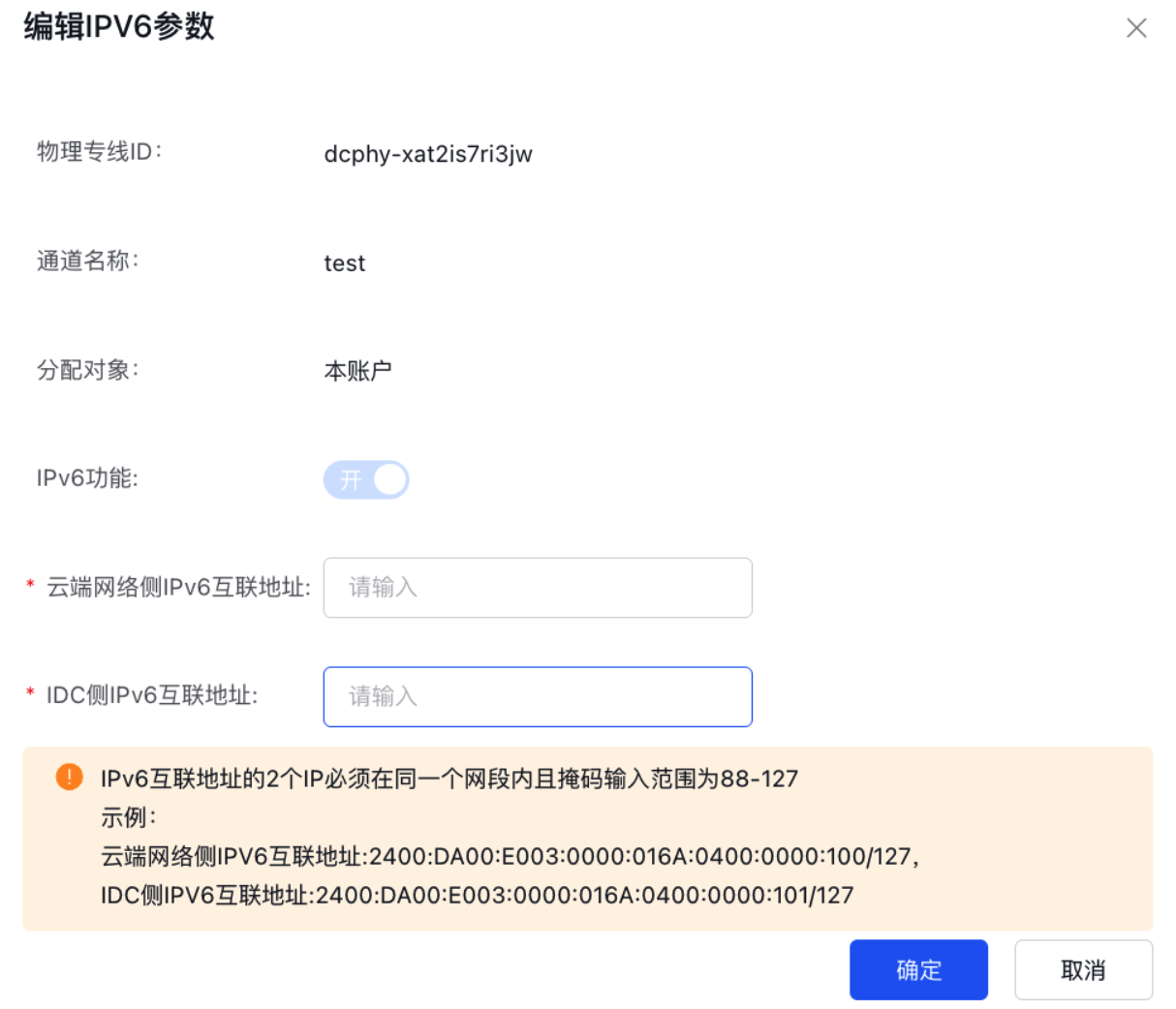
image.png

  1. In the pop-up dialog box, enter the IPv6 interconnection address, then click OK to complete the operation.

Previous
Dedicated Channel Cross-Account Authorization for Cloud Smart Network
Next
Delete dedicated channel