Charge

ET

  • API Reference
    • API function release records
    • Appendix
    • Common Request Headers and Response Headers
    • Dedicated Line Related Interfaces
      • Add dedicated channel routing parameters
      • Add dedicated channel user object
      • Apply for physical dedicated line
      • Associate dedicated channel
      • Create dedicated channel
      • Create routing rules of Dedicated channel
      • Delete dedicated channel
      • Delete routing rules of dedicated channel
      • Disable dedicated channel IPv6 function
      • Disassociate dedicated channel
      • Enable IPv6 function for the dedicated channel
      • Modify the dedicated channel routing rules
      • Query dedicated channel
      • Query dedicated line details
      • Query dedicated line list
      • Query the routing rules of the dedicated channel
      • Remove dedicated channel route parameters
      • Remove dedicated channel user object
      • Resubmit the dedicated channel
      • Update dedicated channel
      • Update physical dedicated line
    • Error code
    • General Description
    • Interface Overview
    • Overview
    • Service domain
  • FAQs
    • General Problems
  • Function Release Records
  • Getting Started Guide
    • Getting Started Guide
    • On-Premises IDC and Cloud VPC Interconnection
      • Add dedicated channel
      • Add network instance
      • Apply for physical dedicated line
      • Configure user-side routing and test connectivity
      • Create dedicated gateway
  • Operation guide
    • Dedicated channel
      • Add cross-account dedicated channel
      • Add dedicated channel
      • Dedicated Channel Cross-Account Authorization for Cloud Smart Network
      • Dedicated Channel IPv6 Feature Configuration
      • Delete dedicated channel
      • Dynamic routing BGP configuration for dedicated channels
      • Static route configuration for dedicated channels
    • Dedicated gateway
      • Create dedicated gateway
      • Dedicated Gateway
    • Identity and access management
    • Monitor and Operations
      • Alarm Strategy Description
      • Dedicated Channel Instance Diagnosis
      • Fault Drill
    • Physical dedicated line
      • Apply for physical dedicated line
      • Express Tunnel process
      • Manage Physical Dedicated Line
      • Operation preparation
  • Product billing
    • Billing Item Description
    • Charge
    • Expiration description
    • Overdue description
  • Product Description
    • Application scenarios
    • Dedicated Line Access Point Address
    • Product advantages
    • Usage restrictions
    • What Is Dedicated Line Access
  • SDK
    • GO SDK
      • Dedicated line
      • Exception handling
      • Initialization
      • Install the SDK Package
      • Overview
      • Version history
    • Java-SDK
      • Dedicated line
      • Exception handling
      • Initialization
      • Install the SDK Package
      • Overview
      • Version history
    • Python SDK
      • Dedicated line
      • Function Release Records
      • Initialization
      • Install the SDK Package
      • Overview
  • Service Level Agreement (SLA)
    • Service Level Agreement (SLA)
  • Typical Practices
    • Connecting On-Premises IDC to Cloud VPC via Multi-Line ECMP (Dynamic Routing)
    • Connecting On-Premises IDC to Cloud VPC via Multi-Line ECMP (Static Routing)
    • Connecting On-Premises IDC to Cloud VPC via Primary and Backup Dedicated Lines (Dynamic Routing)
    • Connecting On-Premises IDC to Cloud VPC via Primary and Backup Dedicated Lines (Static Routing)
    • Interconnecting IDCs and VPCs Across Different Regions via Dedicated Lines
All documents
menu
No results found, please re-enter

ET

  • API Reference
    • API function release records
    • Appendix
    • Common Request Headers and Response Headers
    • Dedicated Line Related Interfaces
      • Add dedicated channel routing parameters
      • Add dedicated channel user object
      • Apply for physical dedicated line
      • Associate dedicated channel
      • Create dedicated channel
      • Create routing rules of Dedicated channel
      • Delete dedicated channel
      • Delete routing rules of dedicated channel
      • Disable dedicated channel IPv6 function
      • Disassociate dedicated channel
      • Enable IPv6 function for the dedicated channel
      • Modify the dedicated channel routing rules
      • Query dedicated channel
      • Query dedicated line details
      • Query dedicated line list
      • Query the routing rules of the dedicated channel
      • Remove dedicated channel route parameters
      • Remove dedicated channel user object
      • Resubmit the dedicated channel
      • Update dedicated channel
      • Update physical dedicated line
    • Error code
    • General Description
    • Interface Overview
    • Overview
    • Service domain
  • FAQs
    • General Problems
  • Function Release Records
  • Getting Started Guide
    • Getting Started Guide
    • On-Premises IDC and Cloud VPC Interconnection
      • Add dedicated channel
      • Add network instance
      • Apply for physical dedicated line
      • Configure user-side routing and test connectivity
      • Create dedicated gateway
  • Operation guide
    • Dedicated channel
      • Add cross-account dedicated channel
      • Add dedicated channel
      • Dedicated Channel Cross-Account Authorization for Cloud Smart Network
      • Dedicated Channel IPv6 Feature Configuration
      • Delete dedicated channel
      • Dynamic routing BGP configuration for dedicated channels
      • Static route configuration for dedicated channels
    • Dedicated gateway
      • Create dedicated gateway
      • Dedicated Gateway
    • Identity and access management
    • Monitor and Operations
      • Alarm Strategy Description
      • Dedicated Channel Instance Diagnosis
      • Fault Drill
    • Physical dedicated line
      • Apply for physical dedicated line
      • Express Tunnel process
      • Manage Physical Dedicated Line
      • Operation preparation
  • Product billing
    • Billing Item Description
    • Charge
    • Expiration description
    • Overdue description
  • Product Description
    • Application scenarios
    • Dedicated Line Access Point Address
    • Product advantages
    • Usage restrictions
    • What Is Dedicated Line Access
  • SDK
    • GO SDK
      • Dedicated line
      • Exception handling
      • Initialization
      • Install the SDK Package
      • Overview
      • Version history
    • Java-SDK
      • Dedicated line
      • Exception handling
      • Initialization
      • Install the SDK Package
      • Overview
      • Version history
    • Python SDK
      • Dedicated line
      • Function Release Records
      • Initialization
      • Install the SDK Package
      • Overview
  • Service Level Agreement (SLA)
    • Service Level Agreement (SLA)
  • Typical Practices
    • Connecting On-Premises IDC to Cloud VPC via Multi-Line ECMP (Dynamic Routing)
    • Connecting On-Premises IDC to Cloud VPC via Multi-Line ECMP (Static Routing)
    • Connecting On-Premises IDC to Cloud VPC via Primary and Backup Dedicated Lines (Dynamic Routing)
    • Connecting On-Premises IDC to Cloud VPC via Primary and Backup Dedicated Lines (Static Routing)
    • Interconnecting IDCs and VPCs Across Different Regions via Dedicated Lines
  • Document center
  • arrow
  • ET
  • arrow
  • Product billing
  • arrow
  • Charge
Table of contents on this page
  • Charge item
  • Charge
  • Resource price
  • Bill query

Charge

Updated at:2025-11-11

You can use the functions of the Express Tunnel product to realize data interconnection between the on-premises Internet Data Center (IDC) and the cloud-based Virtual Private Cloud (VPC). Using Baidu AI Cloud Express Tunnel product requires payment of relevant fees. Among them, Baidu AI Cloud charges fees related to the use of the Express Tunnel product, and this article introduces the details of this part of the fees.

Charge item

When using Baidu AI Cloud Express Tunnel product, the fees charged by Baidu AI Cloud and the fees not charged by Baidu AI Cloud are as shown in the figure below. For more introductions to billing items and billing formulas, refer to Billing Item Instructions.
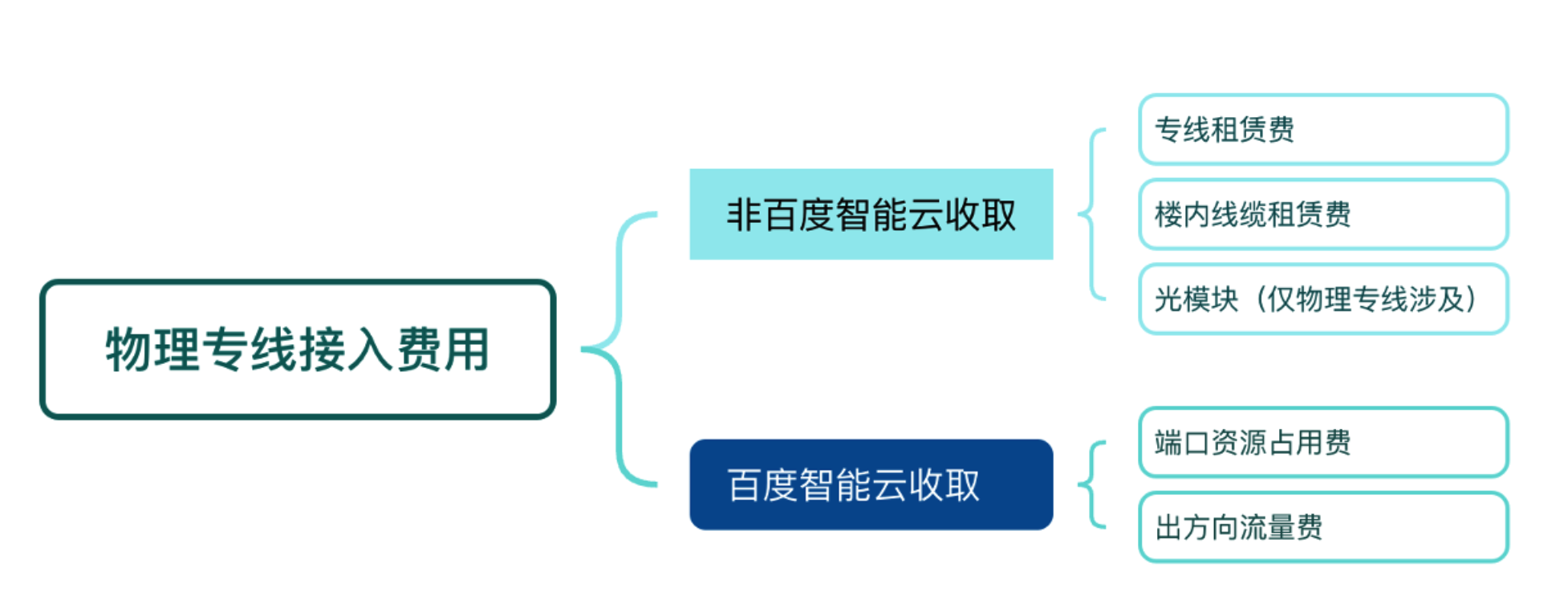
image.png

Charge

Fee typeCharge itemPhysical dedicated line billing instructionsCross account dedicated channel billing instructions Charge type
Fees not charged by Baidu AI CloudLine deployment feeThe fee for deploying optical cables between your on-premises IDC and the Baidu AI Cloud access point is charged by the third-party ISP that actually provides services for you. You need to consult the ISP independently about the relevant price and line planning.The fee for deploying lines between your on-premises IDC and the Baidu AI Cloud partner (also called ISP) you selected is charged by the Baidu AI Cloud partner you chose. You need to contact the partner independently to consult the price.Subject to the standards of the actual charging party
In-building cable rental feeWhen your ISP lays optical cables and enters the equipment room of a third-party property access point that is not Baidu AI Cloud’s property, you may need to pay the in-building cable rental fee to the third-party property.Subject to the standards of the actual charging party
Optical moduleBaidu AI Cloud only provides 1G/10G/100G/400G single-mode optical modules (modules cannot be provided if the data transmission distance exceeds 10 km). Therefore, customers must prepare their own client-side modules.Not applicableSubject to the standards of the actual charging party
Fees charged by Baidu AI CloudPort resource occupancy feeCharged based on the specification of the physical dedicated line port. Currently, only the subscription billing method is supported.Relevant fees are charged by the Baidu AI Cloud partner you chose. You need to contact the partner independently to consult the price.Subscription
Egress traffic feeCharged based on the total traffic of the dedicated channel in the egress direction. Only the egress traffic fee is charged, and the ingress traffic is free. Currently, only the pay-as-you-go billing method is supported.Baidu AI Cloud currently offers a preferential policy of waiving the egress traffic fee for newly added dedicated lines.Pay-as-you-go

Description

The port resource occupancy fee and egress traffic fee are both mandatory billing items for the Express Tunnel product. Only when both the port resource and egress traffic services are in the available state can the Express Tunnel product be used normally.

Resource price

You can view the port resource occupancy fee and egress traffic fee on the Price Details page. The price details are for reference only; the specific fee shall be subject to the actual order result in the Express Tunnel Console.

Bill query

You can query the bill information of the cloud resources purchased under your account. You can also query bill details by configuring custom fields, filtering different statistical items and statistical cycles, etc., and export the full-field bill data under the required conditions according to your own needs. For detailed operations, refer to Bill Management.

Previous
Billing Item Description
Next
Expiration description