Add network instance

ET

  • API Reference
    • API function release records
    • Appendix
    • Common Request Headers and Response Headers
    • Dedicated Line Related Interfaces
      • Add dedicated channel routing parameters
      • Add dedicated channel user object
      • Apply for physical dedicated line
      • Associate dedicated channel
      • Create dedicated channel
      • Create routing rules of Dedicated channel
      • Delete dedicated channel
      • Delete routing rules of dedicated channel
      • Disable dedicated channel IPv6 function
      • Disassociate dedicated channel
      • Enable IPv6 function for the dedicated channel
      • Modify the dedicated channel routing rules
      • Query dedicated channel
      • Query dedicated line details
      • Query dedicated line list
      • Query the routing rules of the dedicated channel
      • Remove dedicated channel route parameters
      • Remove dedicated channel user object
      • Resubmit the dedicated channel
      • Update dedicated channel
      • Update physical dedicated line
    • Error code
    • General Description
    • Interface Overview
    • Overview
    • Service domain
  • FAQs
    • General Problems
  • Function Release Records
  • Getting Started Guide
    • Getting Started Guide
    • On-Premises IDC and Cloud VPC Interconnection
      • Add dedicated channel
      • Add network instance
      • Apply for physical dedicated line
      • Configure user-side routing and test connectivity
      • Create dedicated gateway
  • Operation guide
    • Dedicated channel
      • Add cross-account dedicated channel
      • Add dedicated channel
      • Dedicated Channel Cross-Account Authorization for Cloud Smart Network
      • Dedicated Channel IPv6 Feature Configuration
      • Delete dedicated channel
      • Dynamic routing BGP configuration for dedicated channels
      • Static route configuration for dedicated channels
    • Dedicated gateway
      • Create dedicated gateway
      • Dedicated Gateway
    • Identity and access management
    • Monitor and Operations
      • Alarm Strategy Description
      • Dedicated Channel Instance Diagnosis
      • Fault Drill
    • Physical dedicated line
      • Apply for physical dedicated line
      • Express Tunnel process
      • Manage Physical Dedicated Line
      • Operation preparation
  • Product billing
    • Billing Item Description
    • Charge
    • Expiration description
    • Overdue description
  • Product Description
    • Application scenarios
    • Dedicated Line Access Point Address
    • Product advantages
    • Usage restrictions
    • What Is Dedicated Line Access
  • SDK
    • GO SDK
      • Dedicated line
      • Exception handling
      • Initialization
      • Install the SDK Package
      • Overview
      • Version history
    • Java-SDK
      • Dedicated line
      • Exception handling
      • Initialization
      • Install the SDK Package
      • Overview
      • Version history
    • Python SDK
      • Dedicated line
      • Function Release Records
      • Initialization
      • Install the SDK Package
      • Overview
  • Service Level Agreement (SLA)
    • Service Level Agreement (SLA)
  • Typical Practices
    • Connecting On-Premises IDC to Cloud VPC via Multi-Line ECMP (Dynamic Routing)
    • Connecting On-Premises IDC to Cloud VPC via Multi-Line ECMP (Static Routing)
    • Connecting On-Premises IDC to Cloud VPC via Primary and Backup Dedicated Lines (Dynamic Routing)
    • Connecting On-Premises IDC to Cloud VPC via Primary and Backup Dedicated Lines (Static Routing)
    • Interconnecting IDCs and VPCs Across Different Regions via Dedicated Lines
All documents
menu
No results found, please re-enter

ET

  • API Reference
    • API function release records
    • Appendix
    • Common Request Headers and Response Headers
    • Dedicated Line Related Interfaces
      • Add dedicated channel routing parameters
      • Add dedicated channel user object
      • Apply for physical dedicated line
      • Associate dedicated channel
      • Create dedicated channel
      • Create routing rules of Dedicated channel
      • Delete dedicated channel
      • Delete routing rules of dedicated channel
      • Disable dedicated channel IPv6 function
      • Disassociate dedicated channel
      • Enable IPv6 function for the dedicated channel
      • Modify the dedicated channel routing rules
      • Query dedicated channel
      • Query dedicated line details
      • Query dedicated line list
      • Query the routing rules of the dedicated channel
      • Remove dedicated channel route parameters
      • Remove dedicated channel user object
      • Resubmit the dedicated channel
      • Update dedicated channel
      • Update physical dedicated line
    • Error code
    • General Description
    • Interface Overview
    • Overview
    • Service domain
  • FAQs
    • General Problems
  • Function Release Records
  • Getting Started Guide
    • Getting Started Guide
    • On-Premises IDC and Cloud VPC Interconnection
      • Add dedicated channel
      • Add network instance
      • Apply for physical dedicated line
      • Configure user-side routing and test connectivity
      • Create dedicated gateway
  • Operation guide
    • Dedicated channel
      • Add cross-account dedicated channel
      • Add dedicated channel
      • Dedicated Channel Cross-Account Authorization for Cloud Smart Network
      • Dedicated Channel IPv6 Feature Configuration
      • Delete dedicated channel
      • Dynamic routing BGP configuration for dedicated channels
      • Static route configuration for dedicated channels
    • Dedicated gateway
      • Create dedicated gateway
      • Dedicated Gateway
    • Identity and access management
    • Monitor and Operations
      • Alarm Strategy Description
      • Dedicated Channel Instance Diagnosis
      • Fault Drill
    • Physical dedicated line
      • Apply for physical dedicated line
      • Express Tunnel process
      • Manage Physical Dedicated Line
      • Operation preparation
  • Product billing
    • Billing Item Description
    • Charge
    • Expiration description
    • Overdue description
  • Product Description
    • Application scenarios
    • Dedicated Line Access Point Address
    • Product advantages
    • Usage restrictions
    • What Is Dedicated Line Access
  • SDK
    • GO SDK
      • Dedicated line
      • Exception handling
      • Initialization
      • Install the SDK Package
      • Overview
      • Version history
    • Java-SDK
      • Dedicated line
      • Exception handling
      • Initialization
      • Install the SDK Package
      • Overview
      • Version history
    • Python SDK
      • Dedicated line
      • Function Release Records
      • Initialization
      • Install the SDK Package
      • Overview
  • Service Level Agreement (SLA)
    • Service Level Agreement (SLA)
  • Typical Practices
    • Connecting On-Premises IDC to Cloud VPC via Multi-Line ECMP (Dynamic Routing)
    • Connecting On-Premises IDC to Cloud VPC via Multi-Line ECMP (Static Routing)
    • Connecting On-Premises IDC to Cloud VPC via Primary and Backup Dedicated Lines (Dynamic Routing)
    • Connecting On-Premises IDC to Cloud VPC via Primary and Backup Dedicated Lines (Static Routing)
    • Interconnecting IDCs and VPCs Across Different Regions via Dedicated Lines
  • Document center
  • arrow
  • ET
  • arrow
  • Getting Started Guide
  • arrow
  • On-Premises IDC and Cloud VPC Interconnection
  • arrow
  • Add network instance
Table of contents on this page
  • Operation scenarios
  • Prerequisites
  • Operation steps
  • Subsequent operations

Add network instance

Updated at:2025-11-11

Operation scenarios

Users can integrate network instances to enable interconnection, such as combining the virtual private cloud and dedicated channel into the same CSN Instance, to establish network connectivity between the virtual private cloud and the dedicated channel.

  • Note: This applies when adding a dedicated channel to the Cloud Smart Network. This operation is optional during dedicated line creation and can be performed based on user needs.

Prerequisites

Cloud smart network instance CSN-123 has been created with virtual private cloud VPC-123 added for communication. For specific operations, refer to Create CSN Instance.

Operation steps

  1. Sign in to the CSN Instance Console.
  2. Click on the name of the created CSN Instance.
  3. In the left navigation bar, select the "Network Instance" tab.
  4. Click the "Add Network Instance" button to access the Add Network Instance page, and configure the network instance according to the provided table below.
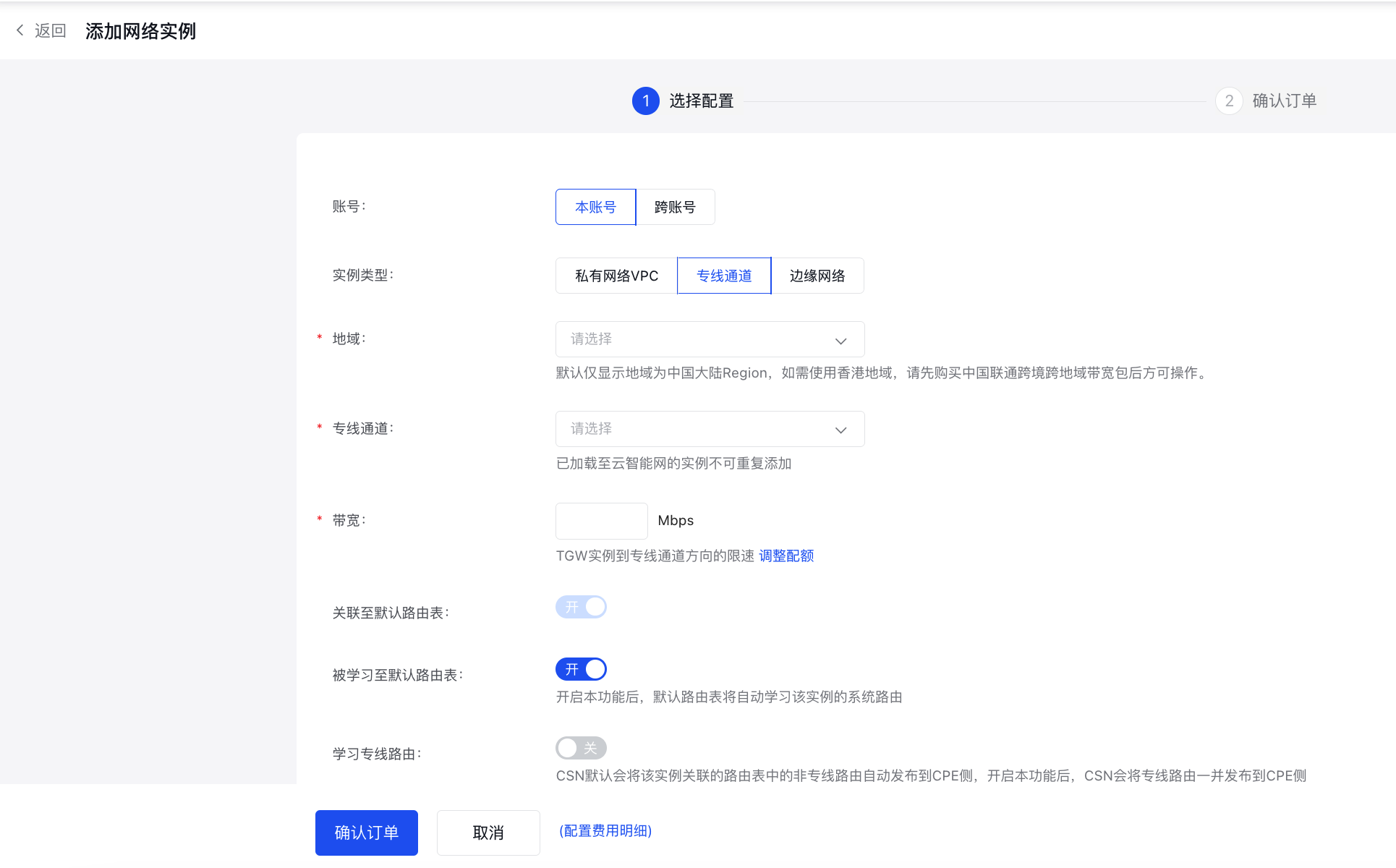
image.png

Edge Network: Bandwidth is limited from the virtual private cloud (VPC) to the TGW instance.
ParametersDescription
AccountUsed to select whether the resource bound to this network instance belongs to your own account or another account. If the resource to be bound is not under your account, select Cross-Account and enter the account ID of the resource owner below.
Instance typeSelect the network instance type to add:
  • Virtual Private Cloud (VPC): The network instance is linked to a VPC. You will need to configure the region, VPC ID, and bandwidth during subsequent steps.
  • Dedicated Channel: The network instance is linked to an ET dedicated channel. In the following steps, you'll configure the region, dedicated channel ID, and bandwidth.
  • Edge Network: The network instance is linked to an edge network VPC. In subsequent steps, you'll choose the region, edge VPC, and bandwidth.

RegionChoose the region where the network instance you want to add is located.
Network instanceSelect the network instance to be added.
Bandwidth
  • Virtual Private Cloud (VPC): Bandwidth is limited from the virtual private cloud (VPC) to the TGW instance.
  • Dedicated Channel: Bandwidth is limited in the direction from the TGW instance to the dedicated channel.
  • Route learning granularity (supported for VPC and edge network types)Define the granularity at which the Cloud Smart Network learns routes from the network instance. You can choose between VPC or Subnet.
    Associate with default route tableDecide whether to associate this network instance with the default CSN route table. This is enabled by default: VPC network instances allow disabling this option, but dedicated channel network instances do not.
    Learned by default route tableChoose whether the default route table should learn routes from this network instance. This is enabled by default: When enabled, the default route table will automatically learn the system routes of this instance.
    Automatically configure routes pointing to TGW for the instance (supported for VPC and edge network types)Enabled by default: Upon enabling, the system automatically adds three routes (10.0.0.0/8, 172.16.0.0/12, 192.168.0.0/16) to the instance's route table, directing them to the TGW.
    Learn dedicated line routes (supported for dedicated channel type)This option is available only when the instance type is set to "dedicated channel" and is disabled by default. By default, CSN advertises non-dedicated line routes in the route table tied to this instance to the CPE side. Enabling this option allows CSN to also advertise dedicated line routes to the CPE side.
    • Description Sample values are for reference only and have no practical meaning.
    1. Click Confirm Order button to complete addition. The dedicated channel test456 can now communicate with virtual private cloud VPC-123 via cloud smart network CSN-123.

    Subsequent operations

    • Configure user-side routing and test connectivity

    Previous
    Add dedicated channel
    Next
    Apply for physical dedicated line