What Is Dedicated Line Access

ET

  • API Reference
    • API function release records
    • Appendix
    • Common Request Headers and Response Headers
    • Dedicated Line Related Interfaces
      • Add dedicated channel routing parameters
      • Add dedicated channel user object
      • Apply for physical dedicated line
      • Associate dedicated channel
      • Create dedicated channel
      • Create routing rules of Dedicated channel
      • Delete dedicated channel
      • Delete routing rules of dedicated channel
      • Disable dedicated channel IPv6 function
      • Disassociate dedicated channel
      • Enable IPv6 function for the dedicated channel
      • Modify the dedicated channel routing rules
      • Query dedicated channel
      • Query dedicated line details
      • Query dedicated line list
      • Query the routing rules of the dedicated channel
      • Remove dedicated channel route parameters
      • Remove dedicated channel user object
      • Resubmit the dedicated channel
      • Update dedicated channel
      • Update physical dedicated line
    • Error code
    • General Description
    • Interface Overview
    • Overview
    • Service domain
  • FAQs
    • General Problems
  • Function Release Records
  • Getting Started Guide
    • Getting Started Guide
    • On-Premises IDC and Cloud VPC Interconnection
      • Add dedicated channel
      • Add network instance
      • Apply for physical dedicated line
      • Configure user-side routing and test connectivity
      • Create dedicated gateway
  • Operation guide
    • Dedicated channel
      • Add cross-account dedicated channel
      • Add dedicated channel
      • Dedicated Channel Cross-Account Authorization for Cloud Smart Network
      • Dedicated Channel IPv6 Feature Configuration
      • Delete dedicated channel
      • Dynamic routing BGP configuration for dedicated channels
      • Static route configuration for dedicated channels
    • Dedicated gateway
      • Create dedicated gateway
      • Dedicated Gateway
    • Identity and access management
    • Monitor and Operations
      • Alarm Strategy Description
      • Dedicated Channel Instance Diagnosis
      • Fault Drill
    • Physical dedicated line
      • Apply for physical dedicated line
      • Express Tunnel process
      • Manage Physical Dedicated Line
      • Operation preparation
  • Product billing
    • Billing Item Description
    • Charge
    • Expiration description
    • Overdue description
  • Product Description
    • Application scenarios
    • Dedicated Line Access Point Address
    • Product advantages
    • Usage restrictions
    • What Is Dedicated Line Access
  • SDK
    • GO SDK
      • Dedicated line
      • Exception handling
      • Initialization
      • Install the SDK Package
      • Overview
      • Version history
    • Java-SDK
      • Dedicated line
      • Exception handling
      • Initialization
      • Install the SDK Package
      • Overview
      • Version history
    • Python SDK
      • Dedicated line
      • Function Release Records
      • Initialization
      • Install the SDK Package
      • Overview
  • Service Level Agreement (SLA)
    • Service Level Agreement (SLA)
  • Typical Practices
    • Connecting On-Premises IDC to Cloud VPC via Multi-Line ECMP (Dynamic Routing)
    • Connecting On-Premises IDC to Cloud VPC via Multi-Line ECMP (Static Routing)
    • Connecting On-Premises IDC to Cloud VPC via Primary and Backup Dedicated Lines (Dynamic Routing)
    • Connecting On-Premises IDC to Cloud VPC via Primary and Backup Dedicated Lines (Static Routing)
    • Interconnecting IDCs and VPCs Across Different Regions via Dedicated Lines
All documents
menu
No results found, please re-enter

ET

  • API Reference
    • API function release records
    • Appendix
    • Common Request Headers and Response Headers
    • Dedicated Line Related Interfaces
      • Add dedicated channel routing parameters
      • Add dedicated channel user object
      • Apply for physical dedicated line
      • Associate dedicated channel
      • Create dedicated channel
      • Create routing rules of Dedicated channel
      • Delete dedicated channel
      • Delete routing rules of dedicated channel
      • Disable dedicated channel IPv6 function
      • Disassociate dedicated channel
      • Enable IPv6 function for the dedicated channel
      • Modify the dedicated channel routing rules
      • Query dedicated channel
      • Query dedicated line details
      • Query dedicated line list
      • Query the routing rules of the dedicated channel
      • Remove dedicated channel route parameters
      • Remove dedicated channel user object
      • Resubmit the dedicated channel
      • Update dedicated channel
      • Update physical dedicated line
    • Error code
    • General Description
    • Interface Overview
    • Overview
    • Service domain
  • FAQs
    • General Problems
  • Function Release Records
  • Getting Started Guide
    • Getting Started Guide
    • On-Premises IDC and Cloud VPC Interconnection
      • Add dedicated channel
      • Add network instance
      • Apply for physical dedicated line
      • Configure user-side routing and test connectivity
      • Create dedicated gateway
  • Operation guide
    • Dedicated channel
      • Add cross-account dedicated channel
      • Add dedicated channel
      • Dedicated Channel Cross-Account Authorization for Cloud Smart Network
      • Dedicated Channel IPv6 Feature Configuration
      • Delete dedicated channel
      • Dynamic routing BGP configuration for dedicated channels
      • Static route configuration for dedicated channels
    • Dedicated gateway
      • Create dedicated gateway
      • Dedicated Gateway
    • Identity and access management
    • Monitor and Operations
      • Alarm Strategy Description
      • Dedicated Channel Instance Diagnosis
      • Fault Drill
    • Physical dedicated line
      • Apply for physical dedicated line
      • Express Tunnel process
      • Manage Physical Dedicated Line
      • Operation preparation
  • Product billing
    • Billing Item Description
    • Charge
    • Expiration description
    • Overdue description
  • Product Description
    • Application scenarios
    • Dedicated Line Access Point Address
    • Product advantages
    • Usage restrictions
    • What Is Dedicated Line Access
  • SDK
    • GO SDK
      • Dedicated line
      • Exception handling
      • Initialization
      • Install the SDK Package
      • Overview
      • Version history
    • Java-SDK
      • Dedicated line
      • Exception handling
      • Initialization
      • Install the SDK Package
      • Overview
      • Version history
    • Python SDK
      • Dedicated line
      • Function Release Records
      • Initialization
      • Install the SDK Package
      • Overview
  • Service Level Agreement (SLA)
    • Service Level Agreement (SLA)
  • Typical Practices
    • Connecting On-Premises IDC to Cloud VPC via Multi-Line ECMP (Dynamic Routing)
    • Connecting On-Premises IDC to Cloud VPC via Multi-Line ECMP (Static Routing)
    • Connecting On-Premises IDC to Cloud VPC via Primary and Backup Dedicated Lines (Dynamic Routing)
    • Connecting On-Premises IDC to Cloud VPC via Primary and Backup Dedicated Lines (Static Routing)
    • Interconnecting IDCs and VPCs Across Different Regions via Dedicated Lines
  • Document center
  • arrow
  • ET
  • arrow
  • Product Description
  • arrow
  • What Is Dedicated Line Access
Table of contents on this page
  • Introduction
  • Basic components
  • Comparison of access modes
  • Access methods

What Is Dedicated Line Access

Updated at:2025-11-11

Introduction

Express Tunnel (ET) is an exclusive connection channel designed to establish high-speed, low-latency, stable, and secure connectivity between your on-premises Internet Data Center (IDC) and cloud-based Virtual Private Cloud (VPC). Compared with regular cloud access methods (such as VPN connections, public IPs, and public NAT gateways), dedicated line connections feature large bandwidth, low latency, and high privacy. They support private network intercommunication between on-premises IDCs and multiple cloud-based VPCs.

The configuration of dedicated lines is divided into two scenarios. Please choose according to your own situation:

Figure I Cloud-based VPC Communicating with IDC Through a Dedicated Line
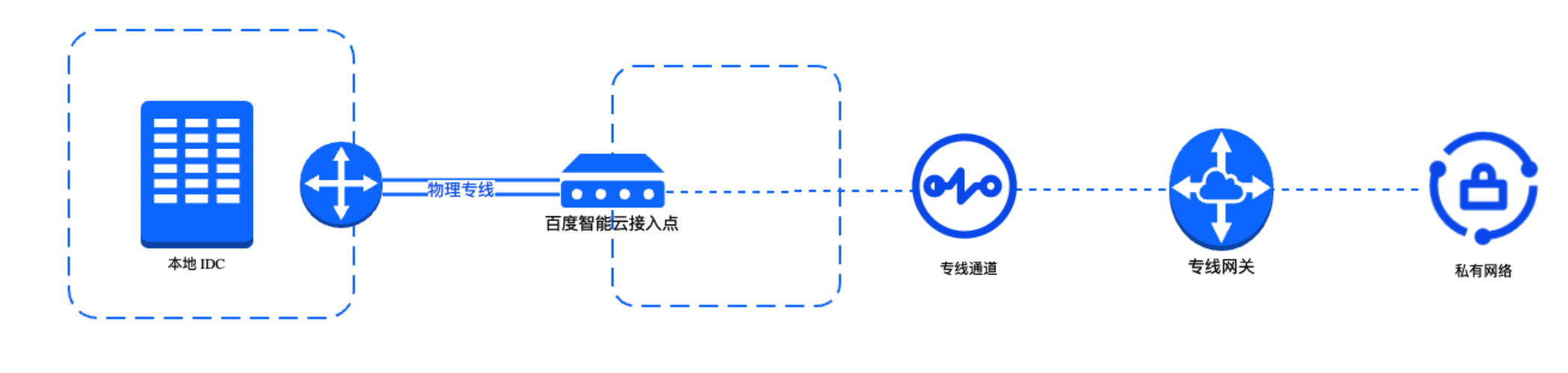
image.png

Figure II Adding a Dedicated Channel to a Cloud Smart Network Instance
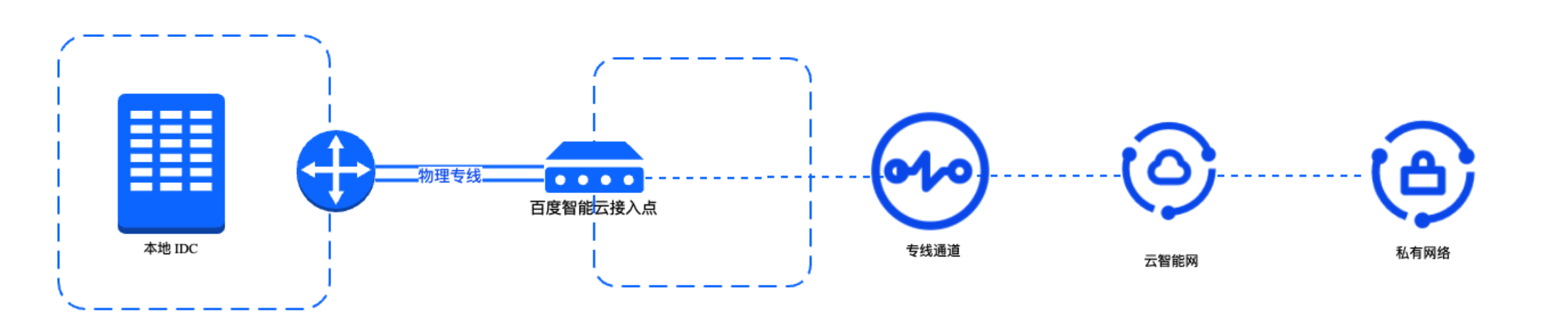
image.png

Basic components

ParametersDescription
Express tunnel access pointThe access point refers to the geographic location where the physical dedicated line connects to Baidu AI Cloud services provided by Baidu AI Cloud, which support connections from various types of carrier physical dedicated lines.
Physical dedicated lineThe physical dedicated line refers to a physical link established between your on-premises IDC and Baidu AI Cloud access point to enable network intercommunication between the two.
Dedicated channelThe dedicated channel is built upon the physical dedicated line, it associates the physical dedicated line with a dedicated gateway, and serves as a logical API for on-premises IDC to communicate with different virtual private clouds via the physical dedicated line. It supports both static route and dynamic route BGP.
Dedicated gatewayThe dedicated gateway refers to a logical access gateway that enables physical dedicated lines to access cloud-based VPCs. It acts as a connection between dedicated channels and cloud-based VPCs. When configuring the route table in the VPC for physical dedicated line connectivity, the next hop must point to the corresponding dedicated gateway.

Description:

  • Currently, Baidu AI Cloud supports dedicated line connections across all commercially available regions, including intra-city and inter-city links. In compliance with Chinese laws, operators must possess the A26 Domestic Communication Facilities Services and A14 Internet Data Transmission Services licenses issued by the Ministry of Industry and Information Technology. Currently qualified operators in mainland China include China Telecom, China Unicom, China Mobile, China Broadcasting Network, and CITIC Networks.
  • The dedicated Line access mode is user-built: After the user submits a dedicated line construction application to the ISP, the ISP is responsible for connecting the dedicated line to Baidu AI Cloud. For user-built dedicated lines, users are responsible for daily operations and maintenance, while Baidu AI Cloud is responsible for constructing and maintaining the internal lines within its own data center.

Comparison of access modes

Baidu AI Cloud dedicated line connections (physical dedicated lines) support two access modes: self-applied dedicated line mode and cross-account dedicated channel mode (sharing partners' resources). For the specific access process of the two modes, refer to Express Tunnel Access Process.

Comparison items Self-applied dedicated line Cross-account dedicated channel (sharing partners' resources)
Nature of dedicated line port Exclusive port Shared port
Overall construction scope Need to contact the ISP independently to lay the physical link between the on-premises IDC and Baidu AI Cloud access point. Only need to connect the network between the on-premises IDC and the ISP's Express Tunnel access point.
Overall construction cycle 2-3 months Within 1 month
Fees charged by Baidu AI Cloud Port resource occupancy fee: Charged based on the specification of the dedicated line port. Port resource occupancy fee: Charged based on the specification of the shared dedicated line port; paid by the actual user (tenant) of the shared dedicated line to the dedicated line partner.
Recommended bandwidth 1 Gbps~400 Gbps <1 Gbps

Access methods

Access methods Description
Console access You can sign in to the Physical Dedicated Line Console and manage resources directly through the Web interface.
API access You can send requests via HTTP or HTTPS for online API calls or secondary development. For details, refer to API Overview.
SDK access You can use SDK calls to more conveniently create and manage resources via APIs. For details, refer to SDK Overview.

Previous
Usage restrictions
Next
SDK