Express Tunnel process

ET

  • API Reference
    • API function release records
    • Appendix
    • Common Request Headers and Response Headers
    • Dedicated Line Related Interfaces
      • Add dedicated channel routing parameters
      • Add dedicated channel user object
      • Apply for physical dedicated line
      • Associate dedicated channel
      • Create dedicated channel
      • Create routing rules of Dedicated channel
      • Delete dedicated channel
      • Delete routing rules of dedicated channel
      • Disable dedicated channel IPv6 function
      • Disassociate dedicated channel
      • Enable IPv6 function for the dedicated channel
      • Modify the dedicated channel routing rules
      • Query dedicated channel
      • Query dedicated line details
      • Query dedicated line list
      • Query the routing rules of the dedicated channel
      • Remove dedicated channel route parameters
      • Remove dedicated channel user object
      • Resubmit the dedicated channel
      • Update dedicated channel
      • Update physical dedicated line
    • Error code
    • General Description
    • Interface Overview
    • Overview
    • Service domain
  • FAQs
    • General Problems
  • Function Release Records
  • Getting Started Guide
    • Getting Started Guide
    • On-Premises IDC and Cloud VPC Interconnection
      • Add dedicated channel
      • Add network instance
      • Apply for physical dedicated line
      • Configure user-side routing and test connectivity
      • Create dedicated gateway
  • Operation guide
    • Dedicated channel
      • Add cross-account dedicated channel
      • Add dedicated channel
      • Dedicated Channel Cross-Account Authorization for Cloud Smart Network
      • Dedicated Channel IPv6 Feature Configuration
      • Delete dedicated channel
      • Dynamic routing BGP configuration for dedicated channels
      • Static route configuration for dedicated channels
    • Dedicated gateway
      • Create dedicated gateway
      • Dedicated Gateway
    • Identity and access management
    • Monitor and Operations
      • Alarm Strategy Description
      • Dedicated Channel Instance Diagnosis
      • Fault Drill
    • Physical dedicated line
      • Apply for physical dedicated line
      • Express Tunnel process
      • Manage Physical Dedicated Line
      • Operation preparation
  • Product billing
    • Billing Item Description
    • Charge
    • Expiration description
    • Overdue description
  • Product Description
    • Application scenarios
    • Dedicated Line Access Point Address
    • Product advantages
    • Usage restrictions
    • What Is Dedicated Line Access
  • SDK
    • GO SDK
      • Dedicated line
      • Exception handling
      • Initialization
      • Install the SDK Package
      • Overview
      • Version history
    • Java-SDK
      • Dedicated line
      • Exception handling
      • Initialization
      • Install the SDK Package
      • Overview
      • Version history
    • Python SDK
      • Dedicated line
      • Function Release Records
      • Initialization
      • Install the SDK Package
      • Overview
  • Service Level Agreement (SLA)
    • Service Level Agreement (SLA)
  • Typical Practices
    • Connecting On-Premises IDC to Cloud VPC via Multi-Line ECMP (Dynamic Routing)
    • Connecting On-Premises IDC to Cloud VPC via Multi-Line ECMP (Static Routing)
    • Connecting On-Premises IDC to Cloud VPC via Primary and Backup Dedicated Lines (Dynamic Routing)
    • Connecting On-Premises IDC to Cloud VPC via Primary and Backup Dedicated Lines (Static Routing)
    • Interconnecting IDCs and VPCs Across Different Regions via Dedicated Lines
All documents
menu
No results found, please re-enter

ET

  • API Reference
    • API function release records
    • Appendix
    • Common Request Headers and Response Headers
    • Dedicated Line Related Interfaces
      • Add dedicated channel routing parameters
      • Add dedicated channel user object
      • Apply for physical dedicated line
      • Associate dedicated channel
      • Create dedicated channel
      • Create routing rules of Dedicated channel
      • Delete dedicated channel
      • Delete routing rules of dedicated channel
      • Disable dedicated channel IPv6 function
      • Disassociate dedicated channel
      • Enable IPv6 function for the dedicated channel
      • Modify the dedicated channel routing rules
      • Query dedicated channel
      • Query dedicated line details
      • Query dedicated line list
      • Query the routing rules of the dedicated channel
      • Remove dedicated channel route parameters
      • Remove dedicated channel user object
      • Resubmit the dedicated channel
      • Update dedicated channel
      • Update physical dedicated line
    • Error code
    • General Description
    • Interface Overview
    • Overview
    • Service domain
  • FAQs
    • General Problems
  • Function Release Records
  • Getting Started Guide
    • Getting Started Guide
    • On-Premises IDC and Cloud VPC Interconnection
      • Add dedicated channel
      • Add network instance
      • Apply for physical dedicated line
      • Configure user-side routing and test connectivity
      • Create dedicated gateway
  • Operation guide
    • Dedicated channel
      • Add cross-account dedicated channel
      • Add dedicated channel
      • Dedicated Channel Cross-Account Authorization for Cloud Smart Network
      • Dedicated Channel IPv6 Feature Configuration
      • Delete dedicated channel
      • Dynamic routing BGP configuration for dedicated channels
      • Static route configuration for dedicated channels
    • Dedicated gateway
      • Create dedicated gateway
      • Dedicated Gateway
    • Identity and access management
    • Monitor and Operations
      • Alarm Strategy Description
      • Dedicated Channel Instance Diagnosis
      • Fault Drill
    • Physical dedicated line
      • Apply for physical dedicated line
      • Express Tunnel process
      • Manage Physical Dedicated Line
      • Operation preparation
  • Product billing
    • Billing Item Description
    • Charge
    • Expiration description
    • Overdue description
  • Product Description
    • Application scenarios
    • Dedicated Line Access Point Address
    • Product advantages
    • Usage restrictions
    • What Is Dedicated Line Access
  • SDK
    • GO SDK
      • Dedicated line
      • Exception handling
      • Initialization
      • Install the SDK Package
      • Overview
      • Version history
    • Java-SDK
      • Dedicated line
      • Exception handling
      • Initialization
      • Install the SDK Package
      • Overview
      • Version history
    • Python SDK
      • Dedicated line
      • Function Release Records
      • Initialization
      • Install the SDK Package
      • Overview
  • Service Level Agreement (SLA)
    • Service Level Agreement (SLA)
  • Typical Practices
    • Connecting On-Premises IDC to Cloud VPC via Multi-Line ECMP (Dynamic Routing)
    • Connecting On-Premises IDC to Cloud VPC via Multi-Line ECMP (Static Routing)
    • Connecting On-Premises IDC to Cloud VPC via Primary and Backup Dedicated Lines (Dynamic Routing)
    • Connecting On-Premises IDC to Cloud VPC via Primary and Backup Dedicated Lines (Static Routing)
    • Interconnecting IDCs and VPCs Across Different Regions via Dedicated Lines
  • Document center
  • arrow
  • ET
  • arrow
  • Operation guide
  • arrow
  • Physical dedicated line
  • arrow
  • Express Tunnel process
Table of contents on this page
  • Express Tunnel process
  • Application process
  • Approval process
  • Shared Express Tunnel process
  • Application process

Express Tunnel process

Updated at:2025-11-11

The physical dedicated lines of Baidu AI Cloud's Express Tunnel (ET) product support two modes: self-applied dedicated line mode and cross-account dedicated channel mode (sharing partners' resources). This article introduces the access processes of the two modes, and you can choose the most suitable access method according to your actual situation.

Express Tunnel process

In the self-applied Express Tunnel mode, each stage from applying for a dedicated line to realizing business cloud access through the dedicated line takes a certain amount of time. Please fully evaluate the time consumption of each stage according to the actual situation and reserve sufficient time.

The configuration of dedicated lines is divided into two scenarios. Please choose according to your own situation:

Figure I Cloud-based VPC Communicating with IDC Through a Dedicated Line
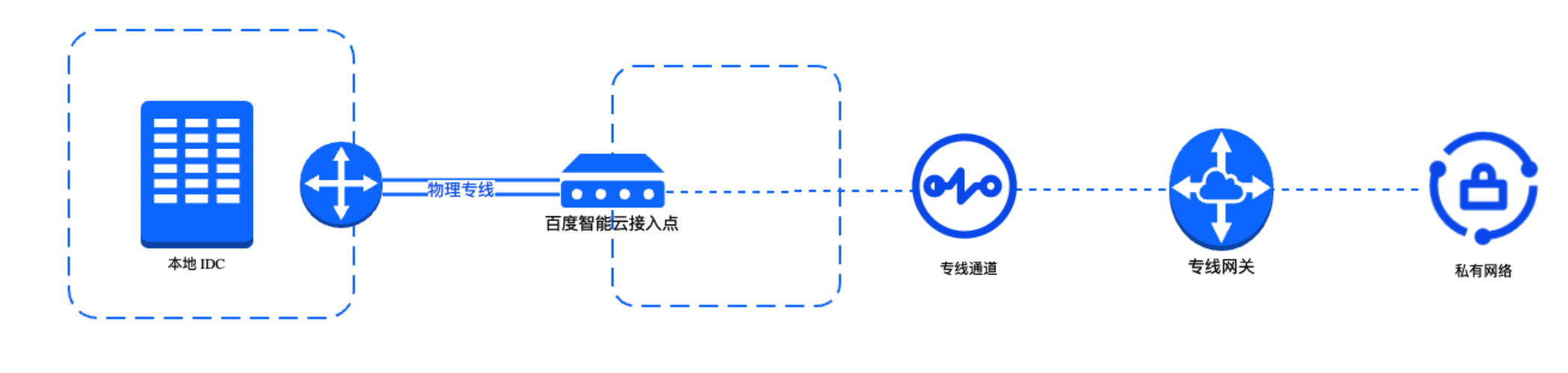
image.png

Figure II Adding a Dedicated Channel to a Cloud Smart Network Instance
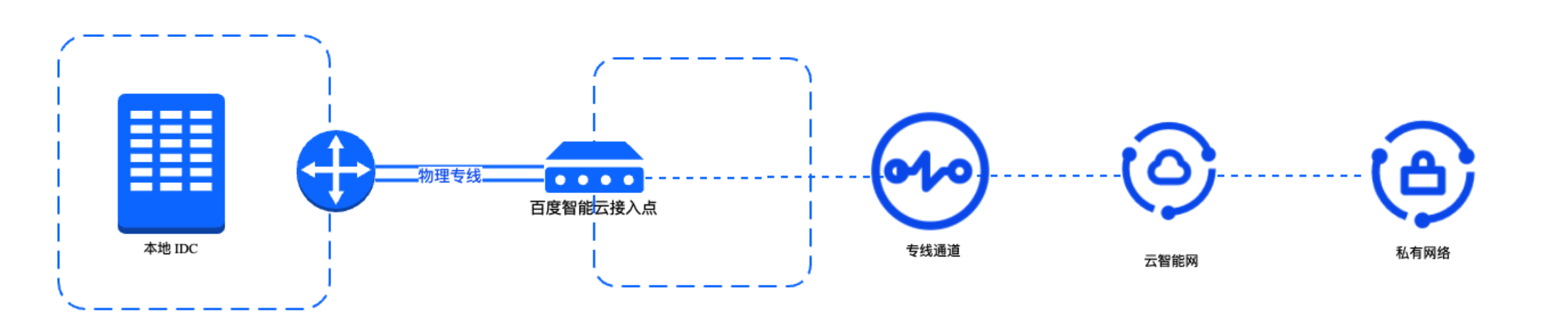
image.png

Application process

Including 2 scenarios:

Scenario I: Cloud-based VPC communicates with IDC through a dedicated line
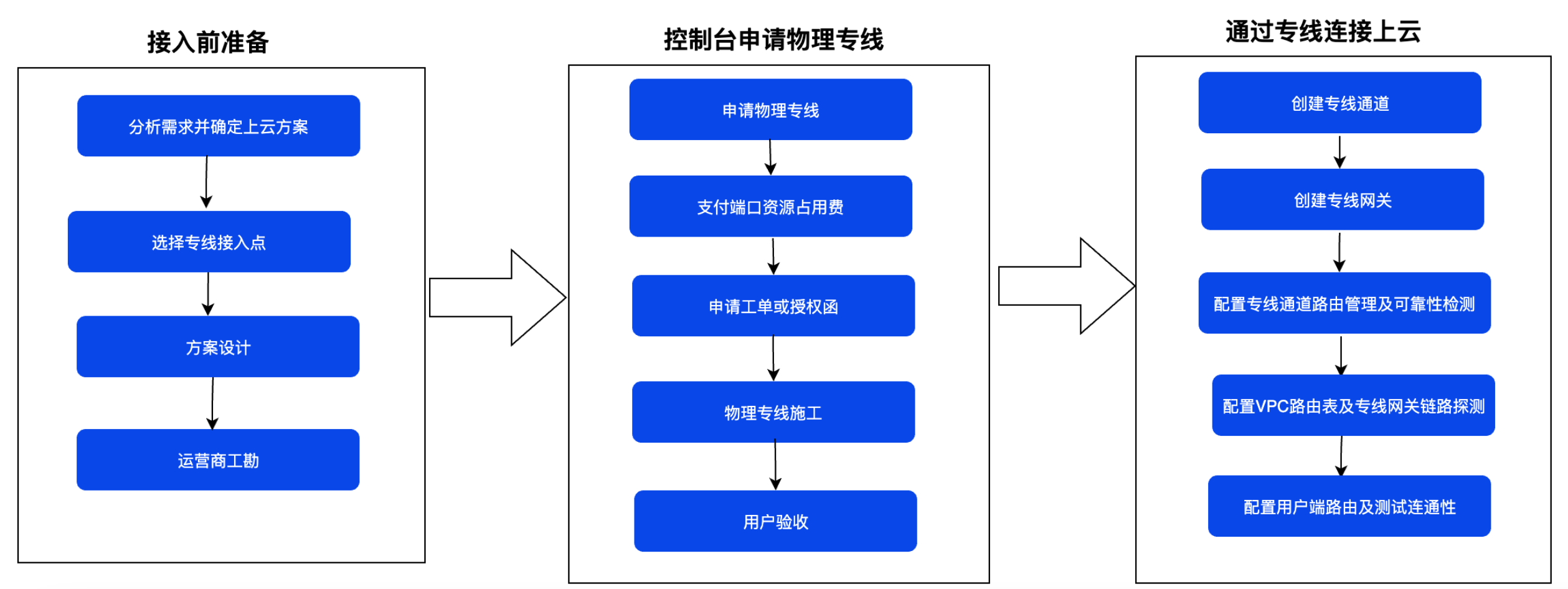
image.png

Scenario II: Adding a dedicated line channel to a Cloud Smart Network instance
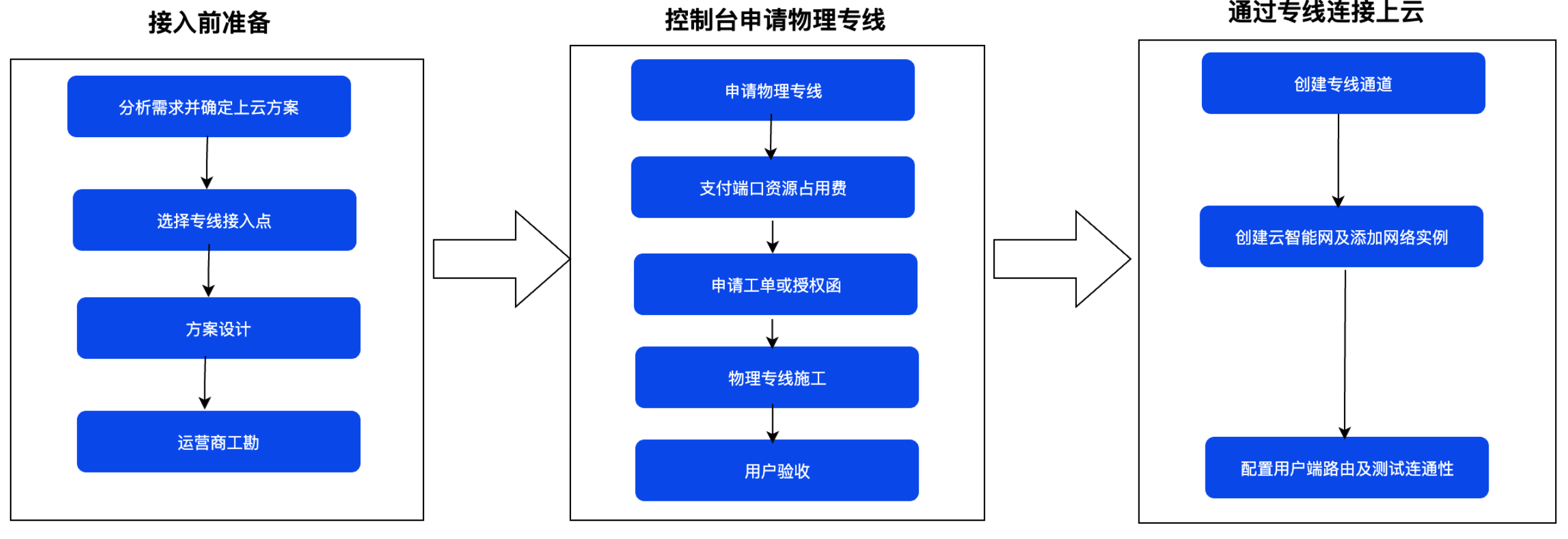
image.png

Note: The authorization letter for dedicated line connection is used to authorize third-party ISPs to enter Baidu AI Cloud data centers for construction and build dedicated line connections.

  1. Before accessing the physical dedicated line on the console, please complete the pre-access preparation work. For specific operations, refer to Operation Preparation.
  2. After completing all preparation work, you need to sign in to the Baidu AI Cloud Express Tunnel Console to apply for a physical dedicated line. For specific operations, refer to Apply for Physical Dedicated Line.
  3. After the physical dedicated line is successfully accessed, you need to create a dedicated channel, a dedicated gateway, etc., to realize cloud access. For specific operations, refer to Create Dedicated Channel, Create Dedicated Gateway, and On-premises IDC Connecting to Cloud-based VPC Through Multi-Line ECMP (Dynamic Routing).

Approval process

  1. After completing all preparation work, you need to go to the Baidu AI Cloud Express Tunnel Console to apply for a physical dedicated line.
  2. Please contact Baidu AI Cloud staff for review immediately after applying for the physical dedicated line through tickets, phone calls, or other methods.
  3. After receiving the information, Baidu AI Cloud staff will contact you and assist in handling the ticket or Letter of Authorization (LOA) for entering the data center for construction.

Note: LOA or tickets are usually time-sensitive. For specific time, you can contact Baidu AI Cloud staff. The port is usually reserved for 30 days.
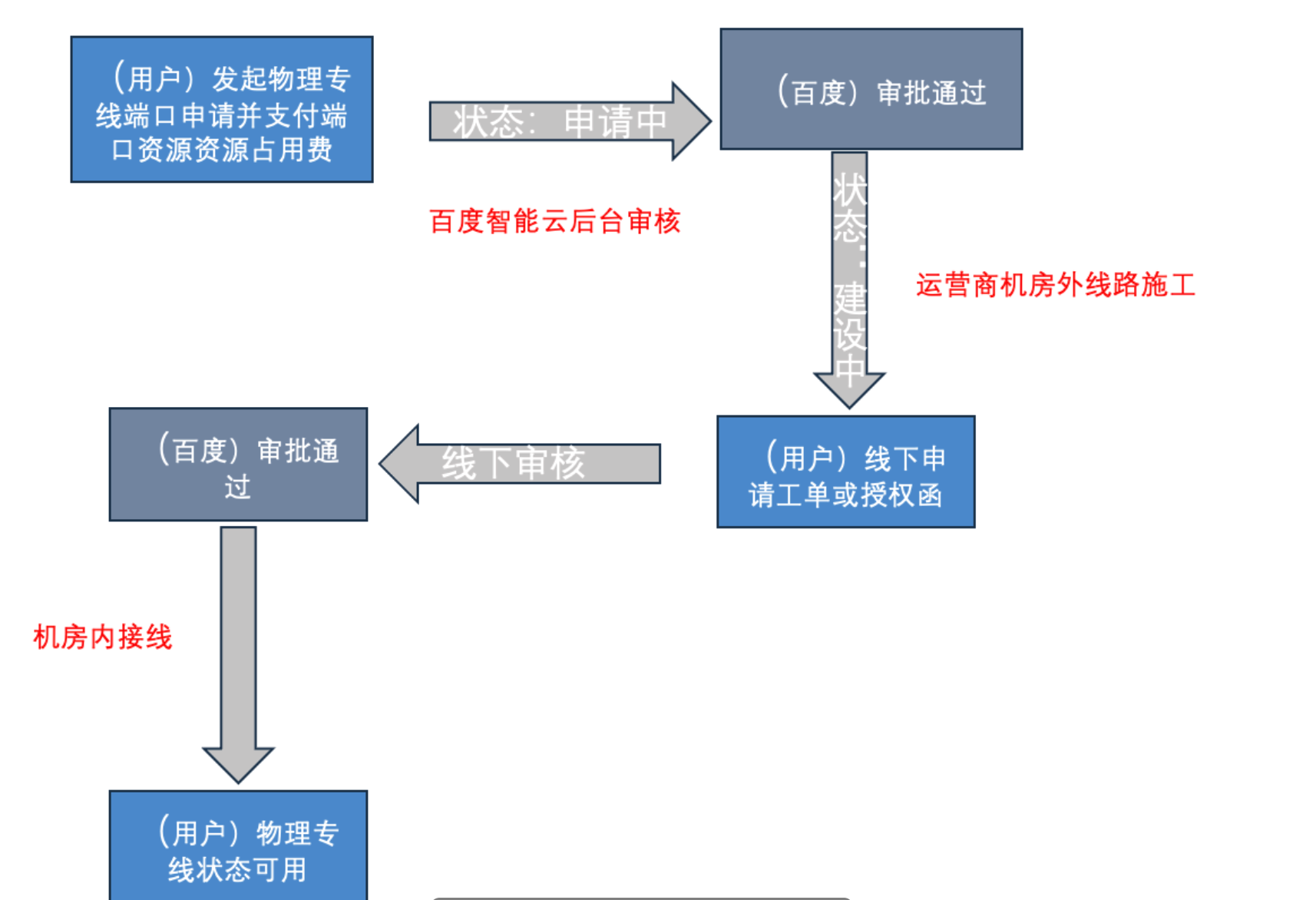
image.png

Shared Express Tunnel process

A shared dedicated line refers to the cross-account dedicated channel mode that shares partners' resources. In this mode, tenants do not need to access Baidu AI Cloud dedicated lines by themselves, but directly apply for shared dedicated lines from dedicated line partners that have already accessed Baidu AI Cloud access points in advance. Using this mode, tenants only need to connect the network between the on-premises IDC and the ISP's access point, and can use the Express Tunnel function through the cross-account dedicated channel created by the dedicated line partner.

  • Multiple tenants share the physical dedicated line between the "dedicated line partner access point" and the "Baidu AI Cloud access point", and all tenants' shared dedicated lines share the bandwidth of this physical dedicated line. Therefore, shared dedicated lines are suitable for small-bandwidth services.

Dedicated line partners can directly use Baidu AI Cloud's shared dedicated line function. Dedicated line partners create shared dedicated lines for tenants, and tenants accept and use the shared dedicated lines.

  • Dedicated line partners have completed the laying and construction of physical lines between the "dedicated line partner access point" and the "Baidu AI Cloud access point". Dedicated line partners only need to help tenants complete the line laying and network connection between the tenant's IDC and the "dedicated line partner access point". Compared with exclusive dedicated lines, the construction cycle of shared dedicated lines is generally shorter, which is suitable for services with short cloud access time requirements.
  • For shared dedicated lines created by dedicated line partners for multiple tenants, a VLAN ID range will be specified, and resource isolation between multiple tenants is achieved based on VLAN IDs.
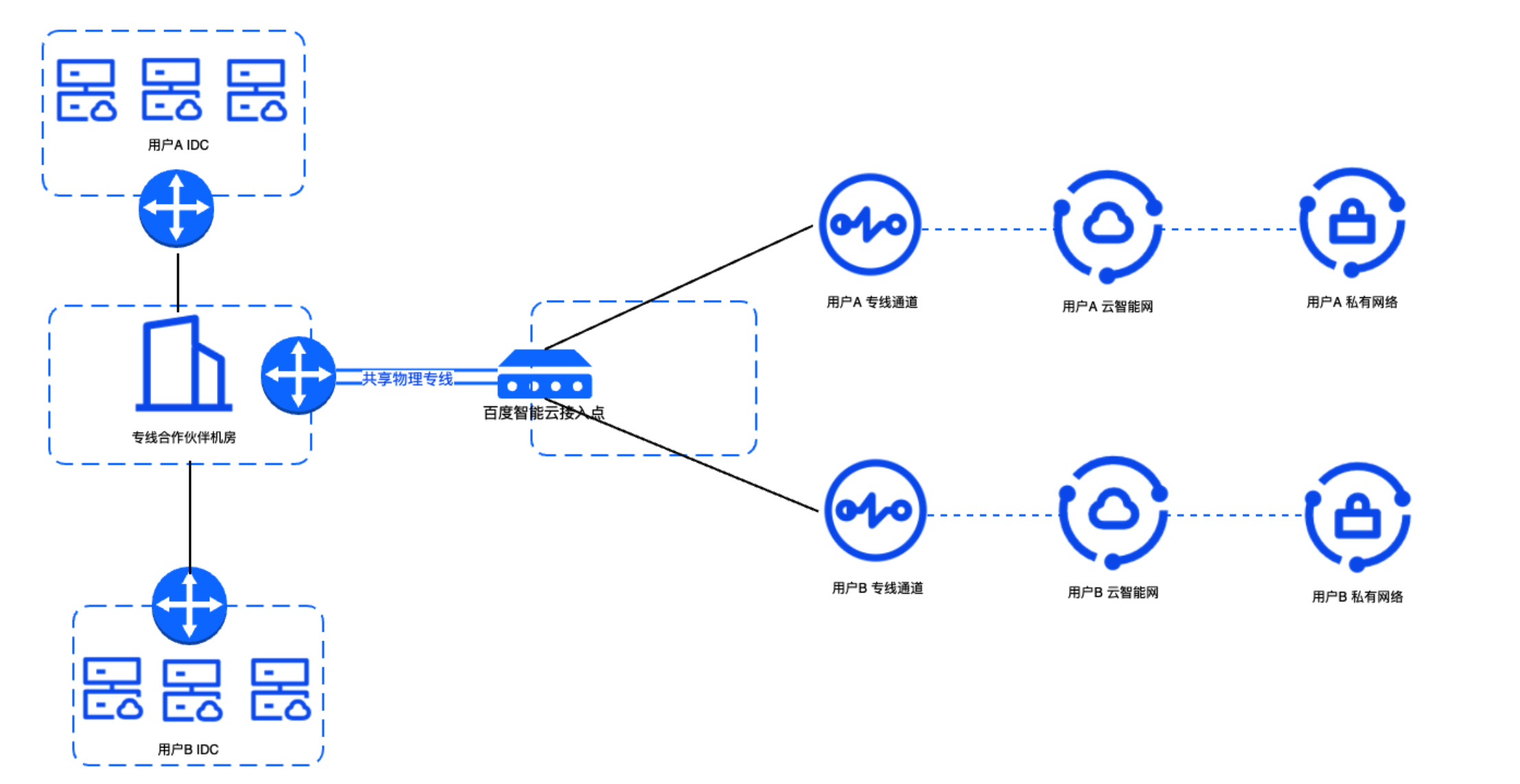
image.png

Application process

Scenario I: Dedicated channel bound to a dedicated gateway
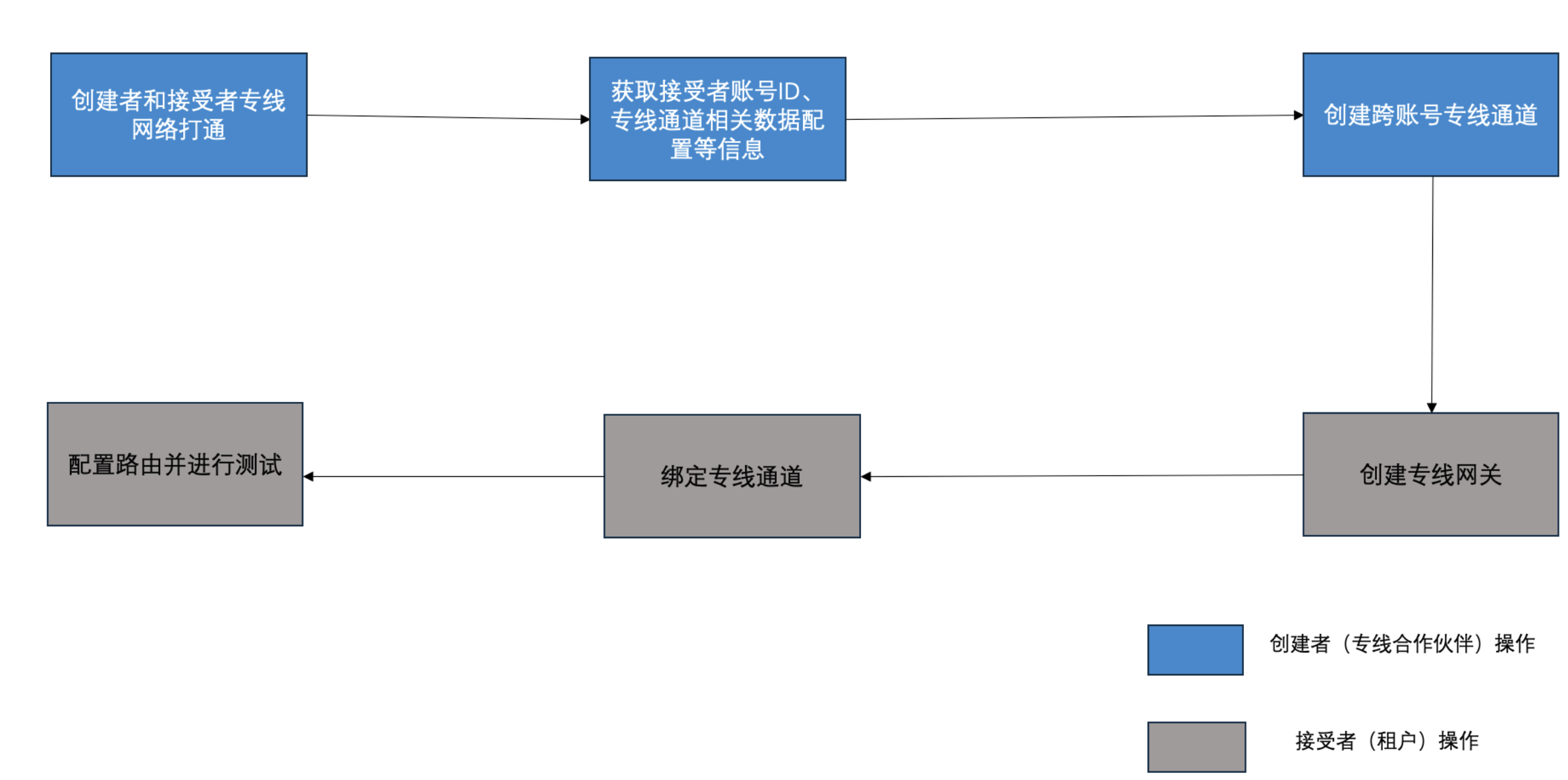
image.png

Scenario II: Dedicated channel loaded into a CSN instance
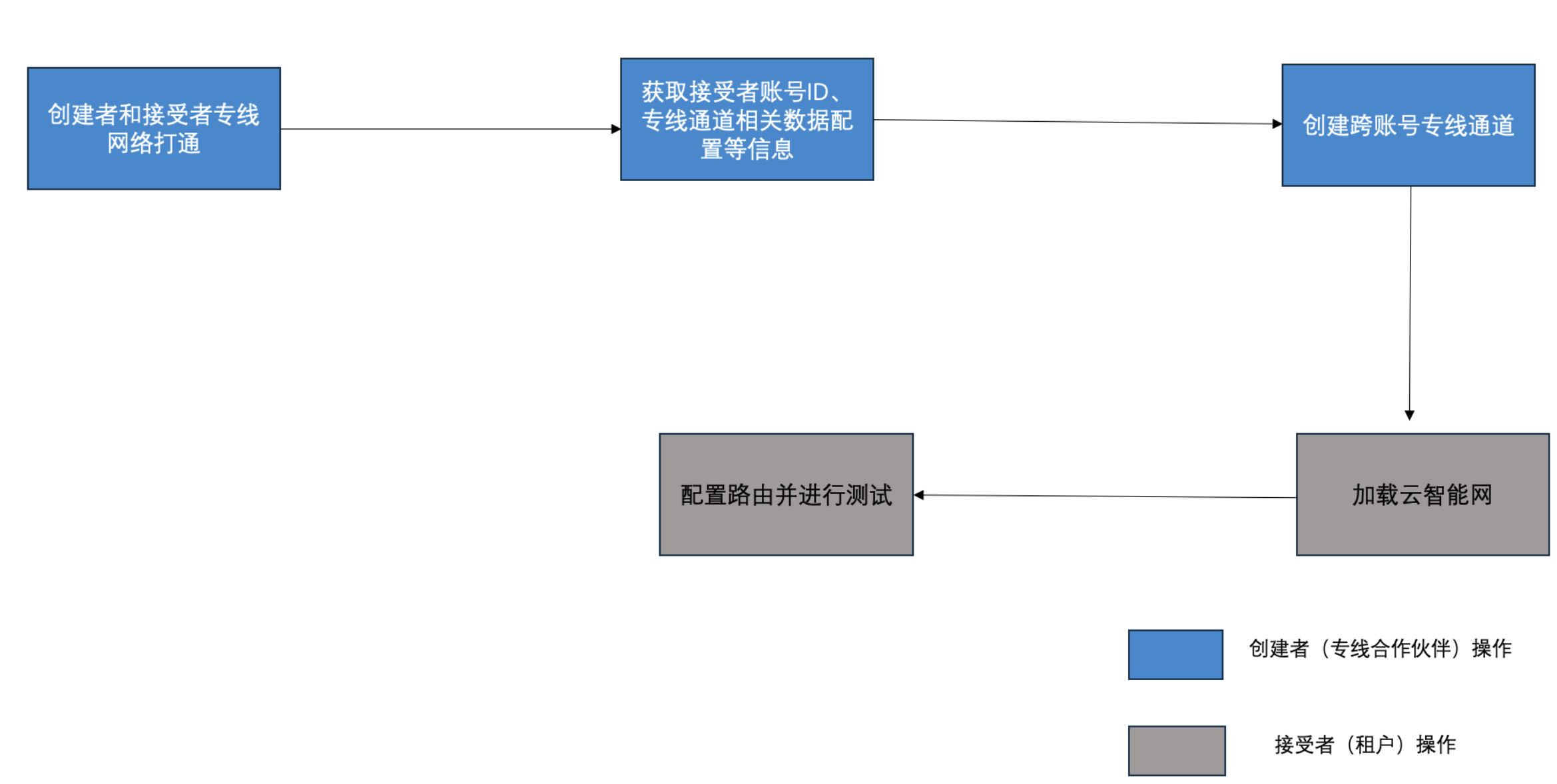
image.png

Description:

  • Accounts A and B in the above figures are both Baidu AI Cloud accounts and are root account IDs.
  • The egress traffic fee of the dedicated channel is charged on a pay-as-you-go basis. Baidu AI Cloud currently offers a preferential policy of waiving the egress traffic fee for newly added dedicated lines. For any changes, please refer to the official website notice.

Previous
Apply for physical dedicated line
Next
Manage Physical Dedicated Line