

Add dedicated channel
Updated at:2025-11-11
Operation scenarios
The dedicated channel is built on the physical dedicated line, providing a logical API for the local data center (IDC) to interact with different virtual private clouds through the physical dedicated line. It supports both static routing and dynamic routing via BGP, with dynamic BGP routing used in this operation.
Operation steps
- Sign in to the Dedicated Channel Console.
- Click the "Add Dedicated Channel" button.
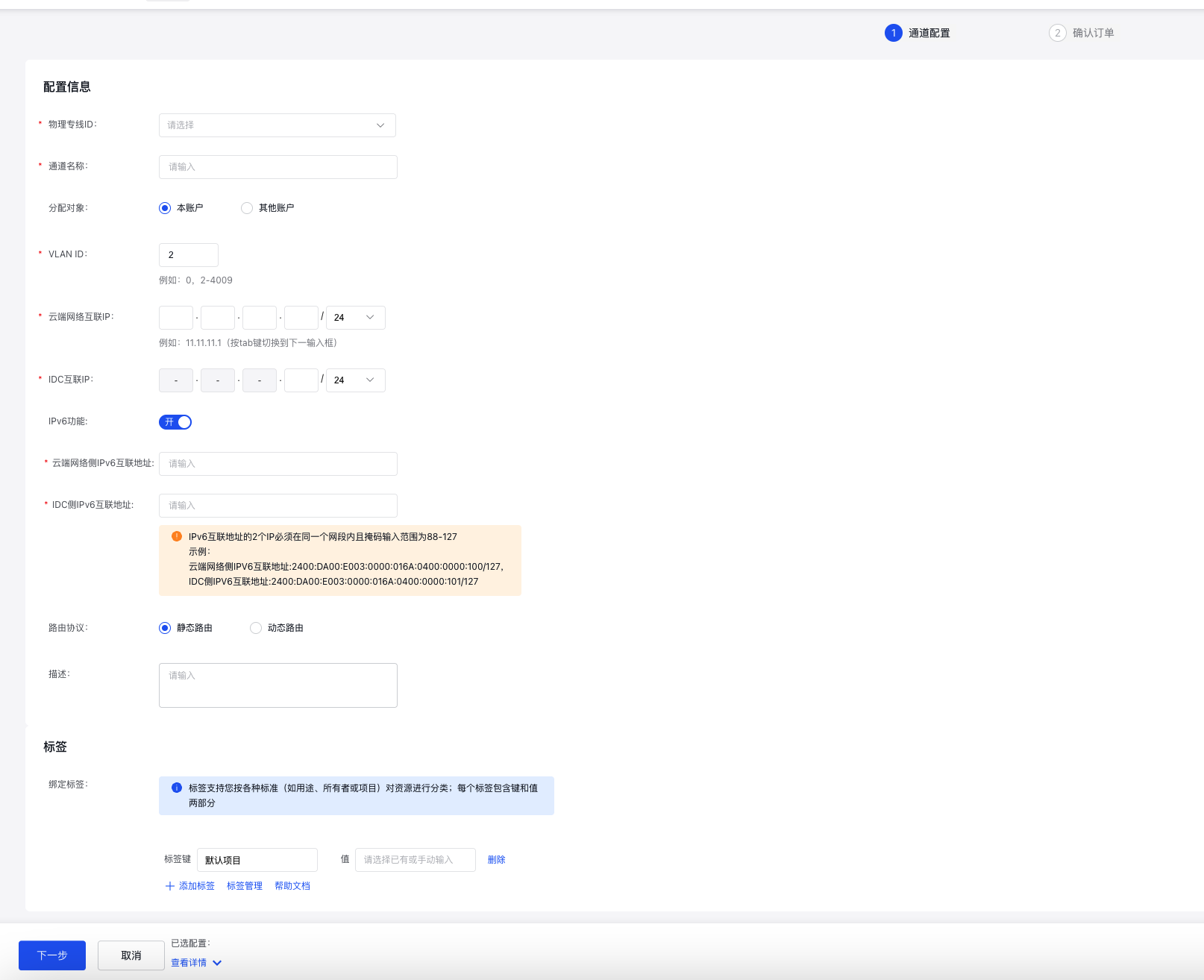
- Use the table below as a guide to configure the dedicated channel.
| Parameters | Description | Example |
| Configuration information | ||
|---|---|---|
| Physical dedicated line ID | Dropdown selection required: Choose the physical dedicated line ID that has already been created and is in an available status. Note: The physical dedicated line ID must belong to this account. | dcphy-xxxxxxxxxxxx |
| Channel name | Enter the name of the dedicated channel. Naming format: 1–65 characters, allowing uppercase/lowercase letters, numbers, Chinese characters, and special characters (-, _, /). The name must begin with a letter or a Chinese character. | test456 |
| Allocation object | This field is required. Options are "current account" (default) or "other accounts.\ | Current account |
| VLAN ID | The system default is set to 2, with an input range of 0, 2–4009. Note: VLAN 0 operates in Layer 3 mode, allowing only one dedicated channel per physical dedicated line. VLANs 2–4009 support trunk mode, which allows multiple dedicated channels under a single physical dedicated line. | 2 |
| Cloud network interconnection IP | Enter the IPv4 interconnection IP address.
| The following network segments are prohibited: 0.0.0.0/24, 127.0.0.0/24, 255.255.255.0/24, 224.0.0.0–239.255.255.255, 240.0.0.0–255.255.255.254.|
| IDC interconnection IP | Enter the IPv4 interconnection IP address.
| The following network segments are prohibited: 0.0.0.0/24, 127.0.0.0/24, 255.255.255.0/24, 224.0.0.0–239.255.255.255, 240.0.0.0–255.255.255.254. |
| IPv6 function | An allowlist feature is available; submit a ticket for approval to enable this function. By default, the setting is "disabled.\ | Enable |
| Cloud network IPv6 interconnection address | IPv6 functionality is disabled by default and cannot be configured. It can be set up after activation.
| Example: IPv6 interconnection address on cloud network side: 2400:DA00:E003:0000:016A:0400:0000:100/127, IPv6 interconnection address on IDC side: 2400:DA00:E003:0000:016A:0400:0000:101/127 |
| Cloud network IPv6 interconnection address | 2400:DA00:E003:0000:016A:0400:0000:101/127 | |
| Routing protocol | Supports both static routing (default) and dynamic routing, with dynamic routing based on the BGP protocol. | Dynamic routing |
| BGP ASN | Baidu AI Cloud’s BGP ASN is 45085. In the Baidu AI Cloud console, users need to input the BGP ASN of their IDC side, which must fall within the range 1 - 4294967295. | 65530 |
| Fake ASN function | Defaults to off and can be enabled manually. | Enable |
| Fake ASN | Valid range: 1 - 4294967295. The value 45085 is prohibited and must differ from the BGP ASN.
| Usage scenario: Client-side upgrades, ASN modifications. However, due to ASN changes, configurations on both PEER ends need to be updated, causing network interruptions during this process. If the local end is unwilling/unable to modify the ASN or does not want to expose its real AS, a FAKE ASN must be used (e.g., ASN100 is replaced with ASN200 locally, while the peer uses ASN300. In this case, FAKE ASN 200 can be configured on the local end).|
| BGP key | This parameter is displayed only when the routing type is set to "dynamic routing." Input the password for the BGP neighbor.
| The BGP key is sensitive information. Please store it securely to prevent loss or leakage.|
| Description | Optional, with a character length of 0-200. | For testing purposes |
| Tag | A Tag consists of a tag key (key) and a tag value (value), which can be used to categorize and search for physical dedicated lines. *Click +Add Icon to add multiple tags; multiple tags can be added in a single operation. *The tag key (key) for multiple tags on the same dedicated channel cannot be duplicated, and each tag key (key) can only have one tag value (value). *Tag keys (key) and tag values (value) are case-sensitive. For example, Key=tag and Key=Tag are considered different Tag Keys. For more details, refer to Tag Management (https://cloud.baidu.com/doc/TAG/s/ukboeqze7) | key:test |
- Note: Only sample values for necessary parameters are provided here. For more parameter descriptions, please refer to Add Dedicated Channel under the Operation Guide directory. The value examples are for reference only.
- After configuration, click OK to finalize creation.
At this stage, both the physical dedicated line test123 and the dedicated channel test456 have been applied.