Custom configuration

BLB BLB

  • API Reference
    • Access control
    • API Service Domain Name
    • Appendix
    • Application BLB Interface
      • Application BLB Instance Related Interfaces
      • Application BLB Listener Related Interfaces
      • Application BLB Security Group Related Interfaces
      • Application BLB Server Group Related Interfaces
    • Application IPv6 BLB Interface
      • Application IPv6 BLB Instance Related Interfaces
      • Application IPv6 BLB Listener Related Interfaces
      • Application IPv6 BLB Security Group Related Interfaces
      • Application IPv6 BLB Server Group Related Interfaces
    • BLB Order Related Interfaces
      • BLB - Resize
      • BLB Charge Shift - Cancel Prepay to Postpay
      • BLB Charge Shift - Postpay to Prepay
      • BLB Charge Shift - Prepay to Postpay
      • BLB Inquiry
      • BLB Unsubscribe Interface
    • Document Update Records
    • Error code
    • Interface Specifications
    • Introduction
    • Load Balancer Dedicated Cluster LBDC Interface
      • LBDC Instance Related Interfaces
    • Service Publishing Point Interface
      • Service Publishing Point Related Interfaces
    • Standard BLB Interface
      • Standard BLB Instance Related Interfaces
      • Standard BLB Listener Related Interfaces
      • Standard BLB Real Server Related Interfaces
      • Standard BLB Security Group Related Interfaces
    • Standard IPv6 BLB Interface
      • Standard IPv6 BLB Related Interfaces
  • FAQs
    • Billing Problems
    • Common Questions Overview
    • Configuration-related questions
    • Fault-related questions
    • General Problems
    • Load Balancer Dedicated Cluster Related Issues
    • Performance-related questions
    • Security Problems
  • Function Release Records
  • Operation guide
    • Access control
    • Access Logs
    • Application BLB instance
    • Application IPv6 Instance
    • BLB metric description
    • Certification
    • Custom configuration
    • Extended domain name
    • General-purpose BLB instance
      • Creating BLB Ordinary Instance
      • Managing BLB Ordinary Instance
    • General-purpose IPv6 BLB instance
    • Identity and access management
    • IP Group Usage Guide
    • Load Balance Dedicated Cluster
    • Load Balancer Frontend and Backend Protocol Correspondence
    • Recording Access Logs Using VPC Flow Logs
    • Service Release Point
    • Tag Management
  • Product Description
    • Application scenarios
    • Basic Architecture
    • Basic concepts
    • Performance Specification Description
    • Product advantages
    • Product features
    • Product Introduction
    • Usage restrictions
  • Product pricing
    • Load Balancer Dedicated Cluster Billing
    • Load Balancer Instance Billing
  • Quick Start
  • SDK
    • GO-SDK
      • Application BLB Instance
      • Initialization
      • Install
      • IPv6 BLB Instance
      • Load Balance Dedicated Cluster (LBDC)
      • Ordinary BLB Instance
      • Overview
      • Service Release Point
      • Version Change Records
    • Java-SDK
      • Application BLB instance
      • General-purpose BLB instance
      • Initialization
      • Install the SDK Package
      • IPv6 BLB Instance
      • Load Balance Dedicated Cluster (LBDC)
      • Overview
      • Service Release Point
      • Version Update Description
    • PHP-SDK
      • Initialization
      • Install
      • Ordinary BLB Instance
      • Overview
    • Python-SDK
      • Application BLB Instance
      • Initialization
      • Install
      • IPv6 BLB Instance
      • Load Balance Dedicated Cluster (LBDC)
      • Ordinary BLB Instance
      • Overview
      • Service Release Point
      • Version Update Description
  • Service Level Agreement (SLA)
    • Description of Baidu AI Cloud Load Balancer Trusted Cloud certification service availability
    • LBDC Service Level Agreement SLA
    • BLB Service Level Agreement (V2.0)
  • Typical Practices
    • BLB Selection Guide
    • Health Check Exception Troubleshooting
    • Implementing BLB Association with Listeners, Real Servers, Security Groups, etc. via Terraform
    • Implementing Multi-Site Hosting via Application BLB
    • Load Balancer Security Protection Strategy
    • Managing BLB via Terraform
    • Obtaining Client Information via Application BLB Instance
    • Using IP Group Function to Mount Real Servers Across VPCs in Different Regions
    • Using IP Group Function to Mount Real Servers Across VPCs in the Same Region
All documents
menu
No results found, please re-enter

BLB BLB

  • API Reference
    • Access control
    • API Service Domain Name
    • Appendix
    • Application BLB Interface
      • Application BLB Instance Related Interfaces
      • Application BLB Listener Related Interfaces
      • Application BLB Security Group Related Interfaces
      • Application BLB Server Group Related Interfaces
    • Application IPv6 BLB Interface
      • Application IPv6 BLB Instance Related Interfaces
      • Application IPv6 BLB Listener Related Interfaces
      • Application IPv6 BLB Security Group Related Interfaces
      • Application IPv6 BLB Server Group Related Interfaces
    • BLB Order Related Interfaces
      • BLB - Resize
      • BLB Charge Shift - Cancel Prepay to Postpay
      • BLB Charge Shift - Postpay to Prepay
      • BLB Charge Shift - Prepay to Postpay
      • BLB Inquiry
      • BLB Unsubscribe Interface
    • Document Update Records
    • Error code
    • Interface Specifications
    • Introduction
    • Load Balancer Dedicated Cluster LBDC Interface
      • LBDC Instance Related Interfaces
    • Service Publishing Point Interface
      • Service Publishing Point Related Interfaces
    • Standard BLB Interface
      • Standard BLB Instance Related Interfaces
      • Standard BLB Listener Related Interfaces
      • Standard BLB Real Server Related Interfaces
      • Standard BLB Security Group Related Interfaces
    • Standard IPv6 BLB Interface
      • Standard IPv6 BLB Related Interfaces
  • FAQs
    • Billing Problems
    • Common Questions Overview
    • Configuration-related questions
    • Fault-related questions
    • General Problems
    • Load Balancer Dedicated Cluster Related Issues
    • Performance-related questions
    • Security Problems
  • Function Release Records
  • Operation guide
    • Access control
    • Access Logs
    • Application BLB instance
    • Application IPv6 Instance
    • BLB metric description
    • Certification
    • Custom configuration
    • Extended domain name
    • General-purpose BLB instance
      • Creating BLB Ordinary Instance
      • Managing BLB Ordinary Instance
    • General-purpose IPv6 BLB instance
    • Identity and access management
    • IP Group Usage Guide
    • Load Balance Dedicated Cluster
    • Load Balancer Frontend and Backend Protocol Correspondence
    • Recording Access Logs Using VPC Flow Logs
    • Service Release Point
    • Tag Management
  • Product Description
    • Application scenarios
    • Basic Architecture
    • Basic concepts
    • Performance Specification Description
    • Product advantages
    • Product features
    • Product Introduction
    • Usage restrictions
  • Product pricing
    • Load Balancer Dedicated Cluster Billing
    • Load Balancer Instance Billing
  • Quick Start
  • SDK
    • GO-SDK
      • Application BLB Instance
      • Initialization
      • Install
      • IPv6 BLB Instance
      • Load Balance Dedicated Cluster (LBDC)
      • Ordinary BLB Instance
      • Overview
      • Service Release Point
      • Version Change Records
    • Java-SDK
      • Application BLB instance
      • General-purpose BLB instance
      • Initialization
      • Install the SDK Package
      • IPv6 BLB Instance
      • Load Balance Dedicated Cluster (LBDC)
      • Overview
      • Service Release Point
      • Version Update Description
    • PHP-SDK
      • Initialization
      • Install
      • Ordinary BLB Instance
      • Overview
    • Python-SDK
      • Application BLB Instance
      • Initialization
      • Install
      • IPv6 BLB Instance
      • Load Balance Dedicated Cluster (LBDC)
      • Ordinary BLB Instance
      • Overview
      • Service Release Point
      • Version Update Description
  • Service Level Agreement (SLA)
    • Description of Baidu AI Cloud Load Balancer Trusted Cloud certification service availability
    • LBDC Service Level Agreement SLA
    • BLB Service Level Agreement (V2.0)
  • Typical Practices
    • BLB Selection Guide
    • Health Check Exception Troubleshooting
    • Implementing BLB Association with Listeners, Real Servers, Security Groups, etc. via Terraform
    • Implementing Multi-Site Hosting via Application BLB
    • Load Balancer Security Protection Strategy
    • Managing BLB via Terraform
    • Obtaining Client Information via Application BLB Instance
    • Using IP Group Function to Mount Real Servers Across VPCs in Different Regions
    • Using IP Group Function to Mount Real Servers Across VPCs in the Same Region
  • Document center
  • arrow
  • BLBBLB
  • arrow
  • Operation guide
  • arrow
  • Custom configuration
Table of contents on this page
  • Add personalized configuration
  • Configuration parameter description

Custom configuration

Updated at:2025-10-16

BLB supports custom configuration function, allowing users to set parameters of BLB Layer 7 listener such as client_header_timeout, client_body_timeout, proxy_buffer_size, proxy_buffers and proxy_set_header, thus meeting user’s custom configuration needs.
Notes

  • The count of personalized configurations in each region is not limited temporarily.
  • Currently, one BLB instance can be bound to multiple personalized configurations, and one type of personalized configuration can be bound to multiple instances.
  • Custom configurations are only applicable to Layer 7 HTTP/HTTPS listeners of the load balancer (previously known as the "application load balancer").

Add personalized configuration

  1. Log in to the Baidu AI Cloud Platform, go to Products & Services > Baidu Load Balance (BLB), and click on the BLB name to access the Instance Details page.
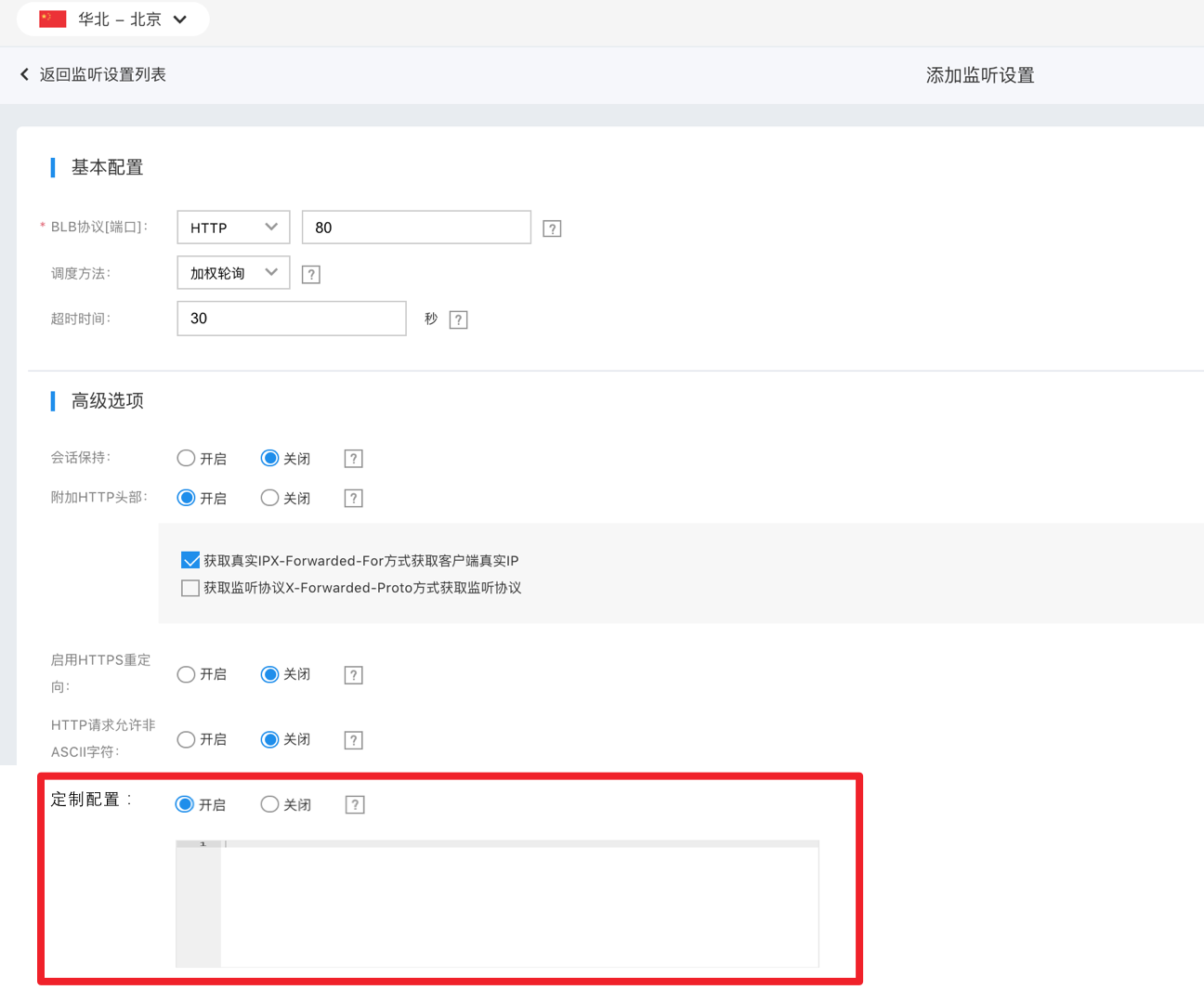
  2. Click "Listener Settings" in the left navigation bar, choose the HTTP or HTTPS protocol to set up a Layer 7 listener.
  3. Turn on the custom configuration switch and add the desired custom settings.
1610452535984.png

Configuration parameter description

The current BLB custom configuration supports the following fields:

Configuration field Parameter range Default value Configuration
client_header_timeout 30-120 60s The timeout duration (second) for reading the client request header. If the client does not send the complete request header within this time, BLB will terminate the request.
client_header_buffer_size 1-16 1k Buffer size (k) for storing client request headers
client_body_timeout 30-120 60s Timeout for reading client request body (in seconds): The timeout refers to the time interval between two successful read operations by BLB, not the total transfer time of the entire request body. If the client doesn't send data within this period, BLB will terminate the request.
proxy_buffer_size 1-64 4k BLB obtains the buffer size (in k) from the real server's response header. If the response header exceeds this size, BLB will reply with a 502 status. When using proxy_buffer_size, proxy_buffers must also be configured.
proxy_buffers [3-8] [4-8] 8 4k BLB reads the buffer count and the size of each buffer (k) from the real server response body.
proxy_buffering on,off on
  • on indicates caching of responses from real servers: BLB will cache responses and return them to the real server only after receiving all the responses.
  • off indicates no caching of responses from real servers: BLB will not cache responses, which may impose some performance pressure on real servers
    . You can also control the caching by adding X-Accel-Buffering in the response header. X-Accel-Buffering: yes means caching. X-Accel-Buffering: no means no caching
  • proxy_set_header
  • X-BLB-Cport $cport
  • X-BLB-Vip $vip
  • X-BLB-Request-Id $bce_blb_request_id
  • X-BLB-Client-Cert $ssl_client_cert
  • X-Real-IP $cip
  • None Request headers transferred to the real server
  • Client port
  • BLB VIP
  • Unique request ID
  • Client certificate for HTTPS requests (effective only for HTTPS listeners)
  • Client IP
  • gzip_json on,off off
  • "on" indicates that during Gzip data compression, application/json is additionally supported among the data types compressed by Gzip. When the client supports Gzip compression and the response Content-Type is included in the supported compression types, BLB will compress the response using Gzip.
  • "off" indicates that Gzip compression does not additionally support application/json. For the full list of supported data types, refer to the data compression documentation.
  • Notes The configured values for proxy_buffer_size and proxy_buffers must satisfy the following constraints: 2 max (proxy_buffer_size, proxy_buffers.size) ≤ (proxy_buffers.num - 1) proxy_buffers.size. For example, if proxy_buffer_size is configured as 24k and proxy_buffers as 8 8k, then 2 24k = 48k and (8 - 1) 8k = 56k. In this case, 48k ≤ 56k. Thus, the configuration will not trigger errors; otherwise, it will.

    Configuration code example:

    Plain Text
    1client_header_timeout:60
    2client_body_timeout:60
    3proxy_buffer_size:4
    4proxy_buffers:8 4
    5proxy_set_header:X-BLB-Cport $cport

    Previous
    Certification
    Next
    Extended domain name