Identity and access management

BLB BLB

  • API Reference
    • Access control
    • API Service Domain Name
    • Appendix
    • Application BLB Interface
      • Application BLB Instance Related Interfaces
      • Application BLB Listener Related Interfaces
      • Application BLB Security Group Related Interfaces
      • Application BLB Server Group Related Interfaces
    • Application IPv6 BLB Interface
      • Application IPv6 BLB Instance Related Interfaces
      • Application IPv6 BLB Listener Related Interfaces
      • Application IPv6 BLB Security Group Related Interfaces
      • Application IPv6 BLB Server Group Related Interfaces
    • BLB Order Related Interfaces
      • BLB - Resize
      • BLB Charge Shift - Cancel Prepay to Postpay
      • BLB Charge Shift - Postpay to Prepay
      • BLB Charge Shift - Prepay to Postpay
      • BLB Inquiry
      • BLB Unsubscribe Interface
    • Document Update Records
    • Error code
    • Interface Specifications
    • Introduction
    • Load Balancer Dedicated Cluster LBDC Interface
      • LBDC Instance Related Interfaces
    • Service Publishing Point Interface
      • Service Publishing Point Related Interfaces
    • Standard BLB Interface
      • Standard BLB Instance Related Interfaces
      • Standard BLB Listener Related Interfaces
      • Standard BLB Real Server Related Interfaces
      • Standard BLB Security Group Related Interfaces
    • Standard IPv6 BLB Interface
      • Standard IPv6 BLB Related Interfaces
  • FAQs
    • Billing Problems
    • Common Questions Overview
    • Configuration-related questions
    • Fault-related questions
    • General Problems
    • Load Balancer Dedicated Cluster Related Issues
    • Performance-related questions
    • Security Problems
  • Function Release Records
  • Operation guide
    • Access control
    • Access Logs
    • Application BLB instance
    • Application IPv6 Instance
    • BLB metric description
    • Certification
    • Custom configuration
    • Extended domain name
    • General-purpose BLB instance
      • Creating BLB Ordinary Instance
      • Managing BLB Ordinary Instance
    • General-purpose IPv6 BLB instance
    • Identity and access management
    • IP Group Usage Guide
    • Load Balance Dedicated Cluster
    • Load Balancer Frontend and Backend Protocol Correspondence
    • Recording Access Logs Using VPC Flow Logs
    • Service Release Point
    • Tag Management
  • Product Description
    • Application scenarios
    • Basic Architecture
    • Basic concepts
    • Performance Specification Description
    • Product advantages
    • Product features
    • Product Introduction
    • Usage restrictions
  • Product pricing
    • Load Balancer Dedicated Cluster Billing
    • Load Balancer Instance Billing
  • Quick Start
  • SDK
    • GO-SDK
      • Application BLB Instance
      • Initialization
      • Install
      • IPv6 BLB Instance
      • Load Balance Dedicated Cluster (LBDC)
      • Ordinary BLB Instance
      • Overview
      • Service Release Point
      • Version Change Records
    • Java-SDK
      • Application BLB instance
      • General-purpose BLB instance
      • Initialization
      • Install the SDK Package
      • IPv6 BLB Instance
      • Load Balance Dedicated Cluster (LBDC)
      • Overview
      • Service Release Point
      • Version Update Description
    • PHP-SDK
      • Initialization
      • Install
      • Ordinary BLB Instance
      • Overview
    • Python-SDK
      • Application BLB Instance
      • Initialization
      • Install
      • IPv6 BLB Instance
      • Load Balance Dedicated Cluster (LBDC)
      • Ordinary BLB Instance
      • Overview
      • Service Release Point
      • Version Update Description
  • Service Level Agreement (SLA)
    • Description of Baidu AI Cloud Load Balancer Trusted Cloud certification service availability
    • LBDC Service Level Agreement SLA
    • BLB Service Level Agreement (V2.0)
  • Typical Practices
    • BLB Selection Guide
    • Health Check Exception Troubleshooting
    • Implementing BLB Association with Listeners, Real Servers, Security Groups, etc. via Terraform
    • Implementing Multi-Site Hosting via Application BLB
    • Load Balancer Security Protection Strategy
    • Managing BLB via Terraform
    • Obtaining Client Information via Application BLB Instance
    • Using IP Group Function to Mount Real Servers Across VPCs in Different Regions
    • Using IP Group Function to Mount Real Servers Across VPCs in the Same Region
All documents
menu
No results found, please re-enter

BLB BLB

  • API Reference
    • Access control
    • API Service Domain Name
    • Appendix
    • Application BLB Interface
      • Application BLB Instance Related Interfaces
      • Application BLB Listener Related Interfaces
      • Application BLB Security Group Related Interfaces
      • Application BLB Server Group Related Interfaces
    • Application IPv6 BLB Interface
      • Application IPv6 BLB Instance Related Interfaces
      • Application IPv6 BLB Listener Related Interfaces
      • Application IPv6 BLB Security Group Related Interfaces
      • Application IPv6 BLB Server Group Related Interfaces
    • BLB Order Related Interfaces
      • BLB - Resize
      • BLB Charge Shift - Cancel Prepay to Postpay
      • BLB Charge Shift - Postpay to Prepay
      • BLB Charge Shift - Prepay to Postpay
      • BLB Inquiry
      • BLB Unsubscribe Interface
    • Document Update Records
    • Error code
    • Interface Specifications
    • Introduction
    • Load Balancer Dedicated Cluster LBDC Interface
      • LBDC Instance Related Interfaces
    • Service Publishing Point Interface
      • Service Publishing Point Related Interfaces
    • Standard BLB Interface
      • Standard BLB Instance Related Interfaces
      • Standard BLB Listener Related Interfaces
      • Standard BLB Real Server Related Interfaces
      • Standard BLB Security Group Related Interfaces
    • Standard IPv6 BLB Interface
      • Standard IPv6 BLB Related Interfaces
  • FAQs
    • Billing Problems
    • Common Questions Overview
    • Configuration-related questions
    • Fault-related questions
    • General Problems
    • Load Balancer Dedicated Cluster Related Issues
    • Performance-related questions
    • Security Problems
  • Function Release Records
  • Operation guide
    • Access control
    • Access Logs
    • Application BLB instance
    • Application IPv6 Instance
    • BLB metric description
    • Certification
    • Custom configuration
    • Extended domain name
    • General-purpose BLB instance
      • Creating BLB Ordinary Instance
      • Managing BLB Ordinary Instance
    • General-purpose IPv6 BLB instance
    • Identity and access management
    • IP Group Usage Guide
    • Load Balance Dedicated Cluster
    • Load Balancer Frontend and Backend Protocol Correspondence
    • Recording Access Logs Using VPC Flow Logs
    • Service Release Point
    • Tag Management
  • Product Description
    • Application scenarios
    • Basic Architecture
    • Basic concepts
    • Performance Specification Description
    • Product advantages
    • Product features
    • Product Introduction
    • Usage restrictions
  • Product pricing
    • Load Balancer Dedicated Cluster Billing
    • Load Balancer Instance Billing
  • Quick Start
  • SDK
    • GO-SDK
      • Application BLB Instance
      • Initialization
      • Install
      • IPv6 BLB Instance
      • Load Balance Dedicated Cluster (LBDC)
      • Ordinary BLB Instance
      • Overview
      • Service Release Point
      • Version Change Records
    • Java-SDK
      • Application BLB instance
      • General-purpose BLB instance
      • Initialization
      • Install the SDK Package
      • IPv6 BLB Instance
      • Load Balance Dedicated Cluster (LBDC)
      • Overview
      • Service Release Point
      • Version Update Description
    • PHP-SDK
      • Initialization
      • Install
      • Ordinary BLB Instance
      • Overview
    • Python-SDK
      • Application BLB Instance
      • Initialization
      • Install
      • IPv6 BLB Instance
      • Load Balance Dedicated Cluster (LBDC)
      • Ordinary BLB Instance
      • Overview
      • Service Release Point
      • Version Update Description
  • Service Level Agreement (SLA)
    • Description of Baidu AI Cloud Load Balancer Trusted Cloud certification service availability
    • LBDC Service Level Agreement SLA
    • BLB Service Level Agreement (V2.0)
  • Typical Practices
    • BLB Selection Guide
    • Health Check Exception Troubleshooting
    • Implementing BLB Association with Listeners, Real Servers, Security Groups, etc. via Terraform
    • Implementing Multi-Site Hosting via Application BLB
    • Load Balancer Security Protection Strategy
    • Managing BLB via Terraform
    • Obtaining Client Information via Application BLB Instance
    • Using IP Group Function to Mount Real Servers Across VPCs in Different Regions
    • Using IP Group Function to Mount Real Servers Across VPCs in the Same Region
  • Document center
  • arrow
  • BLBBLB
  • arrow
  • Operation guide
  • arrow
  • Identity and access management
Table of contents on this page
  • Introduction
  • Create User
  • Configuration Policy
  • User Authorization
  • Sign in as IAM User

Identity and access management

Updated at:2025-10-16

Introduction

Identity and Access Management helps users manage resource access permissions within cloud accounts. It caters to various enterprise roles by granting different staff levels access to specific product permissions. For enterprises requiring multi-user collaboration for resource operations, using Identity and Access Management is recommended.

It is applicable to the following usage scenarios:

  • Medium and large enterprise customers: Authorization management for multiple employees in the enterprise;
  • Technology-oriented vendor or SAAS platform provider: Resource and permission management for proxy clients;
  • Small and medium-sized developers or small enterprises: Add project members or collaborators for resource management.

Create User

  1. After logging into the root account, select Identity and Access Management from the console to access the user management page.
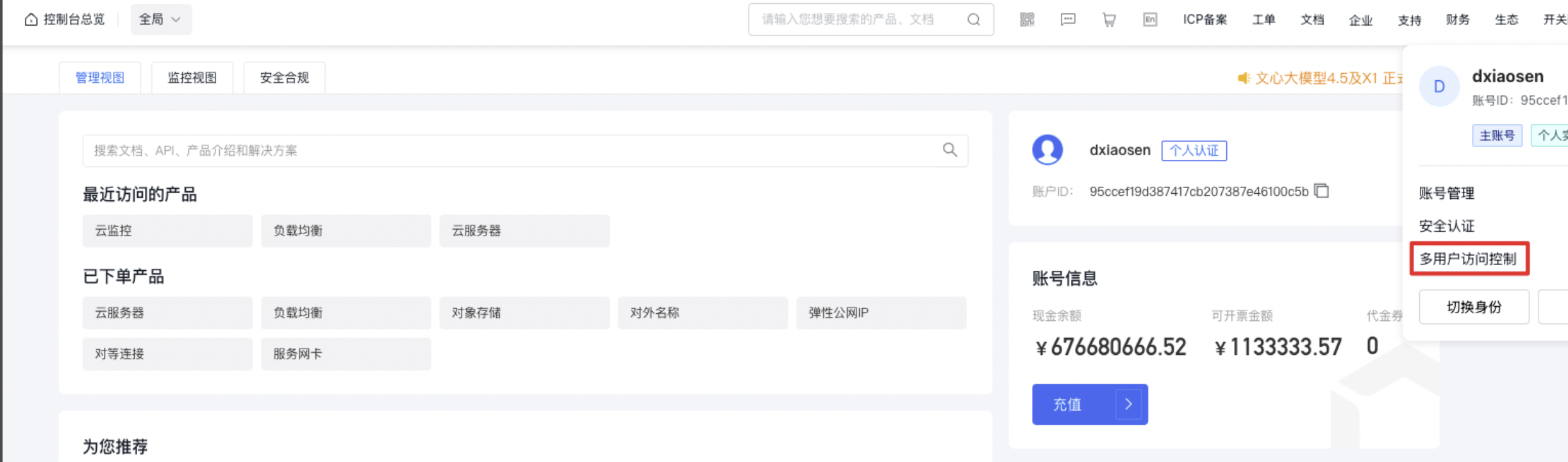
image.png

  1. Access User Management in the left navigation bar, and on the IAM User page, select New IAM User.
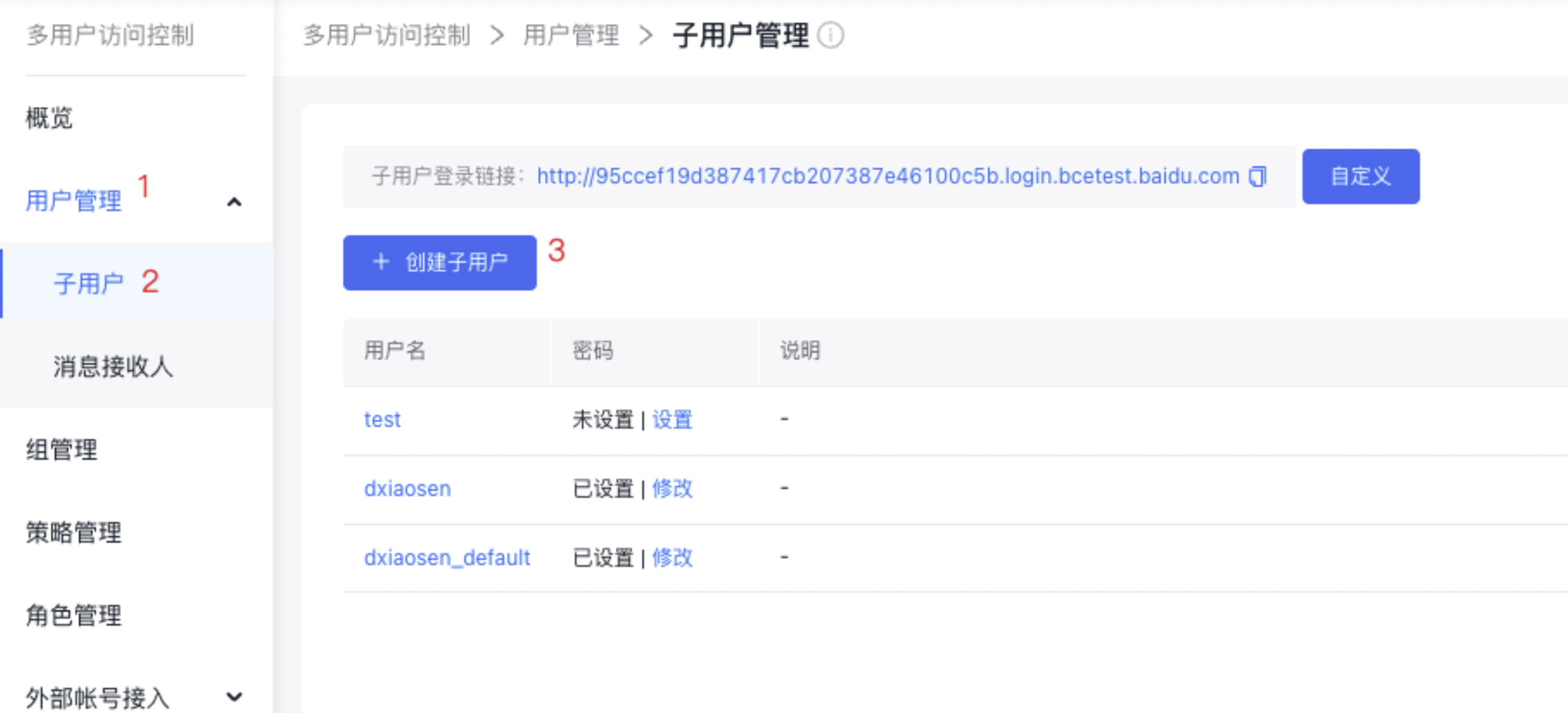
image.png

  1. In the Create IAM User dialog box, enter the User Name, click Confirm, and return to the IAM User Management List to view the new IAM user.
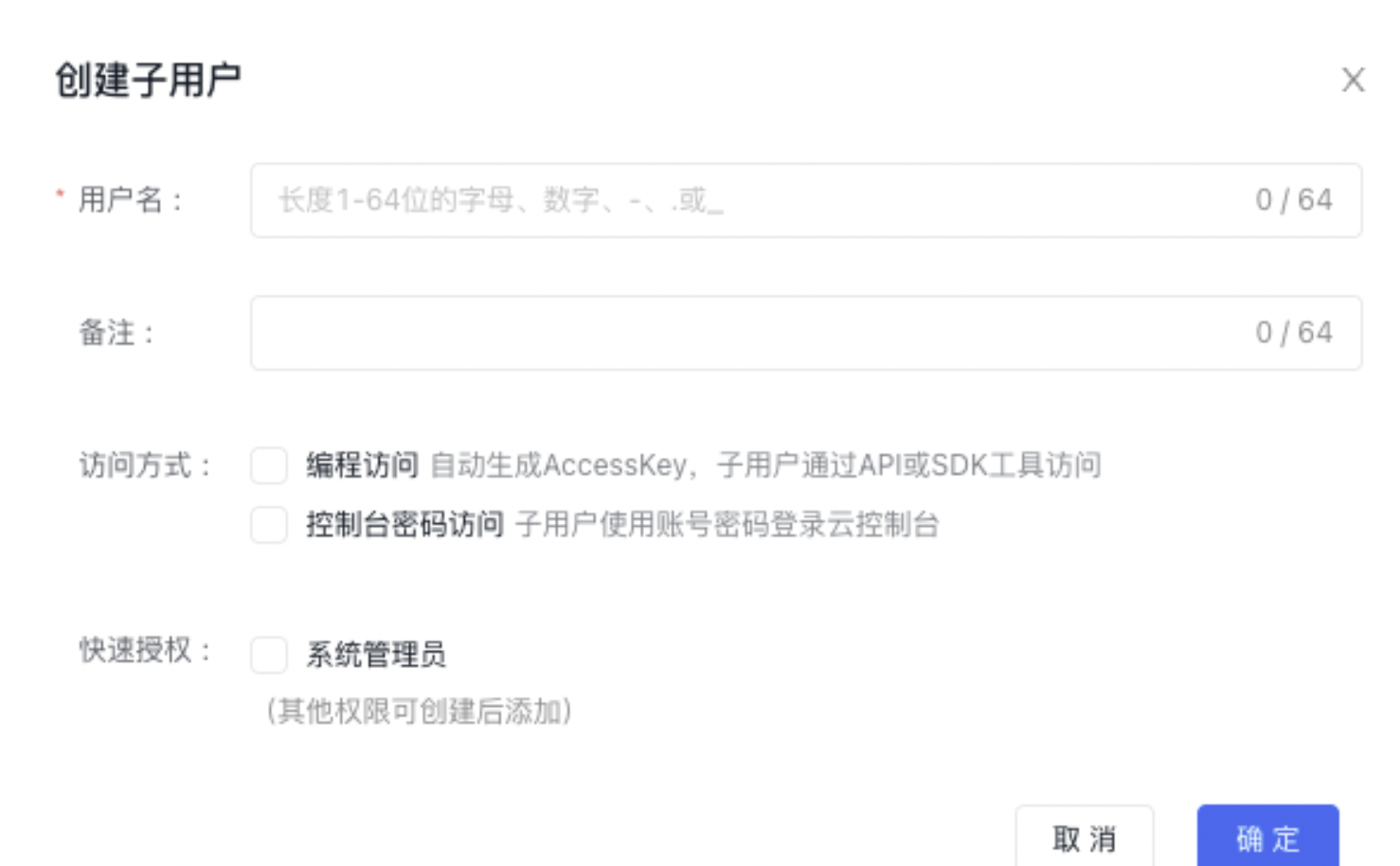
image.png

Configuration Policy

BLB and LBDC offer both system and custom policies to enable product-level and instance-level permission control.

  • System policy: Permission set predefined by Baidu AI Cloud System for resource management. Such policies can be directly authorized for IAM users, and users can only use it but cannot modify it;
  • Custom policy: A user-created, more granular set of permissions for resource management, allowing specific permissions to be configured for single instances. This provides flexibility to address the unique permission management needs of different users.

System Policy

The system policy includes 3 types of policies: management permission, operation and maintenance permission and read-only permission. The scope of permission is as follows:

Policy name Permission Permission scope
BLBFullControlAccessPolicy Permissions for full control and management of Baidu Load Balance (BLB) instances View instance list, view instance details, modify BLB name and description, configure listener, configure real server, monitor instance, trigger instance alarm, create BLB instance, and delete BLB instance
BlBOperateAccessPolicy Permission for operation and maintenance of Load Balancer (BLB) View instance list, view instance details, modify BLB name and description, configure listener, configure real server, monitor instance, and trigger instance alarm
BlBReadOnlyAccessPolicy Permissions for read-only access to Baidu Load Balance (BLB) View instance list and view instance details
LBDCFullControlAccessPolicy Permissions for full control and management of Load Balance Dedicated Cluster (LBDC) Query dedicated cluster list, view dedicated cluster details, view associated BLB instances, monitor dedicated cluster, trigger dedicated cluster alarm, create dedicated cluster, delete dedicated cluster, and upgrade dedicated cluster
LBDCOperateAccessPolicy Permission for operation and maintenance of Load Balancer Dedicated Cluster (LBDC) Query dedicated cluster list, view dedicated cluster details, view associated BLB instances, monitor dedicated cluster, and trigger dedicated cluster alarm
LBDCReadAccessPolicy Permission for read-only access to Load Balancer Dedicated Cluster (LBDC) Query dedicated cluster list, view dedicated cluster details, and view associated BLB instance

Custom Policy

Custom policies authorize users at the instance level, differing from system policies as they apply exclusively to selected instances.

An IAM user navigates to Policy Management in the left navigation bar, selects Create Policy, and chooses Create via Visual Editor. The user then enters the Policy Name and sets Baidu Load Balance (BLB) as the Service Type. The method remains set to Visual Editor by default and requires no changes.
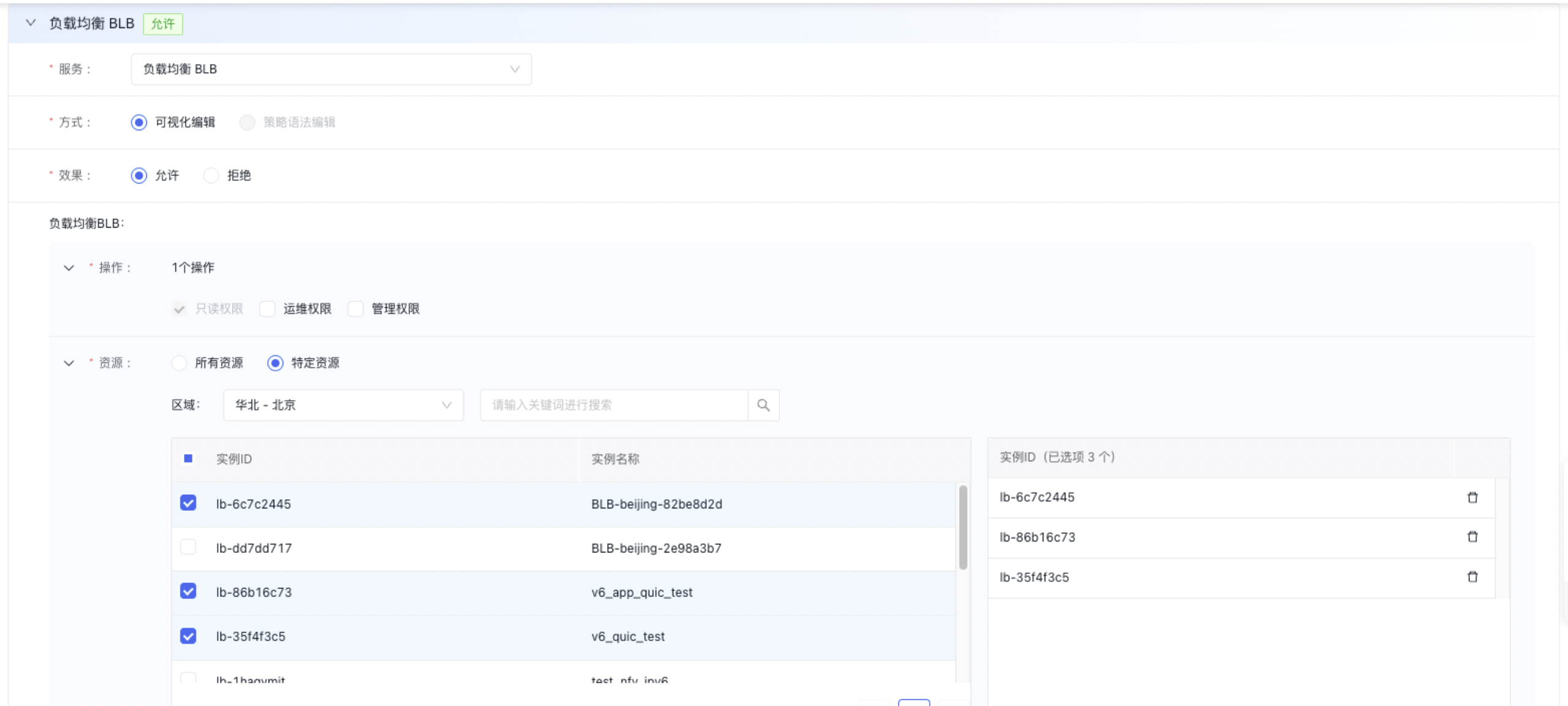
image.png IAM users first navigate to Policy Management via the left navigation bar, then click Create Policy, fill in the policy name and select Load Balance Dedicated Cluster (LBDC) as the service type. The policy creation method defaults to Visual Editor and requires no modification.
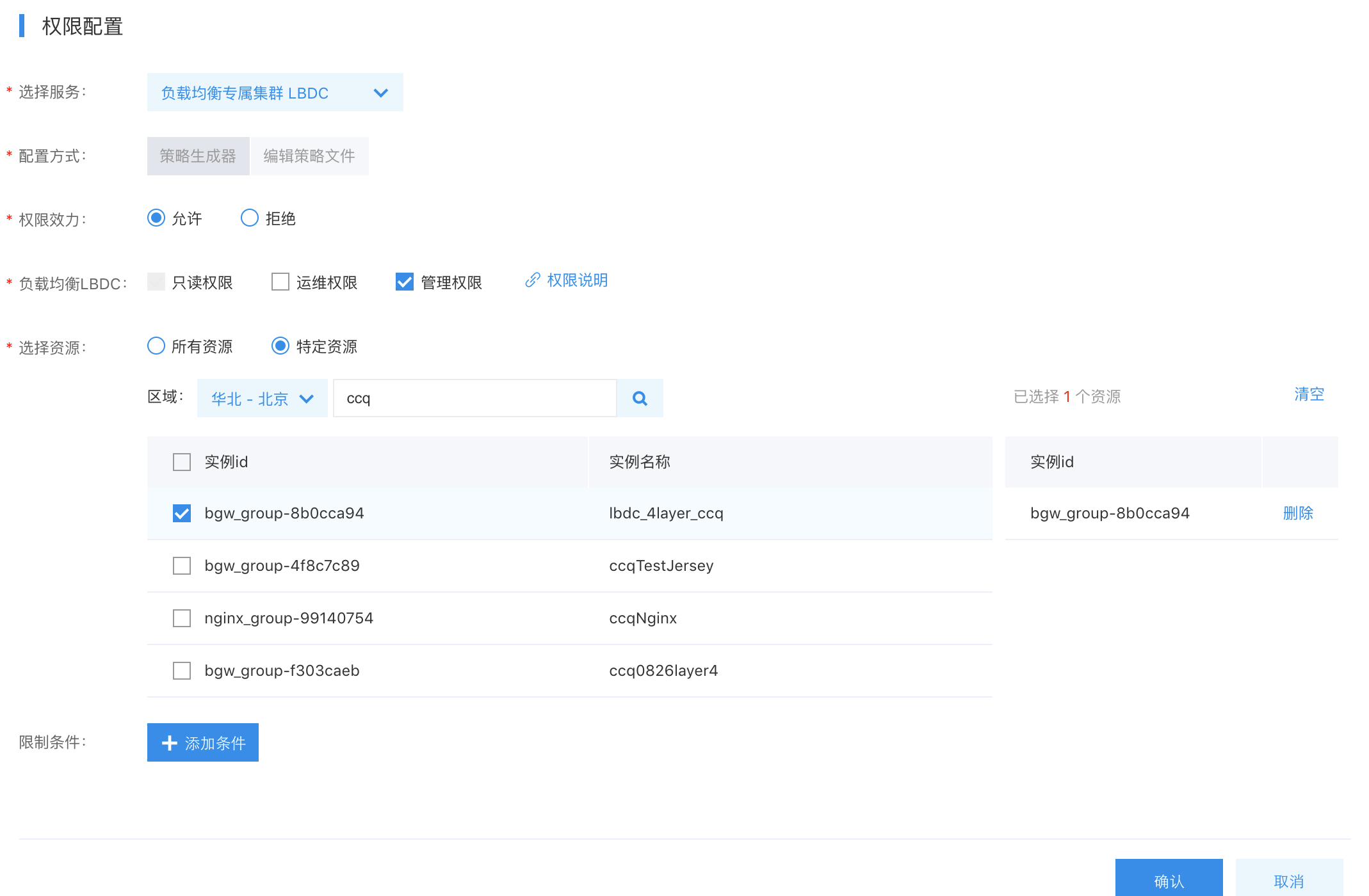
The scope of custom permission is detailed as follows:

Products Read-only permission Operation and maintenance permission Management permission
BLB View instance list and view instance details View instance list, view instance details, modify instance name and description, configure listener, configure real server, monitor instance, and trigger instance alarm View instance list, view instance details, modify instance name and description, configure listener, configure real server, monitor instance, trigger instance alarm, and delete BLB instance
LBDC Query dedicated cluster list, view dedicated cluster details, and view associated BLB instance Query dedicated cluster list, view dedicated cluster details, view associated BLB instances, monitor dedicated cluster, and trigger dedicated cluster alarm Query dedicated cluster list, view dedicated cluster details, view associated BLB instances, monitor dedicated cluster, trigger dedicated cluster alarm, create dedicated cluster, delete dedicated cluster, and upgrade dedicated cluster

User Authorization

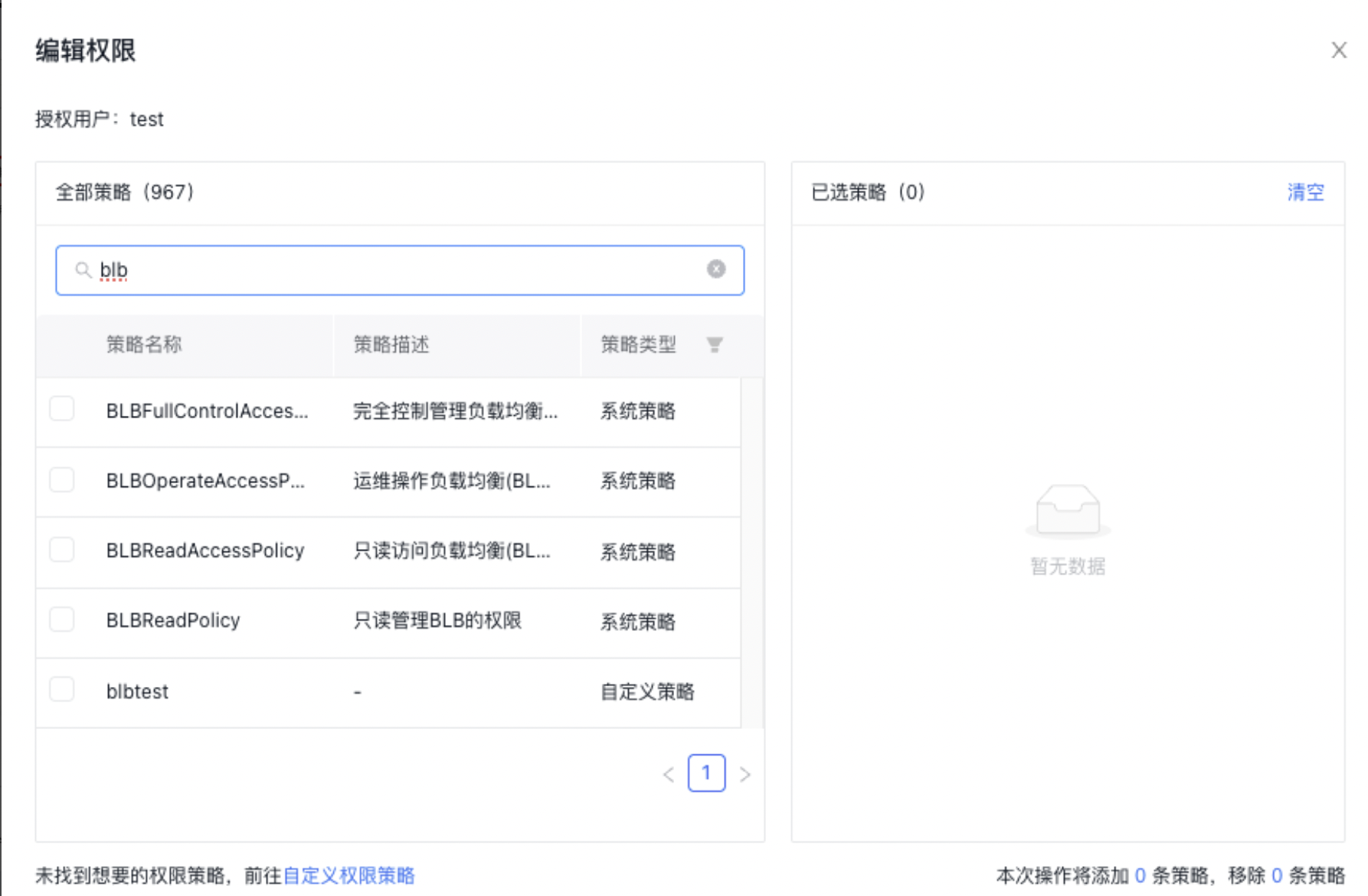
Under User Management -> IAM User, select Add Permission in the Operations column for the corresponding IAM user, then authorize with either System Policy or Custom Policy.

image.png
image.png

Note: To change an IAM user's permissions without modifying existing policy rules, you must delete the current policy and assign a new one since existing policy permissions cannot be unchecked or edited directly.

Sign in as IAM User

After the root account authorizes the IAM user, it can send the link to the IAM user, who can then sign in to the root account's management console via the IAM user login link and operate or view the root account's resources based on the authorized policies.
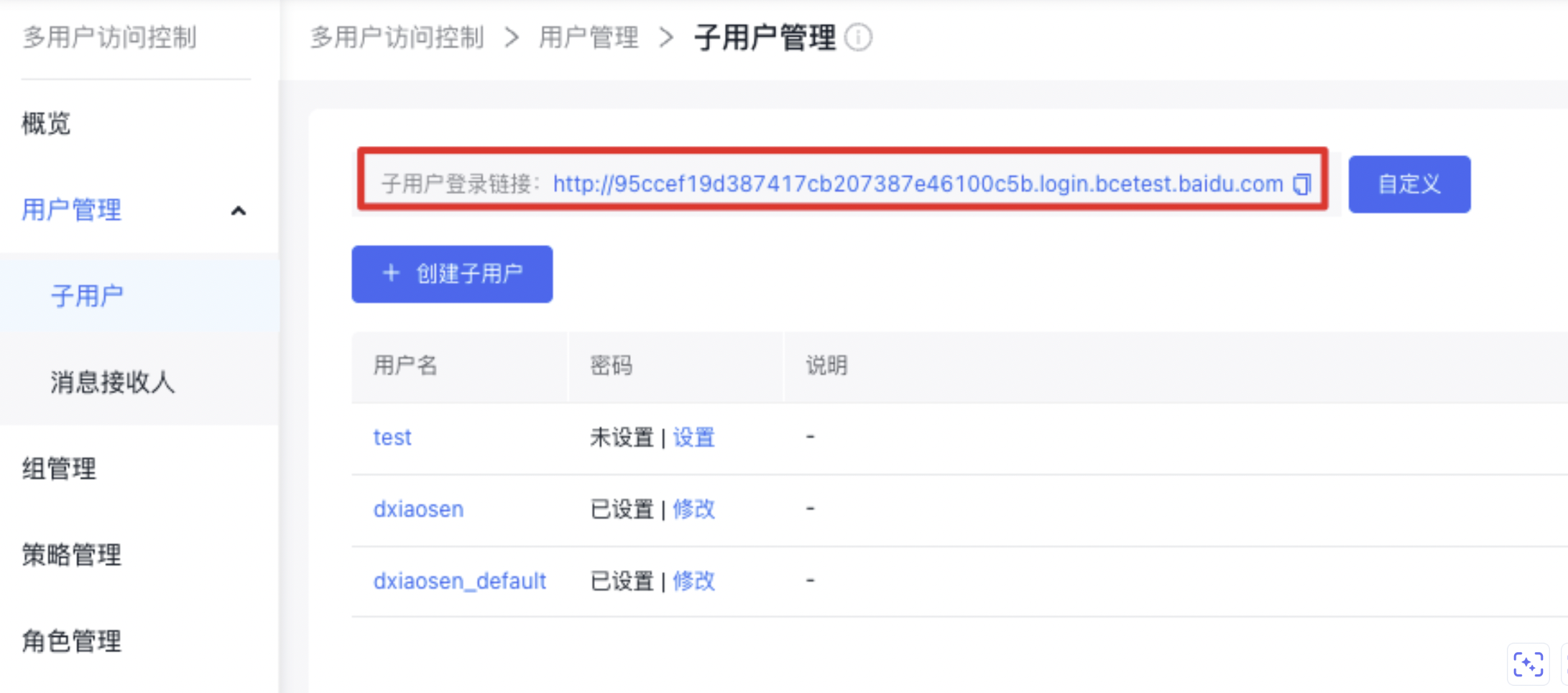
image.png

For other detailed operations, refer to: Multi-User Access Control.

Previous
General-purpose IPv6 BLB instance
Next
IP Group Usage Guide