Using IP Group Function to Mount Real Servers Across VPCs in Different Regions

BLB BLB

  • API Reference
    • Access control
    • API Service Domain Name
    • Appendix
    • Application BLB Interface
      • Application BLB Instance Related Interfaces
      • Application BLB Listener Related Interfaces
      • Application BLB Security Group Related Interfaces
      • Application BLB Server Group Related Interfaces
    • Application IPv6 BLB Interface
      • Application IPv6 BLB Instance Related Interfaces
      • Application IPv6 BLB Listener Related Interfaces
      • Application IPv6 BLB Security Group Related Interfaces
      • Application IPv6 BLB Server Group Related Interfaces
    • BLB Order Related Interfaces
      • BLB - Resize
      • BLB Charge Shift - Cancel Prepay to Postpay
      • BLB Charge Shift - Postpay to Prepay
      • BLB Charge Shift - Prepay to Postpay
      • BLB Inquiry
      • BLB Unsubscribe Interface
    • Document Update Records
    • Error code
    • Interface Specifications
    • Introduction
    • Load Balancer Dedicated Cluster LBDC Interface
      • LBDC Instance Related Interfaces
    • Service Publishing Point Interface
      • Service Publishing Point Related Interfaces
    • Standard BLB Interface
      • Standard BLB Instance Related Interfaces
      • Standard BLB Listener Related Interfaces
      • Standard BLB Real Server Related Interfaces
      • Standard BLB Security Group Related Interfaces
    • Standard IPv6 BLB Interface
      • Standard IPv6 BLB Related Interfaces
  • FAQs
    • Billing Problems
    • Common Questions Overview
    • Configuration-related questions
    • Fault-related questions
    • General Problems
    • Load Balancer Dedicated Cluster Related Issues
    • Performance-related questions
    • Security Problems
  • Function Release Records
  • Operation guide
    • Access control
    • Access Logs
    • Application BLB instance
    • Application IPv6 Instance
    • BLB metric description
    • Certification
    • Custom configuration
    • Extended domain name
    • General-purpose BLB instance
      • Creating BLB Ordinary Instance
      • Managing BLB Ordinary Instance
    • General-purpose IPv6 BLB instance
    • Identity and access management
    • IP Group Usage Guide
    • Load Balance Dedicated Cluster
    • Load Balancer Frontend and Backend Protocol Correspondence
    • Recording Access Logs Using VPC Flow Logs
    • Service Release Point
    • Tag Management
  • Product Description
    • Application scenarios
    • Basic Architecture
    • Basic concepts
    • Performance Specification Description
    • Product advantages
    • Product features
    • Product Introduction
    • Usage restrictions
  • Product pricing
    • Load Balancer Dedicated Cluster Billing
    • Load Balancer Instance Billing
  • Quick Start
  • SDK
    • GO-SDK
      • Application BLB Instance
      • Initialization
      • Install
      • IPv6 BLB Instance
      • Load Balance Dedicated Cluster (LBDC)
      • Ordinary BLB Instance
      • Overview
      • Service Release Point
      • Version Change Records
    • Java-SDK
      • Application BLB instance
      • General-purpose BLB instance
      • Initialization
      • Install the SDK Package
      • IPv6 BLB Instance
      • Load Balance Dedicated Cluster (LBDC)
      • Overview
      • Service Release Point
      • Version Update Description
    • PHP-SDK
      • Initialization
      • Install
      • Ordinary BLB Instance
      • Overview
    • Python-SDK
      • Application BLB Instance
      • Initialization
      • Install
      • IPv6 BLB Instance
      • Load Balance Dedicated Cluster (LBDC)
      • Ordinary BLB Instance
      • Overview
      • Service Release Point
      • Version Update Description
  • Service Level Agreement (SLA)
    • Description of Baidu AI Cloud Load Balancer Trusted Cloud certification service availability
    • LBDC Service Level Agreement SLA
    • BLB Service Level Agreement (V2.0)
  • Typical Practices
    • BLB Selection Guide
    • Health Check Exception Troubleshooting
    • Implementing BLB Association with Listeners, Real Servers, Security Groups, etc. via Terraform
    • Implementing Multi-Site Hosting via Application BLB
    • Load Balancer Security Protection Strategy
    • Managing BLB via Terraform
    • Obtaining Client Information via Application BLB Instance
    • Using IP Group Function to Mount Real Servers Across VPCs in Different Regions
    • Using IP Group Function to Mount Real Servers Across VPCs in the Same Region
All documents
menu
No results found, please re-enter

BLB BLB

  • API Reference
    • Access control
    • API Service Domain Name
    • Appendix
    • Application BLB Interface
      • Application BLB Instance Related Interfaces
      • Application BLB Listener Related Interfaces
      • Application BLB Security Group Related Interfaces
      • Application BLB Server Group Related Interfaces
    • Application IPv6 BLB Interface
      • Application IPv6 BLB Instance Related Interfaces
      • Application IPv6 BLB Listener Related Interfaces
      • Application IPv6 BLB Security Group Related Interfaces
      • Application IPv6 BLB Server Group Related Interfaces
    • BLB Order Related Interfaces
      • BLB - Resize
      • BLB Charge Shift - Cancel Prepay to Postpay
      • BLB Charge Shift - Postpay to Prepay
      • BLB Charge Shift - Prepay to Postpay
      • BLB Inquiry
      • BLB Unsubscribe Interface
    • Document Update Records
    • Error code
    • Interface Specifications
    • Introduction
    • Load Balancer Dedicated Cluster LBDC Interface
      • LBDC Instance Related Interfaces
    • Service Publishing Point Interface
      • Service Publishing Point Related Interfaces
    • Standard BLB Interface
      • Standard BLB Instance Related Interfaces
      • Standard BLB Listener Related Interfaces
      • Standard BLB Real Server Related Interfaces
      • Standard BLB Security Group Related Interfaces
    • Standard IPv6 BLB Interface
      • Standard IPv6 BLB Related Interfaces
  • FAQs
    • Billing Problems
    • Common Questions Overview
    • Configuration-related questions
    • Fault-related questions
    • General Problems
    • Load Balancer Dedicated Cluster Related Issues
    • Performance-related questions
    • Security Problems
  • Function Release Records
  • Operation guide
    • Access control
    • Access Logs
    • Application BLB instance
    • Application IPv6 Instance
    • BLB metric description
    • Certification
    • Custom configuration
    • Extended domain name
    • General-purpose BLB instance
      • Creating BLB Ordinary Instance
      • Managing BLB Ordinary Instance
    • General-purpose IPv6 BLB instance
    • Identity and access management
    • IP Group Usage Guide
    • Load Balance Dedicated Cluster
    • Load Balancer Frontend and Backend Protocol Correspondence
    • Recording Access Logs Using VPC Flow Logs
    • Service Release Point
    • Tag Management
  • Product Description
    • Application scenarios
    • Basic Architecture
    • Basic concepts
    • Performance Specification Description
    • Product advantages
    • Product features
    • Product Introduction
    • Usage restrictions
  • Product pricing
    • Load Balancer Dedicated Cluster Billing
    • Load Balancer Instance Billing
  • Quick Start
  • SDK
    • GO-SDK
      • Application BLB Instance
      • Initialization
      • Install
      • IPv6 BLB Instance
      • Load Balance Dedicated Cluster (LBDC)
      • Ordinary BLB Instance
      • Overview
      • Service Release Point
      • Version Change Records
    • Java-SDK
      • Application BLB instance
      • General-purpose BLB instance
      • Initialization
      • Install the SDK Package
      • IPv6 BLB Instance
      • Load Balance Dedicated Cluster (LBDC)
      • Overview
      • Service Release Point
      • Version Update Description
    • PHP-SDK
      • Initialization
      • Install
      • Ordinary BLB Instance
      • Overview
    • Python-SDK
      • Application BLB Instance
      • Initialization
      • Install
      • IPv6 BLB Instance
      • Load Balance Dedicated Cluster (LBDC)
      • Ordinary BLB Instance
      • Overview
      • Service Release Point
      • Version Update Description
  • Service Level Agreement (SLA)
    • Description of Baidu AI Cloud Load Balancer Trusted Cloud certification service availability
    • LBDC Service Level Agreement SLA
    • BLB Service Level Agreement (V2.0)
  • Typical Practices
    • BLB Selection Guide
    • Health Check Exception Troubleshooting
    • Implementing BLB Association with Listeners, Real Servers, Security Groups, etc. via Terraform
    • Implementing Multi-Site Hosting via Application BLB
    • Load Balancer Security Protection Strategy
    • Managing BLB via Terraform
    • Obtaining Client Information via Application BLB Instance
    • Using IP Group Function to Mount Real Servers Across VPCs in Different Regions
    • Using IP Group Function to Mount Real Servers Across VPCs in the Same Region
  • Document center
  • arrow
  • BLBBLB
  • arrow
  • Typical Practices
  • arrow
  • Using IP Group Function to Mount Real Servers Across VPCs in Different Regions
Table of contents on this page
  • Load balancer instance and virtual machine
  • Prepare peering connections
  • 1. VPC relay route
  • 2. Route configuration for VPC1 where BLB resides
  • 3. Route configuration for VPC2 where the real servers reside

Using IP Group Function to Mount Real Servers Across VPCs in Different Regions

Updated at:2025-10-16

Scenario introduction

The IP group is a type of real server group for application BLB, and refers to using fixed IPs to mount real servers. In some cases, using an IP group to mount real servers across VPCs can provide a more flexible, secure, and manageable network architecture, which is suitable for complex multi-VPC environments and multi-tenant application scenarios. This document will guide you to utilize the IP group functions through practical implementation cases, using peering connections to connect two independent VPC environments across different regions.
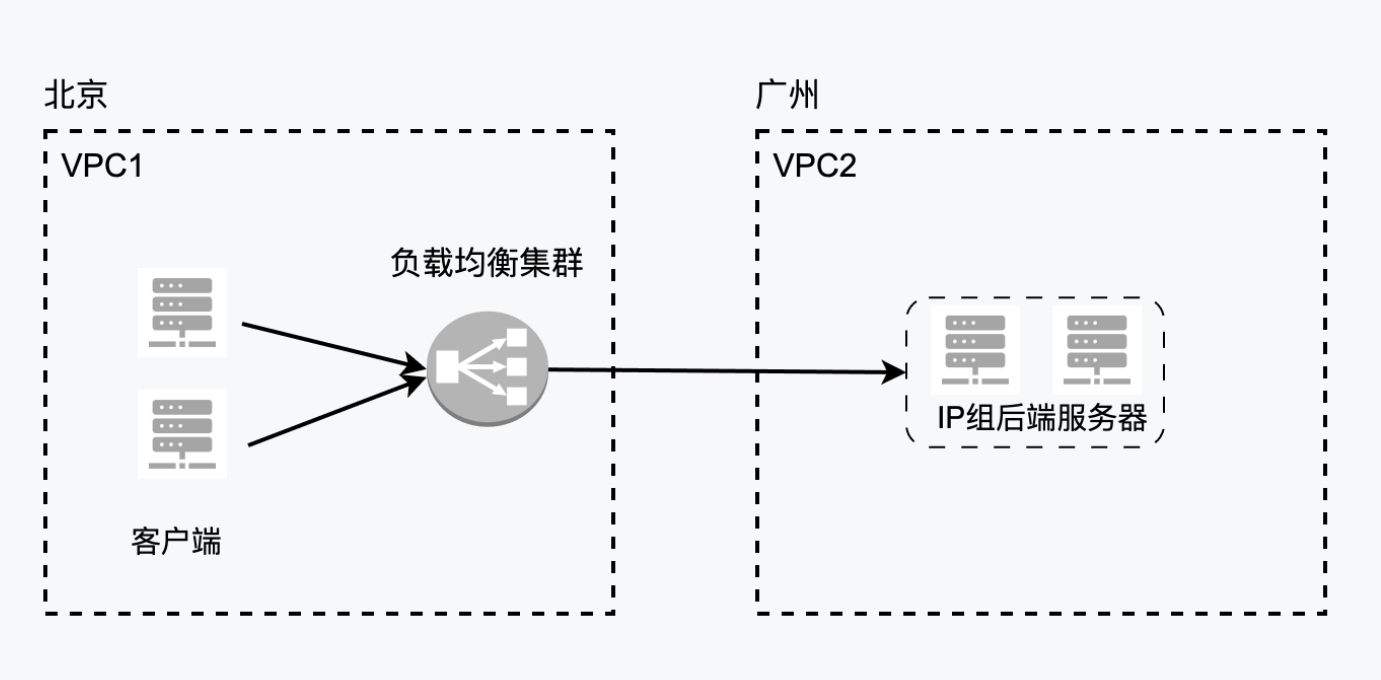
image.png

Prerequisites

  • Currently, only cross-region VPC environments connected via peering connections are supported.
  • To enable relay routing between more than three VPCs interconnected through peering connections, a ticket submission is required.

Environment preparation

  • For two VPCs with planned subnets, one is in Beijing and another in Guangzhou
  • Purchased BLB
  • Deployed real servers across other VPCs
  • Peering connections purchased and deployed

Assume the deployed environment has the following IPs:

Resource type VPC IP
Beijing VPC VPC1 bj_vpc_192(192.168.0.0/16)
Guangzhou VPC VPC2 gz_vpc_10(10.0.0.0/16)
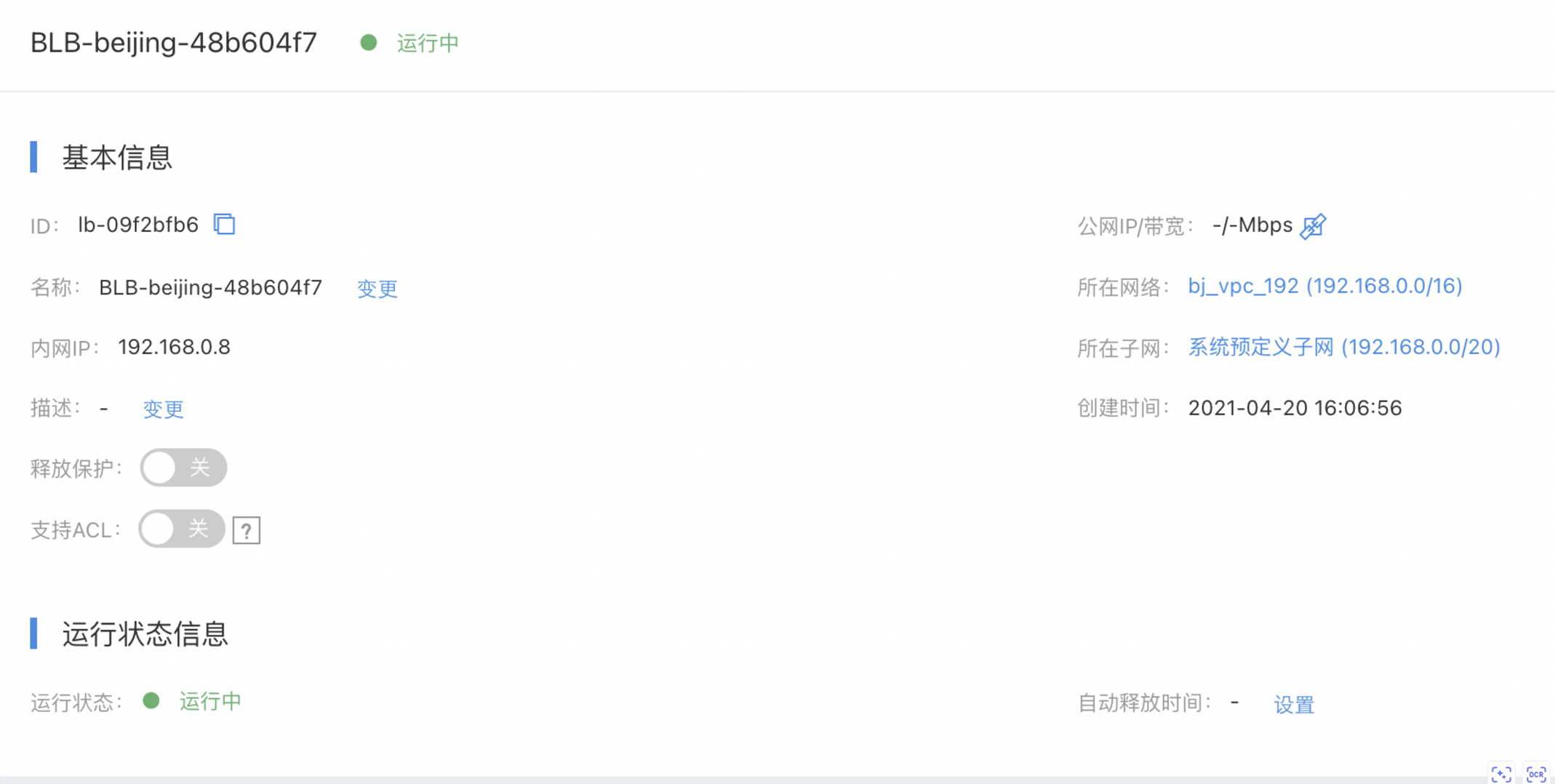
Beijing application load balancer instance VPC1 192.168.0.8
Baidu Cloud Compute 1 (Guangzhou real server 1) VPC2 10.100.100.5
Baidu Cloud Compute 2 (Guangzhou real server 2) VPC2 10.100.200.4

Load balancer instance and virtual machine

  • Load balancer LB information
    image.png
  • Guangzhou real server virtual machine information
    *In this scenario, the real server needs to select virtual machine instances of General Purpose Fourth Generation (g4) or higher
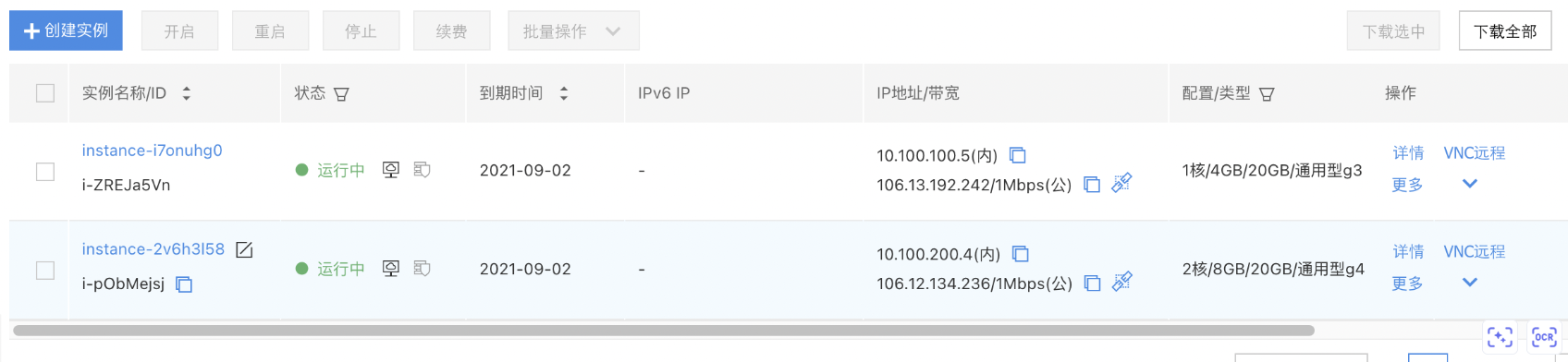
    image.png

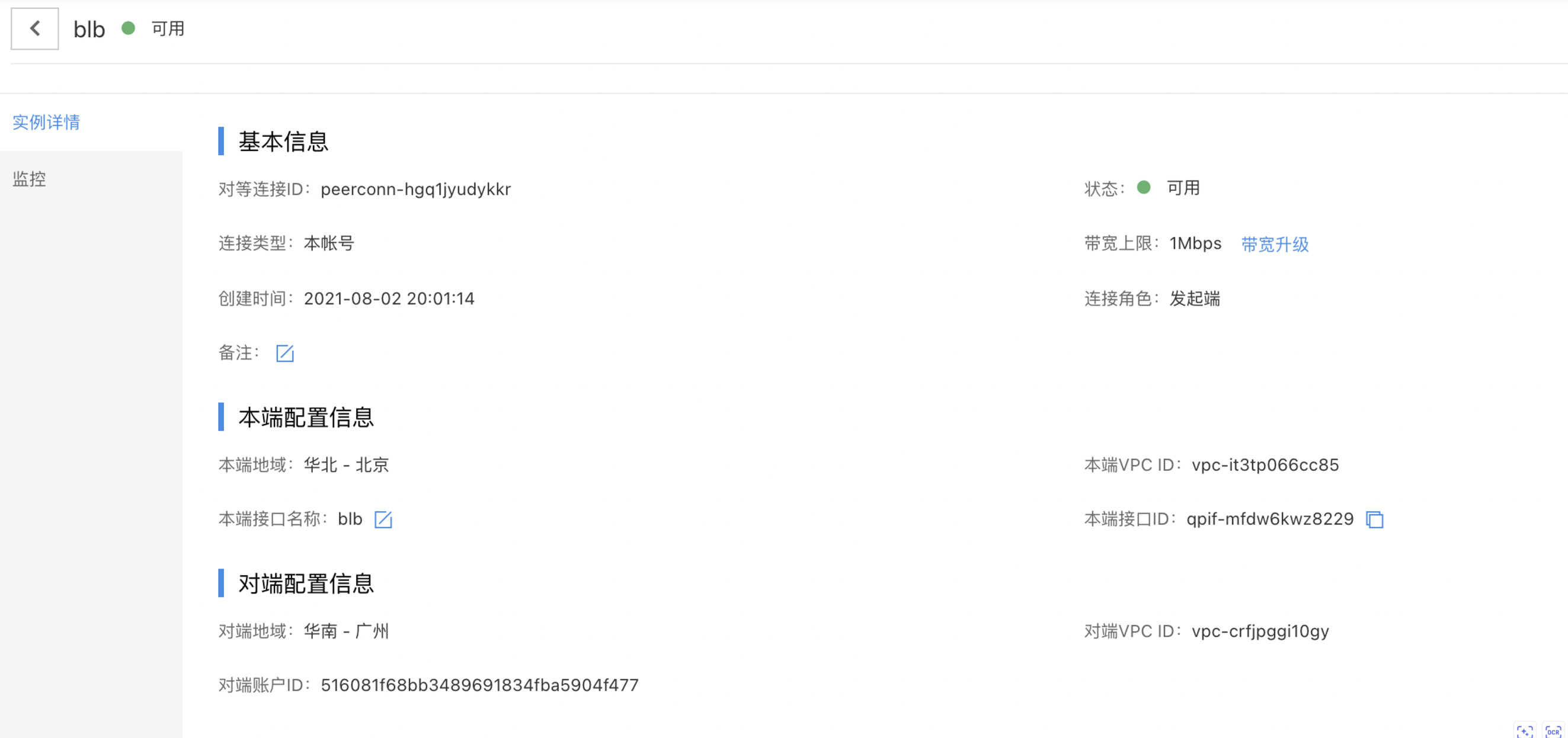
Prepare peering connections

  • Beijing-side peering connections: image.png
  • Guangzhou-side peering connections: image.png

Mount the real server to the load balancer backend

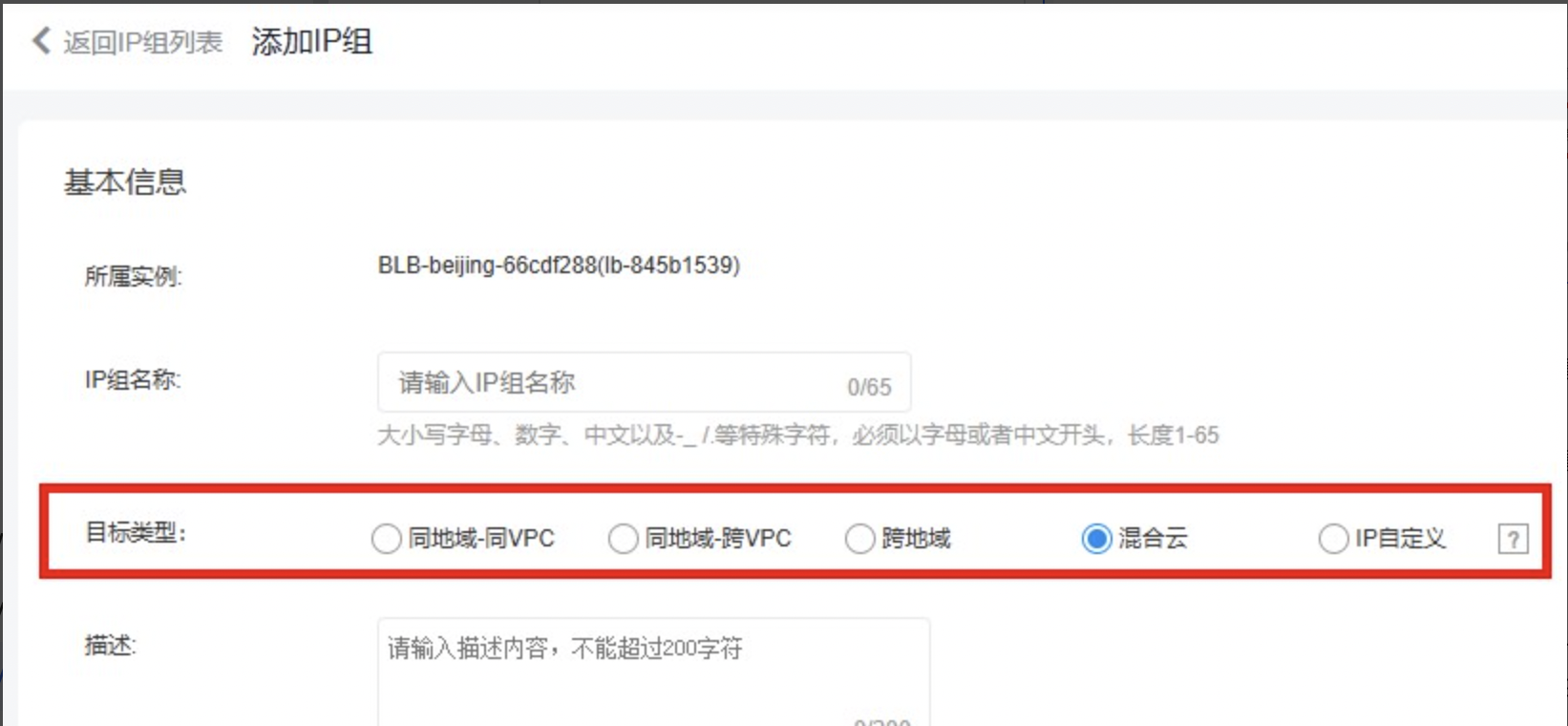
  • Create a target group of IP group type under the Load Balancer image.png image.png
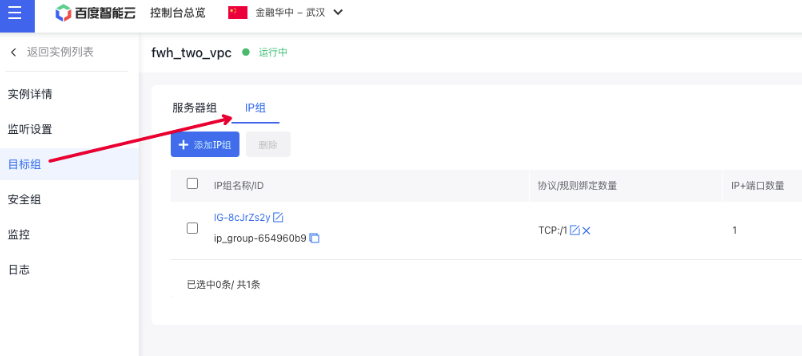
  • Note: Below are the definitions for each type.
Types Application scenarios
Same region - same VPC: The IP addresses added to the IP group belong to the same VPC as the BLB. This allows mounting of servers like BCC or BBC within the same VPC.
Same region - cross-VPC: The IP addresses added to the IP group belong to separate VPCs from the BLB but can communicate through peering connections. For example, cross-VPC BCC or BBC servers can be mounted.
Cross region: The IP addresses added to the IP group belong to different regions with the BLB, which can be interconnected through peering connections, and the IP addresses are compute-type servers (BCC or BBC)
Hybrid cloud: The IP addresses added to the IP group belong to the same region or different regions with the BLB. For example, it can mount servers in offline IDCs, cross-region server IP addresses in the cloud, cross-region network elements with IP addresses, or cross-cloud accessible IP addresses
Custom IP: If the IP custom type is selected, IP members in the IP group can be configured with the above target types respectively
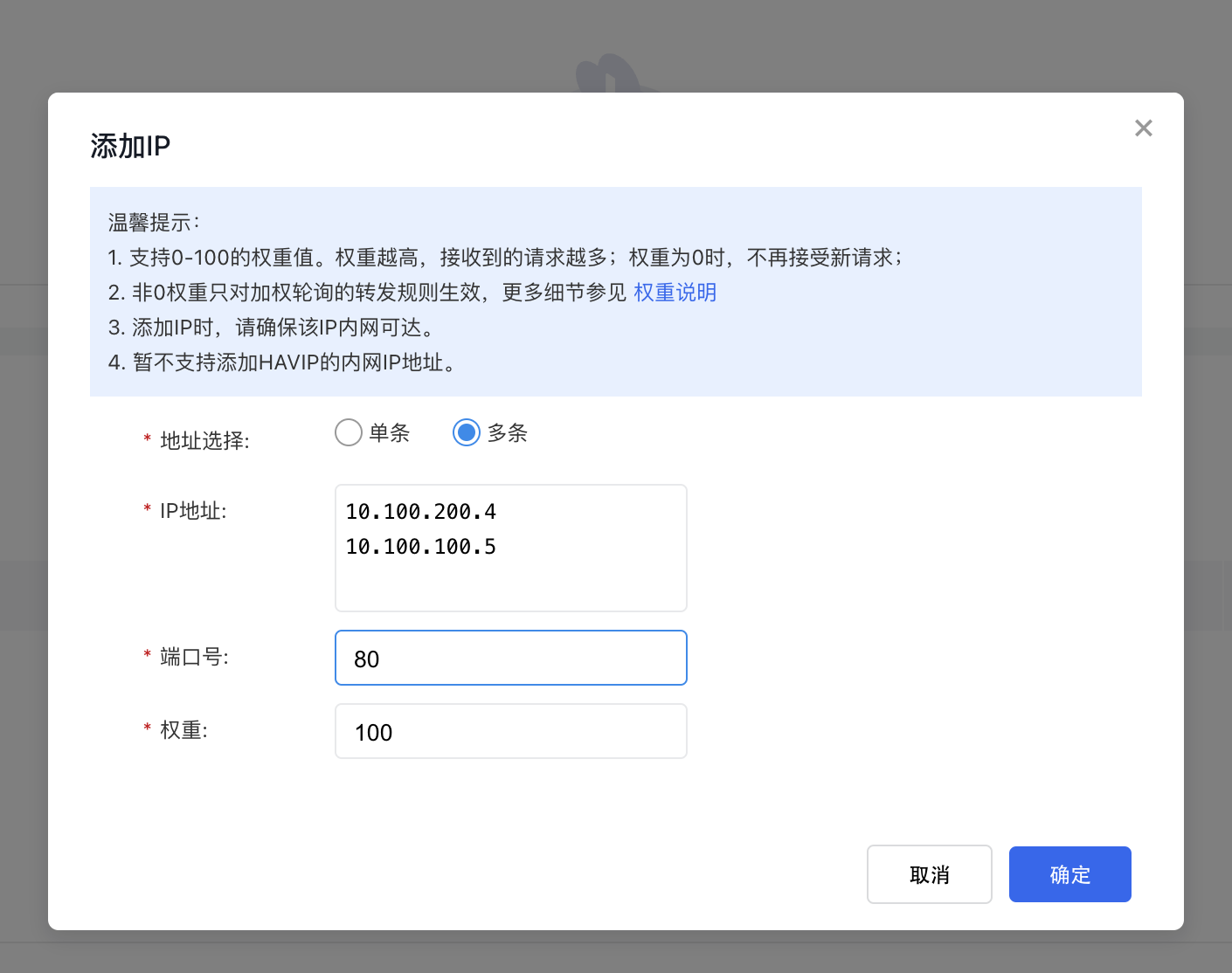
  • Mount 10.100.100.5 and 10.100.200.4 as IP group members, with the target type set to cross-region, and add new open protocols. image.png
  • Set up the appropriate TCP or UDP listeners in the load balancer and attach the IP group created in the previous step.

Use peering connections to connect VPC1 and VPC2 environments and configure routes

For more instructions on peering connections, please refer to: Peering Connections Description Document After creating the corresponding peering connections, we also need to perform the following configuration:

1. VPC relay route

Ensure relay routing is activated for VPC1 where the BLB resides.

2. Route configuration for VPC1 where BLB resides

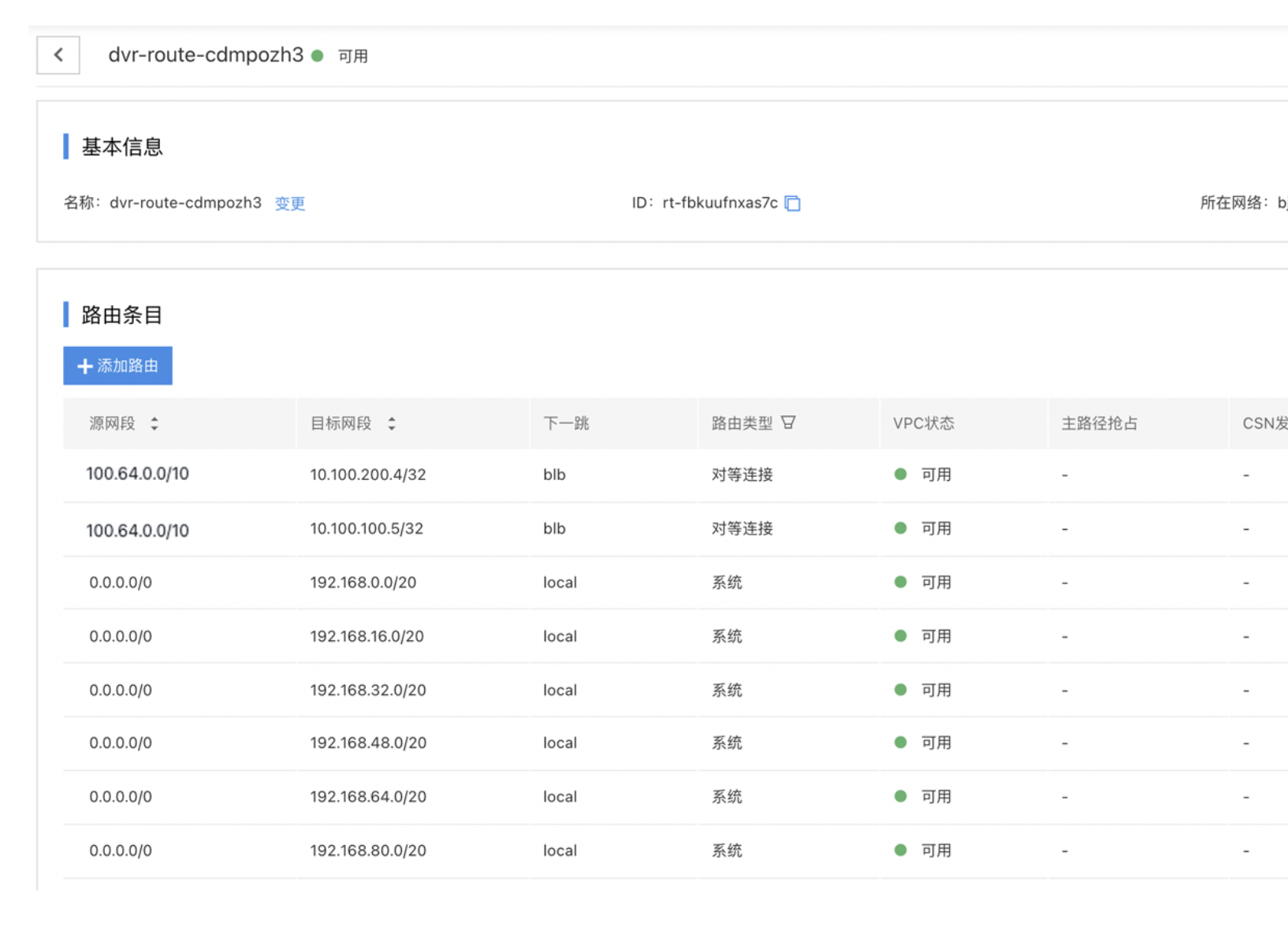
Add a custom route to the route configuration for VPC1 where BLB resides: 100.64.0.0/10->X.X.X.X/32 (real server IP address or network segment). In this example, we configure 100.64.0.0/10->10.100.100.5/32 and100.64.0.0/10->10.100.200.4/32, with the route pointing to the peering connections end to connect health check route. image.png
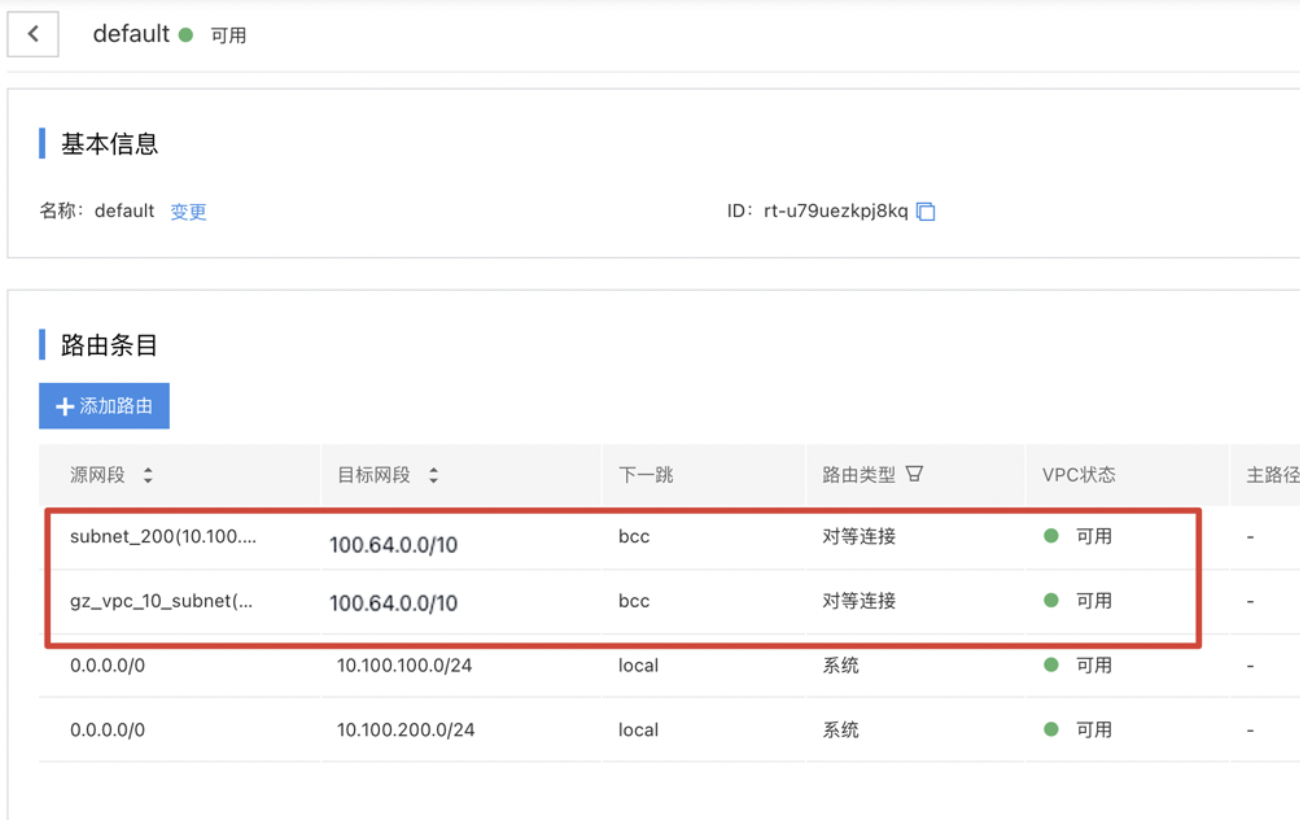
3. Route configuration for VPC2 where the real servers reside

In the VPC2 where the real servers reside, add source network segments 10.100.100.0/24 and 10.100.200.0/24 (the address ranges of the real servers) to the route table used by the real servers, with the destination network segment being the load balancer reserved segment (100.64.0.0/10), and with the route pointing to the peering connections end. image.png Note: If VPC2 achieves connectivity with VPC1 via peering connections and also establishes connections with VPCs in other regions (e.g., VPC3), while simultaneously serves as the real server for BLBs in these different regions, more granular routing policies are required when configuring the target load balancer address network segments. If needed, submit a ticket to obtain corresponding support.
Test connectivity

Access the load balancer IP 192.168.0.8:80 using a client within VPC1
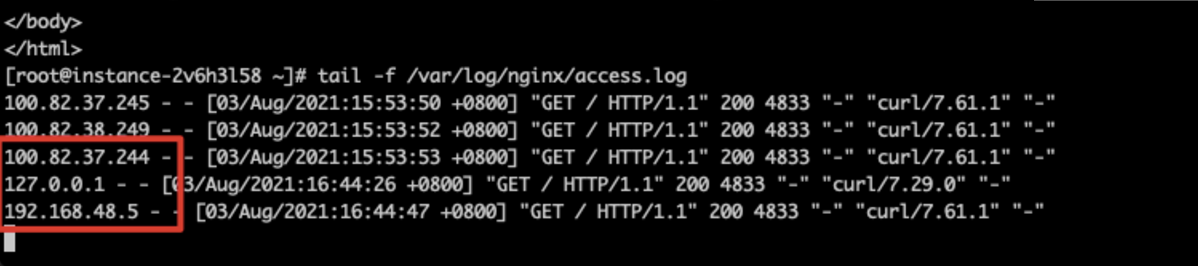
image.png
Data stream across regions and VPC is possible.

How to obtain client source IP (CIP)

  • For TCP/UDP listeners, the CIP can be directly extracted from the message header in same-region same-VPC, same-region cross-VPC, and cross-region scenarios.
  • For cross-region TCP/UDP listeners in hybrid cloud setups, such as scenarios where BLB connects to offline IDCs or cloud-based cross-region servers, the client IP address (CIP) is not visible by default due to multiple NAT conversions across network elements or cross-cloud IP infrastructure. Submit a ticket to gain the necessary support if CIP visibility is required.
  • TCP/UDP/TCPSSL-type listeners currently support ProxyProtocol. Users can enable this on the BLB and decode the ProxyProtocol standard protocol on the real server to retrieve the CIP.
  • For HTTP/HTTPS-type listeners, CIP passthrough is not currently supported. Users can activate the "Obtain real IP via X-Forwarded-For" option to decode the HTTP header on the real server for CIP retrieval.

Note

  • When setting up back-to-origin connections using dedicated lines, ensure that VPC relay routing at both ends avoids routing loops.
  • Route rules and load balancer configurations must match the client's actual network segment environment to guarantee connectivity.
  • Security groups and ACL settings for each BLB and real server must be correctly configured to prevent unintended blockages and packet loss, which could lead to access failures.

Previous
Obtaining Client Information via Application BLB Instance
Next
Using IP Group Function to Mount Real Servers Across VPCs in the Same Region