Implementing BLB Association with Listeners, Real Servers, Security Groups, etc. via Terraform

BLB BLB

  • API Reference
    • Access control
    • API Service Domain Name
    • Appendix
    • Application BLB Interface
      • Application BLB Instance Related Interfaces
      • Application BLB Listener Related Interfaces
      • Application BLB Security Group Related Interfaces
      • Application BLB Server Group Related Interfaces
    • Application IPv6 BLB Interface
      • Application IPv6 BLB Instance Related Interfaces
      • Application IPv6 BLB Listener Related Interfaces
      • Application IPv6 BLB Security Group Related Interfaces
      • Application IPv6 BLB Server Group Related Interfaces
    • BLB Order Related Interfaces
      • BLB - Resize
      • BLB Charge Shift - Cancel Prepay to Postpay
      • BLB Charge Shift - Postpay to Prepay
      • BLB Charge Shift - Prepay to Postpay
      • BLB Inquiry
      • BLB Unsubscribe Interface
    • Document Update Records
    • Error code
    • Interface Specifications
    • Introduction
    • Load Balancer Dedicated Cluster LBDC Interface
      • LBDC Instance Related Interfaces
    • Service Publishing Point Interface
      • Service Publishing Point Related Interfaces
    • Standard BLB Interface
      • Standard BLB Instance Related Interfaces
      • Standard BLB Listener Related Interfaces
      • Standard BLB Real Server Related Interfaces
      • Standard BLB Security Group Related Interfaces
    • Standard IPv6 BLB Interface
      • Standard IPv6 BLB Related Interfaces
  • FAQs
    • Billing Problems
    • Common Questions Overview
    • Configuration-related questions
    • Fault-related questions
    • General Problems
    • Load Balancer Dedicated Cluster Related Issues
    • Performance-related questions
    • Security Problems
  • Function Release Records
  • Operation guide
    • Access control
    • Access Logs
    • Application BLB instance
    • Application IPv6 Instance
    • BLB metric description
    • Certification
    • Custom configuration
    • Extended domain name
    • General-purpose BLB instance
      • Creating BLB Ordinary Instance
      • Managing BLB Ordinary Instance
    • General-purpose IPv6 BLB instance
    • Identity and access management
    • IP Group Usage Guide
    • Load Balance Dedicated Cluster
    • Load Balancer Frontend and Backend Protocol Correspondence
    • Recording Access Logs Using VPC Flow Logs
    • Service Release Point
    • Tag Management
  • Product Description
    • Application scenarios
    • Basic Architecture
    • Basic concepts
    • Performance Specification Description
    • Product advantages
    • Product features
    • Product Introduction
    • Usage restrictions
  • Product pricing
    • Load Balancer Dedicated Cluster Billing
    • Load Balancer Instance Billing
  • Quick Start
  • SDK
    • GO-SDK
      • Application BLB Instance
      • Initialization
      • Install
      • IPv6 BLB Instance
      • Load Balance Dedicated Cluster (LBDC)
      • Ordinary BLB Instance
      • Overview
      • Service Release Point
      • Version Change Records
    • Java-SDK
      • Application BLB instance
      • General-purpose BLB instance
      • Initialization
      • Install the SDK Package
      • IPv6 BLB Instance
      • Load Balance Dedicated Cluster (LBDC)
      • Overview
      • Service Release Point
      • Version Update Description
    • PHP-SDK
      • Initialization
      • Install
      • Ordinary BLB Instance
      • Overview
    • Python-SDK
      • Application BLB Instance
      • Initialization
      • Install
      • IPv6 BLB Instance
      • Load Balance Dedicated Cluster (LBDC)
      • Ordinary BLB Instance
      • Overview
      • Service Release Point
      • Version Update Description
  • Service Level Agreement (SLA)
    • Description of Baidu AI Cloud Load Balancer Trusted Cloud certification service availability
    • LBDC Service Level Agreement SLA
    • BLB Service Level Agreement (V2.0)
  • Typical Practices
    • BLB Selection Guide
    • Health Check Exception Troubleshooting
    • Implementing BLB Association with Listeners, Real Servers, Security Groups, etc. via Terraform
    • Implementing Multi-Site Hosting via Application BLB
    • Load Balancer Security Protection Strategy
    • Managing BLB via Terraform
    • Obtaining Client Information via Application BLB Instance
    • Using IP Group Function to Mount Real Servers Across VPCs in Different Regions
    • Using IP Group Function to Mount Real Servers Across VPCs in the Same Region
All documents
menu
No results found, please re-enter

BLB BLB

  • API Reference
    • Access control
    • API Service Domain Name
    • Appendix
    • Application BLB Interface
      • Application BLB Instance Related Interfaces
      • Application BLB Listener Related Interfaces
      • Application BLB Security Group Related Interfaces
      • Application BLB Server Group Related Interfaces
    • Application IPv6 BLB Interface
      • Application IPv6 BLB Instance Related Interfaces
      • Application IPv6 BLB Listener Related Interfaces
      • Application IPv6 BLB Security Group Related Interfaces
      • Application IPv6 BLB Server Group Related Interfaces
    • BLB Order Related Interfaces
      • BLB - Resize
      • BLB Charge Shift - Cancel Prepay to Postpay
      • BLB Charge Shift - Postpay to Prepay
      • BLB Charge Shift - Prepay to Postpay
      • BLB Inquiry
      • BLB Unsubscribe Interface
    • Document Update Records
    • Error code
    • Interface Specifications
    • Introduction
    • Load Balancer Dedicated Cluster LBDC Interface
      • LBDC Instance Related Interfaces
    • Service Publishing Point Interface
      • Service Publishing Point Related Interfaces
    • Standard BLB Interface
      • Standard BLB Instance Related Interfaces
      • Standard BLB Listener Related Interfaces
      • Standard BLB Real Server Related Interfaces
      • Standard BLB Security Group Related Interfaces
    • Standard IPv6 BLB Interface
      • Standard IPv6 BLB Related Interfaces
  • FAQs
    • Billing Problems
    • Common Questions Overview
    • Configuration-related questions
    • Fault-related questions
    • General Problems
    • Load Balancer Dedicated Cluster Related Issues
    • Performance-related questions
    • Security Problems
  • Function Release Records
  • Operation guide
    • Access control
    • Access Logs
    • Application BLB instance
    • Application IPv6 Instance
    • BLB metric description
    • Certification
    • Custom configuration
    • Extended domain name
    • General-purpose BLB instance
      • Creating BLB Ordinary Instance
      • Managing BLB Ordinary Instance
    • General-purpose IPv6 BLB instance
    • Identity and access management
    • IP Group Usage Guide
    • Load Balance Dedicated Cluster
    • Load Balancer Frontend and Backend Protocol Correspondence
    • Recording Access Logs Using VPC Flow Logs
    • Service Release Point
    • Tag Management
  • Product Description
    • Application scenarios
    • Basic Architecture
    • Basic concepts
    • Performance Specification Description
    • Product advantages
    • Product features
    • Product Introduction
    • Usage restrictions
  • Product pricing
    • Load Balancer Dedicated Cluster Billing
    • Load Balancer Instance Billing
  • Quick Start
  • SDK
    • GO-SDK
      • Application BLB Instance
      • Initialization
      • Install
      • IPv6 BLB Instance
      • Load Balance Dedicated Cluster (LBDC)
      • Ordinary BLB Instance
      • Overview
      • Service Release Point
      • Version Change Records
    • Java-SDK
      • Application BLB instance
      • General-purpose BLB instance
      • Initialization
      • Install the SDK Package
      • IPv6 BLB Instance
      • Load Balance Dedicated Cluster (LBDC)
      • Overview
      • Service Release Point
      • Version Update Description
    • PHP-SDK
      • Initialization
      • Install
      • Ordinary BLB Instance
      • Overview
    • Python-SDK
      • Application BLB Instance
      • Initialization
      • Install
      • IPv6 BLB Instance
      • Load Balance Dedicated Cluster (LBDC)
      • Ordinary BLB Instance
      • Overview
      • Service Release Point
      • Version Update Description
  • Service Level Agreement (SLA)
    • Description of Baidu AI Cloud Load Balancer Trusted Cloud certification service availability
    • LBDC Service Level Agreement SLA
    • BLB Service Level Agreement (V2.0)
  • Typical Practices
    • BLB Selection Guide
    • Health Check Exception Troubleshooting
    • Implementing BLB Association with Listeners, Real Servers, Security Groups, etc. via Terraform
    • Implementing Multi-Site Hosting via Application BLB
    • Load Balancer Security Protection Strategy
    • Managing BLB via Terraform
    • Obtaining Client Information via Application BLB Instance
    • Using IP Group Function to Mount Real Servers Across VPCs in Different Regions
    • Using IP Group Function to Mount Real Servers Across VPCs in the Same Region
  • Document center
  • arrow
  • BLBBLB
  • arrow
  • Typical Practices
  • arrow
  • Implementing BLB Association with Listeners, Real Servers, Security Groups, etc. via Terraform
Table of contents on this page
  • Overview
  • Requirement scenarios
  • Solution overview
  • Configuration steps
  • Environment preparation
  • Examples to achieve BLB-associated listener, real server, security group, and other functions through Terraform
  • Edit the relevant tf files to manage configurations such as BLB, listener, real server, and security group
  • Execute the Terraform command to complete creation
  • Resource destruction
  • Testing and verification
  • Related products

Implementing BLB Association with Listeners, Real Servers, Security Groups, etc. via Terraform

Updated at:2025-10-16

Overview

This document explains how to use Terraform to achieve BLB-associated listener, real server, security group, and other functions

Requirement scenarios

Simplify resource operations and achieve BLB-associated listener, real server, security group and other functions by writing related Terraform code files

Solution overview

  • Download the Terraform tool and prepare the basic environment
  • Write the .tf file to manage basic configuration
  • Achieve BLB instance-associated listener, real server, security group, and other functions through relevant Terraform commands

Configuration steps

Environment preparation

  • Prepare a PC or laptop that can connect to the Internet
  • Sign in to Terraform official website
  • Select the corresponding system to download. After decompression, it is a binary executable file requiring environment variable configuration
  • Enter the configuration file vi ~/.bash_profile
  • Add the environment variable export PATH=${PATH}:/path (path: binary file location)
  • Make the configuration take effect source ~/.profile
  • Check if Terraform can run normally: Execute terraform -v. If the version number can be displayed normally, the installation is successful

Examples to achieve BLB-associated listener, real server, security group, and other functions through Terraform

Edit the relevant tf files to manage configurations such as BLB, listener, real server, and security group

  • Edit main.tf: Used to configure the provider version to download and subsequent required AK/SK information
Plain Text
1    terraform {
2        required_providers {
3            baiducloud = {
4 source  = "baidubce/baiducloud"    #source address
5 version = "1.12.0"  #version number
6            }
7        }
8    }
9
10    provider "baiducloud" {
11 access_key  = "xxxxx"    #AK corresponding to user UID
12 secret_key  = "xxxx"       #SK corresponding to the user UID
13 region      = "bj"               #Region where the instance will be created
14    }
  • Edit blb.tf to manage BLB examples, and refer to Manage BLB by Terraform
  • Edit the blb_listener.tf file to associate the listener
Plain Text
1    resource "baiducloud_blb_listener" "TCP" {                 # Associate TCP
2 blb_id               = "${baiducloud_blb.default.id}"  # blbid created in the previous step
3 listener_port        = 124                                       # Frontend listener port
4 backend_port         = 1240                                  # Backend service port
5 protocol             = "TCP"                                     #  Listener protocol type
6 #scheduler            = "LeastConnection"             # Load balancing algorithm (forwarding rule)
7        scheduler            = "RoundRobin"
8    }
9 resource "baiducloud_blb_listener" "UDP" {                 # Associate UDP
10 blb_id               = "${baiducloud_blb.default.id}"  # blbid created in the previous step
11        listener_port        = 125
12        backend_port         = 125
13        protocol             = "UDP"
14        #scheduler            = "LeastConnection"
15        scheduler            = "RoundRobin"
16 health_check_string  = "healthy"                         #UDP health check string (unique to udp protocol)
17    }
18 resource "baiducloud_blb_listener" "HTTP" {                 # Associate HTTP
19 blb_id               = "${baiducloud_blb.default.id}"   # blbid created in the previous step
20        listener_port        = 126
21        backend_port         = 126
22        protocol             = "HTTP"
23        #scheduler            = "LeastConnection"
24        scheduler            = "RoundRobin"
25    }
  • Edit the blb_server.tf file to associate the security group
Plain Text
1    data "baiducloud_images" "default" {                            # Query images
2        image_type = "System"
3        name_regex = "8.4 aarch"
4        os_name    = "CentOS"
5    }
6    
7 resource "baiducloud_instance" "default1" {                     # Create BCC instance
8        billing = {
9            payment_timing = "Postpaid"
10        }
11        instance_spec = "bcc.gr1.c1m4"
12 image_id      = data.baiducloud_images.default.images.0.id  # The image ID retrieved in the previous step
13        availability_zone = "cn-bj-d"       
14    }
15 resource "baiducloud_instance" "default2" {                     # Create BCC instance
16        billing = {
17            payment_timing = "Postpaid"
18        }
19        instance_spec = "bcc.gr1.c1m4"
20 image_id      = data.baiducloud_images.default.images.0.id  # The image ID retrieved in the previous step
21        availability_zone = "cn-bj-d"
22    }
23 resource "baiducloud_blb_backend_server" "default" {            # Associate real server
24        blb_id       = "${baiducloud_blb.default.id}"
25        backend_server_list {
26 instance_id = "${baiducloud_instance.default1.id}"      # Instance ID created in the previous step
27 weight      = 39                                        # Set weight
28        }
29        backend_server_list {
30            instance_id = "${baiducloud_instance.default2.id}"      
31            weight      = 5
32        }
33    }
  • Edit the blb_security.tf file to associate the security group
Plain Text
1    resource "baiducloud_vpc" "default" {                       # Create VPC
2        name = "terra-test-vpc"
3        description = "baiducloud vpc created by terraform"
4        cidr = "192.168.0.0/16"
5    }
6 resource "baiducloud_security_group" "default1" {           # Create a security group
7        name        = "terra-security-group-1"
8        description = "created by terraform"
9 vpc_id      = "${baiducloud_vpc.default.id}"            # vpcid created in the previous step
10    }
11 resource "baiducloud_blb_securitygroup" "blb_default" {     # Associate security group
12        blb_id      = "${baiducloud_blb.default.id}"
13        security_group_ids = ["${baiducloud_security_group.default1.id}"]
14    }

Execute the Terraform command to complete creation

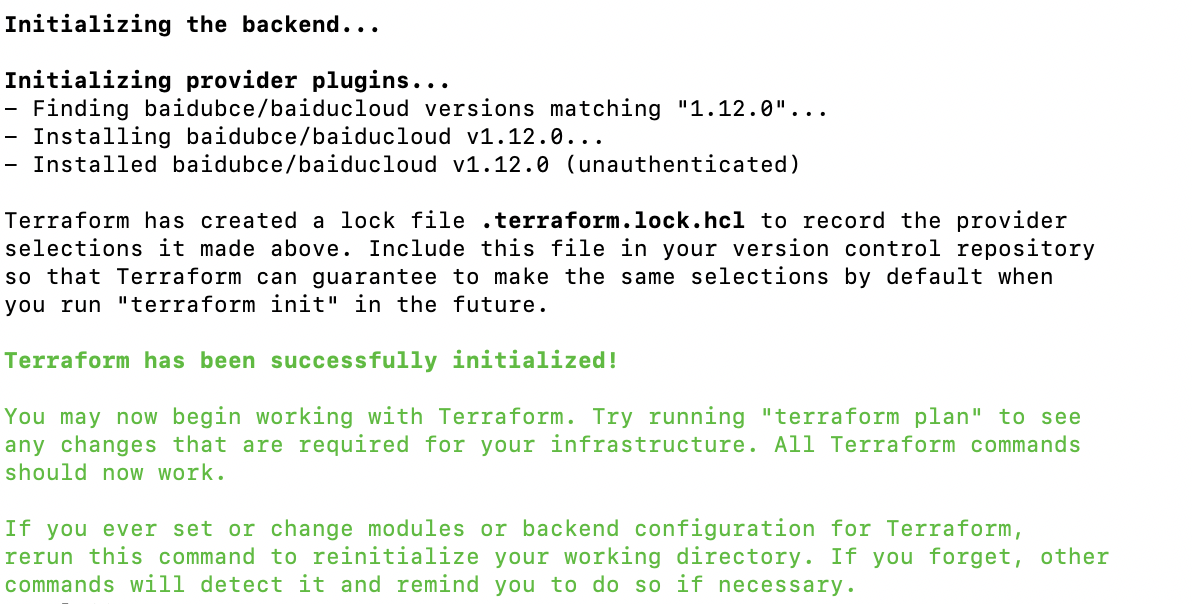
  • terraform init: Used to download or update the Baidu provider. The following message indicates a successful download.
init.png

  • terraform plan: Confirm the resource change plan
  • terraform apply: Execute resource creation; "Apply complete" indicates success

Resource destruction

  • Executing the terraform destroy command can destroy the aforementioned resources
  • "Destroy complete" indicates successful destruction

Testing and verification

  • Execute terraform show to check whether the purchase result can be correctly output locally
  • Sign in to Baidu AI Cloud and check whether the BLB instance is associated with a listener, security group, and real server

Related products

Baidu Load Balance (BLB)

Previous
Health Check Exception Troubleshooting
Next
Implementing Multi-Site Hosting via Application BLB