Recording Access Logs Using VPC Flow Logs

BLB BLB

  • API Reference
    • Access control
    • API Service Domain Name
    • Appendix
    • Application BLB Interface
      • Application BLB Instance Related Interfaces
      • Application BLB Listener Related Interfaces
      • Application BLB Security Group Related Interfaces
      • Application BLB Server Group Related Interfaces
    • Application IPv6 BLB Interface
      • Application IPv6 BLB Instance Related Interfaces
      • Application IPv6 BLB Listener Related Interfaces
      • Application IPv6 BLB Security Group Related Interfaces
      • Application IPv6 BLB Server Group Related Interfaces
    • BLB Order Related Interfaces
      • BLB - Resize
      • BLB Charge Shift - Cancel Prepay to Postpay
      • BLB Charge Shift - Postpay to Prepay
      • BLB Charge Shift - Prepay to Postpay
      • BLB Inquiry
      • BLB Unsubscribe Interface
    • Document Update Records
    • Error code
    • Interface Specifications
    • Introduction
    • Load Balancer Dedicated Cluster LBDC Interface
      • LBDC Instance Related Interfaces
    • Service Publishing Point Interface
      • Service Publishing Point Related Interfaces
    • Standard BLB Interface
      • Standard BLB Instance Related Interfaces
      • Standard BLB Listener Related Interfaces
      • Standard BLB Real Server Related Interfaces
      • Standard BLB Security Group Related Interfaces
    • Standard IPv6 BLB Interface
      • Standard IPv6 BLB Related Interfaces
  • FAQs
    • Billing Problems
    • Common Questions Overview
    • Configuration-related questions
    • Fault-related questions
    • General Problems
    • Load Balancer Dedicated Cluster Related Issues
    • Performance-related questions
    • Security Problems
  • Function Release Records
  • Operation guide
    • Access control
    • Access Logs
    • Application BLB instance
    • Application IPv6 Instance
    • BLB metric description
    • Certification
    • Custom configuration
    • Extended domain name
    • General-purpose BLB instance
      • Creating BLB Ordinary Instance
      • Managing BLB Ordinary Instance
    • General-purpose IPv6 BLB instance
    • Identity and access management
    • IP Group Usage Guide
    • Load Balance Dedicated Cluster
    • Load Balancer Frontend and Backend Protocol Correspondence
    • Recording Access Logs Using VPC Flow Logs
    • Service Release Point
    • Tag Management
  • Product Description
    • Application scenarios
    • Basic Architecture
    • Basic concepts
    • Performance Specification Description
    • Product advantages
    • Product features
    • Product Introduction
    • Usage restrictions
  • Product pricing
    • Load Balancer Dedicated Cluster Billing
    • Load Balancer Instance Billing
  • Quick Start
  • SDK
    • GO-SDK
      • Application BLB Instance
      • Initialization
      • Install
      • IPv6 BLB Instance
      • Load Balance Dedicated Cluster (LBDC)
      • Ordinary BLB Instance
      • Overview
      • Service Release Point
      • Version Change Records
    • Java-SDK
      • Application BLB instance
      • General-purpose BLB instance
      • Initialization
      • Install the SDK Package
      • IPv6 BLB Instance
      • Load Balance Dedicated Cluster (LBDC)
      • Overview
      • Service Release Point
      • Version Update Description
    • PHP-SDK
      • Initialization
      • Install
      • Ordinary BLB Instance
      • Overview
    • Python-SDK
      • Application BLB Instance
      • Initialization
      • Install
      • IPv6 BLB Instance
      • Load Balance Dedicated Cluster (LBDC)
      • Ordinary BLB Instance
      • Overview
      • Service Release Point
      • Version Update Description
  • Service Level Agreement (SLA)
    • Description of Baidu AI Cloud Load Balancer Trusted Cloud certification service availability
    • LBDC Service Level Agreement SLA
    • BLB Service Level Agreement (V2.0)
  • Typical Practices
    • BLB Selection Guide
    • Health Check Exception Troubleshooting
    • Implementing BLB Association with Listeners, Real Servers, Security Groups, etc. via Terraform
    • Implementing Multi-Site Hosting via Application BLB
    • Load Balancer Security Protection Strategy
    • Managing BLB via Terraform
    • Obtaining Client Information via Application BLB Instance
    • Using IP Group Function to Mount Real Servers Across VPCs in Different Regions
    • Using IP Group Function to Mount Real Servers Across VPCs in the Same Region
All documents
menu
No results found, please re-enter

BLB BLB

  • API Reference
    • Access control
    • API Service Domain Name
    • Appendix
    • Application BLB Interface
      • Application BLB Instance Related Interfaces
      • Application BLB Listener Related Interfaces
      • Application BLB Security Group Related Interfaces
      • Application BLB Server Group Related Interfaces
    • Application IPv6 BLB Interface
      • Application IPv6 BLB Instance Related Interfaces
      • Application IPv6 BLB Listener Related Interfaces
      • Application IPv6 BLB Security Group Related Interfaces
      • Application IPv6 BLB Server Group Related Interfaces
    • BLB Order Related Interfaces
      • BLB - Resize
      • BLB Charge Shift - Cancel Prepay to Postpay
      • BLB Charge Shift - Postpay to Prepay
      • BLB Charge Shift - Prepay to Postpay
      • BLB Inquiry
      • BLB Unsubscribe Interface
    • Document Update Records
    • Error code
    • Interface Specifications
    • Introduction
    • Load Balancer Dedicated Cluster LBDC Interface
      • LBDC Instance Related Interfaces
    • Service Publishing Point Interface
      • Service Publishing Point Related Interfaces
    • Standard BLB Interface
      • Standard BLB Instance Related Interfaces
      • Standard BLB Listener Related Interfaces
      • Standard BLB Real Server Related Interfaces
      • Standard BLB Security Group Related Interfaces
    • Standard IPv6 BLB Interface
      • Standard IPv6 BLB Related Interfaces
  • FAQs
    • Billing Problems
    • Common Questions Overview
    • Configuration-related questions
    • Fault-related questions
    • General Problems
    • Load Balancer Dedicated Cluster Related Issues
    • Performance-related questions
    • Security Problems
  • Function Release Records
  • Operation guide
    • Access control
    • Access Logs
    • Application BLB instance
    • Application IPv6 Instance
    • BLB metric description
    • Certification
    • Custom configuration
    • Extended domain name
    • General-purpose BLB instance
      • Creating BLB Ordinary Instance
      • Managing BLB Ordinary Instance
    • General-purpose IPv6 BLB instance
    • Identity and access management
    • IP Group Usage Guide
    • Load Balance Dedicated Cluster
    • Load Balancer Frontend and Backend Protocol Correspondence
    • Recording Access Logs Using VPC Flow Logs
    • Service Release Point
    • Tag Management
  • Product Description
    • Application scenarios
    • Basic Architecture
    • Basic concepts
    • Performance Specification Description
    • Product advantages
    • Product features
    • Product Introduction
    • Usage restrictions
  • Product pricing
    • Load Balancer Dedicated Cluster Billing
    • Load Balancer Instance Billing
  • Quick Start
  • SDK
    • GO-SDK
      • Application BLB Instance
      • Initialization
      • Install
      • IPv6 BLB Instance
      • Load Balance Dedicated Cluster (LBDC)
      • Ordinary BLB Instance
      • Overview
      • Service Release Point
      • Version Change Records
    • Java-SDK
      • Application BLB instance
      • General-purpose BLB instance
      • Initialization
      • Install the SDK Package
      • IPv6 BLB Instance
      • Load Balance Dedicated Cluster (LBDC)
      • Overview
      • Service Release Point
      • Version Update Description
    • PHP-SDK
      • Initialization
      • Install
      • Ordinary BLB Instance
      • Overview
    • Python-SDK
      • Application BLB Instance
      • Initialization
      • Install
      • IPv6 BLB Instance
      • Load Balance Dedicated Cluster (LBDC)
      • Ordinary BLB Instance
      • Overview
      • Service Release Point
      • Version Update Description
  • Service Level Agreement (SLA)
    • Description of Baidu AI Cloud Load Balancer Trusted Cloud certification service availability
    • LBDC Service Level Agreement SLA
    • BLB Service Level Agreement (V2.0)
  • Typical Practices
    • BLB Selection Guide
    • Health Check Exception Troubleshooting
    • Implementing BLB Association with Listeners, Real Servers, Security Groups, etc. via Terraform
    • Implementing Multi-Site Hosting via Application BLB
    • Load Balancer Security Protection Strategy
    • Managing BLB via Terraform
    • Obtaining Client Information via Application BLB Instance
    • Using IP Group Function to Mount Real Servers Across VPCs in Different Regions
    • Using IP Group Function to Mount Real Servers Across VPCs in the Same Region
  • Document center
  • arrow
  • BLBBLB
  • arrow
  • Operation guide
  • arrow
  • Recording Access Logs Using VPC Flow Logs
Table of contents on this page
  • Service enabling
  • Create BLS
  • Create BOS
  • Enable access log recording for the load balancer
  • Log Record field

Recording Access Logs Using VPC Flow Logs

Updated at:2025-10-16

Application scenarios

When external services are enabled for the load balancer, users need to track access. In this case, you can activate the Layer-7 access logging feature of the load balancer, which saves access record data in the VPC flow logs.

Description:

The current function of recording Layer 4 Load Balancer access logs to flow logs only applies to the instances on dedicated clusters. The function of recording Layer 7 Load Balancer access logs to flow logs only applies to the instances on shared clusters and dedicated clusters.

Preparation

Service enabling

In addition to the load balancer, you need to enable the following services:

  1. VPC flow logs
  2. BLS service or BOS service

VPC flow logs can forward access data generated by the load balancer instance to either the BLS or BOS service, so you only need to choose one of these services.

Create BLS

Please refer to BLS operation documentation to create BLS LogStore.

Create BOS

Please refer to BOS operation documentation to create BOS Bucket.

Enable access log recording for the load balancer

  1. Ensure you have created a load balancer instance with a Layer 7 listener (HTTP/HTTPS) deployed.
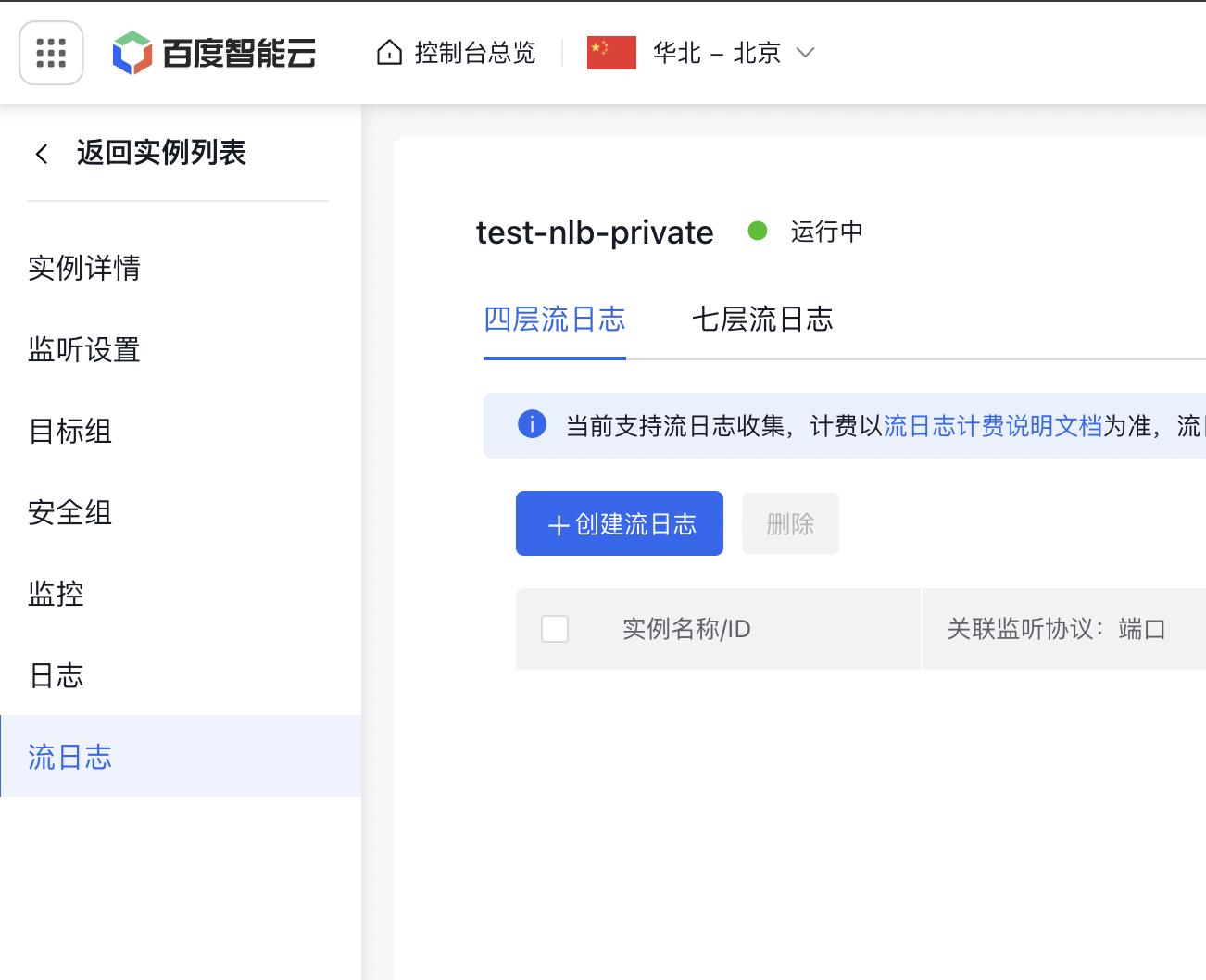
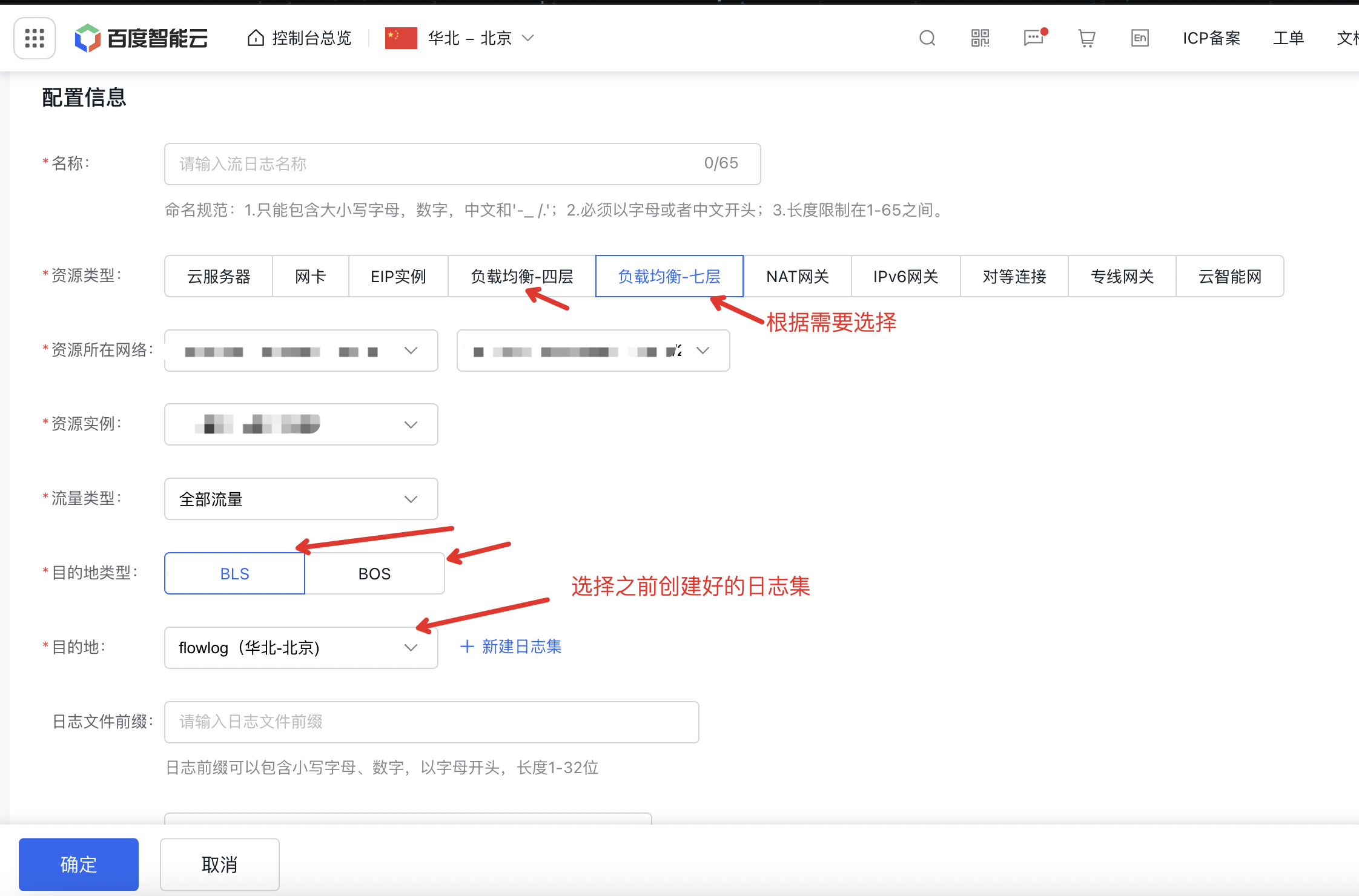
  2. On the Load Balancer List page, click the Load Balancer Instance ID to enter the Load Balancer Details page. Select Flow Logs from the left navigation bar. image.png Click: Layer-7 Flow Logs -> Create Flow Log, redirect to the VPC-side Flow Log Creation page. Select the corresponding parameters as needed and choose the newly created BLS or BOS LogStore or Bucket. beeea9c5e40b7336d04c648e75024644.png Click OK, and then return to the load balancer instance. c29956cec2449a8ea5c9264fa5e385a2.png It can be observed that the current load balancer instance has enabled access logging, which is linked to VPC flow logs.
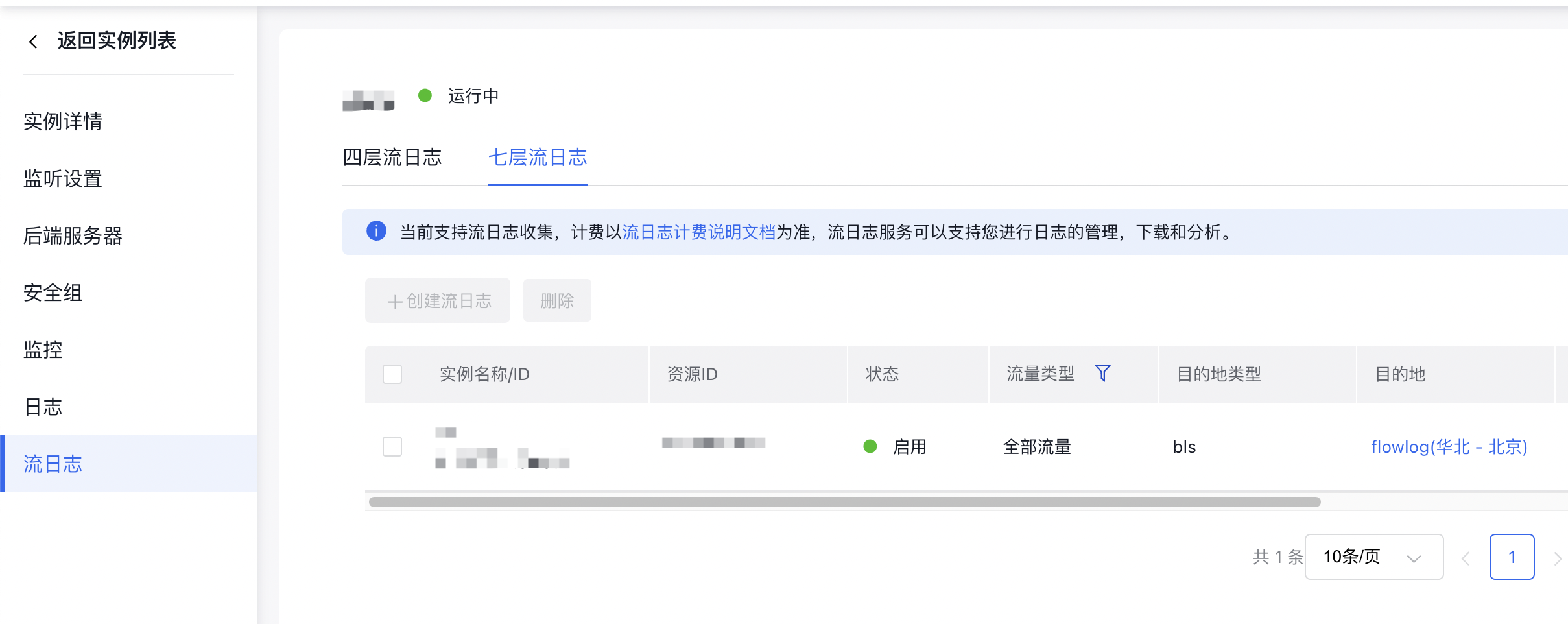
    Note: Log information is recorded with a delay of 2~3 minutes

Log Record field

Field Types Description
time_local string Record the time of access logs
vip string BLB IP
vport int BLB listener port
response_status int Status code of BLB response message
vdum_ups_id string ID of server group accessed by traffic
upstream_addr string Address of real server accessed by traffic
upstream_status string Response code of real server accessed by traffic
remote_addr string The remote client IP establishing connection with the BLB. If BGW does not enable cip_forward, it will be the BGW BIP.
cip string The remote client IP establishing connection with BLB
cport int The remote client port establishing connection with BLB
server_addr string Virtual server IP of the accessed BLB
server_port int Virtual server port of the accessed BLB
scheme string Protocol type (HTTP/HTTPS)
host string Domain name
request string Request line information
request_length int Request length
body_bytes_sent int Bytes of sent responses
http_referer string The refer header content in the request message received by the BLB
http_user_agent string The user-agent header content in the request message received by the BLB
http_x_forwarded_for string The x-forward-for content in the request message received by the BLB
upstream_connect_time float Connection establishment time between BLB and real servers
upstream_response_time float The time taken by BLB to forward a request to the real server and receive a response from the real server
request_time float The time taken by BLB to receive a request from the client and return a response to the client
ssl_handshake_time float SSL handshake time
ssl_session_reused string Indicate whether SSL session is reused. r means reuse, and . means no reuse.
vdum_rs_proto string Real server protocol type
upstream_local_addr string BLB service nodes use internal IPs, which require no attention from users
extension_log string BLB instance ID & BLB instance rate limit status where 0 indicates no rate limit and 1 indicates rate limit & QPS of the BLB instance on the current service node which displays 0 when no rate limit is applied & Count of QPS tokens for the BLB instance on the current service node which displays 0 when no rate limit is applied

Previous
Load Balancer Frontend and Backend Protocol Correspondence
Next
Service Release Point